- Home
- Forum
- General Discussion
- Please do not add all Locales to NUGET, Visual studio is hanging when updating
Please do not add all Locales to NUGET, Visual studio is hanging when updating
This happens everytime I update Syncfusion EJ dll's over NUGET.
I was try to update the grid and gantt and Visual studio keeps hanging/crashing because you have ALL locales, this is really insane, not only takes very long but keeps crashing. Its worse if I do update all, SF needs to revisit this so its easier to update.
can you pleaseNOT add ALL the LOCALES to the Nuget package, everytime we update its taking 35 to an hour and often visual studio hangs.
I was try to update the grid and gantt and Visual studio keeps hanging/crashing because you have ALL locales, this is really insane, not only takes very long but keeps crashing. Its worse if I do update all, SF needs to revisit this so its easier to update.
can you pleaseNOT add ALL the LOCALES to the Nuget package, everytime we update its taking 35 to an hour and often visual studio hangs.
Please provide two options, one for English and another for international.
SIGN IN To post a reply.
5 Replies
KP
Kanimozhi Pandian
Syncfusion Team
April 6, 2016 01:26 PM UTC
Hi Megatron,
We considered this “Reducing Package Size of Syncfusion Javascript NuGet” as an feature request and a support incident has been created under your account to track the status of this requirement. Please log on to our support website to check for further updates.
https://www.syncfusion.com/account/login?ReturnUrl=/support/directtrac/incidents
Regards,
Kanimozhi K.P.
We considered this “Reducing Package Size of Syncfusion Javascript NuGet” as an feature request and a support incident has been created under your account to track the status of this requirement. Please log on to our support website to check for further updates.
https://www.syncfusion.com/account/login?ReturnUrl=/support/directtrac/incidents
Regards,
Kanimozhi K.P.
ME
Megatron
April 10, 2016 02:58 PM UTC
Hi, In your latest update, after rolling back to previous version of Nuget tool, the Nuget is no longer showing an error, the updates still hang.
There is an issues, where even after adding the new libs from 14.1, the references on the dll's/and their properties are still showing that its adding 13.3 the older/previous version of the dll - is this expected?
Should I not see the current dll's version numbers on the dll from the release numbers?
thanks
KP
Kanimozhi Pandian
Syncfusion Team
April 11, 2016 03:40 PM UTC
Hi Megatron,
Q1) Hi, In your latest update, after rolling back to previous version of Nuget tool, the Nuget is no longer showing an error, the updates still hang.
A1)The Visual Studio 2015 hangs while installing Syncfusion JavaScript NuGet since the package has large number of files. But the NuGet packages are get installed properly .It took around 30 minutes to install. As we mentioned in our previous updates currently we are restructuring our Syncfusion JavaScript NuGet package and it will be available with our 2016 Volume 1 SP1 release.
Q2) There is an issues, where even after adding the new libs from 14.1, the references on the dll's/and their properties are still showing that its adding 13.3 the older/previous version of the dll - is this expected?
Should I not see the current dll's version numbers on the dll from the release numbers?
A2)If we upgraded the Syncfusion NuGet packages to latest version the Syncfusion libraries should be updated to latest version. We have updated the Syncfusion NuGet package to latest version 14.1.041, all the Syncfusion libraries are updated properly to latest version. Please refer to below screenshot.
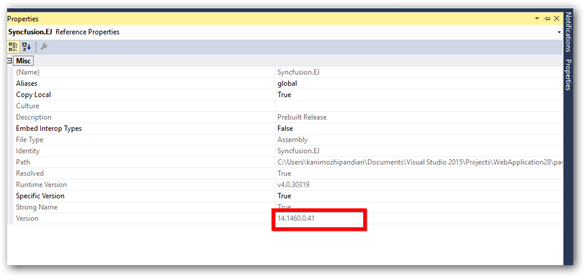
We are unable to reproduce this issue even by adding the references manually/replace the latest libraries to lib folder in NuGet installed location. This issue may occurred since the NuGet package is not updated properly to the latest version while updating a package. So please ensure the NuGet package version after update the Syncfusion NuGet package.
Kindly update us with reproducing steps if we have misunderstood your query.
Thanks,
Kanimozhi K.P.
Q1) Hi, In your latest update, after rolling back to previous version of Nuget tool, the Nuget is no longer showing an error, the updates still hang.
A1)The Visual Studio 2015 hangs while installing Syncfusion JavaScript NuGet since the package has large number of files. But the NuGet packages are get installed properly .It took around 30 minutes to install. As we mentioned in our previous updates currently we are restructuring our Syncfusion JavaScript NuGet package and it will be available with our 2016 Volume 1 SP1 release.
Q2) There is an issues, where even after adding the new libs from 14.1, the references on the dll's/and their properties are still showing that its adding 13.3 the older/previous version of the dll - is this expected?
Should I not see the current dll's version numbers on the dll from the release numbers?
A2)If we upgraded the Syncfusion NuGet packages to latest version the Syncfusion libraries should be updated to latest version. We have updated the Syncfusion NuGet package to latest version 14.1.041, all the Syncfusion libraries are updated properly to latest version. Please refer to below screenshot.
We are unable to reproduce this issue even by adding the references manually/replace the latest libraries to lib folder in NuGet installed location. This issue may occurred since the NuGet package is not updated properly to the latest version while updating a package. So please ensure the NuGet package version after update the Syncfusion NuGet package.
Kindly update us with reproducing steps if we have misunderstood your query.
Thanks,
Kanimozhi K.P.
ME
Megatron
June 2, 2016 04:20 AM UTC
Hi has the syncfusion been fixed with Nuget, or are we still stuck on working with the previous version of nuget.
KP
Kanimozhi Pandian
Syncfusion Team
June 3, 2016 07:37 AM UTC
Hi,
Yes. The installation issue with Syncfusion.JavaScript NuGet packages was fixed.
As per localization standards, we have modified our cultures directory structure and refreshed the Syncfusion JavaScript NuGet package in our Syncfusion NuGet server. Now, you can install the Syncfusion.JavaScript NuGet package without any issue.
Note: This fix will be available from version 14.1.0.41.
Regards,
Kanimozhi K.P.
SIGN IN To post a reply.
- 5 Replies
- 2 Participants
-
ME Megatron
- Apr 5, 2016 09:04 PM UTC
- Jun 3, 2016 07:37 AM UTC

