









Transform your applications today by downloading our free evaluation version
Overview
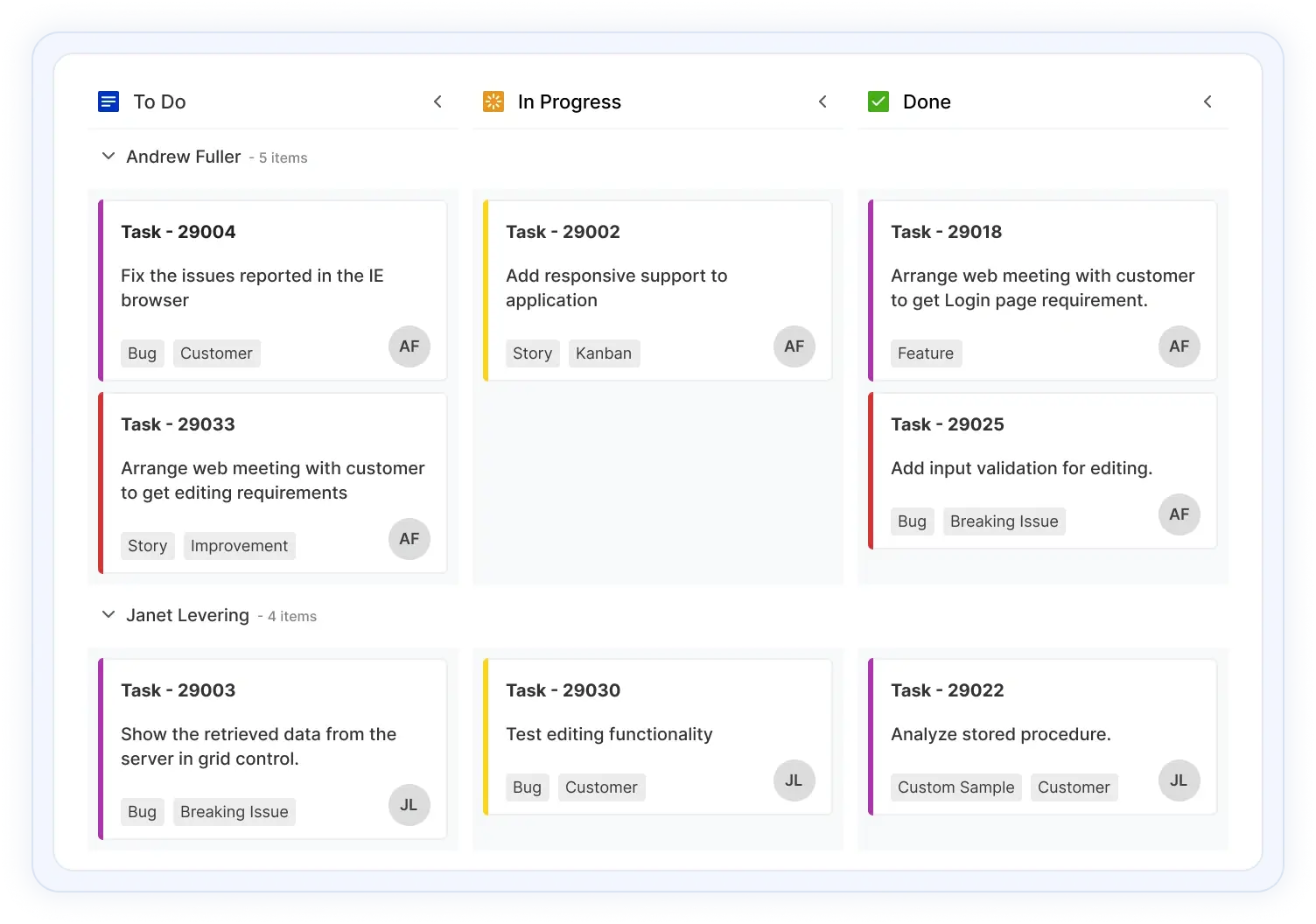
The ASP.NET MVC Kanban Board is a task scheduling control that provides clear user interface representation to manage multiple stages of work. The Kanban board is widely used in various real-time applications such as task scheduler, project management, software or product development, manufacturing process, personal task management, and much more.
The ASP.NET MVC Kanban Board Code Example
Easily get started with the ASP.NET MVC Kanban Board using a few simple lines of CSHTML code as demonstrated below. Also explore our ASP.NET MVC Kanban Board Example which shows you how to render and configure the ASP.NET MVC Kanban Board.
@Html.EJS().Kanban("kanban").Columns(col =>
            {
           col.HeaderText("To Do").KeyField("Open").Add();
           col.HeaderText("In Progress").KeyField("InProgress").Add();
           col.HeaderText("Testing").KeyField("Testing").Add();
           col.HeaderText("Done").KeyField("Close").Add();
       }).Render()
Data binding
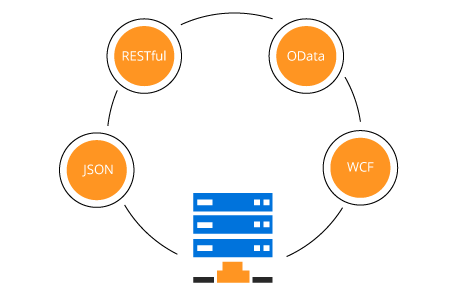
Data binds seamlessly with various local and remote data sources, such as: JSON, RESTful services, OData services, and WCF services.
ASP.NET MVC Kanban loads data on demand by default to reduce transfer and load times. Proper field mapping is mandatory when binding Kanban to the data sources with different field names.
Workflow
The Kanban restrict or allow card transitions from one column to another to maintain a controlled workflow process.
Work in progress (WIP) limits
Users can set limits to the card count at each stage of Kanban workflow to avoid working on multiple tasks. Kanban columns visually change its appearance when validation fails.
Flexible layout
By default, Kanban has a simple layout with cards and columns. But users can create complex Kanban boards based on their application needs and integrate with any team in an organization.
Card options
A card is the main element of Kanban board that provides clear representation of tasks and flows across various stages.

Customizable cards
Change the look and feel of Kanban cards by customizing their default appearance and style using any HTML or CSS element.
Drag and drop cards
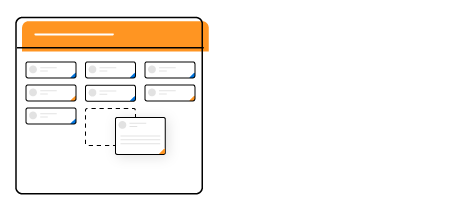
Provides smooth drag-and-drop support to modify the status of cards.

Selection
Easily select multiple cards using mouse, keyboard, or touch interfaces. You can also make multiple selection of cards by pressing the Shift key.
Columns
The Kanban board divides its layout as columns to visualize the different stages of work, e. g. to-do, validate, in-progress, testing, and completed.

Expand and collapse columns
Built-in support is available for expanding and collapsing the columns by interaction and programmatically. Users can also control the collapsible behavior on page load.

Multiple-key mapping
Users can map multiple keys to single columns to group similar columns. i.e., development column has implementation, review, and testing.
Card editing
ASP.NET MVC Kanban provides full support to create, read, update, and delete operations (CRUD) on cards. In addition to built-in editing through dialog, users can create a template that suits their application needs. Editing operations are performed with the help of a data manager.
Stacked header
ASP.NET MVC Kanban allows you to add additional headers to group the logically related columns above the column header in a stacked manner.
Swimlane
Visually split the Kanban board horizontally to categorize the cards based on key i.e., assignee, project, or type. Users can customize the swimlane header with templates and control the visibility of empty rows and items count in a swimlane row.
Frozen rows
The Swimlane frozen rows option makes the rows always visible at the top when scrolling the content. It is mainly used to show corresponding swimlane rows.
Tooltip
Display card information with a default tooltip or customized tooltip template.
Templating
Users can customize the UI elements of Kanban using templates i.e., column header, cards, swimlane header, and tooltip.

Developer-friendly APIs
Developers can have full control over the UI and behavior of the Kanban board through its built-in, developer-friendly APIs. The simple and extensible APIs allow you to customize Kanban functionalities with ease.

Built-in themes
Five built-in, SASS-based themes are available: Material, Bootstrap 3, Bootstrap 4, Fabric, and high contrast.

Right to left (RTL)
ASP.NET MVC Kanban allows you to render its layout, columns, and cards from right to left to improve the user experience and accessibility for RTL languages.
Responsive and touch-friendly
ASP.NET MVC Kanban has a highly responsive layout and a finely optimized design for desktops, touch screens, and smart phones.

Touch support
User-friendly touch gestures and an interactive UI design on Kanban help produce the best user experience.

Adaptive UI
The Kanban user interface adapts automatically to mobile and desktop devices. This helps the application to scale elegantly across all form factors without any additional effort.
Localization
Localize all the static strings that are used in the user interface of the ASP.NET MVC Kanban control using the localization (l10n) library.

Other supported frameworks
The Kanban Board is also available in Blazor, React, Angular, JavaScript, and Vue frameworks. Explore its platform-specific options through the following links:
Supported browsers
The ASP.NET MVC Kanban Board works well with all modern web browsers, including Chrome, Firefox, Edge, Safari, and Opera.
Not sure how to create your first ASP.NET MVC Kanban Board? Our documentation can help.
I’d love to read it nowFrequently Asked Questions
Why should you choose Syncfusion ASP.NET MVC Kanban Board?
- Visual organization and prioritization of your tasks with a transparent workflow.
- Efficient control to manage software and product development, project management, and task planning using swim lanes, cards, WIP validations, and more.
A rich set of built-in functionalities such as data binding, templating for card, scrolling, drag-and-drop, stacked headers, responsiveness, various built-in themes, and much more.
Simple configuration and API.
- Support for all modern browsers.
- Touch-friendly and responsive UI.
- One of the best ASP.NET MVC Kanban Board in the market that offers feature-rich UI to interact with the software.
Extensive demos and documentation to learn quickly and get started with ASP.NET MVC Kanban Board.
Where can I find the Syncfusion ASP.NET MVC Kanban Board demo?
You can find the ASP.NET MVC Kanban Board demo here, which demonstrates how to render and configure the Kanban.
Can I download and utilize the Syncfusion ASP.NET MVC Kanban Board for free?
No, this is a commercial product and requires a paid license. However, a free community license is also available for companies and individuals whose organizations have less than $1 million USD in annual gross revenue, 5 or fewer developers, and 10 or fewer total employees.
How do I get started with Syncfusion ASP.NET MVC Kanban Board?
A good place to start would be our comprehensive getting started documentation.
Our Customers Love Us
Having an excellent set of tools and a great support team, Syncfusion® reduces customers’ development time.Here are some of their experiences.

Satisfying components with great community support.
It solves a lot. I mostly use its Kanban control and Grid control with no problems. It has a great ui design and design options. It made it easy for us to build a warehouse management system.

Muhammed Y.

Co-Founder - Full-Stack Developer
Great Community Program and Pro Components for Building New Solutions
Having gantt component ready to use, helped me to focus on what really matters on my solution

fred P.
Director
See Real Success Stories
Developers around the world trust Syncfusion’s Essential Studio to simplify complex projects and speed up delivery. With a vast library of UI controls, powerful SDKs, and reliable support, Essential Studio helps teams build enterprise-ready applications with confidence.
Read Our Customer StoriesIndustry
Software development
75% Cost reduction
50% Faster development
Industry
Utilities (oil and gas)

450+ hours saved
Streamlined processes and hours of development effort saved.

Advanced, flexible features
Empowered users through robust and versatile functionality.
Industry
Software and technology
1000+ of hours saved
Accelerated development with enterprise-ready UI components.

Efficient file management
Streamlined workflows with document libraries without building them from scratch.
Industry
Software and technology

2 Years of delay avoided
Two years of delays prevented with proactive planning.

On-time delivery
Projects delivered on schedule using trusted controls.
Industry
IT services and IT consulting

Improved performance
Large datasets handled with easy customization and quick debugging.

Highly customizable
Plug-and-play controls with quick template integration.
Industry
Professional services
Instant access
Quick availability of features and resources.
Reduced dependencies
Fewer dependencies for faster development.
Rated by users across the globe
Syncfusion ASP.NET MVC Kanban Board resources


UI kits
 Figma download
Figma download
Awards
Greatness—it’s one thing to say you have it, but it means more when others recognize it. Syncfusion® is proud to hold the following industry awards.









