- Home
- Forum
- Angular - EJ 2
- Parse schedule event property as object type
Parse schedule event property as object type
Hello

I am trying to create an event via popup and pass event property (contact) as object. But getting '[Object Object]' as string rather than object.
Could not pass object as a value to contact property ?
SIGN IN To post a reply.
6 Replies
KK
Karthigeyan Krishnamurthi
Syncfusion Team
July 15, 2019 06:51 AM UTC
Hi Hasan,
Syncfusion greetings.
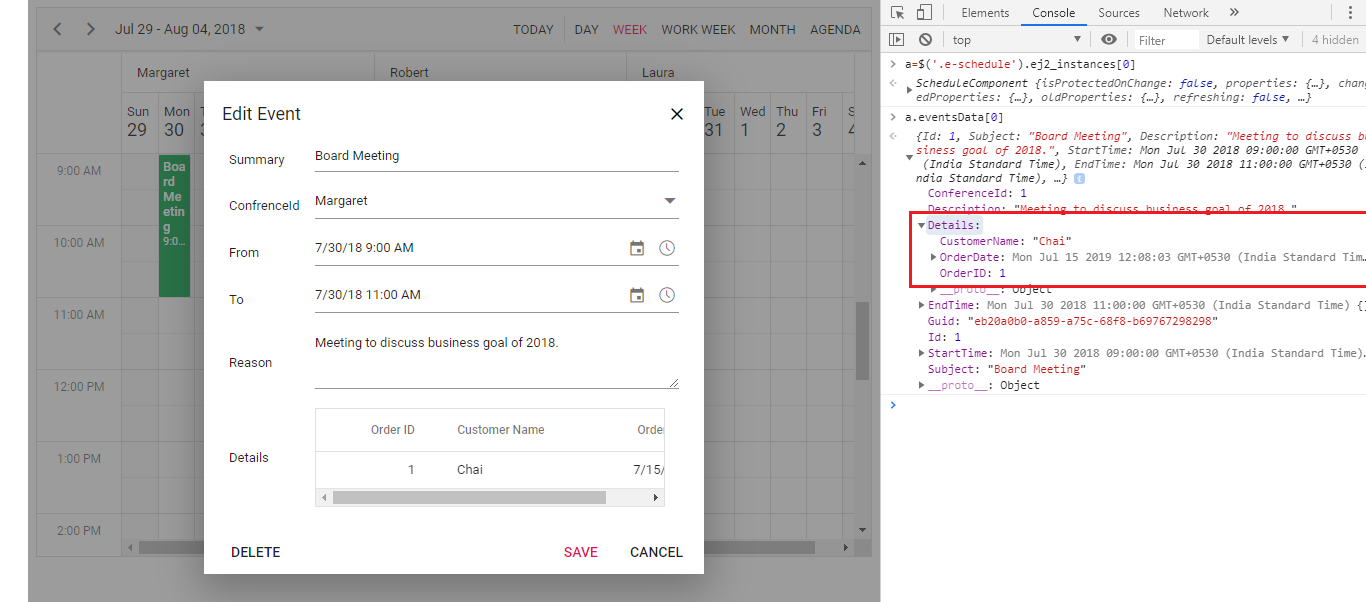
In the below sample, event collection has Details field as object type to display Grid in Scheduler editor window. Kindly share your data collection / code example and which type of control used in editor window to proceed further.
Regards,
Karthi
HR
Hasan Rifaii
July 15, 2019 08:25 AM UTC
Hello , thank you for support
First I am just still trying to create an event right now


I have a contact component to select a contact the selector will return an object
when contact is selected onContactChange function is called and contactCtrl is updated
and on actionBegin I get
HR
Hasan Rifaii
July 15, 2019 12:52 PM UTC
I found this way but I don't know if it's the best approach


then
if there is a better solution please share it
KK
Karthigeyan Krishnamurthi
Syncfusion Team
July 16, 2019 09:21 AM UTC
Hi Hasan,
Thanks for the update.
Please proceed with your way and let us know if you need further assistance. To update the contact field, please use the below condition.
if (args.requestType === "eventCreate" || args.requestType === "eventChange")
Regards,
Karthi
HR
Hasan Rifaii
July 16, 2019 07:09 PM UTC
Hello
It's not working.
Issue now : Its creating event as expected for first time as expected, but when try to edit the event next time it loads data as well, but I save without modifying the box contact it returns again the data.contact : '[Object Object]'
I think simply syncfusion schedule should handle this situation returned value it might be string or object as it is common case
VD
Vinitha Devi Murugan
Syncfusion Team
July 17, 2019 12:26 PM UTC
Hi Hasan,
Thanks for your update.
Q: Data returns as data.contact : '[Object Object]' while saving.
We tried to reproduce your reported scenario at our end with our previously provided sample, but the args.details field returns proper value at our end when saving the data without modifying the box. We have prepared a video demo for your reference with the below sample which can be downloaded from the following location.
Q: I think simply syncfusion schedule should handle this situation returned value it might be string or object as it is common case
We provided the ‘e-field’ support only for limited JS2 Syncfusion components like datepicker, datetimepicker, dropdownlist, multiselect, checkbox and input components . For other JS2 components and angular material component, you have to handle the ‘getting and setting the values to those fields’ in sample end using actionBegin and popupOpen event.
Regards,
M.Vinitha devi
SIGN IN To post a reply.
- 6 Replies
- 3 Participants
-
HR Hasan Rifaii
- Jul 14, 2019 02:23 PM UTC
- Jul 17, 2019 12:26 PM UTC

