- Home
- Forum
- ASP.NET MVC
- Datepicker format issue in Grid
Datepicker format issue in Grid
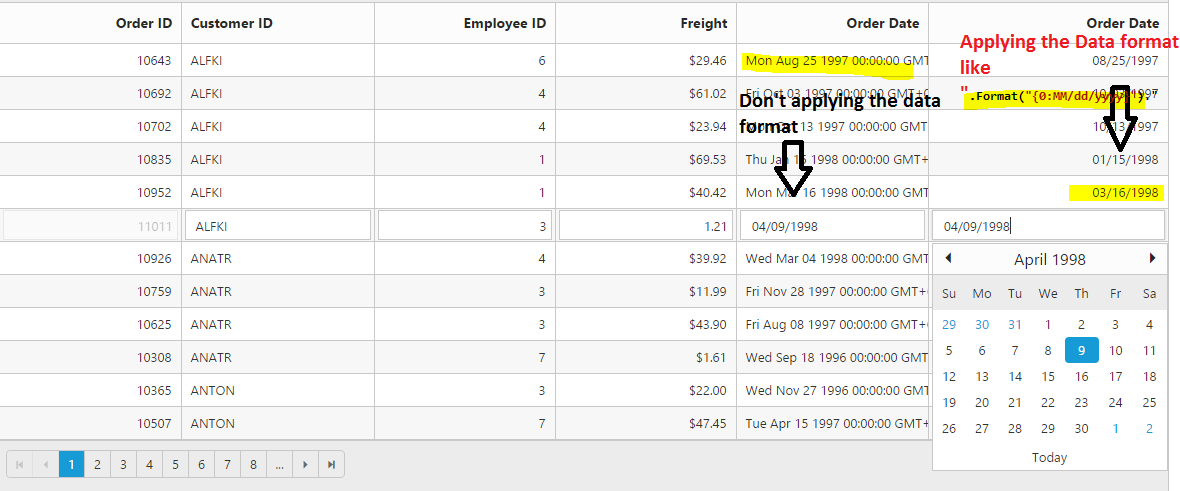
When I load data to Grid the date field is displayed as '2014-01-01T00:00:00.000Z' even after setting the dateformat Format("{0:dd-MM-yyyy}") . The datatype for date in model is DateTime and is stored in Database in Dateformat.
I tried ej.parseJSON(data) inside Databound . Still the same issue. Please provide a solution.
SIGN IN To post a reply.
6 Replies
VA
Venkatesh Ayothi Raman
Syncfusion Team
November 22, 2016 08:55 AM UTC
Hi Anoopa,
Thanks for contacting Syncfusion support.
We were unable to reproduce the reported issue and we have created a sample for your convenient. Please refer to the sample,
Output:
If you still face the same issue, then could you please provide following details?
1) Essential Studio version and browser details.
2) Issue replication procedure.
3) Provide full Grid code example.
4) A sample if possible or modified the given sample as issue reproducible.
Regards,
Venkatesh Ayothiraman.
AN
Anoopa
November 24, 2016 06:59 AM UTC
The solution which you provided is working perfectly. I am facing the issue only in a particular project. I tried copying my changes to the solution which you provided. That is working fine and date is getting formatted . I suspect there is some script conflict occurring in my project which is preventing the date formatting. Please help me out to solve this issue.
VA
Venkatesh Ayothi Raman
Syncfusion Team
November 25, 2016 09:42 AM UTC
Hi Anoopa,
Thanks for the update.
As you have mentioned “I suspect there is some script conflict occurring in my project which is preventing the date formatting”. For this, you can check version details like as follows,
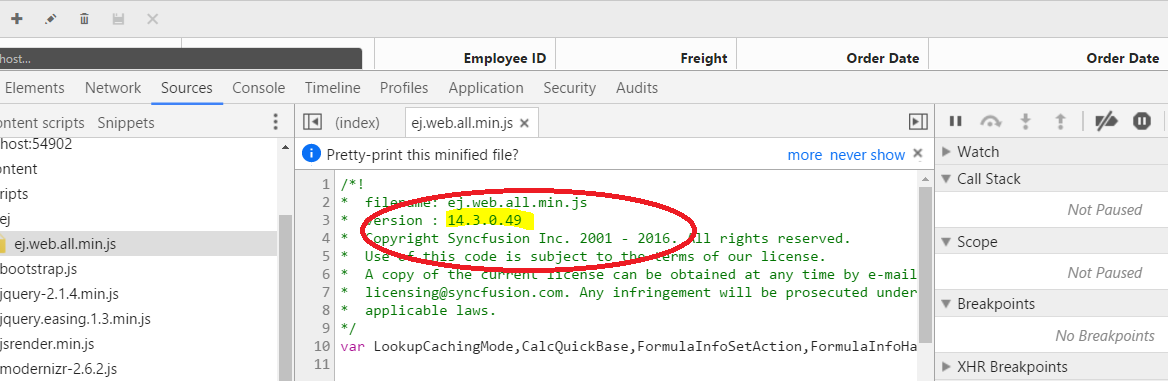
So could you please ensure whether which version of the script files you are using in your application. Also provide details if any script error thrown in console window?
It would be helpful for us to find the problem and provide the solution as earliest.
Regards,
Venkatesh Ayothiraman.
AN
Anoopa
November 27, 2016 05:09 AM UTC
I have having a different version in my project.
/*!
*  filename: ej.web.all.min.js
*  version : 14.1.0.46
*  Copyright Syncfusion Inc. 2001 - 2016. All rights reserved.
*  Use of this code is subject to the terms of our license.
*  A copy of the current license can be obtained at any time by e-mailing
*  [email protected]. Any infringement will be prosecuted under
*  applicable laws.
*/
and I don't have any console errors.
AN
Anoopa
November 27, 2016 05:27 AM UTC
It worked. I updated the js file with the latest version as you replied. I was having a older version. Thanks for your support.
VA
Venkatesh Ayothi Raman
Syncfusion Team
November 28, 2016 05:27 AM UTC
Hi Anoopa,
Thanks for the update.
We are happy to hear that your requirement is achieved.
Thanks,
Venkatesh Ayothiraman.
SIGN IN To post a reply.
- 6 Replies
- 2 Participants
-
AN Anoopa
- Nov 21, 2016 05:24 AM UTC
- Nov 28, 2016 05:27 AM UTC

