Missing chart type? RangeBarSeries
Hi Guys,
Cheers,
I need to use a RangeBarSeries, the RangeColumnSeries works great but I need the columns to be bars going across the screen.
Is there any control I can use to achieve this, or is it possible to extend anything to make one work?
Cheers,
Sean
SIGN IN To post a reply.
5 Replies
RA
Rachel A
Syncfusion Team
June 17, 2016 07:19 AM UTC
Hi Sean,
Thanks for contacting Syncfusion support.
We can achieve the requirement by enabling IsTransposed property in RangeColumnSeries as shown in the below code snippet.
| XAML <chart:RangeColumnSeries IsTransposed="True" ItemsSource="{Binding FinancialDatas}" XBindingPath="Time" High="High" Low="Low" > </chart:RangeColumnSeries> |
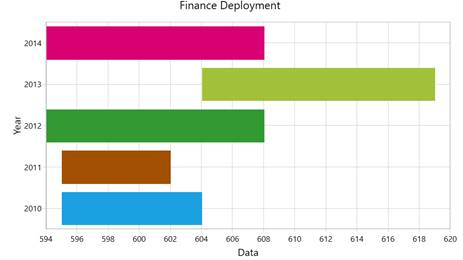
Regards,
Rachel.A
SA
Sean Andrews
June 17, 2016 07:23 AM UTC
Hi Rachel,
Thanks so much
That is perfect! All working exactly as required :)
Cheers,
Sean
RA
Rachel A
Syncfusion Team
June 17, 2016 07:26 AM UTC
Hi Sean,
Thanks for the update.
Please let us know if you need any further assistance .
Regards,
Rachel. A
FT
Fabrício Tibúrcio Silva Araújo
October 19, 2016 12:30 PM UTC
Is possible to put High and Low parameters as DateTime type using IsTransposed option?
I' ve tryed it but it returns me a conversion error when I run...
Thanks
DA
Devi Aruna Maharasi Murugan
Syncfusion Team
October 20, 2016 10:03 AM UTC
Hi Sean,
Thanks for your update.
We are able to set only NumericalAxis into chart’s SecondaryAxis. However, your requirement (High and Low parameters as DateTime type) can be achieved by converting the DateTime value in to double data type. We have prepared a demo sample based on your requirement and it can be downloaded from below link,
Sample: RangebarDate
Regards,
Devi
SIGN IN To post a reply.
- 5 Replies
- 4 Participants
-
SA Sean Andrews
- Jun 16, 2016 04:03 PM UTC
- Oct 20, 2016 10:03 AM UTC

