Overview
Rows in Tree Grid represents each task or data object information from the data source. It supports expanding/collapsing child rows, reordering of rows, indent/outdent rows to change its hierarchy levels and much more features.
Expand and collapse parent rows
Users can expand and collapse parent rows at any time to view information when needed. All the rows or only specific rows can be collapsed programmatically at initial rendering.


Row reordering
Rows can be reordered by drag and drop action to change its position and hierarchy levels. A child row from a parent row can be reordered as sibling to the same parent row or as child to any other parent row.
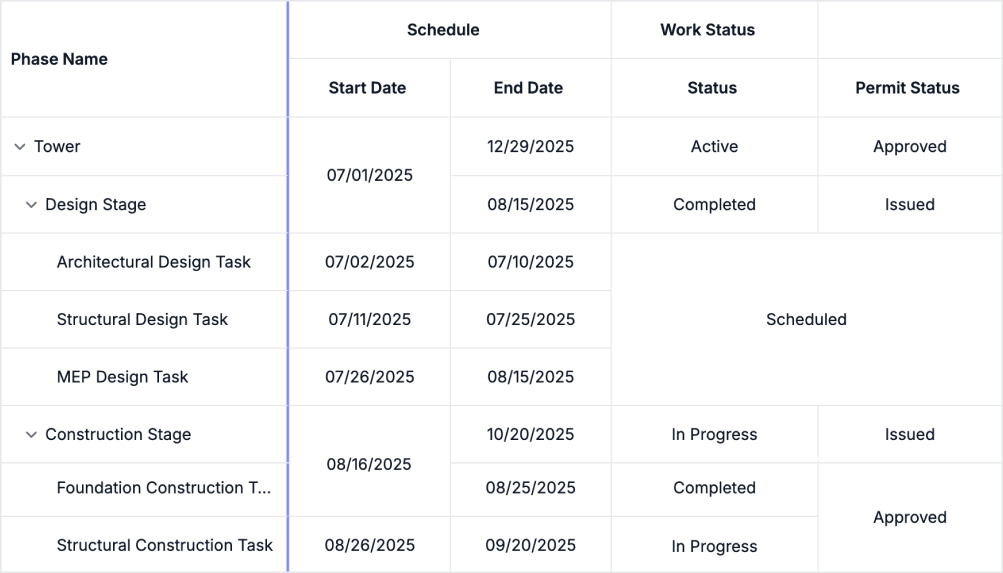
Row and column spanning
The row and column can automatically merges adjacent cells that contain the same value. Identical values are displayed as a single, unified cell across both rows and columns, improving readability and reducing redundancy in hierarchical data.
Row template and detail template
Users can create custom UI for row elements in the table of a TreeGrid. Alternatively, additional information about a data row can also be displayed beneath each row.
 Load large amounts of data 55+ interactive demos 519K+ downloads
Blazor Components – 145+ UI and DataViz Components







