Rich Text Editor SDK
Build Rich Text Editor experiences that simplify content creation
No credit card required.
 React
React Blazor
 Angular
 JavaScript
 Vue
Vue ASP.NET Core
 .NET MAUI
 ASP.NET MVC
Enable rich content editing across major frameworks
Trusted by 41K+
organizations worldwide
25+ years
of UI component expertise
320+ Rich Text Editor
demos and examples
33.2M+ downloads
of the component libraries
Try Our Live Demo
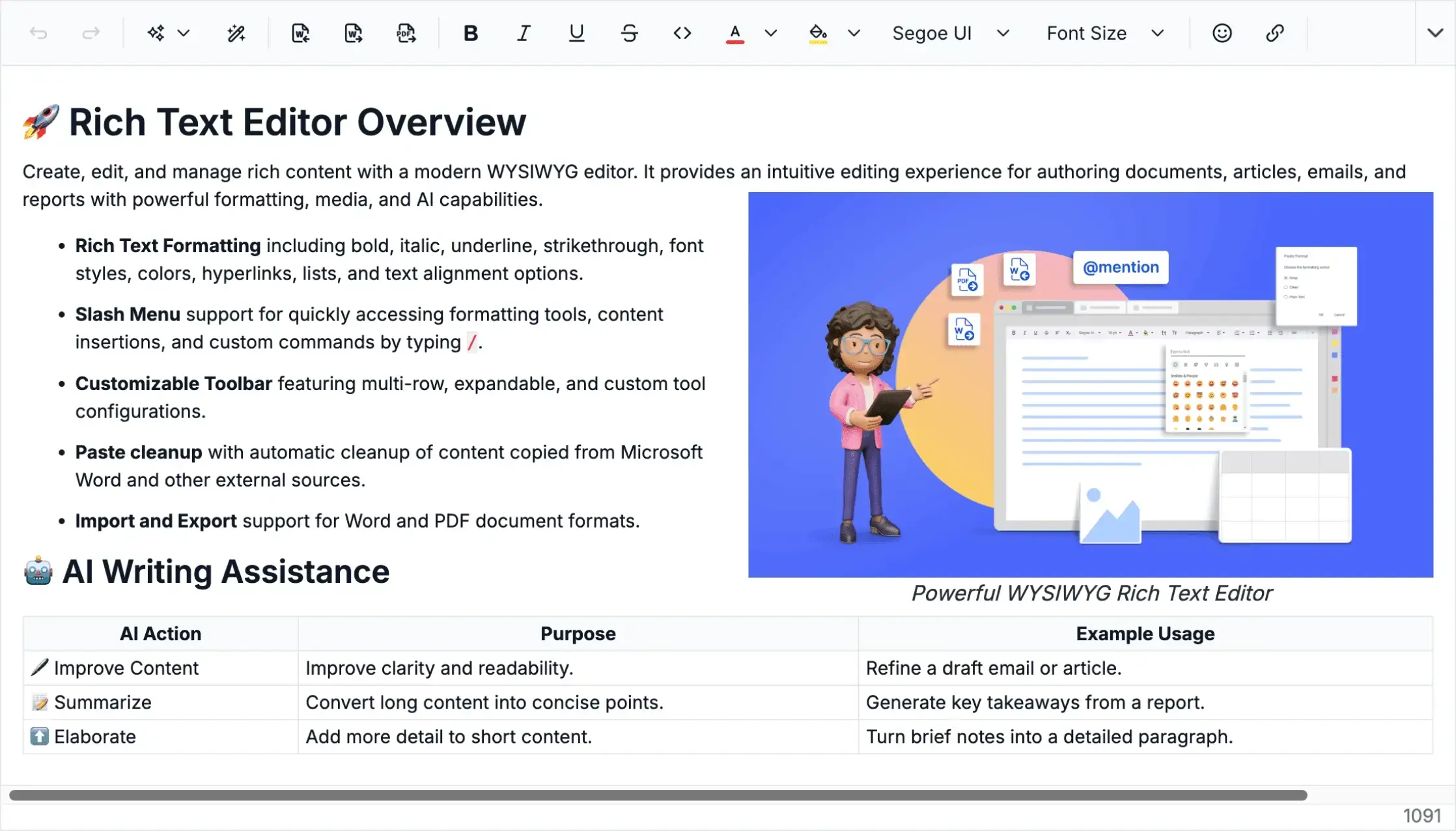




Make rich content easier to write and format
Give users a smooth editing experience with toolbar actions, inline formatting, tables, mentions, paste cleanup, and validation built into the Rich Text Editor.
- Format text, lists, links, tables, and media with quick toolbar actions.
- Edit content in-line with a familiar document-like writing experience.
- Clean pasted content automatically to keep formatting consistent.
- Support structured content creation with undo, redo, and validation.
Give users the right editing tools
Customize the Rich Text Editor toolbar so users get the formatting, media, table, link, and app-specific actions they need without cluttering the editing experience.
- Add, remove, or rearrange toolbar actions based on user needs.
- Use rich text formatting, media, table, and link tools for faster content editing.
- Use custom buttons for app-specific commands and workflows.
- Use expanded, multirow, scrollable, pop-up, or responsive toolbars across screen sizes.


Keep content screens visually consistent
Use built-in themes and flexible styling to make Rich Text Editor experiences consistent across screens, light and dark modes, toolbars, dialogs, and devices.
- Support light and dark modes for comfortable content editing.
- Start with Material, Bootstrap, Tailwind, and Fluent-style themes.
- Match toolbar, dialog, menu, and content-area styles to your product design.
- Keep the editor experience consistent across desktop, tablet, and mobile layouts.
Help teams edit content together in real time
Enable multiple users to write, edit, and update shared content at the same time with synchronized changes that keep content creation coordinated and consistent.
Available on


AI-powered content assistance for faster authoring
Help users generate, refine, summarize, translate, and improve content directly inside the editor so they can move from rough ideas to polished text faster.
Available on

Everything needed for rich content editing
Use Rich Text Editor features for rich formatting, AI-assisted authoring, document import and export, secure editing, accessibility, and customization to help users create and manage content with confidence.

Rich formatting tools
Apply fonts, colors, styles, alignment, lists, links, and text decoration for structured content editing.

AI Assistant
Generate, rewrite, summarize, translate, and enhance content with intelligent writing suggestions.

Smart editing tools
Speed up editing with slash commands, @mentions, an emoji picker, a format painter, and Markdown shortcuts.

Image upload and insert
Embed, resize, and align images using file upload, URL input, and flexible media options.

Table insert and edit
Create, resize, merge, and style tables directly within the rich text editing experience.

Paste cleanup
Remove unwanted styles, scripts, and markup when pasting content from external sources.

Quick toolbar
Access frequently used actions through contextual toolbars for text, images, tables, and links.

Import Word documents
Load Word documents into the editor while preserving supported formatting.

Export to Word and PDF
Save and download edited content as formatted Word or PDF documents.

XSS protection
Sanitize user input to help block malicious scripts and unsafe content in the editor.
One Rich Text Editor SDK for complete editing experiences
Build rich text, block-based, and AI-assisted editing experiences for writing, formatting, structuring, and managing content in one focused SDK.

Rich Text Editor
Create, edit, and format rich content with WYSIWYG editing, advanced styling, media support, customizable toolbars, and smart editing tools.
Available on

Block Editor
Build structured content with block-based and rich text editing, collaborative workflows, and flexible content organization in an editor for modern applications.
Available on

Smart Rich Text Editor
This smart WYSIWYG editor lets you create content faster with AI-assisted writing, smart suggestions, and rich-text editing tools that improve authoring productivity.
Available on

Modern Rich Text Editor
Create structured content with schema-driven WYSIWYG editing, rich formatting, flexible toolbars, contextual editing, slash commands, and HTML and JSON formats.
Available on

Headless Editor
Build fully custom editors with a schema-driven, block-based editing engine, command-based editing, selection management, custom extensions, and no predefined UI.
Available on
Why choose the Syncfusion Rich Text Editor SDK
Choose a focused Rich Text Editor SDK for rich content editing when your project needs only WYSIWYG and block-based authoring capabilities, not a complete UI suite.

Dedicated SDK for content editing
Access the Rich Text Editor and Block Editor in one SDK designed for WYSIWYG editing, structured authoring, and content creation workflows.

Easier product evaluation
Review two components’ editing capabilities, supported platforms, documentation, and examples instead of an entire component suite.

Multiple-framework support
Build content-editing experiences across popular platforms including React, Blazor, Angular, JavaScript, Vue, ASP.NET Core, .NET MAUI and ASP.NET MVC.

Consistent Syncfusion ecosystem
Get consistent APIs, theming, documentation, licensing, updates, and product quality across supported Syncfusion platforms.

Expert developer support
Access Syncfusion documentation, technical support, updates, and implementation guidance to keep development and maintenance moving smoothly.
Create Rich Text Editor experiences faster with AI
Use Syncfusion AI tools to turn content editing requirements into configured editing experiences with less manual setup and faster implementation.

Agentic UI Builder
Describe the screen you need and generate a ready-to-use Rich Text Editor layout with Syncfusion components
Example Prompt: Create an email editor using a Rich Text Editor.

Agent Skills
Guide your AI coding agent with verified Syncfusion Rich Text Editor APIs, setup steps, and implementation patterns.
Example Prompt: Create a React Rich Text Editor with an AI Assistant and preloading prompt and response features.

AI Coding Assistant
Ask questions in your IDE to generate, configure, integrate, and debug Rich Text Editor code.
Example Prompt: Update the React Rich Text Editor to support image insertion with server-side upload. Configure the saveUrl to '/api/image/save' and path to '/uploads/'. Allow only .jpg, .png, and .gif file types.
Trusted by teams building content editing apps


Frequently asked questions
What is the Syncfusion Rich Text Editor SDK?
The Syncfusion Rich Text Editor SDK is a focused SDK for building rich-content editing experiences in modern applications. It includes rich-text editing, block-based authoring, smart editing tools, AI-assisted content workflows, and vast customization options.
Which platforms does the Rich Text Editor SDK support?
The Rich Text Editor SDK supports popular platforms including React, Blazor, Angular, JavaScript, Vue, ASP.NET Core, .NET MAUI and ASP.NET MVC. Availability may vary by editor.
Does the Rich Text Editor SDK support AI-assisted authoring?
Yes. The Rich Text Editor SDK supports AI-assisted authoring experiences for generating, rewriting, summarizing, translating, and improving content. AI availability may vary by editor and platform.
How can I get pricing details for the Rich Text Editor SDK?
Please visit our pricing page to request a quote. Our sales team will contact you shortly to provide further assistance.
How is the Rich Text Editor SDK different from the complete UI suite?
The Rich Text Editor SDK focuses on content editing needs, making it easier to evaluate, adopt, and license when your project requires just editing capabilities instead of an entire component suite.
Why should I choose the Rich Text Editor SDK instead of building an editor from scratch?
The Rich Text Editor SDK reduces custom development effort by providing ready-to-use editing experiences, platform support, documentation, customization options, and ongoing product updates from Syncfusion.
How does the Rich Text Editor SDK improve developer productivity?
The Rich Text Editor SDK simplifies development by providing structured data output, extensible APIs, reusable blocks, and seamless integration support, reducing complexity in content-driven applications.
Resources
Learn more about the Rich Text Editor SDK
Explore demos, KB articles, and documentation to get the most out of the Rich Text Editor SDK.
Documentation
Explore guides, APIs, and quick-start tips
Knowledge base articles
Find solutions and best practices fast
Example demos
See live use cases in action
Contact support
Get expert help when you need it
Community forum
Ask, share, and connect with peers
Feature requests and bug reports
Track issues and suggest improvements
See real success stories
Developers around the world trust Syncfusion’s Essential Studio to simplify complex projects and speed up delivery. With a vast library of UI controls, powerful SDKs, and reliable support, Essential Studio helps teams build enterprise-ready applications with confidence.
Read Our Customer StoriesIndustry
Software development
75% Cost reduction
50% Faster development

Industry
Utilities (oil and gas)

450+ hours saved
Streamlined processes and hours of development effort saved.

Advanced, flexible features
Empowered users through robust and versatile functionality.
Industry
Software and technology
1000+ of hours saved
Accelerated development with enterprise-ready UI components.

Efficient file management
Streamlined workflows with document libraries without building them from scratch.
Industry
Software and technology

2 Years of delay avoided
Two years of delays prevented with proactive planning.

On-time delivery
Projects delivered on schedule using trusted controls.
Industry
IT services and IT consulting

Improved performance
Large datasets handled with easy customization and quick debugging.

Highly customizable
Plug-and-play controls with quick template integration.
Industry
Professional services
Instant access
Quick availability of features and resources.
Reduced dependencies
Fewer dependencies for faster development.
Build better content-editing experiences with the Rich Text Editor SDK
Start with a full-featured WYSIWYG editor, add block-based authoring workflows and enhance content creation with AI-assisted writing, formatting, and media management.
No credit card required.| 33.2M+ downloads
 React
React Blazor
 Angular
 JavaScript
 Vue
Vue ASP.NET Core
 .NET MAUI
 ASP.NET MVC
Recent activities in the Rich Text Editor SDK
Stay updated with the latest Rich Text Editor SDK videos and blogs from Syncfusion, including new content, product updates, and helpful resources.
Awards
Greatness—it’s one thing to say you have it, but it means more when others recognize it. Syncfusion® is proud to hold the following industry awards.









