Gantt SDK
Turn complex project plans into clear, manageable timelines
No credit card required.
 React
React Blazor
 Angular
 JavaScript
 Vue
Vue ASP.NET Core
 .NET MAUI
 ASP.NET MVC
 WPF
WPF WinUI
WinUI UWP
UWPPlan and manage project workflows across major frameworks
Trusted by 41K+
organizations worldwide
25+ years
of UI component expertise
720+ Gantt Chart
demos and examples
19.0M+ downloads
of the component libraries
Try Our Live Demo
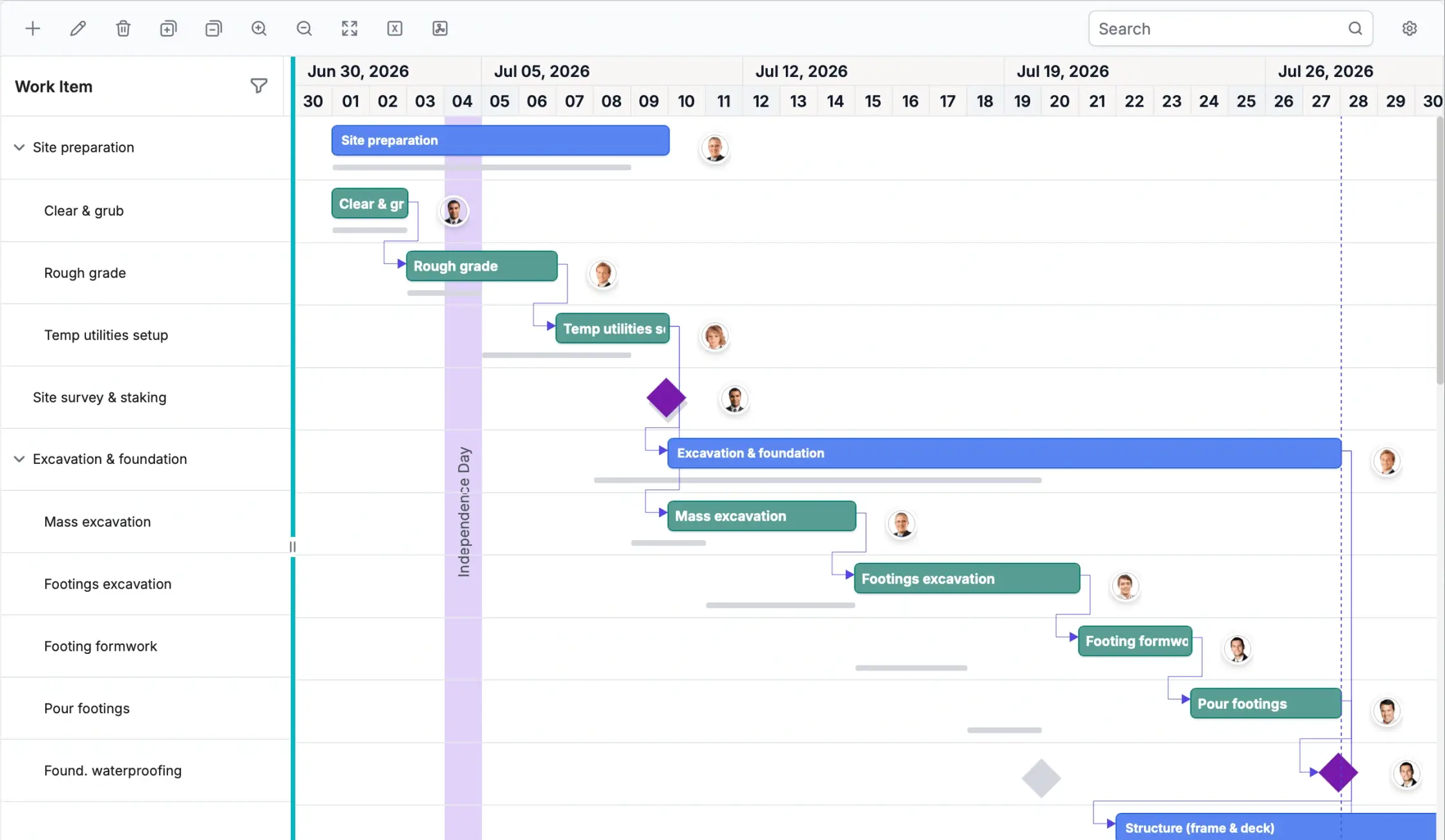



Keep complex project schedules easy to navigate
Build Gantt experiences that help teams plan complex schedules, navigate task hierarchies, track dependencies, and manage high-volume project data without slowing down the timeline view.
Try Our Live Demo
Keep every task connected to the timeline
Plan project schedules with task dates, dependencies, milestones, and critical paths so teams can understand what is due, what depends on what, and what may affect delivery.
- Schedule tasks with start dates, end dates, durations, milestones, and progress tracking.
- Link dependent activities to keep project sequences clear and accurate.
- Identify critical-path tasks that directly affect delivery timelines.
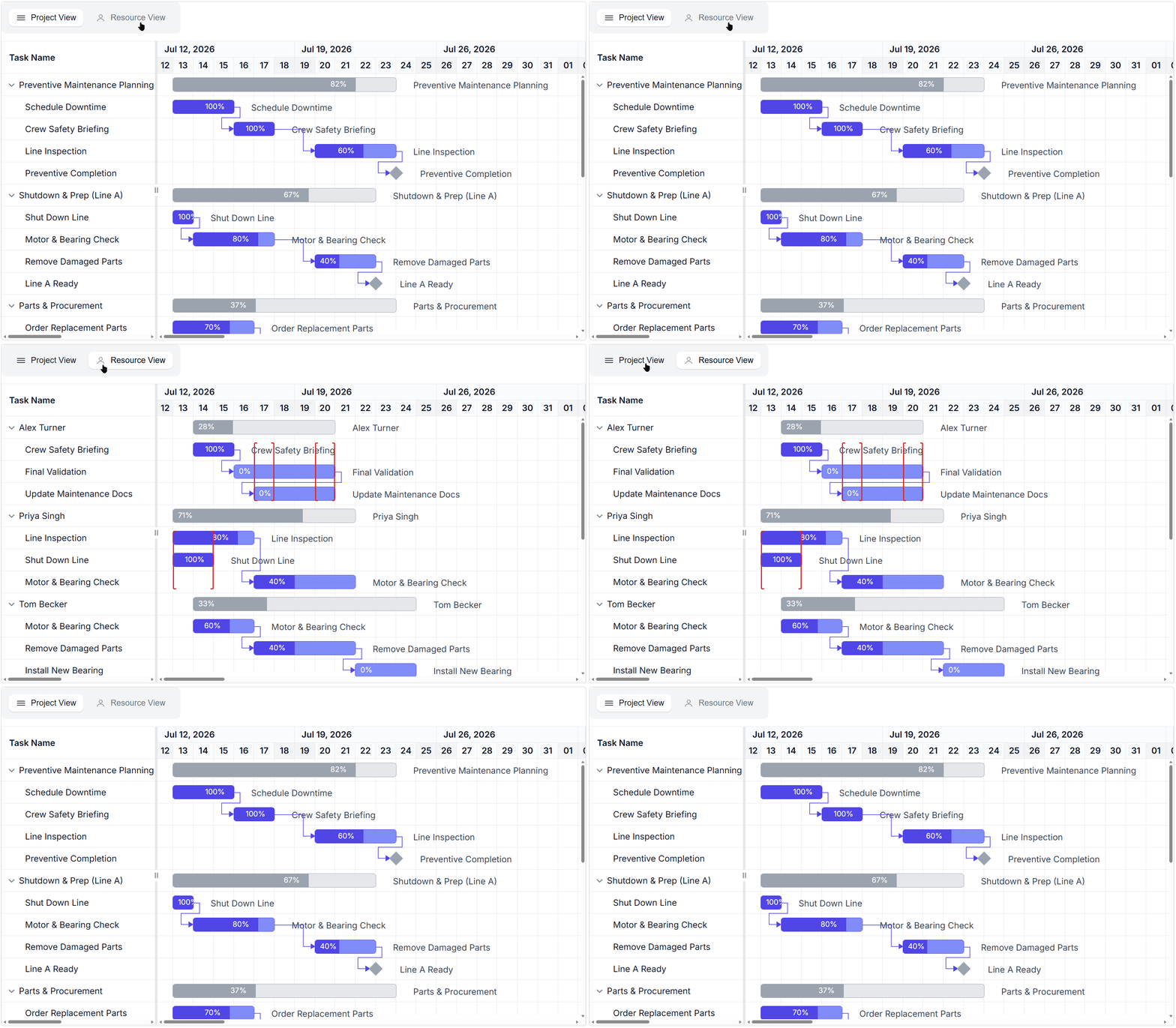
Plan work around real team capacity
Assign resources, monitor availability, and balance workloads across project schedules before conflicts affect delivery.
- Assign resources to tasks, milestones, phases, and project timelines.
- Track workload, availability, and allocation across the schedule.
- Identify overbooked resources, scheduling conflicts, and capacity risks.
- Balance team capacity with task progress, deadlines, and delivery plans.
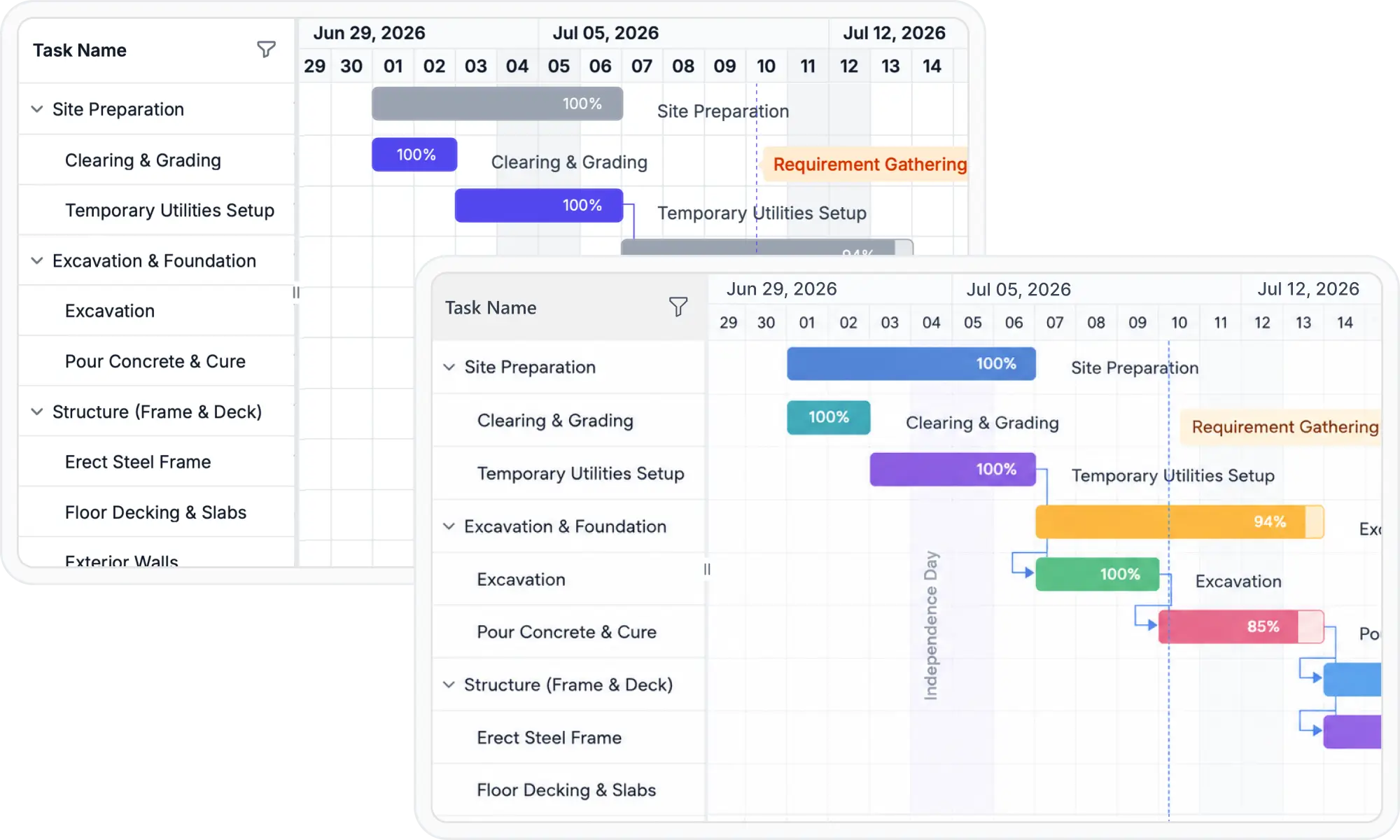
Make every project view feel consistent
Customize taskbars, milestones, labels, templates, and themes so the Gantt experience matches how your teams plan, track, and present project work.
- Start with Material, Bootstrap, Tailwind, and Fluent-style themes.
- Choose between light and dark modes for planning screens.
- Customize taskbars, milestones, labels, toolbars, and timeline templates.
- Style resources, dependencies, grid columns, and task states to match your workflow.
AI-ready Gantt chart for smarter project planning
Use AI-assisted Gantt insights to predict delays, prioritize critical tasks, and rebalance resources across complex schedules before risks affect delivery.
Smart task prioritization
Smart progress predictor
Smart resource allocation
Everything teams need to build complete Gantt experiences
Create project planning screens with scheduling, dependencies, resource management, timeline control, editing, baseline tracking, exporting, and customization features built for real project workflows.

Advanced scheduling
Plan tasks using working days, holidays, custom calendars, milestones, and flexible scheduling options for accurate timeline management.

Dependency management
Define relationships between tasks with multiple dependency types and maintain correct execution order across complex workflows.

Resource management
Assign resources to tasks, monitor workload distribution, and identify overallocation to improve project planning.

Timeline control
Configure timeline views, zoom levels, date ranges, and time scales to support both detailed planning and high-level tracking.

Interactive editing
Update tasks directly within the timeline using drag-and-drop, resizing, taskbar, and inline editing.

Critical path analysis
Identify tasks that directly impact project completion and monitor dependencies to reduce delays and project risks.

Baseline tracking
Compare planned timelines against actual progress to track schedule deviations throughout the project lifecycle.

Filtering and sorting
Find, organize, and analyze tasks quickly with built-in filtering and sorting capabilities.

Export capabilities
Export project data and timeline views to formats like Excel and PDF for reporting, sharing, and analysis.

Templates and customization
Customize taskbars, columns, tooltips, labels, markers, and timeline elements to match application requirements.

Localization and globalization
Support regional date formats and languages for a localized project planning experience.

Responsive and adaptive layouts
Deliver project planning experiences that adapt across screen sizes and supported platforms.
One SDK for project timelines and task workflows
Build Gantt Chart and Kanban Board experiences for timeline scheduling, dependency management, resource planning, progress tracking, and agile task execution using one focused SDK.

Gantt Chart
Plan and manage projects with timeline-based scheduling, task dependencies, resource coordination, milestones, baseline tracking, and progress visualization.
Available on

Kanban Board
Track tasks using a flexible board view for workflow management, task organization, progress monitoring, and agile planning alongside scheduling.
Available on
Why choose the Syncfusion Gantt SDK
Choose the Syncfusion Gantt SDK to build project planning and workflow management applications with focused scheduling capabilities, flexible platform support, and expert developer assistance.

Dedicated SDK for project planning
Access the Gantt Chart and Kanban Board in one focused SDK for timeline scheduling, task tracking, resource planning, and workflow management.

Better product evaluation
Evaluate project scheduling, task tracking, timeline management, and workflow visualization capabilities in one focused SDK package.

Cross-platform development
Build planning and workflow experiences across popular web and .NET platforms with consistent Syncfusion support.

Enterprise-ready project management
Support complex planning needs with dependencies, resources, baselines, critical path analysis, export, localization, and scalable scheduling workflows.

Expert developer support
Access Syncfusion documentation, technical support, product updates, and implementation guidance to keep development and maintenance moving smoothly.
Create Gantt experiences faster with AI
Use Syncfusion AI tools to turn project planning requirements into configured Gantt Chart, timeline, and workflow experiences with less manual setup and faster implementation.

Agentic UI Builder
Describe the screen you need and generate a ready-to-use Gantt Chart layout with Syncfusion components.
Example Prompt: Create a project planning dashboard with milestones, dependencies, and resource allocation.

Agent Skills
Guide your AI coding agent with verified Syncfusion Gantt Chart APIs, setup steps, and implementation patterns.
Example Prompt: Generate a React Gantt Chart with dependencies, timeline views, and editing support.

AI Coding Assistant
Ask questions in your IDE to generate, configure, integrate, and debug Gantt Chart code.
Example Prompt: Show how to configure task dependencies in the Syncfusion React Gantt Chart.
Trusted by teams building project planning apps







Frequently asked questions
Is the Gantt SDK separate from the complete UI component suite?
Yes. The Gantt SDK is offered as a focused package for project planning and task management requirements. It enables teams to use Gantt Chart and Kanban Board capabilities without purchasing the complete UI component suite.
Are additional or dependent components required to use the Syncfusion Gantt SDK?
No. The Syncfusion Gantt SDK includes the necessary components for scheduling and task management scenarios. Additional Syncfusion UI components are not required to use the core Gantt Chart and Kanban Board capabilities.
Can the Syncfusion Gantt SDK be used with AI-driven applications?
Yes. The Syncfusion Gantt SDK can be integrated with AI services or models to enhance planning scenarios such as task planning, resource optimization, workload balancing, and predictive insights.
Which platforms and frameworks are supported by the Gantt SDK?
The Gantt Chart supports React, Blazor, Angular, JavaScript, Vue, ASP.NET Core, ASP.NET MVC, WPF, and UWP. The Kanban Board additionally supports .NET MAUI and WinUI.
How can I get pricing details for the Gantt SDK?
Please visit our pricing page to request a quote. Our sales team will contact you shortly to provide further assistance.
What is the Gantt SDK and when should I choose it?
The Gantt SDK is designed for building applications that require project scheduling, timeline visualization, resource planning, and task tracking. It is best suited when the primary requirement is to implement planning and scheduling functionality without depending on the complete UI component suite.
Resources
Learn more about our Gantt SDK
Explore demos, KB articles, and documentation to get the most out of our Gantt SDK.
Documentation
Explore guides, APIs, and quick-start tips
Knowledge base articles
Find solutions and best practices fast
Example demos
See live use cases in action
Contact support
Get expert help when you need it
Community forum
Ask, share, and connect with peers
Feature requests and bug reports
Track issues and suggest improvements
See real success stories
Developers around the world trust Syncfusion’s Essential Studio to simplify complex projects and speed up delivery. With a vast library of UI controls, powerful SDKs, and reliable support, Essential Studio helps teams build enterprise-ready applications with confidence.
Read Our Customer StoriesIndustry
Software development
75% Cost reduction
50% Faster development

Industry
Utilities (oil and gas)

450+ hours saved
Streamlined processes and hours of development effort saved.

Advanced, flexible features
Empowered users through robust and versatile functionality.
Industry
Software and technology
1000+ of hours saved
Accelerated development with enterprise-ready UI components.

Efficient file management
Streamlined workflows with document libraries without building them from scratch.
Industry
Software and technology

2 Years of delay avoided
Two years of delays prevented with proactive planning.

On-time delivery
Projects delivered on schedule using trusted controls.
Industry
IT services and IT consulting

Improved performance
Large datasets handled with easy customization and quick debugging.

Highly customizable
Plug-and-play controls with quick template integration.
Industry
Professional services
Instant access
Quick availability of features and resources.
Reduced dependencies
Fewer dependencies for faster development.
Build better project planning experiences with the Gantt SDK
Start with a powerful Gantt Chart for timeline-based scheduling, add a Kanban Board for workflow tracking, and enhance planning with AI-ready insights when needed.
No credit card required.| 19.0M+ downloads
 React
React Blazor
 Angular
 JavaScript
 Vue
Vue ASP.NET Core
 .NET MAUI
 ASP.NET MVC
 WPF
WPF WinUI
WinUI UWP
UWPRecent activities in the Gantt SDK
Stay updated with the latest Gantt SDK videos and blogs from Syncfusion, including new content, product updates, and helpful resources.
Awards
Greatness—it’s one thing to say you have it, but it means more when others recognize it. Syncfusion® is proud to hold the following industry awards.









