








Transform your applications today by downloading our free evaluation version
Overview
The Blazor Smart Rich Text Editor is an AI-enhanced editor that extends the capabilities of Syncfusion’s Blazor Rich Text Editor with intelligent content creation, editing, and optimization features. It seamlessly integrates AI assistance within the editor toolbar, enabling users to generate, refine, and transform content without leaving their editing environment.
Blazor Smart Rich Text Editor code example
Get started with the Blazor Smart Rich Text Editor using a few simple lines of C# code, as demonstrated below. Also explore this Blazor Smart Rich Text Editor example, which shows you how to render and configure the component.
@using Syncfusion.Blazor.SmartRichTextEditor
@using Syncfusion.Blazor.RichTextEditor

<SfSmartRichTextEditor>
<p><strong>Editing and improving</strong></p>
<p>
    In today's competitive landscape, effective marketing focuses on building lasting customer relationships
    rather than just selling products. Brands are expected to provide personalized experiences through data
    analytics and consumer insights. As expectations evolve, marketers must stay agile and proactive in their
    strategies.
</p>
<p><strong>Tone and style</strong></p>
<p>
    Agile methodologies are essential in modern project management, particularly in software development.
    They enable teams to adapt quickly and deliver greater customer value through iterative processes and
    collaboration. Successful Agile implementation requires fostering a culture of adaptability, trust,
    and shared ownership.
</p>
<RichTextEditorToolbarSettings Items="@Tools" />
<AssistViewSettings PopupWidth="600px" PopupMaxHeight="700px"
                    Placeholder="Describe what you'd like to create or modify...">
</AssistViewSettings>
</SfSmartRichTextEditor>

@code {
    private List<ToolbarItemModel> Tools = new List<ToolbarItemModel>()
    {
        new ToolbarItemModel() { Name = "AI Commands", TooltipText="Smart Actions" },
        new ToolbarItemModel() { Name = "AI Query", TooltipText="Ask AI (Alt+Enter)" },
        new ToolbarItemModel() { Command = ToolbarCommand.Bold },
        new ToolbarItemModel() { Command = ToolbarCommand.Italic },
        new ToolbarItemModel() { Command = ToolbarCommand.Underline },
        new ToolbarItemModel() { Command = ToolbarCommand.Undo },
        new ToolbarItemModel() { Command = ToolbarCommand.Redo }
    };
}
Smart AI commands
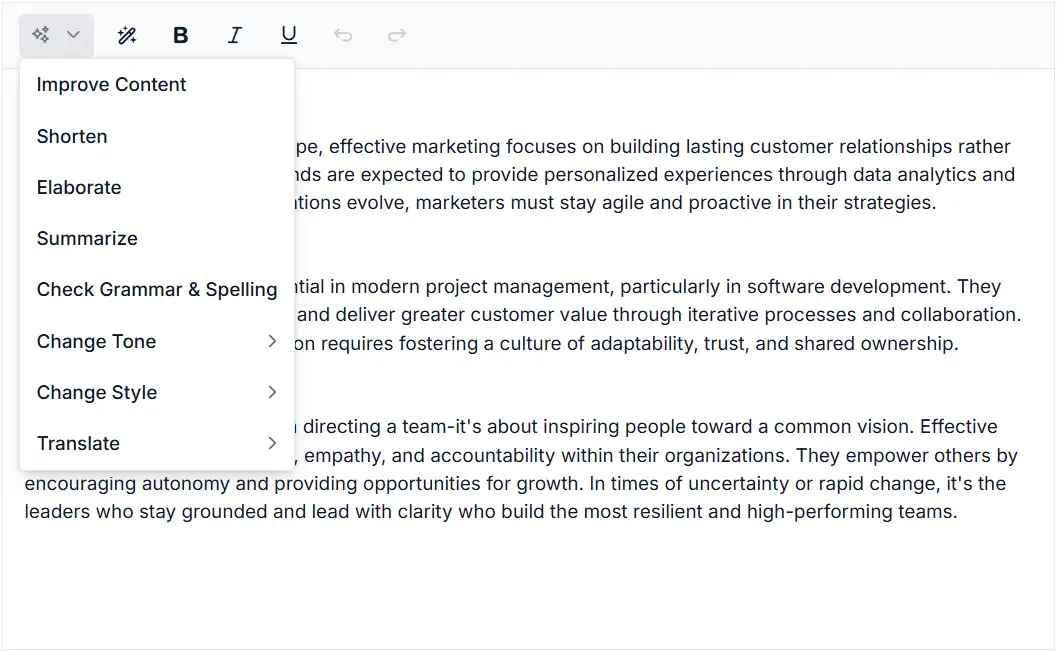
The Smart Rich Text Editor includes a powerful set of built-in AI commands accessible via the Smart Action dropdown in the toolbar. These commands enable content transformation, tone adjustment, style refinement, grammar checking, and multilanguage translation. Commands are fully customizable and support nested grouping for complex command hierarchies, allowing you to tailor the AI assistance to your organizational workflows.

AI query interface
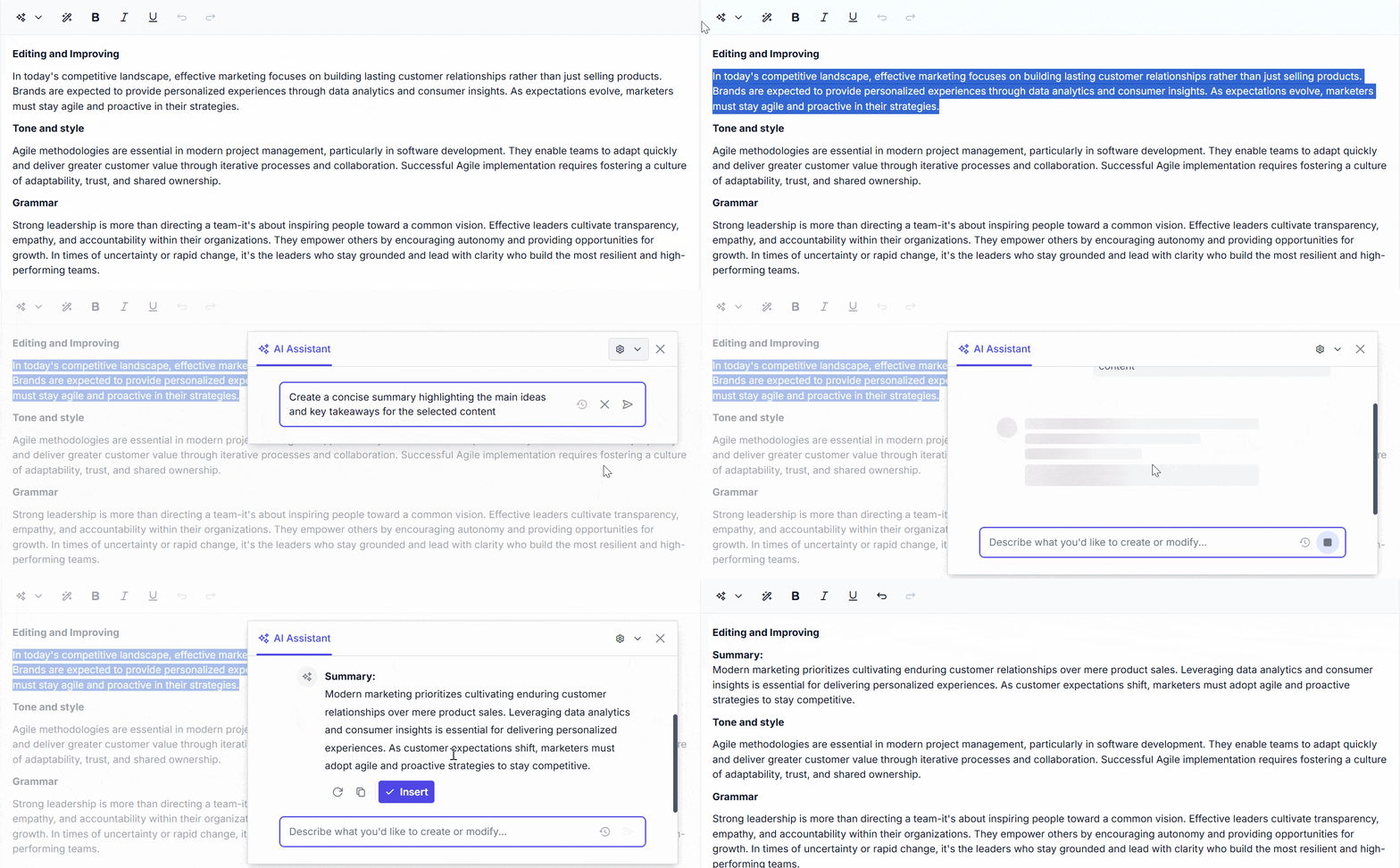
Ask the AI assistant anything directly through the Ask AI prompt input field (activated via Alt+Enter or the Ask AI toolbar button). The AI assistant pop-up displays real-time streaming responses, full conversation histories with save and load functionality, and quick-suggestion chips for fast access to common tasks. Users can regenerate responses, copy results, and insert content directly into their documents with a single click.
Content transformation
Transform selected content with a click using preset AI commands:
- Improve content: Enhance clarity and coherence.
- Shorten: Reduce verbosity while preserving meaning.
- Elaborate: Expand with additional detail and examples.
- Summarize: Create concise overviews.
- Grammar check: Identify and correct errors.
- Change tone: Rewrite in professional, casual, inspirational, or persuasive styles.
- Change style: Convert to business, legal, journalistic, or academic writing.
- Translate: Support for 8 languages: English, German, Spanish, French, Japanese, Chinese, Hindi, Arabic.
Custom AI configuration
Fully customize the AI assistant experience:
- Custom commands: Define your own AI commands with nested groups and persona-specific prompts.
- Pop-up sizing: Adjust AI assistant pop-up dimensions (width, height) with CSS units or pixel values.
- Banner templates: Add company branding, connection status, or compliance notices.
- Toolbar customization: Configure header, prompt, and response toolbars with custom actions.
- Predefined prompts: Preload templates and workflow starters for faster content creation.
Conversation history
The Smart Rich Text Editor maintains a conversation history that defaults to 20 entries. This is accessible via the history dropdown in the AI assistant pop-up. Each entry preserves:
- Original user prompts.
- Time stamp and metadata for regulatory compliance and audit trails.
Streaming responses
Experience real-time AI responses delivered in chunks as they are generated. Responses appear progressively so users can read partial output while generation continues. Users can stop generation mid-stream. The interface shows progress indicators and a stop control. When generation finishes, the final response is rendered for the user.
Inherited features
As a smart component built on Syncfusion’s Blazor Rich Text Editor, the Smart Rich Text Editor inherits all editor features, including rich formatting (bold, italic, underline, superscript, subscript), paragraph formatting (headings, lists, blockquotes, code blocks), table insertion and editing with cell formatting, image and media embedding, link management, Markdown and HTML support, custom toolbars with quick formatting options, and slash menu commands.
Built-in themes
The Smart Rich Text Editor includes several built-in themes: Material, Bootstrap, Fabric (Office 365), Tailwind CSS, and high contrast. Users can customize these built-in themes or create new ones by overriding Sass variables or using the Theme Studio application.
Accessibility
The Smart Rich Text Editor is designed with accessibility in mind, ensuring compliance with the latest web accessibility standards, such as WAI-ARIA. It supports full keyboard navigation (including Alt+Enter for AI prompt), screen reader compatibility, and high-contrast mode, making the component usable for individuals with disabilities.
Other supported frameworks
The AI assistant feature in the Rich Text Editor is available for the React, Angular, JavaScript, and Vue frameworks. Explore it’s platform-specific options through the following links:
Supported browsers
The Blazor Smart Rich Text Editor works well with all modern web browsers, including Chrome, Firefox, Edge, Safari, and Opera.

Not sure how to create your first Blazor Smart Rich Text Editor? Our documentation can help.
I’d love to read it nowFrequently Asked Questions
Why should you choose the Syncfusion Blazor Smart Rich Text Editor?
The Syncfusion Blazor Smart Rich Text Editor provides the following features and benefits:
AI-powered content creation: Generate, refine, and transform content with intelligent suggestions and commands.
Rich formatting capabilities: Inherits all features from the industry-leading Syncfusion Rich Text Editor.
Real-time streaming responses: Experience smooth, progressive AI response generation with stop controls.
Multiple-language support: Translate content into 8 languages with contextual accuracy.
Full customization: Customize AI commands, toolbars, the AI assistant pop-up appearance, and user workflows.
Conversation history: Access and export full conversation histories for regulatory compliance and audit trails.
Event-driven architecture: Comprehensive event callbacks for building custom AI workflows.
Enterprise-readiness: Built-in accessibility, security, and compliance features.
Resources: Extensive demos and documentation to help you get started quickly.
Where can I find the Syncfusion Blazor Smart Rich Text Editor demo?
You can find the Blazor Smart Rich Text Editor demo here.
What is the Blazor Smart Rich Text Editor?
The Blazor Smart Rich Text Editor is an AI-enhanced component that extends Syncfusion’s Rich Text Editor with intelligent content creation, editing, and optimization features. It integrates seamlessly with AI assistance through toolbar commands and a dedicated AI assistant pop-up for generating, transforming, and refining content.
What AI capabilities does the Smart Rich Text Editor offer?
The Smart Rich Text Editor provides prebuilt AI commands for content improvement, tone adjustment, language translation (8 languages), grammar checking, style conversion, content summarization, and elaboration. It also supports free-form AI prompts through the AI assistant pop-up, custom command creation, streaming response generation, and full conversation history tracking. All AI integration is designed to be back-end-agnostic, allowing connection to any AI service provider.
How is conversation history managed?
The Smart Rich Text Editor maintains a configurable conversation history (default 20 entries, customizable) with full access via the history dropdown. History can be programmatically retrieved, cleared, or exported for compliance and audit purposes. Each entry preserves prompts, responses, feedback ratings, attached files, and metadata.
Can I download and utilize the Syncfusion Blazor Smart Rich Text Editor for free?
No, this is a commercial product and requires a paid license. However, a free community license is also available for companies and individuals whose organizations have less than $1 million USD in annual gross revenue, 5 or fewer developers, and 10 or fewer total employees
How do I get started with the Syncfusion Blazor Smart Rich Text Editor?
A good place to start would be our comprehensive getting started documentation.
How does the Blazor Smart Rich Text Editor work?
The Smart Rich Text Editor combines traditional rich text editing with an integrated AI assistant. Users can apply preset AI commands from the toolbar to transform selected content, use the free-form Ask AI interface to generate new content, view real-time streaming responses, maintain conversation history, and programmatically control the AI through C# APIs. All content remains within the editor for seamless workflow integration.
Can I customize the AI commands and interface?
Yes, the Smart Rich Text Editor is fully customizable. You can define custom AI commands with nested grouping, configure AI assistant pop-up dimensions and appearances, customize toolbars, create predefined prompt templates, add company branding via banner templates, and programmatically control all AI features through public properties. Additionally, all event callbacks are exposed for building custom workflows.
Our Customers Love Us
Having an excellent set of tools and a great support team, Syncfusion® reduces customers’ development time.Here are some of their experiences.

Excellent support
Most helpful part of Syncfusion experience is the support team, they even spent lots of time building a functional demo solution created based on our process flow. Never seen this on other providers. Integrating RTEditor with Word Editor, in a process similar to mail merge, but with html data from RTE.

Catalin B.

Senior VBA / Excel consultant
Rich text editor is especially useful
I'm using it to design the frontend for a forum. The rich text editor is especially useful.
G2 User
See Real Success Stories
Developers around the world trust Syncfusion’s Essential Studio to simplify complex projects and speed up delivery. With a vast library of UI controls, powerful SDKs, and reliable support, Essential Studio helps teams build enterprise-ready applications with confidence.
Read Our Customer StoriesIndustry
Software development
75% Cost reduction
50% Faster development
Industry
Utilities (oil and gas)

450+ hours saved
Streamlined processes and hours of development effort saved.

Advanced, flexible features
Empowered users through robust and versatile functionality.
Industry
Software and technology
1000+ of hours saved
Accelerated development with enterprise-ready UI components.

Efficient file management
Streamlined workflows with document libraries without building them from scratch.
Industry
Software and technology

2 Years of delay avoided
Two years of delays prevented with proactive planning.

On-time delivery
Projects delivered on schedule using trusted controls.
Industry
IT services and IT consulting

Improved performance
Large datasets handled with easy customization and quick debugging.

Highly customizable
Plug-and-play controls with quick template integration.
Industry
Professional services
Instant access
Quick availability of features and resources.
Reduced dependencies
Fewer dependencies for faster development.
Rated by users across the globe
Syncfusion Blazor Smart Rich Text Editor resources


UI Kits
 Figma download
Figma download
Awards
Greatness—it’s one thing to say you have it, but it means more when others recognize it. Syncfusion® is proud to hold the following industry awards.









