Grid SDK
Build data-heavy grid applications faster
No credit card required.
 React
React Blazor
 Angular
 JavaScript
 Vue
Vue ASP.NET Core
 .NET MAUI
 ASP.NET MVC
 WPF
WPF WinForms
 WinUI
WinUI UWP
UWPDeliver high-performance data experiences across major frameworks
Trusted by 41K+
organizations worldwide
25+ years
of UI component expertise
2.3K+ Data Grid
demos and examples
57.5M+ downloads
of the component libraries
Try Our Live Demo
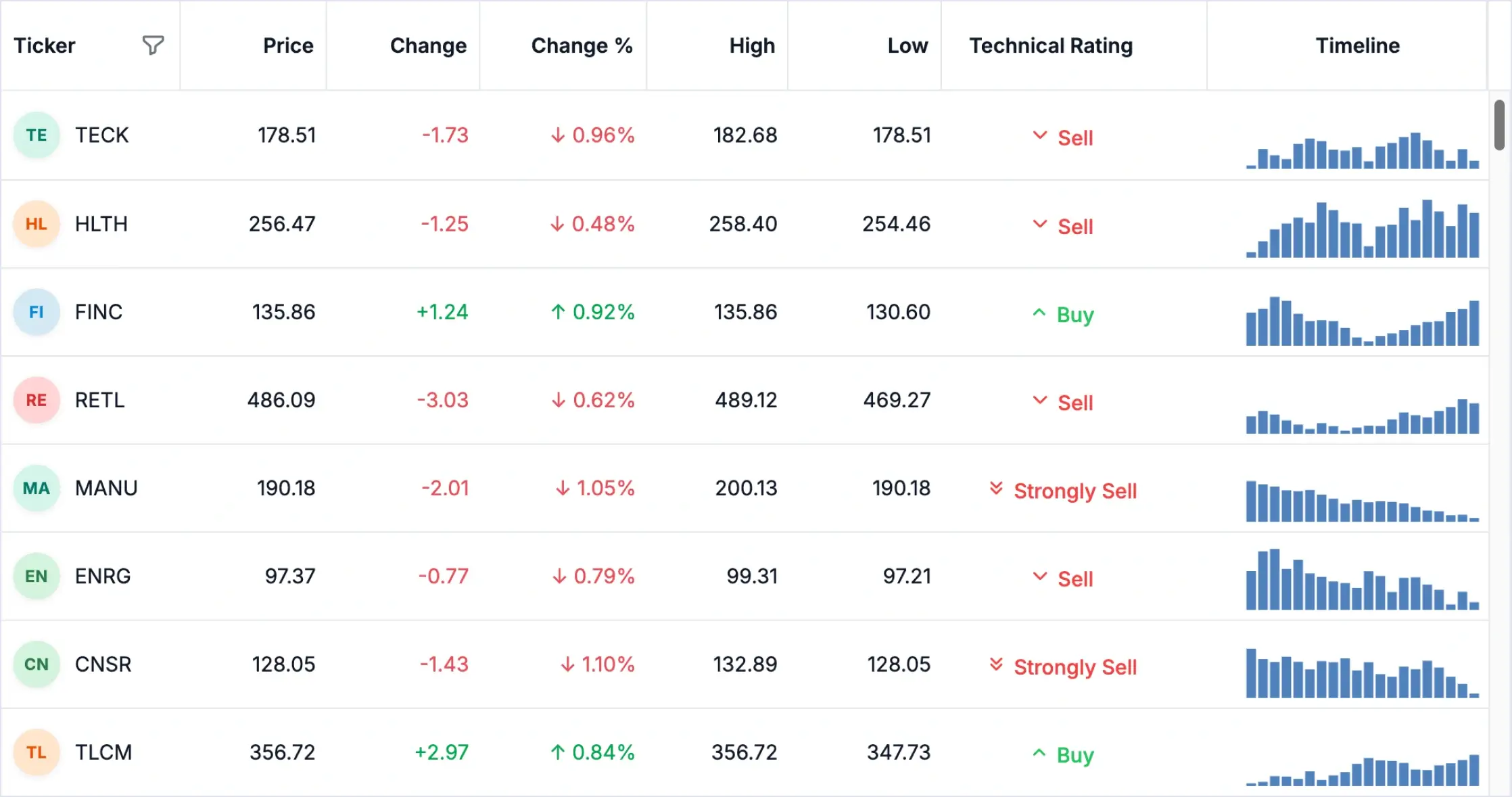



Make large datasets feel fast and easy to use
Display, filter, sort, and manage high-volume data with a responsive Data Grid built for smooth performance, advanced virtualization, and real-world application scale.
Try Our Live Demo

Make your grid fit your product
Customize how records, actions, and details appear so the Data Grid supports your application workflow instead of looking like a generic table.
- Turn cells into meaningful UIs with badges, avatars, links, icons, and formatted values.
- Customize headers with labels, tooltips, filters, and column actions.
- Shape row layouts around real business records and user tasks.
- Reveal related records with expandable detail views.
Keep every data screen consistent
Apply built-in themes and design-system styling so every grid screen feels visually aligned across products, pages, modes, and devices.
- Start with Material, Bootstrap, Tailwind, or Fluent-style themes.
- Switch between light and dark modes without redesigning each grid.
- Align colors, spacing, typography, and interaction states with your brand.
- Keep the same polished grid experience on desktop, tablet, and mobile screens.

AI-ready Data Grid for smarter data discovery
Let users search, filter, and analyze large datasets with natural language prompts that surface relevant records, highlight unusual patterns, and turn complex data into faster decisions.
Semantic filtering
Anomaly detection
Everything needed for advanced Data Grid development
Build fast, scalable, and interactive data screens with the Data Grid capabilities developers usually need most—server-side operations and editing, filtering, exporting, responsive layouts, and master-detail views.

Server-side data operations
Handle paging, sorting, filtering, grouping, aggregation, and CRUD on the server for better scalability.

Advanced filtering
Filter data quickly with Excel-like and multi-condition filters for precise exploration across datasets.

Rich editing
Edit data using inline, batch, dialog, and custom editing modes with built-in validation.

Sorting and paging
Sort data across one or more columns and navigate large datasets efficiently with flexible paging.

Grouping and summaries
Group records and display summaries such as totals, counts, averages, and custom aggregate values.

Flexible data binding
Connect to local, remote, and real-time sources with seamless integration and server-side processing.

Frozen rows and columns
Keep important rows and columns visible as users scroll through large and complex datasets.

Customizable columns
Resize, reorder, freeze, hide template columns to create tailored layouts for enterprise applications.

Selection and clipboard
Select rows, cells, or ranges to copy data easily for spreadsheet-like productivity and faster data handling.

Master-detail views
Display hierarchical data with expandable rows to enable deeper insights into parent-child relationships.

Export and print
Export to Excel, PDF, or CSV, and print directly with formatting preserved for enterprise reporting.

Responsive design
Deliver a seamless experience across desktop, tablet, and mobile devices with adaptive layouts and interactions.
Choose the right grid experience for every data workflow
Use one SDK to build tabular data screens, hierarchical views, pivot analytics, and AI-assisted data exploration without evaluating separate tools for each use case.

Data Grid
Build high performance tabular data experiences with advanced filtering, sorting, editing, virtualization, exporting, and customization support.
Available on

Tree Grid
Display hierarchical and parent-child data with expandable rows, tree-aware interactions, editing, sorting, filtering, and flexible data binding.
Available on

Pivot Table
Analyze multidimensional data with interactive pivoting, grouping, aggregation, filtering, sorting, and summary views for business reporting.
Available on

Why choose Syncfusion Grid SDK
Build data-driven applications faster with a single focused SDK that delivers enterprise-ready grid experiences, multi-framework support, AI-ready capabilities, consistent APIs, and expert developer support under a single license.

One license for data experiences
Access essential grid-based data experiences through a unified SDK, simplifying licensing and product evaluation.

Performance built for scaling
Handle large datasets and complex data operations through optimized rendering, virtualization, and scalable data management.

Connect to any data source
Bind your grid to local, remote, real-time, and server-side data sources. It’s easy to power dashboards, admin screens, and business workflows from your existing application data.

Expert developer support
Get access to Syncfusion technical support, documentation, updates, and assistance for enterprise development needs.

Ready-for-production standards
The SDK supports accessibility, globalization, security, export, and compliance needs, so teams can build reliable applications with confidence.
Create Data Grid experiences faster with AI
Use Syncfusion AI tools to turn data management requirements into configured Data Grid experiences with less manual setup and faster implementation.

Agentic UI Builder
Describe the screen you need and generate a ready-to-use Data Grid layout with Syncfusion components.
Example Prompt: Build a product Data Grid with columns for item name, category, price, and availability. Add sorting, filtering, and inline editing to update stock in real time.

Agent Skills
Guide your AI coding agent with verified Syncfusion Data Grid APIs, setup steps, and implementation patterns.
Example Prompt: Create an employee directory Data Grid with name, department, role, and contact info columns. Enable search functionality, column visibility toggles, and export to Excel or PDF options for quick sharing.

AI Coding Assistant
Ask questions in your IDE to generate, configure, integrate, and debug Data Grid code.
Example Prompt: Design an order management table with order ID, customer, status, and total amount columns. Include advanced filtering, pagination, and row selection options, plus editing support with the DataGrid.
Trusted by developers building data-heavy apps


Frequently asked questions
What is Grid SDK?
Grid SDK is a focused developer toolkit that delivers enterprise grade Data Grid, Tree Grid, Pivot Table, and Smart Data Grid experiences across web, desktop, and mobile applications, without requiring the complete UI suite.
Is Smart Data Grid available on all platforms?
How can I get pricing details for the Grid SDK?
Please visit our pricing page to request a quote. Our sales team will contact you shortly to provide further assistance.
Which platforms does the Grid SDK support?
Grid SDK supports popular platforms such as React, Blazor, Angular, JavaScript, Vue, ASP.NET Core, .NET MAUI, ASP.NET MVC, WPF, WinForms, WinUI and UWP.
Is Grid SDK AI-ready?
Yes. It supports AI experiences such as natural language filtering, anomaly detection, and intelligent insights, helping users explore and analyze data faster.
Resources
Learn more about our Grid SDK
Explore demos, KB articles, and documentation to get the most out of our Grid SDK.
Documentation
Explore guides, APIs, and quick-start tips
Knowledge base articles
Find solutions and best practices fast
Example demos
See live use cases in action
Contact support
Get expert help when you need it
Community forum
Ask, share, and connect with peers
Feature requests and bug reports
Track issues and suggest improvements
See real success stories
Developers around the world trust Syncfusion’s Essential Studio to simplify complex projects and speed up delivery. With a vast library of UI controls, powerful SDKs, and reliable support, Essential Studio helps teams build enterprise-ready applications with confidence.
Read Our Customer StoriesIndustry
Software development
75% Cost reduction
50% Faster development

Industry
Utilities (oil and gas)

450+ hours saved
Streamlined processes and hours of development effort saved.

Advanced, flexible features
Empowered users through robust and versatile functionality.
Industry
Software and technology
1000+ of hours saved
Accelerated development with enterprise-ready UI components.

Efficient file management
Streamlined workflows with document libraries without building them from scratch.
Industry
Software and technology

2 Years of delay avoided
Two years of delays prevented with proactive planning.

On-time delivery
Projects delivered on schedule using trusted controls.
Industry
IT services and IT consulting

Improved performance
Large datasets handled with easy customization and quick debugging.

Highly customizable
Plug-and-play controls with quick template integration.
Industry
Professional services
Instant access
Quick availability of features and resources.
Reduced dependencies
Fewer dependencies for faster development.
Build better data experiences with the Grid SDK
A complete Grid SDK featuring Data Grid, Tree Grid, Pivot Table, and Smart Data Grid that scales from tabular data to hierarchical and analytical views, enhanced with AI-ready experiences.
No credit card required.| 57.5M+ downloads
 React
React Blazor
 Angular
 JavaScript
 Vue
Vue ASP.NET Core
 .NET MAUI
 ASP.NET MVC
 WPF
WPF WinForms
 WinUI
WinUI UWP
UWPRecent activities in Grid SDK
Stay updated with the latest Grid SDK videos and blogs from Syncfusion, including new content, product updates, and helpful resources.
Awards
Greatness—it’s one thing to say you have it, but it means more when others recognize it. Syncfusion® is proud to hold the following industry awards.









