

Overview
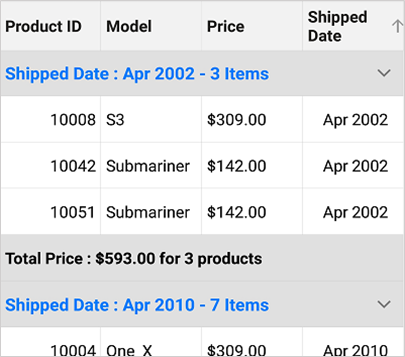
The DataGrid control provides support to group data against one or more columns. Users can display organized data in a hierarchical structure based on matching column values. Groups can be expanded or collapsed through interaction or programmatically. It is also possible to apply custom grouping logic to group data. Customizable indent columns will be created to visually represent the grouping levels when grouping more than one column. It is also possible to animate the expand and collapse icon in the caption row.
Column grouping
Group data by one or more columns programmatically with customizable templates. The DataGrid control also allows you to show or hide a column when grouped.

Group expand and collapse
View the records of each group easily. An intuitive expand icon in group captions provides an easier way to expand or collapse groups. Users can also expand or collapse groups in code behind.

Custom grouping
- Group the data for columns based on custom logic to perform grouping.
- Sort all the inner records of each group.

Display text-based grouping
Group the data for columns based on the displayed text. Users can view the grouped data with the formatted text applied for values.

Summary for groups
View summaries for columns in a group caption. You can also show the summary of records in a group.
Indent column customization
Indent columns are the columns present to the left of the summary rows when grouping more than one column. The number of indent cells in each summary row will be determined by the level of that group. DataGrid provides support to customize the size and background color of the indent column to have an elegant look and feel. It is also possible to customize the background color of the indent cells based on the type of row in a Xamarin.Forms DataGrid control.

Animate group expand and collapse icons
The Xamarin.Forms DataGrid loads two different icons for denoting the group expanded and collapsed state. However, it also provides extensive support to rotate the expander icon animatedly for denoting the collapsed status.

Our Customers Love Us




150+ XAMARIN UI CONTROLS
-
Xamarin.Forms
-
Xamarin.Android
-
Xamarin.iOS
-
GRIDSDATA VISUALIZATIONNAVIGATIONEDITORSLAYOUTPROJECT MANAGEMENTNOTIFICATIONVIEWER/EDITORMISCELLANEOUSCHAT
-
GRIDSDATA VISUALIZATIONNAVIGATIONEDITORSLAYOUTPROJECT MANAGEMENTNOTIFICATIONVIEWER/EDITORMISCELLANEOUS
-
GRIDSDATA VISUALIZATIONNAVIGATIONEDITORSLAYOUTPROJECT MANAGEMENTNOTIFICATIONVIEWER/EDITORMISCELLANEOUS







