



Transform your applications today by downloading our free evaluation version
Overview
The Xamarin.iOS Range Slider is a control that allows users to select a range of values within the specified minimum and maximum limits.
Orientation
A Xamarin.iOS Range Slider can be horizontal or vertical.
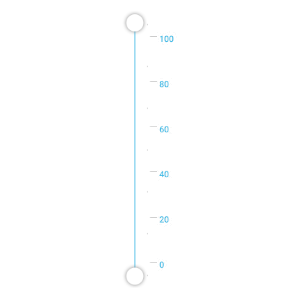
Single slider
Xamarin.iOS Range slider can be used as a simple slider.

Formatting string
You can format the strings to different format like currency format,percent format etc.

Tick customization
You can place tick marks along the track in a uniform manner and you can also customize the position of tick marks.

Color customization
Customize the look and feel of the default tick using color property.

Placement
You can change the tick position to bottom-right, inline, outside, or top-left.
Label customization
You can display custom labels and you can also customize label positions.
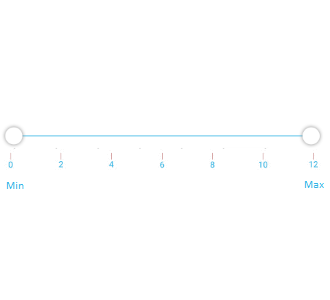
Custom labels
The Range Slider is not restricted to numeric values, so you can visualize values as text, like: Low, Medium, High; or Bad, Good, Excellent.

Placement
You can change the tick position to bottom-right or top-left.
Tooltip customization
The value of the pointer or range is shown in a tooltip. You can control the placement of tooltips.
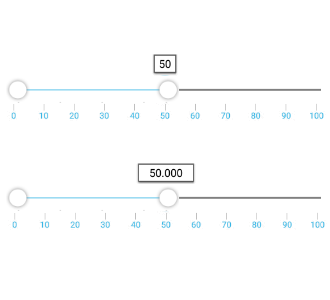
Precision
Define the precision of the value displayed in the tooltip.
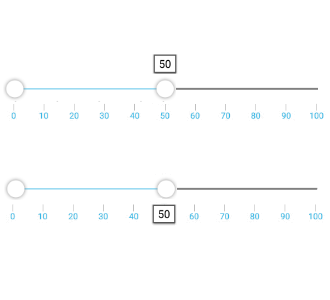
Placement
You can change the tooltip position to bottom-right or top-left.
150+ XAMARIN UI CONTROLS
ALL CONTROLS
- Xamarin.Forms
- Xamarin.Android
- Xamarin.iOS
- GRIDSDATA VISUALIZATIONEDITORSPROJECT MANAGEMENTNOTIFICATIONDOCUMENT PROCESSING LIBRARIESVIEWER/EDITORMISCELLANEOUS
- GRIDSDATA VISUALIZATIONEDITORSLAYOUTPROJECT MANAGEMENTNOTIFICATIONVIEWER/EDITORDOCUMENT PROCESSING LIBRARIESMISCELLANEOUS
- GRIDSDATA VISUALIZATIONEDITORSLAYOUTPROJECT MANAGEMENTNOTIFICATIONVIEWER/EDITORDOCUMENT PROCESSING LIBRARIESMISCELLANEOUS
The most downloaded control (based on the nuget.org download count).
Our Customers Love Us
Having an excellent set of tools and a great support team, Syncfusion® reduces customers’ development time.
Here are some of their experiences.
Here are some of their experiences.

A creator of online tutorials for Microsoft technologies, your controls helped to provide a rich user experience. I wanted a look and feel like a Windows Store app and the Tiles are useful for that.
We're using the file formats and Windows/JavaScript list controls a lot. They're fast, easy to use, and the documentation is good and contains examples. Tickets with questions or suggestions were answered within a day, so we're happy to use the Syncfusion libraries.
Rated by users across the globe
Syncfusion Xamarin.iOS Resources
Learning  Documentation
 Documentation


Awards
Greatness—it’s one thing to say you have it, but it means more when others recognize it. Syncfusion® is proud to hold the following industry awards.









