Overview
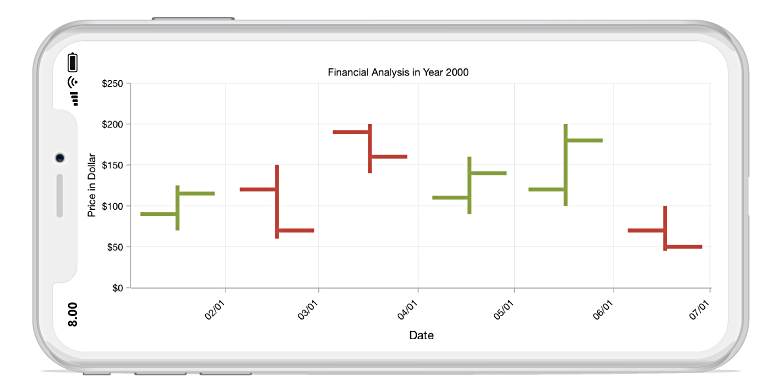
The Xamarin.Forms OHLC chart is like a candle chart. The horizontal lines at the left and right are used to show open and close values of the stock, and the vertical line represents high and low values. They are easily customizable and supports interactive features such as trackball, tooltip, selection, and zooming to track information of the data.
Key features
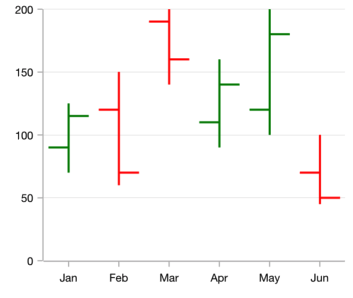
Bull and bear
Customizable bull and bear colors.
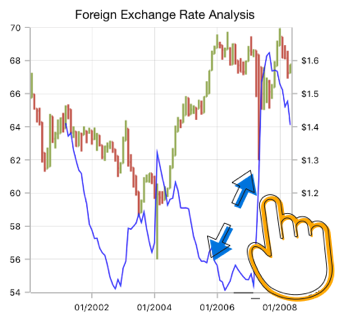
Zooming and scrolling
Supports zooming and panning when dealing with large amount of data to visualize data point in any region.
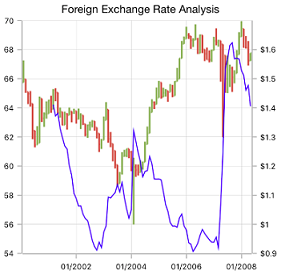
Technical indicators
Supports analyzing historical data and predicting future price movements using technical indicators.
Code example
Easily get started with Xamarin OHLC Chart using a few simple lines of C# code, as demonstrated below,
<?xml version="1.0" encoding="utf-8" ?>
<ContentPage xmlns="http://xamarin.com/schemas/2014/forms"
             xmlns:x="http://schemas.microsoft.com/winfx/2009/xaml"
             xmlns:local="clr-namespace:ChartExample"
             xmlns:chart="clr-namespace:Syncfusion.SfChart.XForms;assembly=Syncfusion.SfChart.XForms"
             x:Class="ChartExample.MainPage">

    <ContentPage.BindingContext>
        <local:ViewModel/>
    </ContentPage.BindingContext>

    <chart:SfChart>

        <chart:SfChart.PrimaryAxis>
            <chart:CategoryAxis/>
        </chart:SfChart.PrimaryAxis>

        <chart:SfChart.SecondaryAxis>
            <chart:NumericalAxis/>
        </chart:SfChart.SecondaryAxis>

        <chart:HiLoOpenCloseSeries ItemsSource="{Binding Data}" XBindingPath="Year" High="High" Low="Low" Open="Open" Close="Close"/>

    </chart:SfChart>

</ContentPage>
public class Model
{
public string Year { get; set; }
public double High { get; set; }
public double Low { get; set; }
public double Open { get; set; }
public double Close { get; set; }
public Model(string xValue, double open, double high, double low, double close)
{
Year = xValue;
Open = open;
High = high;
Low = low;
Close = close;
}
}
public class ViewModel
{
public ObservableCollection<Model> Data { get; set; }
public ViewModel()
{
Data = new ObservableCollection<Model>()
{
new Model("2010", 873.8, 878.85, 855.5, 860.5),
new Model("2011", 861, 868.4, 835.2, 843.45),
new Model("2012", 846.15, 853, 838.5, 847.5),
new Model("2013", 846, 860.75, 841, 855),
new Model("2014", 841, 845, 827.85, 838.65)
};
}
}Learning resources

Explore the Xamarin.Forms OHLC Chart example from GitHub to learn how to render and configure charts.

Open High Low Close Chart User Guide
Learn available options to customize the Xamarin.Forms open high low close chart.

150+ XAMARIN UI CONTROLS
-
Xamarin.Forms
-
Xamarin.Android
-
Xamarin.iOS
-
GRIDSDATA VISUALIZATIONNAVIGATIONEDITORSLAYOUTPROJECT MANAGEMENTNOTIFICATIONVIEWER/EDITORMISCELLANEOUSCHAT
-
GRIDSDATA VISUALIZATIONNAVIGATIONEDITORSLAYOUTPROJECT MANAGEMENTNOTIFICATIONVIEWER/EDITORMISCELLANEOUS
-
GRIDSDATA VISUALIZATIONNAVIGATIONEDITORSLAYOUTPROJECT MANAGEMENTNOTIFICATIONVIEWER/EDITORMISCELLANEOUS







