





Transform your applications today by downloading our free evaluation version
Overview
The Xamarin Rich Text Editor provides a simple yet powerful editor interface to compose richly formatted text with all the common formatting options like bold and italics. The Rich Text Editor is used to create messaging applications, email composers, blog editors, forum post text boxes, feedback and review sections, notes sections, and more. It has a variety of tools to edit and format rich content and returns valid HTML markup content.
Formatting text
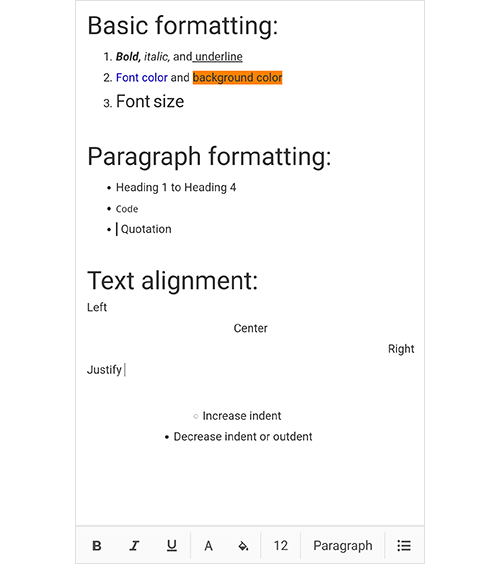
You can apply different formatting styles to selected content, whole paragraphs, or specific words or characters:
- Bold, italics, and underlining.
- Font color and background color.
- Formatting for headings, quotations, code, paragraphs, etc.
- Customizable indentation for paragraphs.
- Text alignment for content.
Adding lists
Organize content by applying ordered (numbered) or unordered (bulleted) lists.

Inserting images
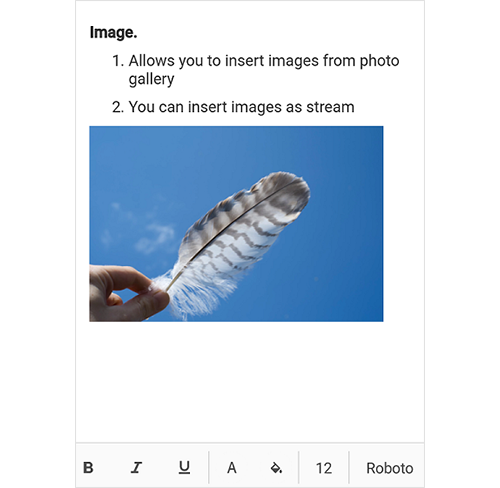
Insert JPEG and PNG images from a photo gallery, embedded resource, or stream into the Rich Text Editor content.
Clipboard
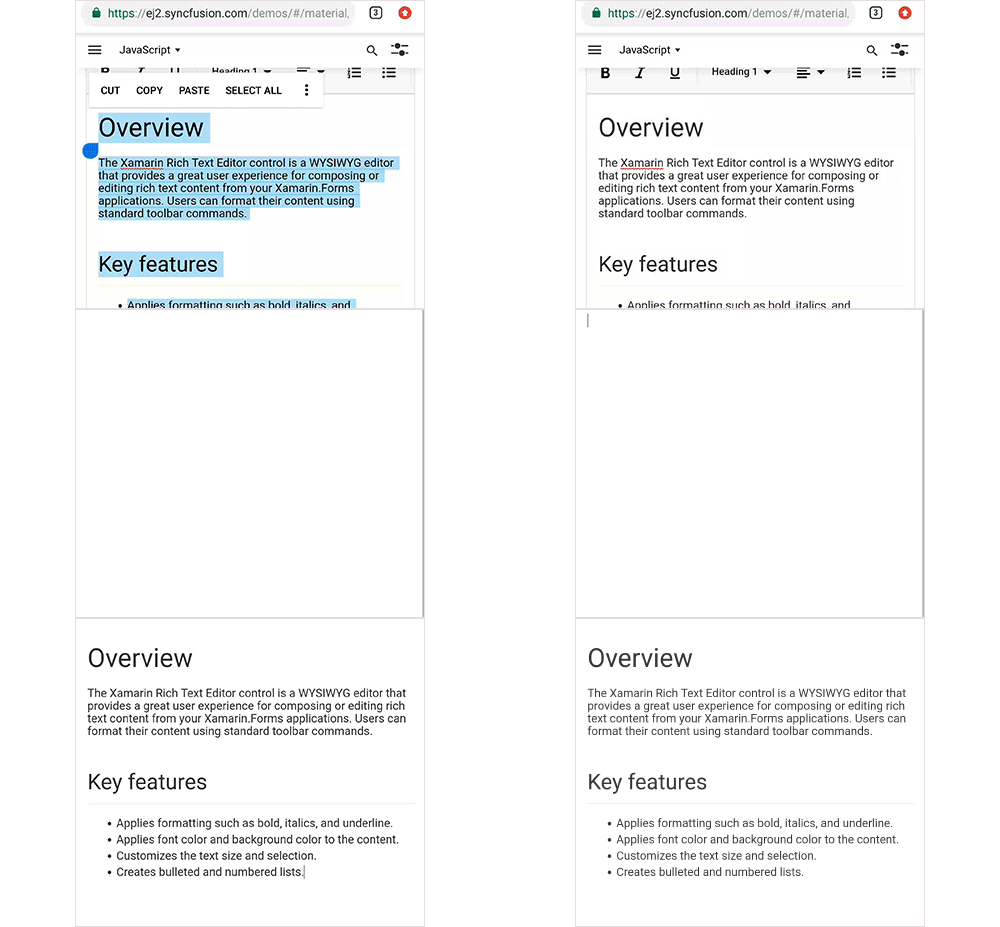
Cut, copy, and paste formatted content within an application or to an external application.
Toolbar customization
- Customize the toolbar appearance by changing the toolbar’s background color, plus the text color and background color of toolbar items.
- Show or hide the entire built-in toolbar or a specific toolbar item.
- Design your own toolbar and achieve the functionalities you require using our comprehensive APIs.

Customizing font
Add fonts from a stream or embedded resource to use in the Rich Text Editor. The default font can also be customized.

AutoSize
RTE accommodates a user’s input by changing the control height automatically to fit the content inside the editable area. The height of the control in AutoSize mode can be controlled using MaximumHeightRequest and MinimumHeightRequest properties.

Xamarin.Forms Rich Text Editor Code Example
Easily get started with the Xamarin.Forms Rich Text Editor using a few simple lines of C# code example as demonstrated below. Also explore our Xamarin.Forms Rich Text Editor Example that shows you how to render and configure the Rich Text Editor for Xamarin.Forms.
<StackLayout>
   <richtexteditor:SfRichTextEditor VerticalOptions="FillAndExpand" Text= "The rich text editor component is WYSIWYG editor that provides the best user experience to create and update the content" />
</StackLayout>
public MainPage()
{
InitializeComponent();
StackLayout stack = new StackLayout();
SfRichTextEditor editor = new SfRichTextEditor
{
VerticalOptions = LayoutOptions.FillAndExpand,Text = "The rich text editor component is WYSIWYG editor that provides the best user experience to create and update the content"
};
stack.Children.Add(editor);this.Content = stack;
}Not sure how to create your first Xamarin Rich Text Editor? Our documentation can help.
I’d love to read it now150+ XAMARIN UI CONTROLS
ALL CONTROLS
-
Xamarin.Forms
-
Xamarin.Android
-
Xamarin.iOS
-
GRIDSDATA VISUALIZATIONNAVIGATIONEDITORSLAYOUTPROJECT MANAGEMENTNOTIFICATIONVIEWER/EDITORMISCELLANEOUSCHAT
-
GRIDSDATA VISUALIZATIONNAVIGATIONEDITORSLAYOUTPROJECT MANAGEMENTNOTIFICATIONVIEWER/EDITORMISCELLANEOUS
-
GRIDSDATA VISUALIZATIONNAVIGATIONEDITORSLAYOUTPROJECT MANAGEMENTNOTIFICATIONVIEWER/EDITORMISCELLANEOUS
The most downloaded control (based on the nuget.org download count).
Frequently Asked Questions
Why should you choose Syncfusion Xamarin Rich Text Editor?
The Syncfusion Xamarin Rich Text Editor provides the following:
A simple yet powerful editor interface to compose richly formatted text with all the common formatting options like bold and italics.
- The ability to create messaging applications, email composers, blog editors, forum post text boxes, feedback and review sections, notes sections, and more.
- A variety of tools to edit and format rich content and return valid HTML markup content.
- Simple configuration and API.
- A touch-friendly and responsive UI.
Extensive demos and documentation to learn quickly and get started with Xamarin Rich Text Editor.
Where can I find the Syncfusion Xamarin Rich Text Editor demo?
You can find our Xamarin Rich Text Editor demo here.
Can I download and utilize the Syncfusion Xamarin Rich Text Editor for free?
No, this is a commercial product and requires a paid license. However, a free community license is also available for companies and individuals whose organizations have less than $1 million USD in annual gross revenue, 5 or fewer developers, and 10 or fewer total employees.
How do I get started with Syncfusion Xamarin Rich Text Editor?
A good place to start would be our comprehensive getting started documentation.
Our Customers Love Us
Having an excellent set of tools and a great support team, Syncfusion® reduces customers’ development time.Here are some of their experiences.

Nice suite of components
A very complete set of components, that has an edge on other major vendors which offer components. A lot less code required to use and code samples for more complete components. Integrates well with other 3rd party components.

John A.

C# Developer (Contract)
Perfect for any developer
The Syncfusion Essential Studio has excellent features that are updated or added constantly on a regular basis. The support is exceptional—fast and professional responses. The support team provides you with code samples. As for the bugs, they always try to include the fix in the next release.

Dejan D.
Chief Executive Officer
Rated by users across the globe
Syncfusion Xamarin.Forms Resources
Learning
 Documentation
 Documentation


Awards
Greatness—it’s one thing to say you have it, but it means more when others recognize it. Syncfusion® is proud to hold the following industry awards.









