

Overview
The Xamarin.Forms DataGrid provides a seamless editing experience to edit cell values in-place using intuitive editors such as date-picker, combobox, picker, numeric text box, and entry. It supports non-editable columns such as images and unbound. Users can embed any control in a cell with template columns. It is possible to commit, or rollback changes based on validation.
Widely used column types
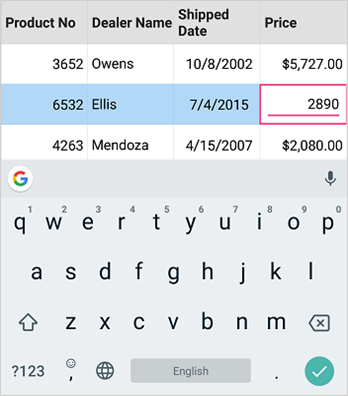
The Xamarin.Forms DataGrid control provides support for widely used column types. Users can easily edit cell values using built-in intuitive editors. The following are supported:
- Entry
- Numeric TextBox
- Picker
- ComboBox
- DatePicker
- Switch
Popup column type
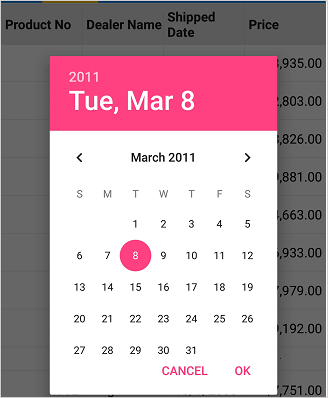
Look up data using the popup column type. The following editors are supported to select an item from a popup: * Picker * DatePicker

Template column
Load any control to represent data using a template. You can perform mouse and keyboard interactions for the template column easily, like for built-in column types for desktop platforms.

Individual column editing
Provide or restrict editing for individual columns in a Xamarin.Forms DataGrid just by setting an API. The editing API setting in the columns takes higher priority than the editing setting in the DataGrid with a flexible editing experience.
Edit mode
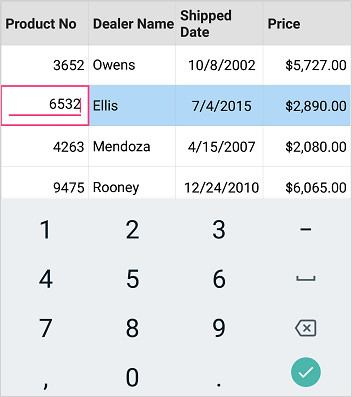
Enter edit mode by either tapping or double-tapping in a Xamarin.Forms DataGrid, which is customizable by setting an API.
Cursor behavior
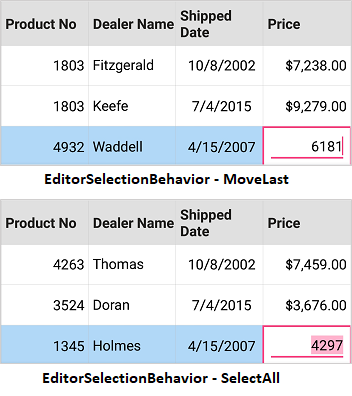
Customize the cursor behavior when a cell enters edit mode to either select the entire text in the edit element or move the cursor to the last. This behavior can be customized through a property in Xamarin.Forms DataGrid.
Programmatic editing
The Xamarin.Forms DataGrid control allows editing a cell programmatically by calling certain methods. It provides separate methods for editing the cell values programmatically. * Enter edit mode for a cell. * Commit the edited value in a cell when completing editing. * Rollback the edited value in a cell when completing editing.
Data validation
The control provides extensive support for validation when the given value in a cell does not meet the validation rule.
Our Customers Love Us




150+ XAMARIN UI CONTROLS
-
Xamarin.Forms
-
Xamarin.Android
-
Xamarin.iOS
-
GRIDSDATA VISUALIZATIONNAVIGATIONEDITORSLAYOUTPROJECT MANAGEMENTNOTIFICATIONVIEWER/EDITORMISCELLANEOUSCHAT
-
GRIDSDATA VISUALIZATIONNAVIGATIONEDITORSLAYOUTPROJECT MANAGEMENTNOTIFICATIONVIEWER/EDITORMISCELLANEOUS
-
GRIDSDATA VISUALIZATIONNAVIGATIONEDITORSLAYOUTPROJECT MANAGEMENTNOTIFICATIONVIEWER/EDITORMISCELLANEOUS







