Overview
The Xamarin.Forms stacked line chart visualizes the data with y-values stacked over one another in the series order. It shows the relationship between individual values to the total sum of the points.

Key features

UI Customization
Customizes the color and line of a stacked line chart using built-in APIs to make it visually unique.
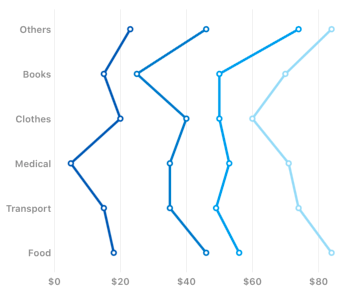
Vertical rendering
Rotate the stacked line chart to plot data in a vertical direction and view data from a different perspective.
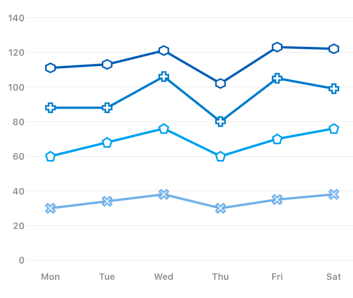
Marker
Marks data points with built in shapes such as circles, rectangles, ellipses, vertical lines, horizontal lines, diamonds, triangles, and pentagons. In addition to these shapes, use images to make the point more attractive.
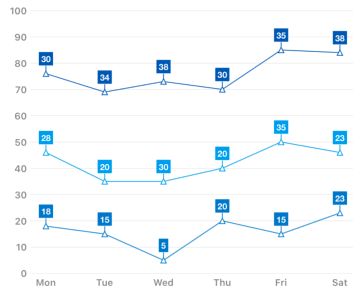
Data labels
Show the detail about the data points with the help of the data label support. Can place the label inside and outside of the chart. Use the connector line to connect the outside label with chart.
Code example
<?xml version="1.0" encoding="utf-8" ?>
<ContentPage xmlns="http://xamarin.com/schemas/2014/forms"
             xmlns:x="http://schemas.microsoft.com/winfx/2009/xaml"
             xmlns:local="clr-namespace:ChartExample"
             xmlns:chart="clr-namespace:Syncfusion.SfChart.XForms;assembly=Syncfusion.SfChart.XForms"
             x:Class="ChartExample.MainPage">

    <ContentPage.BindingContext>
        <local:ViewModel/>
    </ContentPage.BindingContext>

	<chart:SfChart>

		<chart:SfChart.PrimaryAxis>

			<chart:CategoryAxis />

		</chart:SfChart.PrimaryAxis>

		<chart:SfChart.SecondaryAxis>

			<chart:NumericalAxis />

		</chart:SfChart.SecondaryAxis>

		<chart:StackingLineSeries ItemsSource="{Binding Data}" XBindingPath="Category" YBindingPath="Expense"/>

	</chart:SfChart>

</ContentPage>
public class Model
{
public string Category { get; set; }
public double Expense { get; set; }
public Model(string xValue, double yValue)
{
Category = xValue;
Expense = yValue;
}
}
public class ViewModel
{
public ObservableCollection<Model> Data { get; set; }
public ViewModel()
{
Data = new ObservableCollection<Model>()
{
new Model("Food", 88),
new Model("Transport", 75),
new Model("Medical", 68),
new Model("Clothes", 70),
new Model("Books", 65),
new Model("Others", 73),
};
}
}Learning resources


Learn available options to customize the Xamarin.Forms stacked line chart.

150+ XAMARIN UI CONTROLS
-
Xamarin.Forms
-
Xamarin.Android
-
Xamarin.iOS
-
GRIDSDATA VISUALIZATIONNAVIGATIONEDITORSLAYOUTPROJECT MANAGEMENTNOTIFICATIONVIEWER/EDITORMISCELLANEOUSCHAT
-
GRIDSDATA VISUALIZATIONNAVIGATIONEDITORSLAYOUTPROJECT MANAGEMENTNOTIFICATIONVIEWER/EDITORMISCELLANEOUS
-
GRIDSDATA VISUALIZATIONNAVIGATIONEDITORSLAYOUTPROJECT MANAGEMENTNOTIFICATIONVIEWER/EDITORMISCELLANEOUS







