





Transform your applications today by downloading our free evaluation version
Overview
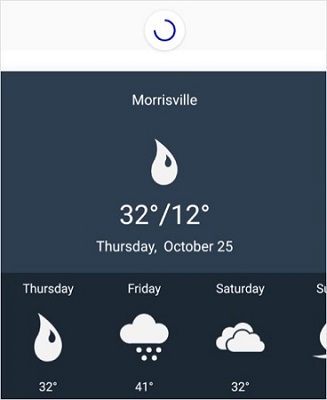
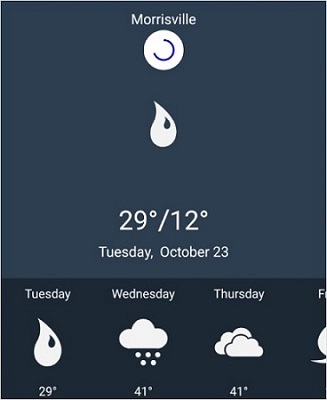
The Xamarin Pull-to-Refresh control is a panel that can be pulled to refresh data in an application. It can be done either through user interaction or programmatically. It has the ability to load any complex views or layouts in its pulling pane and allows users to pull down from the top of the view. Furthermore, the appearance and transition of the progress indicator can be customized.
Transition Types
Animate transitions between the pulling pane and the refresh indicator when performing a pull operation. The two types of built-in transitions are:
- Slide-on-Top — Slides the progress animation over the pulling pane.
- Push — Pushes the pulling pane to display the progress animation.
ListView pull to refresh
Load a ListView control, even one with a complex template, in the pulling pane and refresh the data by pulling down from the top of the ListView.

DataGrid pull to refresh
Load complex views such as the DataGrid or any other custom layouts in the pulling pane and refresh the data through a pulling action. You can also customize the built-in pulling transition animation.

Customizations
Customize the appearance of the progress indicator for a better user experience. Choose from built-in transition modes to achieve a platform-specific native look and feel.
Customize the following aspects:
- Background color, stroke color, and stroke width of the progress indicator.
- Height and width of the progress view.
- Pulling threshold (distance of the pulling transition).
- Refresh content threshold (starting position of the progress view).

Xamarin.Forms Pull To Refresh Code Example
Easily get started with the Xamarin.Forms Pull To Refresh using a few simple lines of XAML and C# code example as demonstrated below. Also explore our Xamarin.Forms Pull To Refresh Example that shows you how to render and configure the Pull To Refresh for Xamarin.Forms.
<?xml version="1.0" encoding="utf-8" ?>
<ContentPage xmlns="http://xamarin.com/schemas/2014/forms"
    xmlns:x="http://schemas.microsoft.com/winfx/2009/xaml"
    xmlns:local="clr-namespace:GettingStarted"
    x:Class="GettingStarted.MainPage"
    xmlns:syncfusion="clr-namespace:Syncfusion.SfPullToRefresh.XForms;assembly=Syncfusion.SfPullToRefresh.XForms">
    <syncfusion:SfPullToRefresh x:Name="pullToRefresh"/>
</ContentPage>
using Syncfusion.SfPullToRefresh.XForms;
using Xamarin.Forms;
namespace GettingStarted
{
public class App : Application
{
SfPullToRefresh PullToRefresh;
public App()
{
PullToRefresh = new SfPullToRefresh();
MainPage = new ContentPage { Content = PullToRefresh };
}
}
}Not sure how to create your first Xamarin Pull To Refresh? Our documentation can help.
I’d love to read it now150+ XAMARIN UI CONTROLS
ALL CONTROLS
-
Xamarin.Forms
-
Xamarin.Android
-
Xamarin.iOS
-
GRIDSDATA VISUALIZATIONNAVIGATIONEDITORSLAYOUTPROJECT MANAGEMENTNOTIFICATIONVIEWER/EDITORMISCELLANEOUSCHAT
-
GRIDSDATA VISUALIZATIONNAVIGATIONEDITORSLAYOUTPROJECT MANAGEMENTNOTIFICATIONVIEWER/EDITORMISCELLANEOUS
-
GRIDSDATA VISUALIZATIONNAVIGATIONEDITORSLAYOUTPROJECT MANAGEMENTNOTIFICATIONVIEWER/EDITORMISCELLANEOUS
The most downloaded control (based on the nuget.org download count).
Frequently Asked Questions
Why should you choose Syncfusion Xamarin Pull To Refresh?
This control allows you to request a refresh action on pull gesture.
- Customize width, height, and progress stroke width.
- Specify the transition mode of the animation.
Background and progress stroke color customization.
- Customize the indicator threshold.
- Refresh data programmatically.
MVVM support for refreshing events.
- One of the best Xamarin Pull to Refresh controls in the market that offers a feature rich UI.
Expansive learning resources such as demos, documentation to learn quickly and get started with Xamarin Pull to Refresh.
Where can I find the Syncfusion Xamarin Pull To Refresh demo?
You can find our Xamarin Pull To Refresh demo here.
Can I download and utilize the Syncfusion Xamarin Pull To Refresh for free?
No, this is a commercial product and requires a paid license. However, a free community license is also available for companies and individuals whose organizations have less than $1 million USD in annual gross revenue, 5 or fewer developers, and 10 or fewer total employees.
How do I get started with Syncfusion Xamarin Pull To Refresh?
A good place to start would be our comprehensive getting started documentation.
Our Customers Love Us
Having an excellent set of tools and a great support team, Syncfusion® reduces customers’ development time.Here are some of their experiences.

Amazing tool, great designs
Using Xamarin templates from Syncfusion I can focus on the code and do not have to worry about design. Very easy to implement.

Dirk F,

Software Development Engineer, Small-Business
Essential for any Xamarin developer!
A large number of components that complement or improve almost everything that does not yet exist in Xamarin. The support is the best I've ever seen! They fix bugs quickly and are always willing to listen to suggestions.

Cezar W,
Co-Founder, Small-Business
Rated by users across the globe
Syncfusion Xamarin.Forms Resources
Learning
 Documentation
 Documentation


Awards
Greatness—it’s one thing to say you have it, but it means more when others recognize it. Syncfusion® is proud to hold the following industry awards.









