
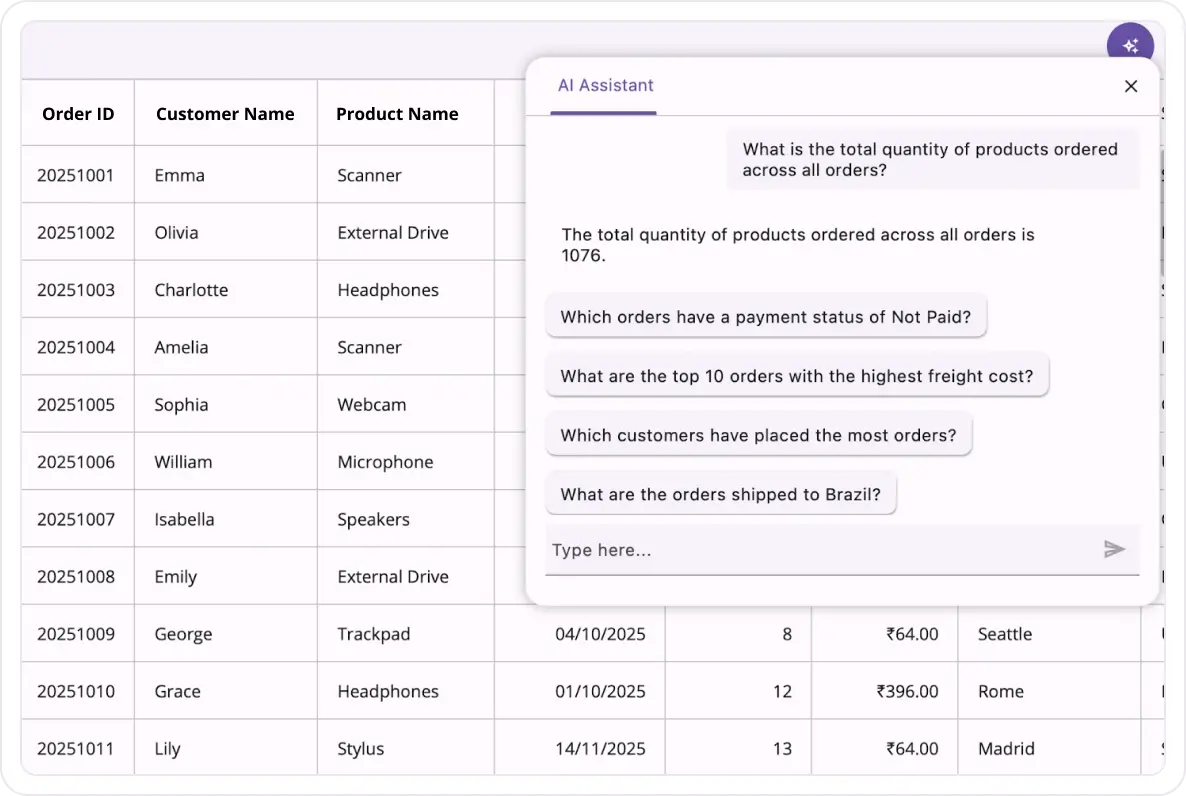

Overview
The AI-powered .NET MAUI Smart DataGrid (.NET MAUI Smart Grid) combines all the essentials-sorting, grouping, filtering, and styling-with intelligent AI features that save time and boost productivity. Users can leverage AI to automatically organize records, apply smart filters, and highlight specific cells or rows for quick insights. Powered by advanced AI services like OpenAI, Google Gemini, Groq, and DeepSeek, it delivers a secure and smarter way to interact with data across your .NET MAUI apps.
Why choose Syncfusion’s .NET MAUI Smart DataGrid?
AI-powered efficiency
Users can automatically sort, group, filter, and highlight data with AI-driven suggestions, enabling them to organize complex datasets effortlessly.
Natural language interaction
Perform sorting, filtering, and grouping using plain English commands. This simplifies complex operations for non-technical users.
Adapts to any resolution
The Smart DataGrid has a highly responsive layout and an optimized design for desktops, tablets, and smartphones. It works well on all mobile phones that use iOS, Android, or Windows OS.
Attractive, customizable themes
Material light and dark themes are built in, with full support for light and dark modes. Easily customize the grid’s appearance by using resource dictionaries to match the application’s branding.
.NET MAUI Smart DataGrid code example
Easily get started with the .NET MAUI Smart DataGrid control using a few simple lines of XAML code example as demonstrated below. Also, explore our .NET MAUI Smart DataGrid Example that shows you how to render and configure the Smart DataGrid.
<?xml version="1.0" encoding="utf-8" ?>
<ContentPage xmlns="http://schemas.microsoft.com/dotnet/2021/maui"
             xmlns:x="http://schemas.microsoft.com/winfx/2009/xaml"
             xmlns:syncfusion="clr-namespace:Syncfusion.Maui.SmartComponents;assembly=Syncfusion.Maui.SmartComponents"
             xmlns:local="clr-namespace:GettingStarted"
             x:Class="GettingStarted.MainPage">
    <ContentPage.BindingContext>
        <local:OrderInfoRepository x:Name="viewModel" />
    </ContentPage.BindingContext>
    <ContentPage.Content>
        <syncfusion:SfSmartDataGrid  x:Name="dataGrid"
             ItemsSource="{Binding OrderInfoCollection}">
              <syncfusion:SfSmartDataGrid.AssistViewSettings>
                <syncfusion:DataGridAssistViewSettings SuggestedPrompts="{Binding Suggestions}"/>
            </syncfusion:SfSmartDataGrid.AssistViewSettings>
        </syncfusion:SfSmartDataGrid>
    </ContentPage.Content>
</ContentPage>
AI sorting
Sort your data intelligently by simply providing an AI prompt. The Smart DataGrid interprets your instructions and applies optimal sorting based on user-defined context and intent. Instead of manually configuring multiple sort conditions, you can describe what you need in natural language and the AI organizes your data accordingly. This feature saves time, reduces complexity, and ensures your data is always presented in the most meaningful way for analysis and decision-making.
Intelligent filtering
Enable advanced filtering with the power of AI and natural language input. Instead of manually setting multiple filter conditions, simply describe what you need, and this AI-powered data grid instantly interprets your instructions. It applies predictive filters dynamically, surfacing the most relevant data without complex configurations.
AI grouping
Group records effortlessly by describing your requirement in plain language. Instead of manually configuring multiple grouping rules, simply provide an instruction. The Smart DataGrid uses AI to interpret your intent and automatically organizes data into meaningful categories. This eliminates tedious setup, reduces complexity, and ensures your data is structured for better analysis and visualization.
AI highlighting
Instantly emphasize important data by using natural language prompts. Just tell this AI-powered data grid what matters and it automatically applies dynamic highlighting to specific cells or rows, making critical information stand out for quick analysis.
 95+ UI controls
200+ interactive .NET MAUI demos
3.5M+ downloads
95+ UI controls
200+ interactive .NET MAUI demos
3.5M+ downloads
Not sure how to create your first .NET MAUI Smart DataGrid? Our documentation can help.
I’d love to read it now.NET MAUI DataViz & UI Controls
Standalone UI SDKs
Integrate the DataGrid, Chart, Scheduler, and Rich Text Editor UI components into applications to enable rich interaction and visualization, delivering a seamless user experience.
Document Solutions
Integrate the PDF Viewer, DOCX Editor, Spreadsheet Editor, and document-processing libraries into the .NET MAUI applications to enable a smooth user experience.
Frequently Asked Questions
Why should you choose the Syncfusion .NET MAUI Smart DataGrid?
The Syncfusion .NET MAUI Smart DataGrid control supports the following features:
- Instantly load large amounts of data.
Easily apply styles to every element in a grid.
Select one or more rows with built-in selection modes.
Sort one or more columns in ascending or descending order.
- Update cells in real time, enhancing efficiency and responsiveness.
- Load and display custom or multiple views in cells using column templates.
Group data by one or more columns using flexible templates.
Leverage high performance and handle large data sets efficiently.
Display a row containing summary data for columns with aggregate types such as sum, minimum, maximum, average, and count.
- One of the best .NET MAUI Smart DataGrid in the market, offering feature-rich UI to interact with the software.
Enjoy simple configuration and APIs.
- Utilize a touch-friendly UI.
Take advantage of extensive demos and documentation to help you get started quickly with the control.
Where can I find the Syncfusion .NET MAUI DataGrid demo?
You can find our .NET MAUI Smart DataGrid demo here. It demonstrates how to render and configure the Smart DataGrid.
What is the .NET MAUI Smart DataGrid?
Can I try the Syncfusion .NET MAUI Smart DataGrid for free?
Yes, Syncfusion offers a 30-day free trial. After the trial, licensing is required for continued use.
How do I implement paging in the .NET MAUI Smart DataGrid?
Use the Syncfusion data pager control and bind it to the Smart DataGrid’s ItemsSource. Customize the page size using the PageSize property.
Can I download and utilize the Syncfusion .NET MAUI Smart DataGrid for free?
No, this is a commercial product and requires a paid license. However, a free community license is also available for companies and individuals whose organizations have less than $1 million USD in annual gross revenue, 5 or fewer developers, and 10 or fewer total employees.
How do I get started with the Syncfusion .NET MAUI Smart DataGrid?
A good place to start would be our comprehensive getting started documentation.
How can I bind data to the .NET MAUI Smart DataGrid?
The .NET MAUI Smart DataGrid control can be bound to an external data source to display data in a tabular format. It supports data sources such as lists, IEnumerable, and more. The SfDataGrid. ItemsSource property helps bind this control with a collection of objects.
<?xml version="1.0" encoding="utf-8" ?><ContentPage xmlns="http://schemas.microsoft.com/dotnet/2021/maui" xmlns:x="http://schemas.microsoft.com/winfx/2009/xaml" xmlns:syncfusion="clr-namespace:Syncfusion.Maui.SmartComponents;assembly=Syncfusion.Maui.SmartComponents" xmlns:local="clr-namespace:GettingStarted" x:Class="GettingStarted.MainPage"> <ContentPage.BindingContext> <local:OrderInfoRepository x:Name="viewModel" /> </ContentPage.BindingContext> <ContentPage.Content> <syncfusion:SfSmartDataGrid x:Name="dataGrid" ItemsSource="{Binding OrderInfoCollection}"> <syncfusion:SfSmartDataGrid.AssistViewSettings> <syncfusion:DataGridAssistViewSettings SuggestedPrompts="{Binding Suggestions}"/> </syncfusion:SfSmartDataGrid.AssistViewSettings> </syncfusion:SfSmartDataGrid> </ContentPage.Content></ContentPage>How do you handle sorting in the .NET MAUI Smart DataGrid?
The Smart DataGrid has built-in functionality to sort one or more columns using the SortingMode property. When sorting is enabled, the data grid automatically reorders the data based on the chosen sort criteria. You can sort data by tapping on the column header. After sorting, a sort icon appears in the respective column header to indicate the direction of the sort.
Is the .NET MAUI Smart DataGrid responsive?
Yes, the grid adjusts dynamically to different screen sizes and orientations for a seamless experience.
Our Customers Love Us




See Real Success Stories
Developers around the world trust Syncfusion’s Essential Studio to simplify complex projects and speed up delivery. With a vast library of UI controls, powerful SDKs, and reliable support, Essential Studio helps teams build enterprise-ready applications with confidence.
Read Our Customer StoriesIndustry
Software development
75% Cost reduction
50% Faster development

Industry
Utilities (oil and gas)

450+ hours saved
Streamlined processes and hours of development effort saved.

Advanced, flexible features
Empowered users through robust and versatile functionality.
Industry
Software and technology
1000+ of hours saved
Accelerated development with enterprise-ready UI components.

Efficient file management
Streamlined workflows with document libraries without building them from scratch.
Industry
Software and technology

2 Years of delay avoided
Two years of delays prevented with proactive planning.

On-time delivery
Projects delivered on schedule using trusted controls.
Industry
IT services and IT consulting

Improved performance
Large datasets handled with easy customization and quick debugging.

Highly customizable
Plug-and-play controls with quick template integration.
Industry
Professional services
Instant access
Quick availability of features and resources.
Reduced dependencies
Fewer dependencies for faster development.
Rated by users across the globe



Syncfusion .NET MAUI Smart DataGrid resources


Awards
Greatness—it’s one thing to say you have it, but it means more when others recognize it. Syncfusion® is proud to hold the following industry awards.









