




Transform your applications today by downloading our free evaluation version
Overview
The image editor component lets you easily modify images by performing actions like cropping, rotating, inserting text, drawing free-hand, and much more.
Freehand drawing
A pen tool allows freehand drawing over an image. It also supports customizing stroke thickness, opacity, and the color of the pen.

Stroke thickness
The default stroke thickness of the pen can be customized.

Color palette
The pen stroke color can be customized using the available color palette.
Drawing shapes
Annotate shapes like rectangles, circles, and arrows over an image. This feature also supports z-ordering the shapes. Adding shapes to edit an image is widely used to mask an unwanted area or to point out a specific region in the image. Rectangles and circles can be customized by either filling the shape or drawing it as an outline. Shapes can also be resized.

Image transformation
Rotate and flip images with all edits.

Rotation
Image rotations are used to rotate any upside-down images taken with a camera. The orientation of an image can also be changed.

Flip
Flip an image to create a mirror image of the original.
Cropping
Crop a particular region of an image to a desired size. There are many useful predefined aspect ratios available. The cropping rectangle can be resized according to the aspect ratio.

Text annotation
Edit an image by adding a text annotation to show useful information over an image. Also, you can make the text bold, change the font family, and align, italicize, or underline your text.

Custom view annotation
Any image can be added over another image as an annotation to add more information. The annotated image can be resized and positioned to any desired size and location.

Editing utilities
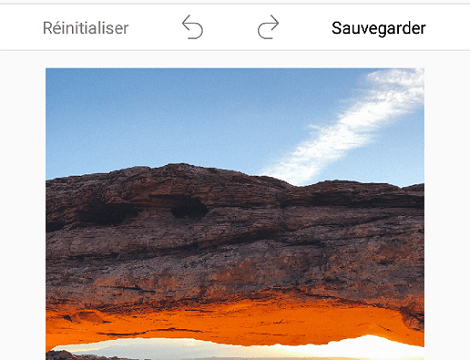
The image editor control supports save, reset, undo, and redo operations to enhance the editing experience.
Save
Edited images can be saved in a desired format, such as .png, .jpg, and .bmp, to a desired location on a device. Also, the size of the images can customized.
Undo and redo
The image editor control supports n number of undo and redo operations for all editing actions performed over an image. Use this to undo any unwanted editing action or redo previously undone actions.
Reset
Reset the image to the original form by discarding any editing changes done to an image.
Serialization
Edits over an image can be saved using serialization, and can be loaded any time to edit an image later.
Zooming and panning
Zoom an image. The zoomed image can be panned smoothly to view the desired region. All features like text, shapes, freehand drawing, etc., are compatible with zooming and panning.

Toolbar customization
Customize the built-in toolbar by allowing the addition of any number of new toolbar items and removal of existing items. This helps in performing any custom action.

Localization
The image editor has localization support that makes it easy to localize applications to any language.
110+ UWP CONTROLS
ALL CONTROLS
GRIDS
DATA VISUALIZATION
INPUT CONTROLS
CALENDAR
NAVIGATION
BUSINESS INTELLIGENCE
LISTS & DROPDOWN
NOTIFICATION
MISCELLANEOUS
FILE VIEWERS & EDITORS
Standalone UI SDKs
Integrate the DataGrid, Chart, Scheduler, Gantt, and Diagram UI components into applications to enable rich interaction and visualization, delivering a seamless user experience.
Document Solutions
Integrate the PDF Viewer, DOCX Editor, Spreadsheet Editor, and document-processing libraries into the UWP applications to enable a smooth user experience.
Our Customers Love Us
Having an excellent set of tools and a great support team, Syncfusion® reduces customers’ development time.Here are some of their experiences.

Excellent experience with Syncfusion!
Syncfusion is a product that makes life easier! I use it to create Blazor applications (server side and webassembly) and the controls speed up development a lot. Furthermore, if needed, it is possible to ask for direct support that is never long in coming!

Andrea Scarpante,

Sydea srl
The complete component set
It is the most complete component set available. Also very handy is the fact that there is a community edition, this gives me the opportunity to test thing at home without buying a separate license.

Johan Visser,

H and T Pawnbrokers
See Real Success Stories
Developers around the world trust Syncfusion’s Essential Studio to simplify complex projects and speed up delivery. With a vast library of UI controls, powerful SDKs, and reliable support, Essential Studio helps teams build enterprise-ready applications with confidence.
Read Our Customer StoriesIndustry
Software development
75% Cost reduction
50% Faster development
Industry
Utilities (oil and gas)

450+ hours saved
Streamlined processes and hours of development effort saved.

Advanced, flexible features
Empowered users through robust and versatile functionality.
Industry
Software and technology
1000+ of hours saved
Accelerated development with enterprise-ready UI components.

Efficient file management
Streamlined workflows with document libraries without building them from scratch.
Industry
Software and technology

2 Years of delay avoided
Two years of delays prevented with proactive planning.

On-time delivery
Projects delivered on schedule using trusted controls.
Industry
IT services and IT consulting

Improved performance
Large datasets handled with easy customization and quick debugging.

Highly customizable
Plug-and-play controls with quick template integration.
Industry
Professional services
Instant access
Quick availability of features and resources.
Reduced dependencies
Fewer dependencies for faster development.
Rated by users across the globe
Syncfusion UWP Resources
Learning
 Documentation
 Documentation


Awards
Greatness—it’s one thing to say you have it, but it means more when others recognize it. Syncfusion® is proud to hold the following industry awards.









