
---
title: React Kanban Board | Fast, Flexible React Task Board | Syncfusion®
description: Build efficient workflows with the React Kanban Board. Drag drop tasks, customize cards, and create a powerful React task board for real projects.
platform: react
control: Kanban
---

# React Kanban Board for Smarter Task and Workflow Management

* Visually organize and prioritize your tasks with a transparent workflow.
* Manage software and product development, projects, and task planning.
* Includes functionalities like data binding, swimlanes, card templates, scrolling, drag-and-drop, and themes.

![React Kanban banner.](https://ft.syncfusion.com/featuretour/react-js2/images/kanban/react-kanban-banner-preview.webp)

48k+

## Overview

The React Kanban Board is a task-scheduling control that provides an intuitive interface for managing multiple stages of work. It is widely used in various real-time scenarios, such as task scheduling, project management, software and product development, manufacturing processes, and personal task management.

**Interactive demo:** [Live demo](https://ej2.syncfusion.com/products/typescript/kanban/overview/?stackblitz=false)

## Why choose Syncfusion React Kanban Board?

![A high performance React Kanban Board.](https://ft.syncfusion.com/featuretour/react-js2/images/kanban/react-kanban-high-performance.svg)
### High-Performance Virtualization

Render thousands of cards effortlessly with [smooth scrolling](https://ej2.syncfusion.com/react/documentation/kanban/virtual-scrolling) and minimal DOM load for optimal performance.

![Seamless Drag-Drop in React Kanban Board.](https://ft.syncfusion.com/featuretour/react-js2/images/kanban/react-kanban-smooth-drag-drop.svg)
### Seamless Drag & Drop

Reorder cards and columns intuitively with visual skeletons and clear [drop](https://ej2.syncfusion.com/react/documentation/kanban/drag-and-drop) indicators for precise placement.

![React Kanban Board adaptive UI.](https://ft.syncfusion.com/featuretour/react-js2/images/kanban/react-kanban-responsive-design.svg)
### Responsive Design

Enjoy a fully [adaptive layout](https://ej2.syncfusion.com/react/documentation/kanban/responsive-mode) with mobile-optimized interactions and touch-friendly navigation.

![AI-Assisted development process.](https://ft.syncfusion.com/featuretour/react-js2/images/kanban/syncfusion-agentic-ui-builder.svg)

### AI-Assisted Development

Build agile workflow management experiences faster with the [Agentic UI Builder](https://ej2.syncfusion.com/react/documentation/mcp-server/agentic-ui-builder/getting-started) and [Syncfusion Agent Skills](https://ej2.syncfusion.com/react/documentation/skills). Generate Kanban boards, swimlanes, task flows, and drag-and-drop interactions with minimal manual effort.

![Seamless data binding in React Kanban Board.](https://ft.syncfusion.com/featuretour/react-js2/images/kanban/react-kanban-seamless-data-binding.svg)
### Data Integration & Binding

Connect easily to [local or remote data](https://ej2.syncfusion.com/react/documentation/kanban/data-binding) sources with built-in support for seamless CRUD operations.

![Built-In Dialogs in React Kanban Board.](https://ft.syncfusion.com/featuretour/react-js2/images/kanban/react-kanban-dialogs.svg)
### Built-In Dialogs & CRUD

Leverage ready-to-use dialogs for [adding, editing, and deleting cards](https://ej2.syncfusion.com/react/documentation/kanban/dialog#crud-url) with validation included.

## Installation & Quick Start
Follow these three steps to integrate the Kanban Board into your React application.

1

### Install the Kanban Board Package
Install the [Syncfusion React Kanban package by using npm](https://www.npmjs.com/package/@syncfusion/ej2-react-kanban).

```bash
npm install @syncfusion/ej2-react-kanban --save
```

2

### Import the required CSS styles
Import the required Syncfusion CSS files to apply proper layout and theme styling.

```css
@import '../node_modules/@syncfusion/ej2-base/styles/tailwind3.css';
@import '../node_modules/@syncfusion/ej2-buttons/styles/tailwind3.css';
@import '../node_modules/@syncfusion/ej2-dropdowns/styles/tailwind3.css';
@import '../node_modules/@syncfusion/ej2-inputs/styles/tailwind3.css';
@import '../node_modules/@syncfusion/ej2-layouts/styles/tailwind3.css';
@import '../node_modules/@syncfusion/ej2-navigations/styles/tailwind3.css';
@import '../node_modules/@syncfusion/ej2-popups/styles/tailwind3.css';
@import '../node_modules/@syncfusion/ej2-notifications/styles/tailwind3.css';
@import '../node_modules/@syncfusion/ej2-kanban/styles/tailwind3.css';
```

3

### Initialize the Kanban Board component
Configure and render the React Kanban using the sample shown. Define the component in src/App.tsx and manage the data source in src/datasource.ts. Explore the [React Kanban example](https://ej2.syncfusion.com/react/demos/#/bootstrap5/kanban/overview) to learn more.

```tsx

import { KanbanComponent, ColumnsDirective, ColumnDirective } from "@syncfusion/ej2-react-kanban";
import './App.css';
import { kanbanData } from './datasource';

function App() {
  return (
    <KanbanComponent keyField="Status" dataSource={kanbanData} cardSettings={{ contentField: 'Summary', headerField: 'Id' }}>
      <ColumnsDirective>
        <ColumnDirective headerText="To Do" keyField="Open" />
        <ColumnDirective headerText="In Progress" keyField="InProgress" />
        <ColumnDirective headerText="Testing" keyField="Testing" />
        <ColumnDirective headerText="Done" keyField="Close" />
      </ColumnsDirective>
  </KanbanComponent>
  );
}
export default App;
```

```datasource
export let kanbanData: Record<string, any>[] = [
    {
        "Id": 1, "Status": "Open", "Summary": "Analyze the requirements."
    },
    {
        "Id": 2, "Status": "InProgress", "Summary": "Improve application performance."
    },
    {
        Id": 3, "Status": "Closed", "Summary": "Meeting arranged with the customer."
    }
];
```

[Get Started Now](https://www.syncfusion.com/downloads/react?tag=es-ft-react-kanban-board-static-menu)

No credit card required.

[React Kanban Guide](https://ej2.syncfusion.com/react/documentation/kanban/getting-started)

**Interactive demo:** [Live demo](https://ej2.syncfusion.com/products/typescript/kanban/workflow/?stackblitz=false)

AI-assisted development

## Build Feature-Rich React Kanban Experiences Faster

Accelerate workflow management application development with Syncfusion AI tools that turn requirements into fully configured kanban experiences with minimal manual setup.

![Agentic UI Builder icon](https://cdn.syncfusion.com/content/images/FT/common/sf-agentic-ui-builder.svg)

### Agentic UI Builder

Turn prompts into ready-to-use UI screens, layouts, and workflows with Syncfusion React components.

**Example Prompt**
Create an agile project board with swimlanes, task cards, and drag-and-drop workflows.

[Explore Agentic UI Builder](https://ej2.syncfusion.com/react/documentation/mcp-server/agentic-ui-builder/getting-started)

![Agent Skills icon](https://cdn.syncfusion.com/content/images/FT/common/sf-agent-skills.svg)

### Agent Skills

Accelerate development with Syncfusion AI Agent Skills for faster implementation and integration.

**Example Prompt**
Generate a React Kanban board with swimlanes, custom cards, and drag-and-drop support.

[Explore Agent Skills](https://ej2.syncfusion.com/react/documentation/skills)

![AI Coding Assistant icon](https://cdn.syncfusion.com/content/images/FT/common/sf-ai-coding-assistant.svg)

### AI Coding Assistant

Accelerate development with AI that generates, configures, and troubleshoots component code directly in your IDE.

**Example Prompt**
Show how to customize card templates in the Syncfusion React Kanban.

[Explore AI Coding Assistant](https://ej2.syncfusion.com/react/documentation/mcp-server/ai-coding-assistant/getting-started)

## Workflow

The Kanban restrict or allow card transitions from one column to another to maintain a controlled workflow process.

* [Kanban workflow example](https://ej2.syncfusion.com/react/demos/#/bootstrap5/kanban/workflow)

## Work in progress (WIP) limits

Users can set limits to the card count at each stage of Kanban workflow to avoid working on multiple tasks. Kanban columns visually change its appearance when validation fails.

* [WIP validation documentation](https://ej2.syncfusion.com/react/documentation/kanban/validation)
* [React Kanban WIP validation example](https://ej2.syncfusion.com/react/demos/#/bootstrap5/kanban/wip-validation)

**Interactive demo:** [Live demo](https://ej2.syncfusion.com/products/typescript/kanban/validation/?stackblitz=false)

## Flexible layout

By default, Kanban has a simple layout with cards and columns. But users can create complex Kanban boards based on their application needs and integrate with any team in an organization.

* [Flexible layout documentation](https://ej2.syncfusion.com/react/documentation/kanban/responsive-mode#layouts)

## Card options

A card is the main element of Kanban board that provides clear representation of tasks and flows across various stages.

* [Card options documentation](https://ej2.syncfusion.com/react/documentation/kanban/cards)
* [React Kanban Card example](https://ej2.syncfusion.com/react/demos/#/bootstrap5/kanban/card-template)

![Illustration of card customization with React Kanban.](https://ft.syncfusion.com/featuretour/react-js2/images/kanban/react-kanban-card-appearance.webp)

### Customizable cards

Change the look and feel of Kanban cards by customizing their default appearance and style using any HTML or CSS element.
![React Kanban drag and drop.](https://ft.syncfusion.com/featuretour/react-js2/images/kanban/react-kanban-drag.webp)

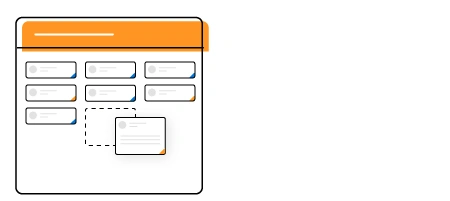
### Drag and drop cards

Provides smooth drag-and-drop support to modify the status of cards.

* [Drag and drop cards documentation](https://ej2.syncfusion.com/react/documentation/kanban/drag-and-drop)

![React Kanban multiple selection.](https://ft.syncfusion.com/featuretour/react-js2/images/kanban/react-kanban-selection.webp)

### Selection

Easily select multiple cards using mouse, keyboard, or touch interfaces. You can also make multiple selection of cards by pressing the Shift key.

* [Card selection documentation](https://ej2.syncfusion.com/react/documentation/kanban/cards#selection)

## Columns

The Kanban board divides its layout as columns to visualize the different stages of work, e. g. to-do, validate, in-progress, testing, and completed.

* [Columns documentation](https://ej2.syncfusion.com/react/documentation/kanban/columns)
* [Kanban Columns example](https://ej2.syncfusion.com/react/demos/#/bootstrap5/kanban/toggle-columns)

![React Kanban toggle column.](https://ft.syncfusion.com/featuretour/react-js2/images/kanban/react-kanban-toggle-column.webp)

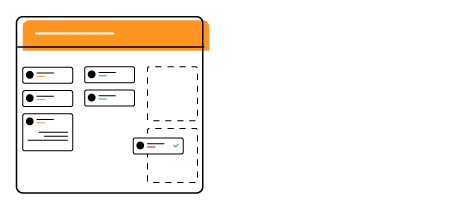
### Expand/Collapse column

Built-in support is available for expanding and collapsing the columns by interaction and programmatically. Users can also control the collapsible behavior on page load.
* [Expand/Collapse column documentation](https://ej2.syncfusion.com/react/documentation/kanban/columns#toggle-columns)

![React Kanban multiple key.](https://ft.syncfusion.com/featuretour/react-js2/images/kanban/react-kanban-multikey.webp)

### Multi-key

Users can map multiple keys to single columns to group similar columns. i.e., development column has implementation, review, and testing.

* [Multi-key documentation](https://ej2.syncfusion.com/react/documentation/kanban/columns#multi-key-mapping)

**Interactive demo:** [Live demo](https://ej2.syncfusion.com/products/typescript/kanban/swimlane/?stackblitz=false)

## Card editing

React Kanban provides full support to create, read, update, and delete operations (CRUD) on cards. In addition to built-in editing through dialog, users can create a template that suits their application needs. Editing operations are performed with the help of a data manager.

* [Card editing documentation](https://ej2.syncfusion.com/react/documentation/kanban/dialog)

## Stacked header

React Kanban allows you to add additional headers to group the logically related columns above the column header in a stacked manner.

* [Stacked header documentation](https://ej2.syncfusion.com/react/documentation/kanban/columns#stacked-headers)
* [Kanban Stacked header example](https://ej2.syncfusion.com/react/demos/#/bootstrap5/kanban/stacked-header)

**Interactive demo:** [Live demo](https://ej2.syncfusion.com/products/typescript/kanban/stacked-header/?stackblitz=false)

**Interactive demo:** [Live demo](https://ej2.syncfusion.com/products/typescript/kanban/swimlane/?stackblitz=false)

## Swimlane

Visually split the Kanban board horizontally to categorize the cards based on key i.e., assignee, project, or type. Users can customize the swimlane header with templates and control the visibility of empty rows and items count in a swimlane row.

* [Swimlane documentation](https://ej2.syncfusion.com/react/documentation/kanban/swimlane)
* [Kanban Swimlane header example](https://ej2.syncfusion.com/react/demos/#/bootstrap5/kanban/swimlane-template)

## Frozen rows

The Swimlane frozen rows option makes the rows always visible at the top when scrolling the content. It is mainly used to show corresponding swimlane rows.

* [Frozen rows documentation](https://ej2.syncfusion.com/react/documentation/kanban/swimlane#enable-frozen-rows)

**Interactive demo:** [Live demo](https://ej2.syncfusion.com/products/typescript/kanban/frozen-rows/?stackblitz=false)

**Interactive demo:** [Live demo](https://ej2.syncfusion.com/products/typescript/kanban/tooltip/?stackblitz=false)

## Tooltip

Display card information with a default tooltip or customized tooltip template.

* [Tooltip documentation](https://ej2.syncfusion.com/react/documentation/kanban/tooltip)
* [Kanban Tooltip header example](https://ej2.syncfusion.com/react/demos/#/bootstrap5/kanban/tooltip-template)

## Templating

Customize the UI elements of the Kanban component, such as its column headers, cards, swimlane headers, and tooltips, by using templates.

* [Custom card template documentation](https://ej2.syncfusion.com/react/documentation/kanban/cards#template)

**Interactive demo:** [Live demo](https://ej2.syncfusion.com/products/typescript/kanban/template/?stackblitz=false)

![React Kanban APIs.](https://ft.syncfusion.com/featuretour/react-js2/images/kanban/react-kanban-api.webp)
## Developer-friendly APIs

Developers can have full control over the UI and behavior of the Kanban board through its built-in, developer-friendly APIs. The simple and extensible APIs allow you to customize Kanban functionalities with ease.

* [APIs documentation](https://ej2.syncfusion.com/react/documentation/api/kanban/index-default)

![Theme illustration for React Kanban.](https://ft.syncfusion.com/featuretour/react-js2/images/kanban/react-kanban-themes.webp)
## Built-in themes

Five built-in SASS-based themes are available, such as Material, Bootstrap, Fabric (Office 365), Tailwind CSS, and High Contrast.

* [Themes documentation](https://ej2.syncfusion.com/react/documentation/appearance/theme)

![React Kanban displaying from right to left.](https://ft.syncfusion.com/featuretour/react-js2/images/kanban/react-kanban-rtl.webp)

## Right to left (RTL)

React Kanban allows you to render its layout, columns, and cards from right to left to improve the user experience and accessibility for RTL languages.

* [RTL documentation](https://ej2.syncfusion.com/react/documentation/kanban/localization#right-to-left-rtl)

## Responsive and touch-friendly

React Kanban has a highly responsive layout and a finely optimized design for desktops, touch screens, and smart phones.

![Illustration of touch support of React Kanban.](https://ft.syncfusion.com/featuretour/react-js2/images/kanban/react-kanban-touch-support.webp)

### Touch support

User-friendly touch gestures and an interactive UI design on Kanban help produce the best user experience.

![Illustration of adaptive UI of React Kanban.](https://ft.syncfusion.com/featuretour/react-js2/images/kanban/react-kanban-adaptive-ui.webp)

### Adaptive UI

The Kanban user interface adapts automatically to mobile and desktop devices. This helps the application to scale elegantly across all form factors without any additional effort.

## Localization

Localize all the static strings that are used in the user interface of the React Kanban control using the localization (l10n) library.

* [Localization documentation](https://ej2.syncfusion.com/react/documentation/kanban/localization)
![React kanban with localization support.](https://ft.syncfusion.com/featuretour/react-js2/images/kanban/react-kanban-localization.webp)

## Not sure how to create your first React Kanban Board? Our tutorial videos and documentation can help.

* [I'd love to watch it now](https://www.syncfusion.com/tutorial-videos/react/kanban-board)
* [I'd love to read it now](https://ej2.syncfusion.com/react/documentation/kanban/getting-started)

## Frequently Asked Questions

### Why should you choose Syncfusion React Kanban Board?

- Visual organization and prioritization of your tasks with a transparent workflow.
- Efficient control to manage software and product development, project management, and task planning using swimlanes, cards, WIP validations, and more.
- A rich set of built-in functionalities such as [data binding](https://ej2.syncfusion.com/react/documentation/kanban/data-binding), templating for card, scrolling, [drag-and-drop](https://ej2.syncfusion.com/react/documentation/kanban/drag-and-drop), stacked headers, responsiveness, various built-in themes, and much more.
- Simple configuration and [API](https://ej2.syncfusion.com/react/documentation/api/kanban/).
- Support for all modern browsers.
- Expansive learning resources such as [demos](https://ej2.syncfusion.com/react/demos/#/bootstrap5/kanban/overview) and [documentation](https://ej2.syncfusion.com/react/documentation/kanban/getting-started) to learn quickly and get started with React Kanban Board.

### What is the price for Syncfusion React Kanban Board?

We do not sell the React Kanban Board separately. It is only available for purchase as part of the [Syncfusion team license](https://www.syncfusion.com/sales/teamlicense). This contains over 1,600 components and frameworks, including the React Kanban Board. The price of the team license starts at **$395 per month** for 5 developers, and includes support and updates until the subscription expires. In addition, we might offer discounts based on currently active promotions. Please contact our [product specialists](https://www.syncfusion.com/company/contact-us) today to see if you qualify for any additional discounts.

### Can I download and utilize the Syncfusion React Kanban Board for free?

No, this is a commercial product and requires a paid license. However, a [free community license](https://www.syncfusion.com/products/communitylicense) is also available for companies and individuals whose organizations have less than $1 million USD in annual gross revenue and five or fewer developers.

### Where can I find the Syncfusion React Kanban Board demo?

You can find our [React Kanban Board demo here](https://ej2.syncfusion.com/react/demos/#/bootstrap5/kanban/overview), which demonstrates how to render and configure the Kanban Board.

### How do I get started with Syncfusion React Kanban Board?

A good place to start would be our comprehensive [getting started documentation](https://ej2.syncfusion.com/react/documentation/kanban/getting-started).

### How do you create a React Kanban Board from scratch?

Install @syncfusion/ej2-react-kanban, add the CSS, then render **KanbanComponent** with ColumnsDirective or ColumnDirective, and map your data via keyField and cardSettings. The [Getting Started guide](https://ej2.syncfusion.com/react/documentation/kanban/getting-started) shows the full steps and TSX sample.

### Does the React Kanban Board support drag and drop functionality?

Yes. Cards can be dragged within a column, across columns, across swimlanes, and even to or from external sources. Behavior can be controlled via properties like [allowDragAndDrop](https://ej2.syncfusion.com/react/documentation/api/kanban/index-default#allowColumnDragAndDrop).

### Can the React Kanban Board sync data with a back end API?

Yes. Use the data manager for remote binding (REST endpoints) or bind local arrays. The demos include a remote data example fetching from a service.

### Does the React Kanban Board support templates and theming options?

Yes. The React Kanban Board supports [card](https://ej2.syncfusion.com/react/documentation/kanban/cards) and [tooltip templates](https://ej2.syncfusion.com/react/documentation/kanban/tooltip) for custom layouts and content, along with built in themes and CSS based styling for appearance and theme customization.

### Is there a way to filter or search for cards inside a React Kanban Board?

Yes. The Syncfusion React Kanban supports data operations (including filtering) through its data layer and samples. You can also combine sorting and a custom UI to filte or search for a bound data set.

### Can I disable drag and drop for specific columns of the React Kanban Board?

Yes. Disableit globally with [allowDragAndDrop={false}](https://ej2.syncfusion.com/react/documentation/api/kanban/index-default#allowdraganddrop), or per column using allowDrag/allowDrop. You can also restrict transitions via transitionColumns.

### Can I display custom badges or tags on cards in the React Kanban Board?

Yes. Use [card templates or fields](https://ej2.syncfusion.com/react/documentation/kanban/cards#template) to render custom elements like badges/tags inside the card UI.

### Can I use custom card templates in the React Kanban Board?

Yes. [Card](https://ej2.syncfusion.com/react/documentation/kanban/cards) content and can be templated. You can also add rich, templated tooltips.

### Can I modify or customize the column headers in the React Kanban Board?

Yes. Configure headers via headerText, combine multiple keys in one column, and use additional settings to shape columns.

### Does the React Kanban Board support full CRUD operations?

Yes. Built in [dialog](https://ej2.syncfusion.com/react/documentation/kanban/dialog) editing provides create, read, update, and deletefunctionality. You can customize dialog fields and behavior.

### Can I save or persist the user's board state in the React Kanban Board?

Yes. Since columns and cards are driven by your data source, persist state (e.g., column order, card status, index) to your back end using the data manager or your own API on making changes. Samples show remote binding patterns you can adapt.

### Does it support swimlanes for grouping and a responsive layout in React Kanban Board?

Yes. Enable [swimlaneSettings](https://ej2.syncfusion.com/react/documentation/api/kanban/swimlanesettingsmodel) to group by a field, and the responsive mode optimizes the layout and touch interactions on mobile devices (tap hold drag, column swipe, compact swim lane menu).

### Can I localize the UI and ensure accessibility in React Kanban Board?

Yes. Localization and accessibility guidance are provided so you can adapt text and attributes to different locales and meet accessibility needs.

Transform your applications today by downloading our free evaluation version

[DOWNLOAD FREE TRIAL](https://www.syncfusion.com/downloads/react?tag=es-seo-ft-react-section-trial)

No credit card required \| 48K+ downloads

## Syncfusion React Kanban Board Resources

### Learning

- [Documentation — React Kanban Board documentation.](https://ej2.syncfusion.com/react/documentation/kanban/getting-started)

### Technical Support

- [Contact Support — Create support tickets for React Kanban Board.](https://support.syncfusion.com/create?categoryId=288&cf_control=978)

- [Community Forum — Join the discussion in our React Kanban Board community forum.](https://www.syncfusion.com/forums/react-js2?control=kanban)

- [Features & Bugs — Create feedbacks for React Kanban Board.](https://www.syncfusion.com/feedback/react?control=kanban)

### UI Kits

- [Figma Download — Download the React Kanban Board Figma UI.](https://cdn.syncfusion.com/resources/EJ2+Figma/Syncfusion-EJ2-Figma-UI-Resource-V1.01.zip)




