 Meena Alagiah
TL;DR: Syncfusion Essential Studio 2026 Volume 2 marks one of our biggest releases yet, featuring AI-powered developer tools, dedicated SDK packages, new UI controls, and major performance improvements across web, desktop, mobile, and document-processing platforms. Whether you’re building intelligent applications, enterprise dashboards, or document automation solutions, this release gives you everything you need to build smarter, faster, and with greater confidence.
Syncfusion Essential Studio 2026 Volume 2 is now available, bringing new controls, AI-powered enhancements, performance upgrades, and productivity improvements across web, mobile, desktop, and document processing platforms.
This release arrives at a time when developers are expected to build smarter applications, automate more document workflows, support multiple platforms, and still deliver fast, polished user experiences. Essential Studio 2026 Volume 2 is designed to help with exactly that: giving teams practical tools that reduce repetitive work and make modern application development easier.
From AI-assisted user experiences and smarter document processing to front-end framework improvements and performance-focused updates, this release helps you build powerful applications with more speed and flexibility.
Here is a closer look at what is new in this release.
Release highlights
Essential Studio 2026 Volume 2 focuses on helping developers build faster, smarter, and more capable applications across web, mobile, desktop, and document processing scenarios.
- New .NET Markdown Library in preview
- New Inline AI Assist component for Blazor
- AI-powered Agent Tools for Document SDK
- Expanded Pure React Components ecosystem
- Production-ready Sankey Diagram
- Major Blazor productivity enhancements
- AI-powered Spreadsheet editing
- Significant PDF Viewer performance improvements
New dedicated SDK packages
This release also introduces a new generation of dedicated Syncfusion SDK packages. These focused offerings give teams more flexibility to choose the capabilities they need, such as Grid SDK, Chart SDK, Scheduler SDK, Gantt SDK, File Manager SDK, Rich Text Editor SDK, and Diagram SDK, instead of purchasing a larger component suite when a focused SDK is a better fit.
Explore our dedicated SDK announcement blog to learn more about choosing the right SDK for your development needs.
New controls
Essential Studio 2026 Volume 2 introduces new controls built for emerging development scenarios, including AI-assisted applications, intelligent content generation, and automated document processing.
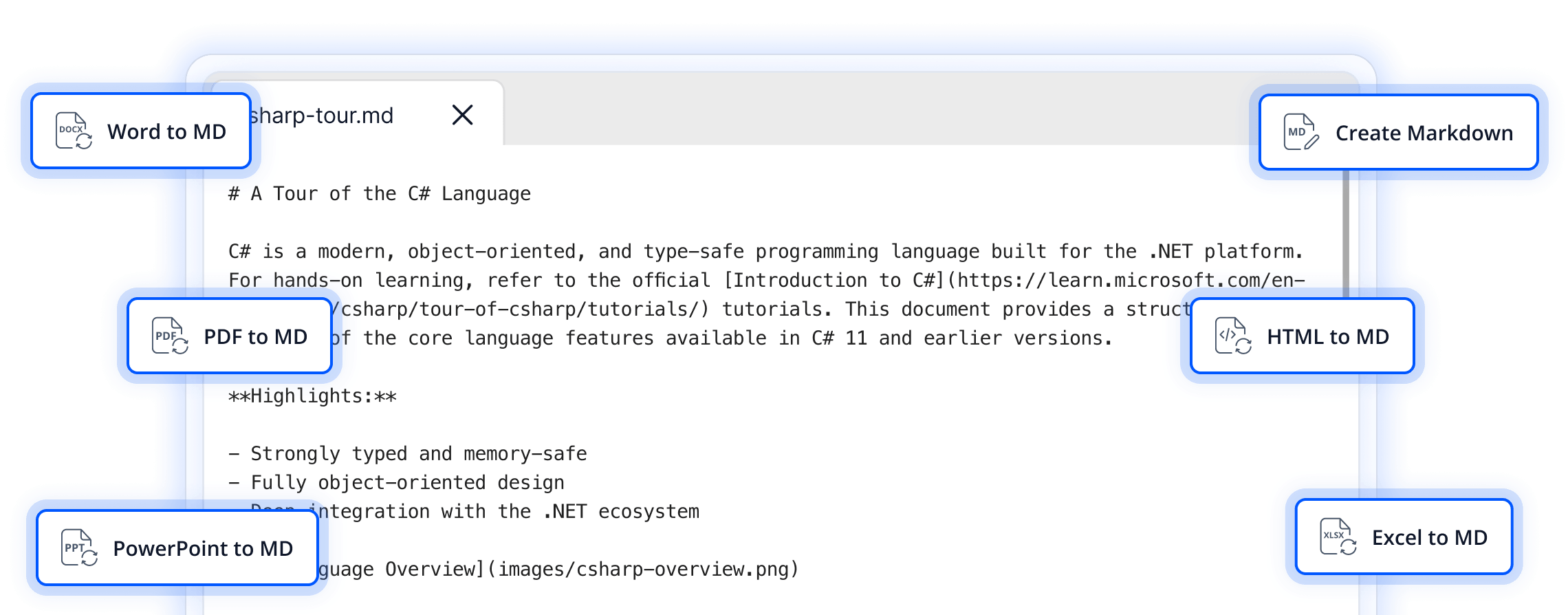
.NET Markdown Library (Preview)
The new .NET Markdown Library allows developers to create, edit, and convert Markdown documents programmatically without relying on external dependencies.
With this library, you can:
- Create Markdown documents using a structured DOM, making content generation easier to manage in code.
- Add headings, lists, tables, checkboxes, images, and hyperlinks for dynamic content creation systems.
- Apply formatting such as bold, italic, strikethrough, superscript, and subscript.
- Insert code blocks and formatted content for technical documentation and automated publishing workflows.
The library also includes document conversion capabilities, including:
- Markdown to Word for editable document outputs.
- Markdown to Excel for converting structured content into spreadsheet-based documents.
- Markdown to PowerPoint for generating presentation-ready content.
- Markdown to PDF for creating final, shareable document outputs.
Inline AI Assist for Blazor
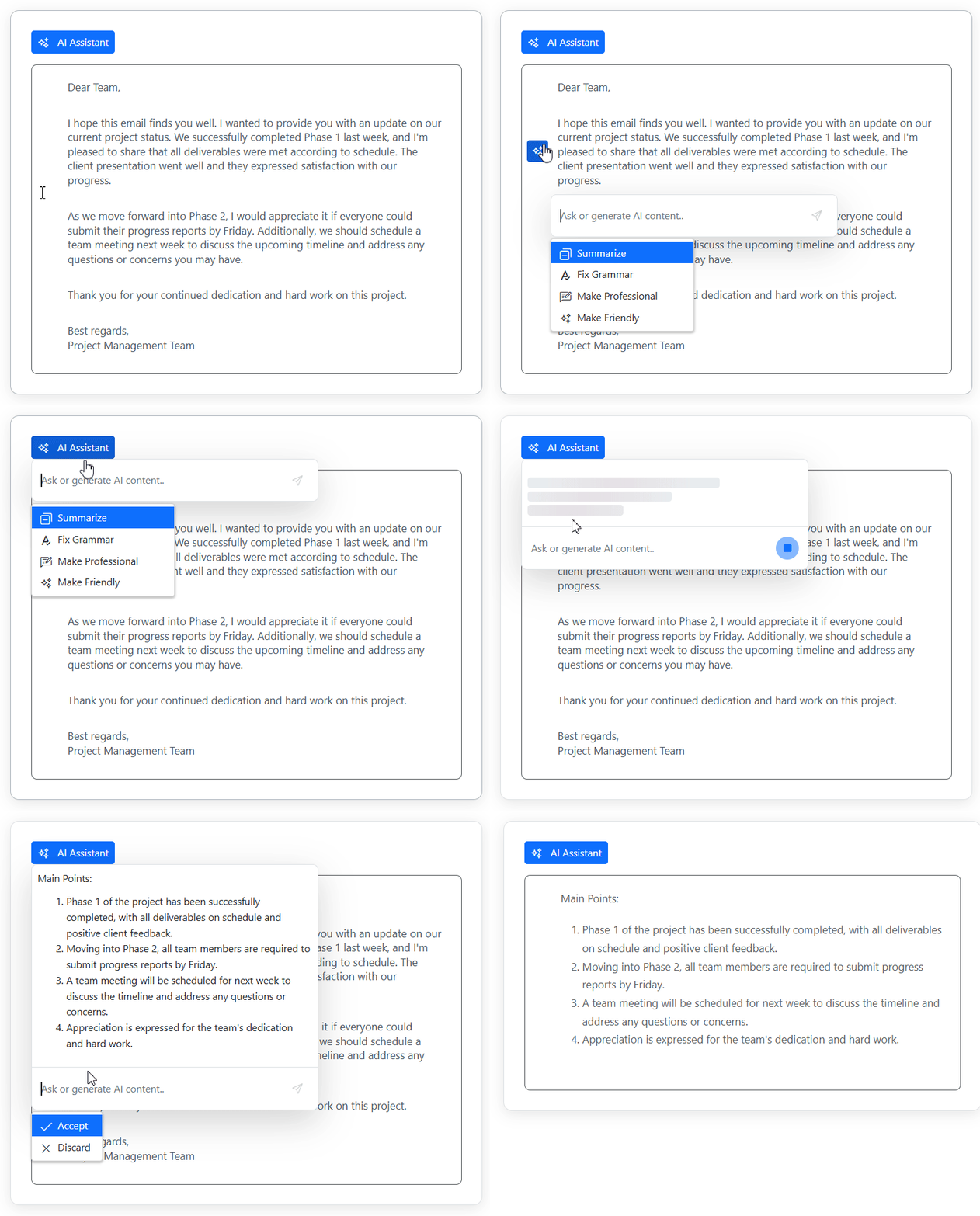
The new Inline AI Assist for Blazor helps you bring AI-powered interactions directly into your application experience, without forcing users into a separate chat interface.
Key capabilities include:
- Inline and pop-up AI interaction modes for flexible placement across application layouts.
- Streaming AI responses for more natural, real-time AI experiences.
- Prompt-based intelligent interactions for contextual AI-powered workflows.
- AI-assisted content generation for writing assistants, copilots, and productivity tools.
This makes it easier to build AI-native applications where assistance appears naturally within the user workflow.
Markdown Viewer for WinUI
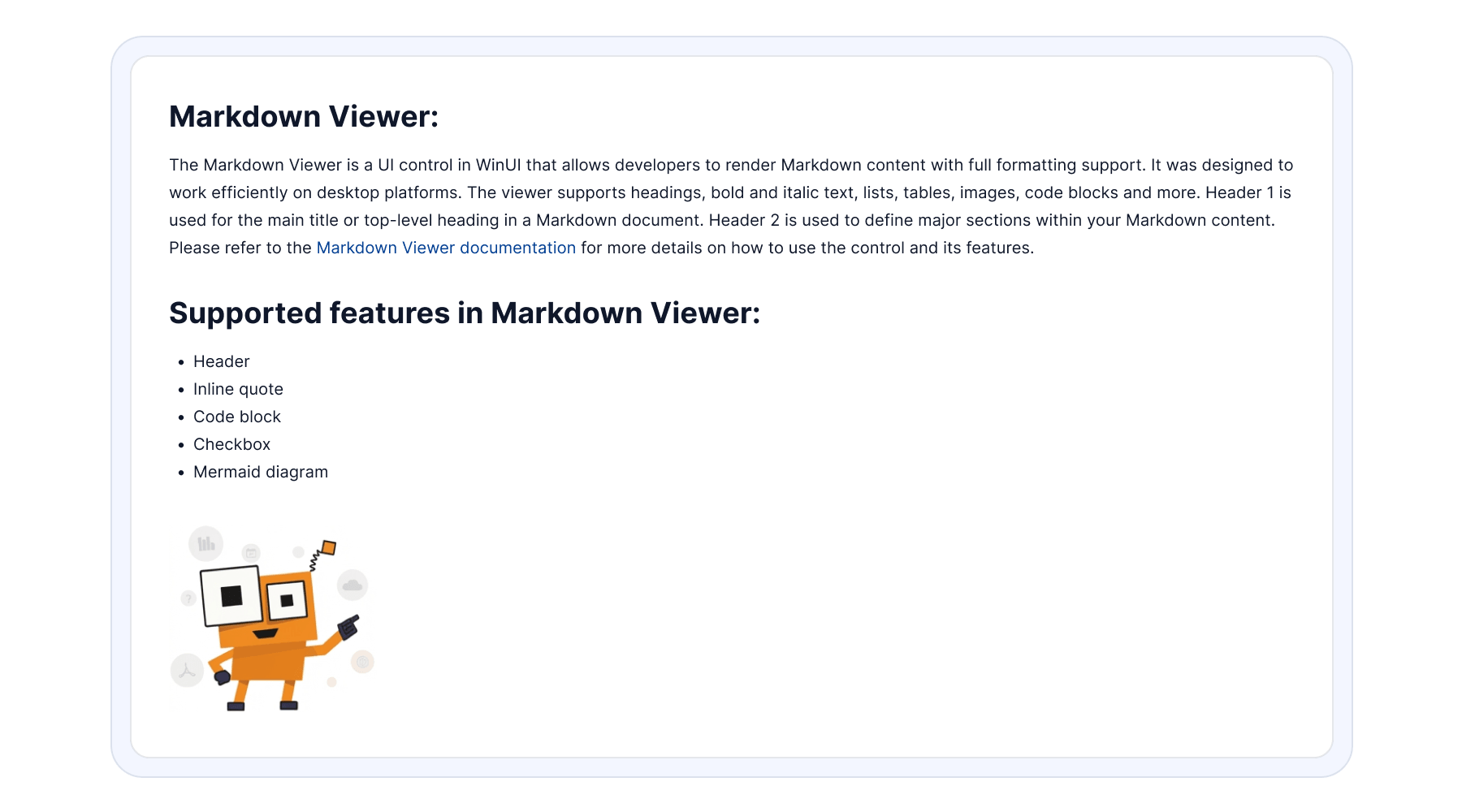
The new Markdown Viewer control for WinUI makes it easier to render rich Markdown content directly inside desktop applications, without external rendering libraries or manual formatting.
Key features include:
- Rich Markdown rendering for headings, lists, links, images, tables, code blocks, and other content elements.
- Support for loading Markdown content from strings, files, or URLs.
- Hyperlink navigation and content customization options for documentation, help systems, and content-driven desktop applications.
Feature enhancements across platforms
Along with new controls, this release brings meaningful improvements across multiple platforms and development frameworks.
Web
For React, JavaScript, Angular, Vue, ASP.NET Core, and ASP.NET MVC, this release delivers richer interactions, better customization, and improved performance for modern front-end applications.
Better theming architecture
Theme management is easier to maintain in large front-end applications with the latest theming architecture improvements. Updates include:
- Modular theme architecture for simpler long-term styling maintenance.
- Centralized theme packages for improved consistency across projects.
- Dedicated index.css and index.scss entry points for cleaner stylesheet management.
- Sass 1.100.0 upgrade for better compatibility and modern styling support.
These updates help teams manage design systems more cleanly at scale.
Expanded Pure React Components ecosystem
The Pure React Components ecosystem continues to expand, giving React developers more framework-native components and greater flexibility.
New additions include:
- Menu component for advanced navigation and contextual menus.
- Switch component for modern toggle-based interactions.
Several Pure React components are now production-ready, including:
- Chart for advanced data visualization.
- Data Grid for enterprise-grade data management interfaces.
- Buttons, Forms, Inputs, and Dropdowns for richer application interactions.
- Toolbar, Dialog, Tooltip, Toast, Spinner, and Skeleton for building interactive applications.
Additional support now includes Tailwind CSS integration and Bootstrap support, helping teams work faster with popular styling approaches.
More web component improvements
-
Data Grid: Adds grouping and master-detail views, infinite scrolling, conditional selection, context menus, row and column spanning, PDF export, and print support for advanced enterprise data applications.
-
AI AssistView: Adds response regeneration, reasoning-process visibility, text-to-speech, dynamic generative UI components, and tool invocation through system prompts for more adaptive AI-powered interfaces.
-
Chart: Adds inline tooltip formatting, multi-level donut charts, and new stock chart series types such as Spline, Spline Area, and Column for richer data visualizations.
-
Pivot Table: Adds native CRUD operations, Top N and Bottom N filtering, incremental filtering, and percentage running totals for faster, more flexible analysis.
-
Sankey Diagram: Now production-ready for process mapping, resource tracking, energy flow diagrams, and financial analysis visualizations.
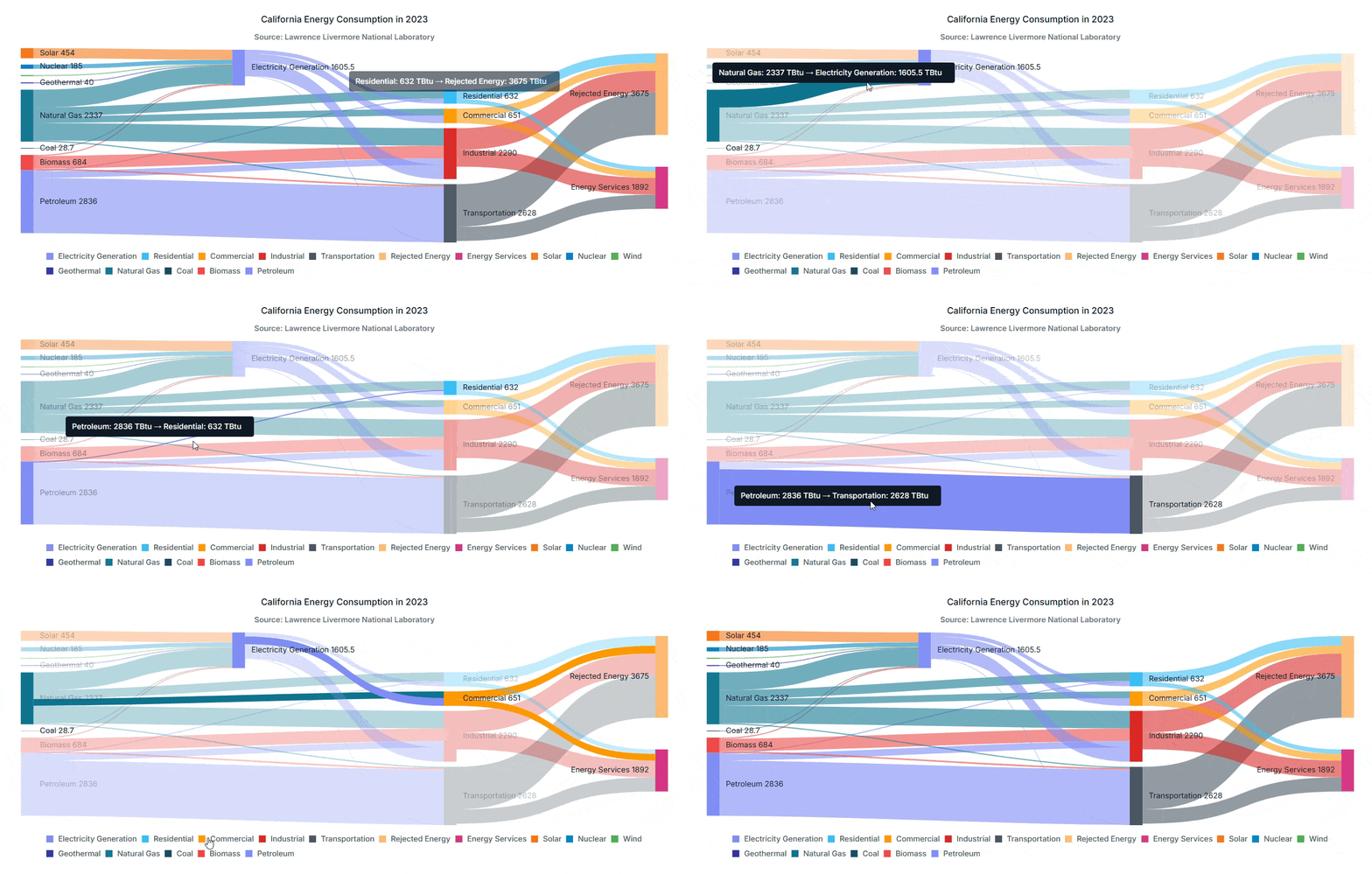
JavaScript Sankey Diagram
Blazor
This release includes major Blazor enhancements that help you build smarter AI-powered applications, improve developer productivity, and deliver richer enterprise experiences.
-
AI AssistView: Adds speech-to-text support, response regeneration with navigation controls, and text-to-speech support, making AI-powered chat experiences more interactive and accessible.
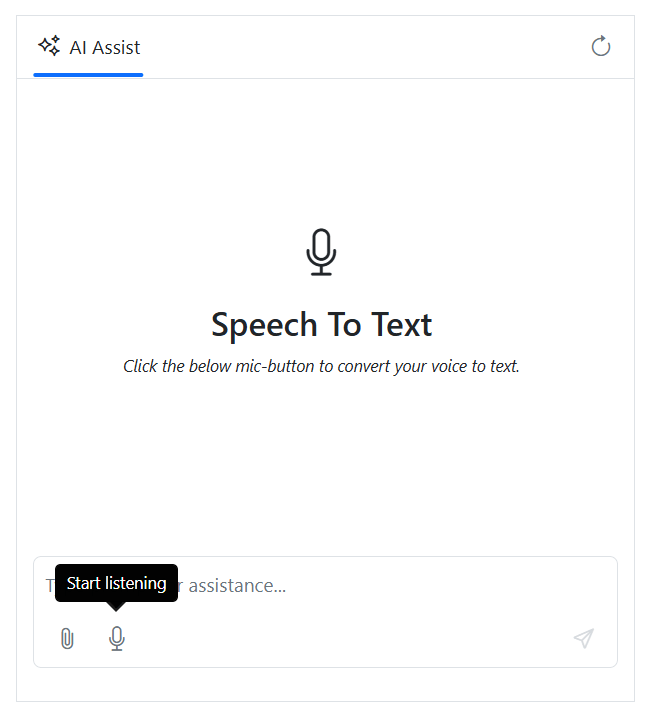
Speech-to-text conversion in Blazor AI AssistView -
DataGrid: Introduces single-click batch editing for faster data entry and an adaptive filter bar that adjusts based on text, numeric, date, and Boolean column types.
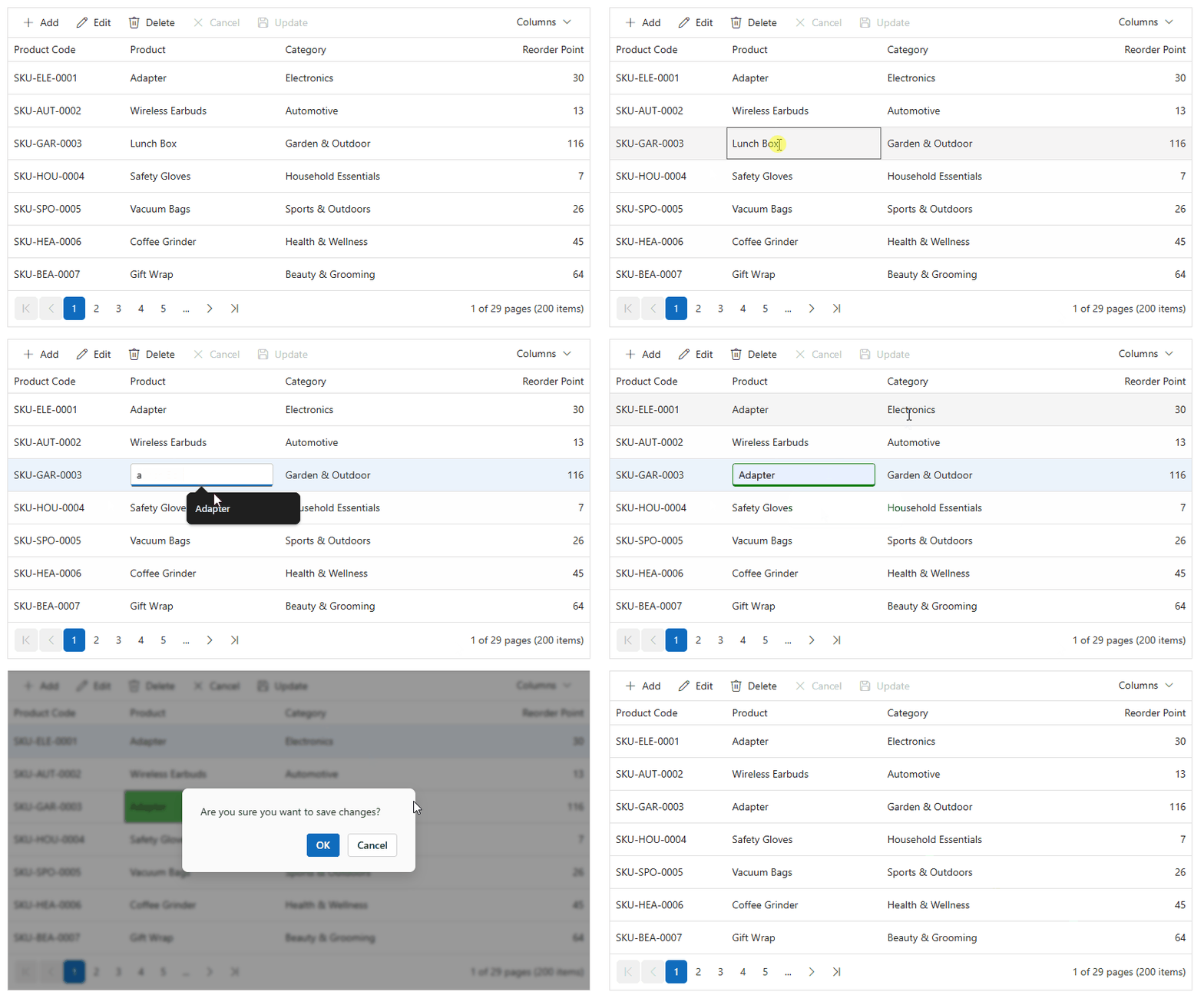
Single-click batch editing in Blazor DataGrid -
Diagram: Adds support for UML class diagrams, annotation interactions such as dragging, resizing, and rotation, and hyperlink support for advanced visual modeling applications.
-
Rich Text Editor: Adds image wrap support directly from the quick toolbar and chunk message handling for efficiently processing large HTML content.
Together, these updates help teams build richer Blazor applications with less effort.
.NET MAUI
The .NET MAUI updates in this release help developers build richer cross-platform applications across mobile and desktop environments.
-
AI AssistView: Adds agent switching, multi-line input, image previews, and time-based conversation grouping for Copilot-style experiences inside your applications.
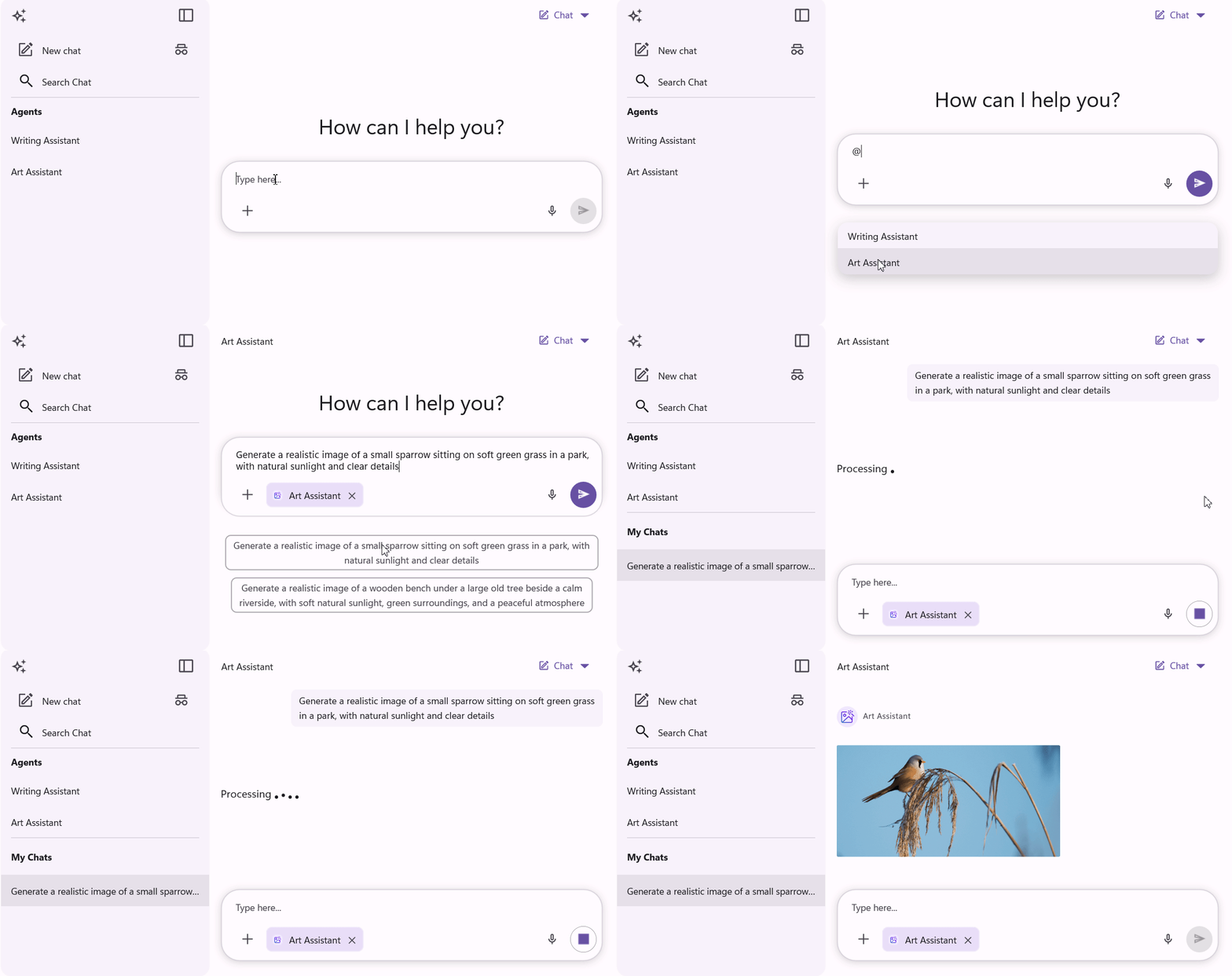
.NET MAUI AI AssistView with agent picker support -
Charts: Adds per-point color mapping and real-time updates through property change listening, giving you more control over analytics and visualization scenarios.
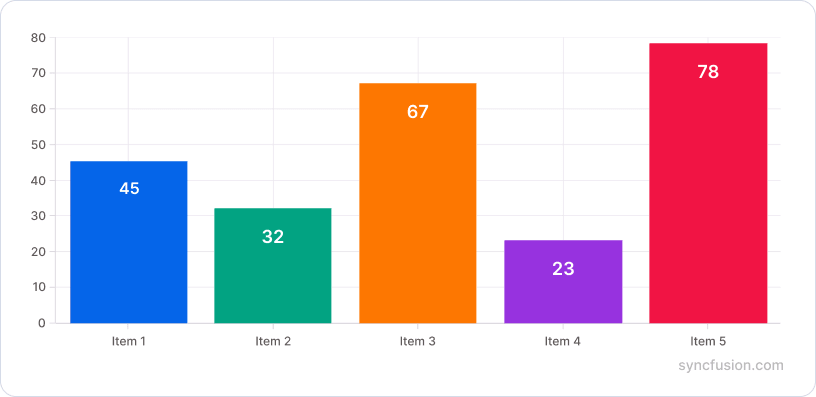
Per-point color mapping in .NET MAUI Charts -
DataGrid: Adds undo and redo support, multi-row drag-and-drop, row resizing, and built-in search UI to improve enterprise data management and large dataset handling.
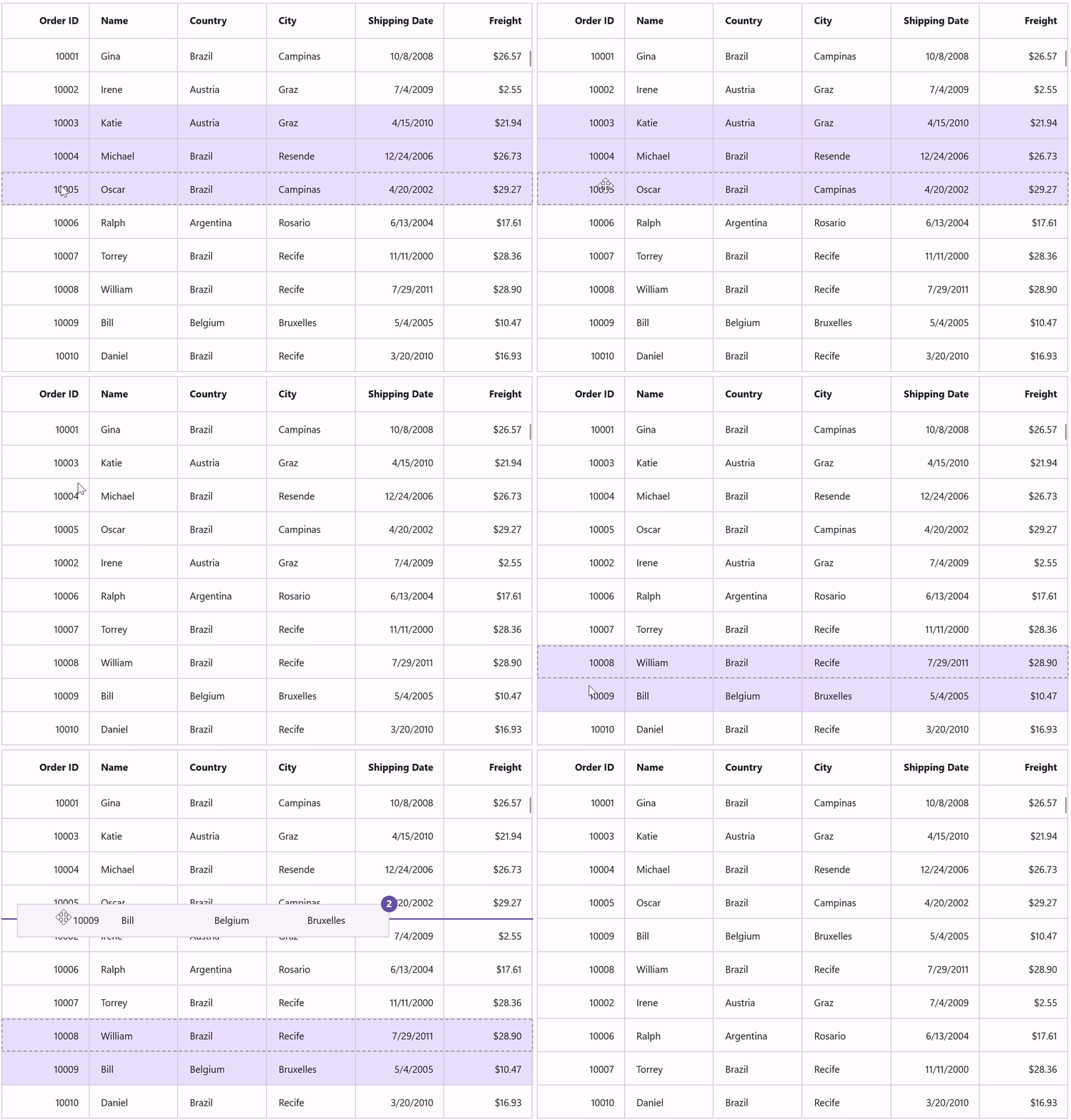
Multi-row drag-and-drop feature in .NET MAUI DataGrid -
Scheduler and Rich Text Editor: Adds improvements for scheduling, event management, calendar interactions, rich content editing, formatting, and customization.
These improvements help you deliver better experiences across devices while keeping cross-platform development efficient.
Document SDK
The Document SDK introduces AI-powered capabilities, security updates, performance improvements, and content transformation features across PDF, Word, Excel, and PowerPoint. These updates help developers build smarter document automation solutions with less complexity.
New improvements include:
-
AI Agent Tools: Enable AI agents to perform document creation, file conversion, OCR processing, content redaction, and smart data extraction across PDF, Word, Excel, and PowerPoint files.
-
Agent Skills: Provide SDK-aware code generation inside IDEs, helping developers generate more accurate code with broad library support and flexible execution modes.
-
.NET PDF Library: Uses updated Blink binaries, version 147.0.7727.56, to improve HTML-to-PDF conversion security and provide a safer document generation experience.
-
JavaScript PDF Library: Adds layout-aware text rendering with styling, alignment, and automatic pagination, plus reusable header and footer templates and XMP metadata support.
-
.NET Excel Library: Supports placing images directly within cells for better alignment during sorting and resizing. Excel-to-Markdown and Markdown-to-Excel conversion also make content transformation easier for reporting and automation scenarios.
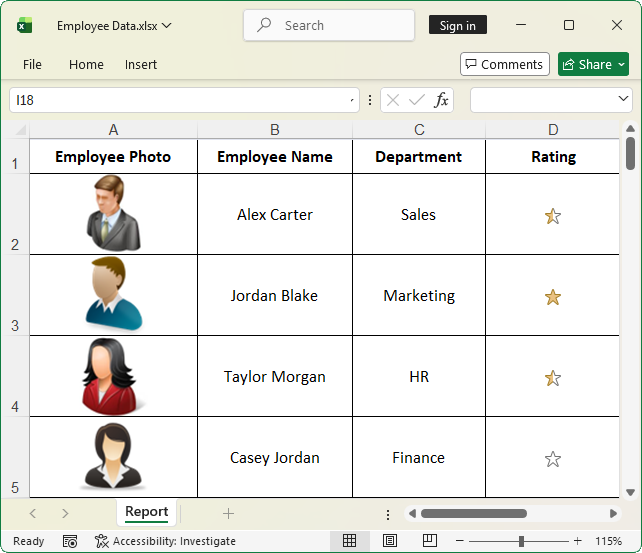
Image-in-cell support in the .NET Excel Library -
.NET Word Library: Delivers up to 70% faster clone and merge operations for large document workflows, along with improved HTML parsing support for <p> and <h1>-<h6> elements aligned with Microsoft Word capabilities.
-
.NET PowerPoint Library: Supports PPTX-to-Markdown and Markdown-to-PPTX conversion, making it easier to transform presentations into structured documentation while preserving content flow and layout.
-
.NET Data Extraction Library: Adds customizable image-saving options using Base64 or URL outputs, while configurable OCR settings provide better control and improved extraction accuracy.
PDF Viewer SDK
The PDF Viewer SDK introduces usability and performance improvements across Web, Blazor, and .NET MAUI, helping you build faster and more interactive document viewing experiences.
New improvements include:
-
Web PDF Viewer: Adds ink erasing and annotation comment filtering, making document review and editing workflows more flexible and intuitive.
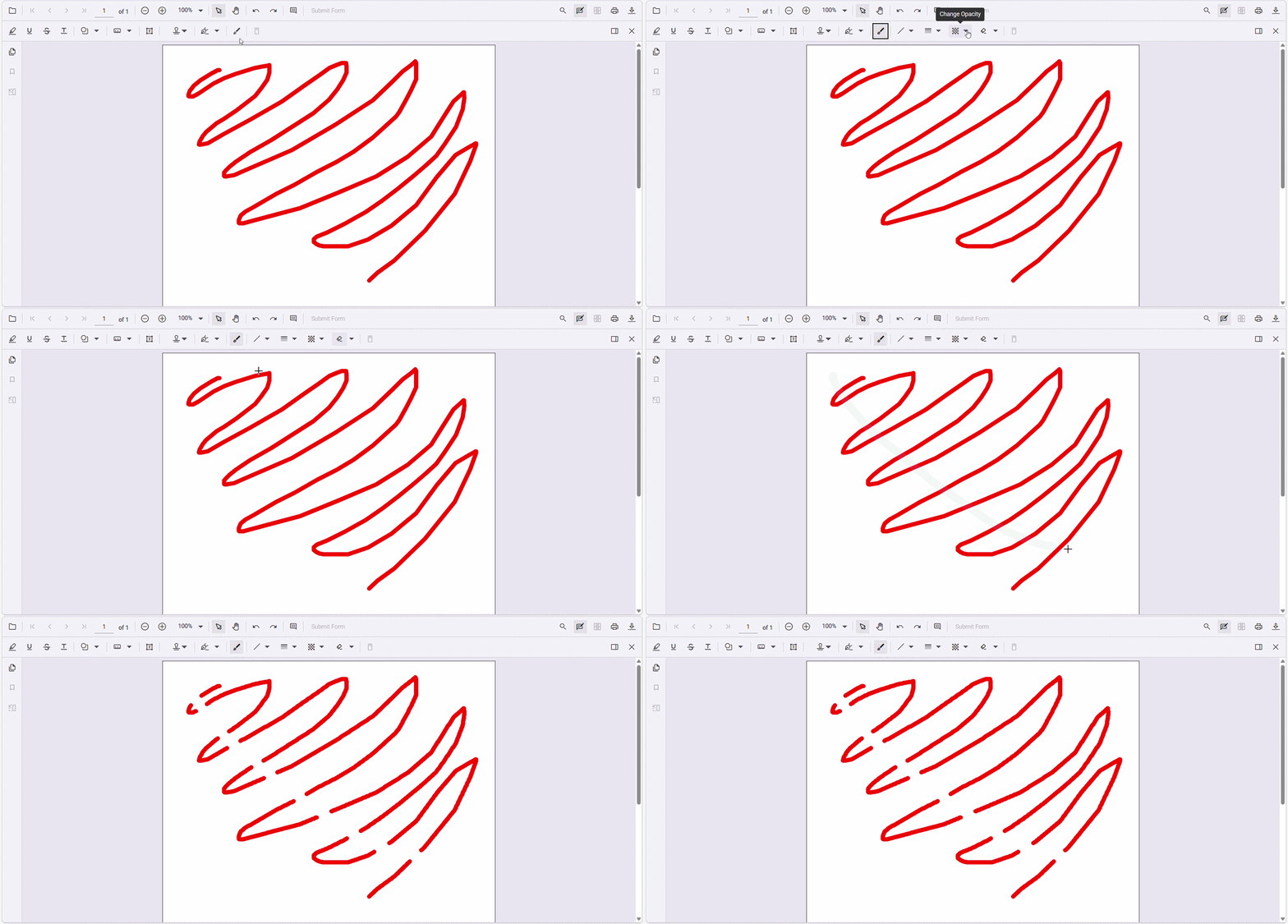
Ink eraser tool in Web PDF Viewer -
Annotation downloads: Improves download performance by 35% for small documents and up to 92% for large documents with around 400 annotations, helping teams handle annotation-heavy documents much faster.
-
Blazor PDF Viewer: Adds formatted bookmark text rendering, preserving bookmark styling from source documents and improving navigation.
-
.NET MAUI PDF Viewer: Adds double-tap zoom control and read-only form field support for better document interaction in mobile applications.
DOCX Editor SDK
The DOCX Editor SDK introduces formatting and security enhancements across Web and Blazor, making document editing more flexible while improving document protection.
New improvements include:
- Web DOCX Editor: Supports bidirectional RTL and LTR character formatting, helping you build better multilingual document editing experiences.
- Security enhancements: Support algorithm SIDs, including SHA-1 and SHA-256, for stronger hash computation, improved password validation, and better document protection across Web and Blazor DOCX editors.
Spreadsheet Editor SDK
The Spreadsheet Editor SDK introduces AI-powered editing capabilities and performance improvements across Web and Blazor, helping you build faster and more intelligent spreadsheet-based applications.
New improvements include:
-
Web Spreadsheet Editor: Adds AI Assist integration for natural language-driven editing, formatting, and data analysis with full undo and redo support.
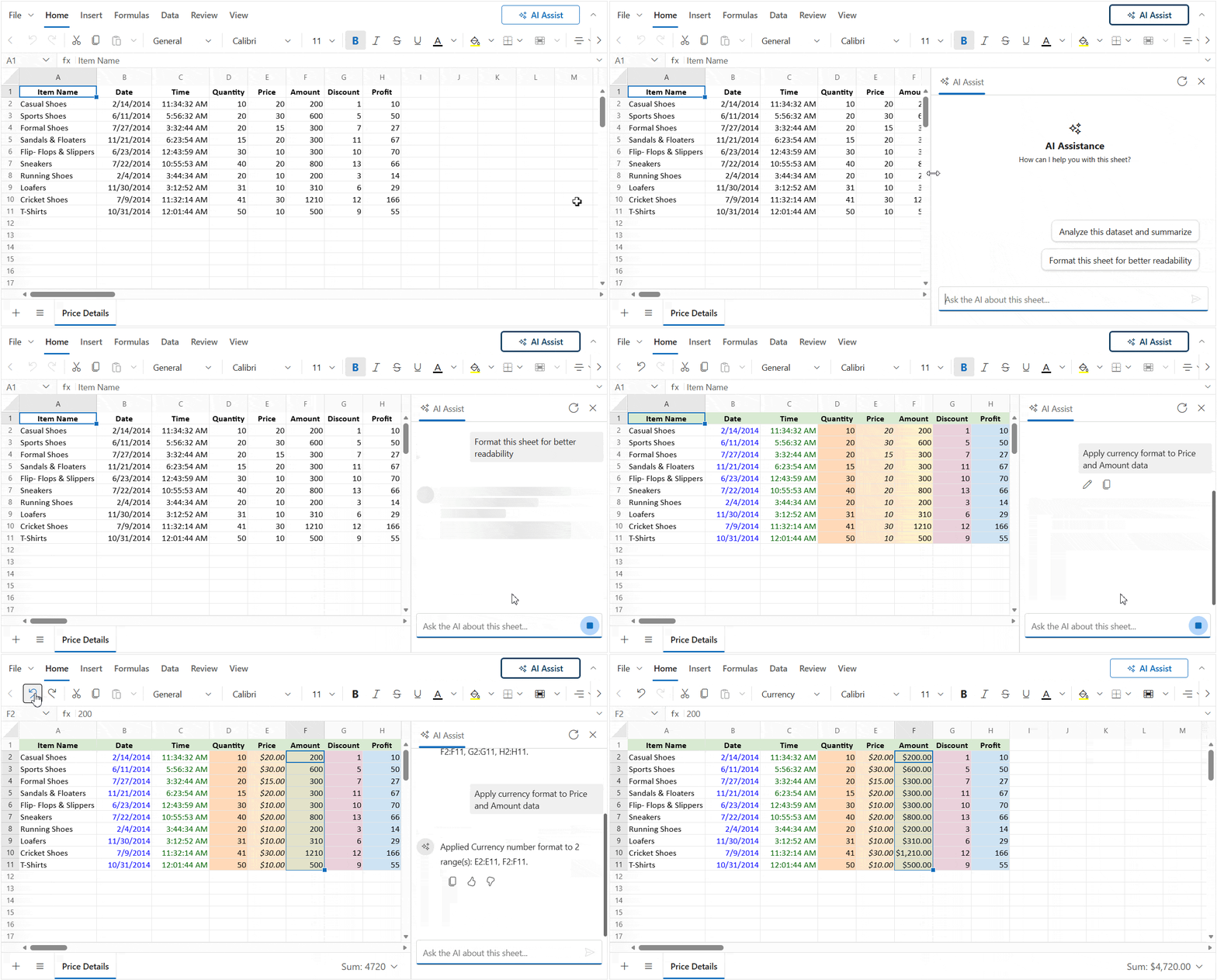
Built-in AI Assist in Web Spreadsheet Editor -
Cell formatting: Adds subscript and superscript support to improve readability and content presentation inside spreadsheet cells.
-
Performance APIs: Adds suspend and resume refresh APIs that reduce unnecessary UI re-renders, improving refresh performance for 1 million cells from 8.8 seconds to 1.3 seconds.
-
Blazor Spreadsheet Editor: Adds ribbon customization, conditional formatting, export options, auto aggregation, and enhanced APIs for greater customization and flexibility.
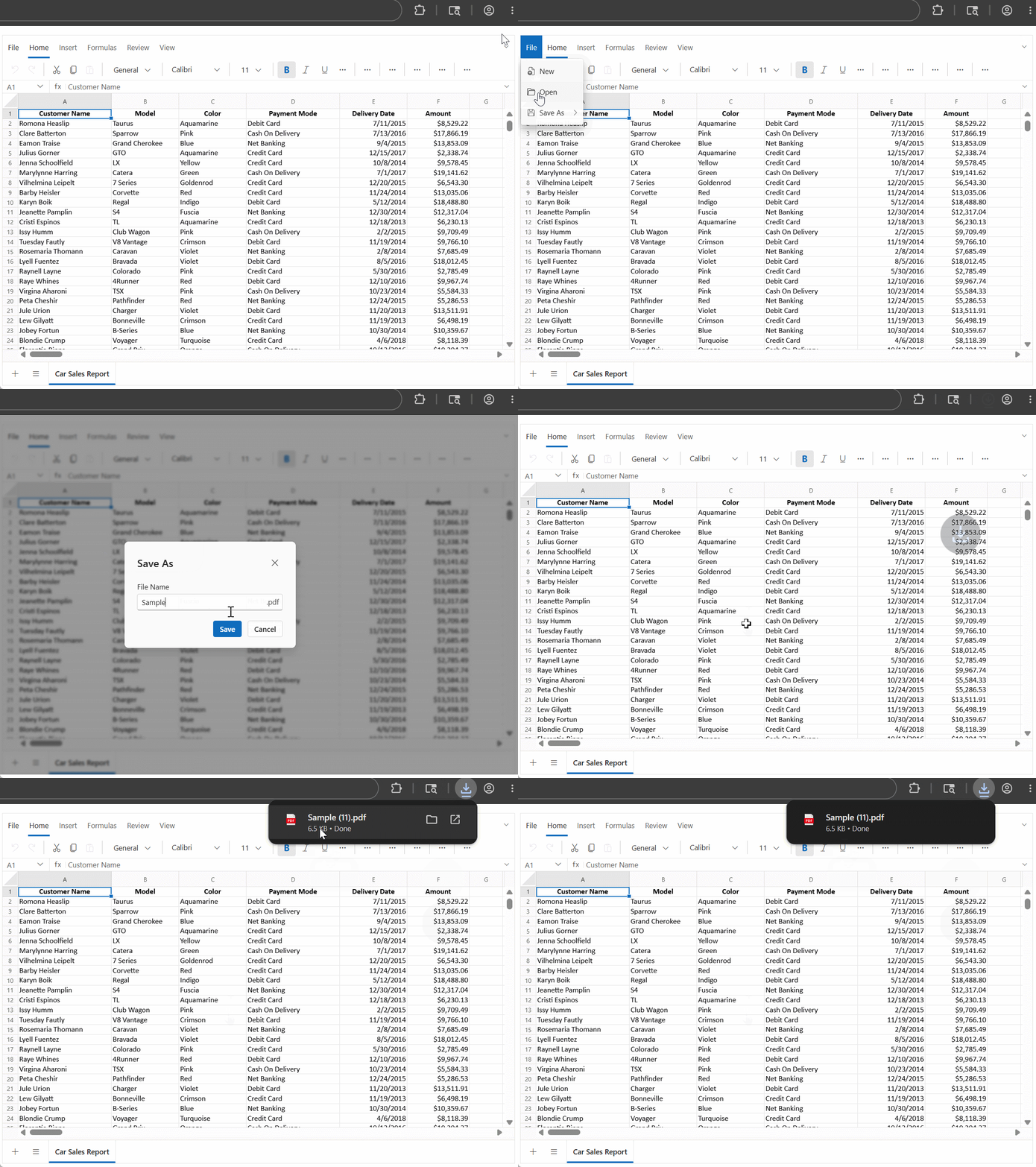
Export options in Blazor Spreadsheet Editor
WPF improvements
This release includes WPF enhancements for better UI flexibility, improved multitasking, and smoother user experiences.
-
Smart Text Editor: Adds an AI suggestion loading indicator, giving users clear visual feedback while AI-generated suggestions are being processed.
-
Tab Control: Adds vertical tab layouts, detachable tabs, pinning support, and customizable tear-off windows for multi-document and productivity-focused applications.
-
Toast Notification: Adds maximum visible toast count control and sound support to help manage notifications more effectively.
-
TreeGrid: Adds search and highlight capabilities along with built-in paging, making large hierarchical datasets easier to navigate.
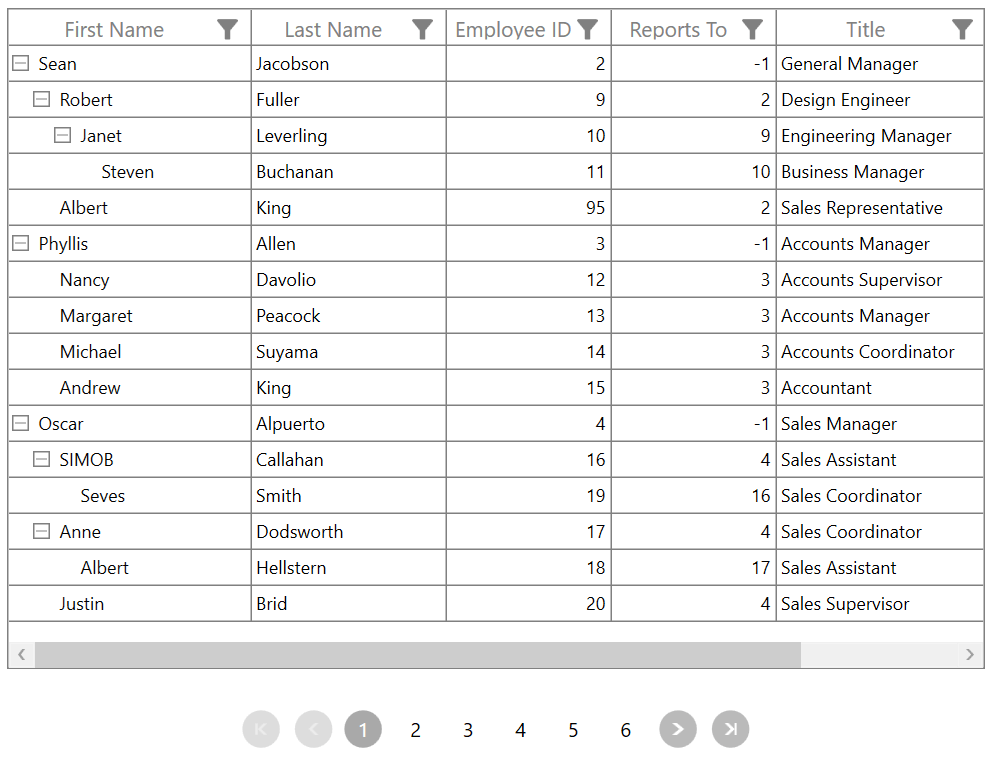
Pagination in WPF TreeGrid
WinForms improvements
WinForms receives important AI-powered and performance enhancements focused on smarter interactions and better responsiveness.
-
AI AssistView: Adds a response toolbar with actions such as copy, regenerate, like, and dislike, along with a stop responding button that gives users more control over AI-generated conversations in real time.
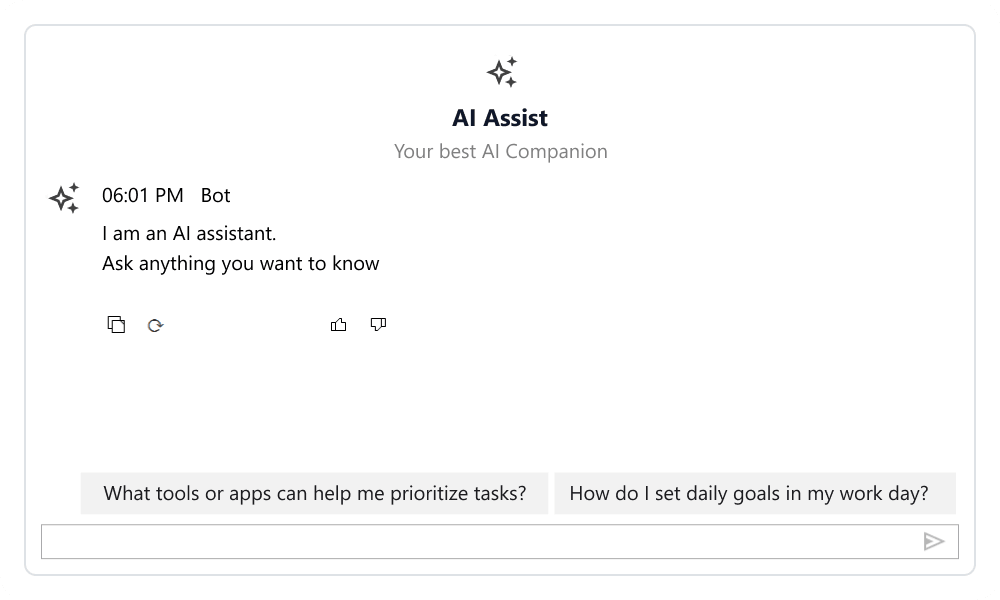
Response toolbar in WinForms AI AssistView -
Calculation Engine: Delivers up to 95% faster COUNTIF formula calculations for large workbooks through intelligent result caching, helping spreadsheet-heavy applications process data more efficiently.
Build smarter with Essential Studio 2026 Volume 2
Modern software development continues to grow more demanding. Teams are building AI-powered experiences, automating document workflows, supporting responsive web and cross-platform applications, and balancing performance, scalability, and speed at the same time.
With Essential Studio 2026 Volume 2, Syncfusion focuses on helping developers reduce complexity so they can spend less time solving infrastructure challenges and more time building great applications.
Whether you are building enterprise software, intelligent assistants, document-heavy systems, or modern cross-platform applications, Syncfusion Essential Studio 2026 Volume 2 gives you the tools to build faster, simplify development, and deliver modern applications with greater confidence.
Explore Syncfusion Essential Studio 2026 Volume 2 today and see how these new capabilities can help you build smarter applications, faster.
Ready to explore? Visit Syncfusion’s website to see the full details, try interactive demos, and check out the What’s New and Release Notes pages. Start building with these tools today!
If you have questions or suggestions, feel free to reach out through our support forum, support portal, or feedback portal. We are always happy to help you!




Be the first to get updates