
 Balaji Elumalai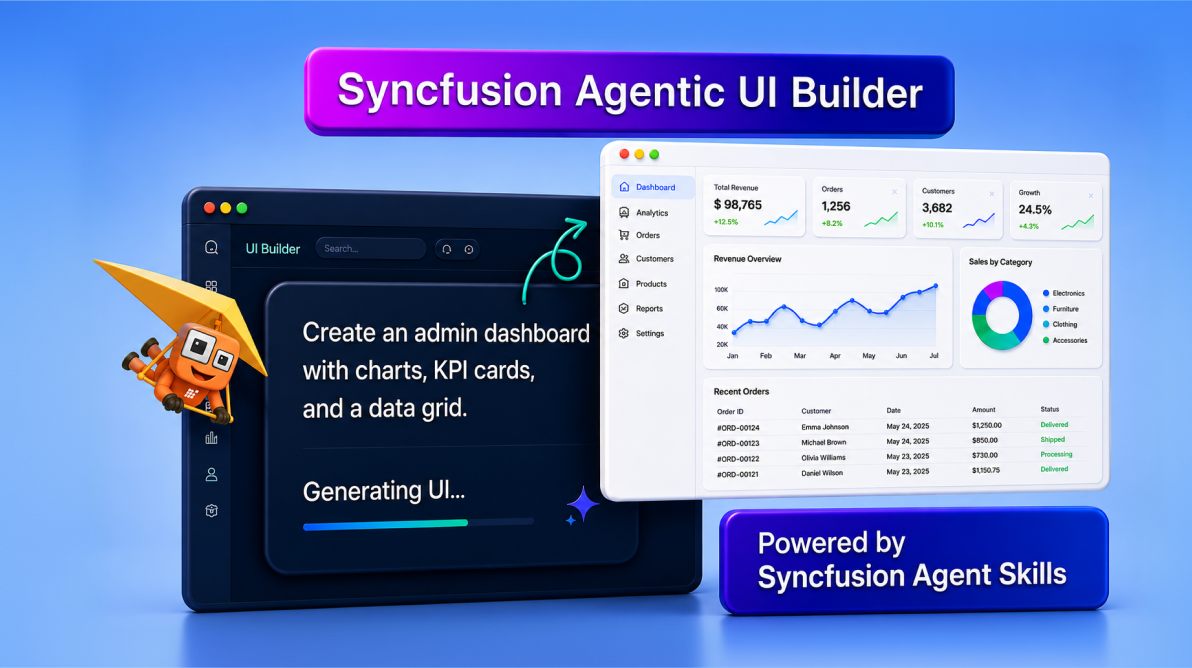
TL;DR: The latest Syncfusion Agentic UI Builder introduces embedded Syncfusion Agent Skills that help AI generate more organized UIs within the project. By grounding generation on the available Syncfusion component intelligence, developers can reduce post-generation cleanup and accelerate UI realization.
AI-assisted development has rapidly changed how developers build application UI. Modern coding assistants can generate layouts, dashboards, forms, and data experiences in seconds using natural-language prompts.
But as AI-generated UI becomes part of real-world enterprise processes, developers increasingly expect more than isolated snippets or visual scaffolding. They need generated UIs that are structured, framework-aware, responsive, maintainable, and ready for integration into actual applications.
That is the direction driving the latest evolution of Syncfusion® Agentic UI Builder.
The newest release introduces embedded Syncfusion Agent Skills, a project-aware architecture designed to help AI generate more uniform, enterprise-focused interfaces using locally available Syncfusion component intelligence.
This evolution builds on the earlier orchestration capabilities of the UI Builder experience and enhances how AI understands, configures, and composes Syncfusion-powered app interfaces directly inside the developer pipeline.
The result is a more streamlined path from prompt to usable UI with improved consistency, reduced setup effort, and a smoother refinement experience for development teams.
Why enterprise UI generation requires more than snippets
While AI tools can quickly generate UI fragments, enterprise applications demand a much higher level of completeness and reliability.
The challenge is not generating UI, it’s making it work correctly within a real app context.
Enterprise interfaces must handle:
- Complex layouts that adapt across devices,
- Accurate and complete feature configuration,
- Cohesive integration with app architecture,
- Accessibility and compliance requirements, and
- Long-term maintainability as the app evolves.
In practice, developers often spend significant time bridging the gap between generated output and production-ready UI. This includes fixing incomplete configurations, aligning layouts, wiring data interactions, and ensuring consistency across the application.
For example, a generated dashboard may include visual elements like charts or grids, but still require additional work to ensure:
- Components are fully configured and functional,
- Layout behavior remains consistent across screen sizes,
- Features are properly integrated with the app, and
- UI patterns align with project standards.
This gap between generated snippets and usable app interfaces is where most development effort is still spent and where improvements in AI-assisted UI generation make the biggest impact.
Introducing embedded Syncfusion Agent Skills
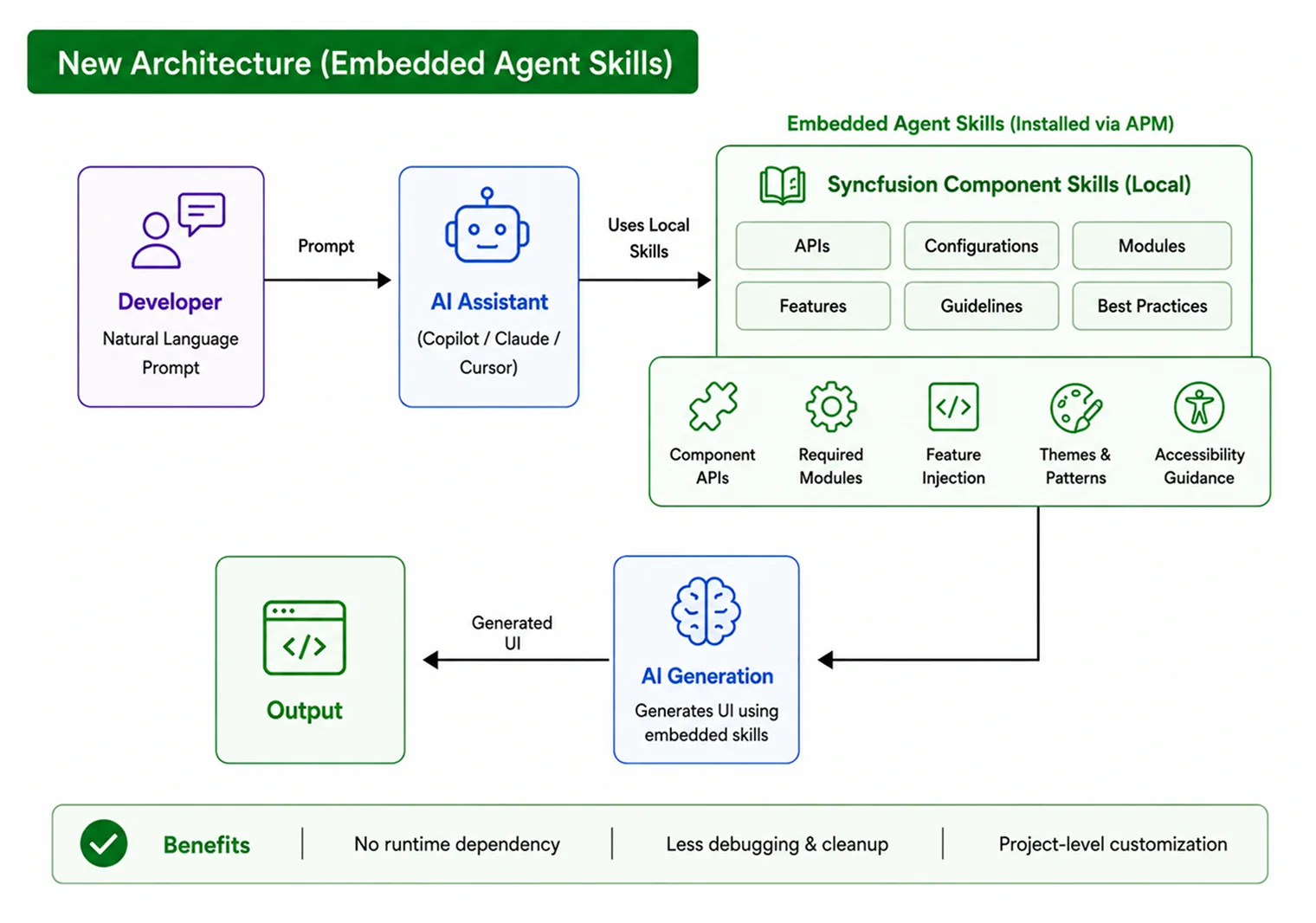
The latest Syncfusion UI Builder introduces embedded Syncfusion Agent Skills that provide locally available implementation guidance within the project environment.
Think of these skills as verified instruction packs that help AI understand how Syncfusion components should be configured and organized inside real applications.
Each skill can include:
- Component APIs,
- Setup guidance,
- Required imports,
- Feature configuration references,
- Framework-specific patterns,
- Accessibility recommendations, and
- Layout composition guidance.
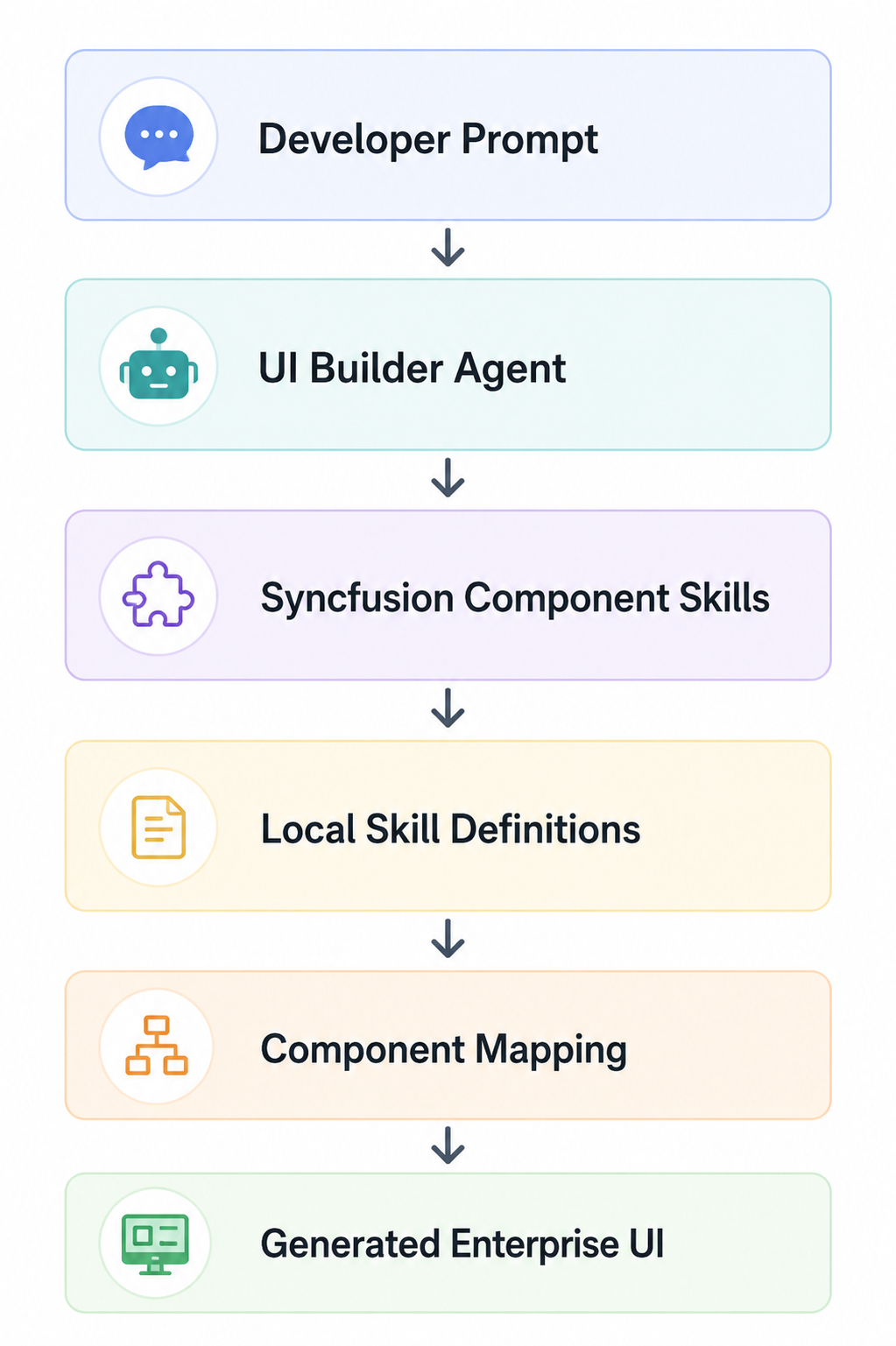
When UI Builder generates interfaces containing components such as DataGrid, Charts, Scheduler, Navigation Drawer, or Forms, the relevant Syncfusion Component Skills are automatically applied during generation.
This helps developers receive more cohesive UI scaffolding with minimized rework cycles.
How Syncfusion Agentic UI Builder has evolved
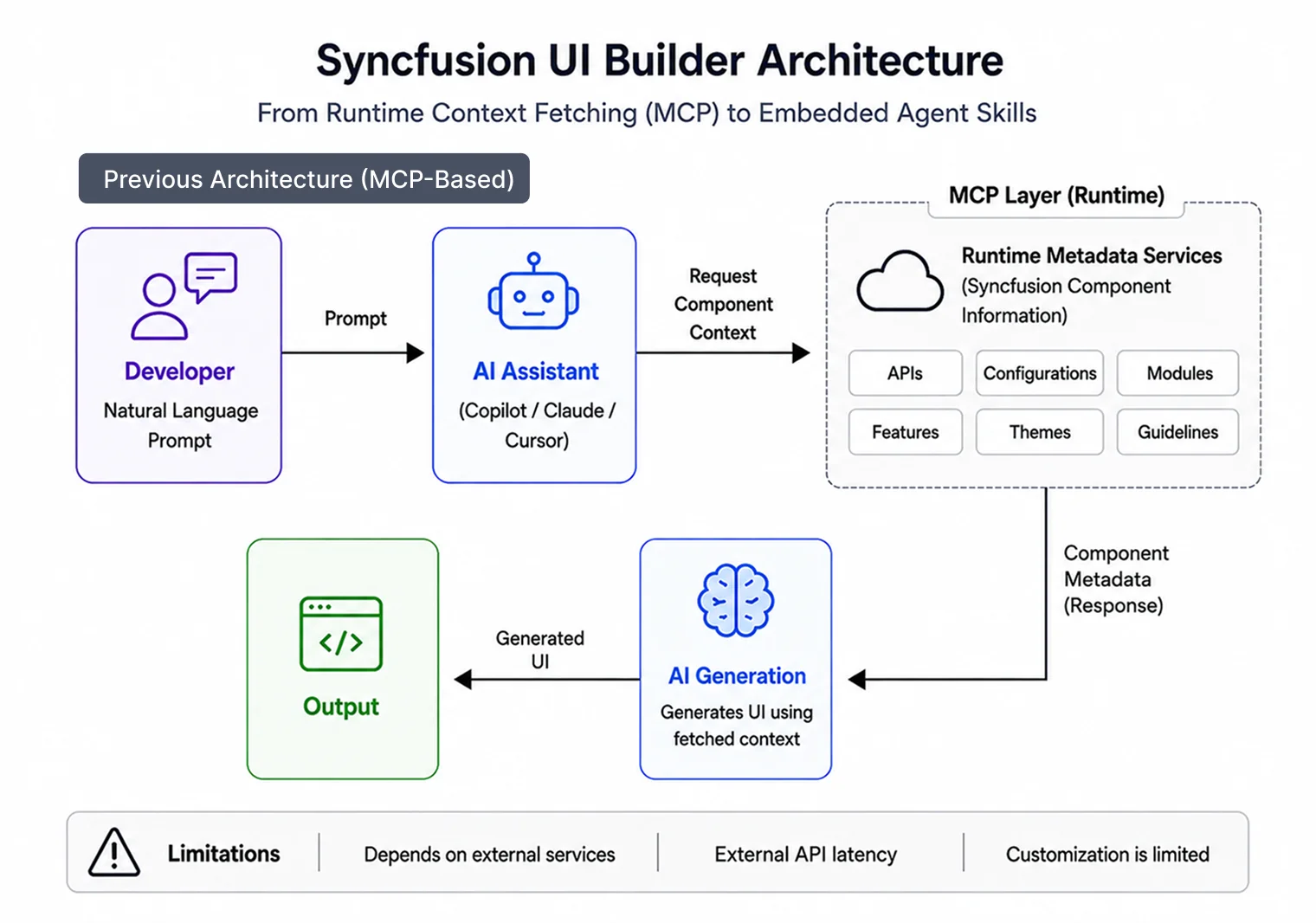
Earlier versions of Syncfusion UI Builder focused heavily on runtime coordination to help AI understand component behavior during generation.
That coordination model helped establish the foundation for AI-assisted Syncfusion UI generation.
As adoption expanded, teams increasingly looked for:
- More project-aware generation,
- Stronger customization capabilities,
- Deeper alignment with internal standards, and
- More streamlined local development experiences.
The addition of Agent Skills further evolves the architecture by bringing implementation guidance directly into the project environment.
This enables generation that is:
- More grounded in the project context,
- Easier to customize, and
- Better aligned with production-scale applications.
Rather than changing the developer experience conceptually, the updated architecture enhances how UI Builder supports AI-assisted UI generation at scale.
Architecture comparison
| Aspect | Earlier Runtime Retrieval Model | Skill-Based UI Builder |
| Component intelligence source | External services | Local embedded skills |
| API resolution | Runtime fetch | Local skill grounding |
| Enterprise compatibility | Environment dependent | Improved |
| Debugging effort | Higher | Reduced |
How the new architecture works
This helps improve:
- Generation uniformity,
- Adaptability across devices,
- Reliability,
- Customization flexibility, and
- Enterprise readiness.
What developers can build faster?
With the evolved architecture, Syncfusion UI Builder can scaffold more complete app UIs with significantly less manual setup.
You can quickly generate:
- SaaS admin dashboards,
- Analytics workspaces,
- Reporting systems,
- Approval workflows,
- CRUD management portals,
- Responsive forms, and
- Data-heavy business applications.
Instead of manually assembling layouts, charts, grids, filters, themes, and navigation patterns, teams can generate production-ready UI foundations from natural-language prompts.
This allows developers to spend more time building product functionality and less time assembling repetitive UI infrastructure.
Building UI with Syncfusion Agentic UI Builder
Install the Agent Package Manager (APM) in your environment. Getting started is quick and requires only a simple installation through APM.
apm install syncfusion/react-ui-builder -t copilotTeams can adjust the target environment based on their preferred AI-assisted development environment, including Copilot, Cursor, Claude, and Syncfusion Code Studio.
After installation, the UI Builder agent and Syncfusion Component Skills are added to the workspace. From there, you can generate interfaces within the AI chat experience using conversational prompts.
Example prompt
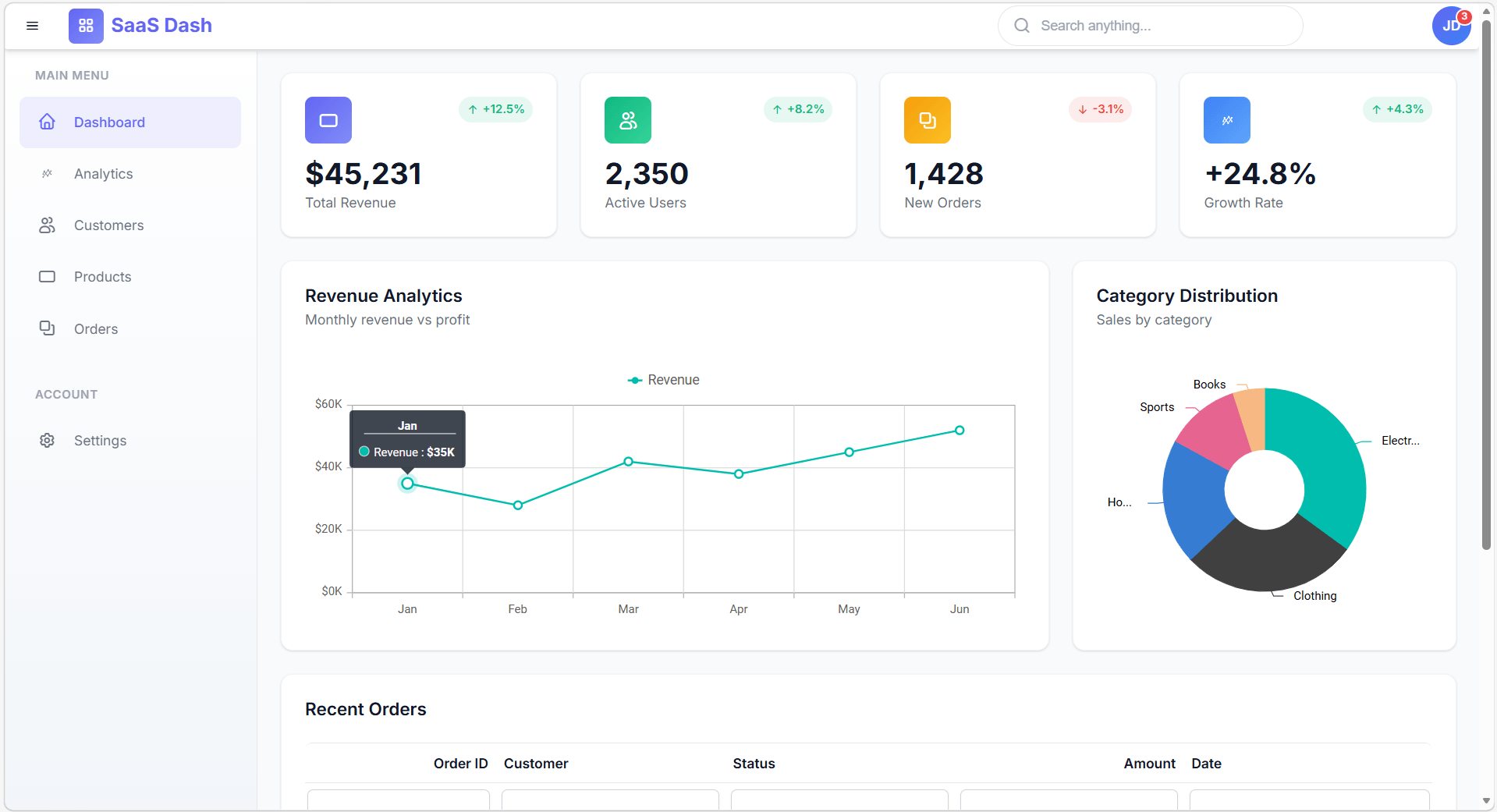
Design a modern SaaS admin dashboard with a collapsible sidebar navigation, KPI summary cards, interactive charts, a sortable data grid, responsive layouts, dark mode support, and accessible UI interactions.What UI Builder automatically handles
Once the prompt is submitted, Agentic UI Builder can automatically:
- Select appropriate Syncfusion components,
- Apply relevant component skills,
- Configure required features,
- Apply responsive layouts, and
- Generate integration-ready UI scaffolding.
Developers receive a more cohesive UI foundation ready for refinement and integration.
What changes with the evolved UI Builder experience
| Traditional AI UI generation | Syncfusion UI Builder |
| Disconnected snippets | Cohesive layouts |
| Manual configuration refinement | Structured component setup |
| Repeated prompting cycles | More stable generation |
| Manual module integration | Guided feature wiring |
| Layout inconsistencies | Design-consistent UI |
| Additional cleanup effort | Streamlined refinement |
| Higher stabilization effort before integration | Faster transition from prototype to usable application UI |
Because generation is grounded using Syncfusion Component Skills, teams can move more efficiently from prototype generation toward usable application scaffolding.
Works across the Syncfusion ecosystem
Syncfusion UI Builder supports multiple frameworks and platforms across the Syncfusion ecosystem.
| Framework / SDK | Installation command | GitHub |
| React | apm install Syncfusion/react-ui-builder -t copilot | React UI Builder |
| Angular | apm install Syncfusion/angular-ui-builder -t copilot | Angular UI Builder |
| Blazor | apm install Syncfusion/blazor-ui-builder -t copilot | Blazor UI Builder |
| .NET MAUI | apm install Syncfusion/maui-ui-builder -t copilot | MAUI UI Builder |
| WPF | apm install Syncfusion/wpf-ui-builder -t copilot | WPF UI Builder |
| WinForms | apm install Syncfusion/winforms-ui-builder -t copilot | WinForms UI Builder |
| WinUI | apm install Syncfusion/winui-ui-builder -t copilot | WinUI UI Builder |
Frequently Asked Questions
What are Syncfusion Agent Skills?
Syncfusion Agent Skills are locally installed guidance packages that help coding agent generate more accurate and framework-aware Syncfusion component implementations directly inside the project workspace.
How is Syncfusion Agentic UI Builder different from traditional AI coding assistants?
Unlike general-purpose coding assistants that primarily generate isolated snippets, Syncfusion Agentic UI Builder focuses on generating structured application interfaces with guided component configuration, responsive layouts, and integrated UI composition.
Do I need prior experience with Syncfusion components to work with Agentic UI Builder?
No. Agentic UI Builder automatically applies component guidance, APIs, modules, and configuration references using Syncfusion Component Skills.
Does UI Builder generate production-ready applications?
UI Builder accelerates the path to production-ready UI scaffolding by generating structured, well-configured interfaces. Developers should still review and validate generated output before deployment.
Which IDEs and tools are supported by Agentic UI Builder?
UI Builder works with AI-assisted environments that support agent skills, including VS Code, Cursor, Syncfusion Code Studio, and similar AI-powered IDE experiences.
AI UI generation is evolving
Thanks for reading! AI-assisted UI development is entering a phase where generated interfaces are expected to be structurally complete, responsive, maintainable, and ready for real application environments.
The latest evolution of Syncfusion Agentic UI Builder is designed for that shift. By introducing embedded Syncfusion Agent Skills, UI Builder helps developers generate more integration-ready app UI directly from natural-language prompts.
Whether building dashboards, analytics systems, SaaS platforms, or internal business apps, teams can spend less time assembling UI infrastructure and more time delivering product functionality.
Explore Syncfusion UI Builder and experience a more streamlined approach to AI-assisted UI generation.
Need help? Reach out via our support forum, support portal, or feedback portal. We’re always happy to assist you!


 No spam, just valuable updates.