





Transform your applications today by downloading our free evaluation version
Overview
The WinForms Navigation Drawer is a sliding panel menu that comes out from the edge of the window and displays contents from a hidden panel. It can be shown by swiping from any of the screen edges or on demand. You can display the menu vertically or horizontally at the left or right side of the view.
Transition
The transition property can be used to customize the animation of the drawer.

Windows Forms side bar at left
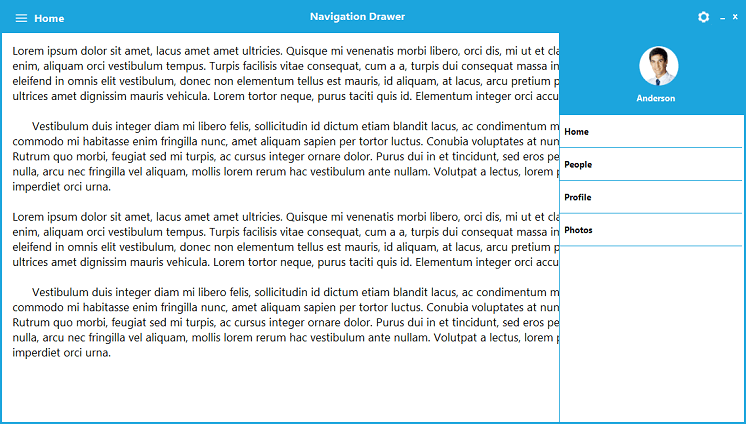
Windows Forms side bar at right
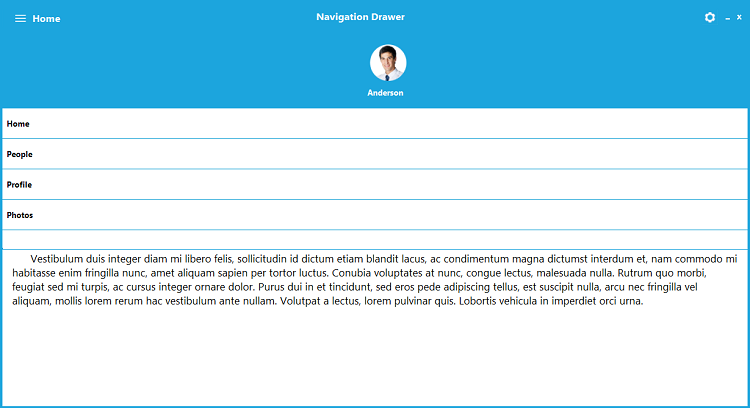
Windows Forms side bar at top
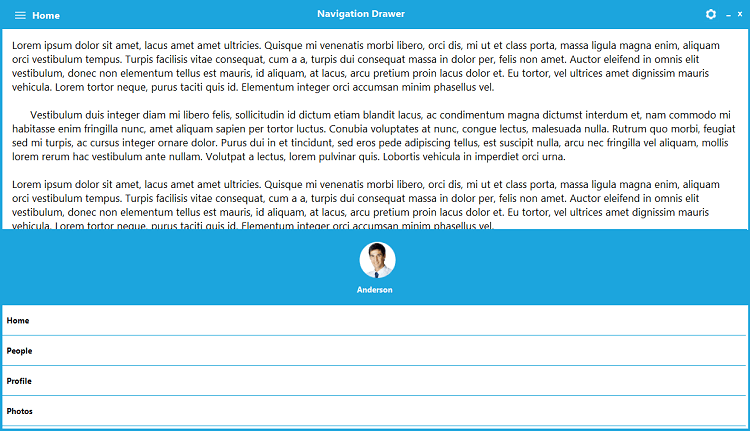
Windows Forms side bar at bottom
Position
The position property can be used to customize the position of the drawer. The drawer can be placed in the left, right, top, or bottom positions.
Custom style
The Navigation Drawer control includes a rich set of themes for professional representation. Using the built-in themes, you can easily change the appearance and feel of the control.
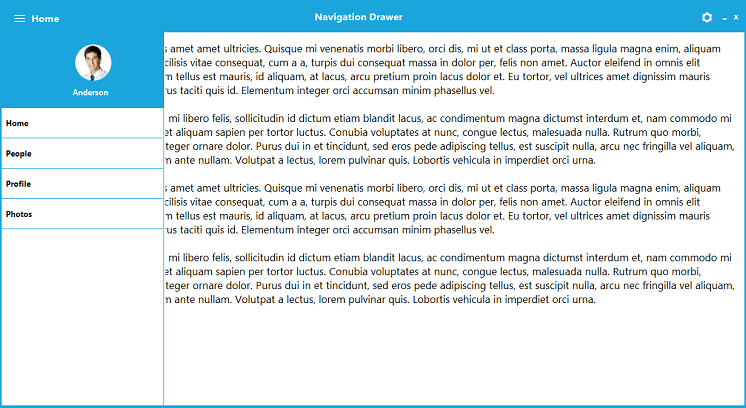
Custom views

Content view
The Navigation Drawer’s main view is the content view, on which the desired items can be placed.

Drawer view
Drawer view is a container that will be displayed on top, alongside and below the content view section, upon selection.
WinForms Navigation Drawer Code Example
Easily get started with the WinForms Navigation Drawer using a few simple lines of C# code example as demonstrated below. Also explore our WinForms Navigation Drawer Example that shows you how to render and configure the Navigation Drawer in WinForms.
using Syncfusion.Windows.Forms.Tools;
namespace WinFormsApp1
{
    public partial class Form1 : Form
    {
        Button showNavigation = new Button();
        NavigationDrawer navigationDrawer1 = new NavigationDrawer();
        DrawerHeader header = new DrawerHeader();
        DrawerMenuItem drawerMenuItem1 = new DrawerMenuItem();
        public Form1()
        {
            InitializeComponent();
            showNavigation.Height = 33;
            showNavigation.Width = 123;
            showNavigation.Location = new Point(300, 200);
            showNavigation.Text = "Show And Hide Navigatio Drawer";
            showNavigation.Click += showNavigation_Click;
            this.header.HeaderText = "header";
            this.header.Location = new System.Drawing.Point(2, 0);
            this.header.Size = new System.Drawing.Size(34, 32);
            this.header.Text = "Header";
            //
            // drawerMenuItem1
            //
            this.drawerMenuItem1.Size = new System.Drawing.Size(250, 50);
            this.drawerMenuItem1.Text = "Inbox";
            this.navigationDrawer1.Dock = System.Windows.Forms.DockStyle.Left;
            this.navigationDrawer1.DrawerWidth = 450;
            this.navigationDrawer1.DrawerHeight = 350;
            this.navigationDrawer1.Items.Add(this.header);
            this.navigationDrawer1.Items.Add(this.drawerMenuItem1);
            this.navigationDrawer1.Location = new System.Drawing.Point(0, 20);
            this.navigationDrawer1.Size = new System.Drawing.Size(200, 200);
            this.navigationDrawer1.Text = "navigationDrawer1";
            this.Controls.Add(navigationDrawer1);
            this.Controls.Add(showNavigation);
        }
        private void showNavigation_Click(object sender, EventArgs e)
        {
            navigationDrawer1.ToggleDrawer();
        }
    }
}
Not sure how to create your first WinForms Navigation Drawer? Our documentation can help.
I’d love to read it now120+ WINDOWS FORMS CONTROLS
ALL CONTROLS
CONVERSATIONAL UI
DATA VISUALIZATION
INPUT CONTROLS
NAVIGATION
DIALOGS & NOTIFICATION
LAYOUT
CALENDAR
MISCELLANEOUS
FILE VIEWERS & EDITORS
Standalone UI SDKs
Integrate the DataGrid, Chart, Scheduler and Diagram UI components into applications to enable rich interaction and visualization, delivering a seamless user experience.
Document Solutions
Integrate the PDF Viewer, DOCX Editor, Spreadsheet Editor, and document-processing libraries into the WinForms applications to enable a smooth user experience.
Frequently Asked Questions
Why should I choose Syncfusion WinForms Navigation Drawer?
- Menu displays in a sliding panel that opens only when users need it.
- Placement and layout are flexible.
Seamless navigation with built-in animations like push, reveal, and slide.
- One of the best WinForms Navigation Drawer in the market that offers feature-rich UI to interact with the software.
- Option to set the transition type of the Navigation Drawer while opening.
- Simple configuration and API.
Extensive demos and documentation to learn quickly and get started with WinForms Navigation Drawer.
Where can I find the Syncfusion WinForms Navigation Drawer demo?
You can find our WinForms Navigation Drawer demo on
GitHub location.
Can I download and utilize the Syncfusion WinForms Navigation Drawer for free?
No, this is a commercial product and requires a paid license. However, a free community license is also available for companies and individuals whose organizations have less than $1 million USD in annual gross revenue, 5 or fewer developers, and 10 or fewer total employees.
How do I get started with Syncfusion WinForms Navigation Drawer?
A good place to start would be our comprehensive getting started documentation.
Our Customers Love Us
Having an excellent set of tools and a great support team, Syncfusion® reduces customers’ development time.
Here are some of their experiences.
Here are some of their experiences.

Excellent experience with Syncfusion!
Syncfusion is a product that makes life easier! I use it to create Blazor applications (server side and webassembly) and the controls speed up development a lot. Furthermore, if needed, it is possible to ask for direct support that is never long in coming!

Andrea Scarpante,
Sydea srl
The complete component set
It is the most complete component set available. Also very handy is the fact that there is a community edition, this gives me the opportunity to test thing at home without buying a separate license.

Johan Visser,
H and T Pawnbrokers
See Real Success Stories
Developers around the world trust Syncfusion’s Essential Studio to simplify complex projects and speed up delivery. With a vast library of UI controls, powerful SDKs, and reliable support, Essential Studio helps teams build enterprise-ready applications with confidence.
Read Our Customer StoriesIndustry
Software development
75% Cost reduction
50% Faster development
Industry
Utilities (oil and gas)

450+ hours saved
Streamlined processes and hours of development effort saved.

Advanced, flexible features
Empowered users through robust and versatile functionality.
Industry
Software and technology
1000+ of hours saved
Accelerated development with enterprise-ready UI components.

Efficient file management
Streamlined workflows with document libraries without building them from scratch.
Industry
Software and technology

2 Years of delay avoided
Two years of delays prevented with proactive planning.

On-time delivery
Projects delivered on schedule using trusted controls.
Industry
IT services and IT consulting

Improved performance
Large datasets handled with easy customization and quick debugging.

Highly customizable
Plug-and-play controls with quick template integration.
Industry
Professional services
Instant access
Quick availability of features and resources.
Reduced dependencies
Fewer dependencies for faster development.
Rated by users across the globe
Syncfusion Windows Forms Resources
Learning  Documentation
 Documentation


Awards
Greatness—it’s one thing to say you have it, but it means more when others recognize it. Syncfusion® is proud to hold the following industry awards.









