Overview
ASP.NET MVC Stock Chart, also known as the ASP.NET MVC Candlestick Chart is mostly used in the stock market to represent the high, low, open, and close values of the stock. Supports interactive trackball, crosshair feature to track information on data.
Hollow and filled Candlestick Chart
A filled candlestick is drawn when the stock closes lower than the opening price, representing the open price at the top and close price at the bottom.
Multi series
Use multi-series Candlestick to represent two or more data set, each data set representing high, low, open, and close values.
Combination for Candlestick with another chart
Use line and column charts along with candle chart to show the close and volume of the data.
Multiple pane
Allows you to render the stock price in different panes of the chart. Visualize the candle values in one pane and the volume in a different pane.
Candle chart with Range selector
You can use the range selector along with financial chart to filter and navigate through a large number of data points.
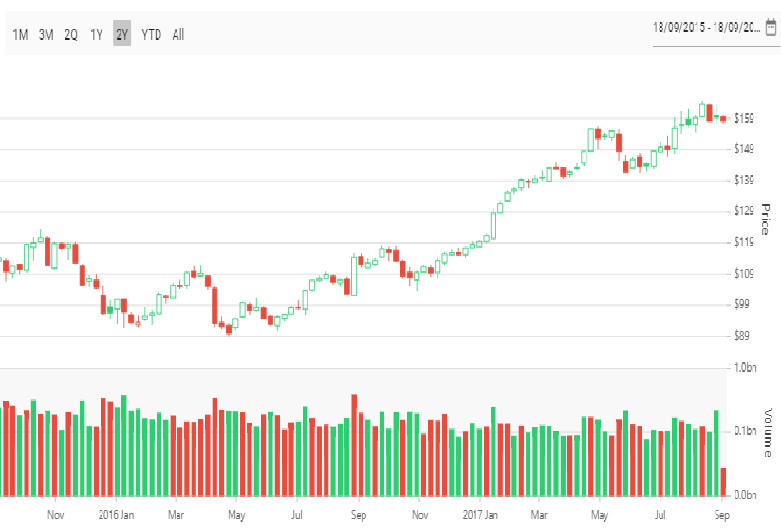
Bull and bear
Customizable bull and bear colors.
ASP.NET MVC Candle Chart Code Example
Easily get started with ASP.NET MVC Stock Chart using a few simple lines of C# code example as demonstrated below. Also explore our ASP.NET MVC Candle Chart Example that shows you how to render and configure the chart.
@Html.EJS().Chart("container").Series(series =>
{
    series.Type(Syncfusion.EJ2.Charts.ChartSeriesType.Candle).XName("x").High("high").Low("low").Open("open").Close(close").
    DataSource(ViewBag.dataSource).Add();
}).PrimaryXAxis(px => px.ValueType(Syncfusion.EJ2.Charts.ValueType.Category)).Render();
public class HomeController : Controller
{
public ActionResult Index()
{
List<ChartData> chartData = new List<ChartData>
{
new ChartData { x= "South Korea", high = 39.4, low = 23, open = 6, close = 11 },
new ChartData { x= "India", high = 3274, low = 19, open = 16, close = 21 },
new ChartData { x= "Pakistan",high = 19.4, low = 14, open = 23, close = 24 },
new ChartData { x= "Germany", high = 29.4, low = 16, open = 12, close = 15 },
new ChartData { x= "Australia", high = 17.4, low = 18, open = 15, close = 23 },
new ChartData { x= "Italy", high = 12.4, low = 18, open =12, close = 17 },
new ChartData { x= "United Kingdom", high = 29.4, low = 13, open = 9, close = 21 },
};
ViewBag.dataSource = chartData;
return View();
}
}
public class ChartData
{
public string x;
public double high;
public double low;
public double close;
public double open;
}Learning Resources


140+ ASP.NET MVC UI CONTROLS







