Overview
The WPF TreeGrid control provides support to select rows and use keyboard navigation. Users can display checkboxes in tree nodes and use recursive checking and selection synchronization.
Row selection
Users can select rows with extensive support for keyboard navigation. The following ways are available to select items:
- Single-row selection
- Multiple-row selection
- Extended multiple-row selection

Checkbox node selection

Node selection
Select rows or nodes using an intuitive checkboxes in a row. WPF TreeGrid provides different modes of checkbox selection. It’s also possible to show an indeterminate state in a checkbox.
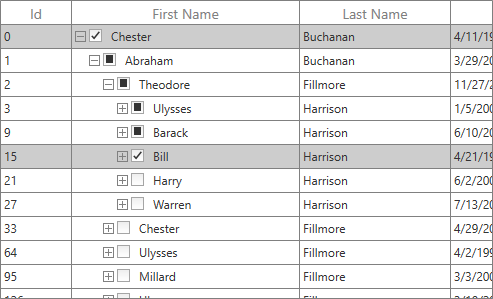
Tristate checkbox
Users can make the checkboxes with an indeterminate state (tri-state).

Recursive checking
Select all the child nodes by clicking a parent node checkbox recursively. Also, synchronize the selection with the checkbox click.

Conditional checkbox
Users can enable or disable a checkbox, and customize its appearance, based on conditions.
Selection style
Users can customize the appearance of a row or cell selection:
- Text color
- Background color
- Selection border

Navigation modes
Navigate based on a row or cell. Row-based keyboard navigation allows users to navigate only between rows like in list box selection.

Disable selection or navigation for columns
Disable the selection or navigation on a particular column easily to make read-only columns for just displaying the data alone.
Keyboard interaction
Navigate rows or cells to select rows. Keyboard navigation is similar to that in Excel, including shift key combinations.
140+ WPF CONTROLS







