
 Deepa Thiruppathy
TL;DR: Struggling with complex document automation or AI integration? Syncfusion Document SDK 2026 Volume 2 introduces AI Agent Tools, Markdown conversion, enhanced OCR, and performance improvements across PDF, Word, Excel, and PowerPoint libraries to help you build faster, smarter, and more reliable document solutions.
If you’ve ever spent hours maintaining PDF parsers, fixing document conversion issues, or trying to make AI understand complex document content, you’re not alone. Document-heavy applications often become difficult to maintain as requirements grow across formats, platforms, and automation scenarios.
Syncfusion Essential Studio® 2026 Volume 2 for Document Processing addresses these challenges with AI agent tools, Markdown conversion, and enhancements across PDF, Word, Excel, and PowerPoint libraries.
Here’s what’s new and why it matters in real-world applications.
Deterministic Document Processing for AI Agents
AI-powered document processes often break down at the same point: document structure. Large language models don’t natively understand PDFs, Word files, or spreadsheets. Teams end up stitching together prompts, parsers, converters, and validators, creating pipelines that are hard to maintain and easy to break.
AI Agent Tools for the Document SDK
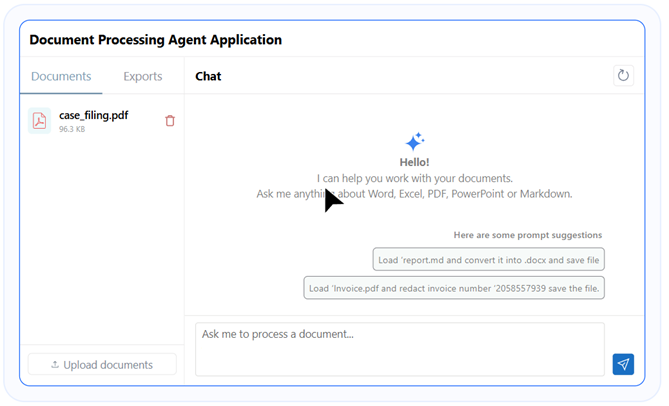
The Syncfusion AI Agent Tools library addresses this by providing AI agents with direct access to reliable, production-ready document operations via callable tools powered by the Syncfusion Document SDK.
Instead of asking an LLM to “figure out” document structure, agents can now invoke deterministic operations such as:
- PDF: Create, convert, redact, sign, merge, and compress PDFs.
- Word: Perform mail merge, track changes, and convert documents.
- Excel: Create charts, work with formulas and pivot tables, and export data.
- PowerPoint: Merge, split, and convert presentations.
- Office-to-PDF: Convert Word, Excel, and PowerPoint files to PDF.
- Smart Data Extraction: Extract tables, forms, text, and scanned-image content as structured JSON.
The library runs entirely within your infrastructure on-premises or private cloud and integrates with OpenAI, Azure OpenAI, Claude, or custom orchestration systems. Documents never leave your environment.
Execution can be handled entirely in memory for low-latency operations or through cloud-backed storage (Azure Blob Storage or Amazon S3) for scalable, stateless processing.
Real-world example: An insurance claims application can use AI Agent Tools to extract data from uploaded documents, generate reports, convert files, and archive records without relying on custom parsing logic for each document type.
Download the AI Agent Tools NuGet package and extend it with your own custom AI agent tools by cloning the open-source repository for the real-world use cases.
Agent Skills: Accurate SDK code inside your IDE
Alongside AI Agent Tools, Document SDK Agent Skills focus on developer productivity.
Agent Skills ground AI coding assistants in verified Syncfusion APIs, eliminating outdated or hallucinated code suggestions. When installed, supported IDEs and assistants can generate accurate, production-ready code using the correct NuGet packages and platform-specific patterns.
Agent Skills support:
- Word, PDF, Excel, PowerPoint, Markdown, data extraction, and calculation libraries
- .NET, Java, Flutter, and JavaScript platforms
- Works with GitHub Copilot, Visual Studio Code, Code Studio, Cursor, Claude, and more.
- Two operating modes: Generate code (Mode 1), Execute via csx script (Mode 2)
- One-command installation and granular skill selection
- Auto loaded by supported agents
Depending on the prompt style, developers can either generate ready-to-use code snippets or execute document actions directly via temporary scripts.
Real-world example: A development team building a document management system can generate SDK-specific code directly inside their IDE, reducing time spent searching documentation and correcting AI-generated code suggestions.
Stop building fragile LLM-to-document pipelines from scratch! Explore Syncfusion AI Agent Tools documentation and Document SDK Agent Skills documentation to get started.
Markdown as a first-class enterprise format
Markdown has become the preferred authoring format for developers and content teams, but most enterprise delivery still happens in Word, Excel, PowerPoint, and PDF. Bridging that gap manually slows everything down.
.NET Markdown Library (Preview)
The Syncfusion .NET Markdown Library introduces a structured document object model for Markdown, allowing developers to create, read, and edit Markdown programmatically without external dependencies.
What you can build and format
- Document creation with DOM: Create Markdown documents programmatically using a structured, intuitive object model for clean, maintainable code.
- Rich content support: Add and organize Headings, paragraphs, block quotes, thematic breaks, tables, lists, and checkboxes.
- Advanced text formatting: Apply rich formatting including bold, italic, strikethrough, inline code, subscript, and superscript.
- Media and linking: Insert images and hyperlinks to enhance document interactivity.
- Code block support: Easily include formatted code blocks for technical documentation.
Supported conversion:
Seamlessly convert Markdown to and from multiple popular file formats using Syncfusion libraries:
- Word documents: Convert Markdown to Word and text formats such as .doc, .docx, .xml, .html, and .rtf, and convert Word documents to Markdown.
- Excel documents: Convert Excel files to and from Markdown.
- PowerPoint presentations: Convert PPTX files to Markdown and generate PPTX files from Markdown.
- PDF documents: Convert Markdown to PDF format and convert PDF documents to Markdown.
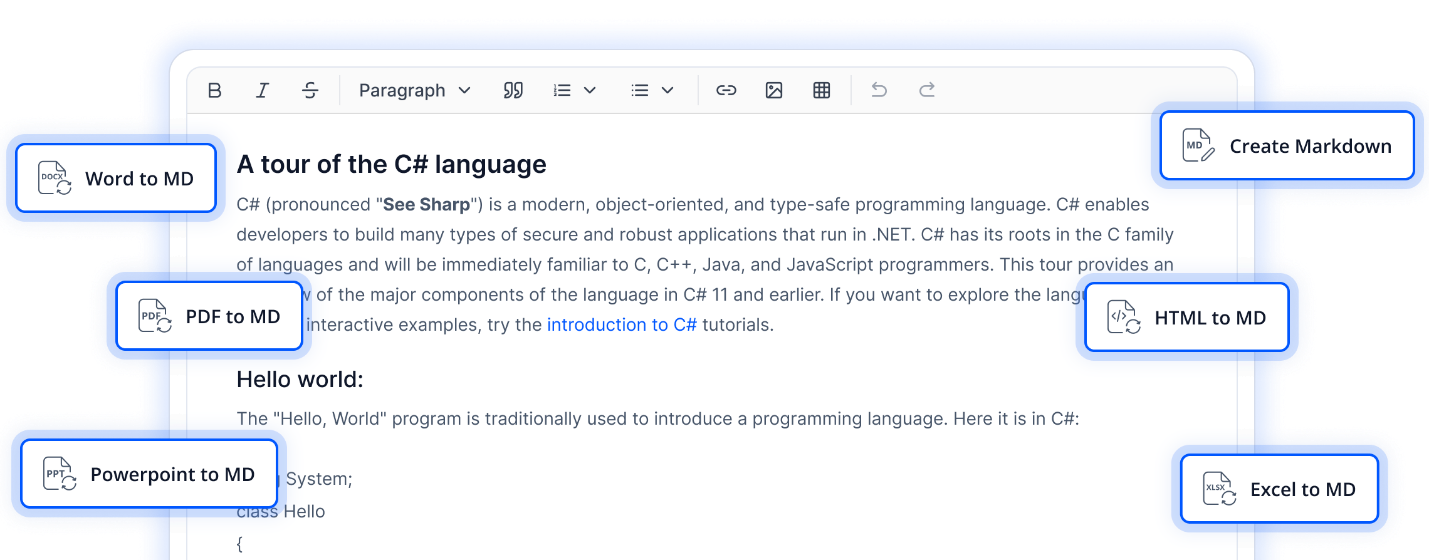
The Syncfusion .NET Markdown Library covers more conversion targets than any comparable lightweight Markdown library, making it the practical choice for teams that need Markdown as a bridge between authoring and enterprise delivery formats.
Real-world example: A documentation platform can store content in Markdown and automatically publish it as Word, PDF, PowerPoint, and Excel files for different audiences without maintaining separate versions of the same content.
PDF enhancements across platforms
.NET PDF Library: HTML-to-PDF security update
HTML-to-PDF remains a core process for invoices, dashboards, and reports. In this release, the Blink binaries used for HTML-to-PDF conversion have been updated to version 147.0.7727.56, which addresses known security vulnerabilities and improves conversion reliability.
JavaScript PDF Library: Layout and metadata control
The JavaScript PDF Library now offers deeper layout-level control, enabling more complex client-side PDF generation.
New capabilities include:
- Layout-aware text elements with styling, alignment, and automatic pagination.
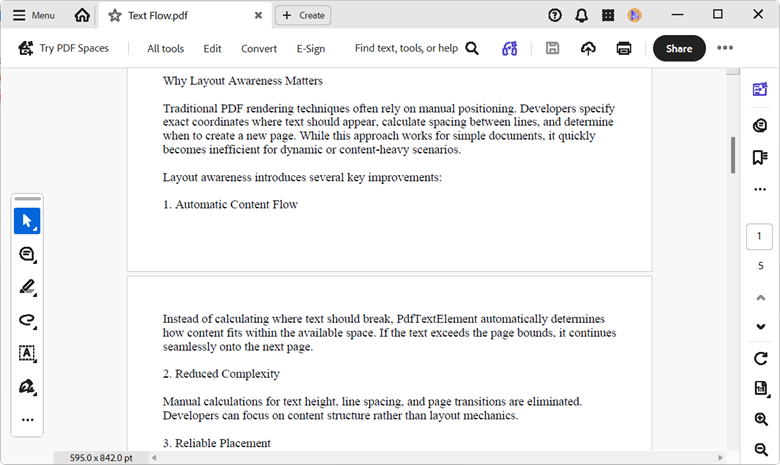
Layout-Aware Text Elements in JavaScript PDF Library - Reusable header and footer templates with static content and dynamic fields such as page numbers and dates.
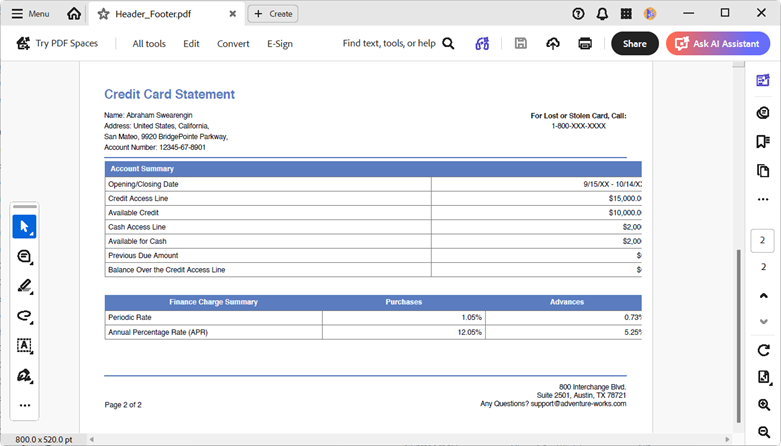
Reusable Headers & Footers in JavaScript PDF Library - XMP metadata embedding for standardized document indexing, searchability, and archival procedures.
For more details, check our JavaScript PDF library documentation.
Real-world example: A reporting application can generate secure, metadata-rich PDF invoices and statements directly from HTML while improving document traceability and searchability.
Smarter Data Extraction and OCR control
.NET Data Extraction Library updates
Accuracy in document extraction often depends on how much control you have over OCR and image handling. This release adds two practical improvements to the Syncfusion .NET Data Extraction Library:
- Custom image handling: Access extracted images as streams and choose whether to embed them directly in Markdown as base64 or reference them via URLs in cloud storage.
- Configurable OCR settings: Fine-tune language selection, OCR engine version, image preprocessing, page segmentation, and multi-language handling before extraction begins.
These controls are especially valuable in healthcare, logistics, and financial processes where extraction accuracy directly affects downstream systems.
Real-world example: A healthcare provider can extract information from scanned patient records using customized OCR settings, improving recognition accuracy before the data is routed to downstream systems.
If your extraction pipeline is losing accuracy because OCR settings are locked down, this release gives you the control you’ve been missing. Explore the .NET Data Extraction Library documentation.
Excel, Word, and PowerPoint improvements
- Place images directly inside cells so they move and resize naturally with cell changes.
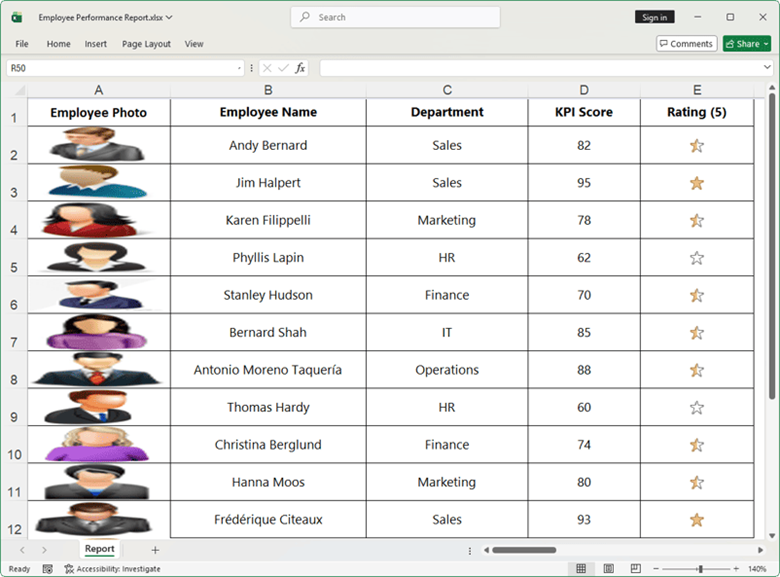
Images Inside Cells in .NET Excel Library - Convert Excel files to clean Markdown for documentation or publishing.
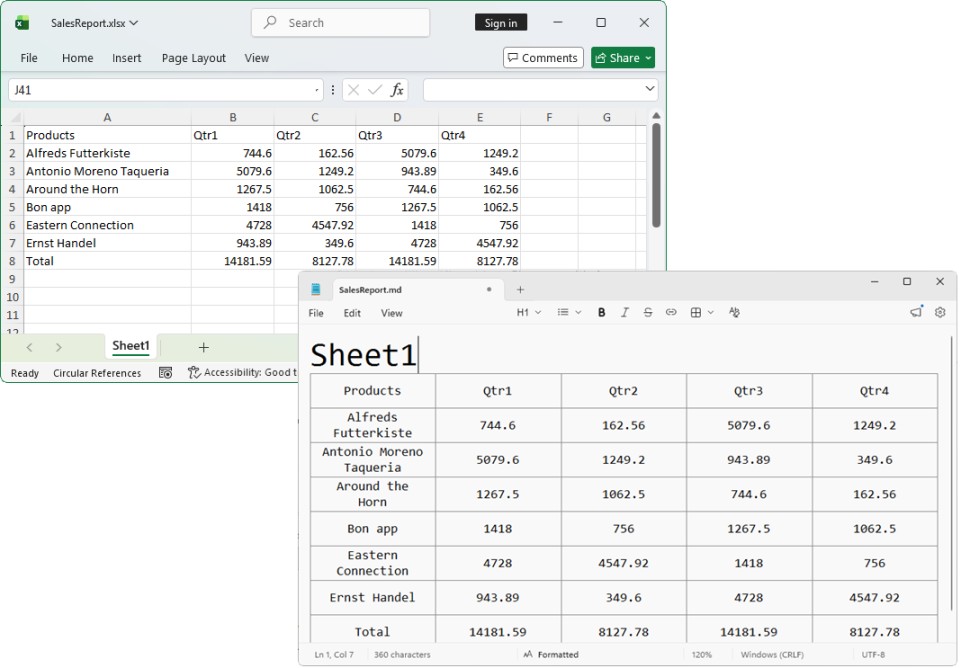
Convert Excel to Markdown in .NET Excel Library - Convert Markdown back into structured Excel data for reporting and analysis.
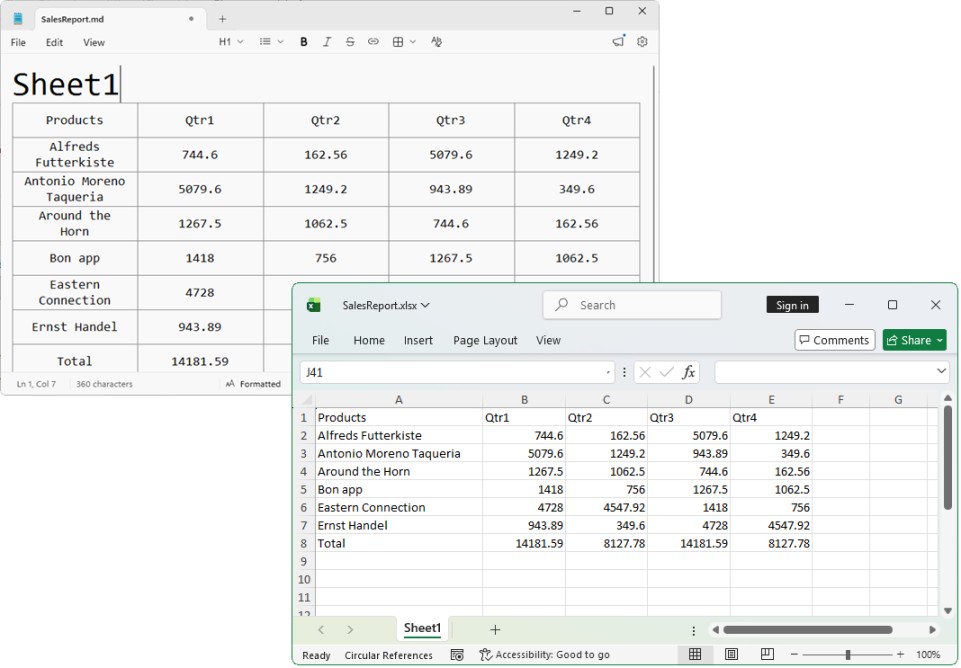
Convert Markdown to Excel in .NET Excel Library
Real-world example: A financial reporting application can convert spreadsheet data into Markdown for review, then regenerate structured Excel reports from updated content when publishing final results.
- Up to 70% faster clone and merge operations, ideal for high-volume document generation
- Improved HTML parsing with better support for attributes across paragraph and heading tags
This update delivers immediate, measurable gains for high-volume Word processing workloads. See the Syncfusion .NET Word Library documentation.
Real-world example: Organizations that generate thousands of personalized contracts or customer letters each day can reduce processing time by accelerating document cloning and merging.
- Full bidirectional conversion between Markdown and PPTX.
- Convert PowerPoint presentations to Markdown format
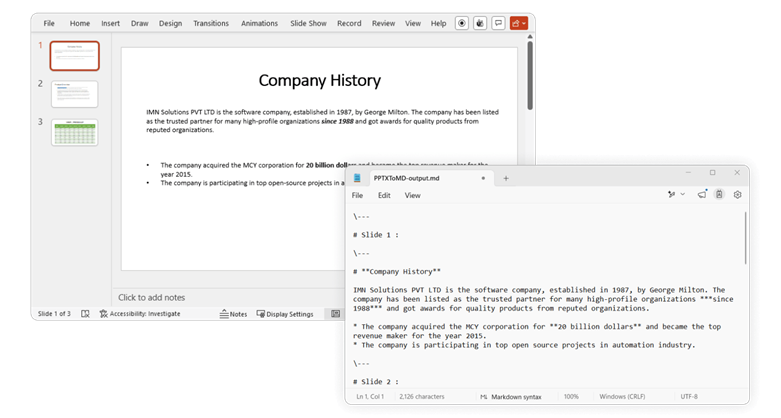
PowerPoint‑to‑Markdown Conversion in .NET PowerPoint Library - Convert Markdown documents into PowerPoint presentations
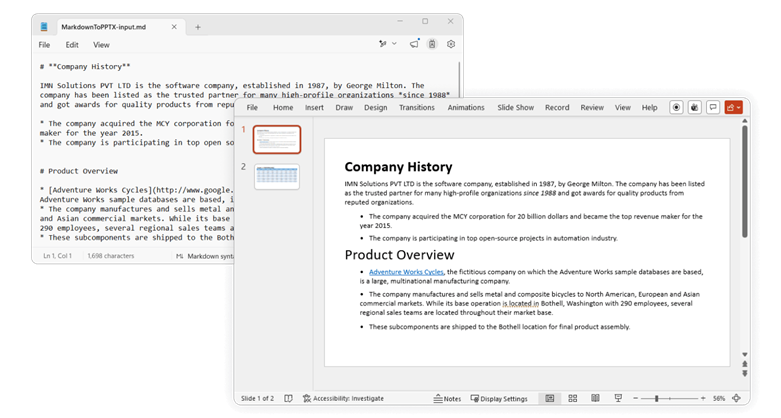
Convert Markdown to PowerPoint in .NET PowerPoint Library
- Convert PowerPoint presentations to Markdown format
- Generate presentations from structured Markdown content or publish existing decks as Markdown for reuse
Real-world example: Training teams can create presentation decks directly from Markdown-based course content and keep slide materials synchronized with their source documentation.
If your team is rebuilding slide decks from Markdown content by hand, the Syncfusion PowerPoint Library automates that entire process. Explore the .NET PowerPoint Library documentation.
Frequently Asked Questions
The Data Extraction Library works with PDFs and common image formats, including JPEG and PNG. Images can be saved as base64-encoded strings embedded directly in Markdown or as URL references pointing to cloud storage.What image formats does the .NET Data Extraction Library support for custom image saving?
No. All Syncfusion Document SDK libraries are fully independent. No Microsoft Office or Adobe installation is required on the server or client. The libraries handle all document processing internally.Does the Syncfusion Document SDK require Microsoft Office or Adobe to be installed?
You can configure the following OCR parameters before extraction: Language: Set the target language for text recognition. Tesseract version: Specify the Tesseract OCR engine version. Image enhancement mode: Adjust preprocessing for better accuracy on low-quality or handwritten documents. Page segmentation and regions: Control how pages are segmented for extraction. Multi-language document configurations are supported. For a full reference, see the OCR configuration documentation.What OCR settings are configurable in the .NET Data Extraction Library?
Yes. The new header and footer template support enables per-page dynamic content, including page numbers, dates, times, document titles, and static branding elements such as logos and shapes. Both static and dynamic content are supported within a single reusable template. You define it once, and it applies consistently across all pages.Does the JavaScript PDF Library support dynamic page headers and footers?
Yes. The AI Agent Tools library is designed for enterprise security requirements. All document processing runs fully on-premises or within your private cloud environment. No document content is transmitted to external services. You control the infrastructure; the library only coordinates with the AI orchestration system (OpenAI, Azure OpenAI, Claude, or custom) through your own API keys and endpoints.Can AI Agent Tools run entirely on premises without sending documents to external services?
Standard Copilot suggestions are based on general training data, which often produces outdated or hallucinated API calls for SDK-specific libraries. Agent Skills grounds the assistant in verified Syncfusion Document SDK APIs, correct NuGet package recommendations, and platform-specific patterns. The result is production-ready code on the first prompt, not code that requires manual correction against the documentation.How does Agent Skills differ from standard GitHub Copilot suggestions for Syncfusion APIs?
What does this release mean in practice?
Syncfusion Essential Studio® 2026 Volume 2 for Document Processing isn’t a collection of small tweaks. It’s a shift toward more reliable, scalable, and AI-compatible document processes.
AI agents can now work with documents deterministically instead of guessing. Markdown becomes a genuine bridge format across the SDK. And core libraries benefit from measurable improvements in performance, security, and accuracy without breaking existing pipelines.
If you’re building document-intensive applications in .NET or JavaScript, or integrating document processes into AI-driven systems, this release delivers practical improvements you can put into production immediately.
Ready to explore? Visit our What’s New and Release Notes and start building with these tools today!
If you’re a Syncfusion user, you can download the setup from the license and downloads page. Otherwise, you can download a free 30-day trial.
You can also contact us via our support forums, support portal, or feedback portal for queries. We are always happy to assist you!



 No spam, just valuable updates.