
 Deepa Thiruppathy
TL;DR: Syncfusion’s 2026 Volume 1 release offers smarter PDF, Word, and Excel automation along with the new Smart Extractors, faster Excel‑to‑PDF conversions, and interactive PDF/Word features. You can process tables, forms, and ink annotations with precision, apply localized date‑time fields, and redact sensitive images securely. With deterministic, on‑prem libraries across .NET, JavaScript, and Blazor, teams gain high‑performance, secure document intelligence without Office or Adobe dependencies.
Document workflows are becoming increasingly complex. From invoices and contracts to forms and reports, organizations must extract, process, and transform document data reliably at scale.
The Syncfusion® Essential Studio 2026 Volume 1 release introduces several important improvements to the Document SDK that help you build smarter and faster document workflows. These updates span .NET, JavaScript, and Blazor platforms, delivering new intelligent extractors, performance improvements, and richer document capabilities.
The result? You can automate document-heavy processes more reliably while maintaining complete programmatic control over PDF, Word, and Excel files without any dependency on Microsoft Office or Adobe tools.
Let’s explore what’s new in this release.
Smart Data Extractor: Document structure extraction (Preview)
Extracting structured data from PDFs and scanned images is a challenge many organizations face every day.
Consider a few common scenarios:
- Accounts teams manually key invoice data into ERP systems.
- Healthcare providers re-enter patient information from scanned forms.
- Legal teams search through thousands of contracts for specific clauses.
- HR systems process large volumes of unstructured resumes.
In all these situations, the real bottleneck is converting unstructured documents into reliable structured data.
The new Smart Data Extractor addresses this challenge. It is a high-performance C# library for .NET that analyzes the visual layout of PDFs and images to reconstruct complete document structures.
By examining layout cues such as alignment, spacing, and separators, the library identifies document elements and extracts them as structured data. Each extracted field includes a confidence score, allowing you to validate and integrate results into downstream systems.
Key capabilities
- Document structure extraction: Identify text, images, tables, headers, footers, and layout regions with precision.
- Form recognition: Automatically detect structured form fields.
- Table extraction: Detect table regions, rows, columns, and merged cells.
- Page-level control: Extract content from specific pages or ranges.
- File format support: Works with PDF, JPEG, PNG, and other common image formats.
- Confidence thresholding: Filter extracted results using configurable confidence scores (0.0–1.0).
These capabilities allow you to turn unstructured documents into structured data pipelines ready for analytics, automation, or system integration.
Smart Table Extractor: High-accuracy tabular data extraction (preview)
Tabular data is one of the most common formats used in business documents.
Examples include:
- Finance invoices
- Lab test reports
- Payroll breakdowns
- Tax schedules
- Insurance coverage summaries
Extracting this data accurately from scanned documents can be extremely difficult. A missed row, column, or merged cell can quickly lead to reporting errors or costly manual corrections.
The Smart Table Extractor is designed to solve this problem. This high-accuracy C# library detects table structures in PDFs and images, reconstructing rows, columns, headers, and merged cells with precision. It also returns structured outputs with confidence scores so you can validate extracted data before integrating it into downstream systems.
Key capabilities
- Detect table structures: Identify boundaries, headers, rows, columns, and cell spans with high accuracy.
- Work with multiple formats: Extract tables from PDF, JPEG, PNG, and other common image formats.
- Handle borderless tables: Even when table borders are faint or missing, the extractor can still detect the structure.
- Extract specific pages: Process only the pages or ranges you need.
- Control extraction accuracy: Adjust confidence thresholds to fine-tune the output quality.
This makes it easier to process financial reports, invoices, and other table-heavy documents with reliable accuracy.
Smart Form Recognizer: Intelligent form detection (preview)
Many organizations still rely on scanned forms that contain no interactive fields.
Common examples include:
- Loan applications
- Patient intake forms
- Legal agreements
- Government permits
- HR onboarding documents
Digitizing these forms typically requires manually recreating every field.
The new Smart Form Recognizer removes that manual step. This .NET library analyzes visual cues such as lines, boxes, and circles to detect form regions and identify fields like text inputs, checkboxes, radio buttons, and signatures. It then converts these detected elements into structured JSON and can automatically generate fillable PDFs.
Key capabilities
- Form layout detection: Detect structured fields using visual layout heuristics.
- Fillable PDF generation: Automatically convert detected forms into interactive PDFs.
- Page-level processing: Analyze entire documents or target only the page ranges you need.
- Multi-format support: Extract forms from PDF, PNG, JPEG, and other common formats.
- Confidence filtering: Adjust confidence thresholds to fine-tune results.
This dramatically simplifies the process of digitizing paper forms and integrating them into automated workflows.
.NET Excel Library: Faster conversions and smarter formulas
Beyond document extraction, this release also introduces important improvements to Excel automation.
Bar-of-Pie chart conversion support
Bar-of-Pie charts are commonly used in financial and analytical reports to highlight smaller categories that standard pie charts cannot display clearly. When exporting Excel documents to PDF or images, preserving these charts accurately is essential.
The Syncfusion Excel Library now supports converting Bar-of-Pie charts to high-quality images and PDFs, ensuring visual fidelity during Excel-to-PDF and Excel-to-image conversions.
14 new supported formulas
Modern Excel workflows often rely on dynamic array formulas to process large datasets.
To support these advanced scenarios, the library now adds support for 14 additional Excel formulas:
- DROP
- EXPAND
- HSTACK
- VSTACK
- RANDARRAY
- NORM_S_INV
- SEQUENCE
- TAKE
- WRAPCOLS
- WRAPROWS
- ISOMITTED
- MAKEARRAY
- REDUCE
- SCAN
These formulas are supported for both read and write operations, ensuring Excel documents generated programmatically maintain their intended logic and calculations.
Performance improvement for Excel-to-PDF conversion
Large Excel workbooks can slow down document processing pipelines. This release significantly improves Excel-to-PDF conversion performance. Workbooks containing up to 1.5 million cells now convert up to 72.27% faster (approximately 3× faster) than before.
This improvement reduces processing bottlenecks in reporting systems, invoice generation engines, and large-scale data workflows.
.NET PDF Library: Interactive page actions
Many documents require interactive behaviors such as navigation, validation, or automatic actions when a page loads.
Examples include:
- Training manuals that navigate users to relevant sections
- Onboarding guides that open external resources
- Compliance documents that trigger validation scripts
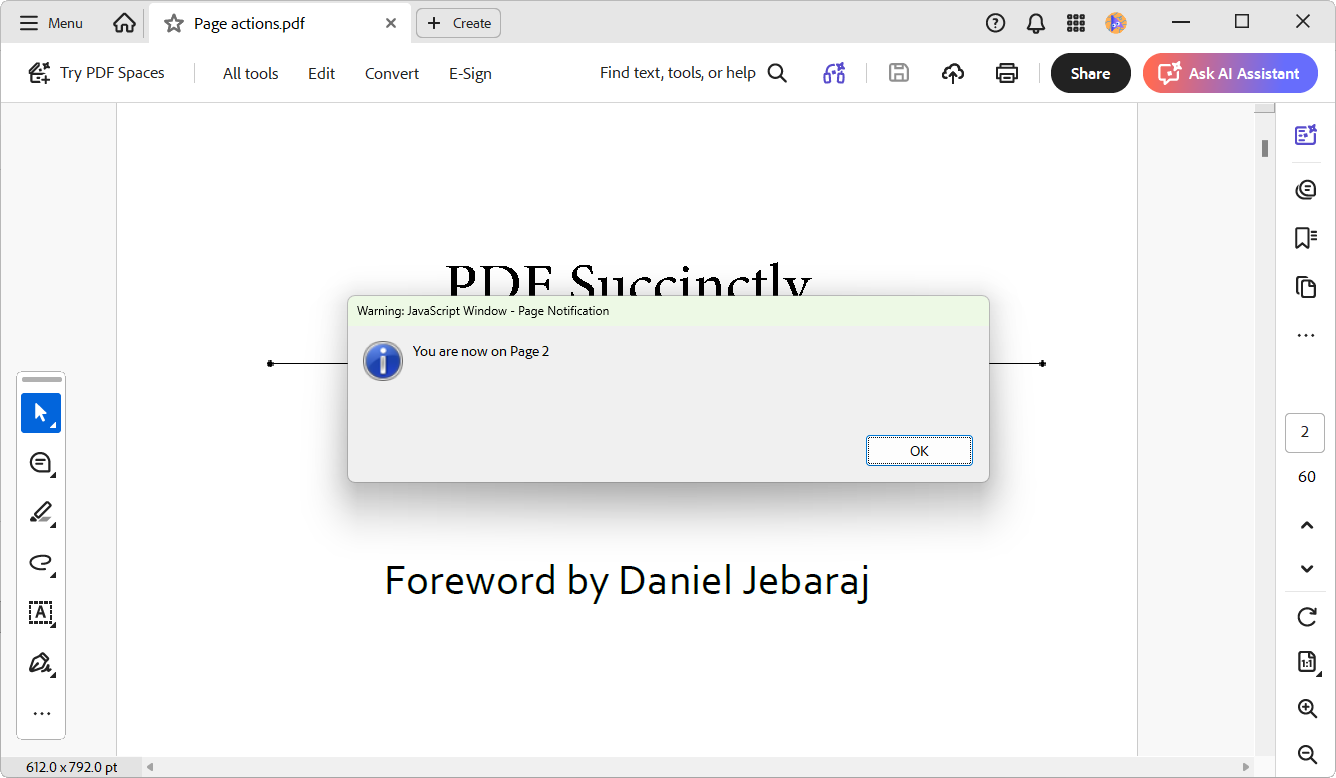
The Syncfusion .NET PDF Library now supports fully programmable page-level actions. You can add, modify, or remove actions triggered when a page opens or closes.
These actions enable scenarios such as:
- In-document navigation
- Opening external web links
- Executing JavaScript for interactive behavior
See the feature in action below:
.NET Word Library: Freehand ink and localized date-time fields
This release extends the .NET Word Library with freehand ink support and date-time localization.
Ink object support
Freehand ink drawings are widely used in education and engineering workflows. Designers sketch concepts using stylus input, field engineers annotate technical blueprints, and educators create handwritten diagrams for lessons.
With the Syncfusion .NET Word Library, you can now create, edit, and convert ink objects directly within .docx documents. Freehand drawings, annotations, and stylus-based inputs are preserved accurately during PDF and image conversions, maintaining full visual fidelity.
Localized date and time fields
Date formatting varies across regions.
For example:
- US format: 03/10/2026
- UK format: 10/03/2026
Incorrect formatting can create confusion in global documents.
The Word Library now supports localized date and time rendering, automatically applying the correct regional format based on the field language.
JavaScript PDF Library: Image redaction & text box field action support
This 2026 volume 1 release strengthens the JavaScript PDF Library with image redaction and form field actions.
Image redaction support
Before sharing documents, organizations often need to remove sensitive information such as:
- Customer account numbers
- Confidential signatures
- Medical records
- Personal identifiers
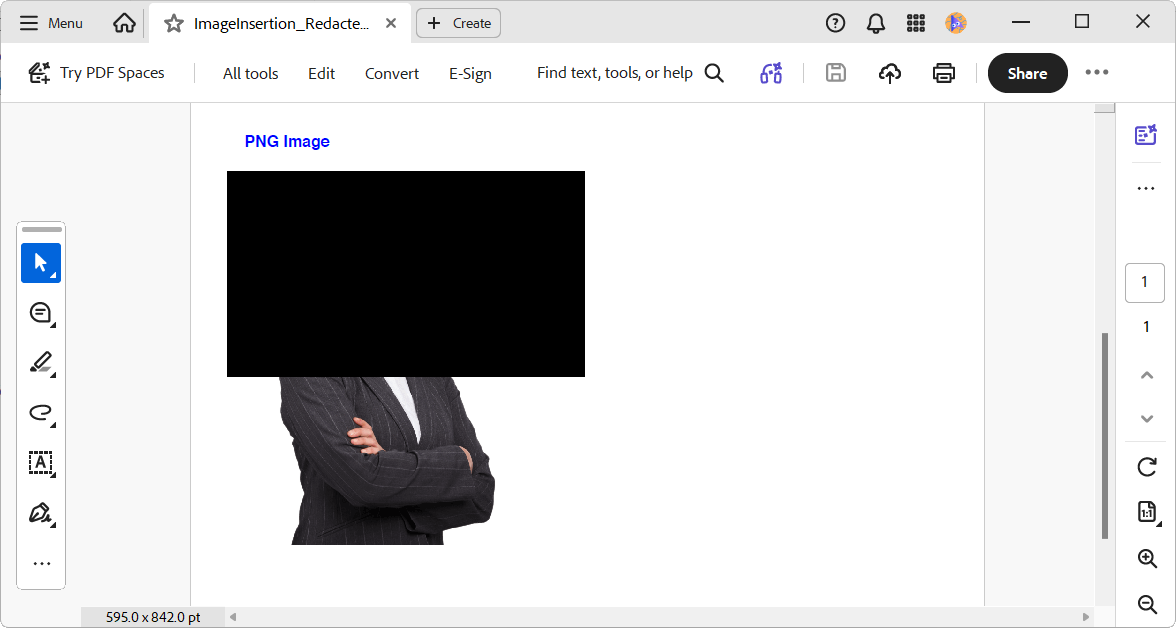
This level of permanent, irreversible image reduction is now built into the Syncfusion JavaScript PDF Library. You can permanently clear the sensitive content from the underlying image data, supporting secure document processing and compliance-focused workflows.
Take a look at how this functionality behaves:
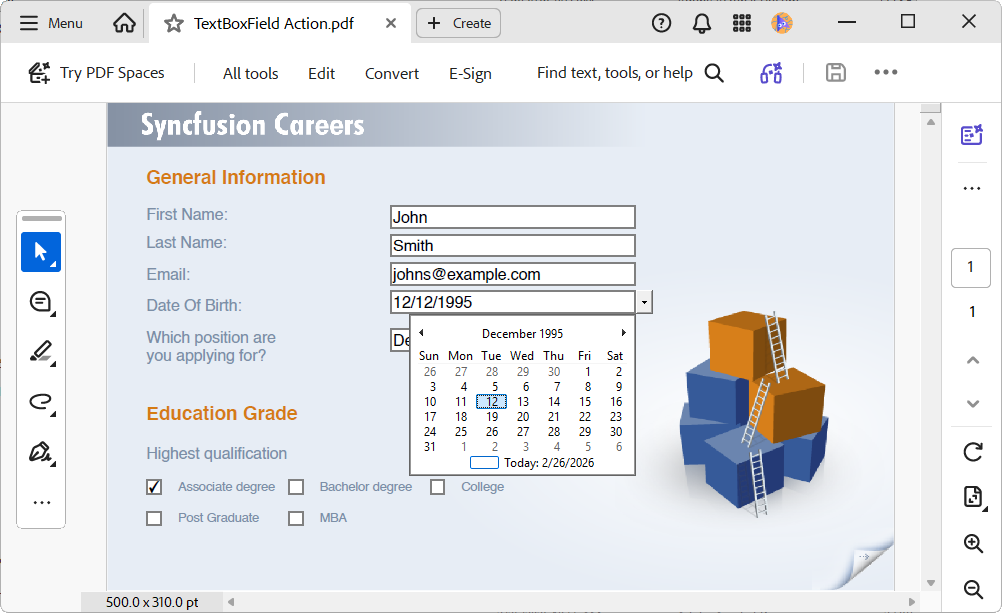
Text box field actions
Interactive PDF forms demand more than blank text fields. We need real-time validation and keystroke-level control in scenarios such as:
- Insurance policy number validation
- Government ID formatting
- Currency formatting for financial forms
Without validation, invalid data fails only on the backend, leading to costly rework. This is where Synfusion provides event-based text field validation as a solution.
The JavaScript PDF Library now supports text box field actions, namely, Key Pressed, Format, and Validate events. They enable Textbox form fields to respond to keystrokes in real-time, apply custom formatting rules, and enforce validation logic as part of interactive PDF workflows.
Here’s a preview of the feature in action:
Dedicated Font Manager: Cross-library enhancement
We have introduced a new FontManager class to provide a unified and optimized font-caching system shared across all document-conversion libraries, including:
- Word-to-PDF
- Excel-to-PDF
- PowerPoint-to-PDF
- PDF-processing workflows
This centralized font management significantly optimizes performance and memory usage in multithreaded conversions by preventing redundant font loading.
Key capabilities:
- Shared font caching: Stores the fonts in a unified cache to avoid repeated loading.
- Memory reduction: Eliminates duplicate font objects, reducing memory usage during large or parallel document conversions.
- Performance optimization: Allows multiple threads to safely reuse the same font instances, improving processing speed.
- Automatic cleanup: Disposes of unused fonts after a configurable delay (
FontManager.Delay) to keep long-running apps working efficiently at all times. - Manual cache reset: Provides
FontManager.ClearFontCache()to immediately clear all cached fonts whenever you need (while stopping the servers).
Document SDK Visual Studio Code Extension: Zero minutes to Blazor apps
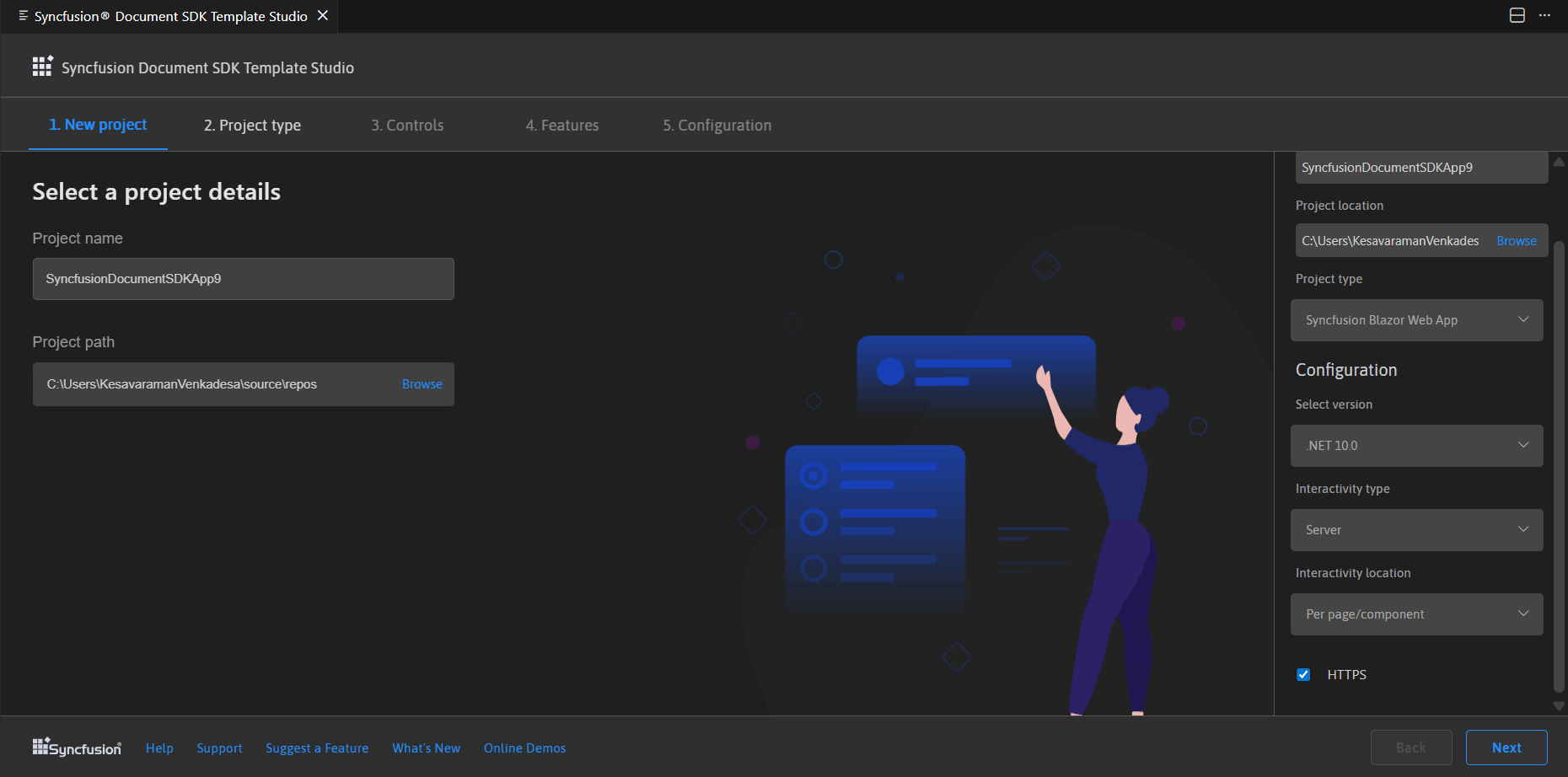
Syncfusion Document SDK Extension for Visual Studio Code now helps you quickly build Blazor apps with powerful components for handling PDF, Excel, Word, and PowerPoint files; no Microsoft Office or Adobe software is required. It offers ready-to-use project templates and handy Blazor code snippets, so beginners can get started quickly with preconfigured document-processing features.
Frequently Asked Questions
Can ink objects created in Word documents be preserved during Word‑to‑PDF conversion?
Yes. Ink elements created in .NET Word (DocIO) library are fully preserved during Word‑to‑PDF conversion.
Can I add custom text to redaction region in the JavaScript PDF Library?
Yes. Developers can add custom text on the redaction regions to indicate that the content was intentionally removed for compliance, auditing, or security reasons.
Does the Visual Studio Code extension support Word, PDF, and Excel libraries in Blazor?
Yes. With this release, the Visual Studio Code extension provides support for all Blazor document libraries, including Word, PDF, and Excel components.
Is there any specific excel formula to remove specific rows or columns from a range?
Yes. The DROP in-built formula is designed to remove specific rows or columns from a range. Along with DROP, 13 other new dynamic array functions extend your ability to reshape, combine, filter, generate, and transform Excel data dynamically.
Wrapping up
Thanks for reading! In this blog, we explored the new user-friendly features added in the Syncfusion Document Processing Libraries as part of the Essential Studio 2026 Volume 1 release. This release is designed around intelligence, performance, and precision, bringing you:
- Smarter Document SDKs,
- Faster Excel conversions, and
- Richer document fidelity.
Our goal is to help you build smarter document workflows with reliable, developer‑friendly tools.
Ready to explore? Visit our What’s New and Release Notes pages and start building with these tools today!
Your feedback matters! Share your thoughts in the comments or connect with us through our support forum, support portal, or feedback portal. We can’t wait to see what you create!




 No spam, just valuable updates.