Try Our Live Demo
Why the right notation matters
A diagram is only useful if the people reading it understand it immediately. Using the notation built for what’s being modeled, rather than stretching one generic notation to cover everything, makes that possible.
A shared visual language
Standard symbols mean a decision point, a database field, or a business gateway reads the same way for every viewer, technical or not.
Structure matched to each model
Business processes, databases, and software designs each have different natural shapes; a dedicated notation fits each one.
Less time drawing, more time modeling
Ready-made shapes and connectors mean a process diagram gets assembled instead of constructing every symbol from scratch.
Flowchart
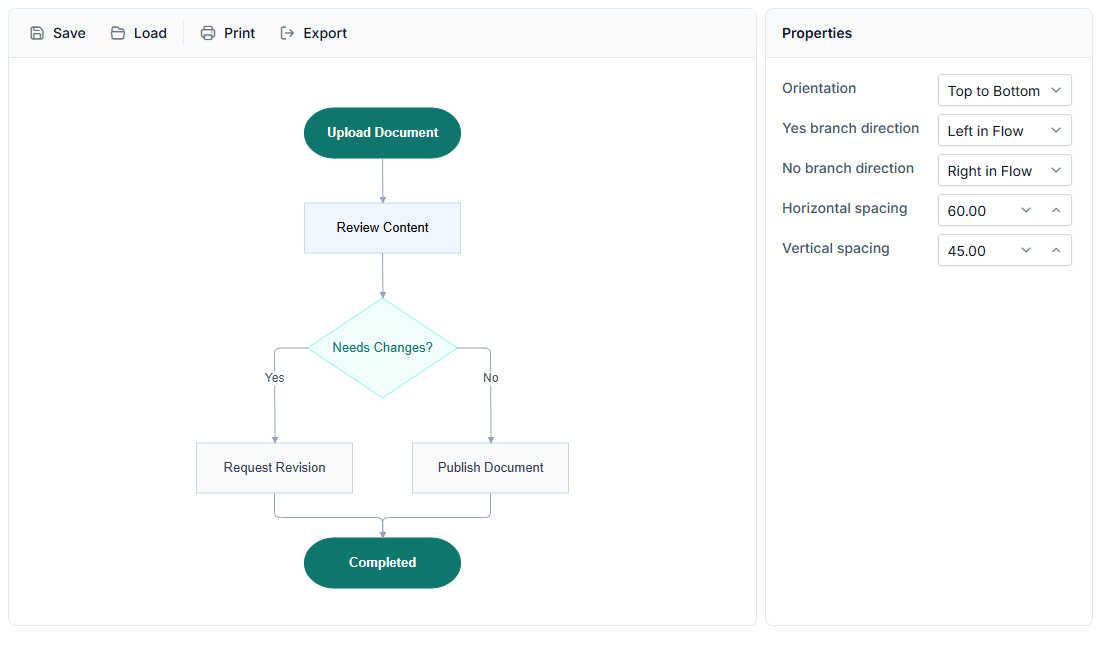
A flowchart uses a small, recognized set of symbols so that a process, decision, or stored-data step means the same thing wherever it appears, connected by arrows that show which step comes next. Use a flowchart when a sequential process needs to be communicated in a universally recognized notation.
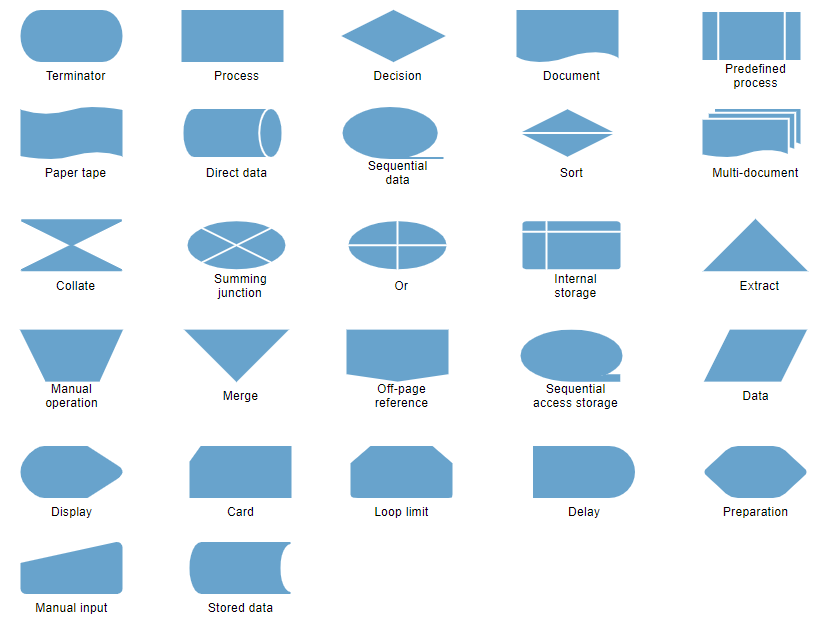
- Provide Terminator, Process, Decision, Data, Document, and similar shapes as ready-made objects, or from a Symbol Palette
- Support straight, orthogonal, and curved connectors, with decorators marking flow direction and labels such as Yes or No on a decision branch
- Generate an entire flowchart from a data source instead of placing shapes manually, using the Automatic Layouts algorithm
- Deliver consistent flowchart shapes across every supported platform, as shown in the platform support table below

BPMN
BPMN (Business Process Model and Notation) is a stricter, standardized notation built for sharing business process definitions across organizations, rather than the generic symbols a flowchart uses. Use BPMN when a process definition must be exchanged between teams or organizations.
- Provide events (circles), gateways (diamonds), and activities (rounded rectangles) as the three core building blocks
- Support sequence, message, and association connectors, each carrying a distinct semantic meaning
- Deliver BPMN shapes across JavaScript, Angular, React, Vue, Blazor, ASP.NET Core, MVC, WPF, and UWP platforms
- Enable the full BPMN shape catalog and configuration through the BPMN Diagrams page
Swimlane
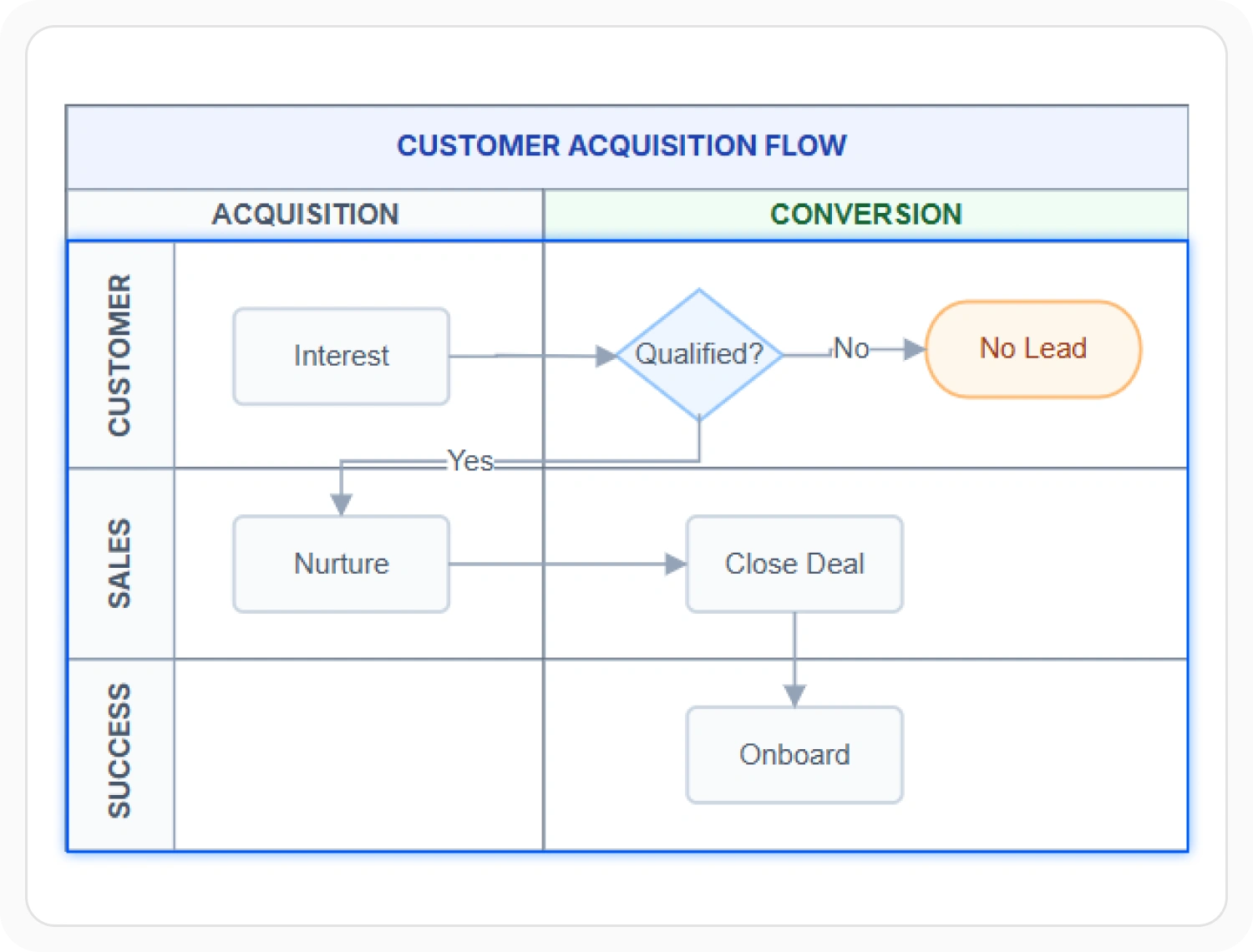
A swimlane diagram shows a process and the department or role responsible for each part of it in a single view, using a built-in swimlane shape rather than a hand-drawn grid. Use a swimlane when responsibility for each step needs to be visible alongside the process flow.
- Provide lanes to represent responsibility and phases to mark stages over time, cutting across every lane at once
- Deliver a single built-in swimlane shape that replaces a grid assembled from individual rectangles and lines
- Support horizontal and vertical lane orientations, phase headers, and lane-specific content placement across supported platforms
- Enable full swimlane configuration through the Swimlane Diagrams page
UML
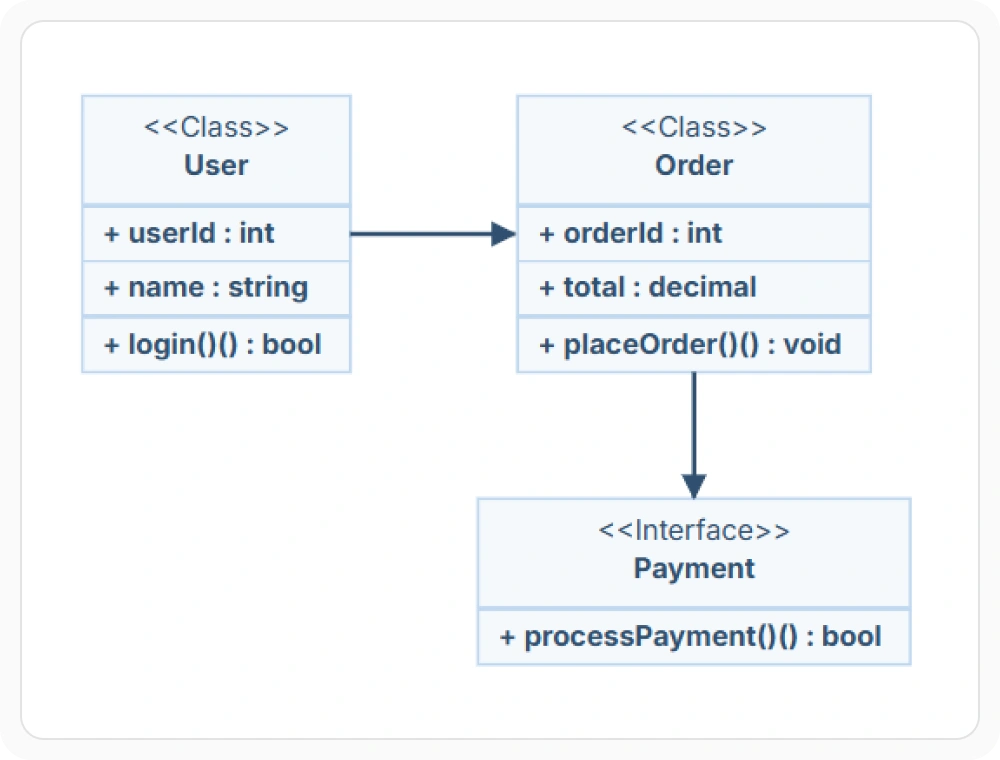
UML defines its own stricter notations for describing software, rather than the general-purpose symbols a flowchart uses. Use UML when software structure, behavior, or interaction needs a notation designed for it specifically.
- Support class diagrams to describe structure: classes, interfaces, and the relationships between them
- Provide activity diagrams to describe behavior, including parallel flow through fork and join nodes
- Deliver sequence diagrams to describe interaction between participants over time
- Enable the full UML notation through the UML Diagrams page
Entity Relationship
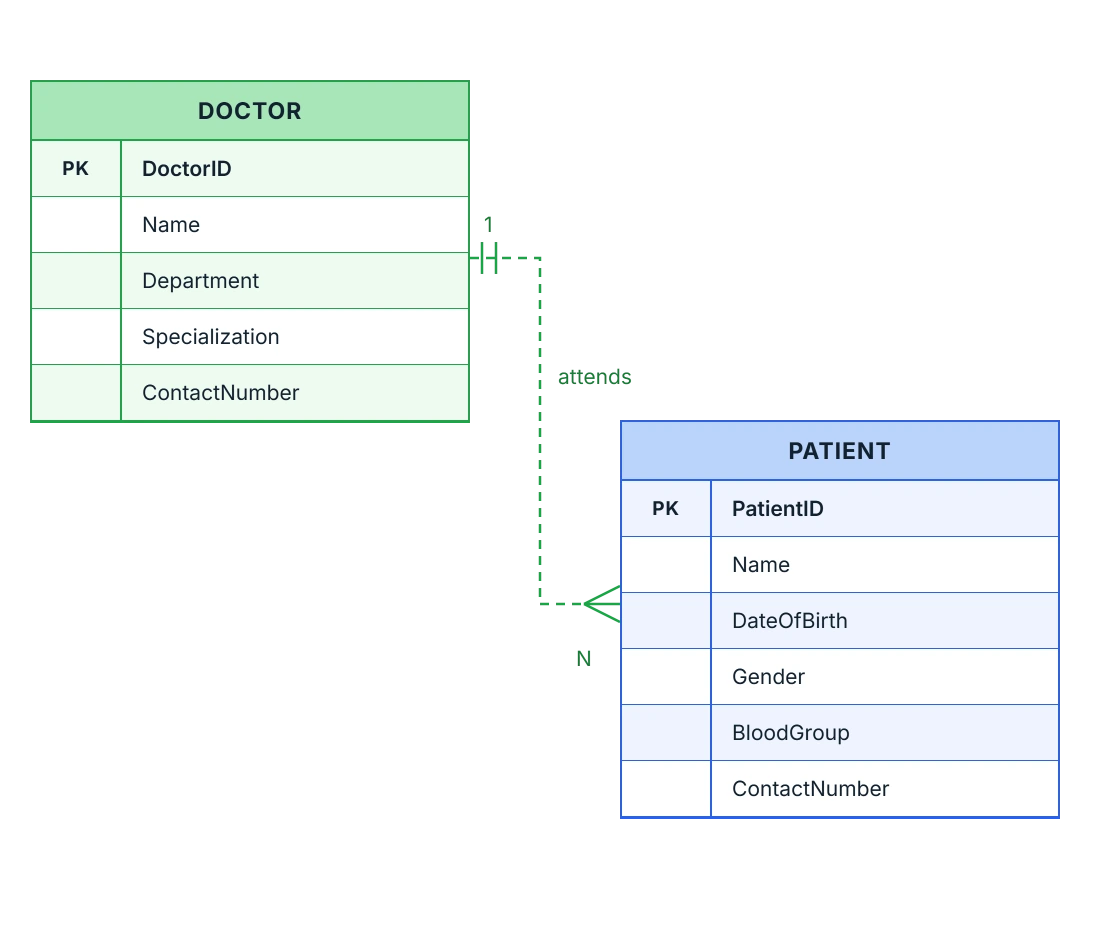
An entity relationship diagram describes a database’s structure, its entities, fields, and the relationships between them, rather than a process or a sequence of steps. Use an entity relationship diagram when a database schema needs to be visualized before implementation.
- Provide entities that represent tables, with fields for each column, its data type, and key constraints
- Support Crow’s foot notation to show the cardinality of a relationship between two entities
- Deliver dedicated entity relationship shapes and connectors across supported web platforms
- Enable full cardinality and field-type configuration through the Entity Relationship Diagrams page
PLATFORM SUPPORT
Flowchart shape support by platform
Flowchart shapes are available on every Diagram SDK platform, but the underlying object model is not identical everywhere. JavaScript, Angular, React, Vue, ASP.NET Core, ASP.NET MVC, and Blazor expose flowchart shapes through a shared flow-shape type, while WPF, UWP, and Windows Forms provide the same shapes through their own node and stencil libraries.
| Flowchart capability | JavaScript frameworks | ASP.NET Core and MVC | Blazor | WPF | UWP | Windows Forms |
|---|---|---|---|---|---|---|
| Built-in flowchart shapes | ||||||
| Built-in BPMN shapes | ||||||
| Built-in Swimlane shapes |
Frequently Asked Questions
What is the difference between a flowchart and a BPMN diagram?
A flowchart uses generic symbols, such as Process and Decision, to describe any sequence of steps. A BPMN (Business Process Model and Notation) diagram uses a stricter, business-process-specific notation intended for sharing process definitions across organizations; see BPMN Diagrams.
What is the difference between a BPMN diagram and a swimlane diagram?
A BPMN diagram uses a standardized notation — events, gateways, and activities — for sharing business process definitions across organizations. A swimlane diagram organizes a process into lanes by department or role so responsibility for each step is visible; see Swimlane Diagrams.
What is the difference between a flowchart and a UML diagram?
A flowchart uses generic, notation-agnostic symbols for any process. UML defines its own stricter notations instead, including activity diagrams for behavior, class diagrams for structure, and sequence diagrams for interaction, each suited to describing software rather than a general process; see UML Diagrams.
Which diagram types are available as built-in shapes in the Diagram SDK?
The Diagram SDK includes built-in shapes and notations for flowcharts, BPMN, swimlanes, UML (class, activity, and sequence), and entity relationship diagrams. Each diagram type ships with its own standard symbols, connectors, and ready-made shapes; see Symbol Palette for shape configuration.
What is the difference between a flowchart and a swimlane diagram?
A flowchart describes the steps of a process without saying who’s responsible for each one. A swimlane diagram adds that dimension, organizing the same kind of process steps into lanes by department or role; see Swimlane Diagrams.
What is the difference between a UML diagram and an entity relationship diagram?
A UML diagram describes software — structure through class diagrams, behavior through activity diagrams, and interaction through sequence diagrams. An entity relationship diagram describes a database’s entities, fields, and the relationships between them; see UML Diagrams and Entity Relationship Diagrams.
What is the difference between a flowchart and an entity relationship diagram?
A flowchart describes a process: a sequence of steps and decisions. An entity relationship diagram describes something else entirely: a database’s structure, its entities, fields, and the relationships between them; see Entity Relationship Diagrams.
Are built-in diagram type shapes available on every supported platform?
Flowchart shapes are available on every platform. BPMN and swimlane shapes are available on JavaScript, Angular, React, Vue, Blazor, ASP.NET Core, MVC, WPF, and UWP, but not on Windows Forms. The underlying object model also differs: web and Blazor platforms share a flow-shape type, while WPF, UWP, and Windows Forms provide the same shapes through their own node and stencil libraries.
Resources
Learn more about our Diagram SDK
Explore demos, documentation, and support resources to get the most out of the Syncfusion Diagram SDK.
Review shared concepts and supported platforms
See one flowchart implementation in action
Ask, share, and connect with peers
Find solutions and best practices fast
Get expert help when needed
Feature requests and bug reports
Track issues and suggest improvements
Awards
Greatness—it’s one thing to say you have it, but it means more when others recognize it. Syncfusion® is proud to hold the following industry awards.









