Try Our Live Demo
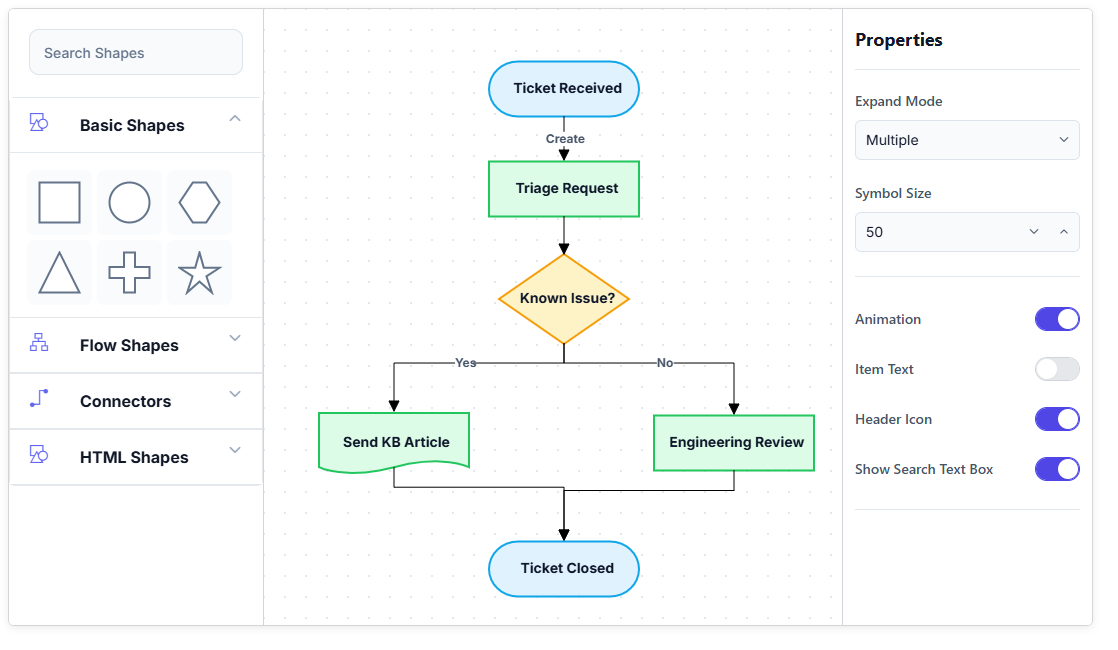
Why the symbol palette matters
Building a diagram is faster when the shapes it needs are already organized and ready to place, rather than defined from scratch every time.
Shapes organized, not scattered
Related symbols sit together in named, collapsible groups instead of one long, unsorted list.
Preview before placing
A preview follows the pointer while dragging, so the shape being placed is visible before it lands on the canvas.
Find a shape fast
A large shape catalog, like a full BPMN or UML set, can be searched instead of scrolled through group by group.
Palettes group related symbols
The symbol palette organizes shapes and connectors into named groups, rather than presenting every symbol in a single flat list. Use palette groups when a large set of symbols needs to be categorized for quick access.
- Provide each group with its own title and the ability to be expanded or collapsed independently
- Support one or multiple groups expanded at the same time, depending on how the palette is configured
- Enable a group to mix nodes and connectors, such as flowchart shapes alongside their typical connector style
- Ensure grouped palette organization remains consistent across supported platforms


Dragging a symbol onto the diagram
A symbol is added to the diagram by dragging it from the palette onto the canvas, rather than being created in code. Use drag-and-drop when shapes need to be placed visually instead of through programmatic configuration.
- Provide a preview of the symbol that follows the pointer while dragging, showing its size and appearance before it’s dropped
- Support resizing or turning off the preview independently of the symbol’s normal palette appearance
- Ensure the symbol palette works alongside the diagram as a separate component, not as part of the diagram surface itself
- Enable drag-and-drop across JavaScript, Angular, React, Vue, Blazor, ASP.NET Core, MVC, WPF, UWP, and Windows Forms platforms
Sizing and appearance independent of the diagram
How a symbol looks inside the palette doesn’t have to match how it looks once it’s placed on the diagram. Use independent sizing and appearance when palette symbols need a different visual scale or style than their placed counterparts.
- Provide symbol width, height, and spacing inside the palette set independently of the node’s size on the diagram
- Support a symbol’s description or tooltip generated dynamically to explain what it represents
- Enable complex palette items to use HTML or SVG templates, the same as nodes on the diagram itself; see Diagram Elements
- Ensure independent sizing and appearance remain configurable across supported platforms


Finding a symbol quickly
A palette with a large number of symbols benefits from being searchable rather than requiring every group to be scanned by eye. Use search when a palette covers a large shape catalog that would be impractical to scroll through.
- Provide a built-in search that filters the palette down to matching symbols as text is typed
- Support filtering symbols programmatically based on custom criteria
- Enable search behavior suited to large shape catalogs such as the full set of BPMN or UML shapes
- Ensure search and filtering remain available across supported web and desktop platforms
Building a palette from data
A palette’s groups and symbols don’t have to be hardcoded. They can be generated from a business object collection, similar to how a diagram itself can be built from data. Use data-bound generation when palette contents need to reflect a dynamic data source rather than static definitions.
- Support binding a collection of objects directly to a palette’s groups and symbols
- Enable symbols to be added to or removed from a palette programmatically at runtime
- Provide data-driven palette generation consistent with building a diagram from data; see Data Import & Export
- Ensure data-bound palette generation remains available across supported platforms

PLATFORM SUPPORT
Symbol palette support by platform
A symbol palette or stencil component is available on every Diagram SDK platform, but some finer capabilities are confirmed more consistently than others. JavaScript, Angular, React, Vue, ASP.NET Core, ASP.NET MVC, and Blazor share a common symbol palette component, while WPF, UWP, and Windows Forms provide the same concept through their own palette or stencil classes.
| Capability | JavaScript frameworks | ASP.NET Core and MVC | Blazor | WPF | UWP | Windows Forms |
|---|---|---|---|---|---|---|
| Palette or stencil with grouped, expandable symbols | ||||||
| Drag preview while placing a symbol | ||||||
| Built-in or programmatic symbol search and filtering | ||||||
| Palette generated from a bound data collection |
Frequently Asked Questions
Is the symbol palette part of the diagram itself?
No. The symbol palette is a separate component that sits alongside the diagram. It displays draggable symbols, but the diagram surface is where those symbols are actually placed and edited.
Does a symbol’s size in the palette have to match its size once placed on the diagram?
No. The width, height, and spacing of a symbol inside the palette are set independently of the size the resulting node takes on the diagram.
Can existing shape libraries be imported into a palette?
On some platforms. Windows Forms, for example, supports converting Visio stencil files into a symbol palette, and WPF includes a separate Symbol Designer application for creating and saving custom palettes visually.
Can the palette show a preview of a shape before it’s dropped onto the diagram?
Yes, on platforms where drag preview support is available. A preview of the symbol’s size and appearance follows the pointer while dragging, and this preview can be resized or turned off.
Can a large palette be searched instead of scrolled through?
Yes, on platforms with search or filtering support. Symbols can be filtered by typed text or by custom programmatic criteria, which helps with large catalogs such as a full BPMN or UML shape set.
Can a palette’s symbols come from a data source instead of being hardcoded?
Yes, where data-bound palette generation is supported. A collection of business objects can be bound to a palette’s groups and symbols, similar to how a diagram itself can be built from data; see Data Import & Export.
Resources
Learn more about our Diagram SDK
Explore demos, documentation, and support resources to get the most out of the Syncfusion Diagram SDK.
Review shared concepts and supported platforms
Representative symbol palette demo
See grouping, sizing, and customization in action
Ask, share, and connect with peers
Find solutions and best practices fast
Get expert help when needed
Feature requests and bug reports
Track issues and suggest improvements
Awards
Greatness—it’s one thing to say you have it, but it means more when others recognize it. Syncfusion® is proud to hold the following industry awards.









