Try Our Live Demo
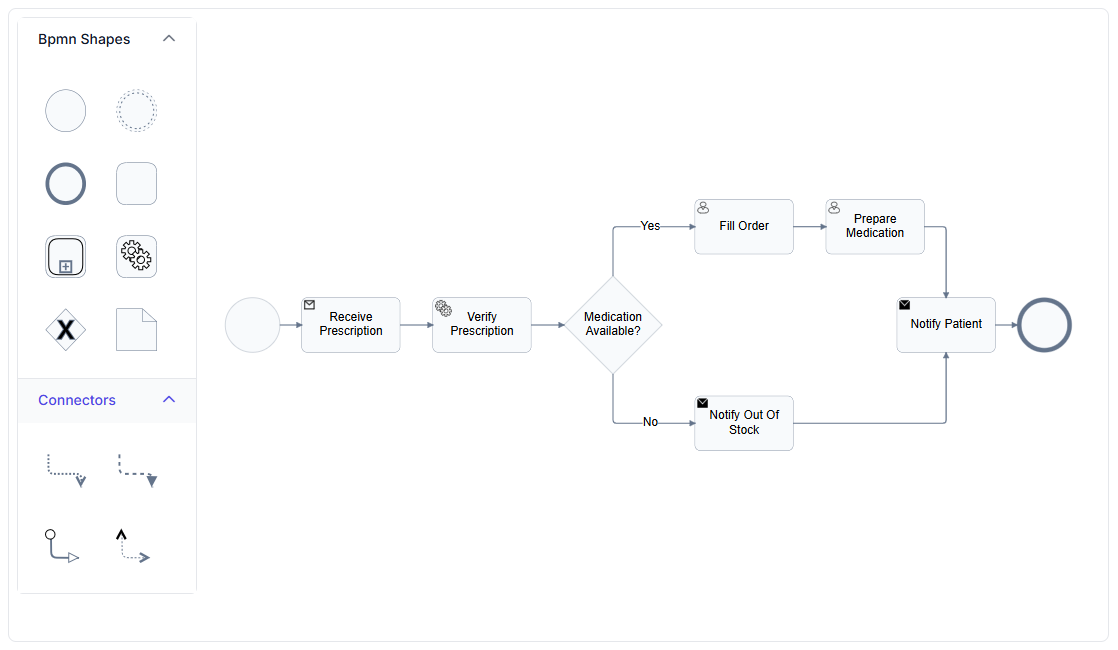
Why BPMN notation matters
A generic flowchart can describe almost any process, but that flexibility comes at a cost: two people can draw the same process very differently. BPMN removes that ambiguity.
A notation everyone recognizes
BPMN is a published standard, so a shape means the same thing whether it was drawn by this team or another organization entirely.
Every element has one meaning
An event, a gateway, and an activity are visually and semantically distinct, instead of one generic box standing in for all three.
Shared across teams and tools
A process modeled in BPMN can be understood by business analysts, engineers, and partner organizations without a legend.
Events, gateways, and activities
Events, gateways, and activities are the three core building blocks of a BPMN process, each with a distinct shape and meaning. Use these three building blocks when a business process needs to be modeled in standard BPMN notation.
- Provide events, shown as circles, to mark where a process starts, pauses, or ends, with triggers such as a message or a timer
- Support gateways, shown as diamonds, to control how the process branches or merges, including exclusive, inclusive, parallel, and complex types
- Deliver activities, shown as rounded rectangles, to represent a task or a subprocess that can be expanded to show its own detail
- Enable further typing of a task as a user, service, manual, or other specialized kind of work


Data objects, data stores, and groups
Beyond the flow of the process itself, BPMN notation includes shapes for the information a process uses and for organizing related elements visually. Use these shapes when a process model needs to show the data it relies on or group related elements together.
- Provide a data object to represent information used, produced, or required by the process, including a collection of records
- Support a data store to represent information the process reads from or writes to persistently
- Deliver a group to frame a set of elements that belong together, without affecting the process flow itself
- Ensure data objects, data stores, and groups are available across JavaScript, Angular, React, Vue, Blazor, ASP.NET Core, MVC, WPF, and UWP platforms
Sequence, message, and association flows
Three distinct connector types carry different meanings in a BPMN diagram, rather than one generic arrow standing in for all of them. Use these connector types when a process model needs to distinguish between internal flow order, cross-participant communication, and artifact linking.
- Provide a sequence flow, a solid line, to show the order activities and gateways are performed in
- Support a message flow, a dashed line, to show communication crossing between separate participants
- Deliver an association flow, a dotted line, to link a shape to a text annotation or artifact without affecting the process itself
- Ensure all three connector types are available across supported web and desktop platforms


Documenting a process with text annotations
A text annotation adds explanatory detail to a specific shape without becoming part of the process flow. Use a text annotation when a shape needs additional context that should not alter the process model itself.
- Provide an annotation that stays attached to its target shape, and moves or is removed along with it
- Support repositioning an annotation independently of its target shape’s own position
- Deliver an association flow to connect an annotation to its target shape
- Ensure text annotations remain available across supported web and desktop platforms
PLATFORM SUPPORT
BPMN support by platform
BPMN shapes are available on most Diagram SDK platforms, but coverage of flows, annotations, and palette support is not confirmed as identically complete everywhere. JavaScript, Angular, React, Vue, ASP.NET Core, ASP.NET MVC, and Blazor share a common BPMN shape model, while WPF and UWP expose the same shapes through their own view-model classes.
| Capability | JavaScript frameworks | ASP.NET Core and MVC | Blazor | WPF | UWP | Windows Forms |
|---|---|---|---|---|---|---|
| Full BPMN shape catalog | ||||||
| BPMN flows (sequence, message, association) | ||||||
| BPMN shapes available from a symbol palette |
Frequently Asked Questions
How is a BPMN diagram different from a generic flowchart?
A generic flowchart uses a small set of general-purpose symbols, such as Process and Decision, that can represent almost any sequence of steps; see Flowchart Diagrams. BPMN uses a larger, standardized set of shapes with more specific meanings, built for describing business processes in a way multiple organizations can read consistently.
What’s the difference between a data object and a data store?
A data object represents information tied to a specific point in the process, such as an input or output of an activity. A data store represents a more persistent place the process reads from or writes to, independent of any single step.
How are pools and lanes represented in a BPMN diagram?
Pools and lanes use the same swimlane structure available elsewhere in the Diagram SDK, rather than a separate BPMN-specific shape. See Swimlane Diagrams for how swimlanes, orientation, and phases work.
Is BPMN support identical across every platform?
No. The core BPMN shape catalog is broadly available, but flow types, text annotations, and palette support are not confirmed as equally complete on every platform, as shown in the table above.
What do the different BPMN gateway types mean?
A gateway controls how a process branches or merges. Exclusive allows only one path to continue, parallel allows every path to continue at once, inclusive allows one or more paths depending on conditions, and complex handles branching that doesn’t fit the other three patterns.
What’s the difference between a sequence flow, a message flow, and an association flow?
A sequence flow shows the order steps happen in within one process. A message flow shows communication between separate participants, such as two organizations. An association flow simply links a shape to a text annotation or artifact and has no effect on how the process runs.
Can BPMN shapes be dragged onto the canvas instead of added in code?
Yes, where symbol palette support for BPMN shapes is available. Predefined shapes can be dragged from a palette onto the diagram surface; see Symbol Palette.
Resources
Learn more about our Diagram SDK
Explore demos, documentation, and support resources to get the most out of the Syncfusion Diagram SDK.
Review shared concepts and supported platforms
Representative BPMN editor demo
See BPMN shapes and flows in action
Ask, share, and connect with peers
Find solutions and best practices fast
Get expert help when needed
Feature requests and bug reports
Track issues and suggest improvements
Awards
Greatness—it’s one thing to say you have it, but it means more when others recognize it. Syncfusion® is proud to hold the following industry awards.









