React Data Grid - Evaluation Guide
Evaluate the Syncfusion React Data Grid for Enterprise Adoption
Data Grids are widely used in applications such as operational dashboards, financial reporting, case management, inventory tracking, and high-volume transactional workflows. This guide organizes technical evidence into a structured evaluation process, incorporating key conditions, benchmarks, security considerations, and references.
Start with the evaluation framework, then focus on the technical topics most relevant to your application’s requirements.
Quick evaluation framework
Evaluate these areas in the following order so that any compatibility issues or security constraints are identified early, before investing time in advanced customization and testing.
| Order | Evaluation area | What to assess | How to verify | Decision impact |
|---|---|---|---|---|
| 1. | Runtime fit | Frameworks, React versions, SSR model, browsers | Match the target environment to the published compatibility tables and verify any stated condition. | Unsupported runtime requirements can stop the evaluation early. |
| 2. | Build and application fit | Build tools, package formats, state, theming, CI/CD | Install in the real repository and run the existing build and test pipelines. | Reveals integration work before deeper product testing. |
| 3. | Data and API fit | Adaptors, back ends, authentication, API stability, extensibility | Connect a production-shaped endpoint and implement one representative customization. | Shows whether the Data Grid fits existing service and application boundaries. |
| 4. | Performance fit | Rendering mode, server operations, DOM footprint, real-time updates | Reproduce expected row, column, update, and interaction patterns on target hardware. | Determines whether the chosen configuration meets workload needs. |
| 5. | Security and procurement fit | Responsibility boundaries, CSP, deployment, compliance evidence | Validate runtime behavior with DevTools and review the cited assurance documents. | Clarifies what the component provides and what the application must enforce. |
| 6. | Final decision | Conditions, limitations, evidence, and unresolved risks | Record pass, conditional pass, or fail for every required area. | Prevents a feature-rich result from hiding a critical architectural mismatch. |
AI integration and responsibility
The Data Grid can host AI-assisted experiences through custom cell renderers, toolbar extensions, and event hooks. These extensibility points enable intelligent capabilities such as semantic filtering, anomaly highlighting, contextual recommendations, and other domain-specific AI scenarios. Examples include semantic filtering and anomaly highlighting.
AI responsibility boundary: The Data Grid does not include built-in AI services. Applications connect their own AI models and remain responsible for security, data handling, and auditing.
1
Architecture compatibility
Evaluate how well the Data Grid integrates with the application’s existing architecture, including rendering patterns, build processes, styling approach, browser support, and testing ecosystem. This helps ensure the component can be adopted without requiring major architectural changes.
Framework and runtime compatibility
Verify that the Data Grid supports the application’s framework, React version, runtime environment, and rendering model. This ensures the component functions correctly within the existing technology stack and deployment environment.
Framework and environment support
The Data Grid works consistently across supported web environments and does not require environment-specific configuration.
| Deployment environment | Coverage |
|---|---|
| React 18/19 SPA | Supported with standard configuration. |
| Next.js App Router | Supported; use the documented client-component boundary. |
| Next.js Pages Router | Supported on Pages Router versions. |
| Vite SPA | Supported as a standard package dependency. |
| Remix | Supported with documented client-side hydration behavior. |
| Gatsby SSG | Supported for static generation and runtime hydration. |
| Electron | Runs in the renderer process as a React component. |
| Micro-Frontend (Module Federation) | Supported when Syncfusion packages are declared as a shared singleton at the shell. |
| Micro-Frontend (Single-SPA) | Runs as a client-rendered React component in Single-SPA. |
| SharePoint | Supported in SharePoint Framework web parts. |
| Preact | Supported through Preact’s React compatibility layer. |
Use the published system requirements as the versioned reference.
React version compatibility
Ensure that the application’s React version meets the minimum version requirements for the corresponding Syncfusion release. Refer to the release history when planning upgrades.
| React version | Minimum Syncfusion version | Approximate release year | Coverage |
|---|---|---|---|
| React 16 | Syncfusion v16 | 2018 | Supported and documented. |
| React 17 | Syncfusion v18 | 2020 | Supported and documented. |
| React 18 | Syncfusion v20 | 2022 | Supported and documented. |
| React 19 | Syncfusion v29 | 2024 | Confirmed compatible in the cited release information. |
| React Strict Mode | No minimum version constraint | — | Compatible; the source reports no double-invoke or duplicate state-mutation issues in development Strict Mode. |
| Organization-pinned React version | N/A | — | Consumes the host application’s React version without the source reporting peer-dependency conflicts. |
| Future React major planning | Review release history | — | Use the published history to plan adoption. |
When upgrading React, keep all @syncfusion packages at or above the mapped minimum. The source describes historical adoption of React 17, 18, and 19. Evaluators should verify future versions in current release documentation.
SSR and server component integration
The Data Grid supports integration with Next.js App Router through a documented client-component boundary and server-driven initial data loading. It also supports Streaming SSR, Incremental Static Regeneration (ISR), and Edge runtimes.
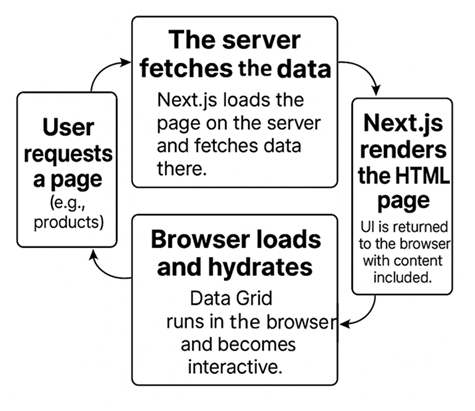
- Server-side paging: Only the first page of data is included in the initial response, regardless of the total dataset size.
- Hydration boundary: Place the Data Grid inside a client component to avoid hydration mismatches in the App Router.
- Streaming SSR: The Data Grid can be rendered within a React Suspense boundary while initial data is streamed from the server.
- Incremental Static Regeneration: The Data Grid hydrates correctly on ISR-generated pages without requiring additional Grid-specific configuration.
- Edge runtime: No Node.js-only dependencies prevent deployment in Edge runtime environments.
Browser and runtime support
Use the browser compatibility matrix to verify supported browser versions for deployment and release planning. Modern browsers are supported by default, whereas Internet Explorer requires a polyfill.
| Browser runtime | Coverage |
|---|---|
| Chrome (latest) | Supported |
| Firefox (latest) | Supported |
| Safari (latest) | Supported |
| Microsoft Edge (latest) | Supported |
| Opera (latest) | Supported |
| Internet Explorer 11+ (EOL June 2022) | Supported only when the documented ES6 Promise polyfill is added. |
Build, package, and module compatibility
Confirm that the Data Grid aligns with the organization’s existing build processes, package management strategy, and modular delivery architecture without requiring proprietary tooling.
Build compatibility
Validate the package in the organization’s actual build pipeline. The Data Grid uses standard npm/ESM integration without proprietary build plugins. Only imported feature modules are included in the production bundle, while unused modules are automatically removed during the build process.
| Environment or toolchain | Support and condition |
|---|---|
| Webpack | Supported as a standard npm/ESM React package; no custom plugin is required. |
| Vite | Supported through ESM without additional Grid-specific configuration. |
| Turbopack | Supported through ESM export. Core rendering and data binding were validated by Syncfusion under Turbopack's production pipeline.No Turbopack-specific plugin required. Teams should verify their CSS strategy and SSR/Suspense setup. |
| Nx / Turborepo | Supported as a standard npm dependency without custom executors, generators, or monorepo-specific configuration. |
TypeScript strict mode ("strict": true) |
Public props, APIs, and event signatures are typed; standard usage does not require @ts-ignore suppressions. |
| Next.js App and Pages Router | Supported, with client-component usage where required. |
| Create React App (legacy/deprecated) | Supported for existing projects. Vite is recommended for new projects or migrations. No additional Grid-specific configuration is required. |
Package distribution and module support
The package supports both modern and legacy module-loading approaches. Organizations with module governance policies or internal registry requirements can inspect the distributed package contents to verify compliance.
| Module format | Support | Notes |
|---|---|---|
| ESM | Supported | Primary format in dist/es6; used by Vite, Next.js, and Webpack 5. |
| CJS | Supported | Compatible with legacy Node toolchains, Jest, RequireJS, and SystemJS. |
| UMD | Supported | Available as dist/[package-name].umd.min.js for script, AMD, and CommonJS loading. |
Inspect the published package structure on the npm package page.
Micro-frontend and module federation compatibility
Evaluate compatibility with micro-frontend architectures from a dependency and bundle-management perspective. The Data Grid supports Webpack Module Federation and Single-SPA, enabling shared dependency configurations that help prevent duplicate bundles and reduce version conflicts across micro-applications. Runtime isolation is evaluated separately.
| Scenario | Build and package implication |
|---|---|
| Multiple grids on one page | Each instance has independent state; runtime isolation is evaluated in the dedicated runtime section. |
| Webpack Module Federation shell | Use shared-dependency configuration to prevent duplicate packages and version conflicts. |
| Vite Module Federation | Supported with @originjs/vite-plugin-federation ; the same singleton principle applies. |
| React.lazy route | Compatible without Grid-specific configuration. |
Application architecture integration
Evaluate how the Data Grid fits within existing application architecture, respecting application-owned state, established data-flow patterns, and organizational design-system standards without requiring architectural refactoring.
State management neutrality
The Data Grid accepts data through props and emits actions through events. It does not require a global store, internal context provider, or proprietary parallel data layer.
This architectural neutrality allows the application to retain existing state ownership and integrate with existing React state-management solutions without architectural refactoring. The practical connection patterns are documented once in the State Management Integration category.
Theming and design system integration
The theming system uses CSS custom properties and SCSS-based themes to align the Data Grid with an production design system without modifying component code.
- 22 built-in themes are described in the theme documentation, including Fluent 2, Material 3, Bootstrap 5.3, and Tailwind 3.
- CSS variables can be used as design tokens.
- Theme Studio generates maintainable SCSS/CSS.
| CSS strategy | Coverage |
|---|---|
| CSS custom properties / design tokens | Supported through CSS-variable overrides. |
| Sass / SCSS variables | Supported; Theme Studio can generate customized themes. |
| CSS Modules | Supported to reduce global-style conflicts. |
| Runtime multitenant switching | Partially supported. CSS-file or class swapping covers basic scenarios; full brand customization requires Theme Studio. |
| Dark mode | Built-in dark variants for all themes with no custom CSS required. |
| Theme Studio | Exports SCSS/CSS without requiring changes to component implementations. |
| Brand and design-system alignment | CSS variables and SCSS tokens cover typography, color, and spacing. |
CI/CD and testing compatibility
Confirm that the Data Grid can be built, tested, and deployed through existing engineering workflows without requiring specialized tooling or infrastructure.
CI/CD pipeline compatibility
Grid-dependent features can run in the same CI/CD infrastructure used by the rest of a React application. No separate test environment or Grid-specific polyfill is required for the listed tools.
Testing framework compatibility
Choose tools that match the existing test pyramid and verify representative interactions, not only initial rendering.
| Testing tool | Compatibility | Notes |
|---|---|---|
| Jest | Supported | Jest guide |
| Vitest | Supported | Works with jsdom and happy-dom environments. |
| React Testing Library | Supported | Standard DOM queries can be used without vendor-specific selectors. |
| Cypress | Supported | End-to-end tests run against Grid interactions without custom Grid configuration. |
| Playwright | Supported | Grid elements can be addressed with standard locators. |
| Storybook | Supported | Can be used for visual-regression scenarios. |
Try live demo and navigate to the Testing tab to explore testing approaches and validate implementations using code examples and test cases.
2
Integration and extensibility
Connect the Data Grid to existing data sources, authentication systems, state management solutions, and design systems. Assess extensibility through APIs, events, templates, and customization points while verifying compatibility with existing backend integrations, authorization requirements, and multi-instance deployments.
Data and back-end integration
Verify how the Data Grid integrates with application services, databases, ORMs, and authentication systems.
Data source integration
DataManager adaptors translate Data Grid paging, sorting, filtering, searching, grouping, aggregation, and CRUD actions into the back end’s request and response conventions.
| Adaptor | When to use | Enterprise implication |
|---|---|---|
| URL adaptor | Standard REST APIs | Works across back-end technologies and microservice/cloud architectures. |
| ODataV4 adaptor | OData v4 services | Uses a standardized query protocol for filtering, sorting, and paging. |
| Web API adaptor | ASP.NET Web API | Aligns request and response handling with .NET conventions. |
| GraphQL adaptor | GraphQL endpoints such as Apollo, Node.js, or Hot Chocolate | Fetches only the fields required by the Data Grid, reducing payload size while supporting GraphQL query and mutation operations. |
| Web Method adaptor | Legacy ASP.NET ASMX services | Allows the UI to be modernized without replacing the existing service. |
| RemoteSave adaptor | Client-managed data with server persistence | Can reduce API volume in batch-editing or high-frequency UI workflows. |
| Custom adaptor | Proprietary or non-standard APIs | Controls request and response shaping and can extend a built-in adaptor. |
A custom adaptor can reshape fields, response envelopes, authorization headers, or tokens while extending a built-in adaptor rather than starting from nothing.
Try live demo and navigate to the Integration tab, then select Adaptors chip to explore available data adaptors and their configuration patterns.
Back-End framework coverage
Select the adaptor according to the endpoint protocol rather than the server language alone.
| Back end | Possible adaptors | Reason |
|---|---|---|
| Django REST framework | URL adaptor, custom binding | REST maps directly; custom binding covers non-standard envelopes or authentication. |
| Express and Node.js | URL adaptor, GraphQL adaptor, custom binding | Choose according to REST or GraphQL endpoint type. |
| FastAPI | URL adaptor, custom binding | REST maps directly; custom binding covers non-default envelopes. |
| Flask and FlaskAPI | URL adaptor, custom binding | REST is the default pattern; custom binding covers non-standard conventions. |
| Next.js API routes | URL adaptor, custom binding | API routes behave as REST endpoints. |
| GraphQL in Node.js | GraphQL adaptor, custom adaptor | GraphQL adaptor formats queries for Node.js GraphQL servers; custom adaptor handles schema variations. |
| GraphQL in Apollo | GraphQL adaptor, custom adaptor | GraphQL adaptor formats queries for Apollo GraphQL servers; custom adaptor handles schema variations. |
| GraphQL in Hot Chocolate | GraphQL adaptor, custom adaptor | .NET GraphQL implementations integrate via GraphQL adaptor, while the custom adaptor covers schema-specific deviations. |
| ASP.NET Web API | Web API adaptor, URL adaptor | Web API adaptor is optimized for .NET response conventions; URL adaptor applies where REST-only patterns are used. |
| Legacy ASMX | Web Method adaptor, custom adaptor | Calls WebMethod endpoints without replacing the back end. |
Try live demo and navigate to the Integration tab, then select the Backends chip to explore Data Grid integration with various backend technologies.
Database integration
The browser component does not connect directly to a database. Every database integration passes through an application-owned API endpoint.
| Database | Possible adaptors |
|---|---|
| Microsoft SQL Server | URL adaptor, Web API adaptor, custom adaptor |
| MySQL | URL adaptor, custom adaptor |
| PostgreSQL | URL adaptor, custom adaptor |
| SQLite Server | URL adaptor, RemoteSave adaptor, custom adaptor |
Try live demo and navigate to the Integration tab, then select the Databases chip to learn how to connect the Data Grid to databases such as SQL Server, MySQL, PostgreSQL, and SQLite through back-end APIs.
ORM compatibility
The Data Grid has no direct ORM dependency. Any ORM can be used when the API implements the selected adaptor’s request and response contract.
- Entity Framework Core
- Hibernate and Java Persistence API
- Django ORM
- SQLAlchemy
- Sequelize and Prisma
- Laravel Eloquent
- Dapper
- Custom ADO.NET, raw SQL, and stored procedures
Authentication passthrough
Authentication headers can be applied through DataManager so that data loading and all supported data operations use the application’s tokens.
| Authentication pattern | Support and responsibility |
|---|---|
| JWT bearer token | Configured on DataManager and attached to every request. |
| OAuth 2.0 (PKCE and client credentials) | The application’s authentication layer supplies the token; DataManager headers carry it. |
| Token refresh | Handled through the DataManager request interceptor. |
| Mutual TLS | Configured below the DataManager boundary in the HTTP transport layer. |
| 401/403 failure | Surfaced through the failure event; retry, redirect, and notification logic remains in the application. |
Review custom headers and DataManager middleware logic for token injection and refresh patterns.
API stability and extensibility
The Data Grid supports customization through documented extension points, React templates, typed events, and methods, enabling flexible and maintainable implementations.
Versioning and API stability
The Data Grid follows semantic versioning and maintains a stable public API across releases, helping ensure predictable upgrades and backward compatibility for documented features.
| Change type | Policy |
|---|---|
| Breaking changes | Introduced in major versions, not minor or patch releases. |
| New properties, events, and methods | Added in minor versions and described by the source as backward compatible. |
| Deprecations | Remain functional during the deprecation window and carry TypeScript @deprecated annotations. |
| Major upgrades | Accompanied by a migration guide with before-and-after examples for the published breaking-change list. |
Extensibility model
Visual extension points accept React components through documented public APIs, allowing customizations without modifying the component implementation. React mounts template components instead of using innerHTML or dangerouslySetInnerHTML, helping maintain upgrade stability. The Grid’s rendering layer does not introduce HTML injection risk; any raw HTML rendering remains the application’s responsibility.
| Extension point | Layer | Replaces | Common use |
|---|---|---|---|
| Column template | Cell | Default cell text | Rich or interactive cell content. |
| Header template | Column header | Default label | Custom header content and appearance. |
| Row template | Row | Entire row layout | Business-specific row structure. |
| Detail template | Expanded row | Expandable panel | Additional information or nested React/Syncfusion components. |
| Caption template | Group caption | Default group text | Custom group-header presentation. |
| Cell edit template | Edit cell | Default input | Custom React or Syncfusion editors. |
| Dialog template | Dialog editing | Default form | Custom form while retaining built-in validation. |
| Filter bar template | Column filter | Default filter input | Custom filter controls and behavior. |
| Pager customization | Pagination | Default pager | Custom pagination layout and interaction. |
| Footer aggregate template | Footer | Aggregate cell | Custom computed-value presentation. |
| Group footer template | Group footer | Group aggregate cell | Custom group-level summaries. |
| Group caption template | Group caption aggregate | Inline aggregate | Custom aggregate information in the group caption. |
| Empty record template | Empty state | No-record message | Custom empty-state content. |
| Toolbar customization | Toolbar | Default toolbar | Application-specific layout and controls. |
Try live demo and navigate to the Integration tab, then select Extensibility chip to access related resources and examples.
Programmatic API: Events and Methods
The typed event and method API’s provide control before, during, and after operations. The API’s are documented in a versioned reference, and the feature-rich interactive sample can be used to test representative scenarios and explore available capabilities.
| Capability | Architectural implication |
|---|---|
| Pre-execution interception | Operations can be intercepted and cancelled before execution. |
| Edit lifecycle control | Begin, validate, save, and cancel stages are interceptable; the application can approve commits. |
| Programmatic data operations | Application code can add, update, delete, or batch-update records. |
| Server-side query delegation | Paging, sorting, filtering, searching, grouping, and aggregation can be delegated to the back end and integrated with any server-side query layer. |
| Programmatic query refinement | Sort, page, group, filter, and search operations can run client-side or be invoked against back-end APIs. |
| Computed summary control | Footer, group-footer, and group-caption aggregates are configurable and retrievable. |
| Hierarchical data organization | Expand, collapse, lazy loading, and group lifecycle events are controllable. |
| Selection state control | Row, cell, checkbox, and range selection can be read or set; the source states that selection persists across data operations. |
| Cross-instance row movement | Rows can move between Grid instances; drag lifecycle events can be intercepted or cancelled. |
| Range-based value propagation | Cell values can be propagated across adjacent ranges; autofill lifecycle events are exposed. |
| DOM-efficient large-data rendering | Visible rows and columns are rendered while remaining data is loaded on demand. |
| Column and layout control | Columns can be resized, auto-fitted, reordered, frozen, shown, or hidden at runtime. |
| Persistent row visibility | Rows can be pinned across scrolling and data operations. |
| Parent-child data structures | Nested Grid relationships receive parent-row context through documented props. |
| Programmatic extraction | Selected rows or cells can be copied with or without headers. |
| Programmatic output | Excel, PDF, and CSV export can be triggered; server-side export is available for large datasets and print mode is configurable. |
| Preference persistence | Column sizing, order, visibility, and freeze state can be serialized to application-selected storage. |
| Regional and language adaptation | RTL, locale-aware formatting, and UI strings are configurable at component level. |
| Responsive layout | Grid layout and dialogs adapt to mobile and tablet viewports through configuration without requiring a separate responsive implementation. |
| Context and menu interaction | Context-menu and column-menu items and lifecycle events are configurable. |
| Keyboard and accessibility control | Keyboard navigation is built in and keyboard events are exposed for custom interaction handling and accessibility requirements. |
| Loading-state control | Spinner and loading indicators can be controlled independently of data operations. |
| Audit-trail support | Edit events expose old and new values with row context and can be integrated into compliance logging workflows. |
| Instance isolation | Each Grid instance exposes an independent API surface and does not share state with other Grid instances on the same page. |
State management integration
The Data Grid integrates with application-managed state, allowing teams to use their existing React state management approach.
State management compatibility
The Data Grid accepts data through props and emits actions through events without requiring a global store, context provider, or proprietary data layer. Existing React state libraries can supply data and respond to Data Grid events without refactoring application state ownership.
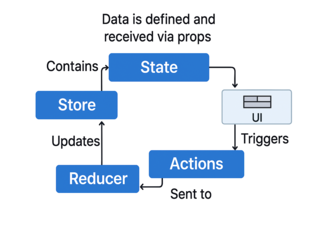
Compatibility matrix
The following matrix shows supported state management libraries and typical integration approaches for the Data Grid.
| State library | Compatibility | Connection pattern |
|---|---|---|
| Redux and Redux Toolkit | Compatible | Pass store data as the data source; dispatch inside Grid event handlers. |
| Zustand | Compatible | Pass a store slice as the data source; the Grid consumes rather than writing directly to the store. |
| TanStack Query and RTK Query | Compatible | Pass query results as data; use Grid events to trigger re-fetch. |
| React Context | Compatible | Pass context values as data; the source does not require a provider inside the Grid. |
| MobX | Compatible | Pass observables; the Grid re-renders when the observable changes. |
| Jotai and Recoil | Compatible | Pass atom values through normal React data flow. |
For a documented implementation path, use the Redux service guide.
Try live demo and navigate to the State Management tab to explore different integration patterns and verify data flow in real time.
Multi-Grid and micro-frontend integration
The Data Grid supports deployment in applications that use multiple Grid instances or micro-frontend architectures, enabling flexible composition across modules and application boundaries.
Multi-Grid runtime behavior
Multiple Grid instances do not share configuration, data, events, adaptors, or lifecycle state unless the application explicitly coordinates them.
| Runtime concern | Behavior |
|---|---|
| State isolation | Each instance maintains independent configuration, data source, state, event pipeline, adaptor, and lifecycle. |
| Cross-Grid coordination | The application owns coordination through its state layer; Grid events and methods provide the integration surface. |
| Dashboard composition | Multiple instances render and scroll independently without the source reporting cross-instance event leakage. |
Micro-Frontend runtime behavior
At runtime, the Grid remains within its micro-frontend module boundary. Lazy loading and independent module lifecycles are supported, while version conflict policy remains a shell concern.
| Runtime concern | Behavior |
|---|---|
| Module boundary | A Grid can be added, updated, or removed within one module without altering other shell modules. |
| Lazy loading | The Grid loads inside React.lazy and Suspense boundaries and supports on-demand feature loading without reported hydration issues. |
| Independent module upgrades | Modules can follow independent upgrade paths when the shell enforces a shared singleton; the shell resolves version conflicts. |
Review the micro-frontend architecture article for the referenced architecture pattern.
3
Performance and scalability
Evaluate performance optimization mechanisms, including row and column virtualization, server-side data operations, and DOM efficiency strategies. Validate scalability across large datasets, concurrent instances, real-time updates, wide schemas, grouped data, and deployment constraints to ensure the Data Grid meets workload requirements.
Rendering and data processing performance
Select rendering and server-processing strategies before interpreting benchmark numbers.
Rendering performance modes
The Data Grid provides multiple rendering modes to optimize row and column rendering for different data-access patterns. Choose the rendering mode according to row count, column width, navigation pattern, grouping, update frequency, and server-side processing requirements.
| Rendering mode | Typical scenario | Prevents | Outcome |
|---|---|---|---|
| Row virtualization | Large vertical row sets | Rendering the complete dataset in the DOM | Keeps viewport row rendering bounded. |
| Column virtualization | Wide tables | Rendering every column regardless of visibility | Bounds horizontal DOM work. |
| Infinite scrolling | Sequential browsing | Loading the full dataset initially | Loads subsequent pages on demand. |
| Immutable mode | Frequent or real-time changes | Full Grid re-render for each change | Updates changed rows rather than rebuilding all rows. |
| Lazy-load grouping | Large grouped data | Loading all child records initially | Fetches records when groups expand. |
Server-Side operations
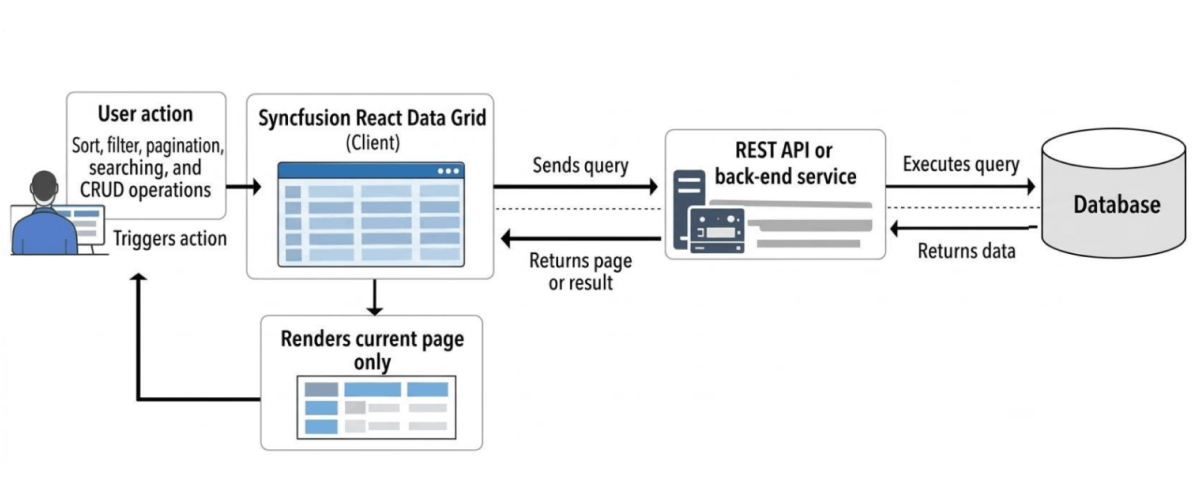
Server-executed operations allow the browser to receive only the records required for the current view while delegating data-processing operations to the back end. This supports datasets larger than browser memory and policies that prohibit full dataset transfer.
| Operation | Grid behavior | Architectural benefit |
|---|---|---|
| Paging | Sends page parameters; the server returns the requested page. | Limits payload and avoids full transfer. |
| Sorting | Sends sort descriptors for server execution. | Allows database-level ordering beyond browser memory. |
| Filtering | Sends predicates to the API. | Keeps the full dataset off the client. |
| Searching | Translates search terms to server predicates. | Supports search without loading all rows. |
| Grouping | Supports server grouping with lazy child loading. | Reduces initial memory and expansion cost. |
| Aggregation | Computes aggregates at the data source. | Keeps totals aligned with the complete dataset. |
| CRUD | Submits modifications to back-end endpoints. | Keeps the server authoritative and auditable. |
DOM efficiency
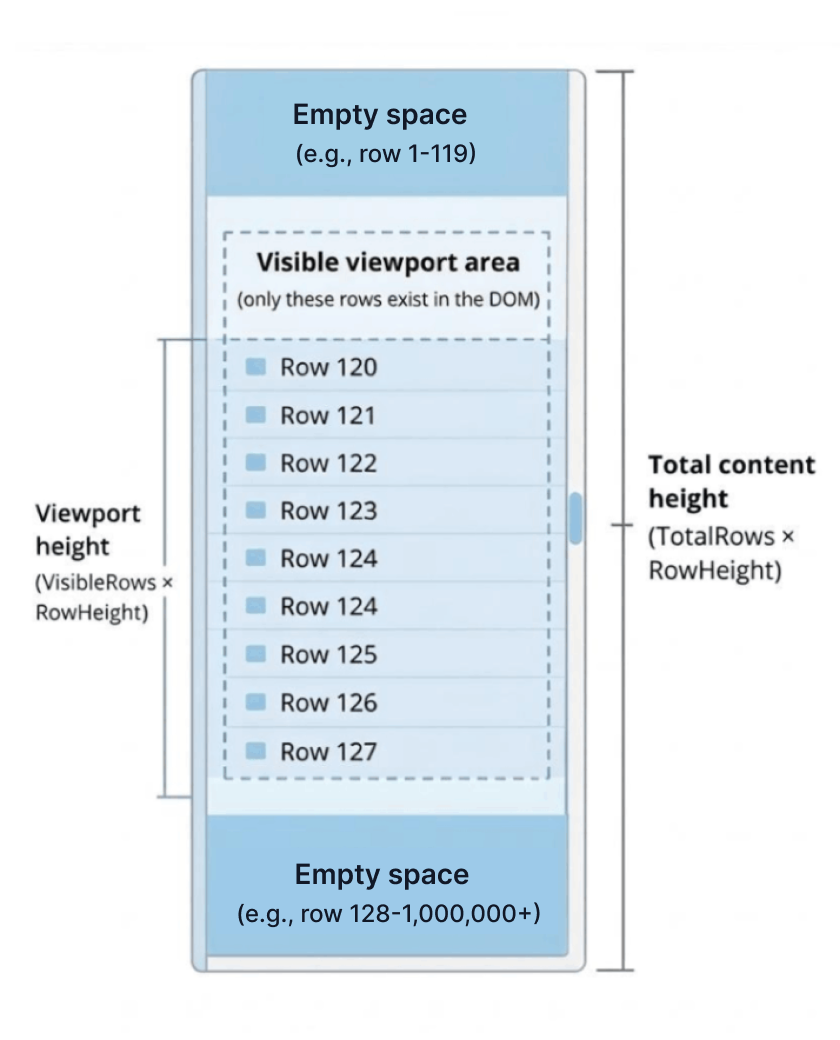
The Data Grid limits DOM growth by reusing rendered elements within the viewport, reducing memory consumption and helping maintain responsive scrolling as data volume increases.
The following node counts illustrate the effect of viewport rendering.
| Dataset or concern | Standard table | Virtualized Grid |
|---|---|---|
| 1,000 rows × 10 columns | ~10,000–15,000 DOM nodes in a standard table | ~300–600 nodes with virtualization, based on the source scenario. |
| 100,000 rows × 10 columns | ~1,000,000+ nodes and significant slowdown in a standard table | ~300–600 nodes with virtualization in the cited scenario. |
| 1,000,000 rows × 10 columns | A standard table typically becomes unresponsive | ~300–600 nodes with virtualization in the cited scenario. |
| Memory at large scale | Grows with dataset size in a standard table | Primarily determined by viewport height with virtualization. |
| Scroll performance | Degrades as large DOM trees trigger layout work | Only viewport rows participate in layout and paint. |
Figure: DOM footprint under virtualization
Performance benchmarking and validation
Benchmark data should be evaluated alongside the tested workload, environment, and measurement methodology to support informed performance assessments.
Benchmark scenario
The published benchmark covers common operations on a large interactive dataset.
| Scenario | Measurement | Architectural relevance |
|---|---|---|
| Initial Grid load | Time to first Grid render and completion of the first paint | Establishes baseline page-load impact. |
| Sorting | Time to sort and restore the original order | Shows responsiveness for common ordering actions. |
| Filtering | Time to apply and clear predicates | Shows iterative data-narrowing cost. |
| Searching | Latency to apply and clear search queries | Shows repeated exploratory-search response. |
| Grouping | Time to group rows and restore a flat view | Shows hierarchical-presentation cost. |
Testing environment
- Component: Syncfusion React Data Grid 2026 Volume 1, version 33.1.44.
- Framework: React production build.
- Browser: Google Chrome 122.x.
- Operating system: Windows 11 64-bit.
- Hardware: AMD Ryzen 5 7530U, 16 GB RAM, AMD Radeon graphics.
- Dataset: 100,000 rows by 12 columns.
- Method: Action lifecycle events measured the time from operation start through completion of the corresponding UI update.
Results can change with hardware, browser, viewport, data volume, columns, enabled features, templates, and application configuration.
Benchmark results
The following benchmark results show approximate timings for initial load, sorting, filtering, searching, and grouping under paging, infinite scrolling, and virtual scrolling. Results were measured on a large interactive Data Grid and should be interpreted in the context of the documented testing environment.
| Operation | Virtual scrolling (ms) | Infinite scrolling (ms) |
|---|---|---|
| Initial load | ~98 | ~199 |
| Sorting | ~167 | ~240 |
| Clear sorting | ~63 | ~144 |
| Filtering | ~132 | ~243 |
| Clear filtering | ~106 | ~278 |
| Searching | ~217 | ~317 |
| Clear searching | ~66 | ~190 |
| Grouping | ~996 | ~138 |
| Clear grouping | ~85 | ~318 |
Try live demo and open the Performance Benchmark tab to view and validate live performance metrics.
Real-Time performance and scalability
Validate sustained updates and scale dimensions that are not captured by a single row-count benchmark.
Real-Time update performance
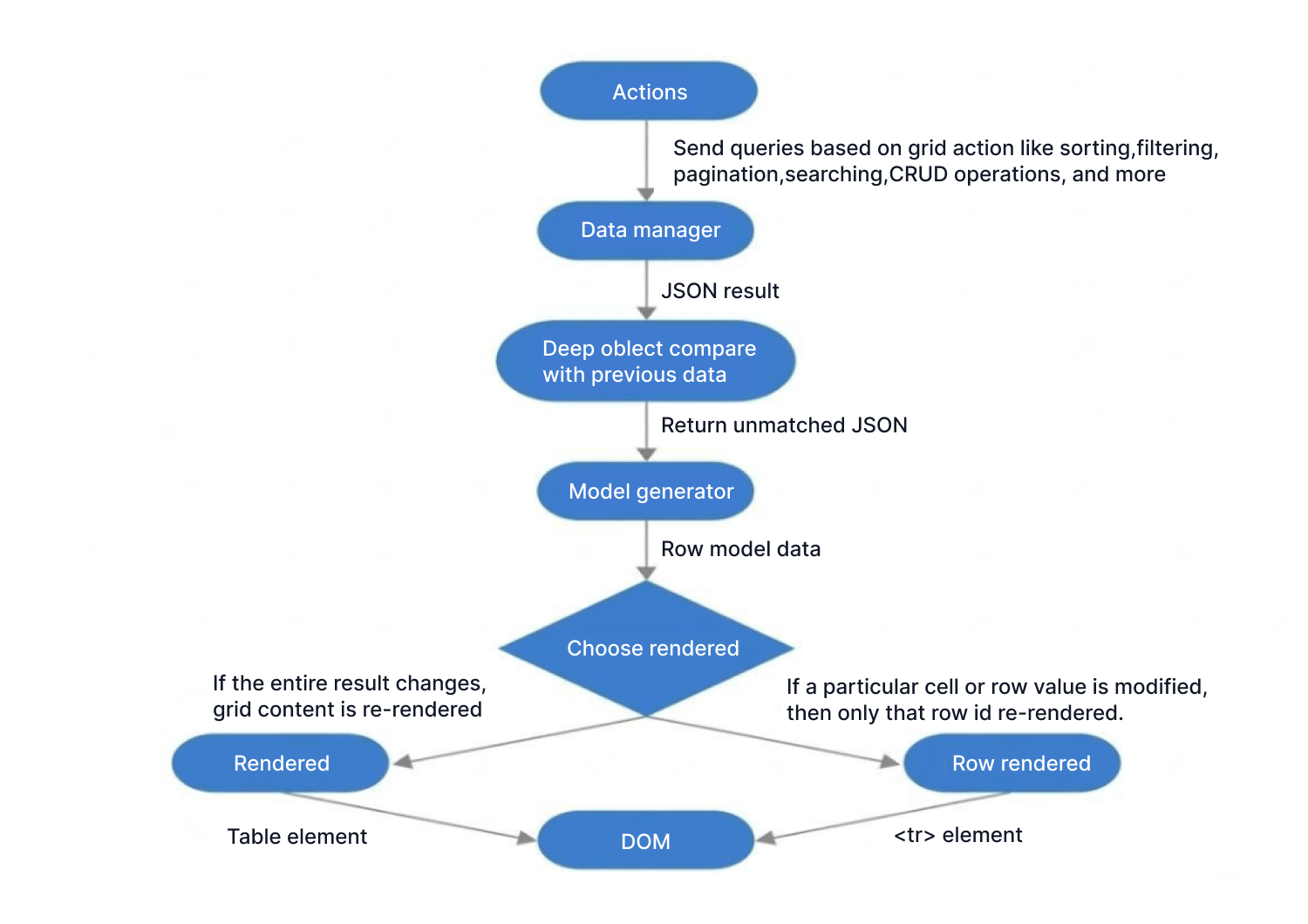
Immutable rendering is the primary mechanism for sustained update streams. It uses efficient change detection to limit rendering to changed rows, minimizing DOM mutations and helping preserve selection, scrolling position, and overall layout stability during frequent updates.
| Real-time scenario | Coverage | Rendering behavior |
|---|---|---|
| Batch updates | Supported | Only modified rows re-render. |
| Single-row updates | Supported | Targets the changed row rather than the full Grid. |
| High-frequency feeds | Immutable mode | Diff-based rendering reduces DOM mutations. |
| Live data with frozen columns | Supported | Frozen areas remain synchronized. |
| Real-time updates with row virtualization | Supported | Only visible rows render while off-screen rows remain virtualized. |
| Streaming updates with large datasets | Supported | Updates apply incrementally. |
| Updates while rows are selected | Supported | The source states that selection remains stable. |
| Updates during scrolling | Supported | The source states that scroll position remains stable. |
| Updates with complex layouts | Supported | Column widths, frozen sections, and layout remain stable in the source scenario. |
The live data demo shows continuous updates in the browser.
Figure: Immutable re-rendering flow
Scalability beyond row count
Scalability includes wide schemas, concurrent instances, dynamic columns, grouped data, aggregation, device constraints, and large exports—not only row count. Row and column virtualization support efficient rendering of large datasets and wide tables. Rendering cost scales per Grid instance, while each instance retains its own bounded viewport, predictable memory usage, and independent lifecycle.
| Dimension | Coverage | Behavior |
|---|---|---|
| Column count | Column virtualization | Only visible columns render. |
| Large rows and columns | Dual-axis virtualization | Only visible cells participate. |
| Concurrent Grid instances | Multiple instances supported | Each instance has its own rendering lifecycle. |
| Dynamic columns | Runtime column updates | Column definitions change without full component reinitialization. |
| Multi-grid dashboards | Multiple Grid layouts supported | Each Grid virtualizes its own dataset. |
| Large grouped data | Lazy group loading | Child rows are fetched on expansion. |
| Large-data aggregation | Server-side aggregation | Totals can be calculated against the complete back-end dataset. |
For very large exports, server-side export is recommended so the application’s back end generates the complete file outside browser memory.
4
Security and compliance
Understand the security responsibility boundary between the Grid (presentation layer) and application-owned functions such as authentication, authorization, data protection, and audit logging. Review deployment security characteristics, export controls, compliance certifications, and vulnerability management to validate organizational readiness and regulatory compliance.
Security architecture and responsibilities
Separate component behavior from the controls that the application, back end, and infrastructure must implement.
Security responsibility matrix
The component is a browser UI layer rather than an identity, authorization, or data-protection service. Use the matrix to assign ownership before implementation.
| Security concern | Component behavior | Application responsibility |
|---|---|---|
| Cross-site scripting | Renders application-provided data; sanitizer support can be enabled when templates render HTML. | Validate and sanitize inputs on the server and before client delivery. |
| Authentication | Does not manage identity, credentials, or sessions. | Integrate identity providers and manage tokens and sessions. |
| Authorization | Does not decide permissions; visibility is supplied by configuration and returned data. | Enforce access control and decide what data and actions are available. |
| Sensitive data | Displays supplied values. | Mask, redact, or protect fields before rendering. |
| Export | Provides export APIs. | Authorize exports and apply masking or filtering. |
| Audit logging | Emits edit and interaction events. | Format and forward audit records to monitoring or SIEM systems. |
| Transport security | Uses the host application's network layer and does not initiate independent network communication. | Configure TLS, certificates, and secure endpoints. |
| Content Security Policy | Designed to run within CSP-enforced applications. | Set and enforce the application’s CSP. |
| Dependency security | Distributed as versioned packages. | Maintain update, provenance, and vulnerability-monitoring policies. |
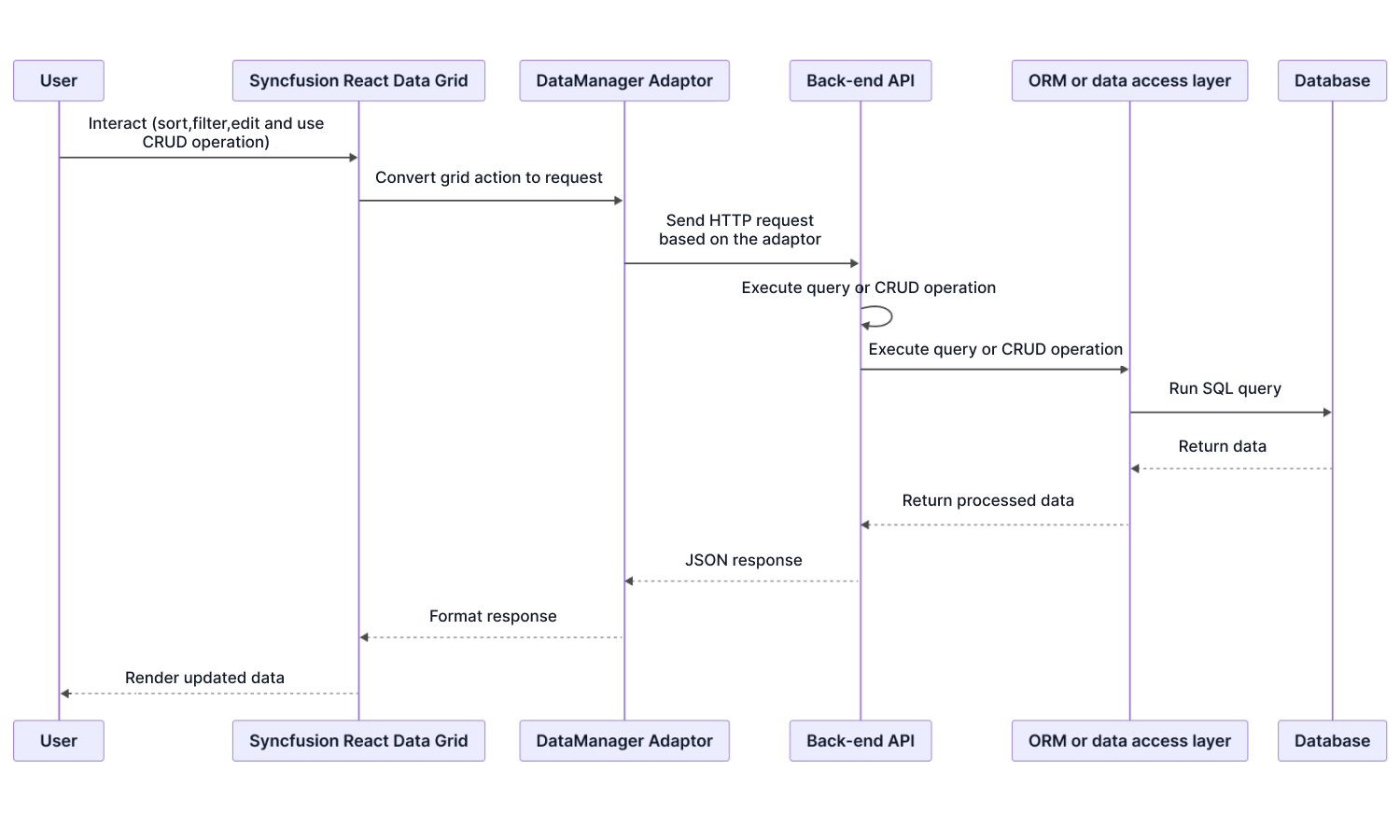
Security architecture overview
The Grid receives data processed by the application API, renders it in the browser, and emits events for interactions such as editing, sorting, filtering, and export back to application logic. Data retrieval and modification remain the responsibility of backend services.
OWASP security responsibility context
OWASP categories apply according to the Grid’s position as a client-side rendering dependency. The matrix identifies the system layer responsible for addressing each applicable risk area.
| OWASP area | Relation to the Grid | Responsible layer |
|---|---|---|
| A01 Broken Access Control | The Grid renders the dataset supplied by the application. | The application and back end must enforce access decisions. |
| A03 Software Supply Chain Failures | The Grid is an external frontend dependency. | Use trusted sources, controlled versions, protected registries, and secure pipelines. |
| A04 Cryptographic Failures | Encryption applies to browser-to-API communication. | Infrastructure and back-end services own TLS and encryption policy. |
| A05 Injection | Cell data may originate from users or APIs. | Validate and sanitize before sending data to the client. |
| A07 Authentication Failures | The component does not manage login sessions or tokens. | The application and identity provider own authentication. |
| A08 Software or Data Integrity Failures | Package integrity depends on provenance and lock-file management. | Pin versions, use lock files, and validate packages through trusted registries. |
| A09 Security Logging and Alerting Failures | Edit and record events represent user actions. | Capture and route them to logging and monitoring systems. |
Application and data security
Validate data flow, permission enforcement, deployment behavior, and export controls in the target application.
Data flow and network behavior
All Grid requests use the application’s existing API endpoints and HTTP path. The component does not introduce an independent network channel.
- The back end defines routing and endpoint exposure.
- The application attaches authentication and other headers before requests are sent.
- The back end performs validation and access control.
- WAF, reverse proxy, gateway, and related network controls remain at the organization’s infrastructure boundary.
Authentication and authorization integration
The Grid functions as a presentation component and does not perform authentication, authorization, or session management. Permissions are evaluated by the application and backend services and expressed through returned data, column configuration, edit settings, and intercepted events.
| Security requirement | Grid capability | Enforcement layer |
|---|---|---|
| Column visibility | Application-defined columns | Set definitions after role evaluation. |
| Edit permissions | Editing can be enabled or disabled per column. | Set flags before rendering based on permissions. |
| Row-level access | Only supplied rows are rendered. | Restrict rows in back-end queries; render only authorized results. |
| Cell-level edit rules | Edit events can be intercepted and validated. | Run application validation before persistence. |
| Sensitive-data masking | Masked values can be supplied to cells. | Prefer back-end masking for regulated data; client-only masking is insufficient. |
| Read-only mode | Editing can be disabled globally. | Configure from role or session context. |
| Edit audit capture | Change events are emitted. | Forward records to the audit or SIEM pipeline. |
| Authenticated API communication | Requests use DataManager hooks and the application’s HTTP configuration. | Attach headers in the application and validate every token at the back end. |
Deployment security characteristics
The Data Grid’s deployment security properties are architectural characteristics rather than optional configuration settings.
| Deployment characteristic | Meaning |
|---|---|
| No external runtime connections | The source states that the component does not call Syncfusion or third-party services during normal runtime. |
| CDN-free self-hosting | CSS and JavaScript assets are available in the npm packages; a runtime CDN dependency is not required. |
| Air-gapped deployment | Operation and license validation do not require internet access or external network connectivity. |
| Internal registry installation | Packages can be installed from internal Nexus or Artifactory registries. |
CSP unsafe-inline not required |
The source states that normal rendering uses external stylesheets rather than runtime inline-style injection. |
CSP unsafe-eval not required |
The source states that the rendering pipeline does not use eval or the Function constructor. |
| No telemetry or analytics calls | The source states that component usage, errors, and analytics are not transmitted. |
Export security
Export APIs provide output generation, while the application controls authorization, data selection, masking, endpoint security, and audit capture.
| Export concern | Handling | Enforcement location |
|---|---|---|
| Who can export | The application can expose or restrict export actions. | Application layer |
| Data included | Exports reflect the data and transformations supplied by the application, including masked values when provided. | Application layer |
| Transmission to Syncfusion | Export generation does not send data to Syncfusion services. | Component architecture |
| Export audit logging | The application can intercept export actions and forward them to audit systems. | Application and logging layer |
| Server-side export | Data is sent to the application’s own export service, which the application must secure. | Application and back-end service |
Compliance and security assurance
Collect current certification, vulnerability-management, and runtime-verification evidence for procurement and deployment approval.
Compliance certifications
Review current procurement evidence rather than relying only on a guide summary.
| Certification or standard | Source coverage | Procurement reference |
|---|---|---|
| SOC 2 Type 2 | The source describes independently audited, actively maintained controls. | SOC 2 overview |
| GDPR | Documented GDPR-aligned data-processing practices. | GDPR overview |
| WCAG 2.1 AA | The source states that components are tested and documentation is available. | Accessibility documentation |
| ISO 27001 | The source instructs evaluators to contact the enterprise team for current status. | Contact sales for current evidence. |
| Section 508 | The source connects Section 508 alignment to WCAG 2.2 AA conformance and procurement documentation. | Section 508 documentation |
Vulnerability management
Security issues and dependency updates are handled through the standard release process and responsible-disclosure channel.
| Vulnerability-management area | Coverage | Verification |
|---|---|---|
| Responsible disclosure | A public reporting process and channel are documented. | Responsible disclosure |
| Security patches | Delivered through standard product releases. | Release notes |
| Fix documentation | Release history identifies versions containing fixes. | Release history |
| Enterprise escalation | Support handling follows the customer’s agreement. | Support SLA |
| Dependency monitoring | Third-party updates and fixes are incorporated through maintenance releases. | Release notes |
Review regulatory compliance guidance for additional compliance information.
Security assurance statements
Treat assurance statements as testable claims. A corresponding verification method is provided for each.
| Assurance statement | Verification method |
|---|---|
| No outbound calls to Syncfusion or third parties during normal runtime | Inspect browser DevTools Network activity during Grid operations. |
| No runtime inline-style injection | Inspect DOM elements and CSP violation logs. |
No eval or Function-constructor usage |
Run with strict CSP and inspect errors or unsafe-eval violations. |
| Untrusted cell values do not execute scripts | Inject test values and inspect the DOM and runtime behavior. |
| The component does not manage credentials, tokens, or session storage | Inspect cookies, local storage, and session storage. |
| Vendor security documentation, including the source-referenced NIST 800-53 information, is available for procurement | Request the current documentation package from production support or procurement. |
| Accessibility conformance documentation is available | Review the accessibility documentation. |
| Security fixes and dependency updates follow the standard release cycle. | Review release history and release notes. |
5
Interactive live demos
Use the interactive live demos to assess the component in representative usage scenarios. Explore key capabilities, interactions, configuration options, and runtime behavior to validate functional fit and user experience against application requirements.
Try our Live Demo
6
Evaluation checklist
Print or copy this checklist into the evaluation record. Each item maps to a technical claim, limitation, responsibility boundary, or verification method documented in the sections above.
01. Runtime compatibility
- Target framework and deployment environment are covered by the documented compatibility matrix.
- The installed Syncfusion package version meets the minimum requirement for the organization’s React version.
- Next.js client-component boundaries, server-side paging, Streaming SSR, ISR, and Edge-runtime behavior are validated where applicable.
- Required browsers, accessibility modes, and any legacy-browser polyfill conditions are accepted.
02. Build and application architecture
- The production build completes with the target toolchain, TypeScript settings, CSS strategy, and imported feature modules.
- The required ESM, CommonJS, or UMD distribution format fits the application and test environment.
- State flows correctly through the selected library without introducing a parallel global store or proprietary state layer.
- The design system is reproducible through CSS variables, Sass, CSS Modules, built-in themes, or Theme Studio.
- Jest, Vitest, React Testing Library, Cypress, Playwright, or Storybook validation runs in the existing CI/CD pipeline.
- Module Federation or Single-SPA dependency sharing prevents duplicate packages and version conflicts.
03. Data, API, and extensibility
- The selected adaptor matches the production API pattern, response shape, and server-side operation requirements.
- The real back-end framework, database path, and ORM contract are validated through application API endpoints.
- JWT, OAuth, token refresh, mTLS, and 401/403 handling remain correctly divided between DataManager, transport, and application layers.
- Required templates, editors, filters, toolbar extensions, and aggregate presentations are implemented through documented public APIs.
- Critical events and methods support validation, cancellation, auditing, selection control, persistence, export, and other required workflows.
- Semantic versioning, deprecation handling, migration guidance, and staged upgrade testing meet the maintenance policy.
04. Performance and scalability
- Row virtualization, column virtualization, infinite scrolling, immutable mode, or lazy grouping is selected for the actual navigation and update pattern.
- The mutually exclusive choice between infinite scrolling and row virtualization is resolved intentionally.
- Paging, sorting, filtering, searching, grouping, aggregation, and CRUD are delegated to the server where client loading is unsuitable.
- DOM size, memory behavior, scrolling, grouping, and interaction latency are measured with representative rows, columns, templates, and enabled features.
- Expected real-time update rates, frozen columns, selection stability, continuous scrolling, and long-running sessions are validated.
- Mobile and tablet interaction, multiple-grid dashboards, dynamic columns, and very large server-side exports meet the production requirement.
- Published benchmark results are treated as reference points and reproduced on the organization’s own hardware and browser environment.
05. Security and compliance
- Authentication, authorization, row access, field masking, validation, export policy, and audit logging owners are explicitly assigned.
- Network inspection confirms that runtime data travels only through the application’s configured endpoints.
- Strict CSP validation confirms the required behavior for external stylesheets and the absence of
unsafe-evalusage. - Untrusted values and any application-rendered raw HTML are tested for script-execution risk.
- Export permissions, masking, audit capture, and the security of any application-owned server-side export endpoint are verified.
- Current SOC 2, GDPR, accessibility, Section 508, ISO-status, vulnerability, and support evidence required by procurement has been obtained.
- The organization accepts responsibility for dependency pinning, lock files, trusted registries, patch monitoring, and release-note review.
06. Final decision
- Every mandatory criterion is marked Pass, or has an explicitly accepted condition, owner, mitigation, and review date.
- No documented limitation conflicts with a non-negotiable product, architecture, security, accessibility, or deployment requirement.
- Technical evidence, screenshots, logs, benchmark results, package versions, and procurement documents are stored with the evaluation record.
- The selected configuration and responsibilities are approved by development, architecture, security, and procurement stakeholders.
7
Frequently asked questions
Review the questions that most often affect architecture fit, analytical scale, security approval, and long-term adoption.
Can the React Data Grid work while an application migrates from the Next.js Pages Router to the App Router?
Yes. The React Data Grid is documented for both Pages Router and App Router integration patterns. Validate mixed-router deployments during migration, particularly hydration, data loading, and code-splitting behavior.
Validate both paths in the production build, particularly hydration, data loading, and route-level code splitting. See the Next.js integration guide.
Does GraphQL integration require a completely custom adaptor?
No. The built-in GraphQL adaptor supports queries and mutations for sorting, filtering, paging, and CRUD operations. The evaluator configures operations and maps the request and response shapes rather than building the integration from the beginning.
Use a custom adaptor only when the schema or transport contract requires behavior beyond the built-in mapping.
How should multiple micro-front-end teams prevent conflicting React Data Grid versions?
Declare the Syncfusion packages as shared singletons in the shell-level Module Federation configuration. This centralizes the loaded version while allowing each micro-frontend to consume the shared dependency.
Version conflicts remain a shell-level responsibility. Review the micro-frontend architecture guidance and validate the final production bundle.
Can virtualization handle both very large row counts and wide column sets?
Yes. Row and column virtualization can be enabled together so only visible cells participate in rendering. This keeps the DOM bounded for datasets with both many records and many columns.
Measure the actual configuration because templates, grouping, frozen regions, viewport size, and enabled features affect results. Use the virtualization demo as a starting point.
Can the browser receive only the records required for the current view?
Yes. Paging, sorting, filtering, searching, grouping, aggregation, and CRUD operations can be delegated to the back end. The browser then receives the records required for the active view rather than the complete dataset.
How should published performance benchmarks be used during evaluation?
Use the published results to understand the measured scenario and to create a repeatable internal test. They were captured on a defined browser, operating system, hardware configuration, component version, and 100,000-row by 12-column dataset.
Actual results vary with hardware, browser, viewport, data shape, columns, templates, and enabled features. Reproduce the important operations on the organization’s own devices and production-shaped configuration.
What is the recommended approach for exporting very large datasets?
Use server-side export when the required dataset is too large for browser-based generation. The application sends the request to its own back-end export service, which generates and returns the document.
Does the React Data Grid transmit application data to Syncfusion or third-party services at runtime?
The React Data Grid operates through the application’s configured API endpoints and documented deployment model. Verify runtime network behavior using browser DevTools as part of security review.
Can the React Data Grid operate under a strict Content Security Policy?
The React Data Grid is designed to operate within CSP-enforced applications. The application remains responsible for configuring and enforcing CSP policies. Validate the production build under the organization’s CSP configuration and review CSP violation logs during testing.
What happens when a vulnerability is found in a Syncfusion package or one of its dependencies?
Security and dependency fixes are delivered through the standard release process and documented in release notes and release history. Evaluators can report issues through the responsible-disclosure process.
Review the release notes, release history, and the applicable support SLA when planning remediation and escalation.
8
Resources
Use these references after reviewing the guide and FAQs to continue implementation, validation, troubleshooting, and design evaluation.
- React Data Grid documentation- Start with installation and basic configuration.
- Knowledge base articles- Review task-specific solutions and troubleshooting guidance.
- Tutorial videos- Follow feature walkthroughs in video format.
- Feature walkthrough video- See a guided product overview.
- Live interactive demo- Explore the Data Grid in a browser.
- Feature web story- Review a brief visual feature summary.
- Figma UI kits- Check available design assets.







