Form designer
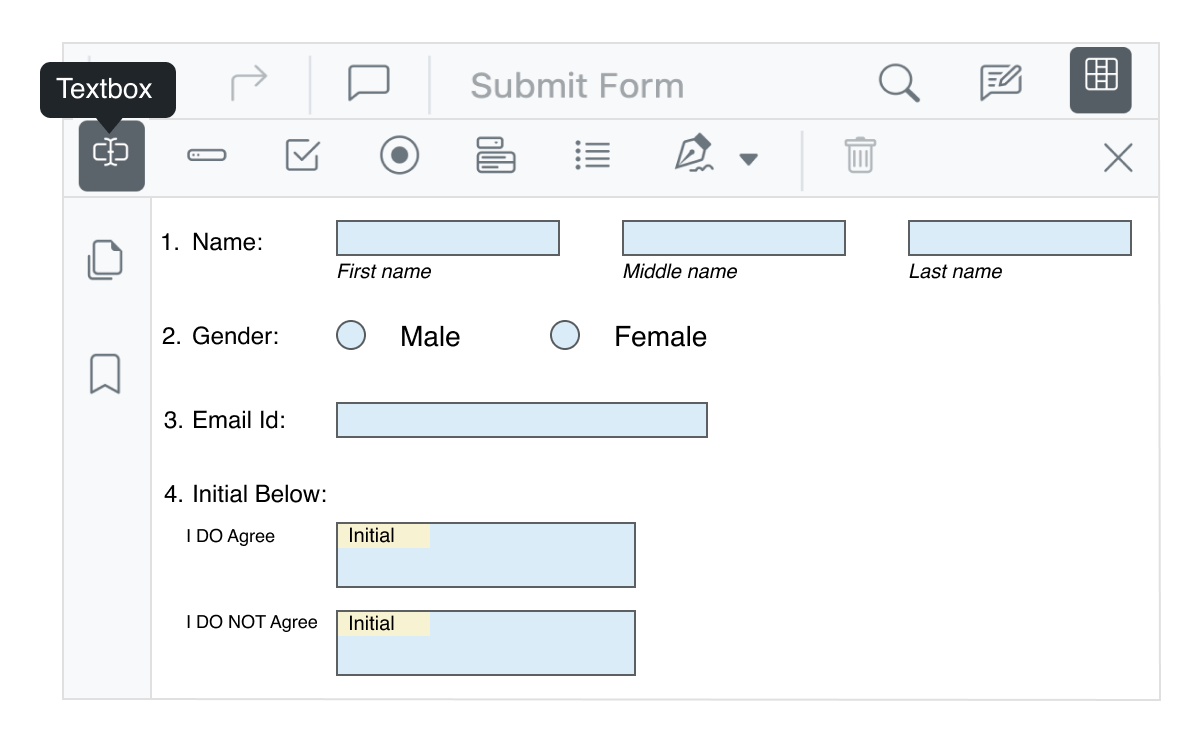
The PDF Viewer in JavaScript provides the option to add, edit, and delete form fields. The form field types supported by the PDF Viewer control are text box, password, checkbox, radio button, list box, dropdown, signature field, and initial field. The form field values can be exported to and imported from JSON, XFDF, FDF, and XML formats.
Angular version compatibility
With continuous improvement in Angular versions, the Angular PDF Viewer is kept up to date to make it compatible with the latest version.
Frequently Asked Questions
Why should you choose Syncfusion Angular PDF Viewer?
The Syncfusion Angular PDF Viewer (ng PDF viewer) supports the following features:
- Accurate and reliable PDF rendering.
Easy navigation and interactions.
Review PDF files with annotating tools such as text markup, shape, measure, free-text, stamp, and sticky notes.
Supports filling and editing of AcroForms.
- One of the best Angular PDF Viewers in the market that offers feature-rich UI to interact with the software.
- Simple configuration and APIs.
- Supports all modern browsers.
- Mobile-touch friendly and responsive.
Expansive learning resources such as demos and documentation to learn quickly and get started with Angular PDF Viewer.
Where can I find the Syncfusion Angular PDF Viewer demo?
You can find our Angular PDF Viewer demo, which demonstrates how to render and configure the PDF Viewer.
Can I download and utilize the Syncfusion Angular PDF Viewer for free?
No, this is a commercial product and requires a paid license. However, a free community license is also available for companies and individuals whose organizations have less than $1 million USD in annual gross revenue, 5 or fewer developers, and 10 or fewer total employees.
How do I get started with Syncfusion Angular PDF Viewer?
A good place to start would be our comprehensive getting started documentation.
Our Customers Love Us




See Real Success Stories
Developers around the world trust Syncfusion’s Essential Studio to simplify complex projects and speed up delivery. With a vast library of UI controls, powerful SDKs, and reliable support, Essential Studio helps teams build enterprise-ready applications with confidence.
Read Our Customer StoriesIndustry
Software development
75% Cost reduction
50% Faster development

Industry
Utilities (oil and gas)

450+ hours saved
Streamlined processes and hours of development effort saved.

Advanced, flexible features
Empowered users through robust and versatile functionality.
Industry
Software and technology
1000+ of hours saved
Accelerated development with enterprise-ready UI components.

Efficient file management
Streamlined workflows with document libraries without building them from scratch.
Industry
Software and technology

2 Years of delay avoided
Two years of delays prevented with proactive planning.

On-time delivery
Projects delivered on schedule using trusted controls.
Industry
IT services and IT consulting

Improved performance
Large datasets handled with easy customization and quick debugging.

Highly customizable
Plug-and-play controls with quick template integration.
Industry
Professional services
Instant access
Quick availability of features and resources.
Reduced dependencies
Fewer dependencies for faster development.
Other supported frameworks
PDF Viewer is also available in Blazor, React, Vue, JavaScript, ASP.NET Core and ASP.NET MVC frameworks. Check out the different PDF Viewer platforms from the links below,






Supported browsers
The Angular PDF Viewer works well with all modern web browsers such as Chrome, Firefox, Microsoft Edge, Safari, and Opera.