
React Rich Text Editor - Evaluation Guide
Evaluate the Syncfusion React Rich Text Editor for Enterprise Adoption
The Syncfusion React Rich Text Editor support knowledge management, documentation, customer communication, policy authoring, content management, learning systems, support workflows, and long-form document creation. This guide organizes the supplied technical evidence into a practical evaluation sequence while retaining compatibility conditions, integration boundaries, performance behavior, security responsibilities, and source references.
Start with the visible evaluation framework, then expand only the technical topics needed for the authoring application under review.
Quick evaluation framework
Evaluate in this order so an unsupported runtime, content model, security condition, or performance requirement is identified before advanced customization begins.
| Order | Evaluation area | What to assess | How to verify | Decision impact |
|---|---|---|---|---|
| 1. | Runtime fit | Framework, React version, SSR model, browsers, and web-only boundary | Match the target environment to published compatibility evidence and test the real route. | Unsupported runtime needs can stop the evaluation early. |
| 2. | Content and authoring fit | HTML or Markdown, isolation mode, formatting, paste, media, output, accessibility, and mobile use | Build the intended authoring workflow with representative content. | Determines whether the editor fits the content model and user experience. |
| 3. | Integration and extensibility fit | Load or save, metadata, media endpoints, forms, state, APIs, custom tools, and workflows | Connect production-shaped services and implement the hardest required customization. | Reveals application and back-end integration effort. |
| 4. | Performance fit | Large documents, media, sustained typing, programmatic updates, multiple editors, and mobile | Run repeatable authoring workloads on target hardware and record results. | Determines scalability for the intended content. |
| 5. | Security and procurement fit | Sanitization, data flow, CSP, authentication, export, compliance, and support evidence | Validate runtime behavior with DevTools and review current procurement documents. | Clarifies what the component provides and what the application must enforce. |
| 6. | Final decision | Conditions, limitations, evidence, ownership, and unresolved risks | Record pass, conditional pass, or fail for every mandatory area. | Prevents broad feature coverage from hiding a critical mismatch. |
AI integration and responsibility
The Rich Text Editor provides a built-in AI Assistant module for operations such as rewriting, summarizing, and formatting. The UI, commands, and properties can be configured within the editor. The editor does not include an AI runtime or directly call an external AI service — the application connects its own back end or model endpoint and owns authentication, authorization, privacy, prompt construction, response validation, human review, logging, and audit requirements.
Key consideration: Verify exactly which editor content is sent to the model, how tenant and user permissions are enforced, how unsafe or incorrect output is reviewed, and whether prompts and responses may be stored by the selected model provider.
1
Architecture compatibility
Verify that the editor fits the existing architecture without requiring significant changes before deeper evaluation begins.
Framework and runtime compatibility
Confirm that the deployment environment, React version, server rendering pattern, and browser requirements match published Syncfusion compatibility. An unsupported environment, client-component boundary gap, or browser exclusion identified here can stop the evaluation early.
Framework and environment support
Confirm that the target framework and deployment environment are supported before evaluating editing features. The Rich Text Editor integrates as a standard React component across supported web application environments.
| Deployment environment | Syncfusion React Rich Text Editor coverage |
|---|---|
| React 18/19 SPA | Supported and works with standard configuration. |
| Next.js App Router | Supported. Requires client component usage with documented guidance. |
| Next.js Pages Router | Supported with documented integration guidance. Stable across all Pages Router versions. |
| Vite SPA | Supported with documented integration guidance. It integrates seamlessly as a standard package dependency. |
| Remix | Supported with documented integration guidance, with client-side hydration behavior that is well-documented and reliable. |
| Gatsby SSG | Supported with documented integration guidance, it supports static generation and hydrates correctly at runtime. |
| Electron | Supported. Runs inside Electron's renderer process as a standard React component. |
| Micro_Frontend (Module Federation) | Supported. Declare as a shared singleton at the shell level; one version loads across all teams. |
| Micro_front_end (single-SPA) | Supported. Runs as a standard, client-rendered React component inside single-SPA. |
| Preact | Supported with documented integration guidance. The editor works seamlessly via Preact’s React compatibility layer. |
Use the published system requirements as the versioned baseline.
Decision guidance: A mixed Next.js Pages Router and App Router application is supported, but App Router pages require a client-component boundary.
React version compatibility
Match the application React version to the minimum Syncfusion version and review release history before changing either dependency.
| React version | Syncfusion minimum version | Approximate release year | Coverage |
|---|---|---|---|
| React 16 | Syncfusion v16 | 2018 | Supported and documented in the current release. |
| React 17 | Syncfusion v18 | 2020 | Supported and documented in the current release. |
| React 18 | Syncfusion v20 | 2022 | Supported and documented in the current release. |
| React 19 | Syncfusion v29 | 2024 | Confirmed compatible in the latest release notes. |
| React Strict Mode | No minimum version constraint. | — | Fully compatible with React Strict Mode and it is validated to work without duplicate state mutation issues in development. |
| Organization-pinned React version | N/A | — | No known framework-level dependency conflicts. The Rich Text Editor consumes the host application's React version. |
| Future React major version planning | Reviewable in release history. | — | Historical adoption pace across React 17, 18, 19 provides evidence-based upgrade planning. |
Keep all @syncfusion packages at or above the mapped minimum version. Published release history shows that support for React 17, 18, and 19 was added within approximately 6–12 months of each stable release. Verify support for future React versions in the current release documentation.
Watch out for: Major releases may update props, settings, or CSS classes. Test upgrades in staging and review migration guidance before production promotion.
SSR and server component integration
The Rich Text Editor uses documented client-component boundaries in Next.js App Router and can initialize from application-prepared content. Validate the exact rendering and data-loading pattern used by the target route.
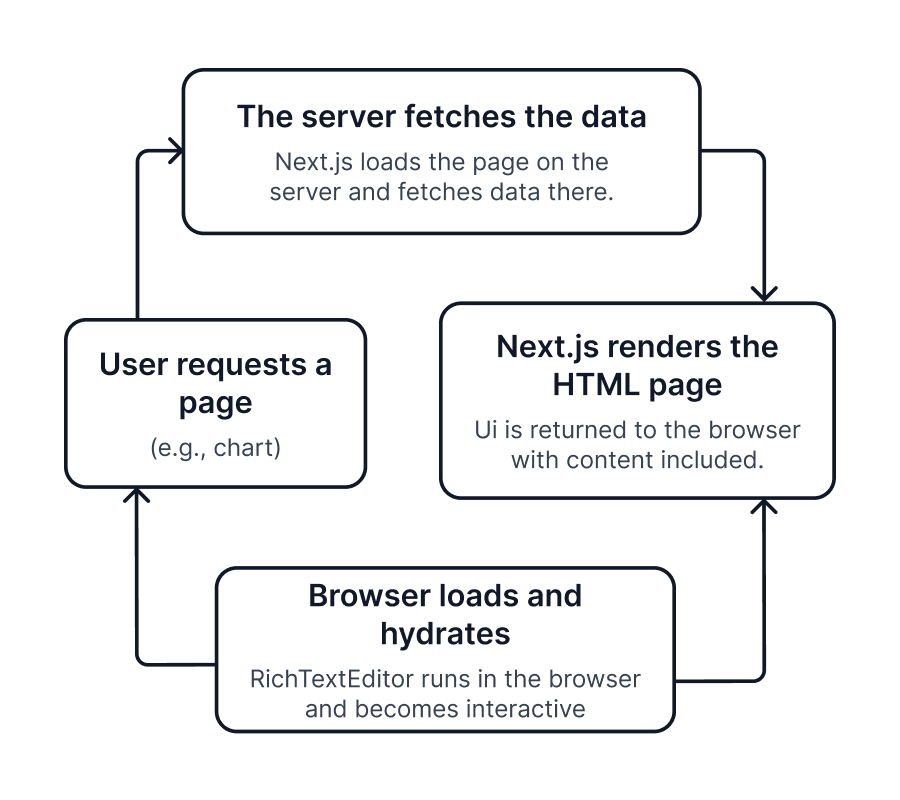
- Content-ready initialization: prepare the editor value and configuration before the client-side editor initializes.
- Hydration boundary: place the Rich Text Editor inside a client component to avoid App Router hydration mismatches.
- Streaming SSR: use a Suspense boundary so surrounding page content can render while the editor and its content initialize asynchronously.
- Incremental Static Regeneration: regenerated pages can hydrate correctly when standard integration patterns are followed; validate behavior against the application data-fetching strategy.
- Edge runtime: The Rich Text Editor can be used in Edge deployments with the appropriate client-component configuration. Validate the application’s data-loading pattern and deployment constraints in the target environment.
Key consideration: Reproduce production CSS loading, initial content, Suspense behavior, route navigation, and hydration in the actual App Router or Edge deployment.
Browser and runtime support
Use the versioned browser matrix for procurement and release planning. The supplied Rich Text Editor browser table covers Chrome, Firefox, Safari, Microsoft Edge, and Opera.
| Browser runtime | Syncfusion React Rich Text Editor coverage |
|---|---|
| Chrome (latest) | Supported |
| Firefox (latest) | Supported |
| Safari (latest) | Supported |
| Microsoft Edge (latest) | Supported |
| Opera (latest) | Supported |
Verification step: Test the required editing modes, clipboard behavior, media insertion, selection, keyboard navigation, and mobile interaction in every browser included in the organization’s support policy.
Build, package, and module compatibility
Verify that the Rich Text Editor installs as a standard npm dependency and passes the production build without proprietary plugins. Validate against the actual repository build and internal registry before proceeding.
Build compatibility
The Rich Text Editor installs as a standard npm dependency, supports modern tree-shaking, and does not require proprietary build plugins. Validate the production build, CSS loading, code splitting, and TypeScript settings in the target repository.
| Environment/ToolChain | Syncfusion React Rich Text Editor support |
|---|---|
| Webpack | Supported and works as a standard npm/ESM React package. Integrates without requiring proprietary plugins. |
| Vite | Supported. ESM-compatible, integrates without configuration. |
| Turbopack | Supported via ESM export. Core rendering and data binding validated by Syncfusion under Turbopack's production pipeline. No Turbopack-specific plugin required. Teams should verify their own CSS strategy and SSR/Suspense configuration. |
| Nx/Turborepo (Monorepo) | Supported with standard npm dependency declaration designed to work without the need for custom executors, generators, or monorepo-specific configuration. |
TypeScript Strict Mode ("strict": true) |
Fully compatible. All public APIs, props, and event signatures are fully typed; no @ts-ignore suppressions required for standard usage. |
| Next.js (App & Pages Router) | Supported. Client-component usage where needed. |
| Create React App (legacy — deprecated) | Supported for existing projects. For new projects or migrations, Vite is the recommended replacement. The Rich Text Editor's Vite integration guide applies directly with no rich-text-editor-level changes required. |
Package distribution and module support
Confirm that the available module format matches the application build and testing toolchain. The published package structure can be inspected before adoption.
| Module format | Support | Notes |
|---|---|---|
| ESM | Supported | Ships as the primary format (dist/es6). Used by default in Vite, Next.js, and Webpack 5 builds. |
| CJS (CommonJS) | Supported | Compatible with legacy Node toolchains, Jest, and CommonJS-based module loaders such as RequireJS and SystemJS. |
| UMD | Supported | Available as dist/[package-name].umd.min.js. Loadable in browsers via script tag, AMD, and CommonJS loaders. |
Inspect the package contents on the npm package page.
Quick win: Install the package in a representative branch and confirm that the lock file, internal registry, bundler, and style-loading policies accept it.
Micro-frontend and module federation compatibility
Micro-frontends can load the Rich Text Editor as a normal React dependency, but the shell should prevent duplicate or mismatched Syncfusion package versions.
| Micro_frontend scenario | Coverage |
|---|---|
| Multiple Rich Text Editors on the same page | Each instance maintains independent state with no cross-instance interference. |
| Module Federation shell (Webpack) | Shared dependency configuration is documented. It prevents bundle duplication and version conflicts across micro-apps. |
| Vite Module Federation | Supported via @originjs/vite-plugin-federation — shared singleton configuration applies identically to Webpack MF. |
| Lazy-loaded route (React.lazy) | Compatible with minimal configuration required. |
Version alignment: Mismatched EJ2 versions can cause runtime or styling issues — manage this in the shell configuration. Confirm ownership of singleton config, shared CSS, and dependency upgrades across modules.
Application architecture integration
Assess whether the editor preserves application ownership of state and aligns with the organization’s design system through CSS custom properties, SCSS variables, dark mode, and Theme Studio.
State management neutrality
The Rich Text Editor manages its own editing state while exposing value and event APIs for integration. It does not introduce a global store, context provider, or proprietary application data layer.
Decision guidance: Keep document persistence, autosave, workflow state, validation, and cross-component coordination in the application. Use editor events to synchronize only the state that the application must own.
Theming and design system integration
Evaluate brand alignment using the real typography, density, toolbar, dialog, focus, high-contrast, and responsive requirements. Theme Studio is the source-supported path for full brand customization.
| CSS strategy | Coverage |
|---|---|
| CSS custom properties / design tokens | Supported. The Rich Text Editor exposes CSS variables for design token overrides. |
| Sass/SCSS variable override | Supported. Themes are built in SCSS and customizable through Theme Studio. |
| CSS Modules | Supported. Prevents global style conflicts. |
| Runtime multitenant theme switching | Partially supported, CSS file or class swaps work for basic scenarios; full brand customization requires Theme Studio. |
| Dark mode | Built-in dark variants are available for supported themes with no custom CSS required. |
| Theme Studio | Supported. Exports SCSS/CSS without touching component source code. |
| Brand/design system alignment | Supported. CSS variables and SCSS tokens cover typography, color, and spacing alignment. |
Syncfusion provides 22 built-in themes and the Theme Studio export workflow.
CI/CD and testing compatibility
Verify that editor installation and behavior can be continuously validated using the organization’s normal engineering workflow across Jest, Vitest, React Testing Library, Cypress, Playwright, and Storybook.
CI/CD pipeline compatibility
Rich Text Editor functionality can use the same React CI/CD infrastructure as the rest of the application. Validate installation, production compilation, type checking, security scanning, browser tests, visual regression, and deployment in the existing pipeline.
Verification step: Run the editor through the actual pull-request and release pipeline instead of validating only a standalone demo repository.
Testing framework compatibility
Use the current team toolchain and confirm that standard DOM locators, jsdom or happy-dom, and browser automation cover the required editing interactions.
| Testing tool | Compatibility | Notes |
|---|---|---|
| Jest | Supported | Blog reference |
| Vitest | Supported | Works with jsdom and happy-dom environments. |
| React Testing Library | Supported | Standard DOM queries work. No Syncfusion-specific selectors needed. |
| Cypress | Supported | E2E tests run against Rich Text Editor interactions without custom configuration. |
| Playwright | Supported | Rich Text Editor elements accessible via standard locators. |
| Storybook | Supported | Rich Text Editor renders correctly for visual regression testing. |
Try live demo and navigate to the Testing tab to explore testing approaches and validate implementations using code examples and test cases.
2
Integration and extensibility
Review how the editor connects to existing application layers with minimal architectural changes.
Content and back-end integration
Validate how editor values, metadata, media, and content lifecycle connect to application services, including authentication passthrough patterns for JWT and OAuth 2.0.
Value integration model
The Rich Text Editor integrates through a value-based model. The application loads and saves the complete content value while retaining control over APIs, storage, metadata, validation, transformation, and lifecycle.
| Capability | When to use | Enterprise benefit |
|---|---|---|
| Content load and save integration | When connecting editor content with APIs, databases, or document services. | Provides a simple and consistent way to move content between the front end and back end without enforcing a fixed API contract. |
| Two-way value binding | When synchronizing editor content with React state, forms, or state management libraries. | Ensures real-time consistency and seamless integration with validation and workflows. |
| Format interoperability (HTML and Markdown) | When different systems require different content formats. | Enables compatibility across CMS platforms, APIs, and rendering systems. |
| Content transformation and validation | When applying sanitization, formatting, or business rules before saving or rendering. | Ensures secure, compliant content without introducing backend-side processing dependencies. |
| Content contract and metadata handling | When sending content along with metadata (title, tags, media references). | Provides a consistent payload structure for APIs while allowing back-end schema flexibility. |
| Media reference integration | When storing images and files in external systems such as CDN or cloud storage. | Improves scalability and performance by separating media storage from content. |
| Persistence and lifecycle control | When implementing autosave, draft, or publishing workflows. | Supports advanced content workflows (draft, versioning, publish) without changing editor behavior. |
Decision guidance: Choose HTML or Markdown and define the content contract before implementation — the application owns storage, metadata, and versioning.
Content responsibility boundary
The editor is a presentation and authoring component. Data governance and persistence remain outside the component.
| Responsibility | Owner |
|---|---|
| Content storage and persistence | Application/back end |
| Authentication and authorization | Application/back end |
| Content validation and sanitization | Application/back end |
| Editor rendering, input handling, and UI interaction | Rich Text Editor |
Security responsibility: The application and back end own content storage, authentication, authorization, validation, sanitization, versioning, moderation, and publishing workflows.
Authentication passthrough
Authentication headers are supplied by the application and applied to editor-triggered network operations such as image upload, media upload, and file-manager requests.
| Auth pattern | Support |
|---|---|
| JWT bearer token | Tokens can be attached to all Rich Text Editor network requests (image upload, media upload, file manager) using request headers configuration. |
| OAuth 2.0 | Token supplied by the application authentication layer and injected into API requests. |
| Secure media access | Media operations (upload/load) can be secured using authenticated endpoints with headers. |
| Auth failure handling (upload-level events) | Supported via specific failure events, allowing the application to handle authentication errors during upload operations. |
Security responsibility: The editor does not own identity, authorization, token refresh, or login redirects. Back-end services must validate every content and media operation.
API stability and extensibility
Review upgrade policy, customization coverage, and programmatic control before committing to application-specific authoring workflows.
Versioning and API stability
Public properties, events, methods, and template APIs are described as the stable public surface. Use release notes and migration guidance as evidence during upgrade planning.
| Change type | Policy |
|---|---|
| Breaking changes | Introduced only in major versions; not included in minor or patch releases. |
| New properties, events, and methods | Added in minor versions; backward-compatible. |
| Deprecations | Deprecated members remain functional through the deprecation window and are flagged with TypeScript @deprecated annotations. |
| Major version upgrades | Accompanied by a migration guide with before and after examples scoped to the published breaking change list. |
Watch out for: Breaking changes are limited to major versions in the supplied policy, but application tests are still required because props, behavior, or CSS may change.
Extensibility model
The Rich Text Editor provides a focused extensibility model through application-controlled value rendering and React components. Custom rendering can interpret or transform editor content and add application-specific UI or logic.
The editor also exposes toolbar configuration, custom tools, content events, paste handling, upload hooks, and external service integration points. React renders custom components; raw HTML introduced by the application must still be validated and sanitized.
Try live demo and navigate to the Integration tab to access resources.
Programmatic API: events and methods
The typed event and method APIs provide targeted control for content editing, media handling, focus, selection, toolbars, modes, and application integration. Unlike data-driven components, the editor does not expose universal pre-, mid-, and post-operation interception for every action.
| Capability | Architectural implication |
|---|---|
| Content change lifecycle handling | The editor notifies the application whenever content changes. The application is responsible for validating, saving, or processing this content based on business needs. |
| Focus and blur interaction control | The application can detect when users enter or leave the editor, making it easy to trigger validations, UI updates, or workflow steps. |
| Editor initialization lifecycle | Once the editor is ready, the application can perform additional setup, such as loading default content or connecting external services. |
| Toolbar action lifecycle handling | Toolbar actions trigger lifecycle events that allow the application to observe and integrate formatting behavior without managing the full execution flow. |
| Programmatic command execution | The application can trigger editor actions from external UI elements such as custom buttons or workflows. |
| Content retrieval and injection | The application can read and set editor content programmatically, ensuring seamless integration with APIs, storage layers, and forms. |
| Selection and range control | Gives control over cursor position and selected text, enabling advanced editing scenarios and custom features. |
| View mode and UI state control | Lets you switch editor modes (source view, fullscreen, inline toolbar) based on user actions or workflows. |
| Media upload lifecycle handling | Image and media upload events provide hooks to integrate secure upload services, handle success and failure scenarios, and enforce validation rules. |
| Paste handling and content sanitization | The application can intercept pasted content and clean or transform it to meet formatting and security requirements. |
| Read-only and enabled state control | The editor's ability to edit can be controlled programmatically, supporting role-based access and workflow-driven editing restrictions. |
| Form and state integration | The editor integrates with React state and form libraries, allowing content to participate in validation and submission flows like any standard input. |
| External service integration hooks | The editor can connect with external tools such as spell checkers or AI services without changing the core editor behavior. |
| Keyboard and accessibility control | Full keyboard navigation is built in, and keyboard events are exposed for custom interaction handling and accessibility compliance. |
| Regional and language adaptation | RTL rendering, locale-aware formatting, and all UI string translations are configurable at the component level. |
| Viewport-responsive layout | The Rich Text Editor's layout and dialogs adapt to mobile and tablet viewports at the configuration level, and no separate responsive implementation is required. |
| Instance isolation | Each Rich Text Editor instance exposes an independent API surface, and no state is shared among multiple Rich Text Editor instances on the same page. |
Review the versioned event API, method API, and feature-rich sample.
State management integration
Confirm that the editor operates as a controlled or uncontrolled component without requiring changes to the existing state management approach across Redux, Zustand, Recoil, React Context, and React Hook Form.
State management compatibility
The editor accepts content through its value API and emits change events for application synchronization. Existing stores and query layers can remain authoritative for persisted or shared content state.
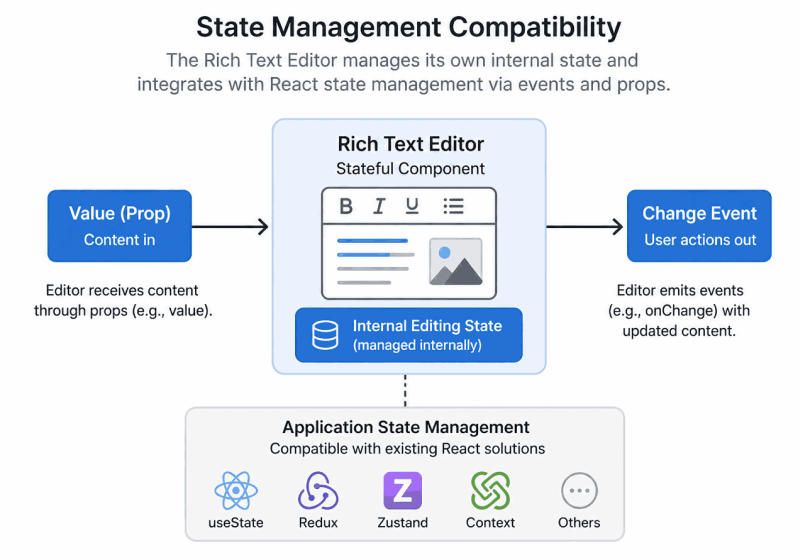
Decision guidance: Confirm ownership for drafts, dirty state, autosave, validation, optimistic saves, conflicts, and restoration. Avoid pushing every keystroke into a remote store unless the application requires it.
Compatibility matrix
Validate the selected state library using the application’s real save, failure, and synchronization patterns.
| State library | How the Rich Text Editor connects |
|---|---|
| Redux and Redux Toolkit | Store value is passed as the editor value, and dispatch is triggered inside editor change events to update the store. |
| Zustand | Zustand store value is bound to the editor value, and updates are handled through change event subscriptions. |
| TanStack Query and RTK Query | Query result provides initial content, and mutations or refetching are triggered based on editor change events. |
| React Context | Context value is passed as the editor value, and updates are propagated through context update functions. |
| MobX | The observable value is bound to the editor, and the editor re-renders automatically when the observable changes. |
| Jotai and Recoil | The atom value is connected to the editor value, following standard React controlled component patterns. |
Try live demo and navigate to the State Management tab to explore different integration patterns and verify data flow in real time.
Multi-editor and micro-frontend integration
Validate that multiple editor instances run independently on the same page and that module boundaries do not introduce version conflicts or shared state.
Multi-editor and micro-frontend runtime behavior
Each editor instance maintains its own content, selection state, toolbar configuration, media operations, clipboard behavior, keyboard interactions, and rendering lifecycle. Cross-editor coordination belongs to application state.
| Runtime concern | How the Rich Text Editor behaves |
|---|---|
| State isolation between instances | Each Rich Text Editor instance maintains an independent content value, selection state, toolbar configuration, and editing lifecycle. Actions performed in one editor instance do not affect any other editor instance. |
| Cross-editor coordination | Coordination between Rich Text Editor instances is handled entirely through the application's state layer. The Rich Text Editor provides the event and method surface; the application owns the coordination logic. |
| Micro front-end module boundaries | The Rich Text Editor operates as a self-contained React component. It can be added, updated, or removed from a module without affecting other modules in the shell. |
| Lazy-load compatibility | The Rich Text Editor loads inside React.lazy and Suspense boundaries without hydration errors. It is compatible with on-demand, module-based loading to enable Rich Text Editor features in MFE shells. |
| Independent upgrade path | Rich Text Editor versioning should be managed consistently across the application. Syncfusion EJ2 components are version-dependent, and using mismatched versions across modules can lead to runtime or styling issues. Version alignment and dependency resolution must be handled at the application or build configuration level. |
| Multi-editor page composition | Multiple Rich Text Editor instances run simultaneously on the same page. Each renders and operates independently with no cross-instance event leakage. |
| Instance-level resource handling | Each Rich Text Editor instance manages its own media uploads, clipboard operations, paste handling, and keyboard interactions. No resource handling is shared across instances unless explicitly configured by the application. |
The Rich Text Editor can be added, removed, or lazy-loaded within a micro-frontend module. The shell or build configuration must align Syncfusion EJ2 versions to avoid runtime or styling conflicts.
Review the micro-frontend architecture reference.
Key consideration: Test multiple editors with independent content, paste, uploads, and toolbars on the same page. Module deployment still requires compatible Syncfusion package versions and coordinated CSS.
3
Performance and scalability
Benchmark and validate editor performance under enterprise-scale content-authoring scenarios before approving for the target content scale.
Rendering and content processing performance
Select the editing and isolation mode — HTML, Markdown, iframe, inline, or resizable — that matches the authoring context before measuring performance.
Editor rendering modes
Choose the authoring and rendering mode based on content format, style isolation, editing context, and layout requirements.
| Rendering/editor mode | Typical content scenario | Primary benefit | Architectural outcome |
|---|---|---|---|
| HTML editor | Rich WYSIWYG authoring with formatting, tables, and media. | Visual editing with immediate formatting feedback. | Provides HTML-based editing with formatting applied directly during authoring. |
| Markdown editor | Developer documentation, issue tracking, lightweight authoring. | Simplified text-based authoring using syntax. | Enables Markdown-based content creation without reliance on visual formatting tools. |
| Iframe editor | Content management systems and secure content authoring applications. | Reduces style and script conflicts with the host application. | Renders editor content inside an iframe to isolate styles and layout from the parent page. |
| Inline editor | In-place or quick-edit scenarios. | Contextual editing without permanent UI elements. | Displays the toolbar only when the content is in focus or selected. |
| Resizable editor | Long-form content creation and extended editing sessions. | Flexible editor sizing during editing. | Allows the editor dimensions to be adjusted without disrupting content. |
Decision guidance: HTML and Markdown are mutually exclusive authoring modes. Iframe, inline, and resizable configurations can be combined with either mode.
Style isolation and host integration
Iframe mode reduces style and script conflicts by placing editable content in a separate document context. Div-based integration provides tighter alignment with host-page CSS and event behavior.
Key consideration: Test typography, pasted content, dialogs, toolbars, custom CSS, print or export output, and content preview in the selected isolation mode.
Performance benchmarking and validation
Run repeatable authoring workloads against the reference benchmark results before approving the editor for the target content scale.
Benchmark scenario
The benchmark scenarios measure editor initialization, text formatting, content operations, document import and export, and multiple-editor loading. These measurements provide reference points for performance and scalability planning with large-scale rich text content.
| Benchmark scenario | What the benchmark measures | Architectural relevance |
|---|---|---|
| Initial editor load | Time required to load the editor with a large amount of document content. | Establishes baseline page-load and initialization cost. |
| Text formatting | Time to apply formatting actions such as bold and heading changes. | Demonstrates responsiveness of inline editing operations. |
| View mode switching | Latency when switching between preview and source views. | Indicates the cost of editor-state and layout transitions. |
| Undo and redo operations | Time taken to apply history-based edits. | Reflects the efficiency of change tracking and state management. |
| Content paste | Processing time for inserting bulk document content. | Shows how the editor handles large input payloads. |
| Document export | Time taken to generate Word and PDF outputs. | Evaluates serialization and layout-rendering performance. |
| Document import | Time required to parse and load external documents. | Measures the cost of content parsing and model generation. |
| Multi-editor instance loading | Initial load time when rendering multiple Rich Text Editor instances on the same page. | Demonstrates scalability and per-instance isolation during concurrent editor initialization. |
Testing environment
- Component: Syncfusion React Rich Text Editor (2026 Volume 1, 33.1.44)
- Framework: React (production build)
- Browser: Google Chrome 122.x (Blink rendering engine)
- Operating system: Windows 11 (64‑bit)
- Hardware: AMD Ryzen 5 7530U processor, 16 GB RAM, AMD Radeon graphics
- Measurement methodology: Performance timings were measured using the Rich Text Editor’s action lifecycle events, capturing the time from operation start to visible UI completion. Most editor operations were evaluated using a 5,000-word document, while document import was measured separately using a media-heavy document with approximately 77 pages and 20,000+ words.
Watch out for: Actual performance may vary based on hardware, browser version, document size and structure, formatting complexity, enabled Rich Text Editor features, and application configuration.
Benchmark results
The benchmark results show average timings for editor loading, formatting, view switching, undo and redo, paste, document import and export, and multiple-editor loading. Interpret the results within the documented testing environment.
Editor operation timings
| Action | Average time |
|---|---|
| Loading editor with 5,000-word content | ~84 ms |
| Applying bold to a paragraph | ~15 ms |
| Changing paragraph to heading | ~30 ms |
| Switching preview to source view | ~303 ms |
| Undo action | ~24 ms |
| Redo action | ~26 ms |
| Pasting document content | ~44 ms |
| Exporting document as Word | ~725 ms |
| Exporting document as PDF | ~2660 ms |
| Importing document | ~756 ms |
Editor instance loading timings
| Instance count | Average loading time |
|---|---|
| 1 editor | ~74 ms |
| 10 editors | ~527 ms |
| 25 editors | ~1254 ms |
Try live demo and navigate to the Performance tab to view and validate live performance metrics.
Real-time editing and scalability
Validate sustained editing behavior across document structure, concurrent instances, dynamic toolbar configuration, programmatic updates, and long sessions — not only character count.
Real-time update performance
The Rich Text Editor applies content and formatting updates within the active editing context without remounting the component in standard scenarios.
Real-time editing and update behavior
| Real-time scenarios | Syncfusion React Rich Text Editor coverage | Rendering/update behavior |
|---|---|---|
| Continuous typing | Fully supported | Text input is handled through internal content updates without requiring component remount in standard scenarios. |
| Rapid formatting actions | Fully supported | Formatting updates are applied to the active selection without affecting surrounding content. |
| Cursor and selection preservation | Fully supported | Cursor position and text selection are maintained during content updates. |
| Toolbar state synchronization | Fully supported | Toolbar state reflects the active selection and formatting context during edits. |
| Media insertion during editing | Fully supported | Images, links, and embedded elements are inserted inline while supporting continued editing. |
| Layout stability during updates | Fully supported | Editor layout and scroll position are designed to remain stable during content changes. |
Key consideration: Validate cursor, selection, undo or redo, toolbar state, scroll position, and autosave behavior under the application’s real update frequency.
Scalability beyond content size
Editor scale includes document structure, media volume, concurrent instances, dynamic configuration, programmatic updates, long sessions, and container complexity—not only character count.
| Scalability dimension | Syncfusion React Rich Text Editor coverage | Behavior at scale |
|---|---|---|
| Large document length | Supported | Editor remains usable under typical large-document scenarios. |
| Complex content structure | Supported | Tables, lists, links, and media are supported within content. |
| Concurrent editor instances | Supported | Editors operate independently under standard configurations, with isolated content state and interactions. |
| Dynamic toolbar configuration | Supported | Toolbar settings update dynamically without requiring full editor reinitialization. |
| Programmatic content updates | Supported | Content updated via APIs without losing cursor or scroll position. |
| Media-heavy documents | Supported | Media elements can be inserted and edited. |
| Long editing sessions | Supported | The editor is designed to support extended editing sessions with consistent interaction behavior. |
| Editor usage in dashboards | Supported | Editors operate independently within complex layouts. |
Media size, media quantity, and document structure influence performance. Validate large documents and multiple editors using the target device class and container layout.
Watch out for: Large-document scenarios are supported, but no maximum document length or media threshold is defined.
4
Security and compliance
Establish the editor’s security boundaries and data governance model before enterprise adoption.
Security architecture and responsibilities
Establish editor behavior boundaries against application, infrastructure, and supply-chain responsibilities — including the OWASP risk area mapping — before the security review.
Security responsibility matrix
The Rich Text Editor provides browser-based authoring and built-in client-side sanitization support, but it does not replace authentication, authorization, server validation, tenant isolation, audit, transport, or policy enforcement.
| Security concern | Component behavior | Application responsibility |
|---|---|---|
| User authentication | The Rich Text Editor does not manage user identity or manage sessions. | Implement user authentication using identity providers, SSO, or token-based mechanisms. |
| Role-based authorization | The Rich Text Editor does not enforce who can view or edit content. | Define and enforce access permissions based on roles or organizational policies. |
| Data validation | The Rich Text Editor accepts and displays content passed to it by the application. | Validate and sanitize all content on the server side before storage or re-rendering. |
| Input sanitization (XSS protection) | The Rich Text Editor includes built-in HTML sanitization to help mitigate cross-site scripting (XSS) risks in client-side input. | Server-side sanitization, encoding, and content filtering must be applied to ensure comprehensive protection against injection attacks. |
| Data persistence | The Rich Text Editor does not provide application-level data storage or backend persistence. However, it supports optional state persistence using browser storage. | Manage content storage, versioning, and lifecycle through back-end services and databases. |
| Encryption in transit | The Rich Text Editor does not perform cryptographic operations. | Enforce TLS/HTTPS for all data transfers between the browser and back-end systems. |
| Logging and auditing | The Rich Text Editor does not generate audit records by default. | Capture editor actions and content changes through application logging and monitoring systems. |
| Content export controls | The Rich Text Editor enables content rendering but does not restrict export behavior. | Apply authorization, watermarking, or export restrictions at the application or service layer. |
| Multitenant isolation | The Rich Text Editor does not distinguish tenants or segregate data. | Enforce tenant boundaries and isolation within back-end services and data stores. |
| Network security | The Rich Text Editor does not initiate independent network connections. | Govern traffic using WAFs, API gateways, proxies, and infrastructure security policies. |
| Dependency and patch management | The Rich Text Editor is delivered as a versioned front-end library dependency. | Monitor releases and apply updates according to internal vulnerability management policies. |
| Compliance enforcement | The Rich Text Editor supports UI-level standards but is not responsible for regulatory enforcement. | Ensure compliance with regulatory, privacy, and governance requirements through application controls. |
Security responsibility: Treat client-side sanitization and UI restrictions as defense in depth. The back end must independently validate, sanitize, authorize, and persist content.
Security architecture overview
The Rich Text Editor runs in the browser, maintains the editing model, renders HTML or Markdown content, and emits events for application handling. The host application and back end own identity, permissions, server-side sanitization, storage, moderation, versioning, and auditing.
Content moves only through application-defined APIs or handlers. The component does not create a Syncfusion-managed content service or independent persistent back end.
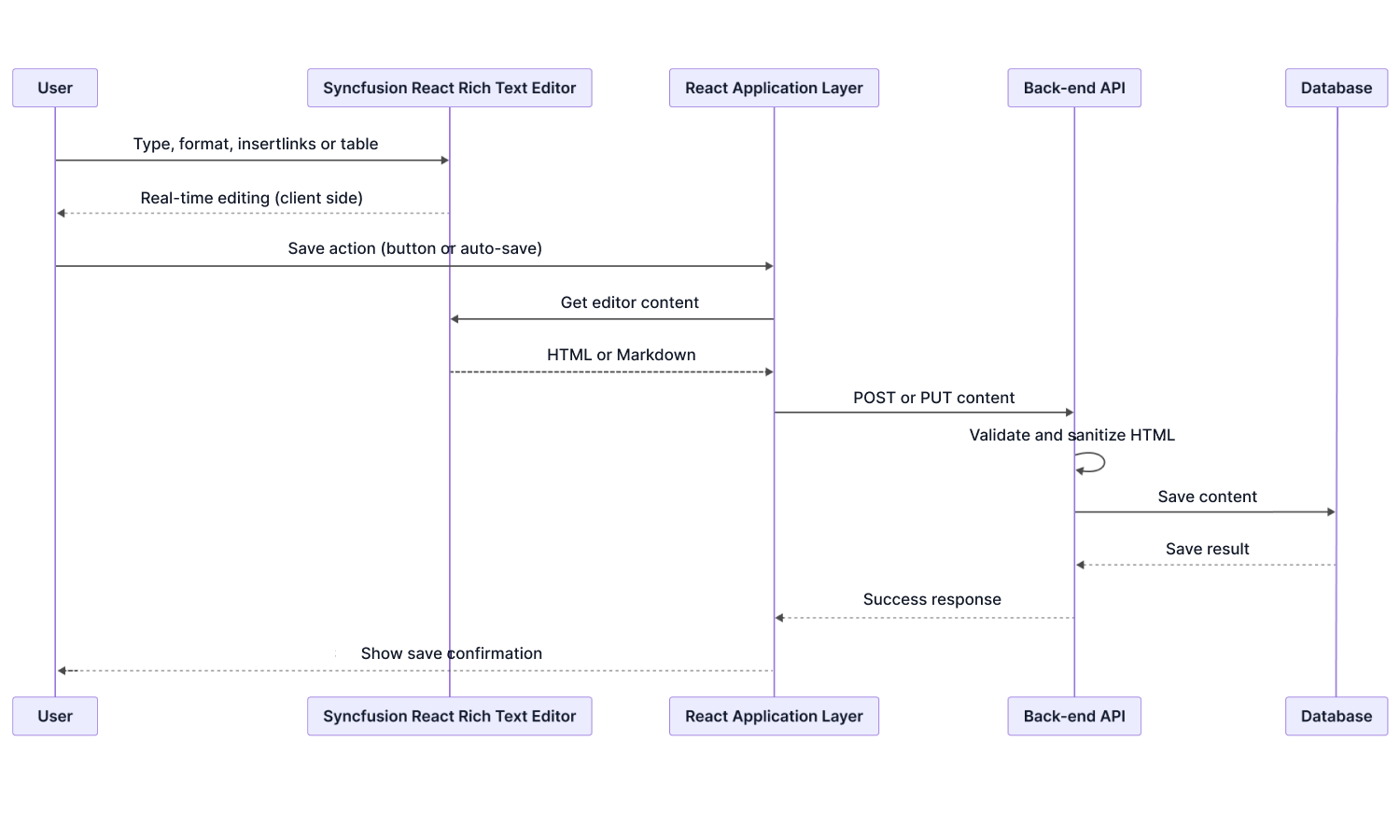
Key consideration: Draw the content flow from identity provider through load, edit, paste, media upload, validation, sanitization, storage, approval, rendering, export, and audit logging.
OWASP security responsibility context
Use this mapping to avoid treating a component security review as a complete application security review.
| OWASP risk area | How it relates to the Rich Text Editor | Responsibility |
|---|---|---|
| A01: Broken Access Control | The Rich Text Editor displays and edits content provided by the application. It does not evaluate user roles or restrict editing capabilities based on permissions. | Access control must be handled by the application and back-end services based on the required content permissions. |
| A03: Software Supply Chain Failures | The Rich Text Editor is delivered as a client-side dependency. Its security depends on the integrity of the package and its source. | The organization must manage dependency updates, trusted sources, and secure build pipelines. |
| A04: Cryptographic Failures | The Rich Text Editor does not perform encryption operations. Any protection of content during transmission relies on the application's use of secure transport. | Infrastructure and back-end services manage TLS, encryption standards, and key policies. |
| A05: Injection | Rich text content may include user-generated input that can introduce cross-site scripting (XSS) risks if not properly handled. The Rich Text Editor includes built-in HTML sanitization to help mitigate unsafe markup during editing. | The content must be validated, sanitized, and encoded at the application level before storage to ensure complete protection. |
| A07: Authentication Failures | The Rich Text Editor does not authenticate users or track identity. It assumes the user context provided by the application. | Authentication and session management are implemented by the application and identity platform. |
| A08: Software or Data Integrity Failures | The Rich Text Editor is consumed as a packaged dependency. Code integrity depends on secure build pipelines and package sourcing. | Organizations manage supply-chain controls such as version pinning, lock files, and internal registries. |
| A09: Security Logging and Alerting Failures | Editor interactions, such as content updates, represent user actions but are not logged automatically by the component. | The application may capture editor events and forward them to logging or monitoring systems. |
Watch out for: User-generated rich text, pasted HTML, custom rendering, and media metadata can introduce injection risks. Apply server-side sanitization and output encoding even when client-side sanitization is enabled.
Application and content security
Verify that data flow, network behavior, deployment characteristics, and export operations align with organizational security requirements.
Data flow and network behavior
The Rich Text Editor does not initiate general content network requests on its own. Content moves when the application loads, saves, uploads, exports, or connects an external service.
- Endpoints and routing: back-end services define where content and media are sent or retrieved.
- Security context: the application attaches identity tokens, session context, and required headers.
- Validation and policy: the back end enforces access, business rules, sanitization, and persistence.
- Infrastructure: firewalls, WAFs, gateways, reverse proxies, and traffic inspection govern editor-related traffic.
Security responsibility: No additional firewall port is required by the component itself. Any network requirement comes from the application’s own content, media, AI, or file-service endpoints.
Authentication and authorization integration
The editor can expose or suppress UI capabilities, but authoritative permission checks remain outside the component.
| Security requirement | Rich Text Editor capability | Security enforcement layer |
|---|---|---|
| Editor access control | The Rich Text Editor can be conditionally rendered or hidden. | Application layer: Rendering logic controls whether the editor is available based on the authentication state. |
| Read or write access | The Rich Text Editor supports editable and read only modes. | Application layer: Edit mode is configured based on role or permission evaluation. |
| Toolbar feature access | Toolbar options can be enabled, disabled, or customized. | Application layer: Toolbar configuration is set at render time based on the user's role. |
| Content editing permissions | Editing behavior can be fully enabled or restricted. | Application layer: Permissions are evaluated before the editor is initialized. |
| Input validation | Editing events can be intercepted before content submission. | Application layer: Validation logic executes during save or submit actions. |
| Sensitive data masking | The Rich Text Editor renders content exactly as supplied. | Back-end or application layer: Sensitive values must be masked before binding to the editor. |
| Content approval workflows | Rich Text Editor emits content change events. | Application and back-end layers: Approval, moderation, and review workflows are enforced on the server side. |
| Export authorization | Export options can be conditionally enabled by the application. | Application layer: Export permissions are evaluated before enabling export actions. |
| Audit logging | Content change and save events are exposed. | Application layer to audit or SIEM: Events are captured and logged by the application. |
| Authenticated data exchange | All content load or save operations use application APIs. | Application layer to back-end APIs: Application attaches auth headers and the back-end validates on each request. |
Deployment security characteristics
Review each deployment statement in the actual packaged build and hosting environment.
| Deployment characteristic | What it means |
|---|---|
| Client-side execution | The Rich Text Editor runs entirely within the user's browser as a React UI component without server-side execution or Syncfusion-managed services. |
| No external runtime dependency | Deployment does not require Syncfusion-hosted runtimes, cloud services, or background processing engines. |
| Application-controlled data flow | All content rendered and edited by the Rich Text Editor is supplied and consumed by the host application under its control. |
| No built-in data persistence | The component does not store or persist content; data persistence is handled exclusively by the back-end systems. |
| No telemetry or usage tracking | The Rich Text Editor does not collect analytics, telemetry, or user interaction data by default. |
| Security ownership retained by the customer | Authentication, authorization, validation, and policy enforcement are fully implemented by the host application. |
| Compatible with enterprise security controls | Supports integration with content security policy headers, secure HTTP configurations, and application-level security policies. |
| Supports multitenant architectures when implemented at the application level | Tenant isolation and boundary enforcement are governed entirely by back-end and application logic. |
| Deployment-agnostic | Can be deployed in on-premises, private cloud, public cloud, or air-gapped environments without changes to security posture. |
| Integrates with standard DevOps pipelines | Fits into existing CI/CD, security scanning, and release validation pipelines without requiring special exemptions. |
CSP validation: Add
unsafe-inlinetostyle-srcto support rich-text formatting. Use browser DevTools to verify inline styles, uploads, AI handlers, and export behavior.
Export security
Export does not create an authorization boundary. The application decides who can export, which content is included, which formats are allowed, and how sensitive or tenant-specific content is protected.
| Export security concern | How it is addressed | Enforcement location |
|---|---|---|
| Who can initiate an export | Export-related actions are exposed only when wired by the application. The application determines availability based on user roles, permissions, or policy checks. | Application layer |
| Authorization for export operations | The Rich Text Editor does not enforce authorization rules. Permission checks are implemented before enabling or executing export actions. | Application logic or back-end services |
| Sensitive data protection | The Rich Text Editor does not classify or obscure sensitive content during export. Data protection controls must be applied before exporting. | Back-end services and policy enforcement |
| Export format restrictions | The Rich Text Editor does not restrict export formats. The application governs permitted output types. | Application and back-end services |
| Export audit logging | Export triggers can be intercepted by the application and recorded with user identity, timestamp, and context for audit purposes. | Application logging and audit systems |
| Data transmission | Export generation does not involve Syncfusion-hosted services or external cloud endpoints. All processing remains within the application environment. | Component architecture |
| Transport security during export | The Rich Text Editor does not implement transport security. Secure transmission is inherited from the application's network configuration. | Infrastructure and network layer |
| Multitenant export isolation | The Rich Text Editor does not distinguish tenant context during export. Tenant boundaries are enforced by application logic and data access layers. | Back-end services |
Security responsibility: Secure any server-side export or document-conversion endpoint and record export actions when required by policy.
Compliance and security assurance
Review current procurement evidence and independently verify runtime, dependency, accessibility, and vulnerability-management claims before enterprise adoption.
Compliance certifications
The listed certifications describe Syncfusion organizational practices and do not represent component-level certification. Review current procurement evidence rather than relying only on the guide summary.
| Certification or standard | Syncfusion coverage | Procurement reference |
|---|---|---|
| SOC 2® Type 2 | Independently assessed controls covering security, availability, and operational integrity, evaluated over a sustained audit period. | SOC 2® Type 2 overview |
| GDPR | Documented data protection and privacy practices aligned with GDPR requirements, supporting customer privacy and regulatory reviews. | GDPR overview |
| WCAG 2.1 AA (accessibility) | UI components, including the Rich Text Editor, are evaluated for conformance with WCAG 2.1 AA accessibility guidelines; supporting documentation is available. | Accessibility standards |
| ISO 27001 | Syncfusion aligns with ISO 27001 information security management practices; certification status and documentation are provided by Syncfusion upon request. | Contact the sales team for certification details. |
| Section 508 | Accessibility conformance is based on WCAG alignment; formal Section 508 documentation is available upon request for procurement use. | Section 508 documentation |
Watch out for: Confirm the current ISO 27001 status and supporting procurement evidence with the Syncfusion enterprise team.
Vulnerability management
Confirm how security issues are reported, fixed, documented, and escalated under the organization’s support agreement.
| Vulnerability management aspect | Syncfusion coverage | Where to verify |
|---|---|---|
| Responsible disclosure process | A publicly defined process allows security researchers and customers to responsibly report potential vulnerabilities using documented channels. | Responsible disclosure policy |
| Security fix delivery | Verified security issues are addressed through regular product updates and distributed using standard package and release channels. | Release notes |
| Fix transparency | Release documentation identifies resolved issues and the product versions in which fixes are available. | Release history |
| Enterprise escalation path | Security-related incidents can be reported through Syncfusion's support system. Enterprise customers' issues are handled in accordance with their support agreements. | Support SLA |
| Dependency risk monitoring | Third-party dependencies are monitored and updated as part of ongoing maintenance and scheduled releases to address known vulnerabilities. | Release notes |
See the responsible disclosure policy and current release notes.
Security assurance statements
Use the listed methods to verify component and application behavior instead of treating assurance statements as self-validating.
| Assurance statement | Verification method |
|---|---|
| The Rich Text Editor does not contact Syncfusion or third-party services by default. External requests occur only when the application configures external resources or service endpoints. | Inspect the browser DevTools Network tab and confirm no external domains are contacted during editor load or usage. |
| The Rich Text Editor's core editing functionality operates within the browser without requiring Syncfusion-managed services. | Review deployment architecture and monitor runtime network traffic for external dependencies. |
| The Rich Text Editor does not rely on dynamic script execution techniques or unsafe JavaScript in the DOM. | Inspect the Elements panel in DevTools and review content security policy reports for inline scripts or unsafe-eval violations. |
| Built-in HTML sanitization helps prevent embedded scripts and unsafe markup from executing. Applications must also validate and sanitize untrusted content before storage and rendering. | Test editor input using script payloads and confirm no execution occurs. |
| The Rich Text Editor does not use eval, function constructors, or dynamic script generation. | Check browser console logs for content security policy warnings or unsafe JavaScript execution notices. |
| The Rich Text Editor does not store authentication tokens, credentials, or session identifiers. | Inspect browser storage for component-generated entries. |
| Editor content is stored and processed only by customer-controlled application services. | Review application data flow diagrams and back-end integration points. |
| No telemetry, analytics, or diagnostic data is transmitted externally by the Rich Text Editor. | Monitor the DevTools Network tab for hidden or background POST or GET requests initiated by the editor. |
| Export operations do not transmit editor content to Syncfusion infrastructure. | Observe network activity during export or print operations and verify no external endpoints are used. |
| Accessibility conformance is documented for the Rich Text Editor. | Accessibility documentation |
| Security fixes and dependency updates are provided through standard product releases. | Release history and Release notes |
| Syncfusion security and compliance certifications are maintained at the organizational level. | Request verification documentation through Syncfusion enterprise support or sales channels. |
| Content formatting, layout, and rendering are computed locally in the browser. | Confirm no remote calls occur during formatting, preview, or layout changes. |
5
Interactive live demos
Use the interactive live demos to assess the component in representative usage scenarios. Explore key capabilities, interactions, configuration options, and runtime behavior to validate functional fit and user experience against application requirements.
Try Our Live Demo
6
Evaluation checklist
Print or copy this checklist into the evaluation record. Each item maps to a capability, condition, responsibility, or verification method documented above.
01. Content and authoring fit
- Required HTML or Markdown mode and iframe, inline, or resizable configuration are validated.
- Formatting, tables, links, media, mentions, paste cleanup, Word-originated content, toolbar behavior, and output formats meet the workflow.
- Required accessibility, keyboard, localization, RTL, responsive, and mobile behavior is confirmed.
- The chosen storage format and content contract are compatible with downstream rendering, search, export, and migration needs.
02. Architecture and delivery
- Production build, package format, TypeScript, CSS, internal registry, and CI/CD pipeline have passed.
- SSR and hydration are verified in the actual App Router, Suspense, ISR, or Edge pattern used by the application.
- Micro-frontend version alignment and multi-editor instance isolation are validated.
- The required CSP policy supports the inline styles used for full rich-text formatting.
03. Content integration, APIs, and extensibility
- Load, save, metadata, autosave, draft, approval, versioning, and publishing workflows are implemented outside the editor.
- Media upload, retrieval, storage, validation, authentication, and failure handling are validated against real endpoints.
- State and form integration handle dirty state, validation, save failure, reset, cancel, and remote refresh correctly.
- The most complex required toolbar command, paste rule, custom rendering, external service, or business workflow is implemented.
- Programmatic events and methods cover content, selection, media, modes, accessibility, and cross-component workflows.
04. Performance and scalability
- The largest representative document loads and remains responsive during typing, formatting, paste, and media operations.
- Cursor, selection, toolbar state, scroll position, undo or redo, and autosave remain stable under rapid updates.
- Multiple editor instances and long-running sessions are profiled for memory, input responsiveness, and event isolation.
- Desktop, tablet, mobile, iframe, and complex-container behavior is tested on representative devices and layouts.
05. Security and compliance
- Authentication, authorization, tenant isolation, server-side validation, sanitization, moderation, and audit logging are enforced outside the editor.
- Outbound requests, browser storage, inline styles, unsafe-eval, sanitization, uploads, AI requests, print, and export behavior are independently verified.
- Content and media export permissions, masking, format restrictions, transport, and tenant isolation are enforced.
- Current SOC 2, GDPR, accessibility, Section 508, ISO 27001 status, vulnerability, and support evidence has been reviewed.
06. Final decision
- No unsupported runtime, native-mobile requirement, CSP conflict, or content-format mismatch remains unresolved.
- Every documented condition or limitation has an owner, mitigation, or accepted exception.
- The AI endpoint, content handling, privacy, authorization, review, and audit responsibilities are approved when AI is used.
- The result is recorded as pass, conditional pass, or fail for every mandatory evaluation area.
- Stakeholders approve the remaining implementation, security, procurement, performance, and maintenance responsibilities.
7
Frequently asked questions
These high-relevance questions address common architecture, integration, performance, AI, security, and procurement concerns.
Does the React Rich Text Editor send content to Syncfusion or another external service?
No under standard usage. Content loading, saving, media transfer, export, and AI requests occur only through application-defined handlers or endpoints. Verify the production build with the browser Network panel.
How is the React Rich Text Editor’s built-in AI Assistant connected to an AI model?
The React Rich Text Editor provides the AI Assistant UI and commands, but it does not include an AI runtime or directly call a model service. The application routes requests through its own handlers, back end, or model endpoint; review the AI Assistant demo.
Can the React Rich Text Editor work with a strict Content Security Policy?
CSP compatibility is conditional. Full rich-text formatting uses dynamically applied inline styles, so a policy that blocks inline styles can prevent font, color, alignment, spacing, and related formatting from appearing correctly. Validate the required style-src policy with the security team.
Does the React Rich Text Editor work during a migration from Next.js Pages Router to App Router?
Yes. The React Rich Text Editor supports both routers. App Router pages must place the editor inside a client-component boundary and should validate hydration using the application’s actual initial-content and Suspense pattern.
How should we handle untrusted HTML and pasted content in the React Rich Text Editor?
Use the React Rich Text Editor’s built-in client-side sanitization and paste cleanup as defense in depth, then validate and sanitize content again on the server before storage or rendering.
Can the React Rich Text Editor participate in forms, validation, drafts, and approval workflows?
Yes. The React Rich Text Editor exposes value and change APIs and can participate in form submission and validation. The application owns save, autosave, draft, versioning, moderation, approval, and publishing logic; see form support.
Can multiple React Rich Text Editor instances run on the same page?
Yes. Each React Rich Text Editor instance maintains independent content, selection, toolbar, event, upload, clipboard, and keyboard state. Rendering cost scales per instance, so profile the intended page composition with representative documents.
Is the React Rich Text Editor suitable for very large or media-heavy documents?
The React Rich Text Editor supports large, complex, and media-rich documents but does not define a fixed size or media limit. Use the reference benchmarks and test the largest representative workload before approval.
How are React Rich Text Editor major upgrades and micro-frontend versions managed?
React Rich Text Editor major releases can include breaking API or CSS changes, and Syncfusion EJ2 packages should remain version-aligned across modules. Use migration guidance, a shell-level singleton policy, staging tests, and visual regression before production.
Is accessibility and procurement documentation available for the React Rich Text Editor?
Yes. Review the current accessibility documentation, SOC 2 information, GDPR information, and Section 508 documentation. Request current formal evidence for procurement.
Can the React Rich Text Editor editing experience be tailored to specific business workflows?
Yes. Toolbar options, custom tools, programmatic commands, paste handling, read-only state, forms, dialogs, and external service hooks can be configured. Implement the most complex required workflow during evaluation; see custom toolbar items.
8
Resources
Use these references after reviewing the guide and FAQs to continue implementation, validation, troubleshooting, and design evaluation.
- React Rich Text Editor documentation- Start with installation and basic configuration.
- Knowledge base articles- Review task-specific solutions and troubleshooting guidance.
- Tutorial videos- Follow feature walkthroughs in video format.
- Feature walkthrough video- See a guided product overview.
- Live interactive demo- Explore the Rich Text Editor in a browser.
- Feature web story- Review a brief visual feature summary.
- Figma UI kits- Check available design assets.







