
 Arulraj Aboorvasamy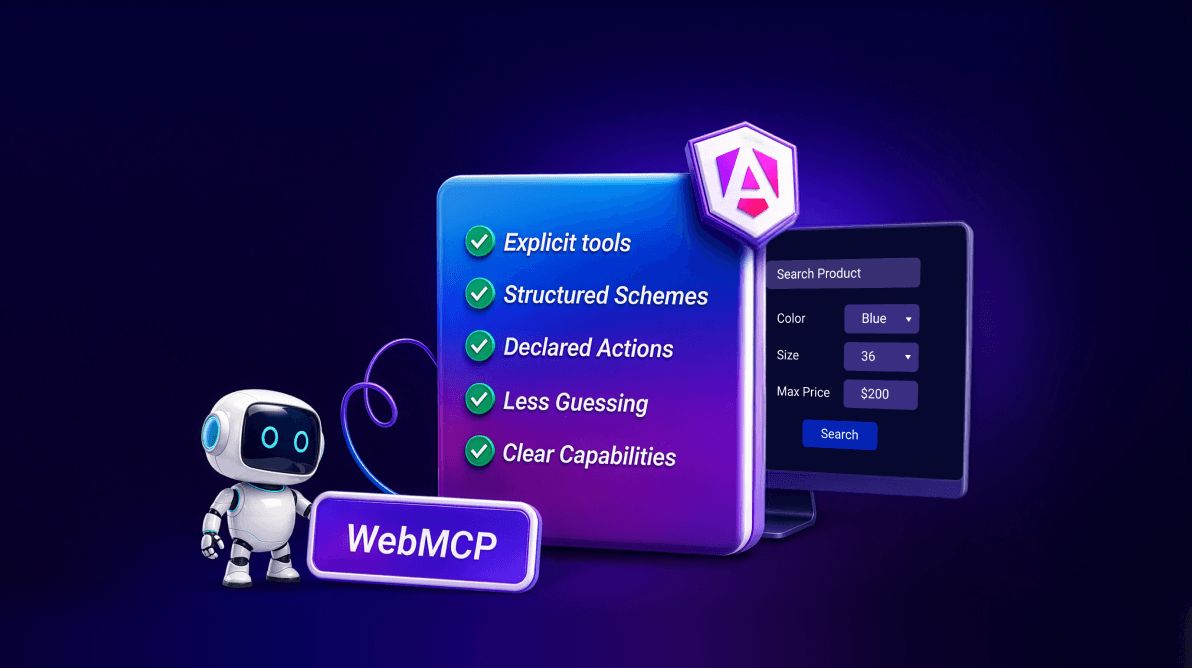
TL;DR: WebMCP for Angular apps allows AI agents to interact with application capabilities through structured tools rather than fragile DOM automation. Learn how Angular’s experimental WebMCP support helps build agent-ready applications with more reliable AI workflows. Syncfusion supports this with Angular AI AssistView and rich UI components that make every AI action clear, intuitive, and trustworthy.
AI in web apps looks impressive, but in many cases, it still behaves like an add-on rather than a true part of the product.
Most applications today expose AI through a prompt box. It can answer questions, summarize, or generate content. That works for simple scenarios. But the moment users expect AI to complete tasks, trigger operations, or interact with real data, the limitations become clear.
The next phase of AI isn’t about better chat; it’s about action-driven experiences.
AI apps are moving beyond chat
Early AI integrations focused on chat because it’s intuitive. But real-world apps go beyond conversation; they’re complex systems designed to execute processes.
- A financial app needs filtering, comparisons, and anomaly detection.
- A support console requires triaging, recommendations, and actions.
- An operations system manages approvals, scheduling, and execution.
In these environments, AI’s value lies in helping users complete tasks, not just in generating responses.
The challenge is that most AI systems still don’t understand how to reliably interact with applications. They can suggest what to do, but struggle to act consistently.
This is the gap WebMCP aims to address.
What is WebMCP?
WebMCP (Web Model Context Protocol) is an emerging/proposed client-side approach that lets web apps expose their capabilities to AI in a structured, machine-readable way.
Instead of interpreting UI elements like buttons and forms, AI can directly understand:
- Available actions.
- Required inputs.
- When and how to execute them.
It turns your app into a set of well-defined tools rather than a surface AI must interpret.
Why this matters for real AI experiences
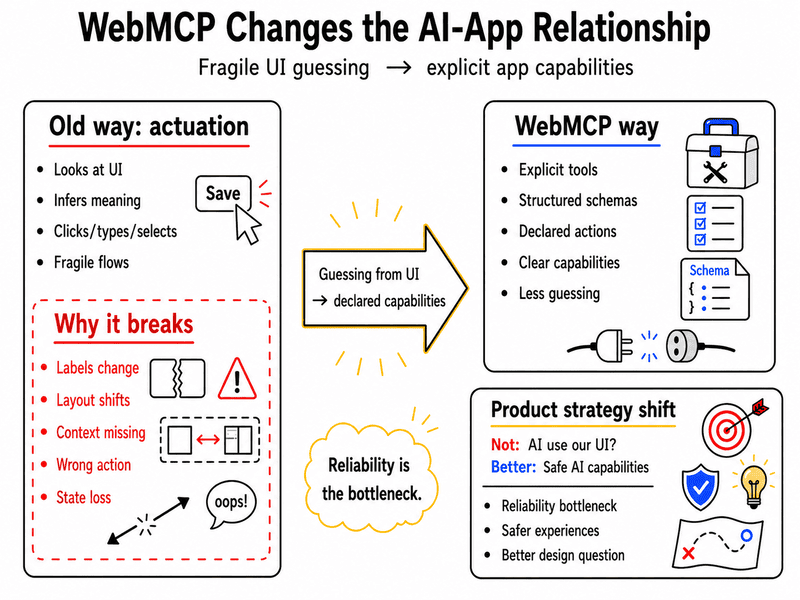
Without structure, AI agents try to “figure out” your UI. This leads to fragile behavior:
- Labels change → Actions fail.
- Layout shifts → Context breaks.
- Small errors → Entire project collapse.
WebMCP reduces much of this uncertainty by giving agents a clearer contract.
Result:
- Predictable behavior.
- Reliable execution.
- Consistent processes.
AI can move from UI guessing toward more reliable, tool-based execution.
How WebMCP reduces reliance on fragile UI guessing with reliable AI actions
With WebMCP, your app no longer needs AI to interpret the interface. Instead, it can directly expose its capabilities through:
This changes the core question from “How can AI use our UI?” to “Which app capabilities should AI safely and reliably control?”
By making actions explicit and structured through WebMCP, AI moves beyond being a surface-level feature and becomes a trusted participant in your product experience.
Why WebMCP for Angular apps is a natural fit
Angular apps are typically designed for structured, process-driven use cases. That makes them especially well-suited for this shift.
Angular already provides:
- Strong state management.
- Clear component boundaries.
- Predictable data flow.
WebMCP builds on top of this by exposing those processes as structured actions.
A clear signal from the Angular ecosystem
There’s also an important shift happening in the Angular ecosystem.
Angular’s AI direction is no longer limited to developer tooling. Angular CLI already includes an experimental MCP server that helps AI assistants interact with Angular projects in the development environment. That is useful for developers, but it is not the same as WebMCP inside the browser.
For Angular developers, this matters because Angular’s WebMCP support is designed around familiar Angular concepts:
- Tools can be:
- Registered through Angular’s dependency injection lifecycle.
- Provided at the app level.
- Scoped to specific routes.
- Declared inside services.
- Tool inputs can be described with structured schemas.
- Angular Signal Forms can be turned into AI-ready tools with minimal configuration. Because the APIs are experimental, teams should validate inputs and account for Signal Form constraints.
This aligns closely with Angular’s existing architecture, making adoption more natural for Angular teams.
Designing AI as a product participant
The key mindset shift is simple: AI is not a feature. It is part of the interaction model.
Not every app needs a fully autonomous agent. But many can benefit from agent-assisted executions in well-defined areas.
Where this makes an immediate impact
A few examples make the opportunity clearer.
- In a sales analytics app, an AI assistant could help users explore performance trends. But the real value lies in its ability to trigger specific, trusted actions, such as applying date filters, generating a summary view, or highlighting underperforming segments.
- In a support app, the assistant could summarize a ticket history, draft a response, and surface the next best action. With structured tool access, it could open a related customer record or set up the steps needed for resolution, rather than leaving the user to do everything manually.
- In a document-heavy business app, AI could extract key points from uploaded material, but the surrounding product still needs tables, visualizations, approval flows, form validation, and stateful interactions that guide users toward completion.
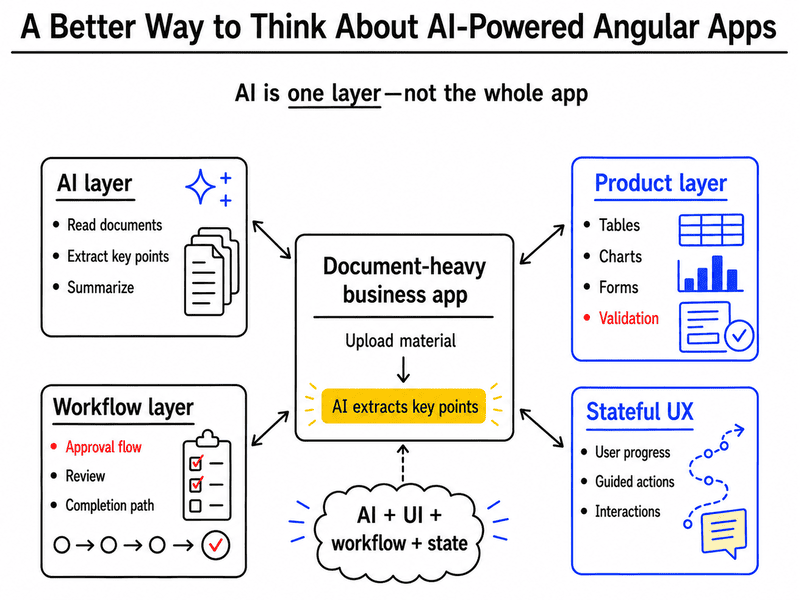
This is where AI strategy becomes UX strategy. The winning apps will not be the ones that merely contain AI. They will be the ones who shape AI into a predictable, useful part of the system.
Governance and safety for WebMCP-enabled actions
When AI agents can trigger actions inside apps, governance must be built in from the start, not layered on later. The goal is to ensure every action is secure, auditable, and aligned with user intent.
- User-level authorization enforcement
Every action must respect the signed-in user’s permissions, ensuring agents can only access and perform what the user is already allowed to do. - Mandatory confirmation for sensitive actions
High-impact actions like deleting data, submitting approvals, sending messages, or updating records should always require explicit user confirmation before execution. - End-to-end auditability
Agent activity should be fully traceable, including the requested action, context, user approval, system execution, and final outcome. - Scoped and controlled capabilities
Exposed actions should be tightly defined tools with limited inputs and predictable outputs, avoiding broad or unrestricted access. - Human-in-the-loop for critical tasks
For regulated or high-stakes scenarios, humans should remain in control, with AI supporting preparation and recommendations rather than making final decisions. - Lifecycle-aligned governance
Safety and oversight should extend across the entire app lifecycle, including design, deployment, and release processes.
Where Syncfusion Fits: Building the UI foundation for AI-ready Angular experiences
For Syncfusion® Angular users, the practical takeaway is not to treat WebMCP as a built-in component capability at this time. Instead, the opportunity is to build the structured UI and execution foundation that future AI-assisted experiences will need.
As browser-level AI interaction models such as WebMCP evolve, this kind of structured UI foundation becomes even more important. AI may help expose, recommend, or trigger actions, but users still need clear and reliable interfaces to understand, control, and trust those actions.
For Angular teams, the practical challenge is therefore not only exposing agent-friendly actions. It is also designing the surrounding product experience that makes AI useful, visible, and trustworthy to end users.
AI AssistView: The conversational entry point
The Syncfusion Angular AI AssistView gives teams a ready-made conversational surface for AI-powered interactions. It supports:
- Prompt and response experiences,
- Built-in toolbars,
- Prompt suggestions,
- Attachments,
- Custom views,
- Templates, and
- Real-time streaming.
Syncfusion also supports AI-related enhancements in Angular, including real-time streaming responses and SpeechToText for voice-to-text input.
This becomes the front door for AI interactions.
Beyond chat: Why the full UI system matters
AI operates inside a broader application experience.
That’s why Syncfusion’s broader Angular component ecosystem also provides:
- DataGrid,
- Query Builder,
- Charts,
- Scheduler,
- Gantt Chart,
- Kanban,
- File Upload,
- PDF Viewer,
- DOCX Editor,
- Spreadsheet Editor,
- Rich Text Editor,
- SpeechToText,
- Chat UI,
- Inline AI Assist, and
- Dashboard Layout.
These components transform AI outputs into structured, actionable experiences.
The bigger picture
The goal isn’t just adding AI, it’s designing systems where AI and UI work together.
- Chat enables interaction.
- Actions drive value.
- UI enables execution.
This moves teams from: “Add AI to the app” to “Build an app where AI helps complete work.”
What should product teams do now?
WebMCP is still early, so this isn’t the moment for blanket adoption. It is the moment for clearer thinking.
Treat WebMCP as an architectural direction to watch and prototype, not a mature browser capability to depend on broadly today.
Focus on high-value, structured use cases:
- Start with tasks that are repetitive, structured, and governed by clear rules.
- These are far better candidates for future agent integration than open-ended, ambiguous experiences.
Design for clarity and user trust:
- AI interactions must keep users oriented at all times.
- Prioritize visibility (what the AI is doing), confirmation (before actions execute), and transparency (why it’s doing it).
- A strong UI is just as critical as model quality; users need to clearly understand and trust the actions taken.
Be selective, not expansive:
- Avoid the temptation to expose every feature to AI.
- The best early wins will come from narrow, high-confidence operations with predictable outcomes.
Align with both product and engineering realities:
- This focused approach reduces risk and complexity.
- It improves usability by keeping experiences understandable.
- It creates a solid foundation to adapt as standards evolve.
Frequently Asked Questions
Is WebMCP only relevant for AI-first products?
No. WebMCP can also make traditional enterprise apps that want to make selected tasks more accessible to AI agents. The value is strongest when the app already contains repeatable actions, structured data, and clear user permissions.
How is WebMCP different from adding a chatbot to an Angular app?
A chatbot usually provides a conversational layer, while WebMCP focuses on exposing app capabilities in a structured way. In practice, an Angular app may use both: a conversational UI for user interaction and WebMCP-style tools for reliable action execution.
Does WebMCP replace existing Angular components or UI architecture?
No. WebMCP does not replace grids, forms, charts, schedulers, or other UI components. It adds an agent-facing layer that can make selected app actions easier for AI systems to understand and invoke.
How should product teams decide which Angular processes are worth exposing to AI agents?
Teams should prioritize processes that are frequent, structured, measurable, and easy to govern. The best early candidates are actions where AI assistance can reduce friction without removing user oversight or increasing operational risk.
Should WebMCP tools be exposed for every feature in an enterprise app?
No. Enterprise teams should start with a small number of high-confidence actions where the business value is clear and the risks are manageable. Exposing too many actions too early can make governance, testing, and user trust harder to manage.
How should teams think about security when exposing app actions to AI agents?
WebMCP-style actions should follow the same permission model as the app itself. An agent should not gain access to actions, records, or processes that the current user is not already authorized to use.
Where does a component library like Syncfusion fit in a WebMCP-ready Angular app?
A component library helps build the visible enterprise experience around AI-assisted systems, including data display, forms, charts, file handling, and conversational surfaces. WebMCP may help agents understand app capabilities, but users still need a trustworthy interface to review, confirm, and complete work.
What is the practical advantage of preparing an Angular app for WebMCP now?
The advantage is architectural readiness. Teams that define clear actions, execution boundaries, state handling, and user confirmations now will be better prepared as agent-facing browser standards and tooling mature.

Turn conversational AI into action-driven Angular systems
Thanks for reading! WebMCP represents a shift from embedding AI to exposing real application capabilities in a structured, AI-friendly way.
For Angular teams, that’s a big opportunity. Apps built with:
- Clear execution,
- Strong state management, and
- Well-defined UI components
…are naturally better positioned to evolve into AI-ready, action-driven experiences.
This is also where tools like Syncfusion AI AssistView and Angular UI components library fit in. They help teams shape AI into a usable product experience rather than a disconnected novelty.
Get started today
If you’re ready to put this into practice:
- Explore Angular UI components,
- Try the AI AssistView demos, and
- Check the getting started documentation to see how it all fits together.
Already using Syncfusion? Download the latest version from the license and downloads page.
New to Syncfusion? Start with a 30-day free trial.
Need help or have questions?
- Reach out via the support forum.
- Use the support portal.
- Share feedback through the feedback portal.
We’re here to help you build smarter, more capable Angular apps, every step of the way.




 No spam, just valuable updates.