
 Lokeshwaran Ragavan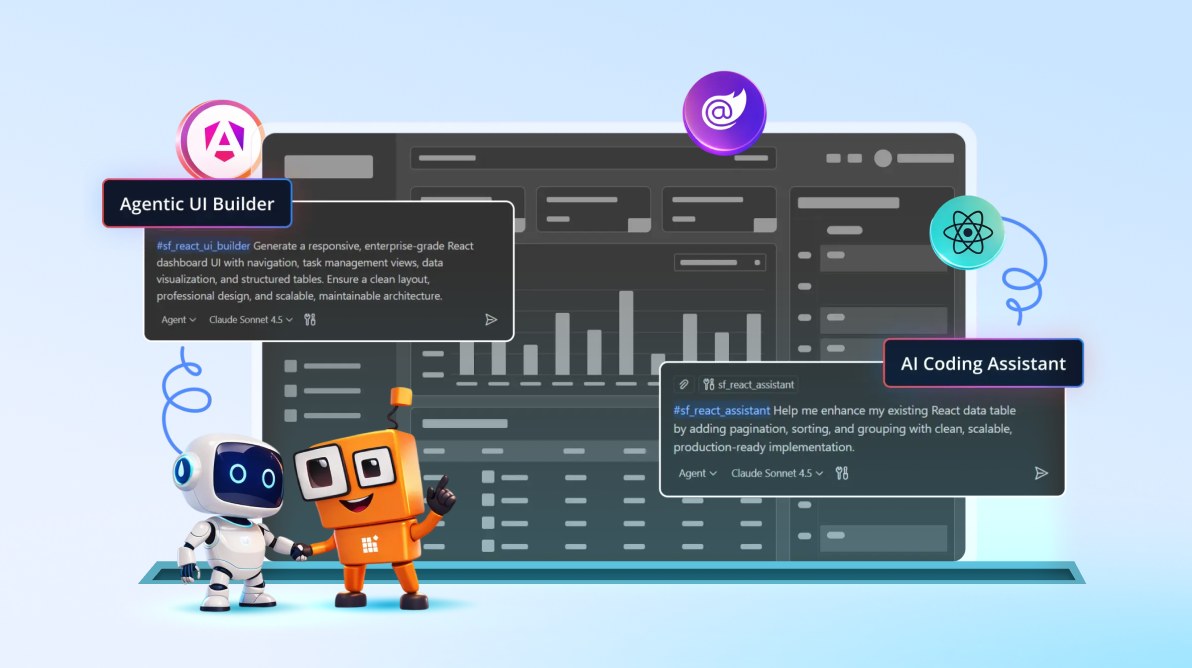
TL;DR: Syncfusion MCP Servers now power the newly introduced Agentic UI Builder, enabling developers to generate complete enterprise UI layouts for React, Angular, and Blazor directly inside their IDE. Combined with the AI Coding Assistant, MCP Servers deliver accurate, documentation-backed UI development from components to full pages.
Enterprise UI development often slows down not because of complexity, but because of fragmentation. Developers constantly switch between documentation, component APIs, layout patterns, theming rules, and icon references, then manually assemble everything inside the IDE. Even with AI-powered editors, results can be inconsistent unless the AI has reliable, component-specific context.
Syncfusion® MCP Servers were introduced to solve this problem by grounding AI-powered developer tools in verified Syncfusion component knowledge. Until now, this foundation powered the AI Coding Assistant, enabling accurate component-level code generation and troubleshooting.
Today, Syncfusion introduces a major new capability built on top of MCP Servers: the Agentic UI Builder. With Agentic UI Builder, developers can now generate complete enterprise UI layouts, pages, dashboards, and application scaffolding directly inside their IDEs for React, Angular, and Blazor.
This guide introduces the Agentic UI Builder, explains how it works with Syncfusion MCP Servers, and shows how it complements the AI Coding Assistant for faster, more reliable UI development.
What is Syncfusion MCP Server?
Syncfusion MCP Server is a lightweight, framework-specific Model Context Protocol (MCP) server that connects AI-powered developer tools to real Syncfusion component expertise.
When enabled in an MCP-capable IDE, the server provides AI tools with direct access to:
- Syncfusion component APIs (properties, events, methods, patterns)
- Pre-built UI layout blocks (dashboards, headers, sidebars, forms)
- Theme and styling guidance across popular design systems
- A comprehensive icon library with usage and accessibility guidance
The goal is simple: eliminate guesswork and reduce time spent searching documentation, without leaving the IDE.
Together, Syncfusion MCP Servers now power two complementary experiences:
- Agentic UI Builder generates complete pages, layouts, and dashboards.
- AI Coding Assistant handles precise component implementation and troubleshooting.
What’s new: Introducing the Agentic UI Builder
While the AI Coding Assistant focuses on individual components, the Agentic UI Builder represents a shift toward end-to-end UI generation.
The Agentic UI Builder (New)
The Agentic UI Builder is a newly introduced capability that enables developers to describe an entire page or workflow and receive a fully structured, enterprise-grade UI layout.
It is currently available for:
Support for additional frameworks is actively in progress.
Why Agentic UI Builder matters
Traditional AI assistance often stops at code snippets. The Agentic UI Builder goes further by coordinating multiple aspects of UI creation at once.
Instead of assembling layouts manually, developers can now:
- Generate responsive layouts in a single prompt
- Use the correct Syncfusion components automatically
- Apply consistent theming and icon usage
- Align with proven enterprise UI patterns
This reduces UI setup time from hours to minutes, without sacrificing correctness.
Real-World UIs Built with Agentic UI Builder
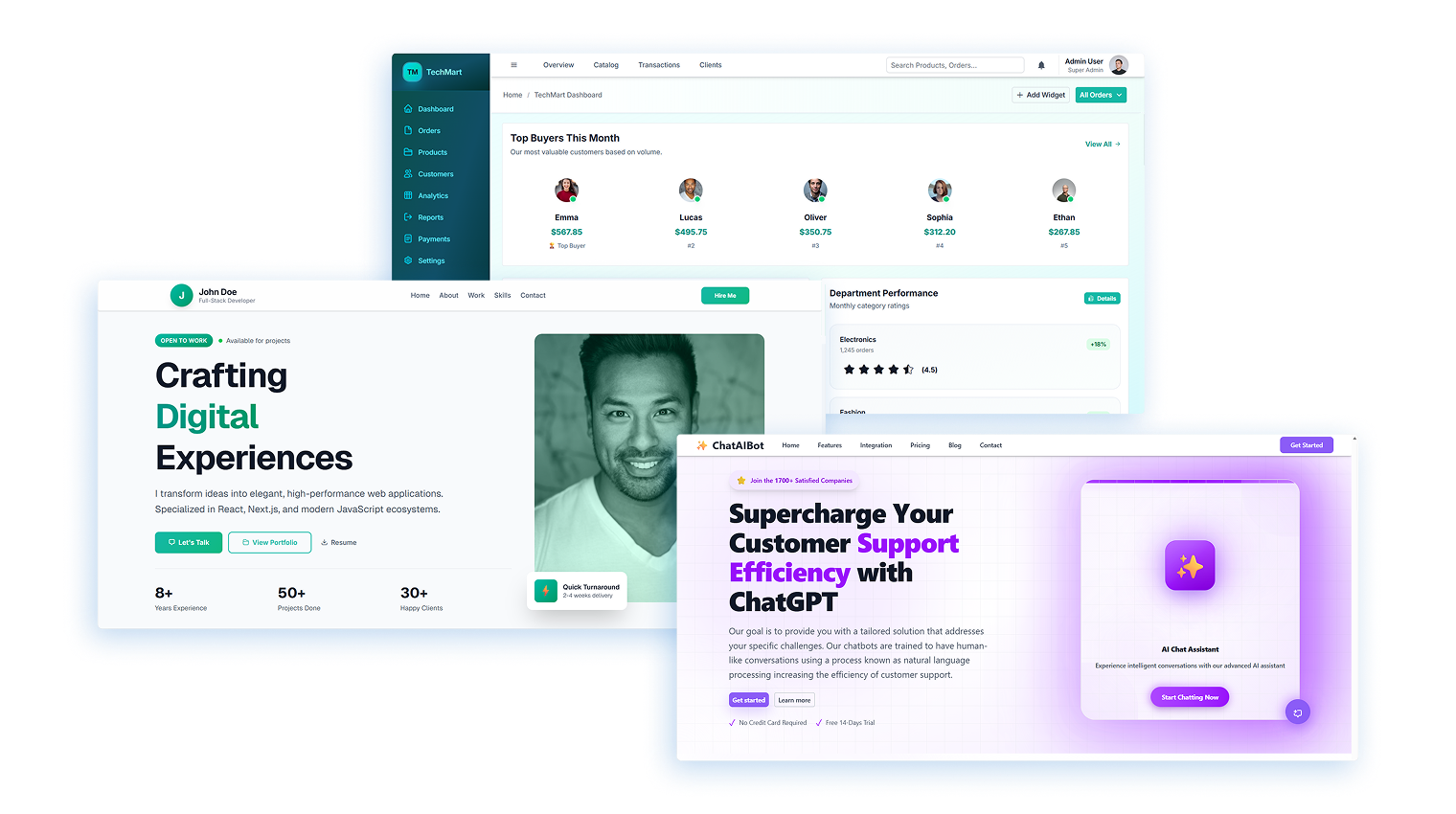
The following live examples, created with the Agentic UI Builder, highlight how high-level UI intent is effectively translated into complete, production-ready applications.
- Portfolio landing page – marketing and personal branding scenarios
- E-commerce Dashboard – data-driven enterprise workflows
- AI Chatbot – conversational, AI-powered user experiences
Key benefits of Syncfusion MCP Servers
Syncfusion MCP Servers unlock several enterprise-ready advantages:
- Verified component intelligence: AI tools work with real Syncfusion metadata, not generic assumptions.
- Design system alignment: Built-in guidance for Tailwind 3, Bootstrap 5.3, Material 3, and Fluent 2 (including light and dark themes).
- Pre-built UI blocks: Reusable layouts for common enterprise screens.
- Comprehensive icon library: 600+ icons with integration and accessibility best practices.
- Unlimited usage: No request limits or time caps.
- Privacy-focused design: MCP Servers do not access project files, store prompts, or train models.
Now, let’s walk through configuring the Syncfusion MCP Server for React in a real setup.
Prerequisites
Before getting started, ensure you have:
- An AI-powered IDE that supports Model Context Protocol (MCP)
- Node.js v18+ and npm
- An active Syncfusion API key
- A valid Syncfusion license (Commercial, Community, or Free trial)
- A React project (optional, but recommended for applying the generated UI)
Installing and configuring the Syncfusion MCP Server (React)
To invoke the Syncfusion MCP Server, configure your MCP client with the following settings:
- npm package:
@syncfusion/react-assistant - Type:
stdio - Command:
npx - Arguments:
-y @syncfusion/react-assistant@latest
Provide your Syncfusion API key via an environment variable in the configuration file.
"env": {
    "Syncfusion_API_Key": "YOUR_API_KEY"
}
VS Code configuration (mcp.json)
1. Create a .vscode folder in your project root.
2. Add a file named mcp.json.
3. Paste the configuration below and set your API key:
{
    "servers": {
        "syncfusion-react-mcp": {
            "type": "stdio",
            "command": "npx",
            "args": [
                "-y",
                "@syncfusion/react-assistant@latest"
            ],
            "env": {
                "Syncfusion_API_Key": "YOUR_API_KEY"
            }
        }
    }
}
4. Start the server from your IDE’s MCP panel.
5. Confirm it’s running (you should see: “Syncfusion React MCP Server is running…”)
For other IDEs (Cursor, Windsurf, JetBrains), follow their MCP configuration guidelines.
Using MCP-Powered tools in your IDE
To activate the tools, start your prompt with one of these mode tags:
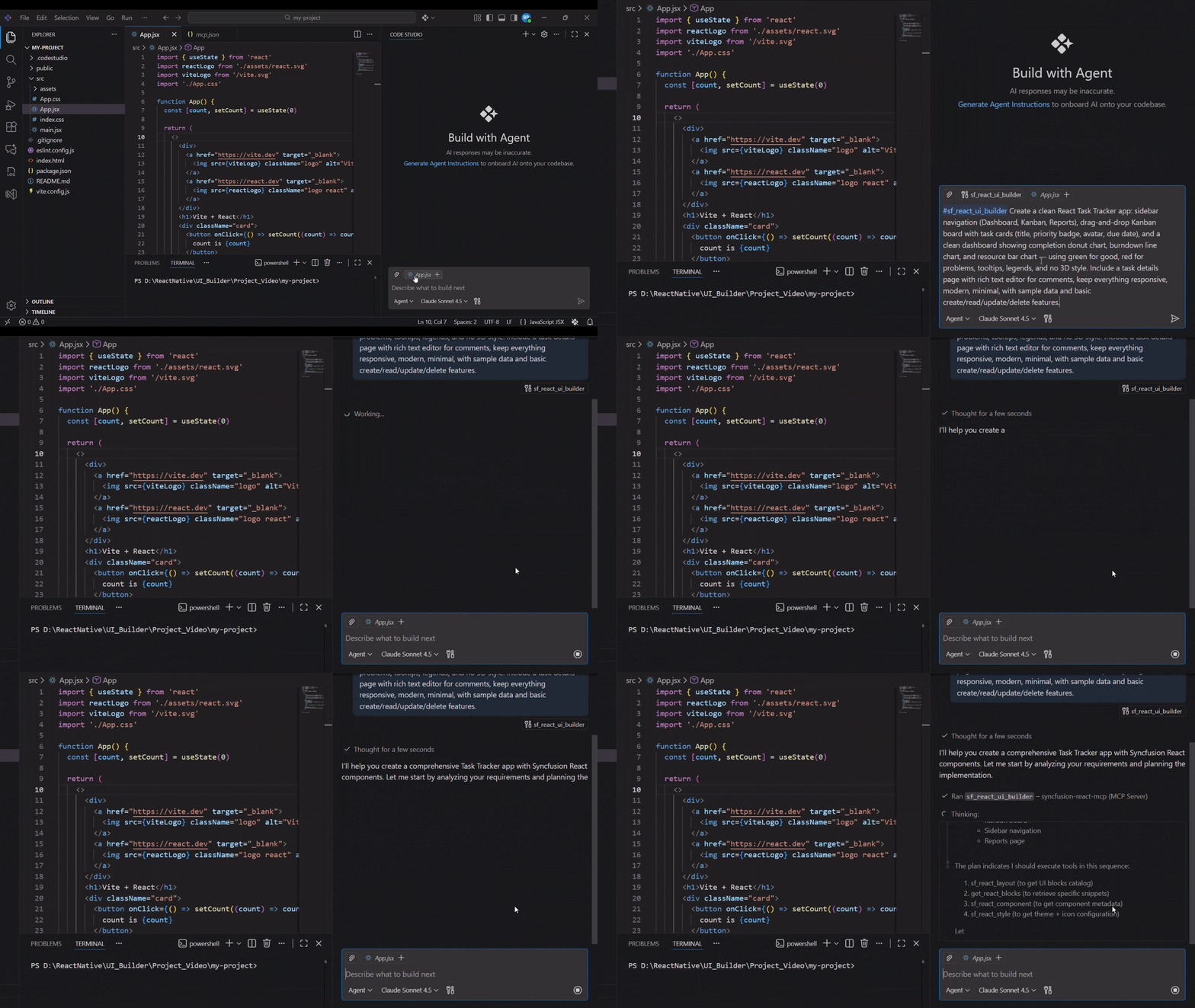
#sf_react_ui_builderfor complete pages and dashboards.#sf_react_assistantfor component-level tasks and troubleshooting.
In VS Code, the mode tag explicitly selects the tool. You then describe your requirement in plain language, and the IDE returns React code aligned with Syncfusion best practices.
Example prompts
Agentic UI Builder
#sf_react_ui_builder
Build a responsive admin dashboard with a left sidebar, top header, and a main grid with filtering and paging. Use Tailwind and dark mode.
AI Coding Assistant
#sf_react_assistant
Show how to configure a Syncfusion React Grid with remote data, sorting, and server-side paging. Include key props and events.
For more examples and ready-to-use prompts, explore our comprehensive prompt libraries:
How the Agentic UI Builder works
When you describe a UI, the Agentic UI Builder coordinates multiple specialized capabilities:
- Layouts: responsive page structure and UI blocks
- Components: correct Syncfusion components and configuration
- Styling: design systems, themes, and icon usage
Sub-tools you can target
1. Layout Tool (#sf_react_layout)
Generates responsive UI patterns and page structures.
Note: You can use this layout tool to create UIs similar to existing React UI blocks.
2. Component Tool (#sf_react_component)
Provides guidance to implement the initial-level Syncfusion components.
3. Styling Tool (#sf_react_style)
Applies Syncfusion theme (light/dark) with CSS utility-based styling and icon integration.
AI Coding Assistant: Precision at the component level
The AI Coding Assistant remains the go-to tool for accuracy and speed when working on individual components.
Use it to:
- Generate fully configured components
- Add features like sorting, paging, or filtering
- Troubleshoot configuration issues
- Create minimal working examples
Framework support
The Agentic UI Builder is currently available for React, Angular, and Blazor, enabling end-to-end UI generation using Syncfusion’s pre-built layouts, components, and design system guidance. Support for additional frameworks is actively in progress and will be rolled out in upcoming releases.
Alongside this, the AI Coding Assistant already supports a broader range of frameworks and platforms, including React, Angular, Blazor, JavaScript, Vue, ASP.NET Core, ASP.NET MVC, .NET MAUI, WPF, WinUI, WinForms, Document SDK, PDF Viewer SDK, and Spreadsheet Editor SDK.
This means you can start benefiting from Syncfusion’s component-level guidance, code generation, and troubleshooting today while more Agentic UI Builder capabilities continue to expand across frameworks.
Best practices for effective usage
- Use strong models, for example:
Claude Sonnet 4.5, GPT-5 series, or equivalent Gemini models. - Be specific: mention the component name, desired design system, layout constraints, and data source shape.
- Review and test the generated code before deploying to production.
- Iterate freely. Unlimited usage makes it practical to refine prompts until the UI matches your requirements.
Privacy and security
Syncfusion MCP Servers are designed to keep your code and prompts private:
- The tools do not access your project files or workspace contents.
- Prompts are not stored or used for training.
- The MCP server functions as a knowledge bridge between your IDE and Syncfusion’s component expertise.
Troubleshooting
If you run into issues while using Syncfusion MCP Server, try the following:
- API key: Confirm
Syncfusion_API_Keyis set correctly in your MCP server config. - Server started: Verify the MCP server is running in your IDE’s MCP panel.
- IDE support: Confirm your IDE supports MCP and that MCP is enabled.
- Restart: Restarting the IDE often clears stuck MCP processes or stale configs.
Uninstallation
Need to remove Syncfusion MCP Server?
- Delete the
mcp.jsonfile from .vscode (or your IDE’s MCP config location). - Restart your IDE.
Frequently Asked Questions
Use Agentic UI Builder for creating complete pages, dashboards, and full interfaces from scratch with coordinated tools for layout, components, styling, and icons. Use AI Coding Assistant for integrating Syncfusion component knowledge directly into your development workflow, perfect for implementing individual components, troubleshooting integration issues, and accessing API documentation on-demand.What's the difference between Agentic UI Builder and AI Coding Assistant?
Syncfusion MCP Server Tools are free with unlimited usage. The MCP server connects your development environment to Syncfusion’s enterprise component library and documentation. All code generation happens through your IDE’s AI assistant (like Claude in Cursor or GitHub Copilot), so there are no additional charges, token limits, or request caps from Syncfusion. You’ll only pay for your AI provider’s service if you’re using a paid IDE or LLM subscription.Are there usage limits or charges for using Syncfusion MCP Server?
The tools don’t access project files or workspace contents directly. User prompts are not stored or used for training. The MCP server acts as a knowledge bridge while respecting your privacy.How is my data protected?
Syncfusion MCP Server Tools generate code suggestions that respect your project structure and coding conventions. The assistants provide implementation guidance through your IDE’s AI, allowing you to review and accept changes before they’re applied. You maintain full control—the MCP server provides context and recommendations, but all code modifications require your approval through your IDE’s interface.How do Syncfusion MCP Server Tools interact with my existing code?

Conclusion
The introduction of the Agentic UI Builder marks a major step forward in how enterprise UIs are built with Syncfusion. Powered by Syncfusion MCP Servers, developers are no longer limited to generating isolated code snippets or individual components. Instead, they can now create complete, structured, and design-consistent application UIs directly inside their IDE.
By combining the strengths of the Agentic UI Builder for full UI generation and the AI Coding Assistant for precise component-level implementation, Syncfusion MCP Servers provide a unified, AI-driven development experience. The result is faster UI development, fewer integration errors, and consistent use of Syncfusion’s enterprise-grade components across frameworks such as React, Angular, and Blazor.
For teams building large-scale applications, this means spending less time assembling UI foundations and more time focusing on business logic, performance, and user experience. As support expands to more frameworks and scenarios, Syncfusion MCP Servers, and the Agentic UI Builder built on top of them, set a new standard for AI-assisted enterprise UI development.
If you have any questions or feedback, reach out through our support forum or feedback portal. We are always happy to assist you!



 No spam, just valuable updates.