
 Ramaraj Marimuthu
TL;DR: Syncfusion Document SDK AI Agent Tools is a .NET library that gives AI agents direct access to enterprise-grade document processing capabilities across PDF, Word, Excel, PowerPoint, Markdown, and more. Instead of building custom orchestration pipelines for document workflows, developers can register AI-callable tools and let agents dynamically create, edit, merge, convert, secure, and extract data from documents using natural language prompts.
AI agents can now reason, plan tasks, and respond intelligently to natural language prompts. But when those workflows involve documents, developers still face a major challenge.
Generating PDFs, merging Word files, extracting tables from scanned documents, converting Office formats, or applying document security typically requires complex orchestration code and multiple format-specific libraries.
Syncfusion® Document SDK AI Agent Tools solve this problem by giving AI agents direct access to enterprise-grade document processing capabilities through AI-callable tools.
With a simple registration model, AI agents can autonomously:
- Create documents
- Merge files
- Convert formats
- Extract structured data
- Apply security
- Process PDFs, Word, Excel, and PowerPoint files
- Execute multi-step document workflows dynamically
Instead of hardcoding workflows, developers can let AI agents decide which tools to invoke, how to chain operations together, and how to complete document tasks from natural language instructions.
Why traditional document automation becomes complex
Consider a request like: “Generate a quarterly report, merge it with last quarter’s summary, convert the result to PDF.”
An AI model can understand this instantly.
But executing it traditionally requires:
- Multiple document libraries
- Manual orchestration logic
- Intermediate file handling
- Conversion pipelines
- Error handling
- Format compatibility management
Developers must manually implement every step. This creates a major gap between AI reasoning and real document execution.
Introducing Syncfusion Document SDK AI Agent Tools
Syncfusion Document SDK AI Agent Tools is a .NET library that transforms traditional document APIs into AI-callable tools for autonomous workflows.
Built on top of Syncfusion’s enterprise-grade document processing engines, the library enables AI agents to dynamically create, modify, convert, secure, and extract information from:
- PDF documents
- Word files
- Excel workbooks
- PowerPoint presentations
- Markdown files
- HTML documents
- RTF content
The tools integrate with the Microsoft Agent Framework and work with providers such as:
- Azure OpenAI
- OpenAI
- Any provider compatible with Microsoft.Extensions.AI
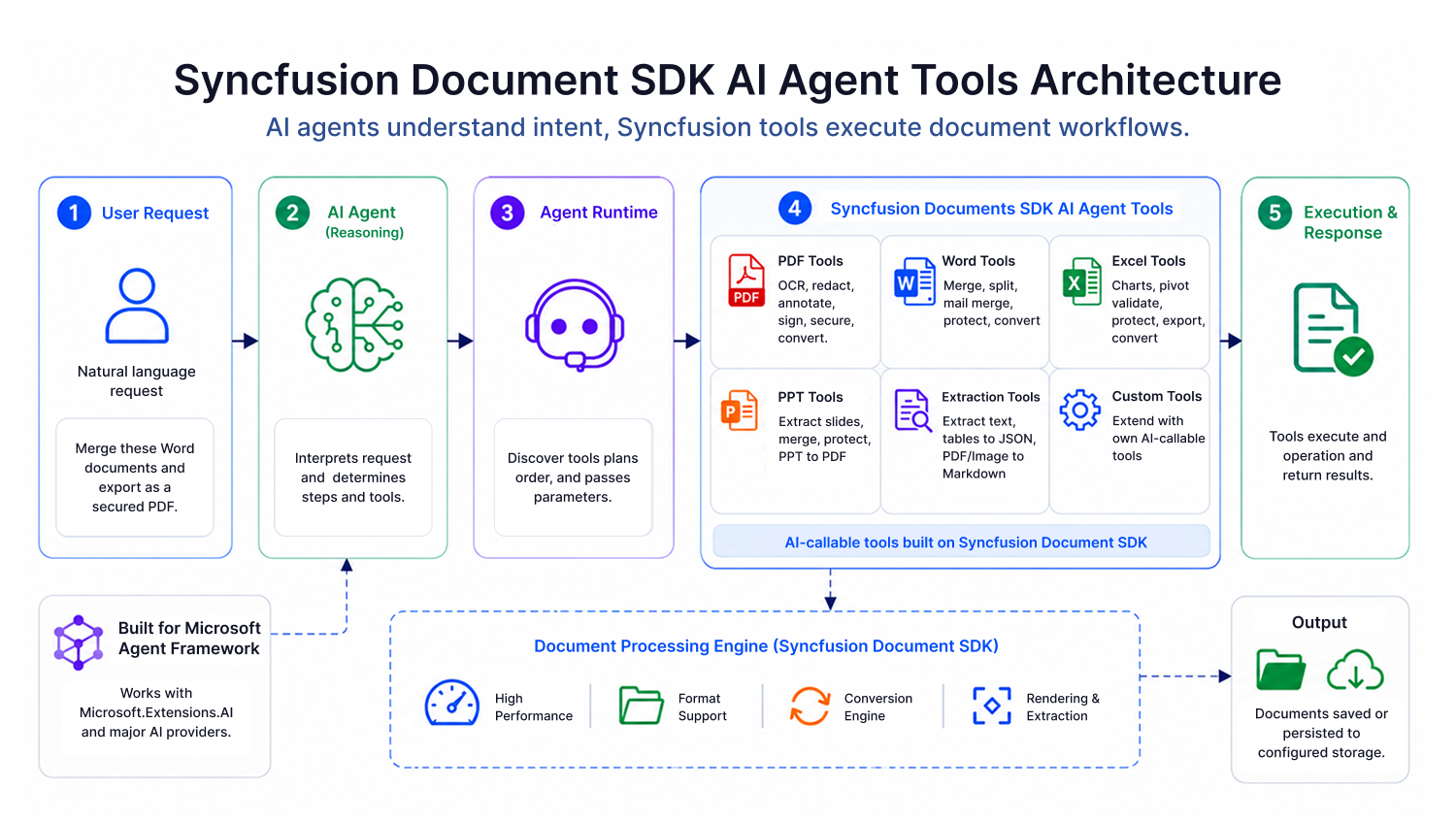
How it works
The workflow is simple:
- A user submits a natural language request
- The AI model interprets the intent
- The agent runtime selects the required Syncfusion tools
- The tools execute document operations
- The final output is returned automatically
For example: “Merge all invoices, add a watermark, and export the final document as a PDF.”
The agent dynamically determines:
- Which tools to invoke
- Execution order
- Required parameters
- Intermediate processing steps
This enables truly autonomous document workflows.
Core capabilities
PDF automation
AI agents can:
- Merge and split PDFs
- Extract text and tables
- Perform OCR workflows
- Apply digital signatures
- Add watermarks
- Redact sensitive information
- Secure and encrypt documents
- Convert PDFs into other formats
Word Document Processing
Agents can:
- Generate documents
- Perform mail merge operations
- Compare documents
- Track changes
- Replace content
- Convert between DOCX, PDF, HTML, Markdown, and RTF
- Protect and secure files
Excel automation
Agents can automate:
- Reports
- Charts
- Pivot tables
- Workbook generation
- Data extraction
- Spreadsheet conversions
- Validation workflows
PowerPoint processing
Agents can:
- Merge presentations
- Extract slide content
- Convert slides to images
- Export presentations to PDF
- Automate presentation workflows
Real-world AI workflow examples
- AI invoice processing: Extract invoice data from PDFs and export structured JSON automatically.
- AI contract automation: Generate contracts, apply signatures, redact confidential data, and export secure PDFs.
- AI reporting pipelines: Create Excel reports, generate charts, convert reports to PDF, and distribute formatted summaries.
- AI knowledge workflows: Convert documents into Markdown for retrieval-augmented generation (RAG) systems and AI search pipelines.
Two flexible execution modes
Syncfusion Document SDK AI Agent Tools support two execution models designed for different application architectures and scalability requirements.
In-Memory mode
In-Memory mode keeps documents as live objects during execution, allowing tools to operate directly on document instances without repeatedly saving and loading files from storage. This approach minimizes disk I/O, improves execution speed, and enables efficient multi-step workflows. It is ideal for desktop applications, interactive assistants, rapid prototyping, and single-instance deployments.
Document storage mode
Document storage mode uses a pluggable storage backend through the IDocumentStorage interface. Documents are loaded and persisted during each operation, making the architecture stateless and horizontally scalable. This mode is ideal for cloud-native applications, distributed AI systems, scalable APIs, and enterprise automation platforms. Supported backends include Azure Blob Storage, Amazon S3, local file systems, and custom storage providers.
Build your first AI document agent
Step 1: Install the required NuGet packages using the command below:
dotnet add package Syncfusion.DocumentSDK.AI.AgentTools
dotnet add package Microsoft.Agents.AI.OpenAI
Step 2: Register Syncfusion agent tools:
// Create document managers (In-Memory mode)
var wordManager = new WordDocumentManager();
var excelManager = new ExcelWorkbookManager();
var pdfManager = new PdfDocumentManager();
var presentationManager = new PresentationManager();

// Create document manager collection for cross-format tools
var repoCollection = new DocumentManagerCollection();
repoCollection.AddManager(DocumentType.Word, wordManager);
repoCollection.AddManager(DocumentType.Excel, excelManager);
repoCollection.AddManager(DocumentType.PDF, pdfManager);
repoCollection.AddManager(DocumentType.PowerPoint, presentationManager);

// Set up input/output directories
string outputDir = @"D:\Output";
string inputDir = @"D:\Input";
Directory.CreateDirectory(outputDir);

// Collect all available tools
var allTools = new List<AITool>();

// Word tools
allTools.AddRange(new WordDocumentAgentTools(wordManager, outputDir).GetTools());
allTools.AddRange(new WordOperationsAgentTools(wordManager).GetTools());
allTools.AddRange(new WordSecurityAgentTools(wordManager).GetTools());
// etc. (WordBookmarkAgentTools, WordMailMergeAgentTools, WordFindAndReplaceAgentTools, ...)

// Excel tools
allTools.AddRange(new ExcelWorkbookAgentTools(excelManager, outputDir).GetTools());
allTools.AddRange(new ExcelWorksheetAgentTools(excelManager).GetTools());
allTools.AddRange(new ExcelSecurityAgentTools(excelManager).GetTools());
// etc. (ExcelChartAgentTools, ExcelConditionalFormattingAgentTools.cs, ...)

// PDF tools
allTools.AddRange(new PdfDocumentAgentTools(pdfManager, outputDir).GetTools());
allTools.AddRange(new PdfOperationsAgentTools(pdfManager).GetTools());
allTools.AddRange(new PdfSecurityAgentTools(pdfManager).GetTools());
// etc. (PdfSecurityAgentTools, PdfContentExtractionAgentTools, PdfAnnotationAgentTools, ...)

// PowerPoint tools
allTools.AddRange(new PresentationDocumentAgentTools(presentationManager, outputDir).GetTools());
allTools.AddRange(new PresentationOperationsAgentTools(presentationManager).GetTools());
allTools.AddRange(new PresentationSecurityAgentTools(presentationManager).GetTools());
// etc. (PresentationContentAgentTools, PresentationFindAndReplaceAgentTools, ...)

// Conversion and data extraction
allTools.AddRange(new OfficeToPdfAgentTools(repoCollection, outputDir).GetTools());
allTools.AddRange(new DataExtractionAgentTools(outputDir).GetTools());
Step 3: Build the AI agent with OpenAI
/// Convert to Microsoft.Extensions.AI tool format
var aiTools = allTools
    .Select(t => AIFunctionFactory.Create(
        t.Method,
        t.Instance,
        new AIFunctionFactoryOptions
        {
            Name = t.Name,
            Description = t.Description
        }))
    .Cast<Microsoft.Extensions.AI.AITool>()
    .ToList();

// Build the AI agent with OpenAI
string apiKey = Environment.GetEnvironmentVariable("OPENAI_API_KEY")!;
string model = "gpt-4o";

AIAgent agent = new OpenAIClient(apiKey)
    .GetChatClient(model)
    .AsIChatClient()
    .AsAIAgent(
        instructions: $"""
            You are a document-processing assistant powered by Syncfusion Document SDK agent tools.
            Input files: {inputDir} | Output files: {outputDir}
            Follow the Create/Load → Operate → Export workflow for every operation.
            """,
        tools: aiTools);
Now the agent can execute document workflows from natural language prompts. For the complete getting started guide, refer to the official documentation.
Extend with custom AI Tools
If your workflows require operations beyond the built-in capabilities, you can create custom AI tools and register them alongside Syncfusion’s built-in tools.
Once registered, the agent can discover and invoke them using the same execution model, allowing teams to extend the framework while maintaining a unified agent architecture.
For the full customization guide, including both operating modes and additional examples, refer to the customization documentation.
Why use Syncfusion Document SDK AI Agent Tools?
- Enterprise-grade document engine
- AI-native execution model
- Cross-format workflow support
- Production-ready architecture
- .NET-first developer experience
- Flexible deployment strategies
- Extensible custom tool architecture
Frequently Asked Questions
What AI frameworks are supported?
The tools are built for the Microsoft Agent Framework and expose standard AITool objects. They work with any framework that supports the Microsoft.Extensions.AI tool abstraction.
Yes. Implement the Can I use a custom storage backend?
IDocumentStorage interface to connect Azure Blob Storage, Amazon S3, local file system, or your own provider.
.NET 8.0, .NET 9.0, and .NET 10.0.What .NET versions are supported?
No. The tools encapsulate all document processing logic. Your agent invokes them automatically based on user prompts.Do I need to write document processing code?
Yes. Use Document Storage mode for stateless, horizontally scalable server-side deployments.Can I use this in a web API?
Yes. You can create custom tools by following the same Can I extend or customize the built-in tools?
[Tool] attribute pattern used by the built-in tools. Refer to the customization for details on creating custom tools and integrating them with the Microsoft Agent Framework.
No. The AI Agent Tools are included with your existing Syncfusion Document SDK license. No additional purchase or license key is required.Do I need a separate license for the AI Agent Tools?
Use In-Memory mode for interactive, single-instance agents like desktop apps or non-scalable environments. Use Document Storage mode for stateless, scalable server-side deployments where documents need to persist across instances or requests.Which mode should I choose, In-Memory or DocumentStorage?
Start building autonomous document workflows
Syncfusion Document SDK AI Agent Tools bridge the gap between AI reasoning and real document execution.
Instead of manually building complex document-processing pipelines, developers can expose AI-callable tools and let autonomous agents dynamically execute workflows across PDF, Word, Excel, PowerPoint, Markdown, and more.
Whether you’re building AI agents, intelligent workflow systems, enterprise automation platforms, or document-processing agents, Syncfusion Document SDK AI Agent Tools provide the execution layer needed to turn AI intent into real-world document outcomes.
Try it today and start building autonomous document workflows with AI.
For queries or feedback, reach out through the support forum, support portal, or feedback portal. We’re always happy to help!



 No spam, just valuable updates.