 Ramaraj Marimuthu
TL;DR: Meet the new Syncfusion PPTX Editor SDK, built to bring PowerPoint viewing, navigation, presenting, and printing directly into web applications. The initial release focuses on presentation viewing, with features such as slide thumbnails, zoom, slideshow mode, speaker notes, presenter view, and printing. Presentation editing capabilities are planned as the SDK evolves.
Bring PowerPoint presentations directly into your web apps
PowerPoint presentations are part of many everyday business workflows, from employee training and sales pitches to project reviews, reports, and customer proposals.
But viewing a presentation from a web application often means asking users to download the file, open another application, review it there, and then return to the original workflow.
For developers, building an embedded presentation experience from scratch creates a different challenge: rendering slide content, navigation, zooming, presentation modes, notes, and printing all require additional development effort.
The Syncfusion® PPTX Editor SDK provides another option. It brings an interactive PowerPoint viewing experience directly into web applications, allowing users to open, navigate, present, and print supported presentations without leaving the application.
And importantly, Microsoft PowerPoint does not need to be installed for the viewing experience. The current release focuses on PowerPoint viewing and presenting. It also establishes the foundation for presentation-editing workflows planned for future releases.
Why bring PowerPoint viewing into your application?
Embedding presentations inside the application where users already work can simplify several common workflows.
Consider a learning portal. Instead of requiring learners to download a training deck and open it separately, the application can display the presentation alongside the rest of the course content. Or consider a document management system. Users reviewing proposals or project presentations can open a PPTX file directly from the application, navigate through the slides, inspect content, and review speaker notes without moving between tools.
The same approach can apply to:
- Employee training systems.
- Sales enablement portals.
- Customer and partner portals.
- Document management applications.
- Review and approval workflows.
- Business applications.
- Presentation libraries.
The goal is simple: keep presentation viewing inside the workflow where the presentation is already being used.
Meet the Syncfusion PPTX Editor SDK
The PPTX Editor SDK provides a familiar presentation-viewing interface for web applications.
Developers can use it to display supported PowerPoint content and give users built-in controls for navigation, zooming, presenting, reviewing notes, and printing.
PPTX Editor SDK at a glance
The current release includes capabilities for:
- Viewing supported PowerPoint presentation content.
- Using a ribbon-based viewer interface.
- Navigating slides with mouse, keyboard, and touch.
- Zooming in and out.
- Browsing slides through thumbnails.
- Handling larger presentations with thumbnail virtualization.
- Presenting slides in full-screen slideshow mode.
- Viewing slide notes.
- Using presenter view with speaker notes.
- Printing presentations.
- Displaying multilingual presentation text.
- Supporting localized and right-to-left application experiences.
Let’s take a closer look at the key viewing capabilities.
View common PowerPoint content in the browser
PowerPoint slides are rarely just text. They combine layouts, images, diagrams, tables, charts, formatting, and other visual elements to communicate information.
The PPTX Editor SDK supports viewing several common presentation elements directly inside your application.
Text boxes and placeholders
Display titles, body content, and free-form text stored in presentation text boxes and placeholders.
Basic AutoShapes
Render supported basic AutoShapes together with fill and outline formatting. These shapes are commonly used for diagrams, process flows, callouts, and visual layouts.
Images
Display images embedded within presentation slides.
Tables
Render supported tables while retaining their content and formatting.
Charts
Display supported charts used within presentation slides.
Paragraph and text formatting
Display basic text and paragraph formatting, including:
- Alignment.
- Indentation.
- Bold.
- Italic.
- Underline.
- Font.
- Font size.
- Text color.
Hyperlinks
Users can interact with supported hyperlinks embedded within presentation content and navigate to their associated targets.
Multilingual content
The PPTX Editor can render presentation text written in different languages, helping developers build presentation experiences for global applications.
Together, these capabilities help retain the structure and visual context of supported presentation content inside the web application.
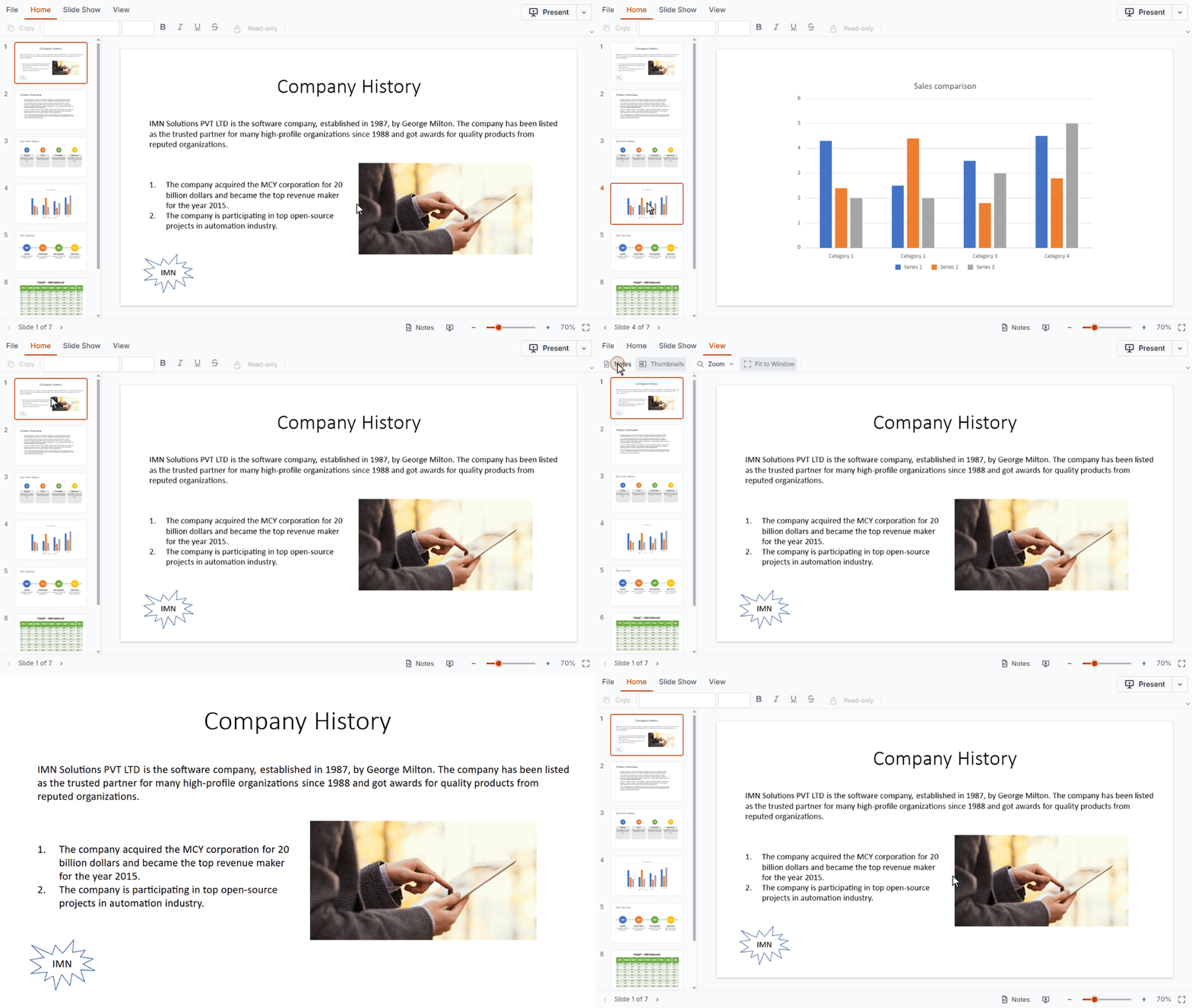
Use a familiar ribbon-based viewer
The PPTX Editor SDK provides a basic viewer ribbon with commands organized into familiar tabs such as:
- Home
- Slide Show
- View
This gives users a consistent location for common viewing and presentation commands.
For applications where users already work regularly with PowerPoint presentations, the ribbon-based approach also reduces the need to learn a completely different presentation-viewing interface.
Navigate with mouse, keyboard, or touch
Users can move through slides using mouse, keyboard, or touch interactions.
This is useful when the PPTX Editor is embedded across desktop and touch-enabled application experiences.
Keyboard support also gives users another option for navigating slides without depending entirely on mouse interaction.
Zoom into presentation details
Slides can contain small text, detailed diagrams, charts, or dense tables that are difficult to inspect at their default size.
Built-in zoom controls let users:
- Zoom in to inspect specific slide content.
- Zoom out to see more of the complete slide.
This can be especially useful in technical presentations, reports, dashboards, and training materials.
Browse slides with thumbnails
The thumbnail pane provides a visual overview of the presentation.
Instead of moving through every slide sequentially, users can select a thumbnail to jump directly to the slide they need.
For presentations containing many slides, thumbnail virtualization helps avoid unnecessarily rendering all thumbnail content at once, supporting a more responsive browsing experience.
Present slides in full-screen mode
Sometimes users need to do more than review a presentation. They need to deliver it.
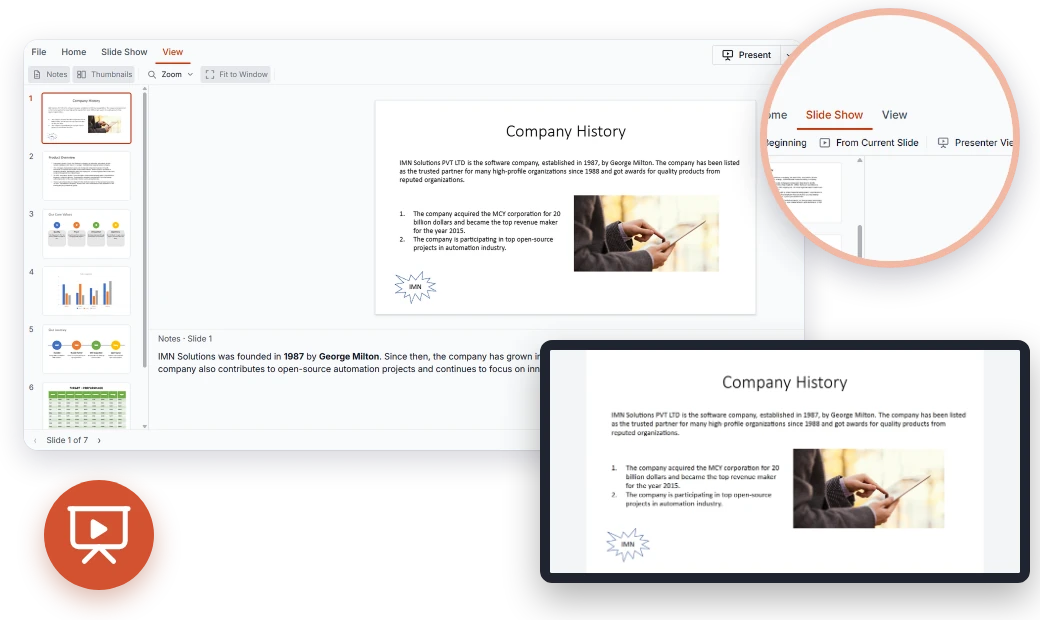
The PPTX Editor SDK includes a slideshow mode for presenting slides in full screen directly from the web application.
This can be useful for scenarios such as:
- Training sessions.
- Sales presentations.
- Product demonstrations.
- Internal project reviews.
- Classroom or learning experiences.
Users can move from reviewing a presentation to presenting it without switching to a separate desktop application.
View speaker notes with presenter view
Speaker notes often contain important context that doesn’t appear on the slide itself. Presenters may use them for:
- Talking points.
- Supporting details.
- Reminders.
- Additional context.
The PPTX Editor SDK supports viewing notes associated with slides and provides presenter-view capabilities for presentation scenarios.
This allows users to access supporting information while delivering the presentation.
Print presentations
Users can also print presentations from the viewer using the browser’s printing capabilities and the available print settings.
This gives applications another way to support presentation workflows without requiring users to download the file simply to produce a printable copy.
Supported web platforms
The PPTX Editor SDK is available across commonly used JavaScript and ASP.NET web development stacks.
| Platform | PPTX Editor |
|---|---|
| React | Supported |
| Angular | Supported |
| Vue | Supported |
| JavaScript | Supported |
| TypeScript-based applications | Supported through the applicable JavaScript framework packages |
| ASP.NET Core | Supported |
| ASP.NET MVC | Supported |
This lets teams integrate PowerPoint viewing into their existing web technology stack rather than introducing a separate presentation-viewing application.
PPTX Editor SDK vs. JavaScript PowerPoint Library
Syncfusion also provides a JavaScript PowerPoint Library, so developers may wonder when to use each product.
The two address different requirements.
| PPTX Editor SDK | JavaScript PowerPoint Library | |
|---|---|---|
| Primary purpose | Interactive presentation experience | Programmatic PowerPoint processing |
| User interface | Yes | No |
| Current focus | View, navigate, present, and print presentations | Create, read, modify, and save presentations through code |
| Typical use | Embed a PowerPoint viewing experience inside an application | Generate or manipulate PPTX files programmatically |
| User interaction | Designed for end users working with presentations | Designed for developers automating presentation operations |
Use the PPTX Editor SDK when users need an interactive PowerPoint experience inside the application.
Use the JavaScript PowerPoint Library when the application itself needs to create or modify PPTX files programmatically without requiring an interactive presentation UI.
The two approaches can serve different parts of a document workflow.
Try the PPTX Editor in React
Here’s a short example of getting started with the React PPTX Editor.
Install the package
npm install @syncfusion/ej2-react-pptxeditor --save
Register your Syncfusion license key and include the required Syncfusion theme styles for your application.
Then add the PPTX Editor component.
import {
  PptxEditorComponent,
  Toolbar,
  ThumbnailView,
  Magnification,
  Navigation,
  Print,
  SlideShow,
  Inject
} from '@syncfusion/ej2-react-pptxeditor';

function App() {
  return (
    <PptxEditorComponent
      id="pptx-editor"
      documentPath="https://document.syncfusion.com/content/pptxeditor-resources/Sample.pptx"
    >
      <Inject
        services={[
          Toolbar,
          ThumbnailView,
          Magnification,
          Navigation,
          Print,
          SlideShow
        ]}
      />
    </PptxEditorComponent>
  );
}

export default App;
Run the application and open it in the browser.
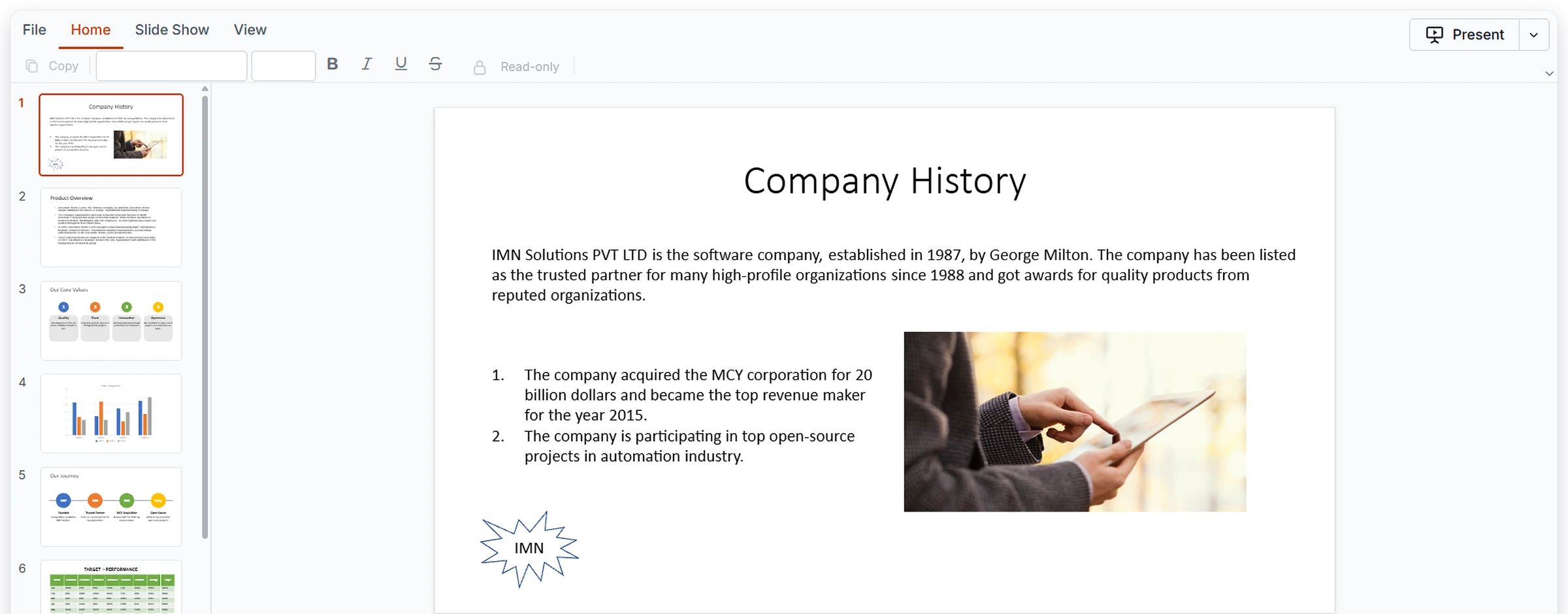
The presentation loads inside the PPTX Editor with the available viewer controls, thumbnail pane, and slide area.
For production integration, theme configuration, licensing, and complete setup instructions, refer to the Getting Started with React PPTX Editor documentation.
Where can you use the PPTX Editor SDK?
Presentation viewing can be useful anywhere PPTX files form part of an application workflow.
Training and e-learning portals
Display training decks, lessons, and course presentations directly inside learning platforms.
Learners can navigate slides, zoom into content, and view supporting presentation information without downloading every file.
Sales enablement platforms
Make pitch decks and product presentations available directly through sales, customer, or partner portals.
Document management systems
Add an interactive PPTX viewing experience alongside other documents managed within the application.
Instead of downloading a presentation just to inspect it, users can preview supported presentation content within the existing document workflow.
Review and approval workflows
Allow reviewers and stakeholders to inspect presentation slides and associated notes as part of a broader approval process.
Business applications
Display proposals, reports, project updates, and other presentation-based content without moving users away from the application.
What’s next: Presentation editing
The current PPTX Editor SDK release focuses on PowerPoint viewing, navigation, presenting, and printing. Presentation editing is the next direction for the SDK.
The underlying architecture provides a foundation for future editing workflows such as:
- Editing presentation content.
- Modifying formatting.
- Manipulating presentation objects.
- Supporting richer presentation-authoring workflows.
These capabilities will expand the PPTX Editor beyond its current viewing experience as the product evolves.
Because product roadmaps can change, refer to the latest Syncfusion PPTX Editor SDK roadmap for current plans and future capability updates.
Try the Syncfusion PPTX Editor SDK
If PowerPoint presentations are already part of your application’s workflow, the PPTX Editor SDK lets you bring the viewing experience closer to where your users already work.
Explore the live demos for your preferred platform:
For API details, configuration options, and complete integration instructions, refer to the Syncfusion PPTX Editor SDK documentation.
Existing Syncfusion customers can access the latest available release through the License and Downloads page.
New users can explore the PPTX Editor SDK with a Syncfusion free trial.
Frequently Asked Questions
What is the Syncfusion PPTX Editor SDK?
The Syncfusion PPTX Editor SDK is an interactive component for bringing PowerPoint presentation experiences into web applications.
The current release focuses on viewing, navigation, presenting, and printing.
Can I edit PowerPoint presentations with the PPTX Editor SDK?
Not in the current release.
The initial release focuses on presentation viewing and presentation-related interactions. Editing capabilities are planned as the product evolves.
Check the latest PPTX Editor SDK roadmap for current plans.
Which presentation elements can the PPTX Editor display?
The current viewer supports several common presentation elements, including:
- Text boxes and placeholders.
- Basic AutoShapes.
- Images.
- Tables.
- Charts.
- Basic paragraph and text formatting.
- Hyperlinks.
- Multilingual text.
Support depends on the presentation content and the capabilities available in the current release.
Can users navigate presentations with a keyboard?
Yes. Slide navigation supports keyboard, mouse, and touch interactions.
Does the PPTX Editor support slideshow mode?
Yes. Users can present supported slides in full-screen slideshow mode from the web application.
Can users view speaker notes?
Yes. The PPTX Editor supports viewing slide notes and includes presenter-view capabilities with speaker notes.
Can users print presentations?
Yes. The current viewer supports printing presentations using the browser’s printing capabilities and available print settings.
Which web platforms are supported?
The PPTX Editor SDK supports web application development with:
- React.
- Angular.
- Vue.
- JavaScript.
- ASP.NET Core.
- ASP.NET MVC.
It can also be used in TypeScript-based applications through the applicable JavaScript or framework integration.
Do users need Microsoft PowerPoint installed?
No. The PPTX Editor viewing experience works within the web application without requiring Microsoft PowerPoint to be installed.
What’s the difference between the PPTX Editor SDK and the JavaScript PowerPoint Library?
The PPTX Editor SDK provides an interactive user interface for working with presentations in web applications.
The JavaScript PowerPoint Library is a programmatic API for creating, reading, modifying, and saving PowerPoint files through code.
Choose based on whether your application needs an end-user presentation experience or programmatic PPTX processing.
Bring PowerPoint viewing into your web application
Displaying a presentation inside a web application shouldn’t require sending users to another application just to inspect the content.
The new Syncfusion PPTX Editor SDK brings presentation viewing, navigation, zooming, slideshow mode, speaker notes, presenter view, and printing into web applications through a familiar interactive interface.
For developers building document management systems, learning platforms, business applications, customer portals, and presentation-driven workflows, it provides a ready-made foundation for embedding PowerPoint viewing without building a presentation viewer from scratch.
And this launch is the starting point. As the PPTX Editor SDK evolves, planned presentation-editing capabilities will extend the experience beyond viewing and into richer presentation workflows.
Explore the PPTX Editor SDK demos and documentation to get started.


Be the first to get updates