 Meena Alagiah
TL;DR: Essential Studio 2026 Volume 1 introduces AI-powered UI components, intelligent document extraction libraries, and new controls across Web, Blazor, .NET MAUI, and desktop platforms. Highlights include Smart Data Extractor, Inline AI Assist, Sankey Diagram, and new WPF controls, along with performance improvements across the Document SDK, PDF Viewer, and Spreadsheet Editor.
Syncfusion is excited to announce the Essential Studio® 2026 Volume 1 release, bringing powerful new UI components, AI-driven capabilities, and performance improvements across the entire platform.
In this release, you’ll find new controls, smart libraries, improved developer experiences, AI-powered capabilities, and performance enhancements for Blazor, JavaScript (React, Angular, Vue, ASP.NET Core/MVC), .NET MAUI, WPF, WinUI, WinForms, and document SDKs.
Whether you’re building enterprise dashboards, document workflows, cross-platform applications, or desktop solutions, this release helps you build faster with smarter components and improved performance.
Let’s explore what’s new.
Key highlights
The 2026 Volume 1 release includes several major capabilities across the Syncfusion ecosystem:
- Smart Data Extractor: Extract structured data from PDFs and images.
- Smart Table Extractor: Extract tables as JSON from PDFs and images.
- Smart Form Recognizer: Detect and convert forms into fillable PDFs.
- Inline AI Assist: Embed contextual AI interactions in web apps.
- Sankey Diagram: Visualize flow relationships between entities in web apps.
- Diagram: Real-time multi-user editing with
Visio (.vsdx)import and export in web apps. - Smart Rich Text Editor: AI-powered content editing for Blazor.
- Chart Wizard: Simplified chart creation in Blazor.
- Markdown Viewer: Render Markdown in WPF applications.
- Smart DataGrid: Natural-language data operations in WPF.
- AI AssistView: Conversational AI assistants for WinForms.
- Agentic UI Builder: Generate application UIs from natural-language prompts for React, Angular, and Blazor applications.
Intelligent Document Processing Libraries
This release introduces new intelligent document processing libraries that help developers convert unstructured documents into structured, machine-readable data.
Smart Data Extractor (Preview)
The Smart Data Extractor analyzes PDF and image documents to detect the complete document structure. It identifies layout patterns such as alignment, spacing, and visual separators to reconstruct structured document content.
Key capabilities:
- Extract text, tables, images, headers, and form fields.
- Detect complex table layouts, including merged cells.
- Process
PDF,JPEG, andPNGfiles. - Return structured JSON with confidence scores.
This enables developers to transform unstructured documents into automated data pipelines and intelligent workflows.
Smart Table Extractor (Preview)
The Smart Table Extractor is designed to detect tables in PDF documents and convert them into structured JSON. It automatically identifies table boundaries and reconstructs rows, columns, headers, and merged cells with high accuracy.
Key capabilities:
- Detect table regions and column boundaries.
- Support bordered and borderless tables.
- Extract merged cells and row span.
- Export structured data as JSON.
This capability is especially useful for processing financial reports, invoices, and other data-heavy documents where accurate table reconstruction is essential.
Smart Form Recognizer (Preview)
The Smart Form Recognizer automatically detects form structures inside PDFs and scanned documents by analyzing visual cues such as lines and boxes to identify form controls.
Capabilities include:
- Detect text fields, checkboxes, radio buttons, and signatures.
- Extract form data into structured JSON.
- Generate fillable PDFs automatically.
This simplifies digitizing paper forms and building automated document workflows.
New UI Controls (Preview)
This 2026 Volume 1 release introduces several new UI controls across the Syncfusion component ecosystem.
Inline AI Assist for Web
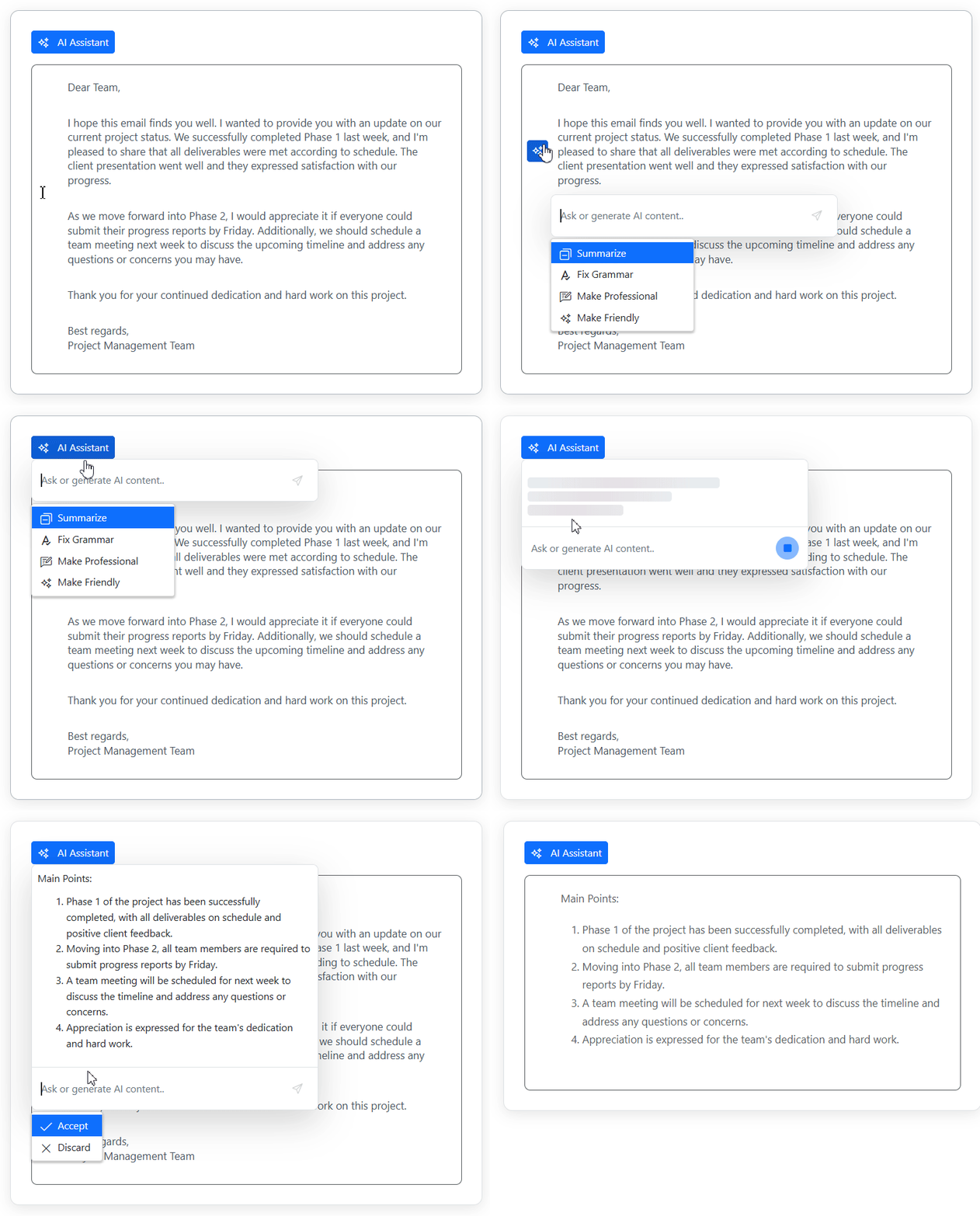
Inline AI Assist component enables contextual AI interactions directly inside your web applications (JavaScript, React, Angular, Vue, ASP.NET Core/MVC). Instead of switching to a separate chat window, AI responses appear inline near the cursor or within contextual overlays, helping users stay focused on their workflow.
Key capabilities:
- Display AI responses inline or in pop-up overlays.
- Provide predefined AI commands through customizable suggestions.
- Allow users to accept, discard, or trigger actions on generated results.
- Display streaming responses with stop controls.
This makes it easier for you to integrate AI assistance in editors, forms, productivity tools, and content creation workflows.
Sankey Diagram for Web
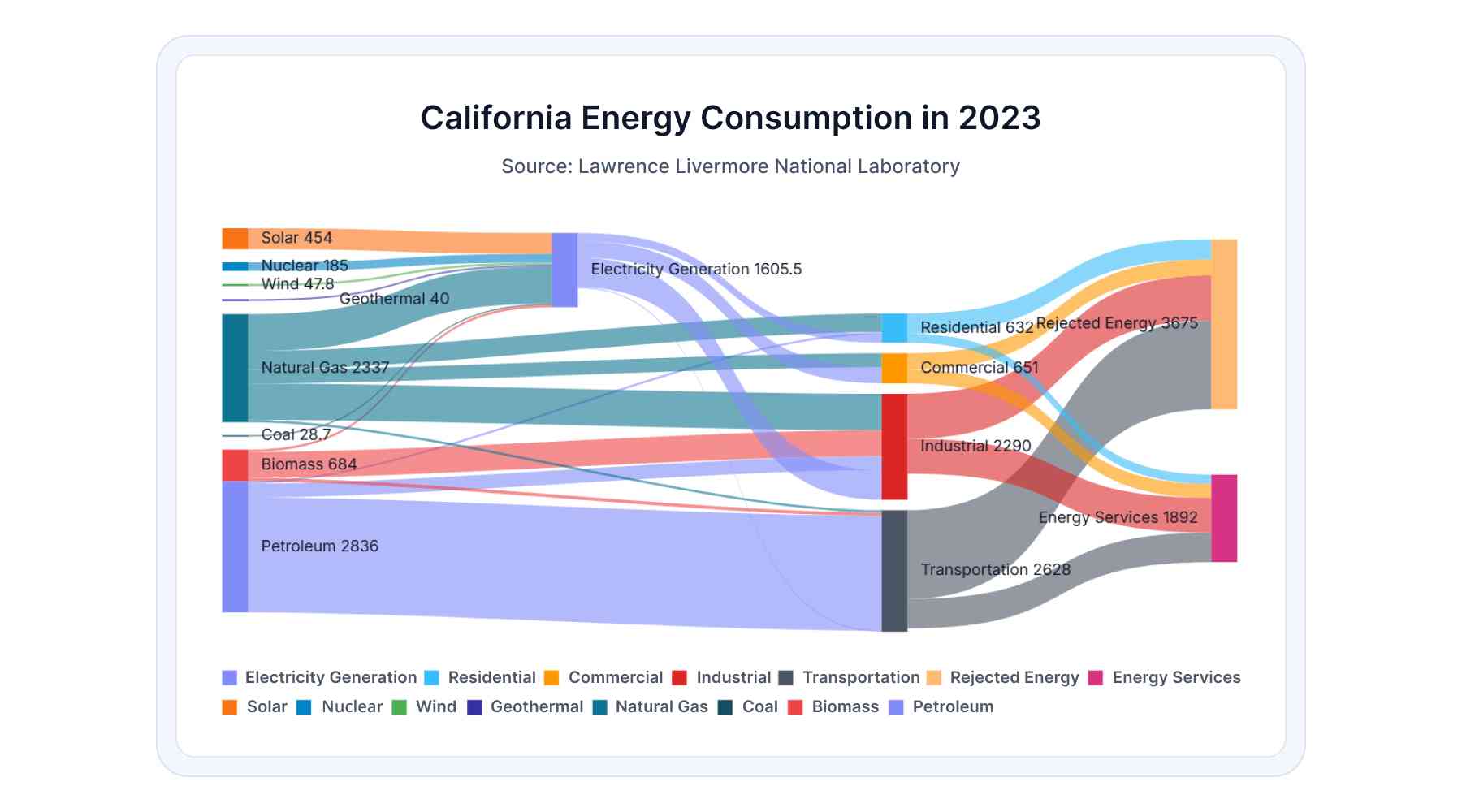
The Sankey Diagram helps you visualize flows relationships between entities within your web applications (JavaScript, React, Angular, Vue, ASP.NET Core/MVC), making it easier to understand how resources, data, or users move through a system.
It can be used to represent energy distribution, financial flows, user journeys, or resource allocation.
With Sankey Diagram, you can:
- Define customizable nodes representing system entities.
- Use weighted links to show the magnitude of flows.
- Automatically position smart labels for nodes and connections.
- Add interactive elements like tooltips and hover interactions.
- Export to PNG, JPEG, SVG, PDF, or print them directly.
Blazor Chart Wizard
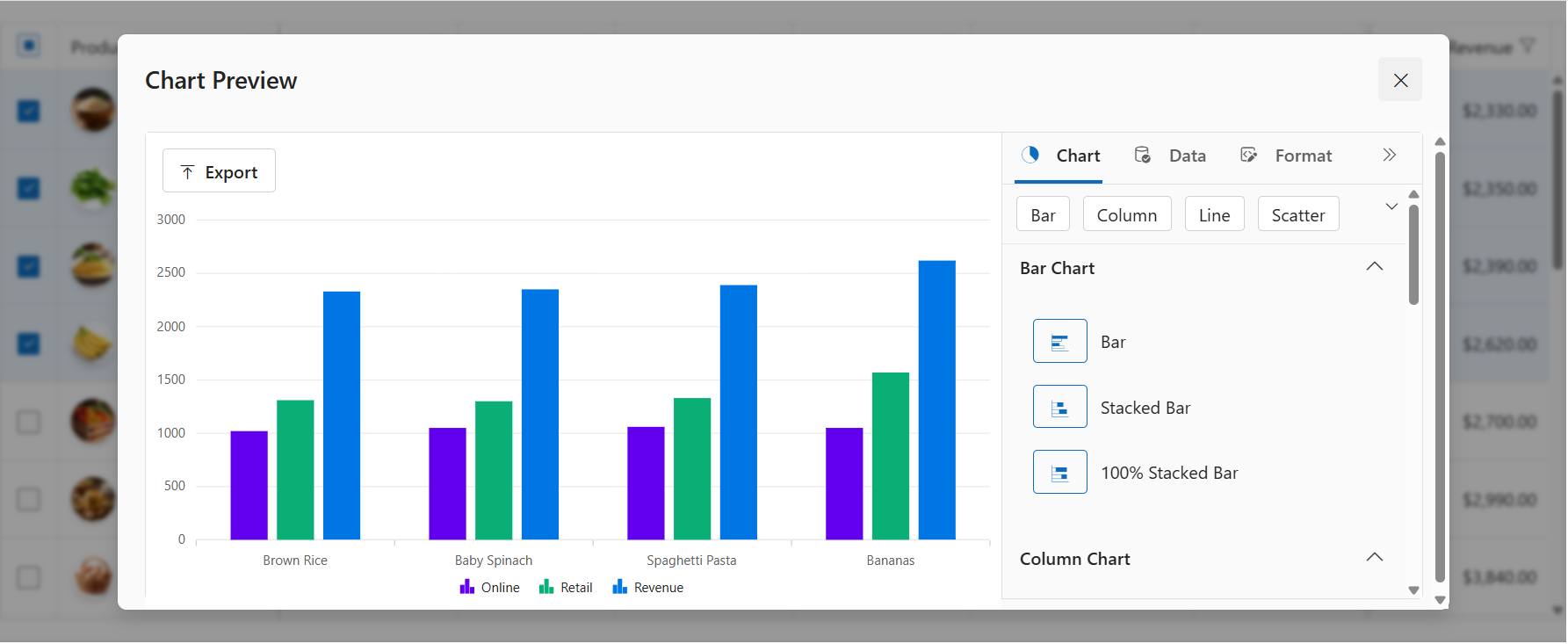
The Chart Wizard component enables users to generate charts using an interactive setup experience.
With the Chart Wizard, you can:
- Map data fields to chart axes and series.
- Preview charts in real time while configuring settings.
- Configure chart options quickly without complex setup.
Blazor Smart Rich Text Editor
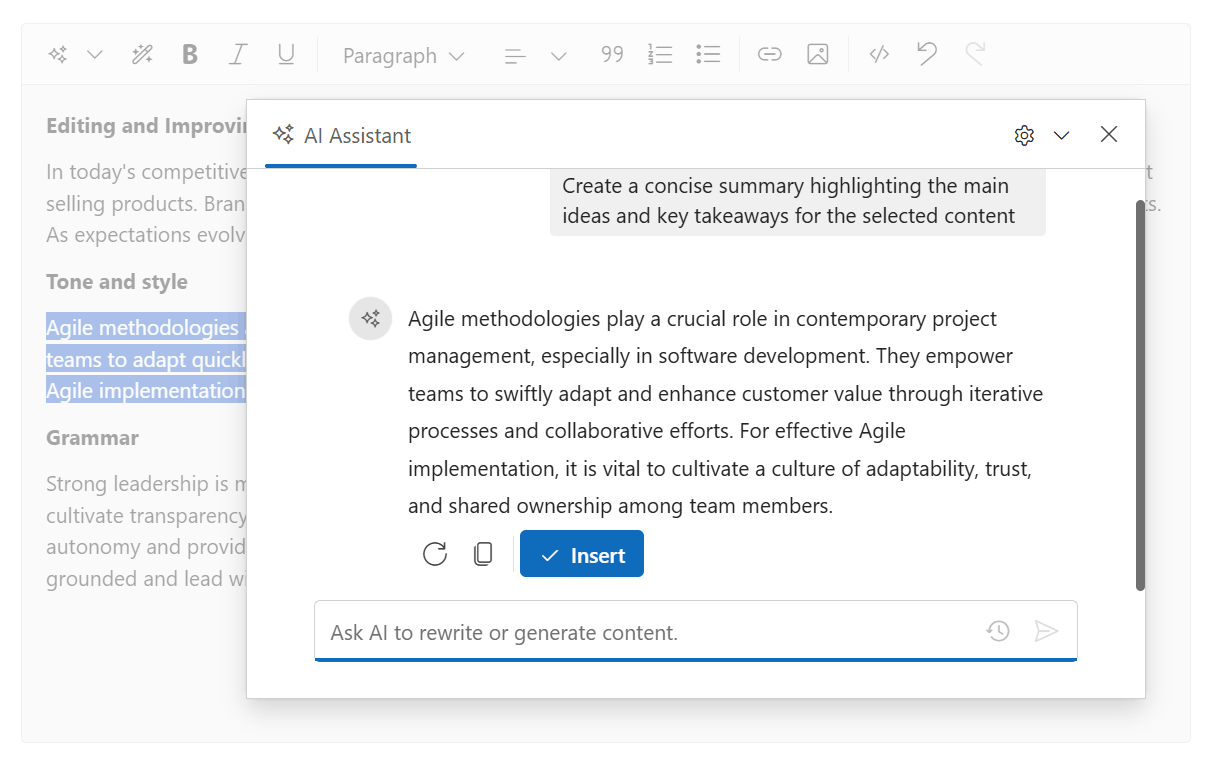
The Smart Rich Text Editor introduces AI-powered writing assistance directly within the editor. Instead of switching between tools, you can interact with AI while continuing to edit content inside the Rich Text Editor.
With Smart Rich Text Editor, you can:
- Generate or refine content using AI-powered writing assistance.
- Receive context-aware suggestions based on your editing context.
- Interact with AI without leaving the editor workflow.
This helps you build intelligent editing experiences while maintaining full control over formatting and content creation.
WinForms AI AssistView (Preview)
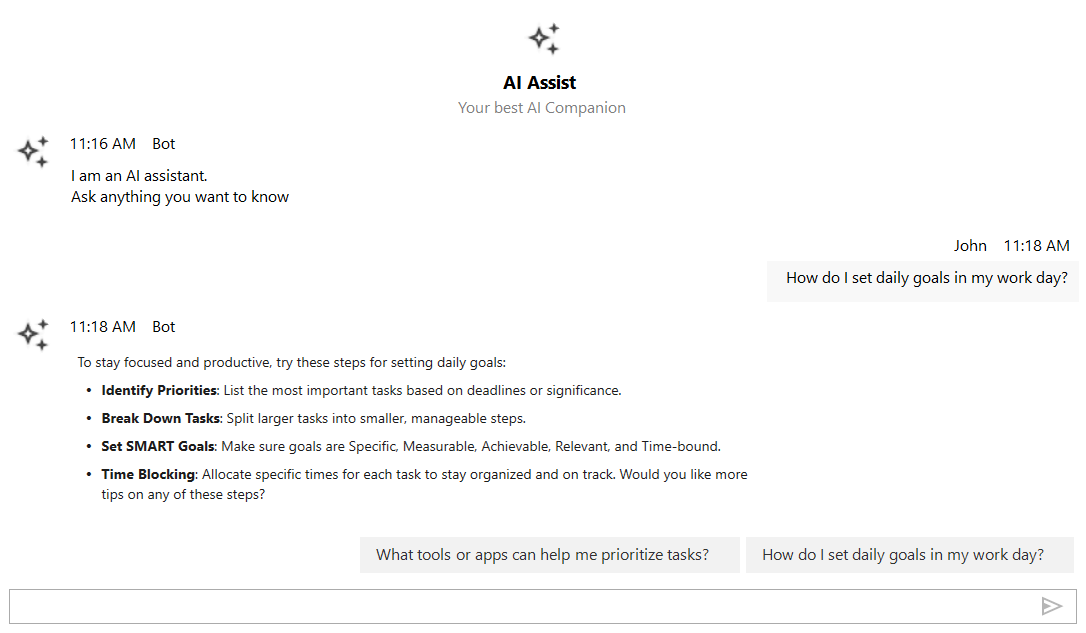
The AI AssistView control introduces conversational AI capabilities to WinForms applications, making it easy to build chat-based assistants.
New WPF Controls (Preview)
-
Markdown Viewer: Render Markdown content with support for headings, lists, images, tables, and code blocks.
-
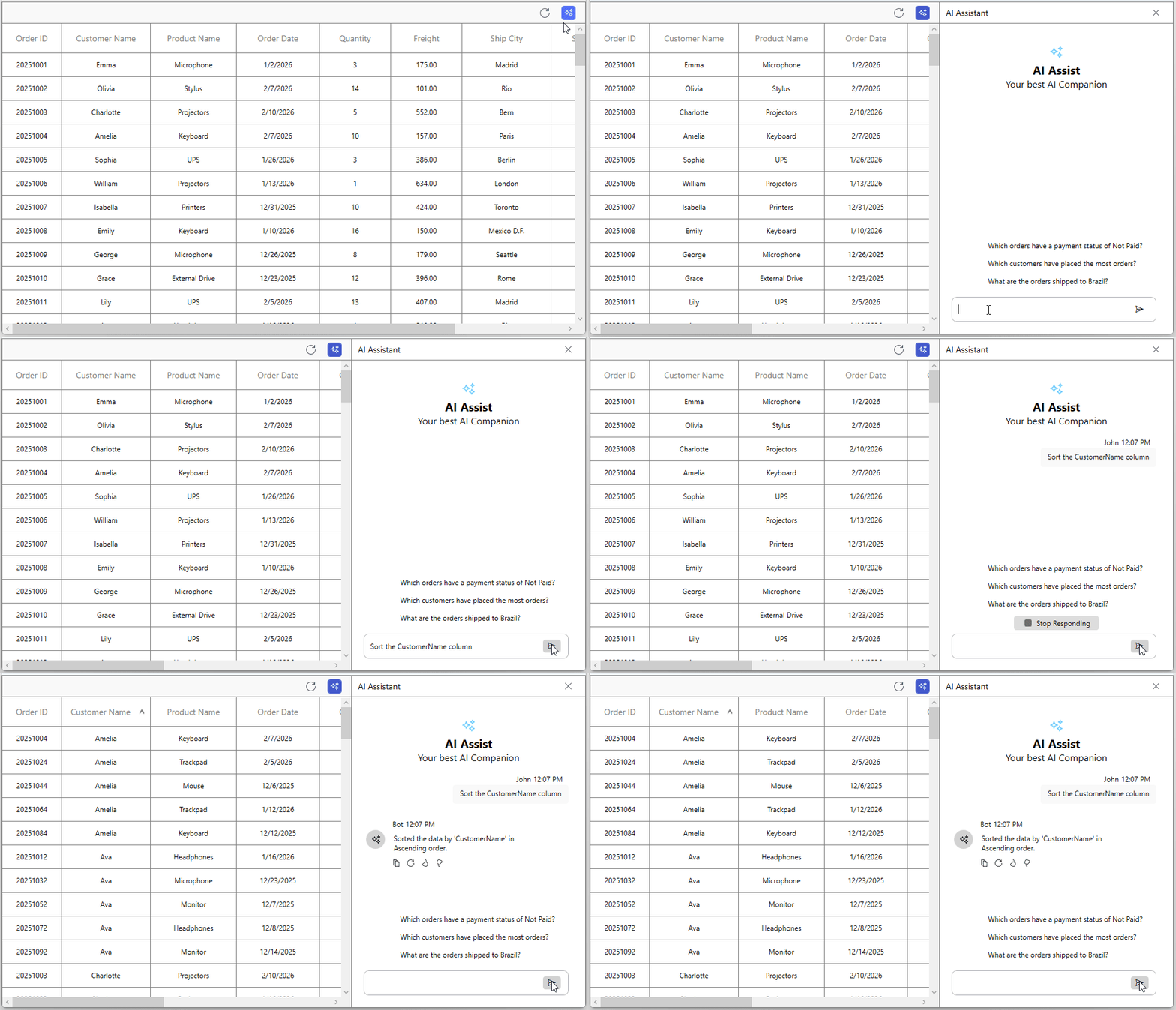
Smart DataGrid: Perform data operations using natural-language prompts such as filtering, grouping, or sorting records.
WPF Smart DataGrid -
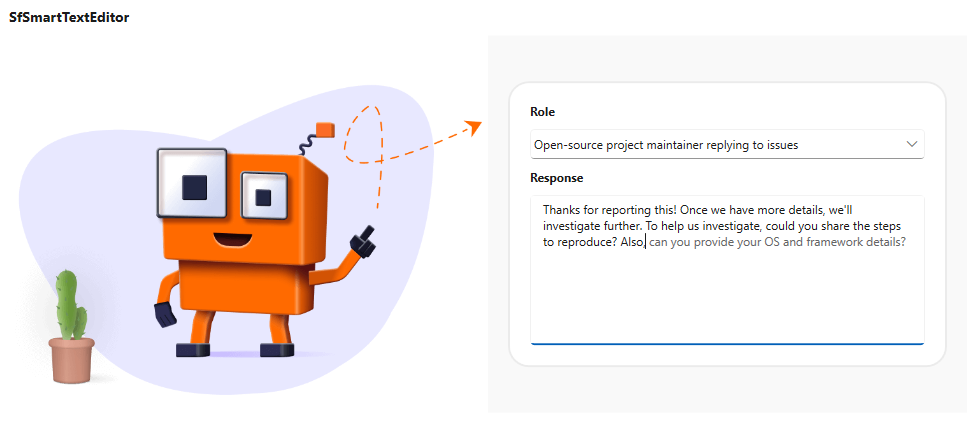
Smart Text Editor: Provides text suggestions and AI-powered completions.
WPF Smart Text Editor -
Tabbed Window: Create IDE-style multi-document interfaces with drag-and-drop tabs and floating windows.
-
Toast Notification: Display lightweight system notifications with customizable layouts and animations.
Agent UI Builder
Syncfusion recently introduced the Agentic UI Builder, powered by Syncfusion MCP Servers. Using natural-language prompts inside your IDE, developers can generate complete UI layouts using Syncfusion components.
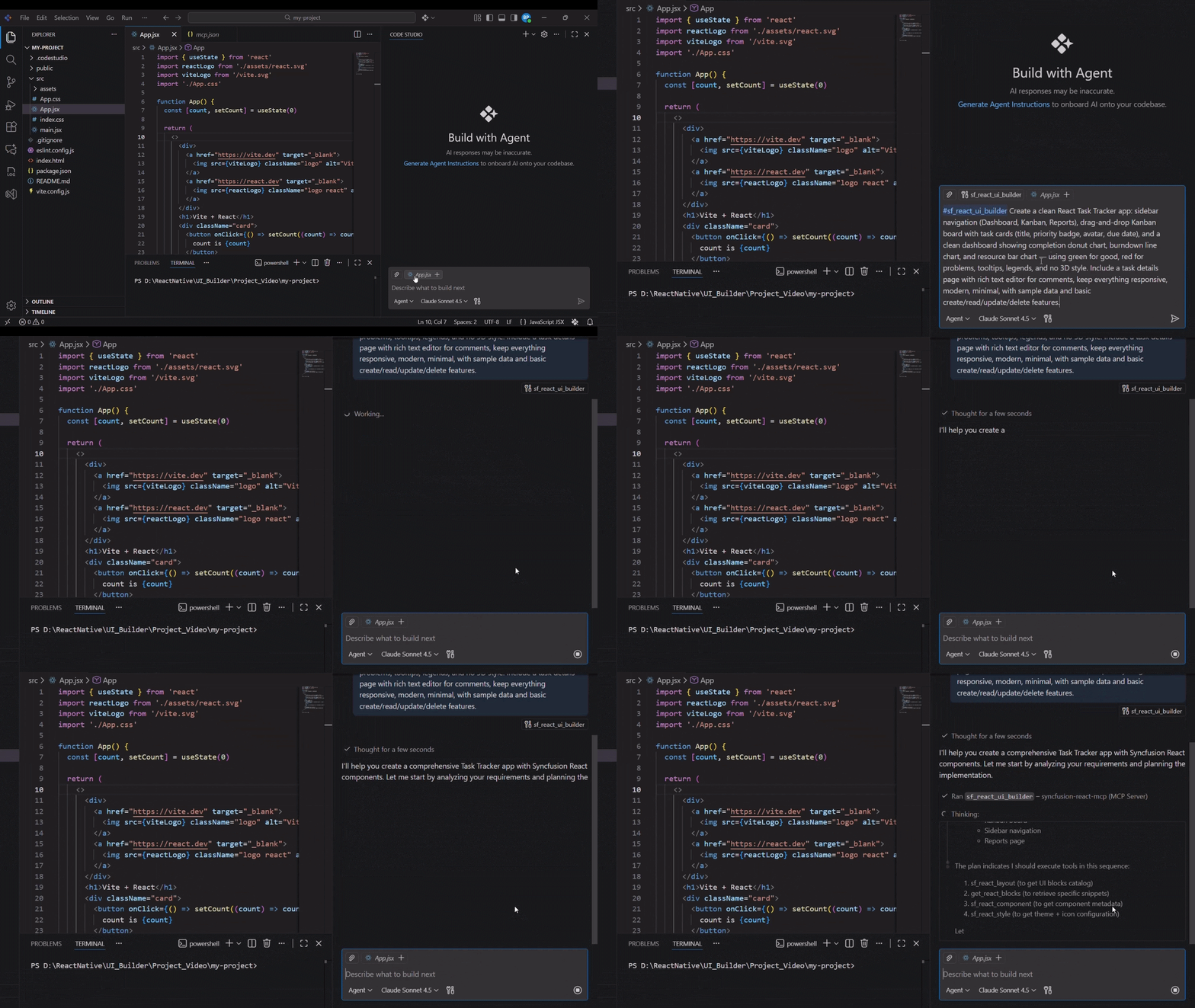
This UI builder currently supports React, Angular, and Blazor, with additional frameworks planned for future releases.
With Agentic UI Builder you can:
- Generate dashboards, forms, and pages.
- Automatically select suitable components.
- Apply consistent enterprise UI patterns.
This dramatically reduces the time required to build application interfaces.
Features and enhancements
This 2026 Volume 1 release introduces several feature improvements and performance enhancements across multiple UI frameworks and SDKs.
Web (JavaScript, React, Angular, Vue, ASP.NET Core/MVC)
The Web component libraries receive several enhancements focused on conversational AI experiences, richer content editing, advanced data visualization, and improved collaboration capabilities.
- AI AssistView enhancements: AI AssistView now supports speech-to-text for hands-free voice input, real-time Markdown rendering with streaming responses, and a scroll-to-bottom button for navigating long chat conversations. These improvements make it easier to build smoother and more accessible chat interfaces.
- Block Editor improvements: You can now resize table columns for more flexible layouts. The editor also offers an improved server image upload experience with progress indicators, support for external image URLs, and better file handling.
- Chart customization enhancements: Charts now support advanced customization options such as series label positioning, legend templates, and linear or radial gradient styling for series, markers, legends, and tooltips. Accumulation charts like Pie, Doughnut, and Pyramid also support legend templates and gradient styling, helping you create more visually expressive dashboards.
- Diagram collaboration and interoperability: The Diagram component now supports real-time collaborative editing, allowing multiple users to work on the same diagram at the same time. You can also import
Visio (.``vsdx``)diagrams, edit them in the Syncfusion Diagram canvas, and export them back to the Visio format. - Gantt Chart scheduling improvements: The Gantt Chart now includes predecessor offset validation to ensure task dependencies remain accurate during load and CRUD operations. You can also define a custom timeline view range, so the visible timeline can differ from the overall project duration.
- Pivot Table PDF export enhancements: The Pivot Table now offers more advanced PDF export capabilities. You can export multiple tables to a single page or separate pages, use template-based exports with hyperlinks and images, replicate the UI layout styling, preserve merged cells, and apply custom data binding before export.
- Rich Text Editor table and image editing improvements: The Rich Text Editor now includes enhanced table editing through a quick toolbar where you can configure width, height, padding, colors, alignment, and borders. Image handling has also improved, allowing you to wrap text around images and paste or drop multiple images directly into the editor.
Blazor
The Blazor components receive several enhancements focused on conversational interfaces, flexible content editing, and improved export capabilities.
-
AI AssistView improvements: AI AssistView now supports streaming Markdown rendering, so responses appear progressively as they are generated. It also includes scroll-to-latest support, making it easier for you to navigate long chat conversations.
-
Block Editor enhancements: The Block Editor now offers improved editing features such as table column resizing, drag-and-drop block reordering, and support for inserting code blocks with a language selector.
-
Gantt Chart PDF export improvements: The Gantt Chart now supports multi-page PDF export with scaling, allowing you to export large project timelines across multiple pages while keeping them readable.
-
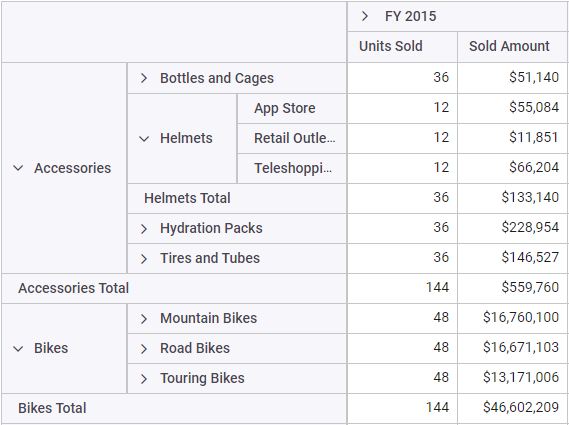
Pivot Table tabular layout support: The Pivot Table now supports a tabular (classic) layout that displays hierarchical data in a structured spreadsheet-style format.
Blazor Pivot Table -
Rich Text Editor media input enhancements: The Rich Text Editor now allows you to paste multiple images, as well as audio and video content, directly into the editor.
.NET MAUI
The .NET MAUI controls receive several usability improvements that help you build more responsive and flexible cross-platform applications.
-
AssistView conversation history support: AssistView now preserves a complete history of AI-driven interactions. This allows you to revisit previous prompts and maintain conversation context across sessions.
-
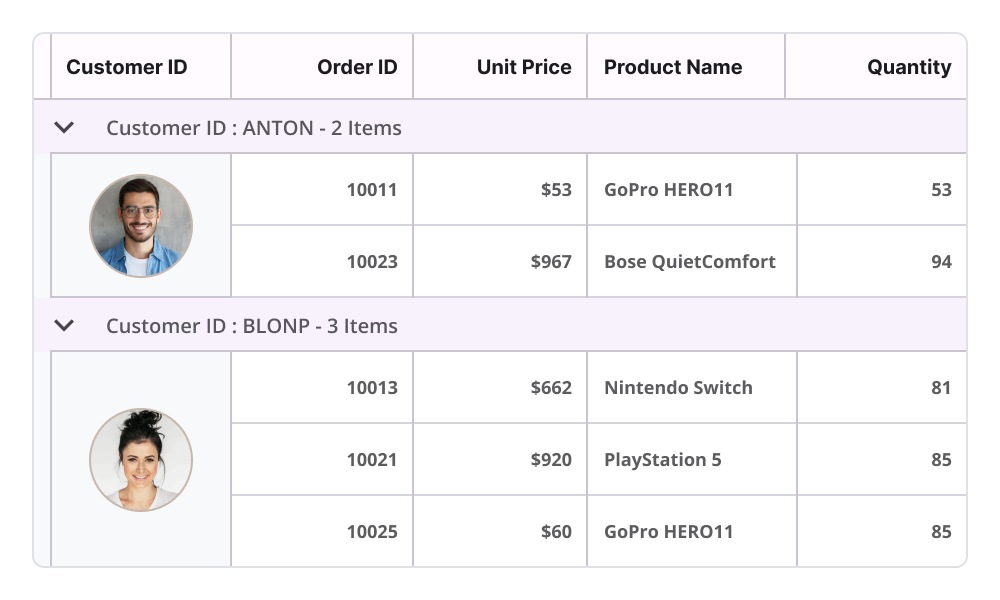
DataGrid cell merging: The DataGrid now supports automatic merging of adjacent cells with identical values, helping you present grouped or repeating data more clearly.
Cell merging in .NET MAUI DataGrid -
Enhanced DatePicker, TimePicker, and DateTimePicker customization: You can now customize picker columns, including column width and styling, giving you better control over the appearance and clarity of the UI.
-
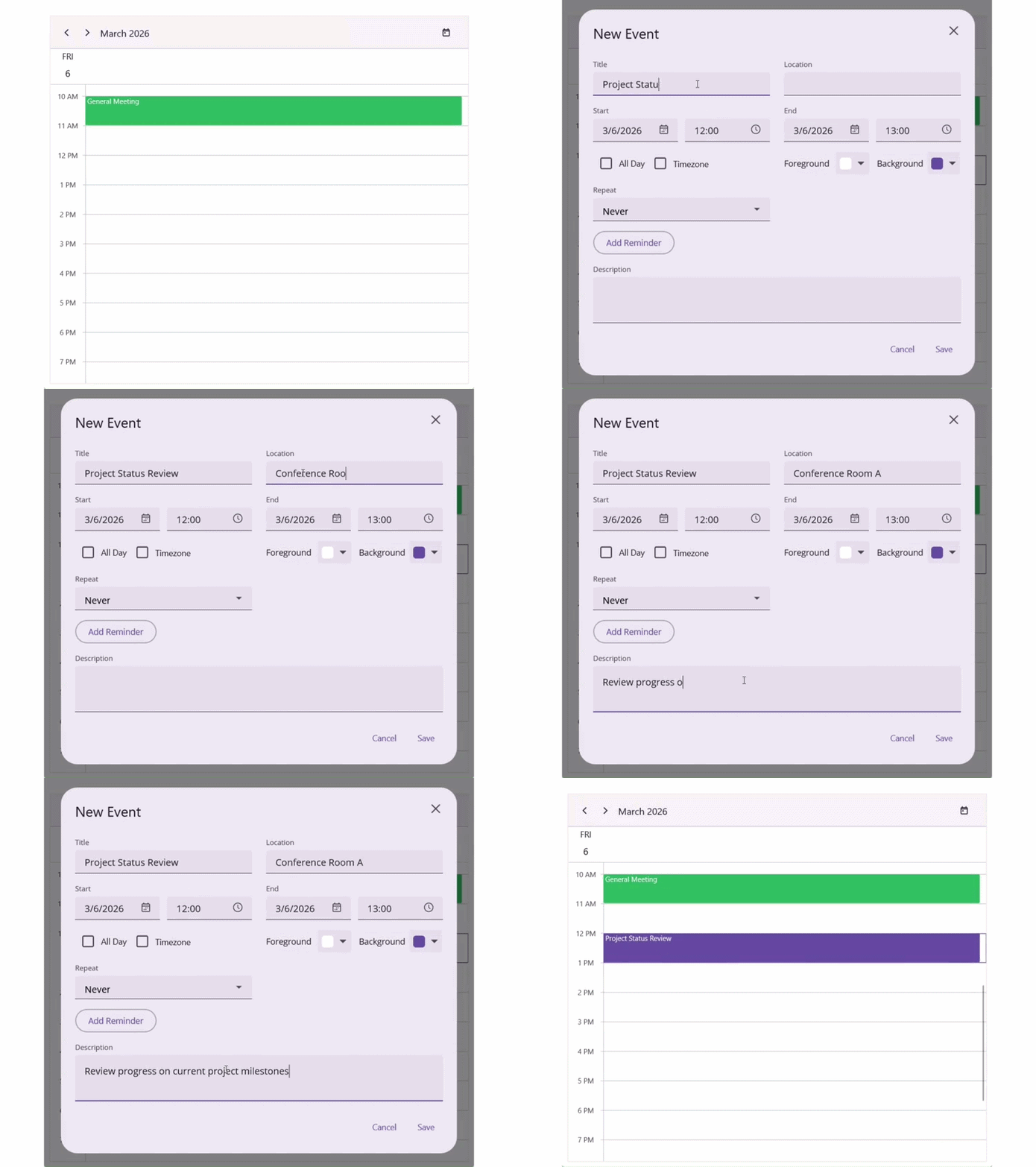
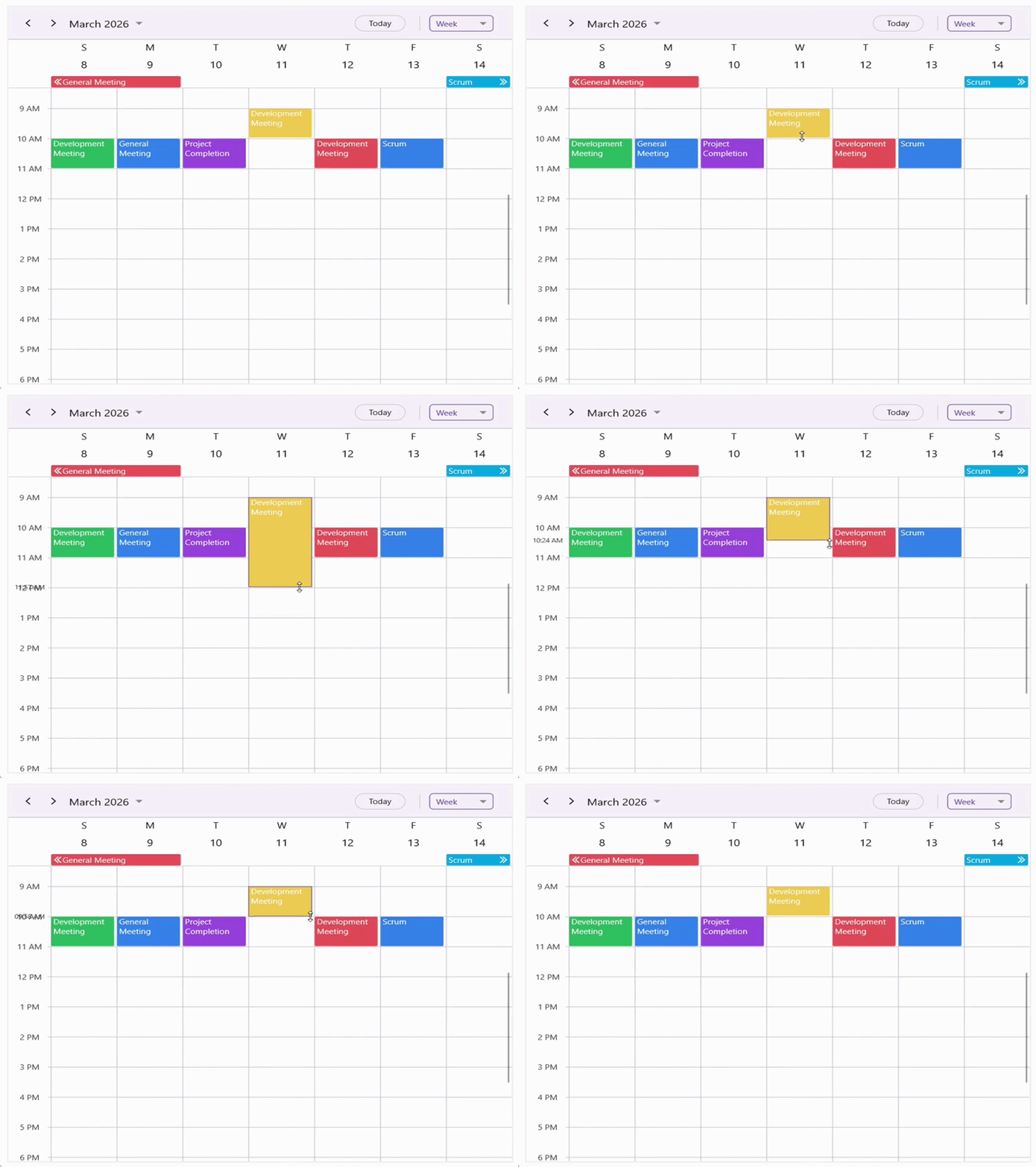
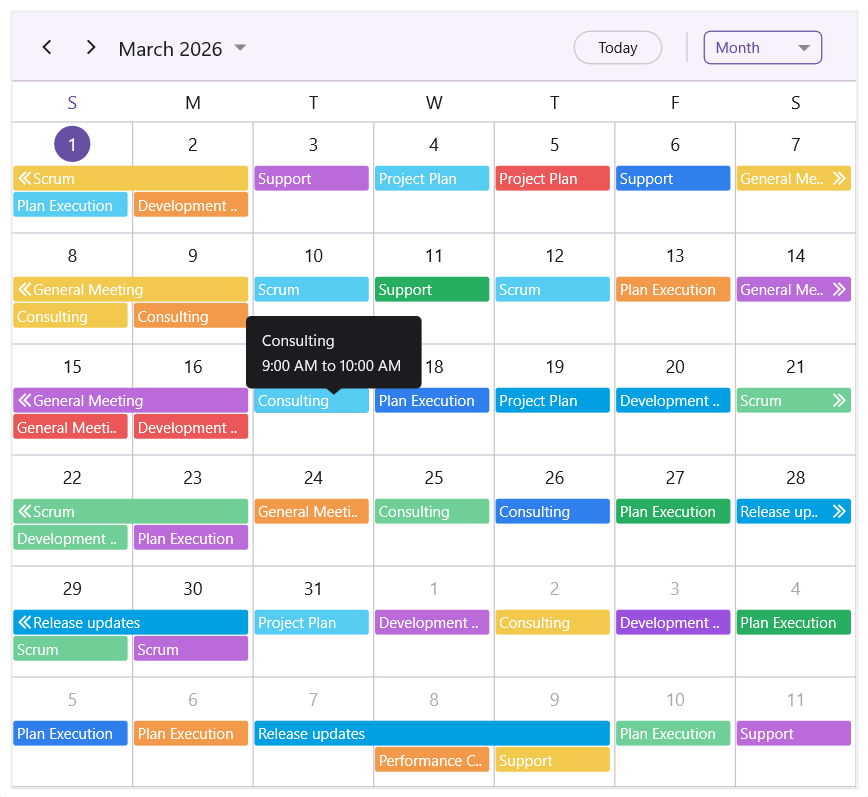
Scheduler usability improvements: The Scheduler control now includes a new appointment editor, drag-based appointment resizing, and appointment tooltips for quick event previews. These improvements make event management faster and easier.
.NET MAUI Scheduler appointment editor
WinForms
The WinForms platform receives performance improvements in the Calculation Engine, helping you process complex spreadsheet calculations faster.
- SUMPRODUCT: SUMPRODUCT calculations are now approximately
37.5%faster, especially when working with large datasets. - IF formula: IF formula evaluation is now up to
75%faster in complex spreadsheets.
WinUI
The WinUI controls receive improvements focused on financial charting and more flexible localization support.
-
Financial chart series support: The Cartesian Charts control now includes Candle and OHLC series designed for financial datasets containing
Open,High,Low, andClose(OHLC) values. These chart types help you build trading dashboards, portfolio monitoring tools, and financial analytics applications.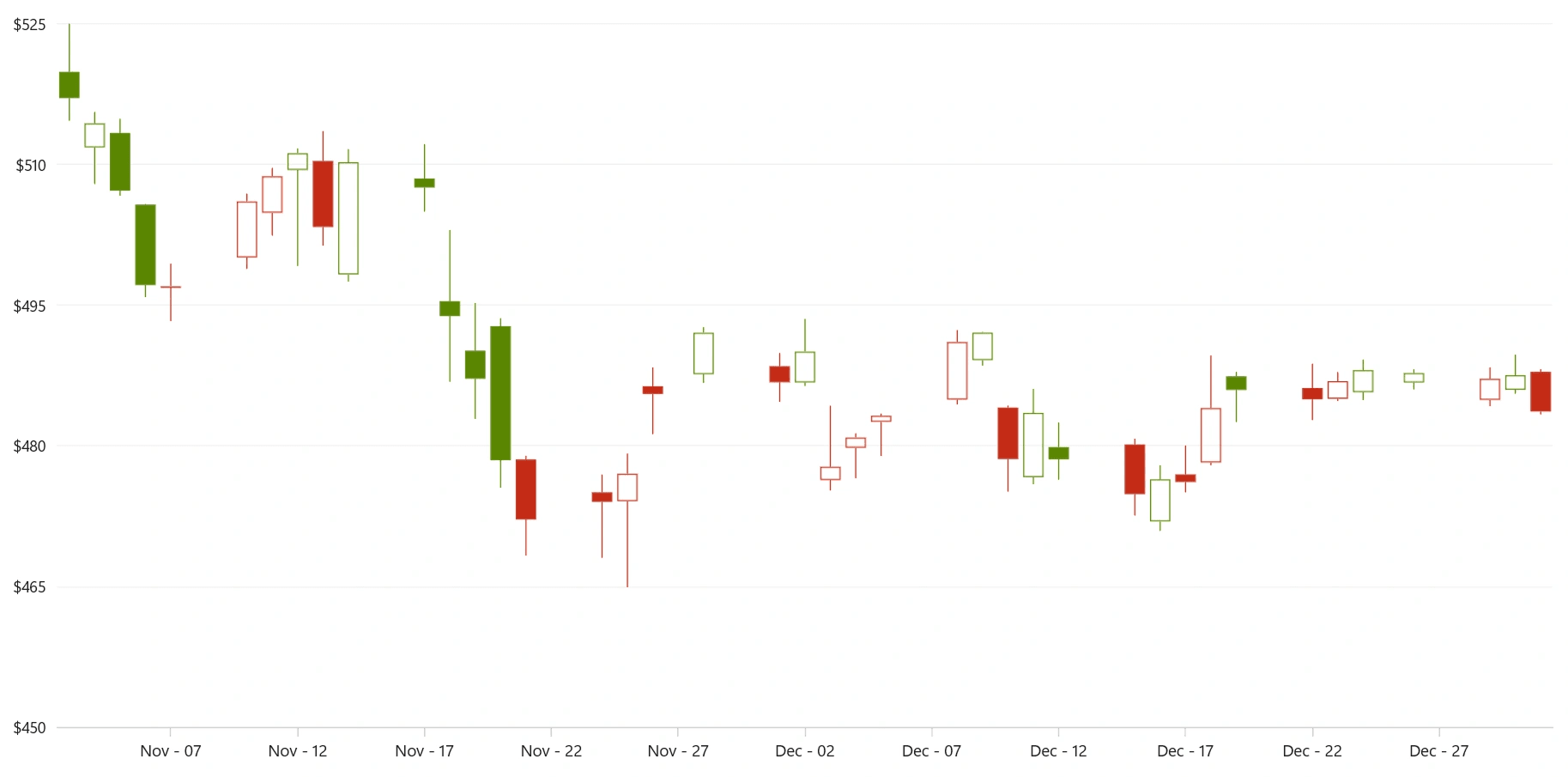
WinUI Candlestick Chart 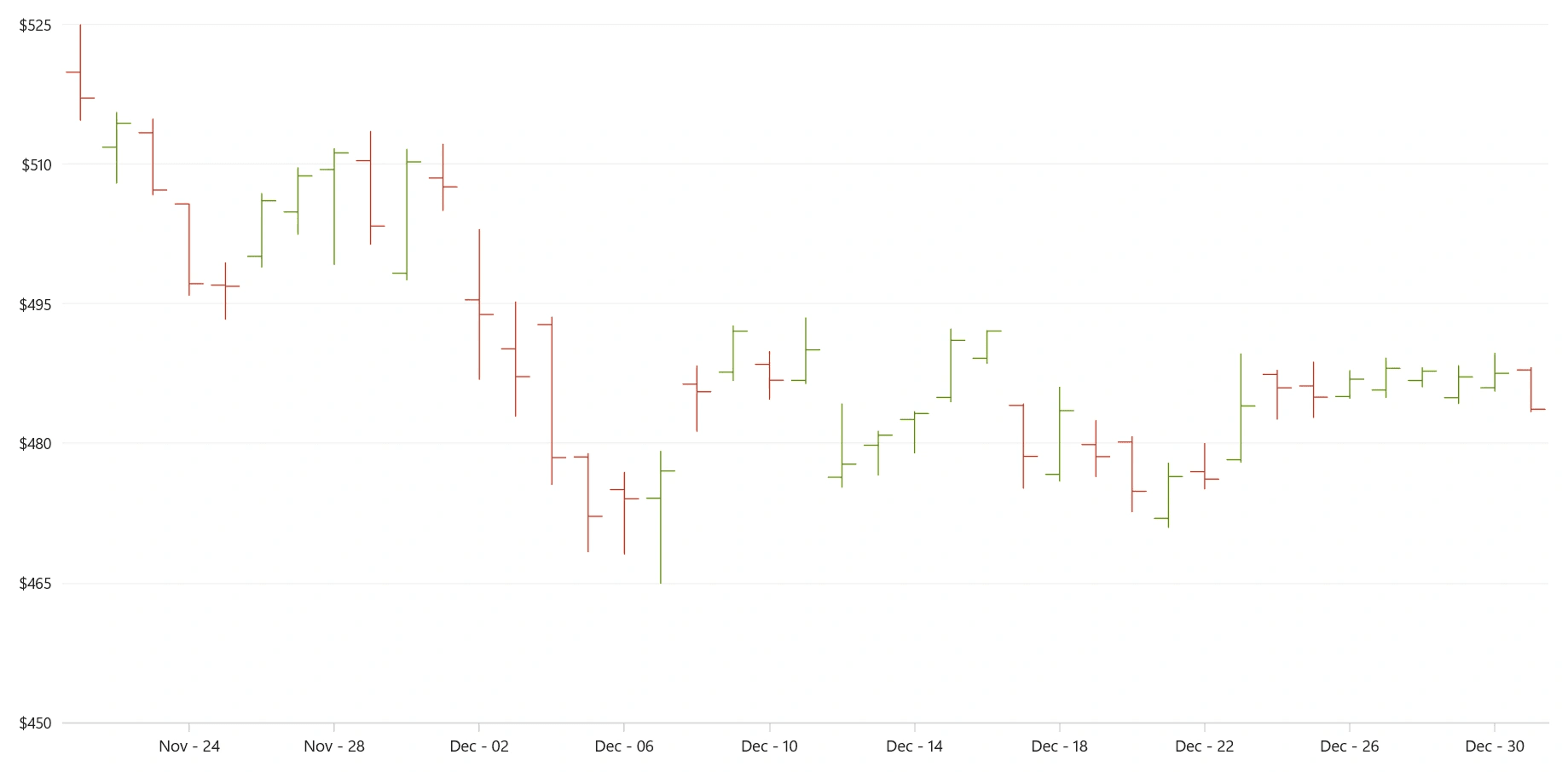
WinUI OHLC Chart -
Simplified localization: You can now implement localization without relying on
.reswresource files. This allows dynamic translation loading, custom localization pipelines, and external translation storage, giving you greater flexibility when managing multilingual applications. -
NumberBox numeric type support: The NumberBox control now supports multiple numeric types, including
double,decimal,byte,short,int,long, andfloat.
Document SDK
The Document SDK introduces several improvements across the .NET and JavaScript document processing libraries, for faster and more reliable document processing.
- Unified Font Manager: A new Font Manager class enables shared font caching across
Word-to-PDF,Excel-to-PDF,PowerPoint-to-PDF, and PDF processing workflows. This optimizes memory usage during conversions across document formats. - .NET Excel Library enhancements: The Excel library now adds 14 new Excel formula functions and delivers up to
72.27%fasterExcel-to-PDFconversion. - .NET PDF Library improvements: Developers can now add, modify, or remove page-level actions triggered when a page opens or closes.
- .NET Word Library updates: The Word library now supports creating and editing ink annotations in DOCX documents and includes improved localization support for date and time fields.
- JavaScript PDF Library enhancements: The JavaScript PDF library now supports image redaction, allowing sensitive graphics or images to be securely removed from PDF documents.
PDF Viewer SDK
The PDF Viewer SDK introduces several performance and usability improvements across the web, Blazor, and .NET MAUI platforms.
- Performance improvements: The Web PDF Viewer (JavaScript, Angular, React, Vue, ASP.NET Core, and MVC) now opens and closes the Organize Pages window much faster. Opening speeds are
51–86%faster, while closing operations are up to93%faster. These improvements also ensure smooth performance when working with very large documents containing5,000–10,000pages. - Faster text search: Text search operations in the Blazor PDF Viewer are now highly optimized, delivering up to
95%faster search responsiveness when working with large PDF documents. - Smart PDF Viewer(Production-ready): The Blazor Smart PDF Viewer component is now production-ready, allowing you to confidently use it in production applications.
- Usability improvements: The .NET MAUI PDF Viewer now preserves the zoom level in single-page view mode when navigating between pages. It also provides access to custom stamp annotation views, giving you more flexibility when working with annotations.
Spreadsheet Editor SDK
- Charting with discontinuous ranges: The web Spreadsheet Editor (JavaScript, Angular, React, Vue, ASP.NET Core, MVC) now allows charts to be created from non-adjacent cell ranges, enabling more flexible data visualization scenarios. Supported chart types include
Column,Bar,Area,Pie,Donut,Line, andScattercharts. - Faster file imports: Server-side file import operations have been optimized for better performance and reduced
35%memory consumption, particularly when handling large Excel workbooks (with 1 million cells). - Blazor Spreadsheet Editor improvements: Undo and redo operations now run significantly faster, delivering up to
85%improvement in formula recalculation performance for large datasets.
DOCX Editor SDK
The DOCX Editor SDK introduces improvements that help maintain document formatting accuracy and enhance editing support for right-to-left languages.
- Preservation of dashed and dotted borders: Both the Blazor DOCX Editor and Web DOCX Editor now preserve dashed and dotted border styles for paragraphs and tables. This ensures documents maintain the same visual appearance during editing as in the original Microsoft Word layouts.
- Improved RTL text and table editing: The editors now provide better Arabic text rendering along with improved RTL table interactions, making it easier to work with right-to-left documents.
Explore Syncfusion Essential Studio 2026 Volume 1
The 2026 Volume 1 release continues Syncfusion’s commitment to delivering powerful developer tools, intelligent UI components, and high-performance document processing libraries.
With new AI-powered components, intelligent document extraction capabilities, collaborative diagramming features, and significant performance improvements, developers can build modern applications faster across web, desktop, and cross-platform environments.
Now it’s your turn to explore these updates and see how they can improve your applications.
Download the latest version of Syncfusion Essential Studio® 2026 Volume 1 and start building with the new features today.
Ready to explore? Visit Syncfusion’s website to see the full details, try interactive demos, and check out the What’s New and Release Note pages. Start building with these tools today!
If you have questions or suggestions, feel free to reach out through our support forum, support portal, or feedback portal. We are always happy to help you!




Be the first to get updates