 Yuvaraj Mohan
TL;DR: AI IDEs are evolving beyond code completion into platforms that support planning, implementation, testing, and collaboration. This guide explores how development teams can evaluate AI IDEs using practical criteria such as developer experience, agentic workflows, codebase awareness, governance, security, and cost transparency to identify solutions that scale effectively across real-world engineering teams.
It’s 4 PM on a Thursday.
A developer is working on a feature request. Still, their attention is scattered across six different places: the IDE, documentation, an AI chatbot, terminal logs, a browser tab full of stack traces, and a team chat window. Every context switch breaks momentum. Every interruption adds friction.
This is what AI-assisted development still looks like for many teams.
The irony is that AI was supposed to simplify software development. Instead, many organizations have added another layer of tools that developers must constantly manage.
That is why choosing the right AI IDE matters more than ever.
The best AI IDEs don’t simply generate code. They reduce complexity, keep developers focused, and help teams build software faster without sacrificing quality, security, or cost control.
The challenge is that most AI IDEs appear similar in demos. Nearly every vendor claims to offer intelligent code generation, autonomous agents, and productivity gains. Once real projects begin, however, the differences become obvious.
- Some tools understand your codebase deeply. Others only understand the file you currently have open.
- Some provide enterprise governance and spending controls. Others leave teams guessing what their AI bill will be at the end of the month.
- Some help organizations establish consistent development standards. Others create more work during code review.
The question is no longer whether your team should use AI.
The question is whether your AI IDE can support how your team actually works.
What is an AI IDE?
An AI IDE (Integrated Development Environment) is a development environment that embeds AI directly into the software development workflow, rather than adding it later through separate plugins or disconnected tools.
Unlike traditional coding assistants that focus mainly on autocomplete, modern AI IDEs can:
- Understand an entire codebase
- Generate and modify code across multiple files
- Assist with debugging and testing
- Create documentation
- Execute multi-step development workflows
The most advanced platforms operate more like collaborators than assistants. They can analyze a problem, create an implementation plan, execute changes, validate results, and suggest improvements without constant manual intervention.
Why AI IDE evaluation matters in 2026
As AI becomes a standard part of software development, organizations face a new challenge: choosing the right platform.
An AI IDE influences three critical outcomes:
- Developer adoption: AI only creates value when developers actually use it. If the experience feels fragmented or disruptive, adoption drops quickly.
- Cost predictability: As AI usage grows across teams, costs can scale just as quickly. Organizations need visibility, budget controls, and governance policies that prevent unexpected spending.
- Engineering consistency: AI-generated code should strengthen development standards, not weaken them. Teams need ways to ensure AI follows established practices and architectural conventions.
When evaluating AI IDEs, these outcomes matter far more than how impressive the AI sounds during a demo.
Three things that actually matter
Most purchasing decisions ultimately come down to three areas:
- Developer Experience
- Cost Control and Transparency
- Team Standards and Governance
Let’s examine each one.
1. Developer experience: AI across the entire development workflow
The best AI IDE does more than complete code. It helps developers move from idea to delivery without constantly leaving their workflow.
Here are the signs that an AI IDE will genuinely improve developer productivity.
AI should complete tasks, not just lines
Autocomplete has become table stakes.
Modern AI tools should be capable of planning work, updating multiple files, identifying dependencies, generating tests, and validating results.
The difference between completing a line of code and completing an entire feature is significant.
One saves minutes.
The other saves days.
Developers should stay inside the editor
Every trip to another tool comes with a productivity cost.
Developers routinely leave their editor to:
- Ask questions
- Review documentation
- Debug issues
- Run tests
- Generate implementation plans
An effective AI IDE keeps as much of that work as possible inside a single environment.
Less context switching means more focus.
AI should understand your codebase
Generic code suggestions rarely solve real-world problems.
Useful AI understands:
- Existing project structure
- Framework conventions
- Internal APIs
- Shared components
- Team architecture patterns
The more context the AI understands, the less time developers spend fixing generated output.
New team members should become productive faster
One overlooked benefit of AI-native development environments is onboarding.
Instead of spending weeks exploring architecture and conventions, new developers can use AI to navigate unfamiliar systems and understand existing patterns.
Teams that onboard developers faster can scale faster.
AI should support the entire development lifecycle
Development is more than writing code.
Developers spend time:
- Planning features
- Writing code
- Testing
- Debugging
- Refactoring
- Documenting
The most effective AI IDEs support all of these activities in a single workflow.
A real-world example
Imagine a team building an analytics dashboard for a voice-notes application.
The dashboard must display:
- Writing trends
- Peak activity times
- Voice versus manual entry statistics
- Weekly usage summaries
Traditionally, a developer might:
- Design schema updates
- Build API endpoints
- Create UI components
- Write tests
- Produce documentation
All while jumping between multiple tools and workflows.
With an AI-native IDE, the process becomes simpler.
- The developer describes the feature requirements.
- The AI generates a proposed implementation plan covering backend, frontend, testing, and documentation.
- After approval, the AI assists with implementation, creates required files, generates tests, and helps validate the result.
Instead of orchestrating every step manually, the developer focuses on reviewing and guiding the process.
That shift from managing tasks to supervising outcomes is where much of the productivity gain comes from.
What this actually looks like in practice
When an AI IDE works well, development feels very different. Instead of jumping between tools, developers can move from planning to implementation in a single workflow.
Code Studio is one example. It combines Plan mode and Agent mode to help teams build features faster while staying in control.
Here’s how this works for our analytics dashboard feature:
-
Developer opens Plan mode and describes: “Add an Analytics page to the Voice Notes App where users can see how they’ve been writing things like how many words they’ve written over the last 30 days, which hours of the day they write most, how many notes they’ve created by voice vs. manually, and a weekly summary of their activity. Use React with chart visualizations for the UI and make sure to include tests and documentation.”
-
Plan mode creates a clear implementation plan: A readable breakdown of everything needed to build this feature, shown directly in the editor. The developer can review it, suggest changes, or approve it as-is.
-
Developer reviews the plan in the editor, no switching to another tool, no losing context.
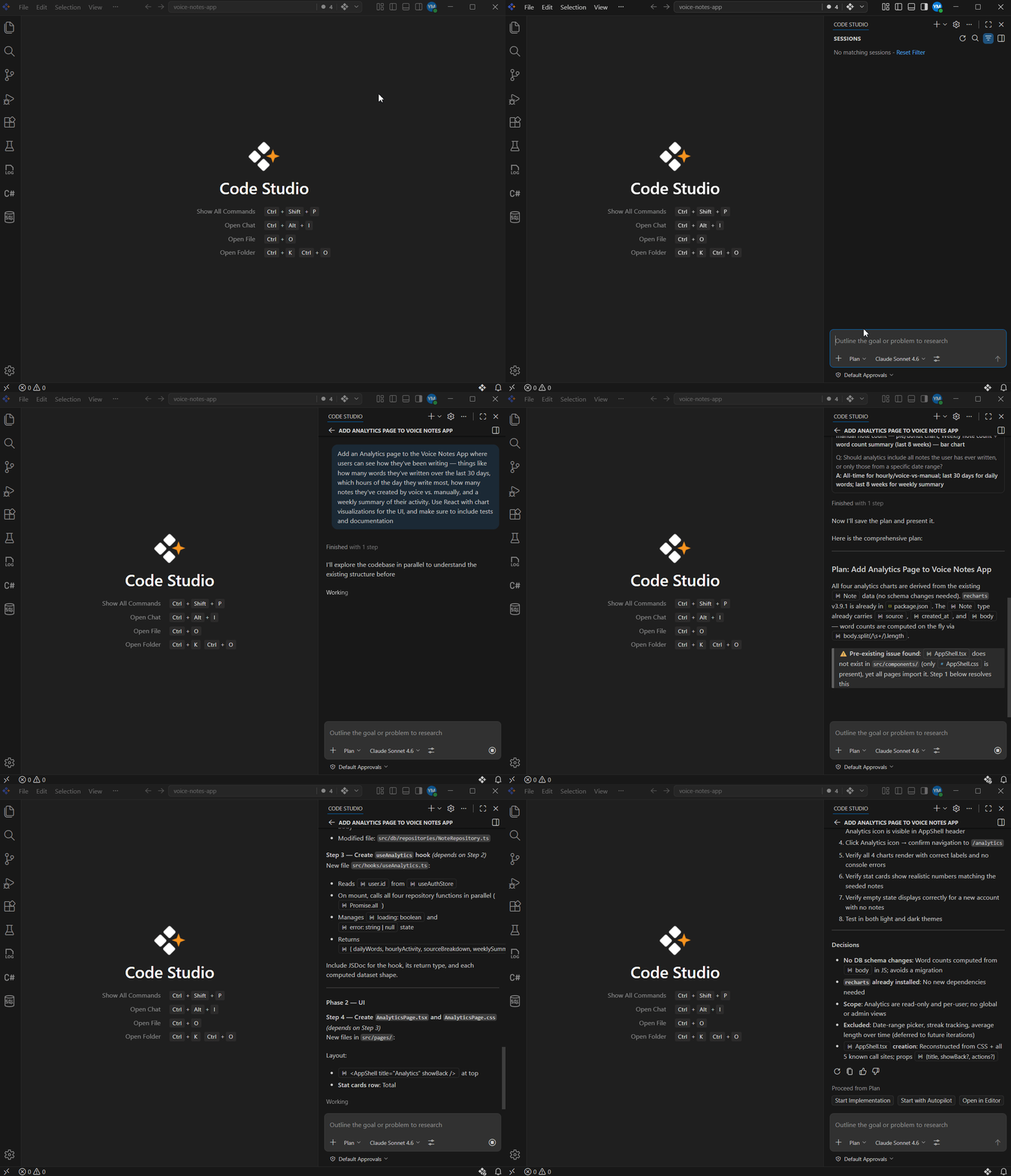
Plan Mode in Code Studio -
Developer clicks “Start Implementation”: Plan mode switches to Agent mode automatically.
-
Agent mode builds the full feature:
-
Sets up everything needed to store and retrieve user writing activity.
-
Creates the logic that calculates trends, peak writing hours, and voice vs. manual note breakdowns.
-
Builds a React dashboard component with chart visualizations that users can see and interact with.
-
Creates tests to make sure everything works correctly.
-
Creates documentation explaining what was built.
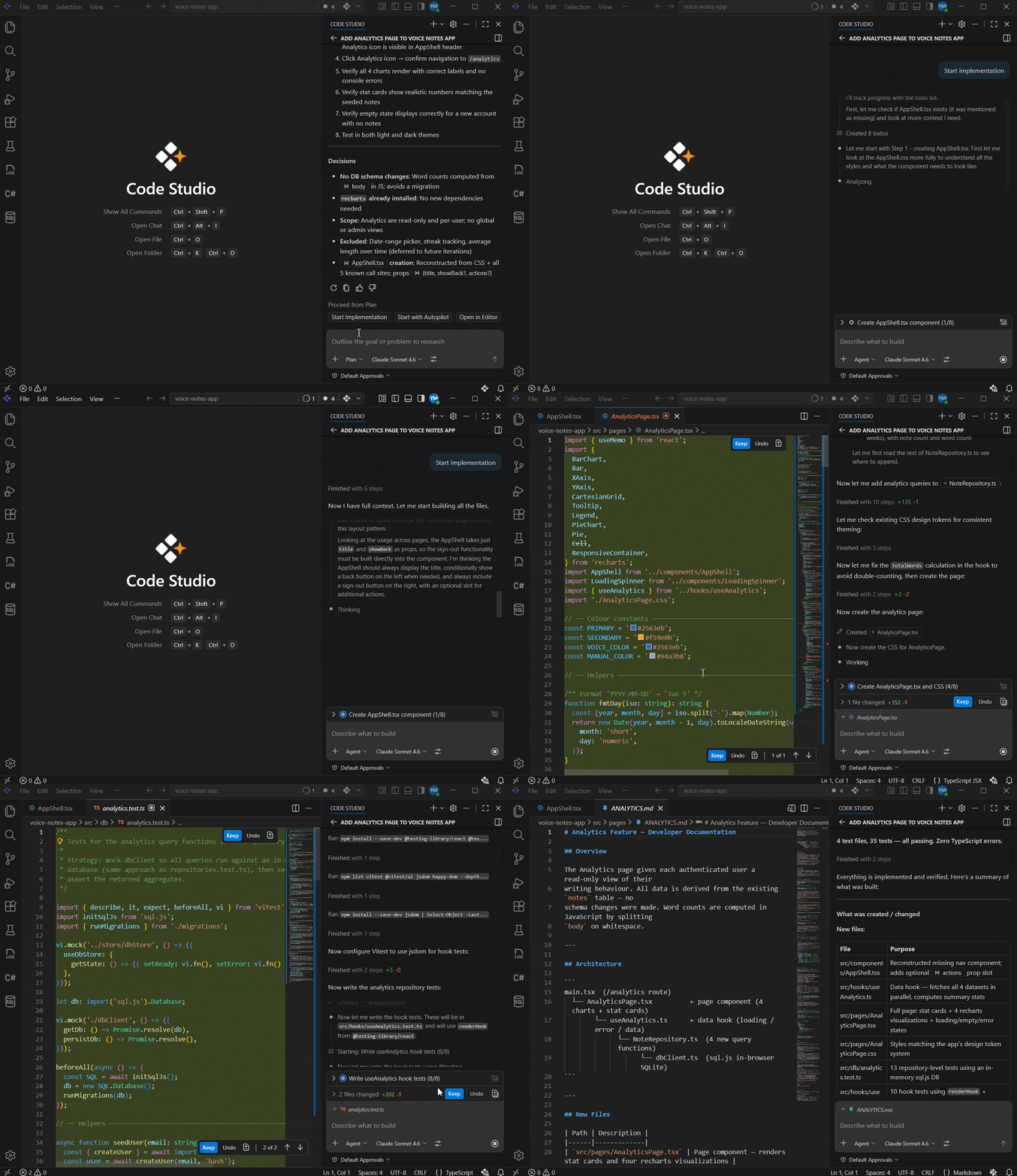
Code Studio Agent Mode
-
Result: A fully working Analytics page inside Voice Notes App, built in a few minutes instead of days. Everything done in one place, no tool-switching, no scattered work.
Measurable difference
-
Time: Much faster; what usually takes days happens in hours.
-
Tool switches: None; developers stay focused in one place instead of context-jumping repeatedly.
-
Code review rounds: Significantly reduced, no rework needed for style/structure mismatches.
-
Developer fatigue: Much lower; no cognitive load from switching tools.
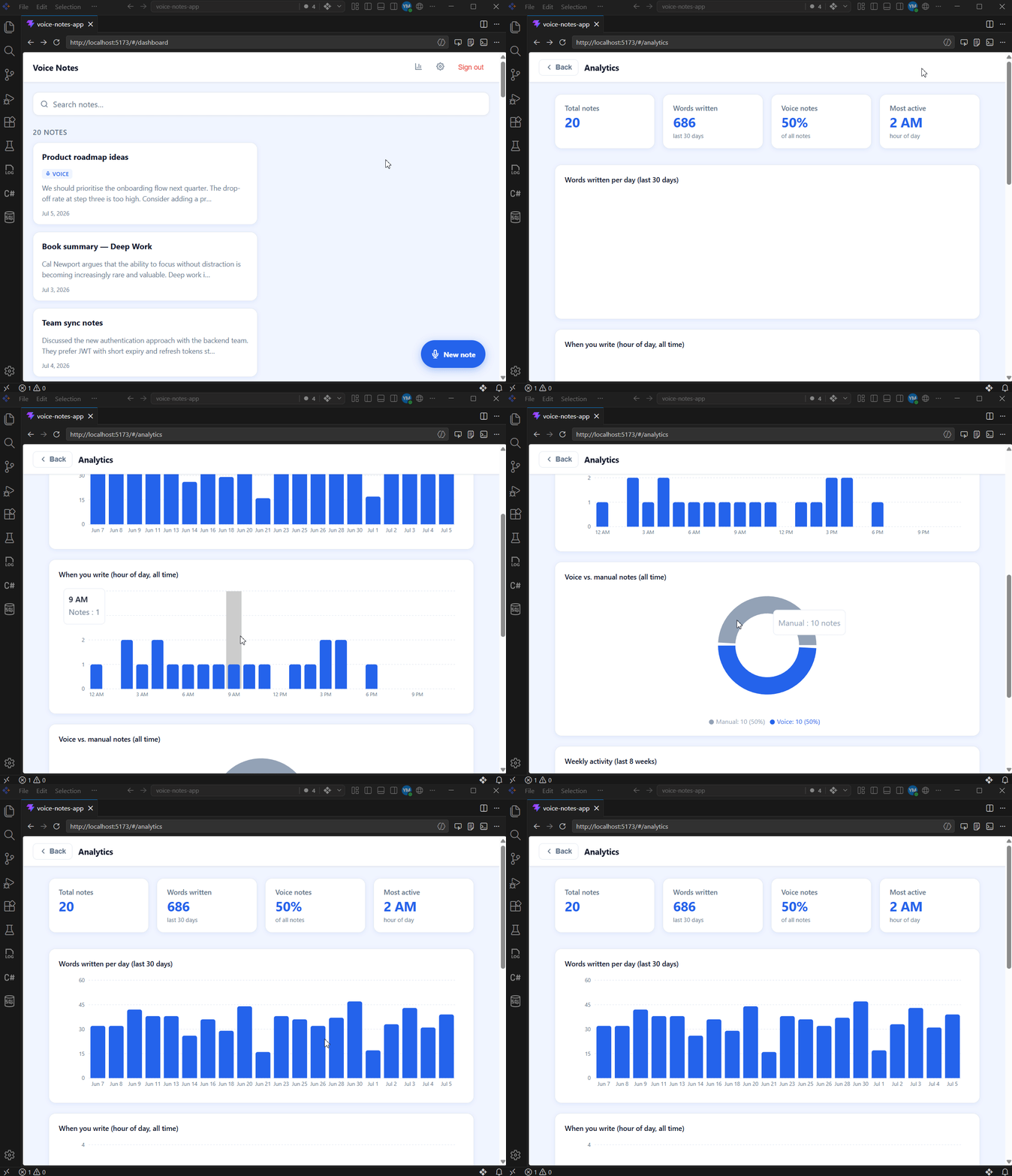
Voice Notes application in Code Studio
How this demonstrates all six points
- Agentic capability: AI handled the entire feature autonomously: planning, building, testing, and documenting without the developer manually doing each step.
- Everything stays in one place: No switching between tools. The developer described the feature, reviewed the plan, and watched it get built all inside Code Studio.
- AI understands your project: Code Studio already knew the Voice Notes App structure and coding style, so everything it built fit naturally into the existing codebase.
- New developers get productive immediately: A new team member can follow this exact workflow from day one without needing to learn how the whole project is structured.
- Covers entire development lifecycle: One prompt covered the full journey: planning → building the feature → charts → tests → documentation, all in one flow.
- Broad language and framework support: The Voice Notes App uses TypeScript, React, and Vite, all fully supported in Code Studio out of the box, with no extra setup needed.
2. Cost control and transparency
As teams become more dependent on AI, usage costs become a business concern. Many organizations discover this too late.
Without visibility, AI spending can rise unexpectedly as team adoption increases. A strong AI IDE should provide safeguards that make scaling predictable.
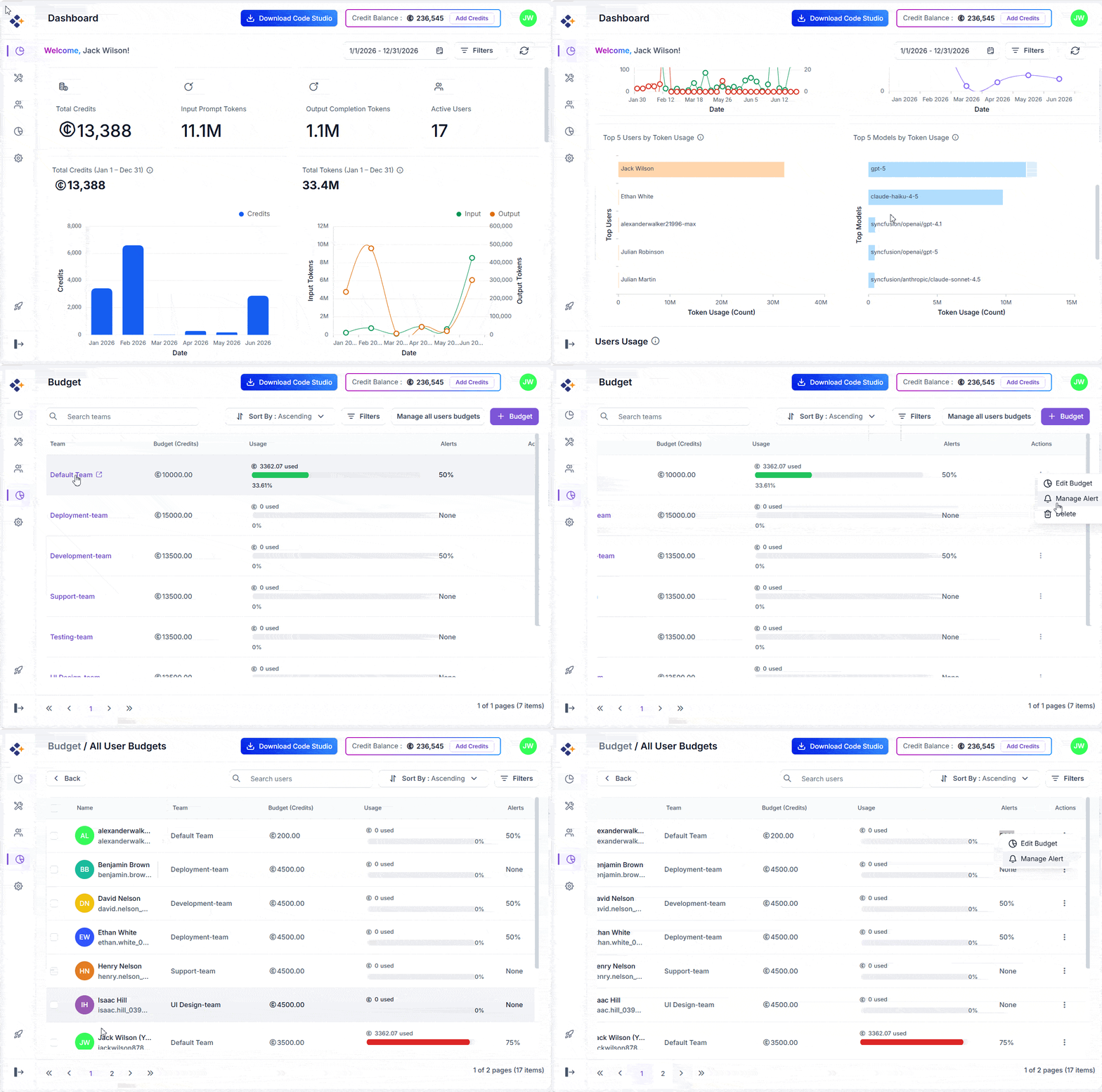
Real-time usage visibility
Leaders should be able to understand:
- Who is using AI
- How frequently it’s being used
- Which models consume the most resources
- Where costs are increasing
Visibility enables informed decisions before costs become a problem.
Budget enforcement
Notifications alone are not enough.
Effective platforms allow teams to:
- Set spending limits
- Create role-based budgets
- Receive proactive alerts
- Prevent accidental overages
AI adoption grows much faster when finance and engineering teams trust the cost model.
Multi-model flexibility
AI providers evolve rapidly.
Organizations should avoid becoming dependent on a single model provider.
Support for multiple providers offers:
- Better resilience
- Cost optimization
- Greater flexibility
- Reduced vendor risk
Enterprise security and governance
Organizations must also consider what happens to their code and data.
An enterprise-ready AI IDE should provide:
- Role-based access controls
- Workspace-level permissions
- Auditability
- Clear data privacy protections
AI governance is becoming just as important as AI capability.
3. Team standards and governance
AI can accelerate development.
It can also accelerate inconsistency.
Without guidance, AI-generated code reflects the habits of individual contributors rather than the standards of the engineering organization.
This often creates a new bottleneck: code review.
The problem: AI that doesn’t know your team’s rules
A developer uses AI to build a feature. The code works, but in review, the structure is wrong, the naming is off, error handling is inconsistent, and tests are missing. Nothing is broken, but nothing fits either. The reviewer spends two hours fixing things that weren’t wrong, just different. The feature ships a day late. Next sprint, different developer, different feature, same result. AI makes individuals faster, but code review has become the new bottleneck.
How to enforce team coding standards automatically
Code Studio gives teams multiple ways to standardize how AI works across the team: custom instructions that always apply in the background, custom prompt files for repeatable tasks, and custom agents for specialized workflows. All of these help enforce consistency without developers having to think about it.
Here we’ll focus on one of the most powerful options: Skills.
A Skill is a reusable, version-controlled package folder stored directly. It tells the AI exactly how your team works; all standards are bundled into a single SKILL.md file. Any developer on the team can invoke it with a simple /skill-name command, or the AI loads it automatically when the task matches.
Here’s how teams use it:
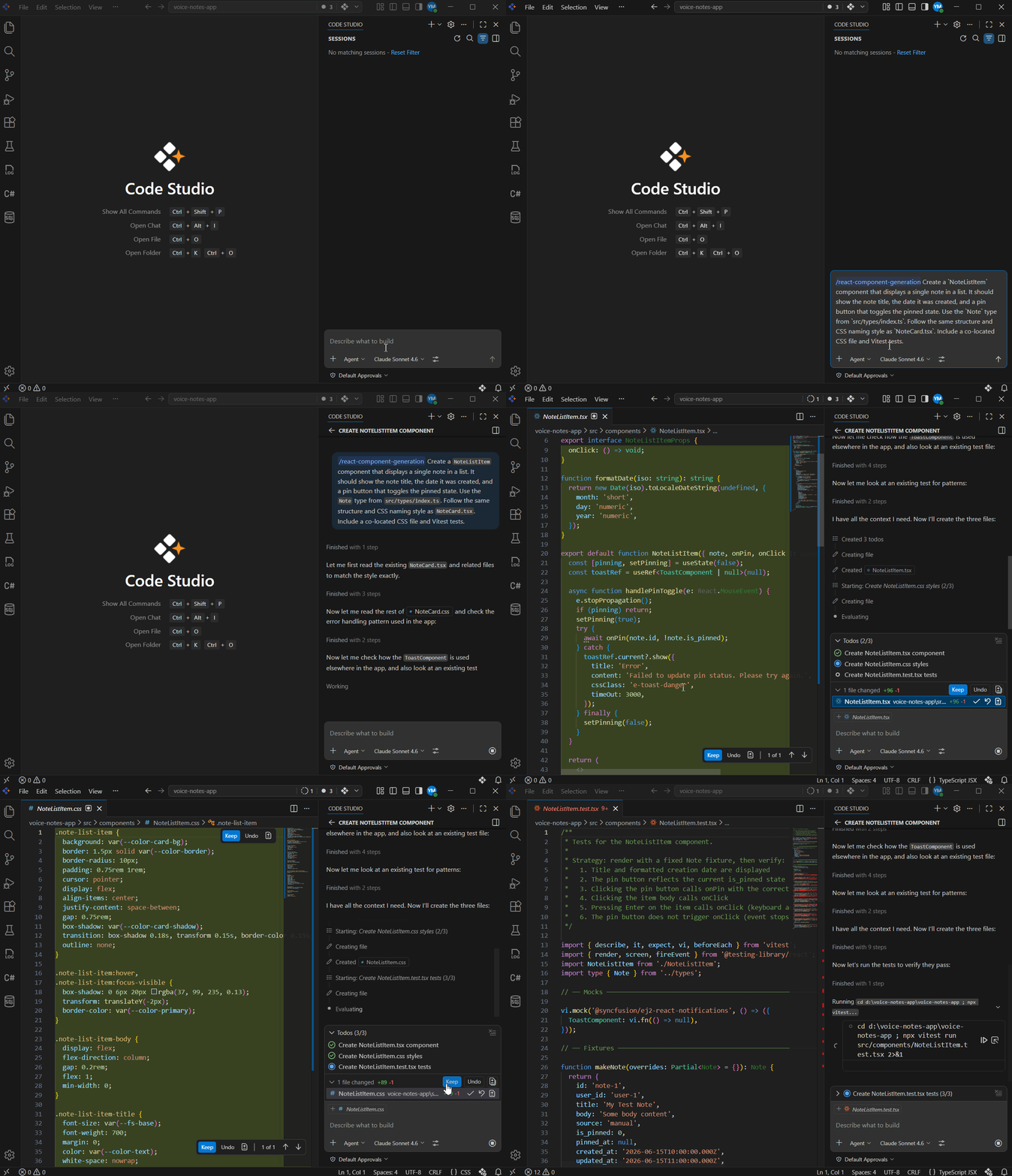
- Team lead creates a react-component-generation Skill that defines: use React Hooks, TypeScript props interface,
useStatefor inputs, a co-located.cssfile with matching class names, Vitest tests, and the flatsrc/components/file structure. See our documentation for how to create Skills. - The Skill is committed to the repo: Every developer gets it automatically on the next pull: no setup, no sharing docs, no onboarding sessions.
- When a developer needs to build a new component: They type
/react-component-generationin the Code Studio chat, or the AI loads it automatically when the task matches. - AI builds the component following the Skill: TypeScript, correct CSS naming, proper error handling, tests included. The code fits the codebase like it was written by a senior developer who’s been on the project for years.
When a new developer joins the team, they clone the repo and the Skill is already there, ready to use from their very first pull request.
How Syncfusion Code Studio stands out
Most AI coding tools solve one of these problems, but the best one solves all these together.
- On developer experience: Code Studio’s Agent mode doesn’t just generate code snippets. It understands your full project, reads your existing files, follows your architecture, creates tests, and writes documentation, all in one task. The difference between a tool that completes a line and a tool that completes a feature is the difference between saving minutes and saving days.
- On AI accuracy: Code Studio’s suggestions reference real types, functions, and imports that actually exist in your codebase. And when Agent mode generates code that fails tests, it reads the actual error output and self-corrects without the developer having to step in. The result is AI you can trust, not AI you have to verify.
- On cost control: Code Studio Enterprise Server gives team leads a real-time view of AI spending across every developer per user, per model, per session. Budget limits auto-enforce before invoices arrive, and automatic failover means work continues without interruption if one provider goes down. No more surprise bills. No more vendor lock-in.
- On security: Code Studio never uses your workspace data, code, or context to train AI models; your intellectual property stays yours. A four-tier role-based access model (admin, team owner, team lead, user) scopes every action to the right person. And code execution is restricted until you explicitly trust a workspace folder, so nothing runs without developer awareness.
- On team standards: Code Studio’s Skills, custom instructions, custom prompts, and custom agents system turns your team’s coding conventions into a version-controlled asset that every developer and every AI session follows automatically. New hire or senior developer, first day or year three, the AI generates code that fits your codebase every time.
You don’t have to choose between speed, cost, quality, and security. A well-chosen AI IDE gives you all four.
Frequently Asked Questions
How can engineering leaders evaluate AI adoption beyond productivity metrics?
Look beyond code generation speed and measure outcomes such as deployment frequency, lead time for changes, onboarding efficiency, bug rates, and developer satisfaction. These metrics provide a clearer picture of long-term business impact.
What risks should organizations consider before standardizing on an AI IDE?
Key considerations include vendor lock-in, data privacy policies, model reliability, compliance requirements, and the platform’s ability to adapt as AI models and development workflows evolve.
How does AI change the role of software developers?
AI shifts developers from manually implementing every step to defining requirements, reviewing outputs, making architectural decisions, and validating quality. Critical thinking and technical judgment become even more important.
What will differentiate successful development teams in the AI era?
The strongest teams will not be those with the most AI tools, but those with clear engineering practices, effective review processes, strong domain knowledge, and the ability to integrate AI into everyday workflows without sacrificing quality or security.
Use AI agents to create implementation plans, generate production-ready code, automate repetitive tasks, and improve code quality across your projects.
Discover Code StudioFinal thoughts
Most AI IDEs look impressive during the first week.
The real test happens a few months later.
- Have developers embraced the tool, or are they still jumping between AI chatbots and their editor?
- Are engineering leaders confident about costs?
- Has code quality improved, or has code review become more difficult?
The strongest AI IDEs succeed because they balance productivity, governance, and consistency.
When evaluating your options, don’t focus on flashy demonstrations or isolated AI features. Focus on how the platform fits into everyday development work.
Because the best AI IDE isn’t the one with the most features. It’s the one your team still relies on six months after adoption.
Look past the demo. Try it on a real task, in a real codebase, with real developers. Pay attention to what your team does in month two; that’s when you find out if the tool earned a permanent place in how your team works.
To learn more, explore Syncfusion Code Studio or review the available Enterprise Pricing options.




Be the first to get updates