
 Yuvaraj Mohan
TL;DR: Modern applications often span multiple repositories, making it difficult for AI assistants to understand the full architecture. Learn how Code Studio multi-repo workspaces and repository-level instructions provide the context AI needs to generate more consistent code, reduce integration issues, and streamline cross-repository development workflows.
You ask your AI assistant to build a new feature.
The backend endpoint gets generated in seconds. The frontend component looks correct. Everything compiles. Then you connect the pieces and discover that the API response doesn’t match what the frontend expects. A utility function gets recreated even though it already exists elsewhere. The code works, but not together.
If this sounds familiar, you’re not alone.
As AI becomes a bigger part of everyday development, many teams are discovering a new challenge: modern applications rarely live in a single repository. Frontends, backends, shared libraries, and infrastructure often exist in separate codebases, while most AI tools still perform best with complete context.
That’s where multi-repo workspaces in Syncfusion® Code Studio can make a significant difference.
In this guide, you’ll learn how to work across multiple repositories in Code Studio, provide AI with the context it needs, and generate code that fits naturally into your entire system instead of a single project.
Why AI struggles in multi-repository projects
Most development teams split applications across multiple repositories for good reasons:
- Independent release cycles
- Clear ownership boundaries
- Separate deployment pipelines
- Better scalability for large teams
A typical application may look like this:
- Frontend Repository
- Backend Repository
- Shared Components Repository
- Infrastructure Repository
While this structure works well for teams, it creates a challenge for AI-assisted development.
When AI only sees one repository, it lacks visibility into:
- API contracts defined elsewhere
- Shared business logic
- Existing utilities
- Team-wide architectural conventions
- Dependencies between repositories
The result is often code that works in isolation but creates integration issues later.
Common symptoms include:
- Frontend and backend mismatches
- Duplicate implementations
- Inconsistent coding patterns
- Increased review and refactoring effort
The underlying issue isn’t code quality. It’s missing context.
What are multi-repo workspaces?
A multi-repo workspace allows multiple Git repositories to be opened and managed together within a single development environment.
The repositories remain independent:
- Separate Git histories
- Separate branches
- Separate deployments
But developers gain a unified workspace where related projects are visible side by side.
For AI-assisted development, this creates an important advantage: the assistant can understand how different parts of the system connect instead of making decisions based on a single repository.
Setting up a multi-repo workspace in Code Studio
Let’s use a practical example.
Suppose you’re working on a Conduit-style article-sharing platform that consists of:
- conduit-frontend
- conduit-backend
Step 1: Open the first repository
Launch Code Studio and open your backend repository.
- File → Open Folder
- Select your backend project directory.
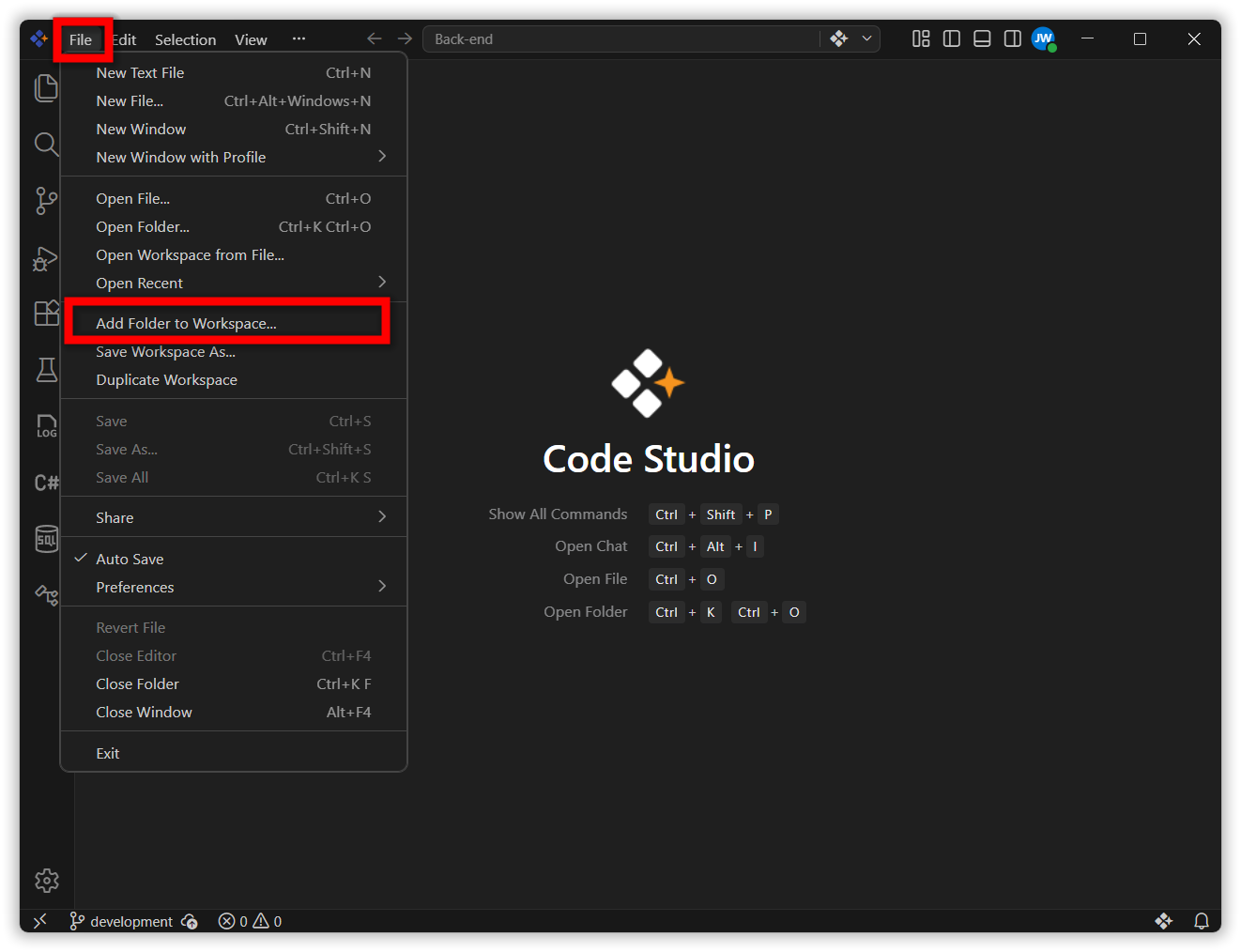
Step 2: Add additional repositories
Next, add the frontend repository to the same workspace.
- File → Add Folder to Workspace
- Select the frontend repository.
Your workspace now contains both projects.
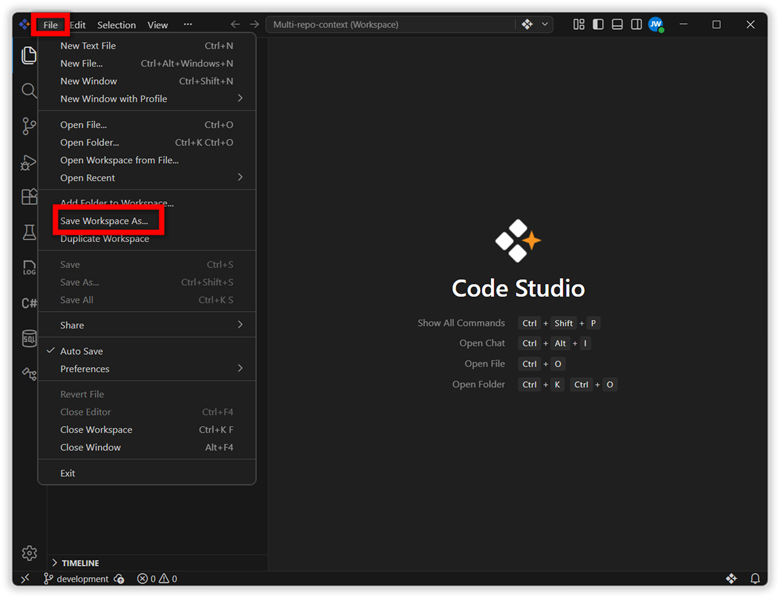
Step 3: Save the workspace
- To avoid repeating the setup process:
File → Save Workspace As - Save it with a meaningful name such as:
Conduit-Multi-Repo - The next time you open Code Studio, both repositories load automatically.
Your workspace now provides a complete view of the application rather than isolated projects.
Help AI understand your architecture
Opening multiple repositories is only part of the solution.
The next step is helping AI understand how those repositories are organized.
Code Studio supports custom instruction files located at: .codestudio/codestudio-instructions.md
Think of these files as onboarding documentation written specifically for AI.
Instead of forcing the assistant to infer patterns from source code alone, you provide clear guidance about your architecture, conventions, and workflows.
Example backend instructions
Your backend instruction file might include:
- Technology stack
- Folder structure
- API design standards
- Response formats
- Error handling patterns
- Existing endpoint conventions
Example:
Tech Stack:
Node.js + Express

API Response Format:
{
    "success": true,
    "data": {}
}

Error Responses:
404 - Resource not found
422 - Validation error
500 - Server error
Example frontend instructions
Your frontend instructions might define:
- Component organization
- Routing strategy
- Styling conventions
- API integration patterns
- State management approach
Example:
Framework:
React 18 + Vite

Styling:
CSS Modules only

Components:
components/

Pages:
pages/

Routing:
React Router v6
These instructions provide context that source code alone may not communicate effectively.
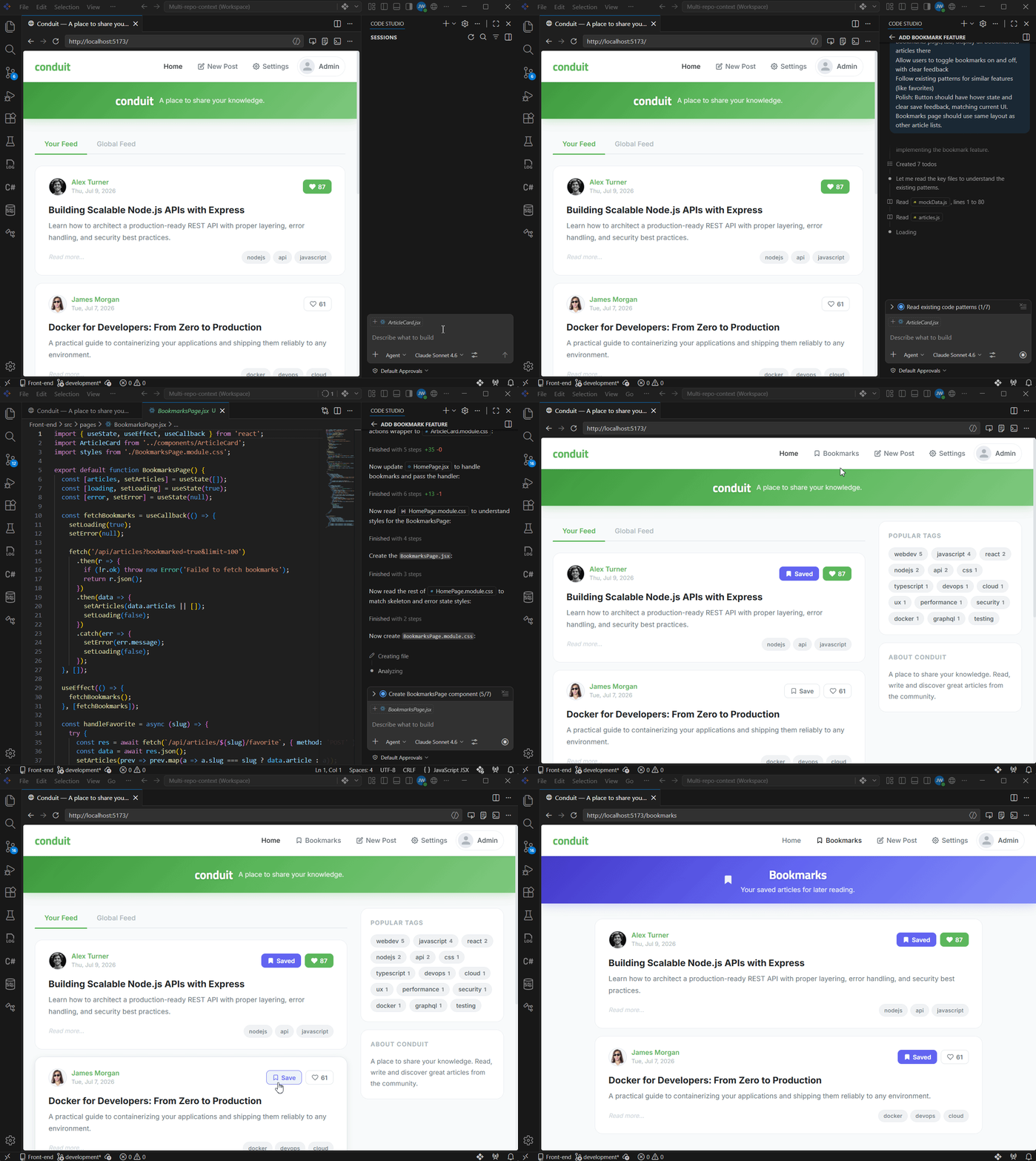
Real example: Building a bookmark feature
Imagine your product team requests a new bookmarking feature.
Requirements
Backend
- Save bookmarks
- Remove bookmarks
- Return bookmark status with articles
- Fetch bookmarked articles
Frontend
- Display a bookmark button
- Allow bookmark toggling
- Create a Bookmarks page
- Follow existing UI patterns
A typical AI workflow might require switching between repositories, copying context manually, and repeatedly explaining how the application works.
With a multi-repo workspace in Code Studio, the AI already has visibility into:
- Backend routes
- Existing API patterns
- Frontend components
- Shared conventions
- Repository instructions
You can simply describe the feature:
- Add article bookmarking
- Users should be able to save articles, view bookmarked articles, and remove bookmarks
- Follow existing patterns used for favorites.
Because both repositories are available in the same workspace, the generated code is more likely to:
- Reuse established endpoint structures
- Match frontend component patterns
- Follow existing naming conventions
- Align with current UI behavior
This reduces the amount of integration work required after generation.
Best practices for multi-repo AI development
Be specific in instruction files
Avoid generic statements like:
Follow existing patterns.Instead, provide concrete examples.
Use CSS Modules.

Import:
import styles from './Button.module.css';

Apply classes:
className={styles.primary}
The more precise your instructions, the more consistent the generated output.
Keep instructions up to date
- Instruction files should evolve alongside your codebase.
- When architectural decisions change, update the documentation.
- Outdated instructions can create confusion for both AI and developers.
Prioritize critical information
- Focus on the details that directly affect implementation:
- API contracts
- Response formats
- Naming conventions
- File structure
- Shared design patterns
- Avoid turning instruction files into lengthy documentation repositories.
- Concise guidance is usually more effective.
Scale workspaces logically
If your organization manages many repositories, avoid loading everything into a single workspace.
Instead, organize projects by development context.
For example:
Frontend Workspace
├── Frontend App
├── Design System
└── Shared UI Library
Backend Workspace
├── API Service
├── Authentication Service
└── Data Pipeline
Smaller, focused workspaces tend to produce better results than massive catch-all environments.
Why this matters
The biggest benefit of multi-repo workspaces isn’t convenience. It’s reducing the gap between generated code and production-ready code.
When AI understands the broader system:
- Integrations become smoother
- Architectural consistency improves
- Code reviews become faster
- Duplicate implementations decrease
- Developers spend less time fixing generated code
Instead of generating solutions that work in isolation, AI can generate solutions that fit naturally into the application as a whole.
Frequently Asked Questions
If your work regularly spans multiple repositories, yes. Even small teams can benefit from having a shared view of interconnected codebases and providing AI with consistent context.Do small teams need multi-repo workspaces?
Large repositories are manageable, but keep instruction files focused on the most important architectural details. Prioritize key conventions rather than documenting everything.What if one repository is significantly larger than the others?
Ask AI to implement a small feature. If the generated code follows your naming conventions, architecture, and coding standards without additional guidance, your instructions are doing their job.How can I tell if my instruction files are effective?
Yes. Each repository can have its own instruction file describing its language, framework, and patterns. This allows AI to understand how different parts of the system work together while respecting the conventions of each codebase.Can Code Studio handle repositories built with different technologies?
Conclusion
Modern software development rarely happens in a single repository. Frontends, backends, shared libraries, and supporting services are increasingly distributed across multiple codebases.
To generate high-quality code, AI needs visibility into those relationships.
By combining related repositories into a single Code Studio workspace and documenting key architectural decisions through custom instruction files, teams can provide the context AI needs to make better decisions from the start.
The result is simple: less time spent fixing integration issues and more time spent building features that ship.
Get started: Quick checklist
- Open all related repos in one Code Studio workspace.
- Create
.codestudio/codestudio-instructions.mdin each repo documenting tech stack, file structure, and patterns. - Document API contracts (endpoint paths, response formats, error codes).
- Save the workspace.
- Ask AI to build your next cross-repo feature.
Your multi-repo landscape deserves an AI that understands the whole picture, not isolated pieces.
With the right repository context and clear instructions, Code Studio can help AI generate code that aligns more closely with your architecture and development standards.
To learn more, explore Syncfusion Code Studio or review the available Enterprise Pricing options.




 No spam, just valuable updates.