A2UI vs. Traditional UI: How Generative UI Changes Frontend Development

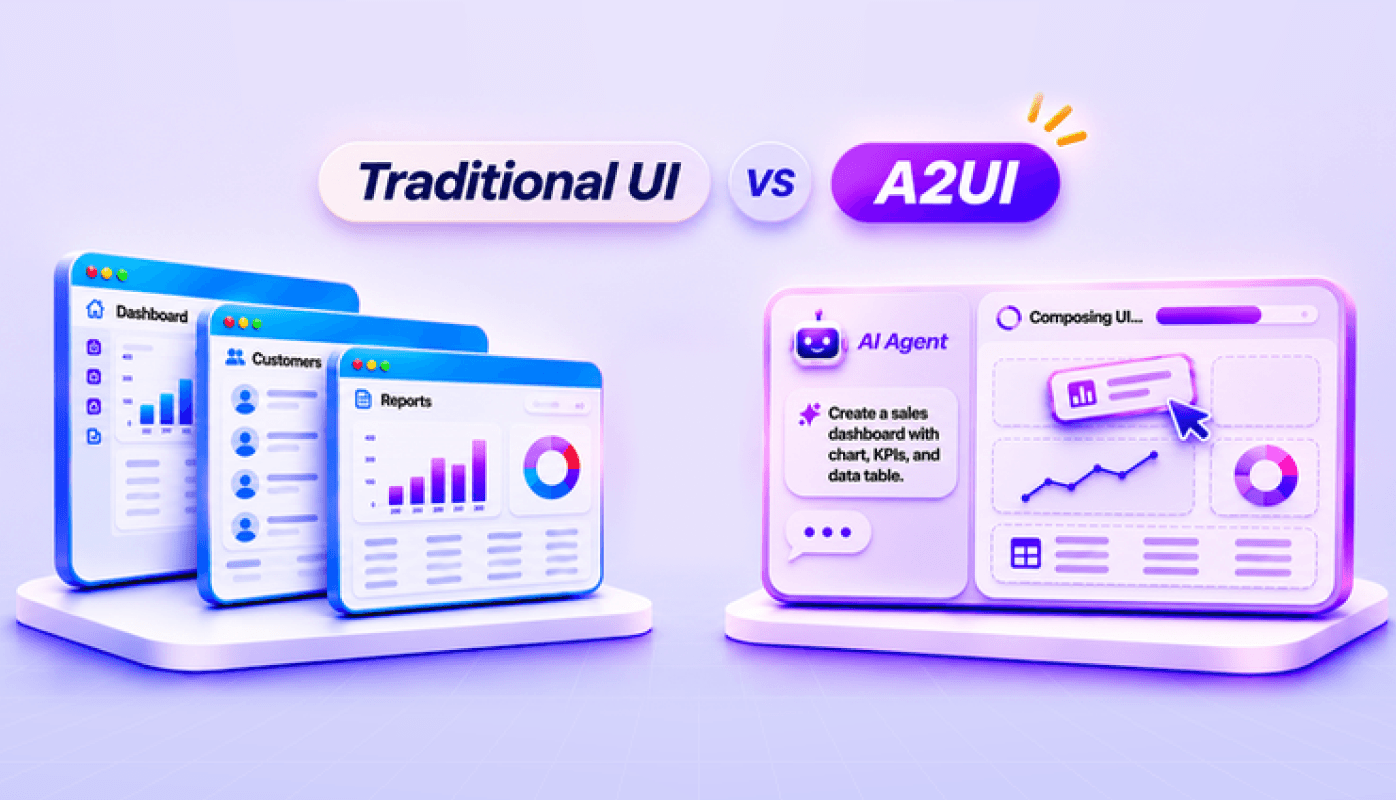
TL;DR: Traditional UI is best for fixed and predictable workflows, while A2UI lets AI agents create interfaces based on user requests using approved UI components. A hybrid approach combines both, the flexibility of A2UI with the predictability of traditional UI. Learn how these approaches differ in architecture, rendering, security, and testing, and when to use each in your applications.
A traditional frontend application is built around screens, components, and workflows defined by developers. This approach works well when users follow predictable paths. But what happens when an application needs to adapt its interface to each user’s request?
Consider an AI-powered customer support application. One user may need an order summary, another may need a replacement form, and someone else may only need a delivery status update. Building a separate screen for every possible interaction can make the frontend increasingly complex.
This is where A2UI (Agent-to-UI) comes in. It allows an AI agent to describe an interface using structured data, while the application renders that description through its approved UI components. Instead of generating arbitrary frontend code, the agent works within the capabilities exposed by the application.
A2UI changes when an interface is composed, but it does not remove the frontend team’s responsibility for rendering, validation, accessibility, security, and user interactions.
In this blog, we’ll compare A2UI with traditional UI development, explore how its message flow and component catalogs work, and examine when traditional, A2UI, or hybrid architectures make sense.
What is A2UI and how does it change frontend development?
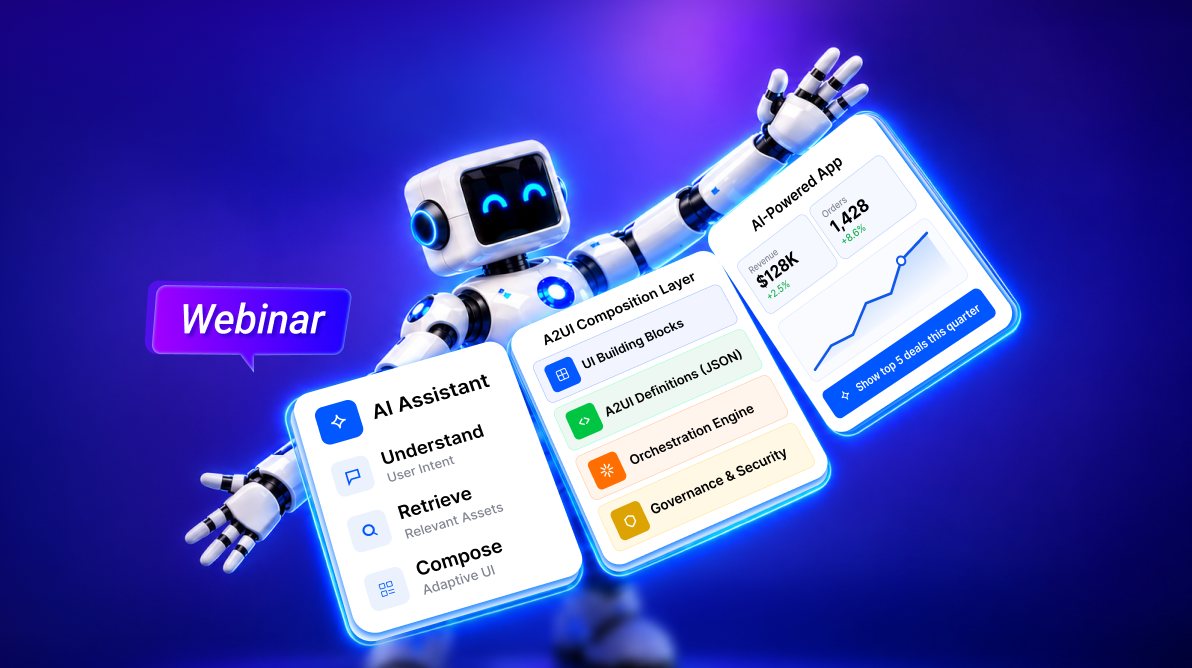
A2UI is a protocol-driven approach that allows AI agents to describe user interfaces through structured messages. A client-side renderer interprets those messages and maps them to approved frontend components.
For example, imagine a user asking an AI assistant to compare two subscription plans. The agent can describe a comparison table containing the plan names, prices, features, and selection options. The frontend renderer uses its approved components to display that interface.
The important distinction is that the agent describes what the interface should contain, while the application controls how it is rendered and what users can do with it.
In a traditional application, developers define the component hierarchy and interaction paths during development. At runtime, application data changes what those components display, but the overall interface structure generally remains within the boundaries of the code.
With A2UI, an agent can select and arrange components at runtime based on the user’s request and the available application context.
This does not mean the agent can create any interface it wants. It can only request components and properties supported by the application’s approved component catalog.
What remains the frontend team’s responsibility?
A2UI changes interface composition, not frontend ownership. Developers still need to manage:
- Component catalogs: Define which components the agent can request and the properties they support.
- Rendering: Map approved component definitions to actual frontend components.
- Validation: Check incoming messages, properties, identifiers, and data references.
- Security: Authenticate users and authorize actions before accessing protected data or services.
- Accessibility: Ensure dynamically composed interfaces remain usable with keyboards and assistive technologies.
- State management: Handle application state, surface data, and user interactions.
- Testing and recovery: Test valid and invalid messages, partial updates, rendering errors, and fallback experiences.
A useful way to think about A2UI is this: the agent proposes an interface, but the application decides whether and how that proposal becomes an interactive experience.
How the request-to-render flow differs
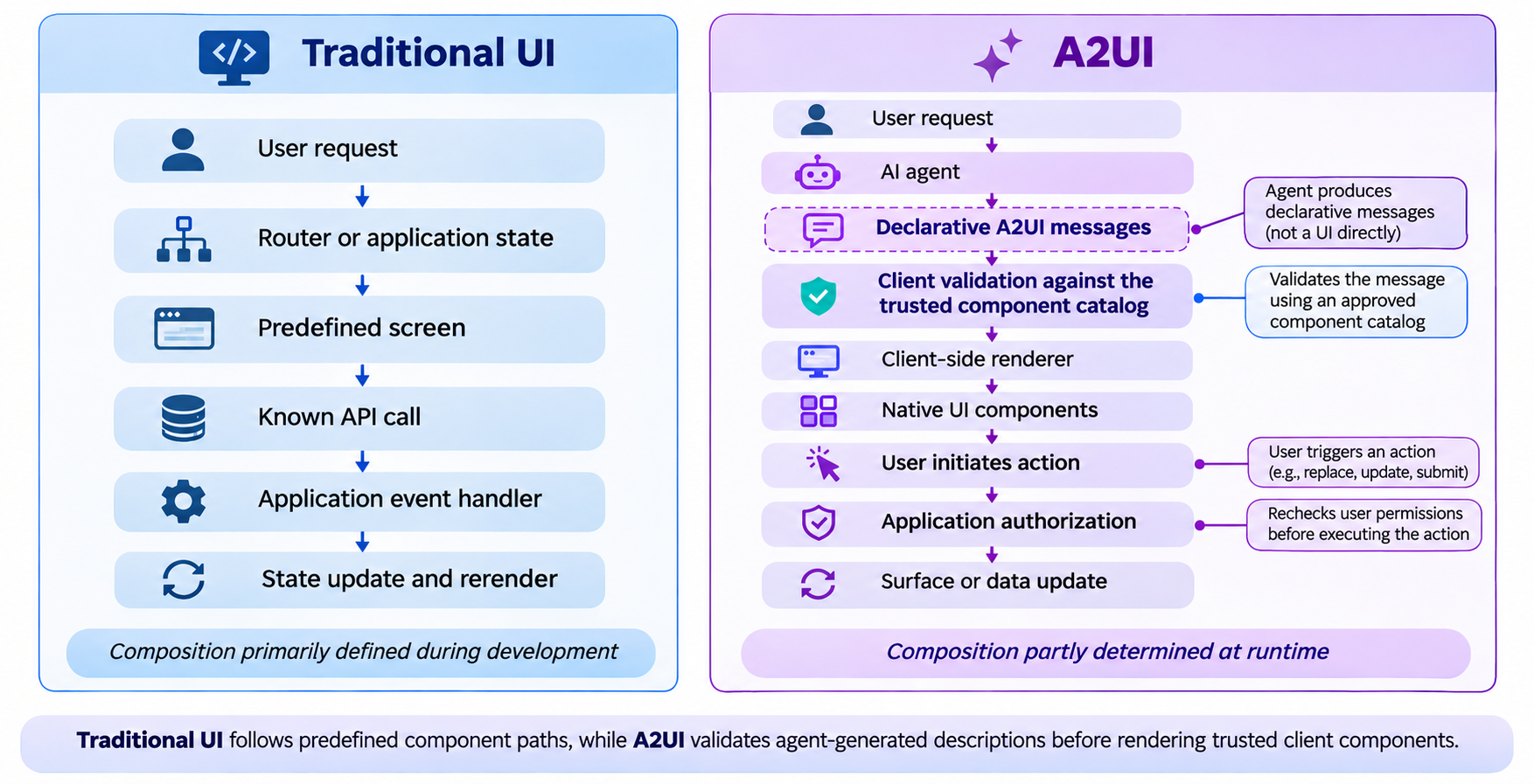
The main difference between traditional UI and A2UI is when the interface structure is selected.
Traditional UI request-to-render flow
In a traditional frontend application, the development team defines the available screens, components, and interactions.
A typical flow looks like this:
- The user opens a page or starts a task.
- The router and application state select a predefined screen.
- The application requests data from the required APIs.
- Components render using the relationships and conditions defined in the application code.
- User interactions trigger predefined event handlers.
- The application updates its state and renders the changes.
Traditional interfaces can still be highly dynamic. Forms, dashboards, grids, and route-based applications respond to user input and changing data. What remains controlled is the set of component structures and transitions the application permits.
A2UI request-to-render flow
With A2UI, an agent can determine which approved components are useful for the current request.
A typical flow looks like this:
- The user sends a request to an agent-enabled application.
- The agent determines which interface components are appropriate.
- The agent sends structured A2UI messages describing the interface and its data.
- The client receives the messages through the configured transport.
- The renderer validates the messages and checks the requested components against the applicable catalog.
- The renderer maps accepted component definitions to native frontend components.
- The client creates or updates the interface.
- User interactions are handled through application-controlled event handlers and the configured return channel.
- The application or backend authorizes the requested operation.
- The agent can send additional messages to update the interface when needed.
The A2UI protocol separates the agent-to-renderer message stream from the handling of user interactions. The renderer receives interface descriptions, while user actions are communicated through the application’s configured interaction or transport mechanism.
This separation allows the application to control what happens when a user clicks a button, submits a form, or selects an option.
What happens during progressive rendering?
A2UI can support progressive updates, allowing the renderer to build an interface as messages arrive instead of waiting for the entire interface description.
For example, a support interface might display its heading and order summary before the remaining components arrive.
However, progressive rendering introduces intermediate states. A component may reference a child that has not arrived yet, or a data value may still be unavailable. The renderer should handle these situations with placeholders, validation, timeouts, and fallback states.
The following diagram can illustrate the difference between the two rendering approaches.
Understanding A2UI messages and component catalogs
A2UI uses structured JSON messages to describe and update an interface. The protocol separates the interface structure from the data displayed by its components.
The following examples use the A2UI v0.9 message format. They are simplified examples to explain the main message types. Always use the component definitions and catalog supported by your selected renderer.
1. Create a surface
A surface represents the UI area that the renderer creates and updates. The createSurface message initializes it and identifies the catalog used to interpret its components.
{
"version": "v0.9",
"createSurface": {
"surfaceId": "orderSupport",
"catalogId": "https://a2ui.org/specification/v0_9/catalogs/basic/catalog.json"
}
}
Here:
versionidentifies the protocol version.surfaceIdidentifies the interface being created.catalogIdidentifies the component catalog that defines the available components and their supported properties.
The catalog is important because it establishes which component definitions the renderer can understand.
2. Update surface components
After creating a surface, the agent can send an updateComponents message to define its component structure.
For example:
{
"version": "v0.9",
"updateComponents": {
"surfaceId": "orderSupport",
"components": [
{
"id": "root",
"component": "Column",
"children": ["title", "orderSummary"]
},
{
"id": "title",
"component": "Text",
"text": "Order support"
},
{
"id": "orderSummary",
"component": "Text",
"text": {
"path": "/order/summary"
}
}
]
}
}
The component definitions are provided as a flat list. Each component has a unique identifier, and parent-child relationships are established through component IDs.
In this example, the root Column contains a heading and an order summary. The order summary references data using a path instead of containing a fixed value.
The renderer must recognize the requested components through the selected catalog before rendering them.
3. Update the surface data model
A2UI keeps interface structure separate from the data displayed by the components. The updateDataModel message supplies or updates that data.
{
"version": "v0.9",
"updateDataModel": {
"surfaceId": "orderSupport",
"path": "/order",
"value": {
"summary": "Order 1048 is eligible for replacement."
}
}
}
The orderSummary component references /order/summary. When the renderer resolves that path against the surface’s data model, it can display the supplied order information.
This separation is useful when the application needs to update data without sending the entire component structure again.
4. Define an approved component catalog
A component catalog defines which UI components and properties are available to an agent.
For example, a customer support application might expose components such as:
- Text for displaying information.
- Button for triggering approved actions.
- Column and Row for arranging content.
- Form for collecting user input.
- DataGrid for displaying structured records.
The actual component names and property definitions depend on the catalog used by the renderer. A production application should use a catalog that matches its supported component implementations rather than assuming every component is available.
The catalog connects the agent’s component descriptions to real frontend components. It also gives the renderer a contract against which it can validate incoming definitions.
A2UI vs. Traditional UI: Key differences
Both approaches can create interactive applications, but they differ in how interface structures are selected and rendered.
| Area | Traditional UI | A2UI |
|---|---|---|
| Composition timing | Primarily during development | Partly at runtime |
| Component selection | Defined by application code | Requested by an agent from an approved catalog |
| Rendering | Renders a known component structure | Maps validated descriptions to native components |
| State | Application-defined state and services | Application state plus surface data and protocol updates |
| User actions | Predefined event handlers | Declared interactions routed through controlled handlers |
| Validation | Form, API, and business-rule validation | Message and catalog validation in addition to business rules |
| Security | Application, browser, API, and backend controls | The same controls, with additional validation of agent messages |
| Testing | Known screens, routes, and interactions | Catalogs, message sequences, generated combinations, and recovery |
| Performance | More predictable rendering paths | Also affected by generation, transport, validation, and composition |
| Best suited for | Stable, repeated workflows | Context-dependent interface composition |
The choice is not simply between a static interface and a dynamic one. Traditional applications can already adapt their layouts and content based on data. A2UI becomes useful when the application needs to adapt the actual composition of an interface to the user’s current request.
How component catalogs control rendering and security
A component catalog is one of the most important parts of an A2UI implementation. It defines the capabilities an agent can request and provides the renderer with the information needed to interpret those requests.
How does a catalog work?
Think of a catalog as an approved list of building blocks. The application defines the available components, their properties, and the rules for using them. The agent uses this information to describe an interface. The renderer then checks the definitions and maps supported components to their frontend implementations.
For example, an application might expose a DataGrid component with properties for columns, data, sorting, and paging. The agent can request a grid using those supported properties, but it cannot introduce an entirely new component just by naming it.
This gives developers control over the available UI capabilities while allowing the agent to choose how to arrange them.
Where does catalog security stop?
A trusted catalog is safer than executing arbitrary model-generated JavaScript, but an allowlist alone does not secure an application.
An approved component can still introduce risks if it accepts unrestricted URLs, unsafe content, excessive data, or actions connected directly to privileged backend operations.
Consider a button that requests an invoice copy. Even if the agent is allowed to display that button, the application must verify the user’s identity, check access to the requested invoice, and authorize the operation before returning the document.
The agent’s output must never be treated as proof of identity or permission.
Follow these practices when implementing A2UI:
- Validate protocol messages, message order, component types, properties, and identifiers.
- Restrict data-binding paths to approved data.
- Limit text lengths, collection sizes, component depth, and payload size.
- Avoid raw HTML, executable callbacks, unrestricted URLs, and arbitrary backend operation names.
- Encode untrusted text and restrict external resources to approved origins.
- Recheck permissions whenever a user performs an action.
- Log useful validation and authorization events without unnecessarily storing sensitive information.
- Protect against prompt injection, action misuse, malformed payloads, and excessive message generation.
A component catalog is a controlled rendering boundary, not a complete security solution. Application and backend controls remain essential.
A practical scenario: Resolving an order problem
Consider a customer support application. A user asks: “My order arrived damaged. Show the purchase details and help me request a replacement.”
The application could handle this request using traditional UI, A2UI, or a hybrid architecture.
Traditional UI: Keep the workflow predictable
The application opens a predefined order-details page. The user selects a Report a problem option, which opens a form containing fields for the issue, additional notes, supporting evidence, and replacement preferences.
This approach works well when:
- The process is used frequently.
- The form fields and validation rules are well established.
- The business requires consistent confirmation steps.
- The workflow involves sensitive or high-impact operations.
The trade-off is that additional scenarios may require more screens, conditional branches, and application logic.
A2UI: Adapt the interface to the request
With A2UI, an agent can inspect the order information it is permitted to access and request a suitable interface.
For example, it might compose a surface containing:
- An order summary.
- A list of affected items.
- A condition selector.
- An evidence uploader, if the application exposes one in its catalog.
- A replacement option.
- An explanation of the next steps.
If only one item is eligible for replacement, the agent may request a simpler interface. If the order is outside the replacement period, it may display an explanation and an escalation option instead.
The frontend still controls the available components, and the backend still determines whether the order is eligible. The agent must not become the authority for replacement policies, account ownership, inventory, or refund approval.
A2UI is useful here because the interface can adapt to the current situation without requiring a separate predefined screen for every variation.
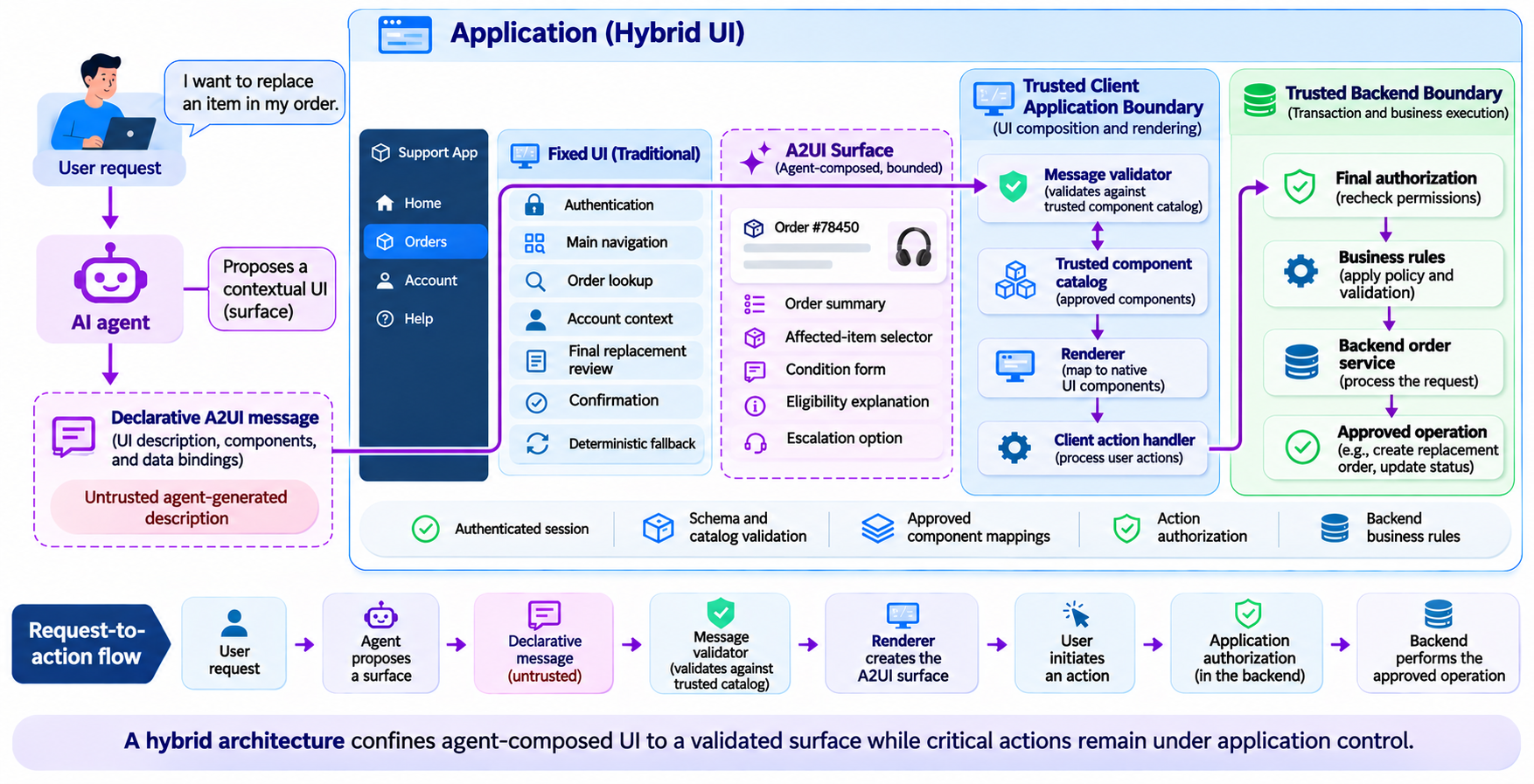
Hybrid UI: Combine flexibility with control
A hybrid architecture combines predefined workflows with agent-composed interfaces. For the same support application, the team might keep the following parts in traditional UI:
- Account navigation.
- Authentication.
- Order lookup.
- Final replacement review.
- Replacement confirmation.
An A2UI panel could handle contextual assistance, explain eligibility, show relevant order information, and help the user select the affected item.
When the user is ready to proceed, the application moves to a predefined confirmation screen. The backend validates the request before making any changes.
This approach provides flexibility without making critical business operations dependent on dynamically generated interface structures.
Testing an Agent-Driven interface
Traditional frontend testing already covers component behavior, routes, API responses, accessibility, and user interactions. A2UI requires these tests as well, but it introduces additional cases because the interface can be composed at runtime.
Testing should cover both the messages received from the agent and the resulting rendered interface.
1. Catalog validation and contract testing
Verify that:
- Every supported catalog component maps to an actual frontend component.
- Only documented properties and data-binding paths are accepted.
- Unsupported component types and properties are rejected.
- Default values are safe.
- Form controls have accessible labels, instructions, and error states.
- User actions map to controlled application handlers.
2. Renderer and message-sequence testing
Create test fixtures containing valid A2UI message sequences and verify the resulting component structure, data bindings, updates, and cleanup.
Include cases such as:
- Duplicate component identifiers.
- Missing component references.
- Unknown surfaces.
- Unsupported components.
- Repeated or out-of-order updates.
- Deleted surfaces receiving additional updates.
- Connections closing before the interface is complete.
The renderer should preserve the last valid state where appropriate, reject invalid transitions, and prevent interactive controls from using stale or unauthorized data.
3. Security and accessibility testing
Test whether the application rejects unauthorized actions, unexpected property types, disallowed URLs, and oversized payloads.
Also test dynamically composed interfaces with keyboards and assistive technologies. Components that are accessible individually may still create an inaccessible interface when combined.
Check heading order, focus movement, reading order, accessible names, and announcements for dynamically updated content.
4. Test failure and recovery scenarios
An agent-generated interface should not leave users with a broken or incomplete experience when something goes wrong.
| Failure | Expected recovery |
|---|---|
| Unknown component | Reject it or use an approved fallback |
| Invalid message | Prevent rendering and report a validation error where supported |
| Missing reference | Show a temporary placeholder, then time out safely |
| Partial stream | Preserve the last valid state or show a retry option |
| Unavailable data | Display an explicit unavailable state |
| Unauthorized action | Block the operation and provide a safe explanation |
| Rendering error | Contain the failure with an error boundary around the generated surface |
| Agent timeout | Keep navigation and deterministic fallback actions available |
| Unsupported capability | Use a compatible catalog or fall back to a traditional interface |
A reliable fallback is particularly important. Users should still be able to complete essential tasks when the agent or rendering process is unavailable.
5. Set limits on dynamically generated interfaces
A2UI introduces additional work into the rendering path, including generation, transport, validation, and component composition.
Set limits for:
- Components per surface.
- Component nesting and reference depth.
- Message and data-model sizes.
- Update frequency.
- Stream timeouts.
- Invalid-output retries.
- Resource-intensive components such as large grids, charts, maps, editors, and document viewers.
Measure time to first valid surface, time to interactive, validation failures, fallback usage, and successful task completion separately. These measurements help identify whether delays come from the agent, transport, validation, rendering, or backend operations.
Where Syncfusion A2UI Components and Composer fit
Building an agent-driven interface involves more than generating a JSON description. Developers also need a way to design the interface, inspect its structure, and render it using the components supported by their application. To understand the overall offering, explore Syncfusion A2UI.
Syncfusion provides two related tools for this workflow: A2UI Composer and Syncfusion A2UI Components.
Syncfusion A2UI Composer: Design and refine interfaces
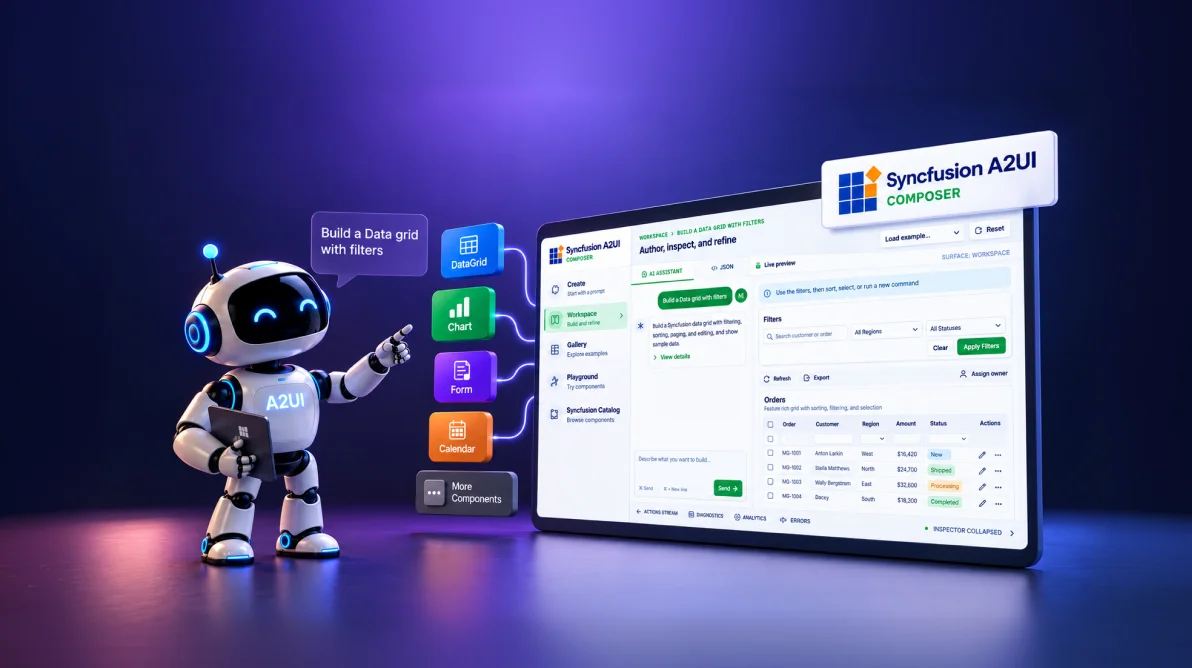
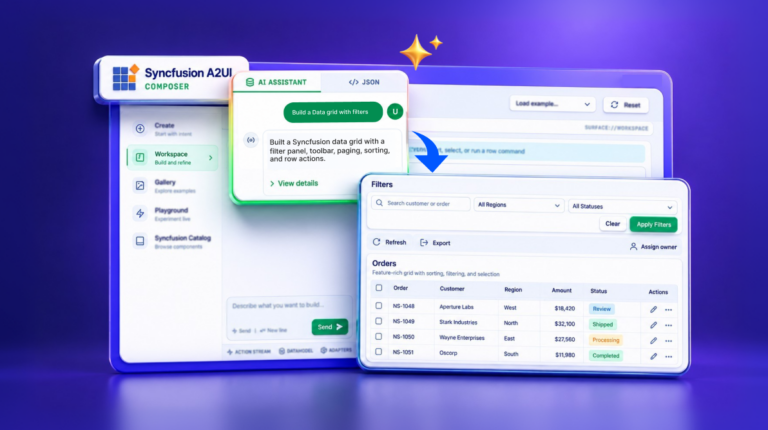
Syncfusion A2UI Composer is a browser-based environment for authoring A2UI v0.9 JSON.
Developers can describe the interface they want using a prompt, generate the corresponding A2UI definition, inspect and edit the JSON, and preview the resulting surface. They can then use the generated definition in an application or with an A2UI agent.
For example, a developer could request a customer dashboard containing a data grid, chart, and summary cards. Composer helps generate and refine the interface definition without requiring the developer to manually write every component description.
Syncfusion A2UI Components: Render interfaces in applications
At runtime, Syncfusion A2UI Components provide the renderer and supported component adapters needed to turn A2UI definitions into interactive Syncfusion UI components.
The React and Angular integrations provide supported component catalogs that map A2UI component definitions to their respective Syncfusion EJ2 components.
The available controls and their properties depend on the package and catalog. Developers should check the supported-component documentation before designing an interface around a particular control.
Composer and the runtime components serve different purposes:
- Composer helps create, inspect, and refine interface definitions.
- A2UI Components render supported definitions within the application.
These tools help with interface authoring and rendering, but developers must still implement application state, data access, authorization, validation, testing, and fallback behavior.
Which approach should you choose?
The right approach depends on how much the interface needs to change at runtime and how much control the application must retain.
| Requirement | Traditional UI | A2UI | Hybrid |
|---|---|---|---|
| Fixed, repeated tasks | Strong fit | Limited fit | Good fit |
| Context-dependent composition | Requires additional logic | Strong fit | Strong fit |
| High-risk transactions | Strong fit | Best limited to assistance | Strong fit |
| Predictable performance | Strong fit | Requires additional controls | Good fit |
| Existing application with stable navigation | Strong fit | Suitable for bounded areas | Strong fit |
| Small, approved component catalog | Not required | Important foundation | Strong fit |
| Deterministic fallback | Part of normal UI design | Must be planned | Strong fit |
Choose traditional UI when:
The interface is stable, frequently used, and follows well-defined workflows. It is a good choice for authentication, financial transactions, administrative operations, and other experiences that require predictable behavior.
Choose A2UI when:
The useful interface depends heavily on the user’s request and current context. It is suitable when the application can expose a limited, well-tested component catalog and validate the agent’s output.
Avoid adopting A2UI just to replace conditional rendering that is already simple and reliable.
Choose a hybrid approach when:
You need both adaptability and control. Keep navigation, authentication, permissions, critical confirmations, and essential workflows in traditional UI. Use A2UI for contextual information, explanations, low-risk forms, and task-specific panels.
For many existing applications, this is a practical way to introduce generative UI without redesigning the entire frontend.
Conclusion
A2UI introduces a different way to build frontend experiences by allowing AI agents to describe interfaces at runtime using structured data. However, the application still controls which components can render, how data is validated, and which actions users can perform.
Traditional UI remains a strong choice for stable and predictable workflows. A2UI is useful when interface composition needs to adapt to user requests, while a hybrid approach offers a balance between flexibility and control.
For most existing applications, starting with a small, low-risk A2UI surface is a practical way to evaluate the approach. With Syncfusion A2UI Components and A2UI Composer, developers can explore agent-driven interfaces using familiar UI building blocks.
Ready to explore generative UI? Try Syncfusion A2UI Composer to design and preview an agent-driven interface, then explore the supported Syncfusion A2UI Components to bring it into your application.
Frequently asked questions
How should a team version custom A2UI component catalogs?
Treat a component catalog as a versioned contract between the agent and the renderer. Give it a clear identifier, maintain compatibility tests, and document changes to component properties and behavior.
For breaking changes, introduce a new catalog version rather than silently changing the behavior of an existing one.
What happens when the agent and client support different catalogs?
The application should make its supported capabilities available to the agent before interface generation. If the agent requests an unsupported component, the renderer should reject it or use an explicitly designed fallback.
It should not assume that a similarly named component has the same properties or behavior.
Can an A2UI surface be cached or restored after a session?
An application can persist a validated surface if its privacy, retention, and compatibility requirements allow it.
However, restoring a surface should involve checking the catalog version, referenced data, current user permissions, and action validity. A previously valid interface should not automatically be considered safe after application state or user permissions change.
Can A2UI work when an application is offline?
A client may be able to render a previously validated local surface if its required components and data are available. However, new agent generation, remote data retrieval, and server-authorized operations generally require connectivity.
Offline behavior depends on how the application is designed; it is not guaranteed by the A2UI protocol itself.
What telemetry is useful when adopting A2UI?
Track catalog mismatches, message-validation failures, partial-stream recovery, rendering errors, fallback usage, rejected actions, time to first valid surface, and successful task completion.
Separate agent, transport, validation, rendering, and backend failures to identify where problems occur. Avoid collecting sensitive prompts or business data unnecessarily.
Start your 30-day free trial
Explore 1,600+ UI components, Document SDKs, and AI-powered tools for web, desktop, and mobile apps.
Get a Free Trial