
 Yuvaraj Mohan
TL;DR: AI coding agents are only as reliable as the context they receive. Learn how context engineering, guardrails, custom agents, prompt files, and reusable skills help development teams reduce unwanted changes, enforce coding standards, and create predictable AI-assisted workflows in Syncfusion Code Studio.
A developer picks up what looks like an easy bug fix.
There’s a null reference error in a component. They open their AI coding assistant, attach the file, and ask for a fix. A few minutes later, the error is gone.
So are several other things.
The assistant renamed functions, reorganized state management, updated a utility method in another file, and introduced changes nobody asked for. The original bug is fixed, but the pull request is now filled with unrelated modifications that need review.
Most developers have experienced some version of this.
The AI didn’t malfunction. It simply worked with the information it was given.
As AI becomes part of everyday development workflows, one challenge keeps surfacing across teams: getting reliable, consistent output from coding assistants. While prompt engineering gets much of the attention, prompt quality is rarely the real issue.
The bigger factor is context.
What the AI can see, what rules it follows, and what actions it’s allowed to take often determine whether the result is helpful or creates more work.
This is where guardrails become essential.
In this article, we’ll look at how Syncfusion® Code Studio helps teams create predictable AI-assisted workflows through context management, project-wide instructions, custom agents, and reusable skills.
The real reason AI goes off scope
When developers get unexpected output from an AI assistant, the first instinct is usually to improve the prompt.
- Write a longer instruction
- Add more constraints
- Be more specific
Sometimes that helps.
But the same problem often returns during the next session because prompts are temporary. Every developer writes them differently. Every conversation starts from a slightly different place.
The result is inconsistency.
Two developers can ask the same coding assistant to solve the same problem and receive very different solutions, simply because the assistant was given different context.
The issue isn’t usually the model. It’s the environment around the model.
If an AI assistant can see an entire project, it treats that project as available for modification. If important information is missing, it fills gaps with assumptions. The broader the context, the larger the potential surface area for changes.
Reliable AI output starts when you intentionally control that environment. Instead of hoping the AI stays within boundaries, you define those boundaries up front.
Why Context and Guardrails Matter
AI doesn’t go out of scope because it’s careless. It goes out of scope because everything it can see becomes fair game. The broader the context, the greater the chance of unnecessary changes.
This is where context engineering and guardrails make a difference. Instead of relying on prompts alone, you create clear boundaries around what the AI can access, understand, and modify.
Without guardrails:
- Code reviews become longer due to unrelated changes.
- Team standards are applied inconsistently.
- Technical debt accumulates more quickly.
- Trust in AI-generated output gradually declines.
With guardrails:
- AI works only within the intended scope.
- Team conventions are applied consistently.
- Output becomes easier to review and maintain.
- Developers get more predictable results across projects and workflows.
The goal isn’t to restrict AI. It’s to give it the right context, rules, and boundaries so it can produce reliable results every time.
Control what the AI can see
One of the simplest ways to improve AI output is to reduce unnecessary context. If an assistant only needs three files to solve a problem, giving it thirty files rarely improves the result.
In Syncfusion Code Studio, Add Context allows developers to attach exactly what’s needed for a task:
- Files
- Folders
- Symbols
- Problems panel diagnostics
- Screenshots
- Active tools
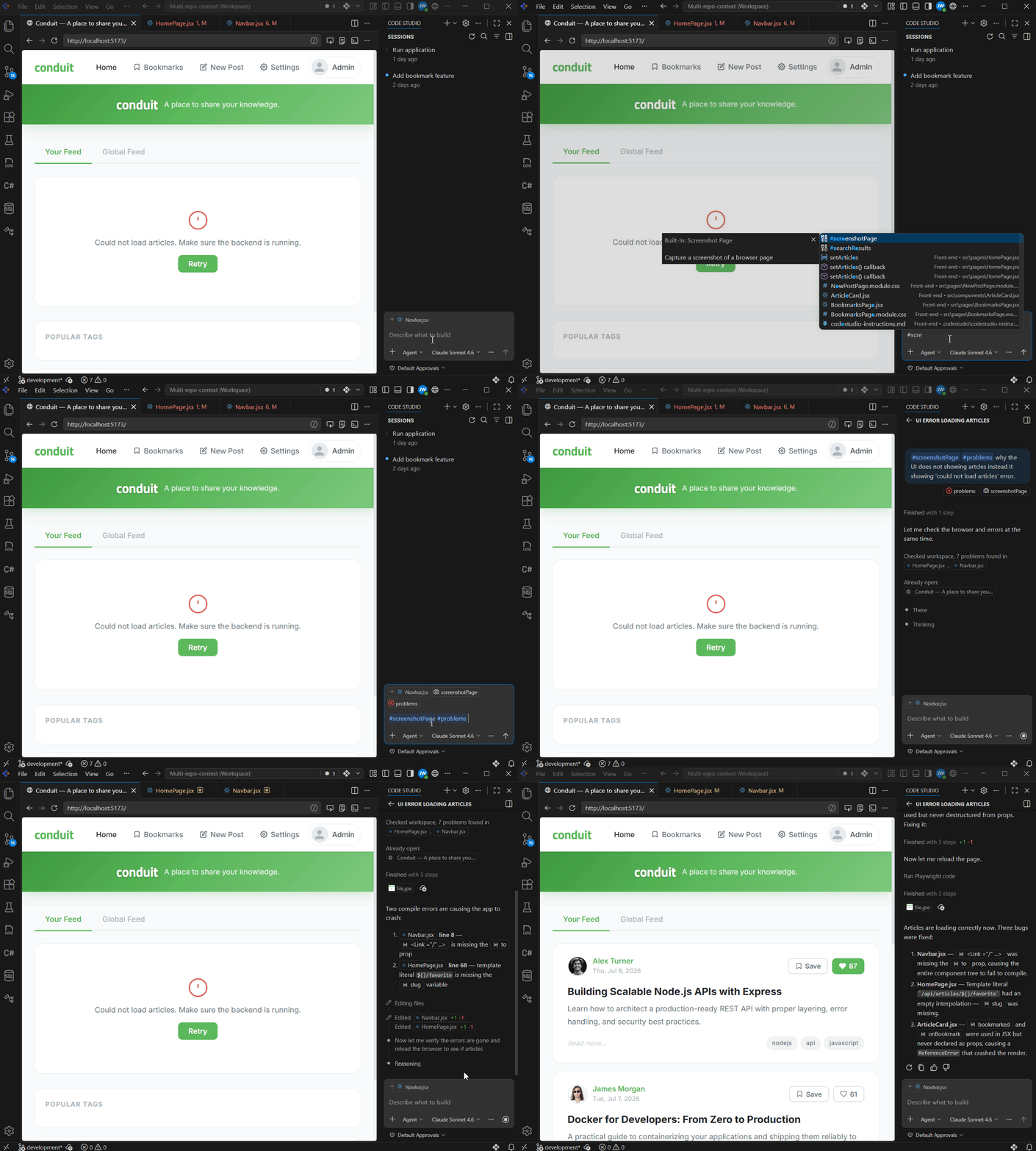
Imagine an article feed page displaying a generic “Could not load articles” error.
A common reaction is to provide the assistant with every related file. The AI then interprets the issue as a broader architectural problem and starts suggesting changes across the application.
Instead, attaching only the error details and a screenshot provides the assistant with the information needed to identify the problem while keeping it focused on the task at hand.
The less irrelevant information the model sees, the less opportunity it has to wander outside the requested scope.
For a full breakdown of context types, see the Add Context documentation.
Define team standards once
Even when task scope is controlled, another problem remains. The AI still doesn’t know how your team expects code to be written.
Without shared guidance, every generated solution reflects the model’s assumptions rather than the project’s standards.
Code Studio addresses this through two complementary mechanisms.
Custom Instructions
Custom Instructions allow teams to define coding standards that automatically apply to specific parts of a codebase.
For example:
- Front-end conventions can apply only to UI files.
- Backend rules can apply only to API projects.
- Testing requirements can apply only to test folders.
Developers don’t need to repeat these requirements in every prompt because they’re automatically included when relevant.
Explore the Custom Instructions documentation to learn how to automatically apply coding standards across files, folders, and projects.
AGENTS.md
While Custom Instructions focus on coding standards, AGENTS.md provides broader project knowledge.
Think of it as a handbook written for AI agents.
It can contain:
- Architecture decisions
- Technology stack guidelines
- Setup requirements
- Testing workflows
- Project conventions
- Team expectations
A simple way to think about the difference is:
- Custom Instructions explain how code should be written.
AGENTS.mdexplains how the project works.
Together, they ensure that AI-generated output aligns with the team’s established practices rather than recreating them from scratch in every conversation.
See the Global Agents documentation to understand how project-wide knowledge and AI guidance can be shared consistently across every development workflow.
Control what the AI can do
Knowing the rules is important. Following a defined workflow is even more important.
That’s where Custom Agents come in.
A Custom Agent combines:
- A specific role
- Instructions
- Approved tools
- Relevant project context
into a reusable workflow.
Instead of asking a general-purpose AI assistant to perform a task, teams can create purpose-built agents for activities such as:
- Bug fixing
- Code reviews
- Test generation
- Security reviews
- Documentation generation
Because the role and toolset are predefined, the agent operates within established boundaries.
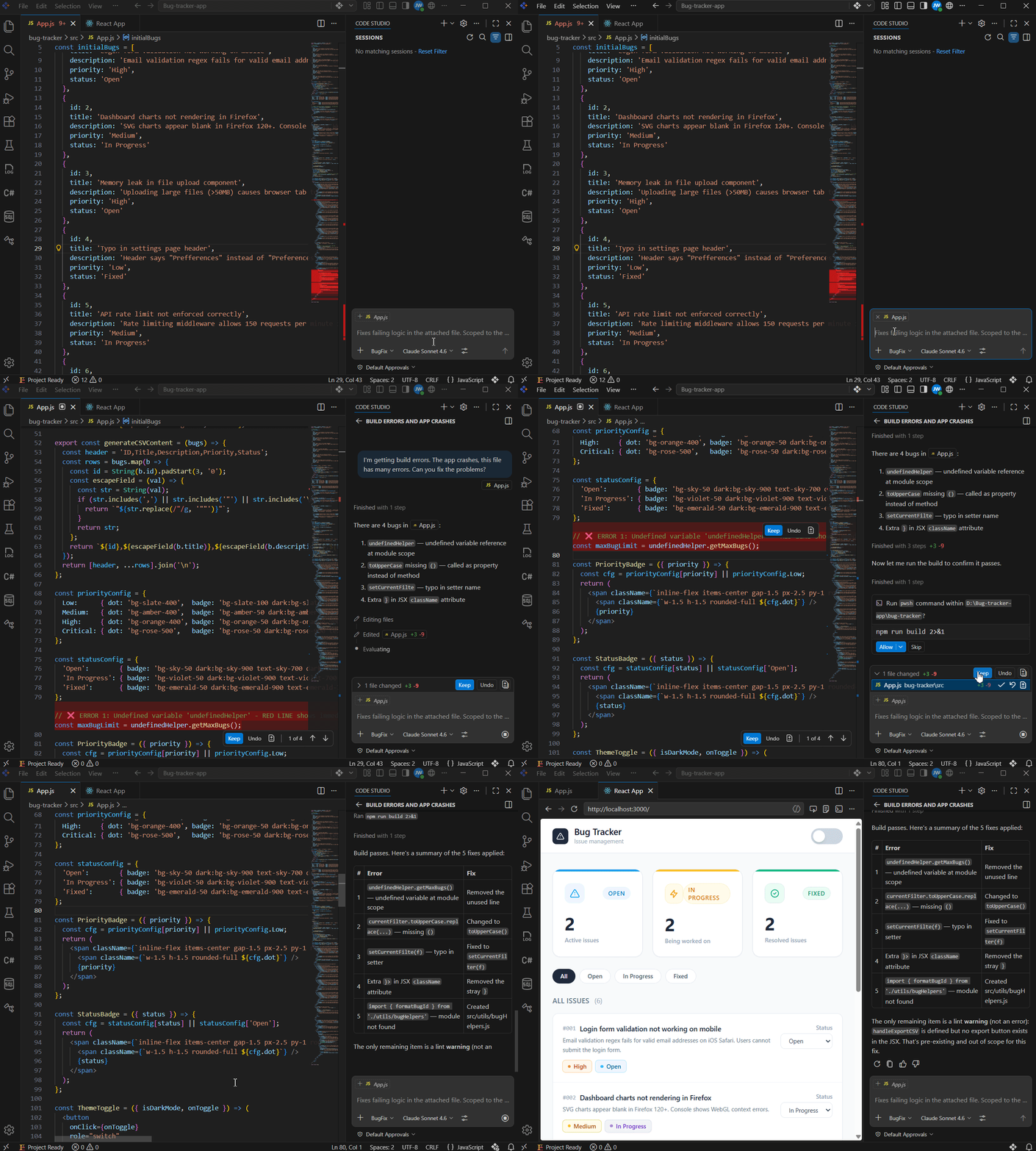
For example, a bug-fixing agent can be restricted to:
- Reviewing attached files
- Editing code
- Running builds
while avoiding unrelated project-wide actions.
This creates a more predictable workflow regardless of who on the team uses the agent.
For configuration details, see the Custom Agents documentation.
Make repeated tasks consistent
Many development activities happen over and over again.
- Code reviews
- Accessibility checks
- Security audits
- Test generation
The challenge isn’t performing these tasks once. It’s performing them consistently across an entire team.
Prompt Files
Prompt Files standardize how requests are made. Instead of every developer writing a slightly different prompt for a code review, the team can define the request once and reuse it whenever needed.
This ensures that the same task starts with the same expectations every time.
Explore the Prompt Files documentation to learn how to create reusable prompts that help teams standardize recurring AI-assisted tasks.
Skills
Skills standardize how the AI executes those tasks. A Skill contains reusable knowledge and instructions that guide the agent’s approach to a specific workflow.
For example, a security review skill can define:
- What to inspect
- Which patterns to flag
- What recommendations to provide
The agent automatically applies those guidelines without requiring developers to explain them repeatedly.
Together:
- Prompt Files standardize the request.
- Skills standardize the execution.
- Custom Agents standardize the workflow.
This combination creates consistent outcomes across projects and teams.
See the Skills documentation to discover how domain-specific instructions can help AI execute tasks more consistently across projects and workflows.
Quick reference
| Feature | Purpose | When to use |
| Add Context | Scopes what the AI can see for a specific task | Every task: attach only what’s relevant |
| Custom Instructions | Enforces coding standards per file type | Always on, committed to the repo |
| Custom Agents | Defines role, tools, and workflow constraints | Recurring tasks: reviews, fixes, generation |
| Skills | Carries domain-specific implementation knowledge | When task execution patterns need to be reusable |
Full system view
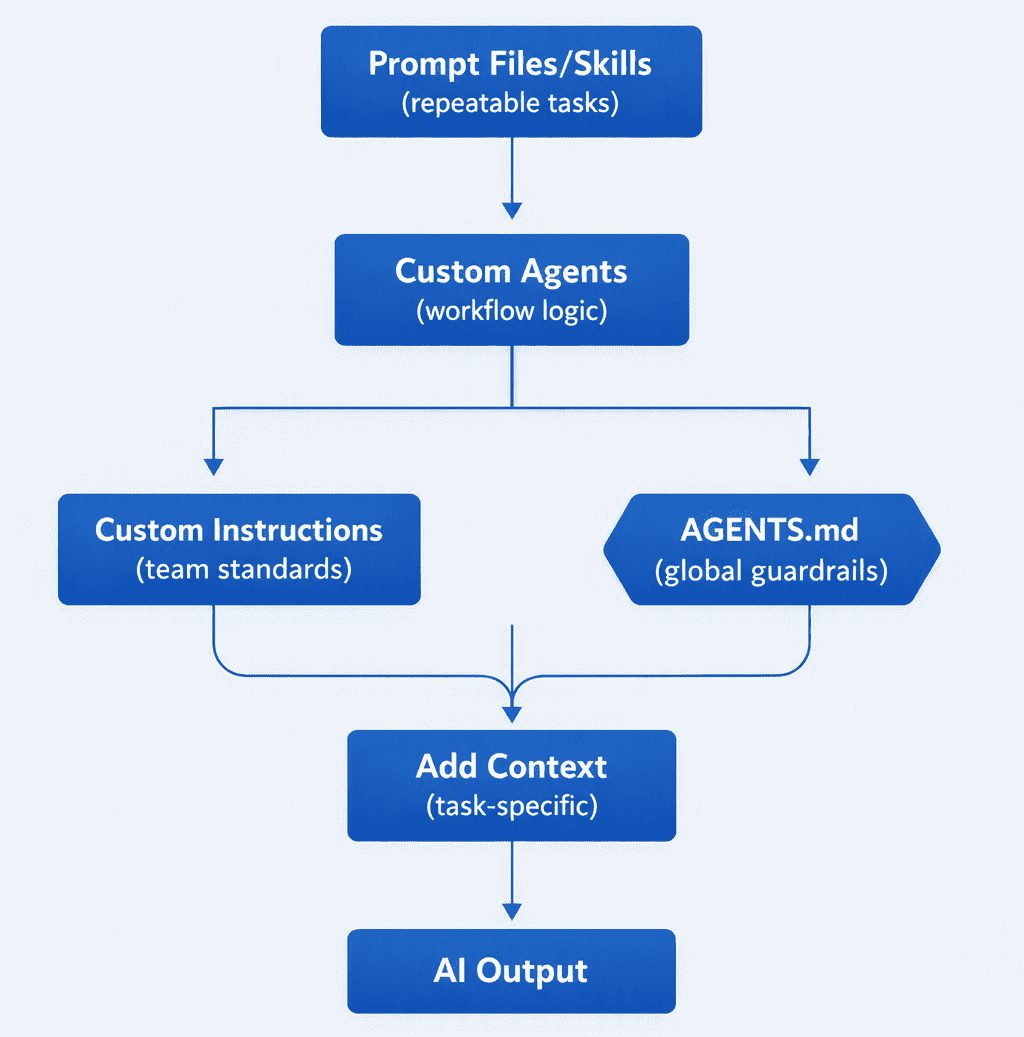
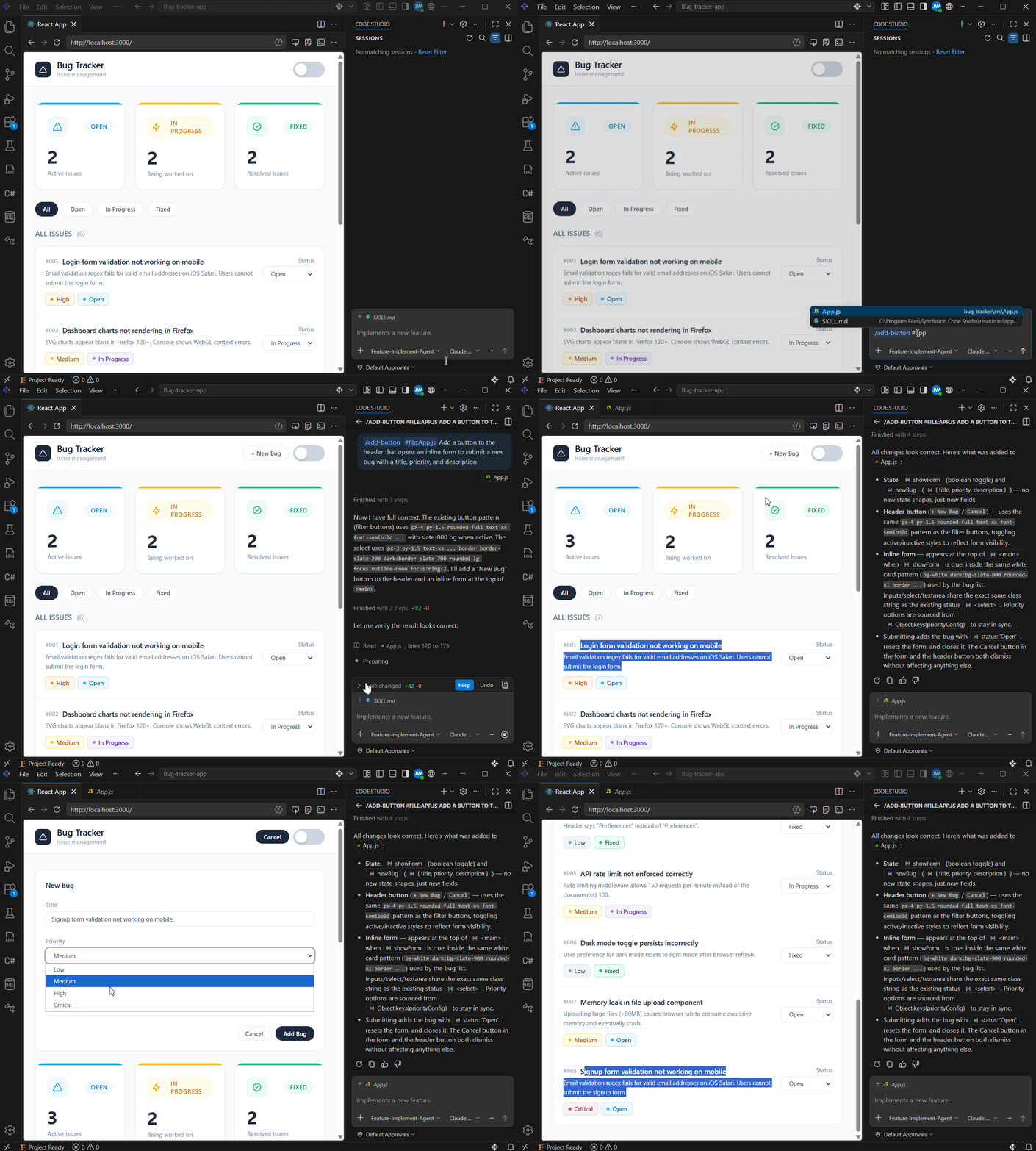
Together, they form a system, not a collection of features. And a system is what makes AI output predictable at the team level, not just in one session for one developer.
From prompt engineering to context engineering
A lot of the AI conversation has focused on writing better prompts.
Prompts certainly matter. But as development teams adopt AI at scale, the larger challenge becomes managing context, workflows, and organizational knowledge.
The question is no longer: “How do I write the perfect prompt?”
It’s: “How do I create an environment where the AI consistently succeeds?”
That’s where context management and guardrails become valuable.
When developers provide only relevant information, establish coding standards, define reusable workflows, and capture organizational knowledge, AI output becomes easier to review, trust, and scale across teams.
Predictable output doesn’t come from restricting AI. It comes from giving AI the right boundaries.
Frequently Asked Questions
Do I need all five layers for every task?
No. Add Context is useful for almost every task. Custom Instructions and AGENTS.md are worth setting up once and leaving on. Custom Agents, Prompt Files, and Skills are worth building when the same task type recurs often enough to justify it. Start with the layers that give the most return with the least setup, and add the rest as the pattern becomes clear.
When should I use AGENTS.md instead of Custom Instructions?
Use AGENTS.md for project-wide knowledge that applies universally: architecture, testing protocols, setup instructions, and tech stack decisions. Use Custom Instructions for coding standards that apply to specific file types or folders. They serve different purposes and work best together.
How much context is too much?
If you’re attaching files to “be safe,” you’re attaching too much. The principle is simple: attach only what the task cannot succeed without. Extra context doesn’t help the AI. It expands the surface area of what it might modify.
What happens if guardrails are misconfigured?
Overly broad Custom Instructions can cause the AI to apply rules that don’t fit the task. An outdated AGENTS.md can lead the agent to make incorrect assumptions about the project. The same discipline applied to code applies here: review guardrail files when the project changes, treat them as living documents, and scope rules as narrowly as necessary.
Should I use a Prompt File or a Skill?
Use a Prompt File when you want to standardize how a task is requested by defining the framing, the question, and the inputs. Use a Skill when you want to standardize how the AI executes the task, including the approach, patterns, and validation checks it follows. Both can coexist within the same workflow.
Use AI agents to create implementation plans, generate production-ready code, automate repetitive tasks, and improve code quality across your projects.
Discover Code StudioGetting Started with Syncfusion Code Studio
If you’re looking to improve the consistency of AI-assisted development, start with a few simple steps:
- Download Code Studio and open your project
- Attach only the context a task genuinely requires.
- Capture team standards using Custom Instructions.
- Document project knowledge in
AGENTS.md. - Create Custom Agents for recurring workflows.
- Reuse proven approaches through Prompt Files and Skills.
Each layer strengthens the others.
Over time, these guardrails transform AI from a helpful assistant into a dependable part of the development process.
- The goal isn’t to give AI more information.
- The goal is to give it the right information at the right time.
And that’s what makes AI output predictable.




 No spam, just valuable updates.