
 Keerthana Rajendran
TL;DR: Essential Studio 2026 Volume 2 brings powerful updates to the Pure React Scheduler, including a mobile-friendly Agenda View, time zone support, load-on-demand data loading, resource grouping, and recurring event management. These enhancements help developers build faster, more scalable scheduling applications with less custom code.
Scheduling is one of those features that looks simple at first glance. In reality, once you start dealing with recurring appointments, multiple resources, users across different time zones, or thousands of events, things become significantly more challenging.
The latest enhancements in the Syncfusion® Pure React Scheduler component are designed to simplify these challenges. Whether you’re building an appointment booking platform, a healthcare scheduling system, a workforce management solution, or an educational calendar application, these updates help reduce custom development effort while improving scalability, usability, and performance.
Let’s explore what’s new in the Essential Studio 2026 Volume 2 release for the Pure React Scheduler and see how these additions can help you create scheduling experiences that are easier to maintain, perform well at scale, and deliver a better experience for users.
See upcoming events faster with agenda view
Traditional calendar layouts work well on large screens, but they can become difficult to navigate on mobile devices or when multiple appointments overlap. Finding the next event often requires zooming, scrolling, or switching between views.
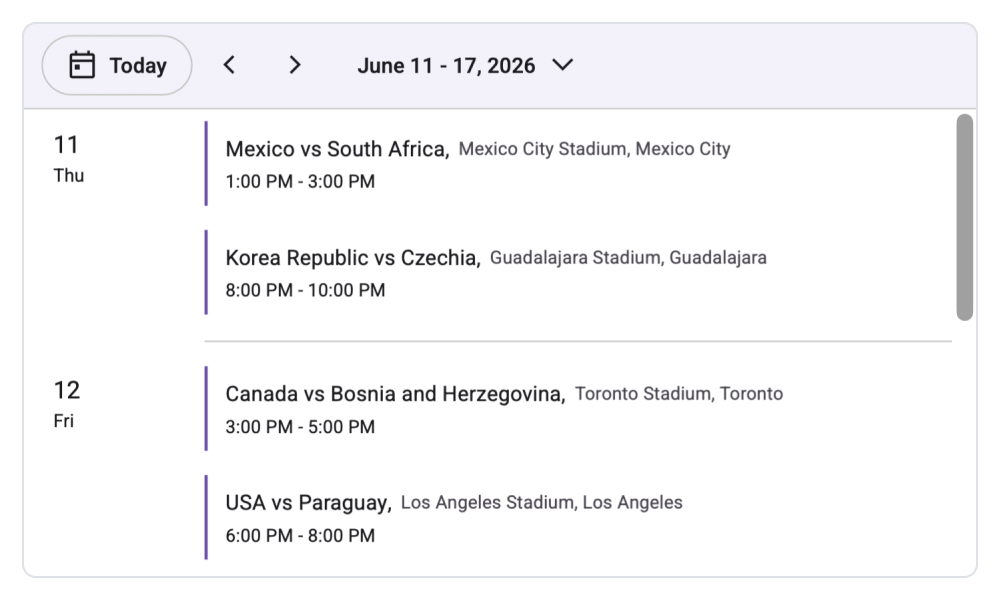
The new agenda view takes a different approach by presenting upcoming appointments as a clean, date-grouped list. Events are arranged chronologically, making it easy to scan what’s coming next without the visual complexity of a traditional calendar grid.
This view is especially useful when users care more about event details than calendar placement.
Designed for everyday scheduling
If you’ve built mobile scheduling screens before, you’ve likely encountered situations where a month or week view becomes cluttered. Agenda view solves that problem by prioritizing readability.
A healthcare application, for example, can display a doctor’s appointments for the day in a simple schedule. Likewise, a sales manager can quickly review meetings without navigating between multiple calendar views.
Why you’ll appreciate it
- Optimized for mobile screens and compact layouts.
- Displays upcoming events clearly with full details.
- Displays appointments in chronological order, grouped by date and sorted by time.
- Makes overlapping events easier to review.
- Supports configurable date ranges to view single or multiple days.
- Supports recurring events seamlessly.
- Includes full keyboard accessibility support.
Example
import { Scheduler, EventSettings, AgendaView } from '@syncfusion/react-scheduler';
import { fifaEventData } from './dataSource';
//Event data imported from the data source file.

export default function App() {
const eventSettings: EventSettings = { dataSource: fifaEventData };
  return (
    <div>
        <Scheduler
            defaultSelectedDate={new Date(2026, 5, 11)}
            eventSettings={eventSettings}
        >
            <AgendaView />
        </Scheduler>
    </div>
  );
}
Refer to the following image.
Schedule confidently across time zones
Time zones seem straightforward until users begin joining events from different regions. Hard-coded conversions and custom date calculations can quickly become difficult to maintain.
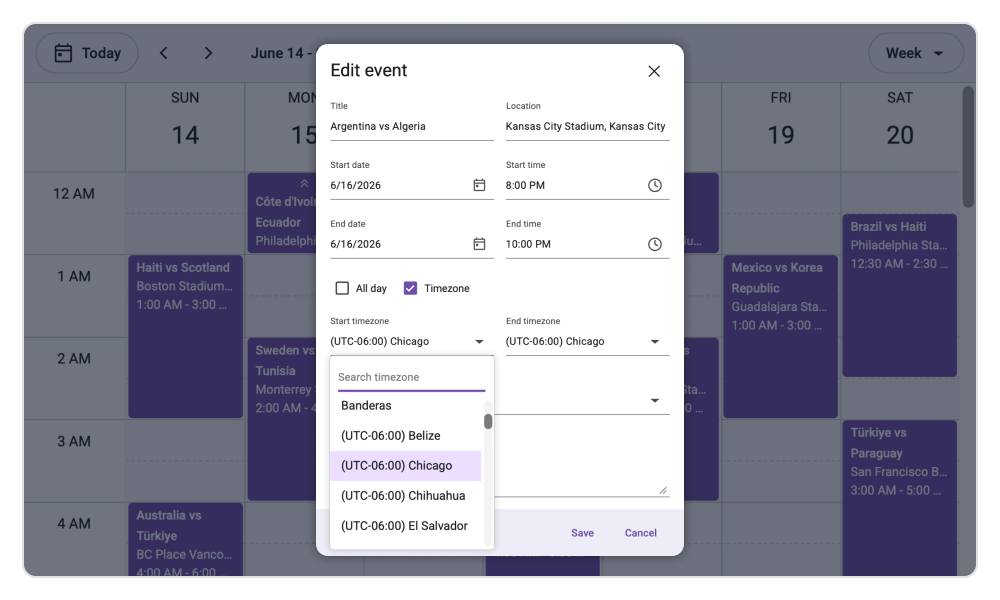
The Scheduler now supports both global scheduler-level time zones and appointment-specific time zones, ensuring events display accurately regardless of users’ locations.
Once configured, time conversions happen automatically, reducing the amount of custom logic developers need to implement.
A practical example
Imagine a product team scheduling a meeting from New York while participants join from London, Singapore, and Sydney. Each attendee sees the meeting in their local time without any manual conversion.
This removes one of the most common sources of scheduling mistakes in distributed teams.
What does this simplify?
- Automatically converts appointments between time zones.
- Displays accurate start and end times for users worldwide.
- Reduces scheduling confusion across regions.
- Supports both scheduler-wide and appointment-level configurations.
- Simplifies global application development.
Example
import { Scheduler, DayView, EventSettings, MonthView, WeekView } from '@syncfusion/react-scheduler';
import { fifaEventData } from './dataSource';

export default function App() {
    const timezone = 'UTC';
    const eventSettings: EventSettings = {
          dataSource: fifaEventData,
    };
  return (
   <div>
     <Scheduler
      defaultSelectedDate={new Date(2026, 5, 15)}
      eventSettings={eventSettings}
      timezone={timezone}
     >
      <DayView />
      <WeekView />
      <MonthView />
     </Scheduler>
    </div>
  );
}
Keep large schedules responsive with load-on-demand
As scheduling applications grow, performance can quickly become a challenge. Loading large volumes of appointments upfront increases payload size, slows rendering, and consumes unnecessary resources.
The new load-on-demand capability solves this by loading only the events needed for the currently visible date range. As users navigate between dates and views, the Scheduler fetches only the relevant data, keeping the experience fast and responsive.
Two ways to implement it
1. Manual data loading with onDataRequest
The onDataRequest event provides the active view’s start and end dates, allowing you to fetch and return only the events within that range.
2. Automatic loading with DataManager
The Syncfusion DataManager can automatically handle data requests during navigation, view changes, and CRUD actions. It sends the active date range to the server, enabling efficient server-side filtering.
Real-world use case
Consider a university scheduling system containing thousands of classes across multiple departments. Instead of loading the entire schedule, only the events for the current week or month are retrieved, helping the UI remain responsive as data grows.
Performance benefits
- Reduces API payload sizes.
- Improves rendering speed.
- Minimizes memory usage.
- Handles large datasets efficiently.
- Delivers a faster, more responsive user experience.
Example
import { WeekView, Scheduler, EventSettings } from '@syncfusion/react-scheduler';
import { DataManager, WebApiAdaptor } from '@syncfusion/react-data';

export default function App() {
        const data = new DataManager({
            url: 'https://ej2services.syncfusion.com/react/hotfix/api/schedule',
            adaptor: new WebApiAdaptor(),
            crossDomain: true
        });

        const eventSettings: EventSettings = {
            dataSource: data
        };
        return (
           <div>
            <Scheduler eventSettings={eventSettings}>
                <WeekView />
            </Scheduler>
           </div>
        );
}
Organize complex schedules with resource grouping
When managing schedules across multiple people, locations, departments, or assets, displaying everything in a single calendar can quickly become difficult to navigate.
Resource grouping helps organize events into structured views, making schedules easier to manage and understand.
The Scheduler now supports several grouping patterns:
- Hierarchical grouping (parent–child relationship)
Branch → Team → Employee: Ideal when resources naturally belong to a hierarchy.
- Sequential grouping (stacked structure)
Branch → Team: Useful when all branches share the same team structure.
- Date-first grouping
Date → Branch → Team → Employee: Helps users review schedules by day before exploring resource-specific details.
Managing complex schedules
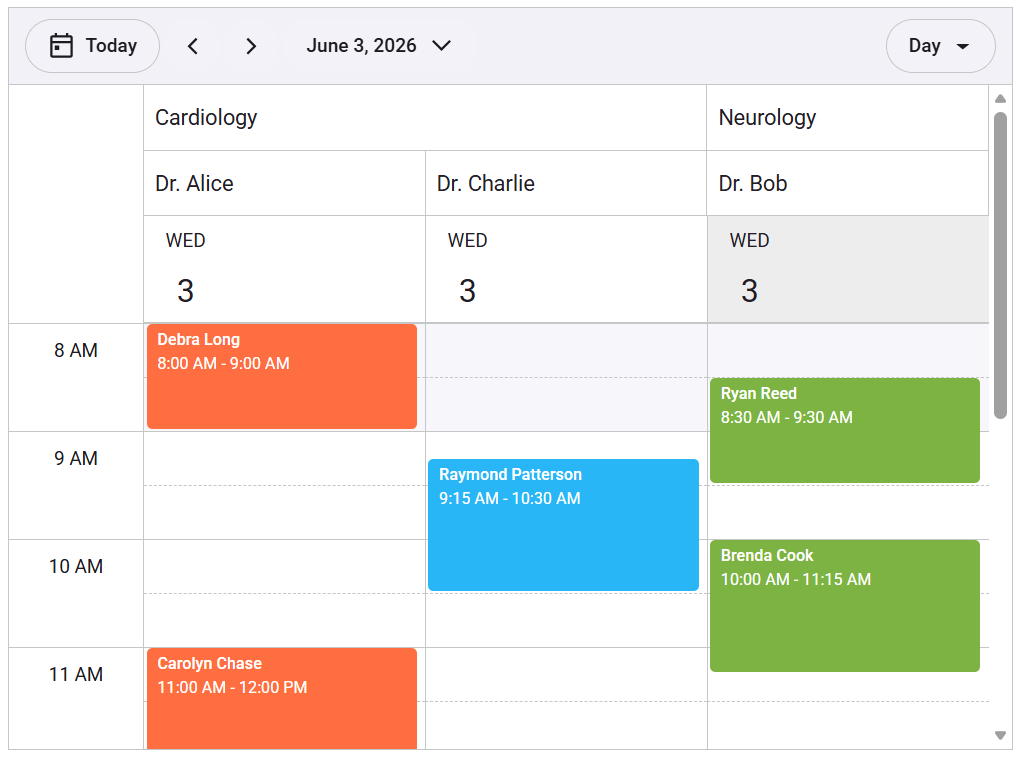
Consider a hospital scheduling system where appointments are organized by department and doctor. Administrators can quickly view availability, identify scheduling conflicts, and manage resource allocation without switching between multiple screens.
Why use resource grouping?
- Clearly associates events with resources.
- Simplifies resource availability tracking.
- Makes scheduling conflicts easier to identify.
- Helps prevent overlapping bookings.
- Reduces visual clutter in large schedules.
- Supports complex organizational structures with multiple levels.
Example
import { Scheduler, DayView, WeekView, MonthView, WorkWeekView, SchedulerResource, EventSettings } from '@syncfusion/react-scheduler';
import { multiLevelGroupingData } from './dataSource';

export default function App() {
    const eventSettings: EventSettings = {
        dataSource: multiLevelGroupingData,
    };
    const resources: SchedulerResource[] = [
        {
            name: 'Departments',
            dataSource: [
                { DepartmentText: 'Cardiology', Id: 1, DepartmentColor: '#e3165b' },
                { DepartmentText: 'Neurology', Id: 2, DepartmentColor: '#1aaa55' }
            ],
            field: 'DepartmentId',
            title: 'Department',
            textField: 'DepartmentText',
            idField: 'Id',
            colorField: 'DepartmentColor'
        },
        {
            name: 'Doctors',
            dataSource: [
                { DoctorText: 'Dr. Alice', Id: 1, GroupId: 1, DoctorColor: '#ff6e40' },
                { DoctorText: 'Dr. Bob', Id: 2, GroupId: 2, DoctorColor: '#7cb342' },
                { DoctorText: 'Dr. Charlie', Id: 3, GroupId: 1, DoctorColor: '#29b6f6' }
            ],
            field: 'DoctorId',
            title: 'Specialist',
            textField: 'DoctorText',
            idField: 'Id',
            groupIDField: 'GroupId',
            colorField: 'DoctorColor'
        }
    ];
    return (
        <div>
                <Scheduler
                    eventSettings={eventSettings}
                    resources={resources}
                    group={{
                        resources: ['Departments', 'Doctors']
                    }}
                    defaultSelectedDate={new Date(2026, 5, 3)}
                    startHour='08:00'
                    endHour='18:00'
                >
                    <DayView />
                    <MonthView />
                </Scheduler>
        </div>
    );
};
See the following output image for better understanding.
Modify future recurring events without affecting history
Recurring events are common in scheduling applications, but editing them has traditionally been an all-or-nothing decision.
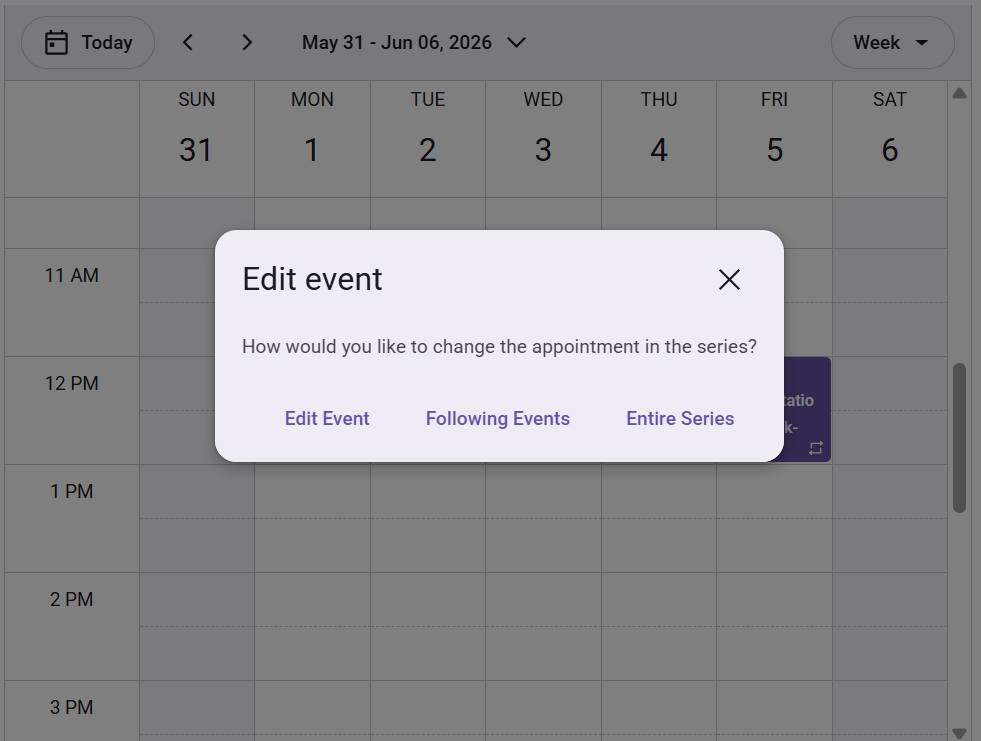
The new recurring events capability provides more flexibility by allowing users to modify the selected occurrence and all future occurrences while preserving earlier appointments.
When enabled, the Scheduler automatically splits the recurrence series into two linked sequences:
- Original series: Ends before the modified occurrence.
- New series: Starts from the selected occurrence. The new series stores a
followingIdthat references the original event ID, maintaining their relationship.
Why this matters
Suppose a weekly project meeting shifts from Thursday to Friday starting next month. Previous meetings should remain unchanged, while future occurrences should follow the new schedule.
Instead of manually recreating appointments, users can update the series from the desired occurrence onward.
Key benefits
- Preserves historical appointment records.
- Simplifies recurring event adjustments.
- Maintains relationships between split series.
- Supports realistic scheduling requirements.
- Reduces manual administrative effort.
Why these updates matter for real-world applications
The most interesting aspect of this release isn’t any single feature—it’s how they work together to solve common scheduling challenges.
Consider a healthcare platform:
- Doctors review appointments using Agenda View on mobile devices.
- Patients across regions see their appointment times automatically adjusted.
- Thousands of appointments load efficiently through on-demand fetching.
- Departments and specialists are organized through resource grouping.
- Follow-up appointments can be rescheduled without disrupting historical records.
These are the kinds of scenarios developers encounter every day, and they often require significant custom implementation effort. The new capabilities help reduce that complexity while keeping applications performant and maintainable.
Frequently Asked Questions
How can I migrate my existing React Scheduler to use Pure React Scheduler's agenda view without breaking other views?
Simply add <AgendaView/> as a child of the Scheduler component. The Scheduler supports switching multiple views simultaneously, so you can offer Agenda alongside Day, Week, or Month views.
Can agenda view be customized to match my application's design?
Yes. Agenda view supports templates and styling customization, making it easy to align with your application’s existing UI patterns.
What should I check if events do not appear when using load-on-demand?
Verify that your data retrieval logic correctly uses the provided startDate and endDate values and returns all events within the requested range. Log API responses to verify completeness.
When should I use load-on-demand instead of loading all appointments?
Use load-on-demand for large datasets or remote data sources. It fetches only the appointments required for the current view, improving performance and reducing load times. For smaller datasets, loading all appointments at once is usually sufficient.

Ready to simplify your most complex scheduling scenarios?
The hardest scheduling challenges rarely appear in the first version of an application. They emerge later when recurring events need exceptions, teams operate across time zones, resources grow, and event data starts scaling.
That’s where the latest Syncfusion Pure React Scheduler enhancements help. Rather than adding features for feature parity, this release focuses on solving real-world scheduling problems. From agenda view and resource grouping to time zone support, load-on-demand data fetching, and recurring event management, these features help developers build scheduling applications that are easier to scale and maintain.
If you’re an existing Syncfusion user, download the latest version from the License & Downloads page. New users can get started with a free 30-day trial.
Have questions or feedback? Connect with us through the support forum, support portal, or feedback portal. We’d love to hear how you’re using Pure React Scheduler in your applications.



 No spam, just valuable updates.