
 Yuvaraj Mohan
TL;DR: AI coding agents often consume thousands of tokens while scanning repositories, analyzing logs, and generating detailed responses. This article compares Headroom and Caveman, two open-source tools that reduce token usage from different directions. Learn how input compression, output optimization, and Syncfusion Code Studio integrations can help lower AI costs while maintaining productivity and development quality.
You start your day inside Syncfusion® Code Studio with a simple goal: review a pull request, investigate a bug, and ship a feature before lunch.
A few hours later, you’ve accomplished all three, but your AI usage dashboard tells a different story. Thousands of tokens spent. More credits burned than expected. And if you’re part of a team, somebody is already asking why AI costs seem to grow every month.
Two open-source projects, Headroom and Caveman, target this problem from opposite directions. But to understand why they work, it helps to know what is driving those costs in the first place.
Why AI coding costs rise so quickly
When developers think about token usage, they often focus on the prompt and the answer. In practice, a large share of cost comes from everything the model reads before it responds.
That often includes:
- Source files
- Build logs
- Error traces
- Tool output
- Previous conversation history
- Configuration files
- Generated diffs and pull request context
For small questions, token usage may stay modest. For repository-wide analysis, debugging sessions, security reviews, or multi-step agent workflows, token consumption can increase fast. That makes token optimization a real engineering concern for teams using AI every day.
Headroom vs Caveman at a glance
Although these tools are often mentioned together, they solve different problems.
| Area | Headroom | Caveman |
| Focus | Input tokens | Output tokens |
| Optimizes | Files, logs, JSON, conversation history | Assistant responses |
| Best For | Large-context workloads | Verbose assistant output |
| Installation Style | MCP integration | Agent skill |
| Data Processing | Compression before model reads | Response shortening after generation |
The simplest way to think about them is this:
- Headroom reduces what the model reads
- Caveman reduces what the model writes
For many Code Studio tasks, both costs appear in the same request. A repository audit, for example, may require the model to read hundreds of files and then produce a long report. That is where the two tools can work well together.
Note: Headroom and Caveman are independent open-source projects. Syncfusion Code Studio can integrate with them, but they are developed and maintained separately.
While the concept is straightforward, the real question for developers is how these tools fit into an actual Code Studio workflow.
Headroom: Reduce what the model reads
Most developers assume token costs come primarily from prompts and responses.
In reality, a large portion of usage often comes from context.
Before an AI coding agent generates a single line of output, it may read:
- Source code files
- Build logs
- Error traces
- Tool outputs
- Previous conversation history
- Configuration files
Headroom targets that part of the workflow.
It sits between your coding agent and the model, automatically compressing incoming context before it reaches the LLM. The system detects whether the content contains source code, JSON, logs, or plain text and applies compression techniques appropriate for that content type. Headroom is designed to keep the original information recoverable when needed.
For developers working with large repositories, verbose logs, or long-running agent sessions, reducing the number of input tokens can significantly reduce overall costs.
Typical use cases include:
- Full repository analysis
- Large debugging sessions
- Log investigation
- Security audits
- Agent workflows that process thousands of files
Curious about the technology behind Headroom’s compression pipeline? Explore the project documentation and implementation details on GitHub.
Caveman: Reduce what the model writes
While Headroom focuses on context, Caveman focuses on responses.
Many AI assistants are naturally verbose.
A simple answer often arrives wrapped inside paragraphs of introductions, caveats, and explanatory filler.
For example:
Standard response
You should wrap the object in useMemo because a new reference is created during every render cycle.
Caveman response
New reference every render. Wrap with useMemo. The recommendation remains identical. The difference is that it uses fewer tokens to deliver the same message.
Caveman accomplishes this by modifying the assistant’s communication style. It is designed to preserve code, commands, URLs, and error messages. Only surrounding prose is shortened.
This makes Caveman particularly useful for:
- Code reviews
- Architecture discussions
- Debugging sessions
- Refactoring guidance
- Repetitive developer conversations
Want to explore Caveman’s compression modes, slash commands, benchmarks, and installation options in more detail? Visit the project on GitHub.
A real Syncfusion Code Studio example
Consider a common request inside Syncfusion Code Studio:
Analyze this repository. Review all files, identify bugs, security issues, performance concerns, and code quality problems. Group findings by severity and recommend fixes.
This type of prompt is expensive because the agent performs two costly operations:
- Reads large amounts of source code.
- Produces a detailed report.
Without optimization, the repository audit produced the following results
| Measurement | Tokens |
| Input Tokens | 789,566 |
| Output Tokens | 61,005 |
These numbers represent the baseline experience without any token-optimization tools enabled. Large repositories, extensive logs, and detailed reports can quickly drive token consumption upward, making repository-wide audits one of the most expensive AI-assisted development tasks.
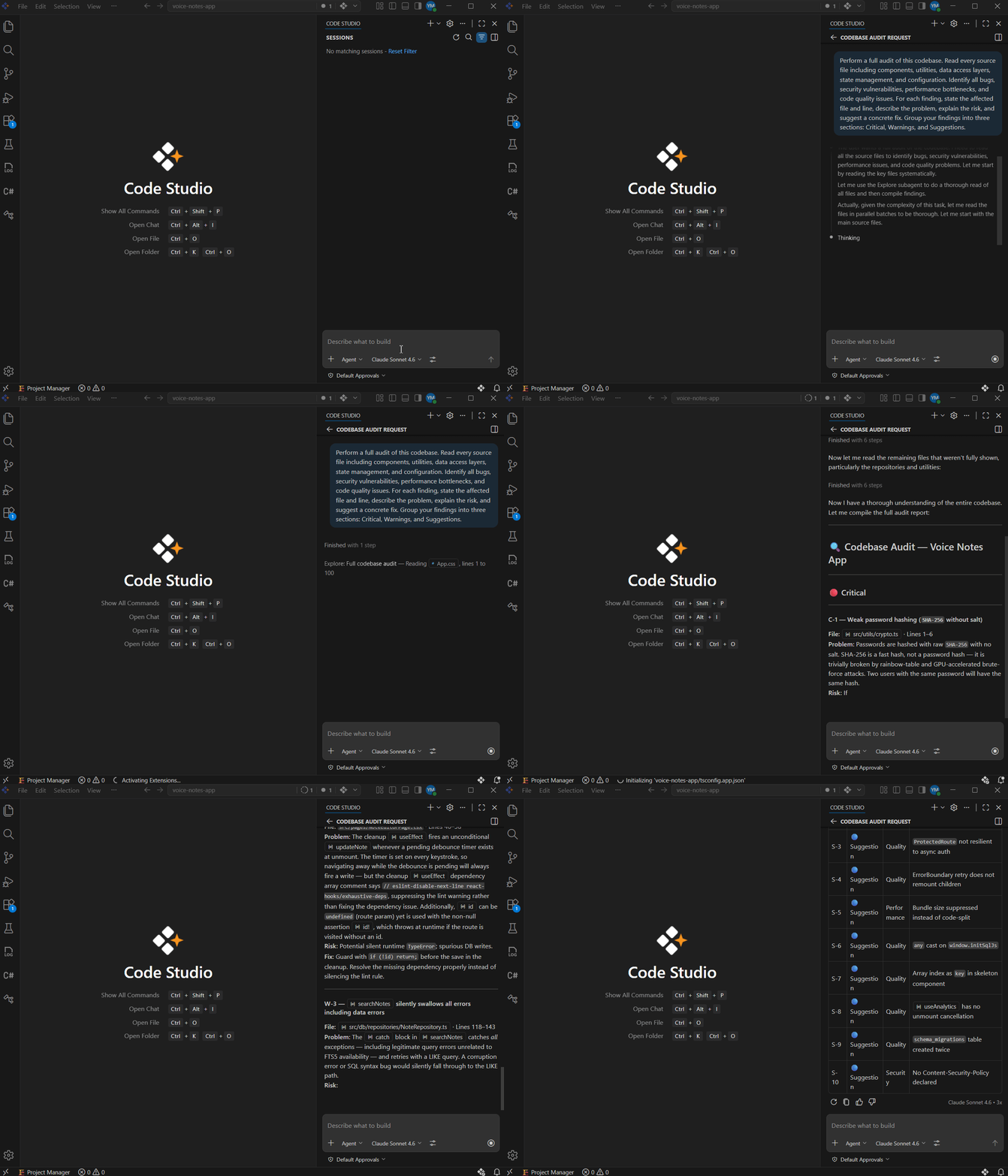
Now let us set up both tools in Syncfusion Code Studio.
Setting up both tools in Syncfusion Code Studio
One reason these projects have gained traction is that neither requires major workflow changes.
Installing Headroom in Code Studio
In Code Studio, Headroom works as an MCP server. This is the cleanest way to connect it because Code Studio picks it up automatically once the configuration file is in place.
Open a terminal and run:
pip install "headroom-ai[mcp]"In the root of your project, create a folder called .codestudio if it does not already exist. Inside that folder, create a file called mcp.json and paste this configuration:
{
    "servers": {
        "headroom": {
            "command": "headroom",
            "args": [
                "mcp",
                "serve"
            ]
        }
    }
}
This tells Code Studio where to find the Headroom MCP server and how to start it.
Enable Headroom in the Tools tab
Open Syncfusion Code Studio and navigate to the Tools tab. If Headroom appears in the list of available MCP tools, enable it by selecting the checkbox next to it.
To use Headroom, simply add a short instruction to your prompt, such as:
Use the Headroom MCP tool to compress the context and reduce token usage.
When configured correctly, the agent can route large context through Headroom before sending it to the model. This helps reduce input token consumption without requiring any changes to your workflow.
Installing Caveman in Code Studio
Caveman installs as a skill directly into Code Studio. One command handles everything.
Open a terminal and run:
npx skills add JuliusBrussee/caveman -a codestudioThe terminal will show a list of available skills. Select caveman from that list and confirm. The installer creates a file at .codestudio/skills/caveman/SKILL.md inside your project. That file is the skill definition that teaches your agent how to compress its replies.
Activate Caveman at the start of a session
At the beginning of any new chat session in Code Studio, type /caveman and press Enter. That slash command switches the agent into Caveman mode for the rest of that session. From that point on, every reply the agent writes comes back trimmed and direct. Code is never touched. Only the surrounding prose gets compressed.
That is the full setup. Headroom requires a small MCP configuration, while Caveman installs as a skill with a single command.
Note: You can add Code Studio instructions to automatically invoke both tools on every request, so you never have to activate them manually.
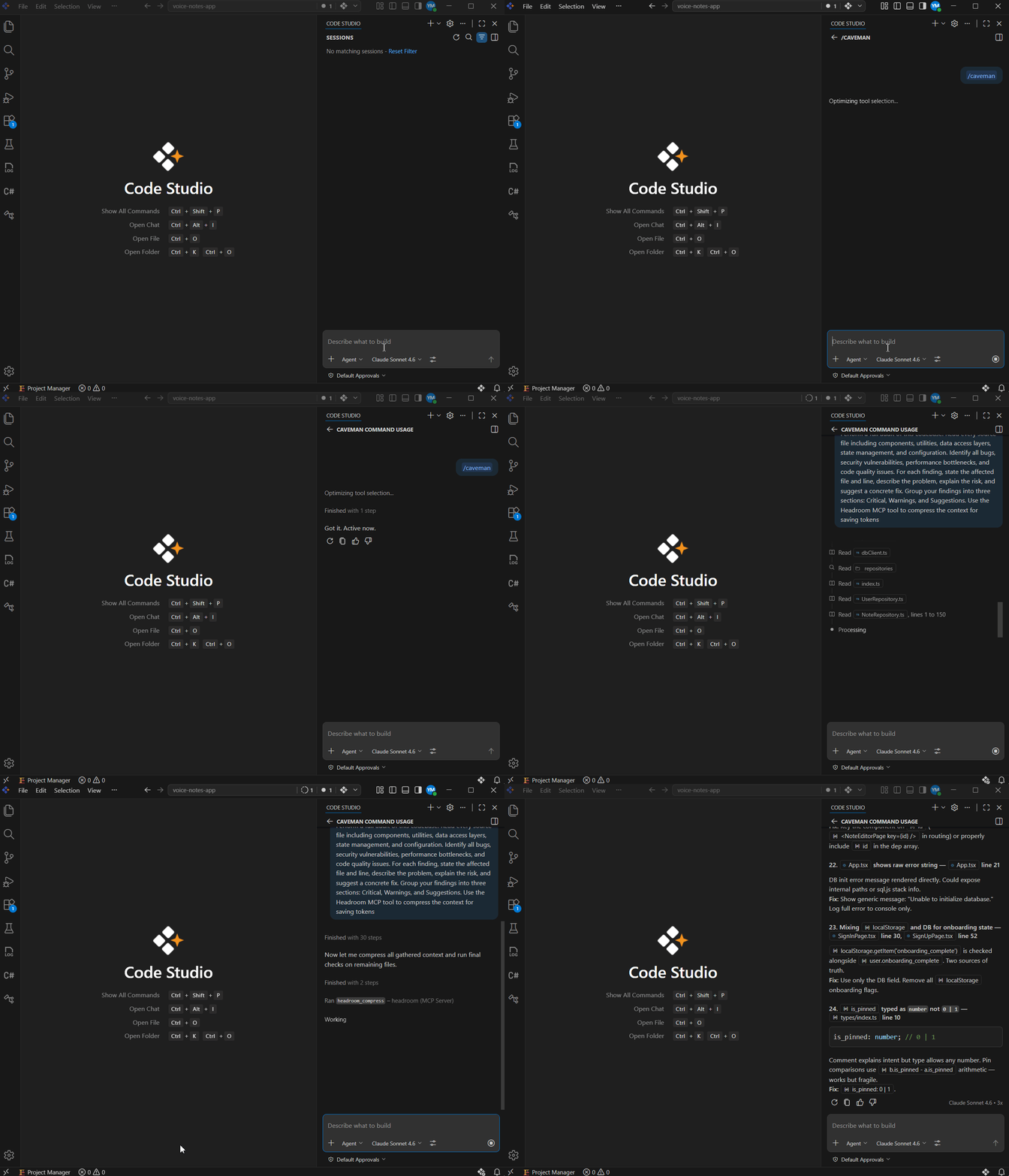
The same audit with both tools enabled
After enabling both tools, we ran the same repository audit again with the same prompt.
| Measurement | Without tools | With Headroom + Caveman | Approx. savings |
| Input tokens | 789,566 | 200,000 | ~75% |
| Output tokens | 61,005 | 7,395 | ~88% |
In this test scenario:
- Input token usage decreased by about 75%
- Output token usage decreased by about 88%
Those are substantial savings for a workflow that combines heavy repository context with a long report.
Test context
This test was run against the voice-notes-app project, which contained roughly 40 TypeScript and React files, using:
- Claude Sonnet 4.6
- Syncfusion Code Studio 2.0.5
- Headroom v0.27.0 in MCP mode
- Caveman in full mode
Token counts were read from the model usage logs reported through the Code Studio Enterprise server.
Important note on results
These results reflect one controlled repository-audit workflow. Actual savings will vary based on:
- Repository size
- File types
- Prompt style
- Model choice
- Response length
- Tool configuration
- Task complexity
In other words, the benchmark is useful as an example, not as a universal guarantee.
When should you use each tool?
Not every AI session needs optimization.
If you’re asking a quick question that touches only a few files, the overhead may not provide meaningful benefits.
However, the value becomes obvious in larger workflows.
Use Headroom when:
- Repositories are large
- Logs are lengthy
- Context windows are growing
- Agents spend significant time reading information
Use Caveman when:
- Responses are excessively detailed
- Teams perform many code reviews
- Debugging conversations become lengthy
- Assistant explanations consume thousands of tokens
Use Both when:
- Auditing repositories
- Refactoring large applications
- Reviewing complex pull requests
- Running long agentic workflows in Syncfusion Code Studio
Practical guidance for teams using Code Studio
If your team is adopting AI coding assistants more broadly, token reduction should be treated as part of workflow design, not just an afterthought.
A good starting approach is:
- Measure token-heavy workflows first
- Identify whether input or output is driving cost
- Apply Headroom to context-heavy tasks
- Apply Caveman to response-heavy tasks
- Use both for high-cost workflows such as audits and large reviews
- Re-check output quality after optimization
This keeps the focus on engineering value, not just token savings. Lower cost matters only if the workflow remains useful.
Frequently Asked Questions
Are Headroom and Caveman competitors?
No. They solve different problems. Headroom reduces input tokens by compressing context before it reaches the model. Caveman reduces output tokens by shortening the assistant’s prose. They can be used together in the same workflow.
Which one is likely to save more?
In many repository-scale and log-heavy workflows, Headroom may save more because input tokens often outweigh output tokens. In response-heavy conversations, Caveman can still make a meaningful difference. The answer depends on where your usage is concentrated.
Does Caveman affect generated code quality?
Caveman is designed to shorten surrounding prose, not rewrite code blocks. In practice, it is most useful when you want shorter explanations while preserving the technical content of the answer.
Does Headroom remove important information?
Headroom is designed to compress context rather than simply discard it. In practice, you should still validate results on your own workloads, especially for critical tasks such as security review or production debugging.
Are Headroom and Caveman free to use?
Both are open-source projects. You can integrate them into your workflow, but you should still review each project’s repository and license details before team-wide adoption.
Use AI agents to create implementation plans, generate production-ready code, automate repetitive tasks, and improve code quality across your projects.
Discover Code StudioFinal thoughts
As AI coding agents become part of everyday development, token usage is becoming a real engineering cost. The challenge is no longer just getting useful answers from a model. It is getting that value efficiently.
Headroom and Caveman approach the problem from different directions. Headroom reduces the amount of context flowing into the model. Caveman reduces the verbosity coming out. For teams using Syncfusion Code Studio, that makes them a practical pair for controlling cost in repository-heavy, response-heavy, and long-running AI workflows.
If your developers already rely on AI for code review, debugging, refactoring, and repository analysis, now is a good time to measure where your tokens go. In many cases, a small tooling change can reduce usage significantly without disrupting how developers work.
Ready to try it? Open Syncfusion Code Studio, install Headroom and Caveman, and see how much you can reduce token usage in your next AI-assisted development session.




 No spam, just valuable updates.