- Home
- Forum
- ASP.NET Core - EJ 2
- Computed value in pivot table
Computed value in pivot table
Dear community,
Is it possible to add a computed value, using pivot table data?
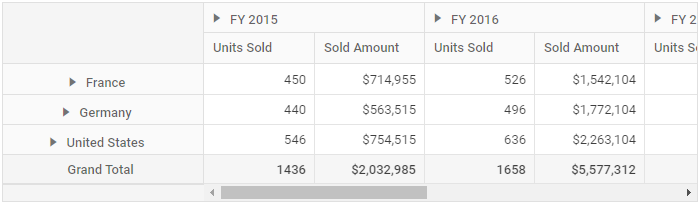
Assuming the following pivot table, how can I add in the pivot table, a new computed field, called Percentage,
which computes the percent increase for Units Sold in FY2015 vs Units Sold in FY2016?
@{
	List<PivotData> pivotData = new List<PivotData>();
    pivotData.Add(new PivotData { Sold = 31, Amount = 52824, Country = "France", Products = "Mountain Bikes", Year = "FY 2015", Quarter = "Q1" });
    pivotData.Add(new PivotData { Sold = 51, Amount = 86904, Country = "France", Products = "Mountain Bikes", Year = "FY 2015", Quarter = "Q2" });
    pivotData.Add(new PivotData { Sold = 90, Amount = 153360, Country = "France", Products = "Mountain Bikes", Year = "FY 2015", Quarter = "Q3" });
    pivotData.Add(new PivotData { Sold = 25, Amount = 42600, Country = "France", Products = "Mountain Bikes", Year = "FY 2015", Quarter = "Q4" });
    pivotData.Add(new PivotData { Sold = 27, Amount = 46008, Country = "France", Products = "Mountain Bikes", Year = "FY 2016", Quarter = "Q1" });
    pivotData.Add(new PivotData { Sold = 49, Amount = 83496, Country = "France", Products = "Mountain Bikes", Year = "FY 2016", Quarter = "Q2" });
    pivotData.Add(new PivotData { Sold = 95, Amount = 161880, Country = "France", Products = "Mountain Bikes", Year = "FY 2016", Quarter = "Q3" });
    pivotData.Add(new PivotData { Sold = 67, Amount = 114168, Country = "France", Products = "Mountain Bikes", Year = "FY 2016", Quarter = "Q4" });
    pivotData.Add(new PivotData { Sold = 75, Amount = 127800, Country = "France", Products = "Mountain Bikes", Year = "FY 2017", Quarter = "Q1" });
    pivotData.Add(new PivotData { Sold = 67, Amount = 114168, Country = "France", Products = "Mountain Bikes", Year = "FY 2017", Quarter = "Q2" });
    pivotData.Add(new PivotData { Sold = 69, Amount = 117576, Country = "France", Products = "Mountain Bikes", Year = "FY 2017", Quarter = "Q3" });
    pivotData.Add(new PivotData { Sold = 90, Amount = 153360, Country = "France", Products = "Mountain Bikes", Year = "FY 2017", Quarter = "Q4" });
    pivotData.Add(new PivotData { Sold = 16, Amount = 27264, Country = "France", Products = "Mountain Bikes", Year = "FY 2018", Quarter = "Q1" });
    pivotData.Add(new PivotData { Sold = 83, Amount = 124422, Country = "France", Products = "Road Bikes", Year = "FY 2015", Quarter = "Q1" });
    pivotData.Add(new PivotData { Sold = 57, Amount = 85448, Country = "France", Products = "Road Bikes", Year = "FY 2015", Quarter = "Q2" });
    pivotData.Add(new PivotData { Sold = 20, Amount = 29985, Country = "France", Products = "Road Bikes", Year = "FY 2015", Quarter = "Q3" });
    pivotData.Add(new PivotData { Sold = 67, Amount = 70008, Country = "France", Products = "Road Bikes", Year = "FY 2016", Quarter = "Q1" });
    pivotData.Add(new PivotData { Sold = 89, Amount = 60496, Country = "France", Products = "Road Bikes", Year = "FY 2016", Quarter = "Q2" });
    pivotData.Add(new PivotData { Sold = 75, Amount = 801880, Country = "France", Products = "Road Bikes", Year = "FY 2016", Quarter = "Q3" });
    pivotData.Add(new PivotData { Sold = 57, Amount = 204168, Country = "France", Products = "Road Bikes", Year = "FY 2016", Quarter = "Q4" });
    pivotData.Add(new PivotData { Sold = 75, Amount = 737800, Country = "France", Products = "Road Bikes", Year = "FY 2017", Quarter = "Q1" });
    pivotData.Add(new PivotData { Sold = 87, Amount = 884168, Country = "France", Products = "Road Bikes", Year = "FY 2017", Quarter = "Q2" });
    pivotData.Add(new PivotData { Sold = 39, Amount = 729576, Country = "France", Products = "Road Bikes", Year = "FY 2017", Quarter = "Q3" });
    pivotData.Add(new PivotData { Sold = 90, Amount = 38860, Country = "France", Products = "Road Bikes", Year = "FY 2017", Quarter = "Q4" });
    pivotData.Add(new PivotData { Sold = 93, Amount = 139412, Country = "France", Products = "Road Bikes", Year = "FY 2015", Quarter = "Q4" });
    pivotData.Add(new PivotData { Sold = 51, Amount = 92824, Country = "Germany", Products = "Mountain Bikes", Year = "FY 2015", Quarter = "Q1" });
    pivotData.Add(new PivotData { Sold = 61, Amount = 76904, Country = "Germany", Products = "Mountain Bikes", Year = "FY 2015", Quarter = "Q2" });
    pivotData.Add(new PivotData { Sold = 70, Amount = 43360, Country = "Germany", Products = "Mountain Bikes", Year = "FY 2015", Quarter = "Q3" });
    pivotData.Add(new PivotData { Sold = 85, Amount = 62600, Country = "Germany", Products = "Mountain Bikes", Year = "FY 2015", Quarter = "Q4" });
    pivotData.Add(new PivotData { Sold = 97, Amount = 86008, Country = "Germany", Products = "Mountain Bikes", Year = "FY 2016", Quarter = "Q1" });
    pivotData.Add(new PivotData { Sold = 69, Amount = 93496, Country = "Germany", Products = "Mountain Bikes", Year = "FY 2016", Quarter = "Q2" });
    pivotData.Add(new PivotData { Sold = 45, Amount = 301880, Country = "Germany", Products = "Mountain Bikes", Year = "FY 2016", Quarter = "Q3" });
    pivotData.Add(new PivotData { Sold = 77, Amount = 404168, Country = "Germany", Products = "Mountain Bikes", Year = "FY 2016", Quarter = "Q4" });
    pivotData.Add(new PivotData { Sold = 15, Amount = 137800, Country = "Germany", Products = "Mountain Bikes", Year = "FY 2017", Quarter = "Q1" });
    pivotData.Add(new PivotData { Sold = 37, Amount = 184168, Country = "Germany", Products = "Mountain Bikes", Year = "FY 2017", Quarter = "Q2" });
    pivotData.Add(new PivotData { Sold = 49, Amount = 89576, Country = "Germany", Products = "Mountain Bikes", Year = "FY 2017", Quarter = "Q3" });
    pivotData.Add(new PivotData { Sold = 40, Amount = 33360, Country = "Germany", Products = "Mountain Bikes", Year = "FY 2017", Quarter = "Q4" });
    pivotData.Add(new PivotData { Sold = 96, Amount = 77264, Country = "Germany", Products = "Mountain Bikes", Year = "FY 2018", Quarter = "Q1" });
    pivotData.Add(new PivotData { Sold = 23, Amount = 24422, Country = "Germany", Products = "Road Bikes", Year = "FY 2015", Quarter = "Q1" });
    pivotData.Add(new PivotData { Sold = 67, Amount = 75448, Country = "Germany", Products = "Road Bikes", Year = "FY 2015", Quarter = "Q2" });
    pivotData.Add(new PivotData { Sold = 70, Amount = 52345, Country = "Germany", Products = "Road Bikes", Year = "FY 2015", Quarter = "Q3" });
    pivotData.Add(new PivotData { Sold = 13, Amount = 135612, Country = "Germany", Products = "Road Bikes", Year = "FY 2015", Quarter = "Q4" });
    pivotData.Add(new PivotData { Sold = 57, Amount = 90008, Country = "Germany", Products = "Road Bikes", Year = "FY 2016", Quarter = "Q1" });
    pivotData.Add(new PivotData { Sold = 29, Amount = 90496, Country = "Germany", Products = "Road Bikes", Year = "FY 2016", Quarter = "Q2" });
    pivotData.Add(new PivotData { Sold = 45, Amount = 301880, Country = "Germany", Products = "Road Bikes", Year = "FY 2016", Quarter = "Q3" });
    pivotData.Add(new PivotData { Sold = 77, Amount = 404168, Country = "Germany", Products = "Road Bikes", Year = "FY 2016", Quarter = "Q4" });
    pivotData.Add(new PivotData { Sold = 15, Amount = 137800, Country = "Germany", Products = "Road Bikes", Year = "FY 2017", Quarter = "Q1" });
    pivotData.Add(new PivotData { Sold = 37, Amount = 184168, Country = "Germany", Products = "Road Bikes", Year = "FY 2017", Quarter = "Q2" });
    pivotData.Add(new PivotData { Sold = 99, Amount = 829576, Country = "Germany", Products = "Road Bikes", Year = "FY 2017", Quarter = "Q3" });
    pivotData.Add(new PivotData { Sold = 80, Amount = 38360, Country = "Germany", Products = "Road Bikes", Year = "FY 2017", Quarter = "Q4" });
    pivotData.Add(new PivotData { Sold = 91, Amount = 67824, Country = "United States", Products = "Mountain Bikes", Year = "FY 2015", Quarter = "Q1" });
    pivotData.Add(new PivotData { Sold = 81, Amount = 99904, Country = "United States", Products = "Mountain Bikes", Year = "FY 2015", Quarter = "Q2" });
    pivotData.Add(new PivotData { Sold = 70, Amount = 49360, Country = "United States", Products = "Mountain Bikes", Year = "FY 2015", Quarter = "Q3" });
    pivotData.Add(new PivotData { Sold = 65, Amount = 69600, Country = "United States", Products = "Mountain Bikes", Year = "FY 2015", Quarter = "Q4" });
    pivotData.Add(new PivotData { Sold = 57, Amount = 90008, Country = "United States", Products = "Mountain Bikes", Year = "FY 2016", Quarter = "Q1" });
    pivotData.Add(new PivotData { Sold = 29, Amount = 90496, Country = "United States", Products = "Mountain Bikes", Year = "FY 2016", Quarter = "Q2" });
    pivotData.Add(new PivotData { Sold = 85, Amount = 391880, Country = "United States", Products = "Mountain Bikes", Year = "FY 2016", Quarter = "Q3" });
    pivotData.Add(new PivotData { Sold = 97, Amount = 904168, Country = "United States", Products = "Mountain Bikes", Year = "FY 2016", Quarter = "Q4" });
    pivotData.Add(new PivotData { Sold = 85, Amount = 237800, Country = "United States", Products = "Mountain Bikes", Year = "FY 2017", Quarter = "Q1" });
    pivotData.Add(new PivotData { Sold = 77, Amount = 384168, Country = "United States", Products = "Mountain Bikes", Year = "FY 2017", Quarter = "Q2" });
    pivotData.Add(new PivotData { Sold = 99, Amount = 829576, Country = "United States", Products = "Mountain Bikes", Year = "FY 2017", Quarter = "Q3" });
    pivotData.Add(new PivotData { Sold = 80, Amount = 38360, Country = "United States", Products = "Mountain Bikes", Year = "FY 2017", Quarter = "Q4" });
    pivotData.Add(new PivotData { Sold = 76, Amount = 97264, Country = "United States", Products = "Mountain Bikes", Year = "FY 2018", Quarter = "Q1" });
    pivotData.Add(new PivotData { Sold = 53, Amount = 94422, Country = "United States", Products = "Road Bikes", Year = "FY 2015", Quarter = "Q1" });
    pivotData.Add(new PivotData { Sold = 90, Amount = 45448, Country = "United States", Products = "Road Bikes", Year = "FY 2015", Quarter = "Q2" });
    pivotData.Add(new PivotData { Sold = 29, Amount = 92345, Country = "United States", Products = "Road Bikes", Year = "FY 2015", Quarter = "Q3" });
    pivotData.Add(new PivotData { Sold = 67, Amount = 235612, Country = "United States", Products = "Road Bikes", Year = "FY 2015", Quarter = "Q4" });
    pivotData.Add(new PivotData { Sold = 97, Amount = 90008, Country = "United States", Products = "Road Bikes", Year = "FY 2016", Quarter = "Q1" });
    pivotData.Add(new PivotData { Sold = 79, Amount = 90496, Country = "United States", Products = "Road Bikes", Year = "FY 2016", Quarter = "Q2" });
    pivotData.Add(new PivotData { Sold = 95, Amount = 501880, Country = "United States", Products = "Road Bikes", Year = "FY 2016", Quarter = "Q3" });
    pivotData.Add(new PivotData { Sold = 97, Amount = 104168, Country = "United States", Products = "Road Bikes", Year = "FY 2016", Quarter = "Q4" });
    pivotData.Add(new PivotData { Sold = 95, Amount = 837800, Country = "United States", Products = "Road Bikes", Year = "FY 2017", Quarter = "Q1" });
    pivotData.Add(new PivotData { Sold = 87, Amount = 684168, Country = "United States", Products = "Road Bikes", Year = "FY 2017", Quarter = "Q2" });
    pivotData.Add(new PivotData { Sold = 109, Amount = 29576, Country = "United States", Products = "Road Bikes", Year = "FY 2017", Quarter = "Q3" });
}

<ejs-pivotview id="PivotView" height="300">
    <e-datasourcesettings dataSource="@pivotData" expandAll="false" enableSorting="true">
        <e-formatsettings>
            <e-field name="Amount" format="C0" useGrouping="true"></e-field>
        </e-formatsettings>
        <e-rows>
            <e-field name="Country"></e-field>
            <e-field name="Products"></e-field>
        </e-rows>
        <e-columns>
            <e-field name="Year" caption="Year"></e-field>
            <e-field name="Quarter"></e-field>
        </e-columns>
        <e-values>
            <e-field name="Sold" caption="Units Sold"></e-field>
            <e-field name="Amount" caption="Sold Amount"></e-field>
        </e-values>
    </e-datasourcesettings>
</ejs-pivotview>
Best regards
Hi Mihai,
We believe your requirement is to create a calculated field value to show the percentage increase between the current and the previous “Sold” values. If this is the case, we would like to inform you that each calculated field only supports only one formula and we able to get only the current cell information. However, you can create a calculated field with dummy or a simple formular and then use the enginePopulated event to perform your own calculation using the formula obtained from the pivot values of the previous and current cell information and display it in the pivot table. Please see the code example below.
Code Example:
|
<ejs-pivotview id="PivotView" enginePopulated="enginePopulated"> <e-datasourcesettings dataSource="@ViewBag.DataSource" expandAll="false" enableSorting="true"> <e-values> <e-field name="Sold" caption="Units Sold"></e-field> <e-field name="Amount" caption="Sold Amount"></e-field> <e-field name="Percentage" type="CalculatedField"></e-field> </e-values> <e-calculatedfieldsettings> <e-field name="Percentage" formula="@totalPrice"></e-field> </e-calculatedfieldsettings> </e-datasourcesettings> </ejs-pivotview> <script> var percentageIncrease = 0; function enginePopulated(args) { for (var i = 0; i < args.pivotValues.length; i++) { for (var j = 0; args.pivotValues[i] != null && j < args.pivotValues[i].length; j++) { if (args.pivotValues[i][j] != null && args.pivotValues[i][j].axis == 'value' && args.pivotValues[i][j].actualText == 'Sold' && args.pivotValues[i][j].columnHeaders != "FY 2015") { // Calculate the percentage increase for the current and the previous “sold” values. percentageIncrease = [(args.pivotValues[i][j].actualValue - args.pivotValues[i][j - 3].actualValue) / args.pivotValues[i][j - 3].actualValue] * 100; }
if (args.pivotValues[i][j] != null && args.pivotValues[i][j].axis == 'value' && args.pivotValues[i][j].actualText == 'Percentage') { // Assign the calculated percentage increase in the created calculated field. args.pivotValues[i][j].formattedText = percentageIncrease.toFixed(1) + '%'; percentageIncrease = 0; } } } } </script> |
Output screenshot:

Please see the below UG document for more information about enginePopulated event.
Document: https://ej2.syncfusion.com/javascript/documentation/pivotview/data-binding#enginepopulated
Meanwhile, we have prepared a sample for your reference. Please find it from the below attachment.
However, if this information differs from your requirements, provide more details, including screenshots/videos (if available), so that we can work towards fulfilling your requirements and providing details as soon as possible.
Please let us know if you have any concerns.
Regards,
Angelin Faith Sheeba.
Attachment: WebApplication2_248a3c4e.zip
Thank you very much for your reply. This is exactly what I was looking for.
Best regards,
Mihai
Hi Mihai,
Thanks for the update. Please contact us if you have any other queries. We are always happy to assist you.
Regards,
Angelin Faith Sheeba.

