- Home
- Forum
- Angular - EJ 2
- "Select all" checkbox doesn't emit event checkboxChange
"Select all" checkbox doesn't emit event checkboxChange
Hi, I am currently evaluating and testing your sample code of Checkbox column.
You can find modified sample here: https://stackblitz.com/edit/angular-ybvgpa
Clicking on checkbox in data rows does emit checkboxChange event, but clicking on checkbox in header row (aka Select all) doesn't.
What's the proper way to obtain checked rows after clicking the "select all" checkbox?
Thanks in advance
Damir
SIGN IN To post a reply.
6 Replies
DG
Damir Gabeljic
July 17, 2019 06:34 AM UTC
Moreover, is it possible to enable autoCheckHierarchy property in your Checkbox Selection sample?
Event after setting autoCheckHierarchy to true, clicking on parent checkbox doesn't change child's checkbox state or vice versa.
To be noticed, in this sample, clicking on checkbox in header row (aka Select all) does emit checkboxChange event.
Thanks in advance
Damir
MP
Manivannan Padmanaban
Syncfusion Team
July 17, 2019 07:16 AM UTC
Hi Damir,
Greetings from Syncfusion Support.
Checkbox selection
Checkbox Selection provides an option to select multiple TreeGrid records with help of checkbox in each row. To render checkbox in each treegrid row, you need to use checkbox column with type as CheckBoxusing column type property. In that using getSelectedRows and getSelectedRecords method, we can get the selectedrows and selected records respectively. Refer the below demo link for checkbox selection and help documentation links,
CheckboxColumn Selection
To render checkboxes in existing column, you need to set [columns.showCheckbox] property as true.
It is also possible to select the rows hierarchically using checkboxes in TreeGrid by enabling [autoCheckHierarchy] property. When we check on any parent record checkbox then the child record checkboxes will get checked.
In checkbox column selection, checkbox change event will trigger only for the data rows checkbox which is the default behavior of TreeGrid. Using getCheckedRecords method, we can get the checked row data. Refer the below sample link,
autoCheckHierarchy property is only for checkbox column we can’t use it for checkbox selection.
Kindly get back to us, if you need further assistance. We will be happy to assist you.
Regards,
Manivannan Padmanaban.
CheckboxColumn Selection
In checkbox column selection, checkbox change event will trigger only for the data rows checkbox which is the default behavior of TreeGrid. Using getCheckedRecords method, we can get the checked row data. Refer the below sample link,
thanks for clarification about CheckboxColumn Selection.
Now, the new problem is that inside checkboxchange event, getCheckedRecords() method returns incorrect data.
Instead of returning currently checked rows, it returns rows that were checked before event.
You can find modified sample here: https://stackblitz.com/edit/angular-ybvgpa-syt6ci?file=app.component.ts
The purpose is to sum some properties of the checked rows in real time, as soon as the checkboxes are clicked.
Delayed approach by clicking outside button is not an option.
Thanks in advance.
MP
Manivannan Padmanaban
Syncfusion Team
July 18, 2019 08:38 AM UTC
Hi Damir,
Thanks for the update.
Checkbox column – is used only for check the data not for selection.
In checkbox column, we have updated the checked rowData after the checkboxChange event. But from the shared code example, we could see that you have try to get the checked records in the checkbox change event itself. Due to this previously selected data is shown in the getCheckedRecords method.
If you want to get the checked records at the time of checkboxChange event, then we suggest you to get the checked records from the checkboxChange event parameter args. Refer the below screenshot,
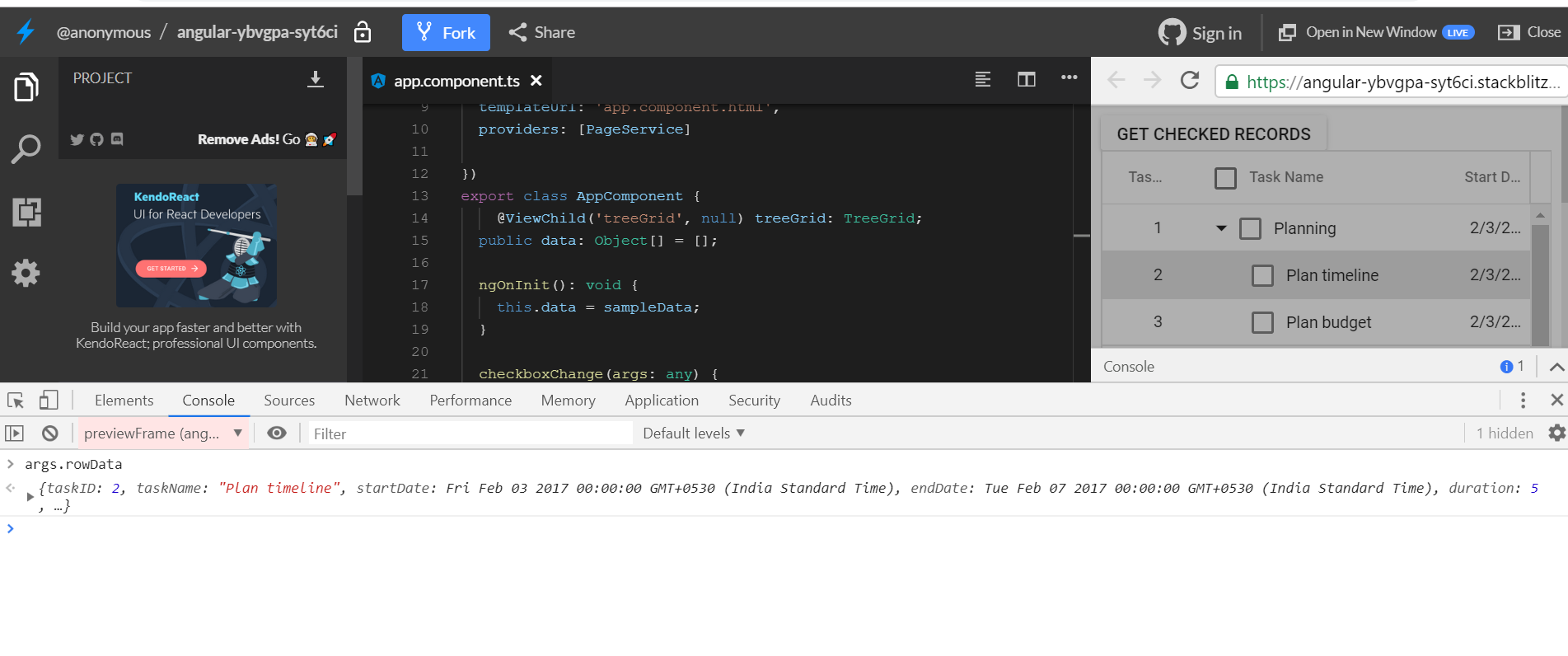
Query: Clicking on checkbox in data rows does emit checkboxChange event, but clicking on checkbox in header row (aka Select all) doesn't
We have validated the defect you have initiated with us. Thank you for the taking the time to report the issue and helping us improve our product. At Syncfusion we are committed to fixing all the validated defect (subject to technological feasibility and Product Development Life Cycle) and including its fix in our subsequent release. So fix for the issue will be included in our upcoming patch release which is expected to be rolled out in 29th July 2019.
You can track the current status of your request, by below feedback link.
Note: To view the above feedback, kindly login into your account.
Till then we appreciate your patience.
Regards,
Manivannan Padmanaban.
If you want to get the checked records at the time of checkboxChange event, then we suggest you to get the checked records from the checkboxChange event parameter args.
Hi Manivannan,
thanks for further clarification.
The problem is still present: even if I get the checked records from the checkboxChange event parameter args, their checkboxState is not actual, but it' s previous one.
As I can see, you trigger this event with current (previous) row data, check if it is cancelled, and only then proceed with modifications on the row (and it's relatives (parent and/or child)) respecting autoCheckHierarchy property of treegrid).
So, as checboxChange event is trigerred before the actual modifications happen, it's not possible to get current checkboxStates of the row and it's relatives.
One solution would be to have two events: checkboxChanging (with previous data and cancel property) and checkboxChanged (with new data).
Sorry if my suggestions are out of scope of this conversation.
Thanks in advance
Damir
MP
Manivannan Padmanaban
Syncfusion Team
July 19, 2019 01:34 PM UTC
Hi Damir,
Thanks for the update.
Query 1: So, as checboxChange event is trigerred before the actual modifications happen, it's not possible to get current checkboxStates of the row and it's relatives.
As you said, currently the checkboxChange event is triggered before the check state change. We consider this as bug and it will be logged in the below feedback link. So both fix will be included in our upcoming patch release which is expected to be rolled out in 29th July 2019.
You can track the current status of your request, by below feedback link.
Note: To view the above feedback, kindly login into your account.
Till then we appreciate your patience.
Regards,
Manivannan Padmanaban.
Regards,
Manivannan Padmanaban.
SIGN IN To post a reply.
- 6 Replies
- 2 Participants
-
DG Damir Gabeljic
- Jul 16, 2019 02:14 PM UTC
- Jul 19, 2019 01:34 PM UTC

