How can we allow the display of text enum?
hi,
An example Personage Type area enum type and number is kept in the database. PersonageType area available for selection is desired to be edited by opening dropdown. But it is not the number value during imaging, we provide how to display the text enum?
Best Regars
Irfan,
Attachment: EnumExample_b7e3df98.zip
SIGN IN To post a reply.
4 Replies
PK
Prasanna Kumar Viswanathan
Syncfusion Team
June 29, 2016 11:53 AM UTC
Hi Irfan,
Thanks for contacting Syncfusion support.
We created a sample in enum with Grid column control. In this sample, we have converted enum values to a list of objects.
Find the code example:
| public ActionResult GridFeatures() { ViewData["EmployeeID"] = EmployeeID; return View(); } public List<object> EmployeeID { get { var EmployeeID = new List<object>(); Array itemNames = System.Enum.GetNames(typeof(UnitOfMeasure)); foreach (String name in itemNames) { Int32 value = (Int32)Enum.Parse(typeof(UnitOfMeasure), name); ListItem listItem = new ListItem(name, value.ToString()); EmployeeID.Add(new { value = listItem.Value, text = listItem.Text }); } return EmployeeID; } } public enum UnitOfMeasure { Nr = 0, Kg = 1, g = 2, l = 3 } |
After converting the list of objects, we have bounded those values as a DataSource for the DropDown column.
| <script type="text/javascript"> var data = @(Html.Raw(Json.Encode(ViewData["EmployeeID"]))); $(function () { ----------------------------------------- allowPaging: true, editSettings: { allowEditing: true }, actionComplete : "complete", toolbarSettings: { showToolbar: true, toolbarItems: [ej.Grid.ToolBarItems.Add, ej.Grid.ToolBarItems.Edit, ej.Grid.ToolBarItems.Delete, ej.Grid.ToolBarItems.Update, ej.Grid.ToolBarItems.Cancel] }, columns: [ { field: "DropDown", headerText: "Drop Down", textAlign: "center", width: 110, editType: ej.Grid.EditingType.Dropdown, dataSource: data }, ---------------------------- ] }); }); </script> |
Regards,
Prasanna Kumar N.S.V
Hi Irfan,
Thanks for contacting Syncfusion support.We created a sample in enum with Grid column control. In this sample, we have converted enum values to a list of objects.Find the code example:
<script type="text/javascript">var data = @(Html.Raw(Json.Encode(ViewData["EmployeeID"])));$(function () {-----------------------------------------allowPaging: true,editSettings: { allowEditing: true },actionComplete : "complete",toolbarSettings: { showToolbar: true, toolbarItems: [ej.Grid.ToolBarItems.Add, ej.Grid.ToolBarItems.Edit, ej.Grid.ToolBarItems.Delete, ej.Grid.ToolBarItems.Update, ej.Grid.ToolBarItems.Cancel] },columns: [{ field: "DropDown", headerText: "Drop Down", textAlign: "center", width: 110, editType: ej.Grid.EditingType.Dropdown, dataSource: data },----------------------------]});});</script>
Regards,Prasanna Kumar N.S.V
Hi Prasanna,
Download and run the example you have given. There are similar problems also in this case. To better understand clearly the problem the first question we give out samples we expect a similar result in as attached picture.
Standart HTML.DropDown helper able to produce the result we want. As can be seen in the picture it should appear in the text of the line in the enum list. User selection via dropdown value should be set as 1-2 but the text should be displayed again .
Best Regars
Irfan,
Hi Irfan,
Thanks for contacting Syncfusion support.We created a sample in enum with Grid column control. In this sample, we have converted enum values to a list of objects.Find the code example:
<script type="text/javascript">var data = @(Html.Raw(Json.Encode(ViewData["EmployeeID"])));$(function () {-----------------------------------------allowPaging: true,editSettings: { allowEditing: true },actionComplete : "complete",toolbarSettings: { showToolbar: true, toolbarItems: [ej.Grid.ToolBarItems.Add, ej.Grid.ToolBarItems.Edit, ej.Grid.ToolBarItems.Delete, ej.Grid.ToolBarItems.Update, ej.Grid.ToolBarItems.Cancel] },columns: [{ field: "DropDown", headerText: "Drop Down", textAlign: "center", width: 110, editType: ej.Grid.EditingType.Dropdown, dataSource: data },----------------------------]});});</script>
Regards,Prasanna Kumar N.S.VHi Prasanna,Download and run the example you have given. There are similar problems also in this case. To better understand clearly the problem the first question we give out samples we expect a similar result in as attached picture.Standart HTML.DropDown helper able to produce the result we want. As can be seen in the picture it should appear in the text of the line in the enum list. User selection via dropdown value should be set as 1-2 but the text should be displayed again .
Best RegarsIrfan,
Hi Prasanna,
I forget upload sample picture. This reply contains picture.
Regards
Irfan,
Attachment: sample_f8a1e126.zip
PK
Prasanna Kumar Viswanathan
Syncfusion Team
July 4, 2016 06:10 AM UTC
Hi Irfan,
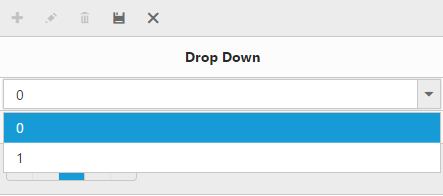
We have modified the sample as per the screenshot were we have displayed the text in the enum list. In dropdown, the value should be set as 1 and 2 and if we select the value then the text will be displayed again according to the value.
Find the screenshots and sample:
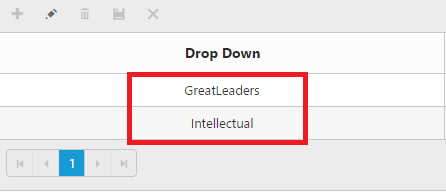
Dropdown values:
Regards,
Prasanna Kumar N.S.V
SIGN IN To post a reply.
- 4 Replies
- 2 Participants
-
IA Irfan Alkan
- Jun 28, 2016 06:30 AM UTC
- Jul 4, 2016 06:10 AM UTC

