Trusted by the world’s leading companies

Java Word Library overview
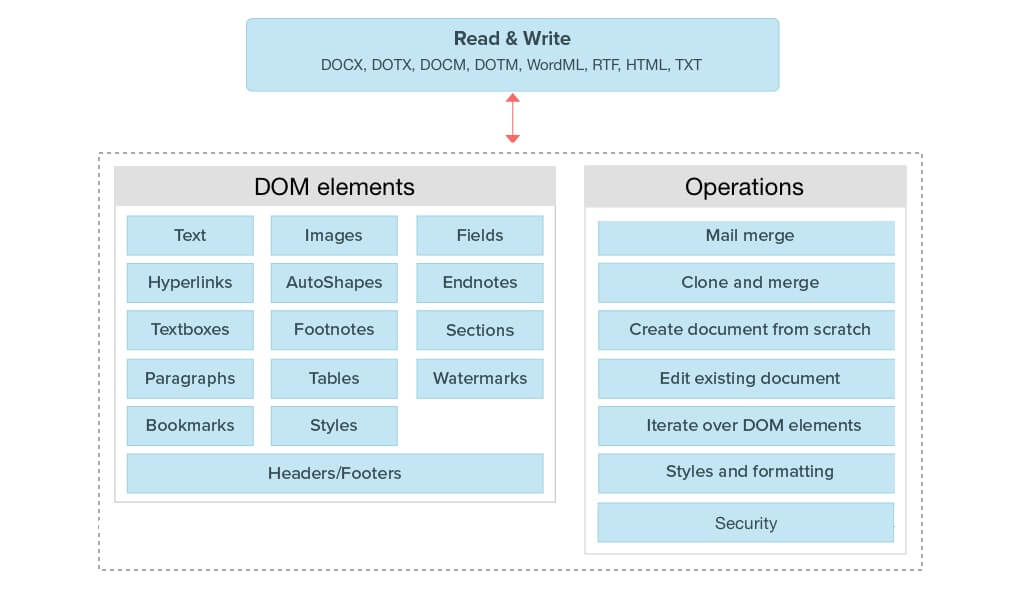
The Syncfusion Java Word Library is a feature-rich, high-performance library that allows you to add advanced Word document processing functionalities to any Java application. It allows you to create, read, and edit Word documents programmatically without Microsoft Office or interop dependencies. You to create complex reports by merging data from various data sources by using its powerful mail merge engine. The library also allows merging, splitting, organizing Word documents, and finding and replacing text with ease.
General information
Blazing fast performance
It is optimized for a server environment where speed and low memory usage are critical, Java Word Library works much faster and consumes less memory when compared to Office automation libraries.
No server deployment fees
There are no distribution fees, per-server licensing fees, or royalties, which makes Java Word Library very cost-effective.
Powerful and comprehensive APIs
All the elements of a typical Word document like text, formatting, images, tables, sections, headers, and footers are accessible through a comprehensive set of APIs. It only takes a few lines of code to create or manipulate richly formatted Word documents.
Supported file formats
Create, read and edit popular text file formats like DOCM, DOTM, DOCX, DOTX, HTML, TXT, RTF, and XML (WordML). Convert Word document to HTML and TEXT files.
Start reports with Word and finish with Word Library
Design reports using Microsoft Word and use Word Library to dynamically populate them with data. The final report can be saved to a Word file or exported to other supported formats.
Mail merge

Simple mail merge
Mail merge is a process of merging data from the data source with a Word document template to produce personalized documents. Multiple documents can also be created from a Word template.

Group mail merge
Perform mail merge by repeating a particular region of the document automatically for every record in the data source.
Nested mail merge
Generate complex reports by repeating nested regions, if you have two or more mail merge regions where one of them is inside the other in a hierarchical form, with relational data.
Data sources
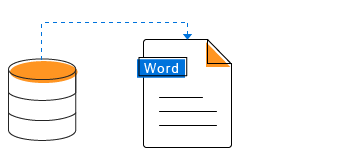
Populate the Word document template with data from common data sources.

Formatting
Format the merged text, numeric values and date-times automatically with the help of field switches.

Images
When the prefix “image:” is added to the merge field name, it replaces it with an image in the Java Word document.

Mail merge events
Customize the document during mail merge by formatting and editing the merged text, numeric and image data with mail merge events and change the layout of the document by inserting breaks.
Mail merge options
Supports options like mapping merge fields with fields in data sources, retrieving merge field names and removing merge fields that are not merged, empty paragraphs and empty groups.
For more information, check our Mail merge features.
Document elements
Section
Organize the document content with sections for grouping and start on a new page, odd page, even page, or continue on the same page.

Header and footer
Add information like title, author, branding and page number to repeat it at the top and bottom of every page. Supports header and footer types such as different first page, and different odd and even pages.

Text
Create or edit documents with different language texts. Supports left-to-right text and right-to-left text, also.

Images
Insert images in a document with all the common layout options like text wrapping, position, size and more. Supports image formats like PNG, BMP, JPEG, TIFF, GIF, EMF, WMF, SVG, etc.

Bookmarks
Create and insert bookmarks to identify a part of the document for future reference.
Hyperlinks
Create a link in a document for quick access of webpages, files, emails, bookmarks, and more.

Fields
Add dynamic information like title, time, etc., to a Word document automatically. Update IF field, date-time, document properties, and more.

Text boxes
Showcase important text or quotes in a document within a text box. Insert and edit text format, and remove an existing text box.

Shapes
Add predefined shapes in Word Open XML Format document (DOCX, DOTX, DOCM, DOTM, Word XML). Insert, edit, format and remove an existing shape.
Document properties
Read and write document information with built-in document properties. Also, supports custom document properties and document variables.
Formatting

Text formatting
Customize the appearance of the text with text-level formatting options like font family, size, style, underline, strikethrough, text color, highlight, subscript, superscript, etc.

Paragraph formatting
Customize the appearance of a paragraph with paragraph-level formatting options like indents, alignment, spacing, tab stops, text direction and more.
Bullets and numbering
Organize items or create an outline of a document with bullets and numbering ranging from a single level list to a multilevel lists.

Page settings
Design the structure and layout of document pages with properties like size, margins, orientation, columns, line numbers, borders, page background, watermarks, etc.

Styles
Create and apply styles to ensure consistency within a document. Supports predefined and custom character styles, paragraph styles and predefined table styles.
Tables
Create, insert and delete tables in a document. Supports nested table also.

Edit
Edit an existing table in a document like merging cells, adding or removing cells and rows, resizing cells, etc.

Format
Format a table with properties like indent, alignment, cell margins and spacing, borders, shadings, repeat header row, break row across pages, etc.

Styles
Give a polished look to tables by applying built-in styles and conditional styling options like first row, last row, banded rows, first column, last column, and banded columns.
Edit and organize
Copy and paste
Copy a part of a document and insert it in the same or a different document with formatting options like use destination styles, keep source formatting, etc.

Edit bookmark contents
Navigate to a bookmark in the document and insert, edit, retrieve, or delete its content. Also replace the bookmarked contents with text, a part of a document, or an entire document.
Merge
Merge multiple documents into a single document with several formatting options like use destination styles, keeping source formatting, etc.
Split
Split a document into multiple small documents based on sections, placeholder text, or any document element.
Design form
Create and insert content controls like plain text, rich text, pictures, checkboxes, combo boxes, dropdown lists, and date pickers in an Open XML Format Word document (DOCX, DOTX, DOCM, DOTM, Word XML). Group parts of a document with block content controls.
Security
Encrypt and decrypt Word documents
Encrypt a Word document with a password and open an encrypted Word document with a valid password.
Protect Word documents
Restrict edit permissions for specific contents in a Word document.
Form filling
Form fields
Create fillable forms with legacy form fields in Word documents for users to complete or print. Fill the form fields and extract data from the form fields effortlessly.
Content controls
Create more functional forms with content controls like plain text, rich text, pictures, checkboxes, combo boxes, dropdown lists, and date pickers in Open XML Format Word documents. Fill the forms and extract data from the content controls effortlessly.
Review

Comments
A comment is a note or annotation that an author or reviewer can add to a document. Also, edit and remove an existing comment from a document.
Accept and reject changes
Accept and reject changes that are tracked within a Word document.
Compare
Compare two Word documents and highlight the changes, such as insertions, deletions, and formatting, as tracked changes.
Feature matrix
| Document Content Features | WORD 2007-2019 | RTF |
|---|---|---|
| Create a Word document from scratch or edit an existing Word document |  |
|
| Open an existing Word document from file system or stream | |
|
| Save the Word document to file system, stream, or stream it to the client browser | |
|
| Create, access and modify paragraphs and text | |
|
| Create, access and modify tables, rows and cells | |
|
| Create, access and modify hyperlinks | |
|
| Create, access and modify bookmarks | |
|
| Access, create and modify document sections, headers and footers | |
|
| Iterate over document content | |
|
| Copy and move document elements between documents | |
|
| Merge multiple Word documents | |
|
| Create, access and modify fields | |
|
| Update fields such as IF and other popular field types | |
 |
| Support for inserting watermarks | |
|
| Create, access and modify comments | |
|
| Access and modify built-in document properties | |
|
| Access and modify custom document properties | |
|
| Encrypt documents and open password-protected documents | |
|
| Specify document protection to control the type of changes | |
|
| Create, access and modify form fields | |
|
| Create, access and modify structured document tags (content controls) | |
- |
| Accept or delete a particular revision or all the revisions in a document | |
|
| Support for inserting HTML text | |
|
| Mail Merge | WORD 2007-2019 | RTF |
|---|---|---|
| Create, access and modify merge fields | |
|
| Retrieve mail merge field names | |
|
| Insert images during mail merge | |
|
| Event handling during mail merge process to apply formatting | |
|
| Perform mail merge on documents that contain complex merge fields | |
|
| Perform mail merge for a specified region | |
|
| Perform mail merge on reports that contain relational details (parent-child data) | |
|
| Document Formatting | WORD 2007-2019 | RTF |
|---|---|---|
| Support for character formatting including font size, font color, font name, bold, italic, underline, etc. | |
|
| Support for paragraph formatting including line spacing, alignment, indentation, spacing before and after, keep follow, etc. | |
|
| Support for bulleted and numbered lists formatting including numbering and levels | |
|
| Support for table formatting including alignment, borders and shading | |
|
| Access and modify all section properties including paper size, margins, and orientation | |
|
| Access, create, and modify paragraph styles | |
|
| Support for applying predefined table styles | |
|
| Review | WORD 2007-2019 | RTF |
|---|---|---|
| Compare two Word documents | |
|
| Bookmarks | WORD 2007-2019 | RTF |
|---|---|---|
| Create and manipulate bookmarks | |
|
| Navigate to a specific bookmark | |
|
| Retrieve document contents between the specified bookmarks and merge to an existing or a new document | |
|
| Insert text or part of a document’s contents between the specified bookmarks | |
|
| Replace a document’s contents between the specified bookmarks with text or part of another document’s contents | |
|
| Delete document contents between the specified bookmarks | |
|
| Conversions | Read | Write | |
|---|---|---|---|
| Word 2007-2016 formats (*.docx, *.dotx, *.docm, *.dotm, *.xml) | |
|
|
| Word 2003 XML Document (*.xml) | |
|
|
| HTML | |
|
|
| Text | |
|
|
| RTF | |
|
Syncfusion Java Word Library Resources


Awards
Greatness—it’s one thing to say you have it, but it means more when others recognize it. Syncfusion® is proud to hold the following industry awards.









