JavaScript Excel Library
Introducing the new JavaScript Excel Library, a robust, feature-rich solution for creating, reading, and editing Microsoft Excel (.xlsx) workbooks programmatically. Built for both Node.js and browser environments, it provides a comprehensive workbook object model for precise manipulation of worksheets, cells, and data, without requiring Microsoft Excel or COM dependencies. Seamlessly integrate spreadsheet processing into React, Angular, JavaScript, Vue, and TypeScript applications to automate workflows and accelerate productivity.
Key features
- Create workbooks from scratch: Create Excel workbooks programmatically using an intuitive object model for better control and maintainability.
- Open, modify, and save: Load existing .xlsx files, update content, and save changes without Microsoft Excel installed.
- Workbook and worksheet management: Create and manage worksheets, named ranges, document properties, and frozen panes.
- Cell operations: Work with cell values, including strings, numbers, dates, formulas, and Booleans. Merge and unmerge cells, add hyperlinks, apply rich text formatting, and manage comments.
- Formatting and visual elements: Customize cell styles and conditional formatting. Create and edit text boxes, AutoShapes, and images.
- Data analysis and reporting: Create tables and charts and use sorting and filtering to organize and analyze data effectively.
- Data validation and protection: Apply data validation rules and protect worksheets and workbooks to maintain data integrity and security.
- Interactive spreadsheet elements: Create and manage form controls to build interactive and user-friendly spreadsheet solutions.

JavaScript PowerPoint Library
Introducing the new JavaScript PowerPoint Library, a powerful and lightweight solution for creating, reading, and editing Microsoft PowerPoint (.pptx) presentations programmatically. Built for both Node.js and browser environments, it provides a document object model for precise slide and content manipulation without requiring Microsoft Office or COM dependencies. Seamlessly integrate presentation processing into React, Angular, JavaScript, Vue, and TypeScript applications to accelerate document automation workflows.
Key features
- Create presentations from scratch: Create PowerPoint presentations programmatically using an intuitive object model for better control and maintainability.
- Open, modify, and save: Load existing .pptx files, update content, and save changes without Microsoft PowerPoint installed.
- Add and edit text: Add and customize text boxes and images, with comprehensive support for text styling and font formatting.
.NET Document Chunking Library
This new library allows users to prepare content for AI-powered applications such as retrieval-augmented generation (RAG), semantic search, knowledge retrieval, and intelligent chat experiences. It automatically segments large documents into context-aware chunks while preserving document structure and metadata, enabling accurate indexing, retrieval, and response generation.
It supports configurable chunking strategies and processes content from various document formats, including PDF, Word, Excel, PowerPoint, and Markdown, helping developers efficiently transform unstructured data into AI-ready content for modern search and generative AI workflows.
Common
Updated SkiaSharp dependencies
The .NET Libraries have been upgraded to use SkiaSharp v4.150.1 and SkiaSharp.HarfBuzz v4.150.1. This update improves rendering stability and includes the latest fixes and optimizations from the SkiaSharp library.
Production-ready JavaScript PDF Library
The JavaScript PDF Library has been enhanced to meet industry standards and is now production-ready.
- Create and edit PDF documents: Generate new PDFs and modify existing documents with comprehensive PDF processing capabilities.
- Document security: Protect PDF documents using encryption, passwords, permissions, and digital signatures.
- Advanced document manipulation: Merge, split, extract, append, and organize PDF pages programmatically.
- Form and annotation support: Create and work with PDF forms, annotations, bookmarks, and other interactive PDF elements.
This transition from preview to production reflects significant improvements in stability, performance, and quality, enabling developers to confidently build enterprise-grade PDF processing applications.
JavaScript PDF Library
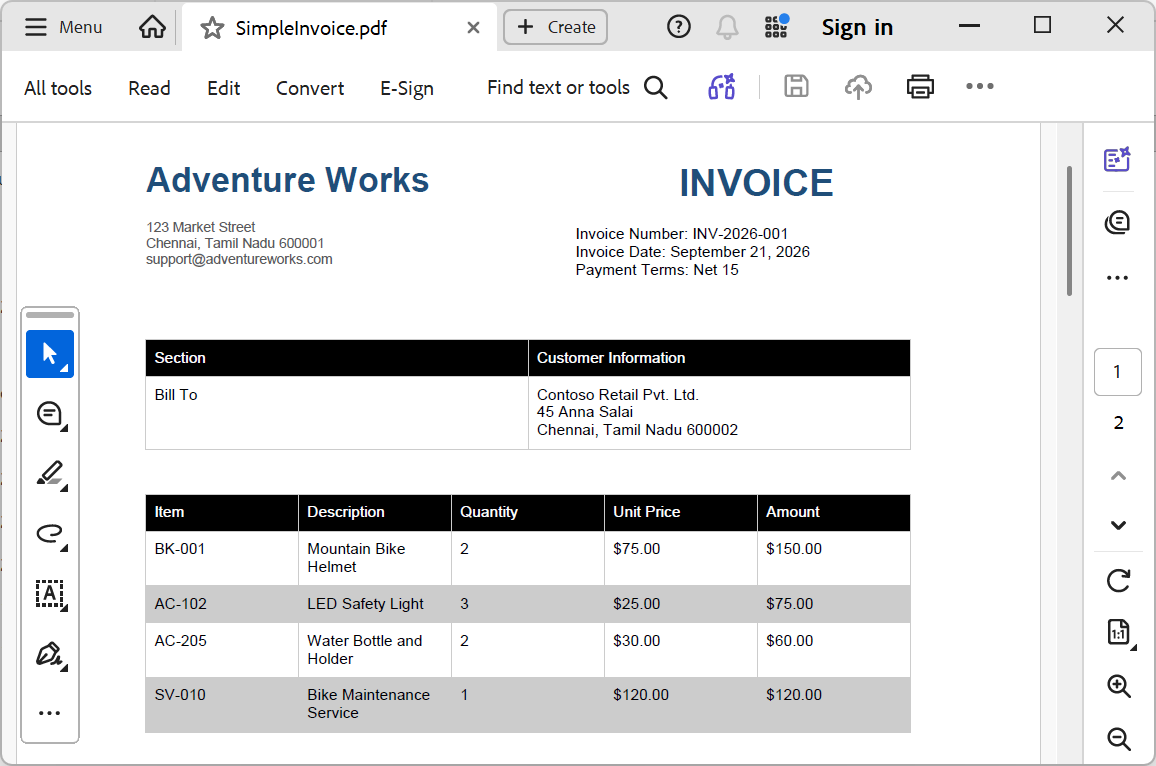
PdfGrid tables
Create and manage professional PDF tables programmatically. Generate tables from data sources, customize their appearance, and handle complex layouts with support for headers, custom column widths, row and column spanning, nested tables, and automatic pagination. Handle large datasets with built-in pagination that automatically flows content across multiple pages while repeating headers for clarity.
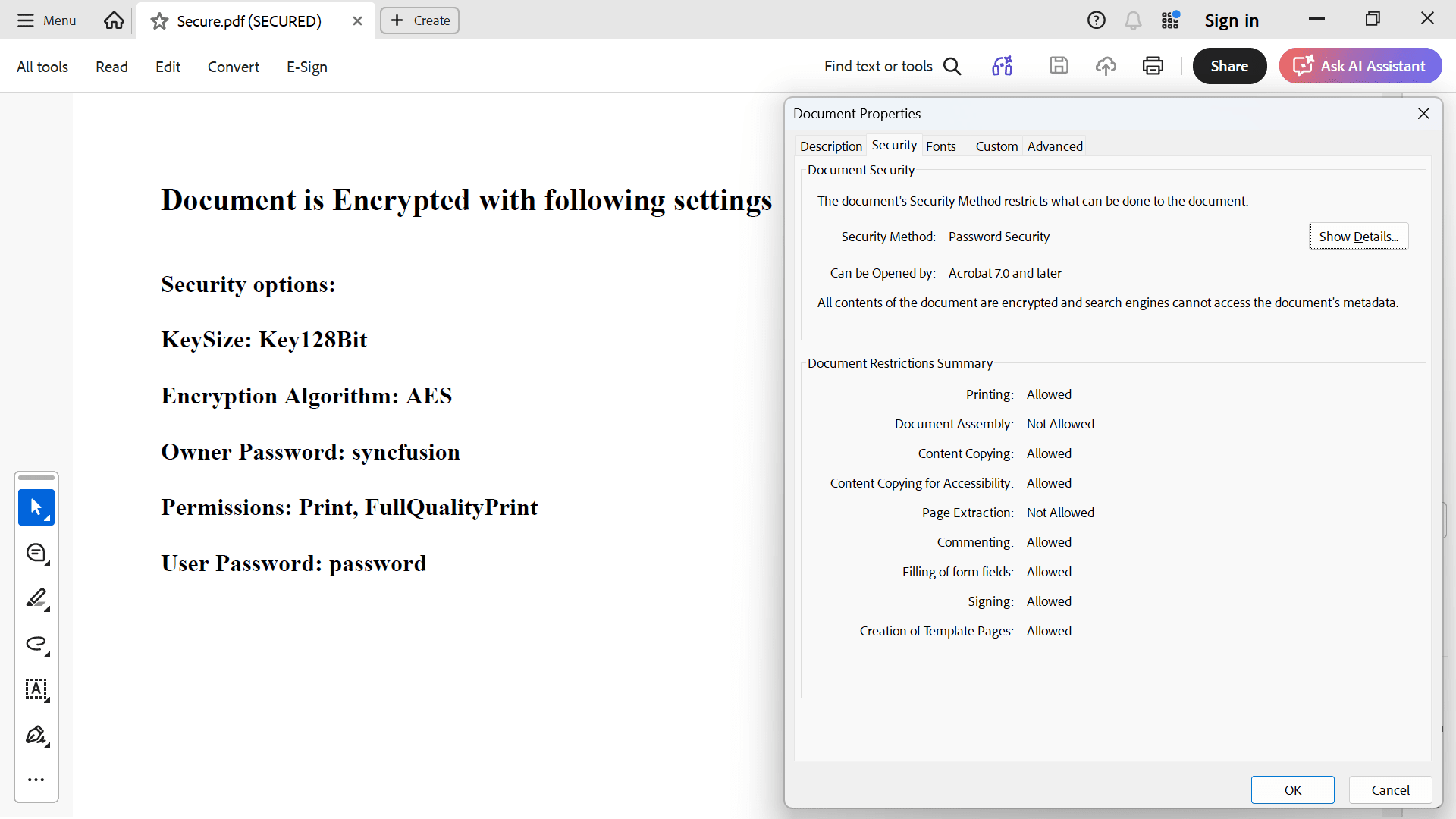
Encryption
Secure PDF documents using RC4 and AES encryption algorithms. Apply user and owner passwords and set permissions for operations such as printing, editing, copying content, filling form fields, and assembling documents. This is essential for maintaining document security and complying with data protection regulations.
Long-term validation (LTV)
Create PDF signatures with long-term validation support to ensure that signature authenticity can be verified even years after a document is signed. All required validation data, including certificate chains, revocation information, and timestamp details, are embedded directly within the signed PDF for future verification without relying on external services.
Use this feature for digitally signed contracts, invoices, compliance documents, and archival records that require long-term trust and regulatory compliance. LTV signatures help preserve signature validity over time, ensuring documents remain verifiable even after certificates expire or validation services become unavailable.
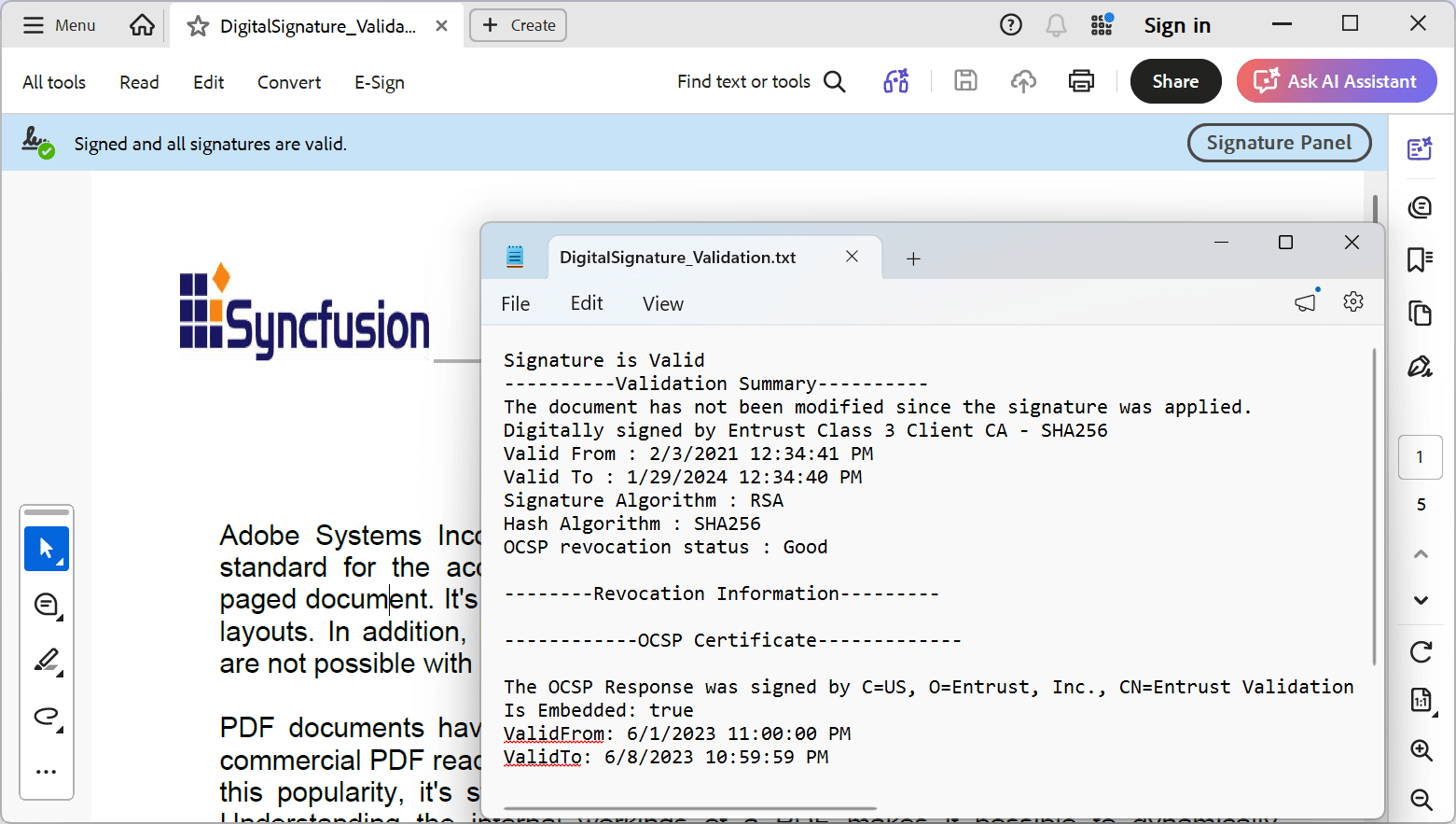
Digital signature validation
Validate digital signatures in PDF documents to verify document authenticity and integrity. The validation checks for document modifications, certificate chain validity, timestamp information, and certificate revocation status using OCSP and CRL.
Create secure document workflows that authenticate signatories, verify documents haven’t been tampered with after signing, and ensure compliance with digital signature standards. Support for multiple signatures enables comprehensive verification across complex document approval chains.
Find-text
Search for specific text in PDF documents and retrieve the location and bounding rectangles for each occurrence. The returned bounds can be used for operations such as highlighting, redaction, annotation, and document navigation.
Incorporate this feature into document processing workflows that require text extraction, content analysis, or visual markup of search results. It enables users to build intelligent PDF viewers, content management systems, and automated document workflows that need precise text localization.
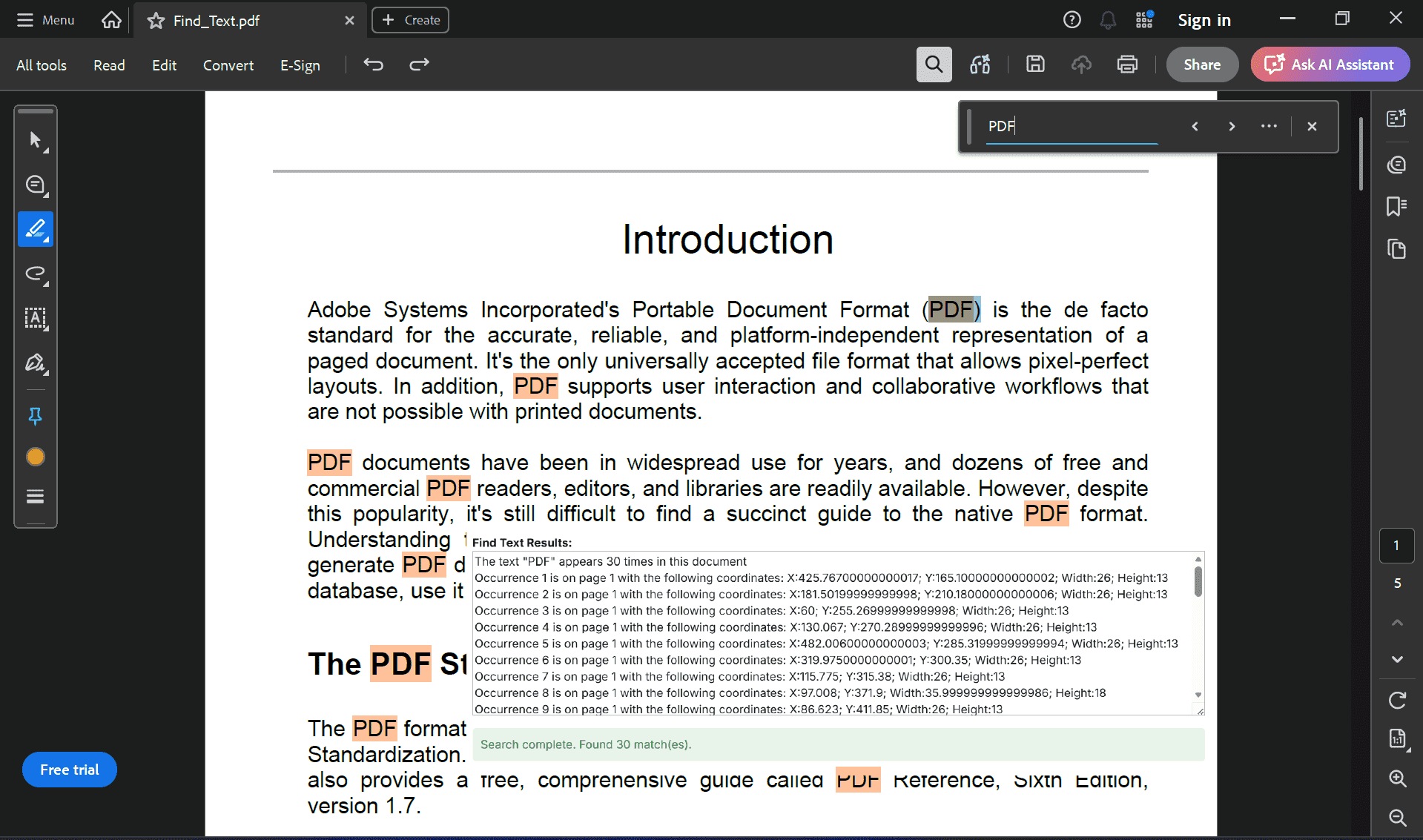
Image markers
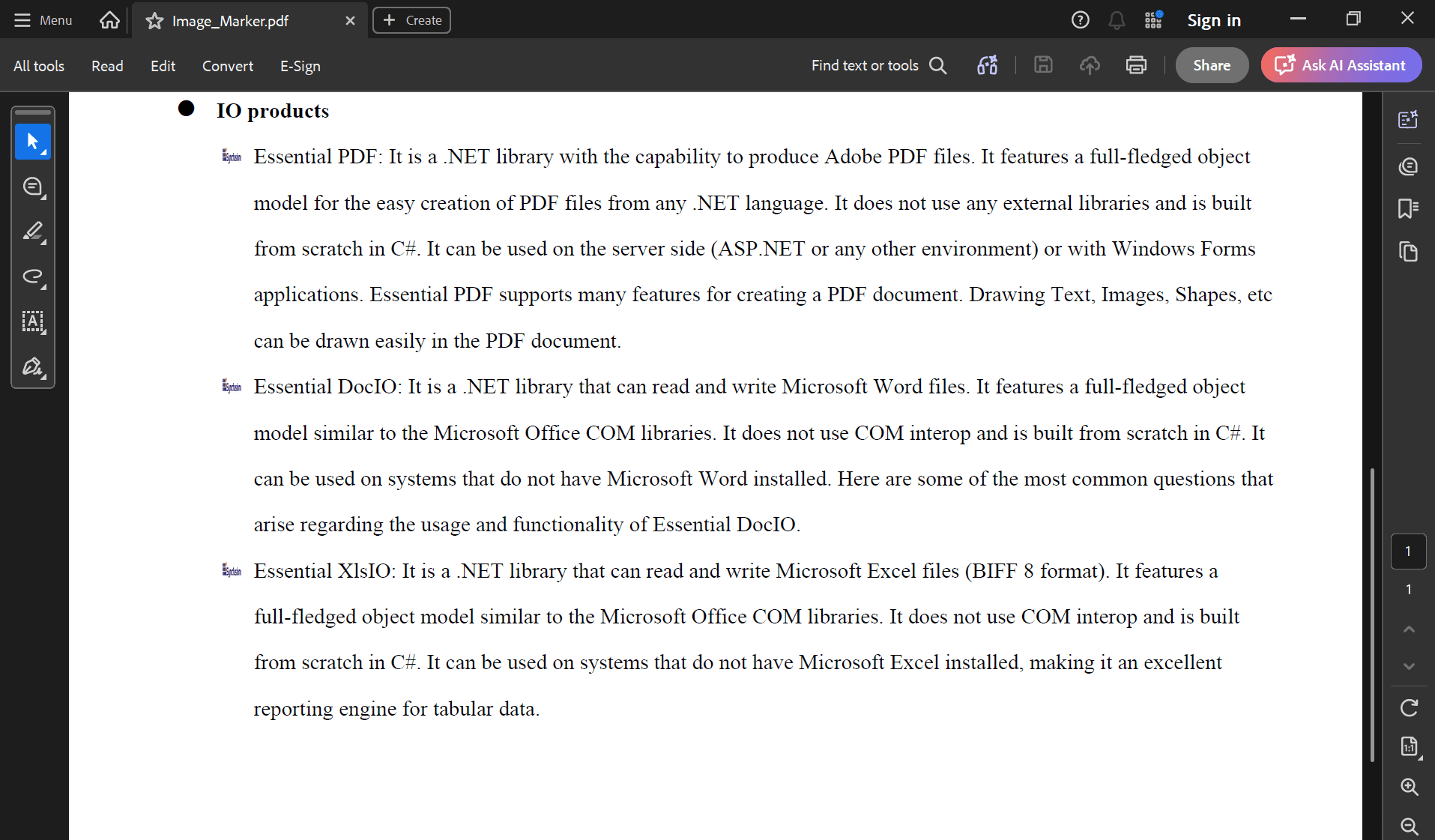
Use custom images as markers for unordered lists in PDF documents. Replace standard bullet points with brand icons, symbols, or decorative images to create visually distinctive and professional-looking lists. This feature lets users build flexible list formatting that goes beyond standard, text-based bullets and numbers.
Border effect
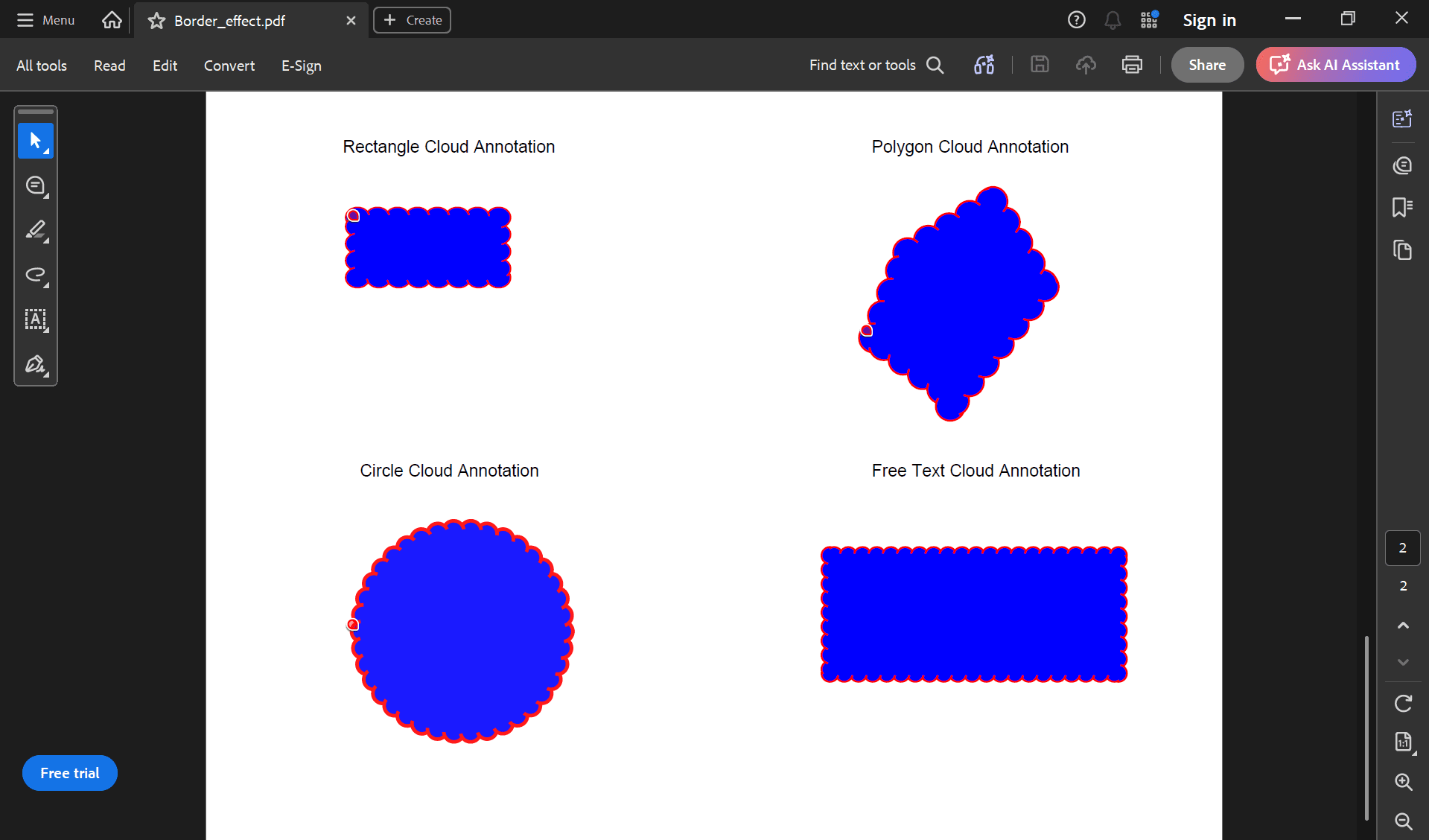
Apply cloud border styles to annotations (circle, ellipse, free text, rectangle, polygon) in PDF documents. Control the visual intensity of the cloud effect to create distinctive annotation appearances for highlighting, feedback, and markup workflows.
In document review workflows, collaborative editing, and visual annotation scenarios, cloud borders help distinguish special annotations or emphasize important content. This enhances the visual presentation of annotated PDFs, improving user experience and document clarity.
.NET PDF Library
SVG-to-PDF conversion
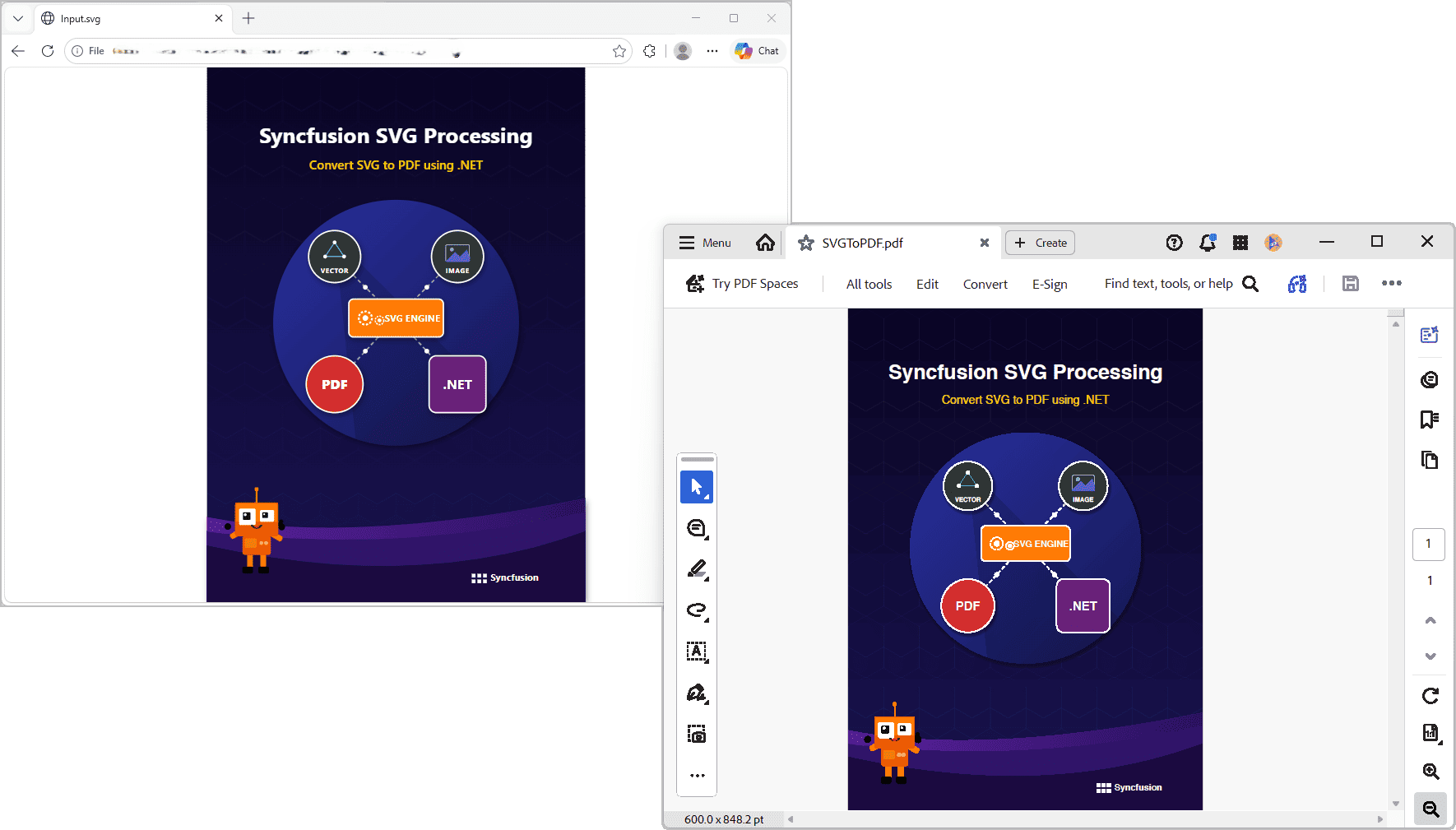
The Syncfusion .NET PDF Library now supports converting SVG files and graphics to PDF documents. This conversion preserves the scalability and visual quality of vector content, making it easier to include logos, diagrams, illustrations, and other SVG-based visuals in generated PDFs.
HTML-to-PDF conversion enhancement
The Blink binaries used in HTML-to-PDF conversion have been updated to version 151.0.7922.138, improving security by addressing known vulnerabilities and ensuring a safer conversion process.
.NET Excel Library
Preserve visual elements as images in Excel-to-Markdown conversion
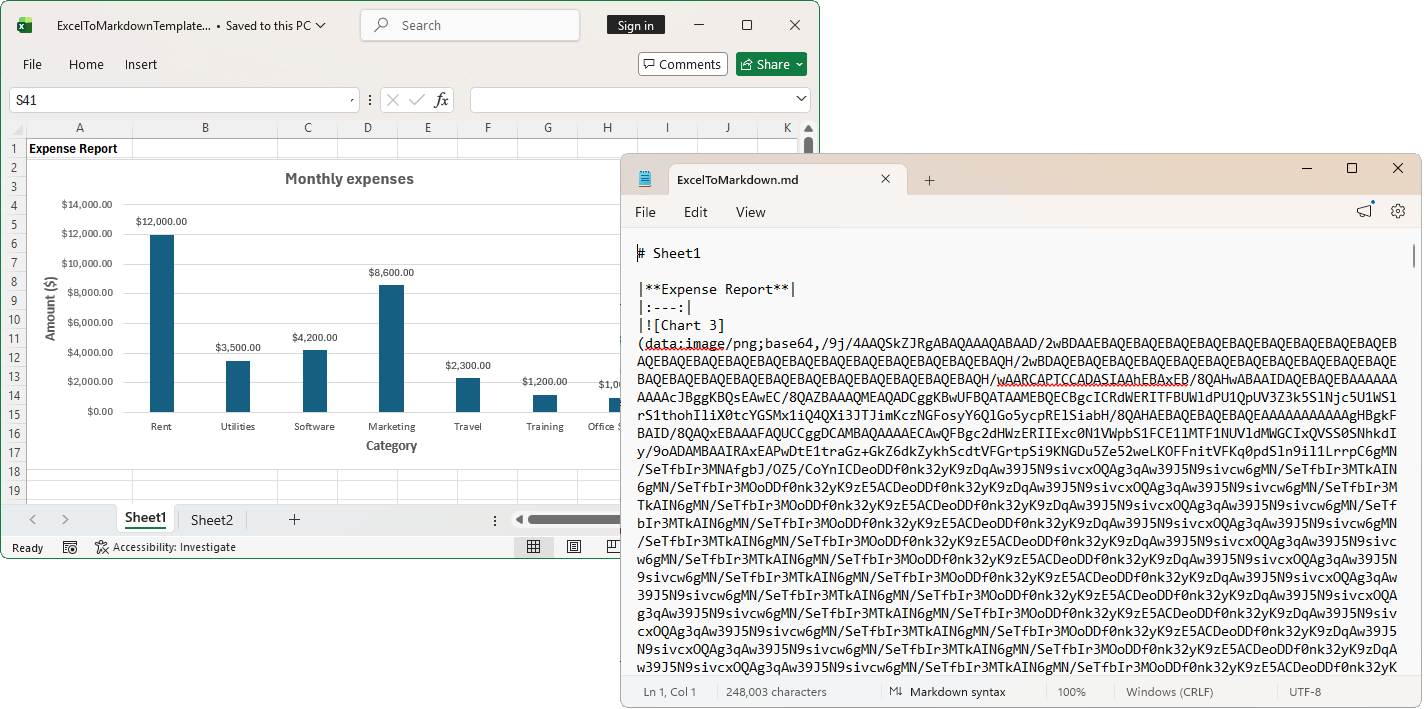
The .NET Excel Library preserves visual elements, including charts, shapes, grouped shapes, and text boxes, as images when converting Excel documents to Markdown. This ensures that visual content is retained and rendered accurately in the resulting Markdown.
Performance improvement
Adding data validation to Excel documents improved performance by more than 90%. This improvement significantly reduces processing time, particularly when applying data validation to large worksheets or extensive cell ranges.
| Data | Before | After |
|---|---|---|
| 100K rows x 50 columns | 32,000 ms | 122 ms |
Custom font registry for Excel to PDF and image conversion
Register custom fonts using the FontManager. This feature provides a private font repository within the library, similar to the Windows Fonts directory (C:\Windows\Fonts), enabling applications to register and manage fonts without installing them on the host system.
Users can load font streams during application startup, such as in the Startup.cs file of an ASP.NET Core application, ensuring that custom fonts are readily available for document conversions. This enables consistent font usage across environments and simplifies deployment when system font availability cannot be guaranteed.
Support SVG images during Excel to PDF conversion
SVG (Scalable Vector Graphics) images are now fully supported in Excel-to-PDF conversion. This enhancement ensures that SVG images embedded in Excel documents are accurately rendered and preserved in the resulting PDF, maintaining their original visual quality, scalability, and appearance.
Explore Demos: Excel to PDF
Different first page header and footer in Excel to PDF conversions
This enhancement ensures that headers and footers configured for the first page in Excel are accurately rendered and preserved in the resulting PDF, maintaining the intended document layout, branding, and formatting consistency while distinguishing the first page from subsequent pages.
Explore demos: Excel to PDF
.NET Word Library
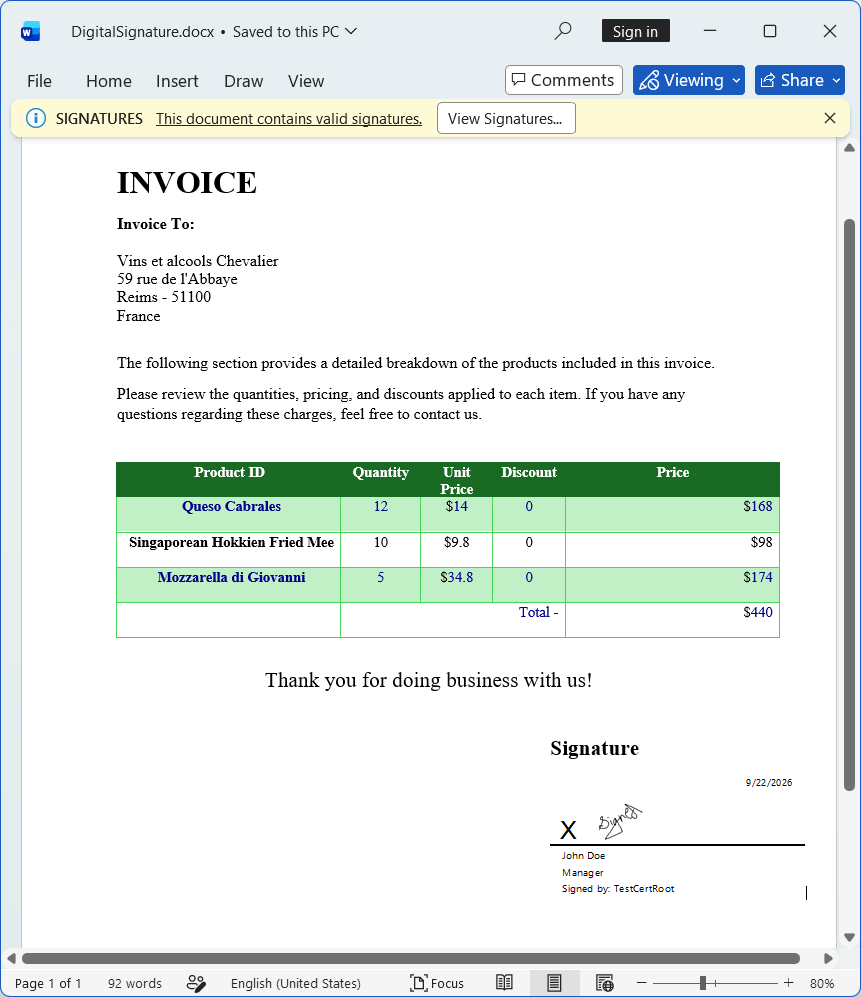
Digital signatures in DOCX documents
Users can create, validate, and preserve digital signatures in DOCX documents. This helps organizations ensure document authenticity, integrity, and non-repudiation through industry-standard certificates. This feature is valuable for enterprise, legal, and regulatory scenarios requiring secure, verifiable document processing.
Embed fonts when saving as DOCX document
The .NET Word library supports embedding fonts when saving DOCX documents. By enabling the EmbedFonts option in SaveOptions, TrueType and OpenType fonts used in the document are embedded in the output DOCX file. This preserves the document’s appearance across different systems, even when the required fonts are not installed.
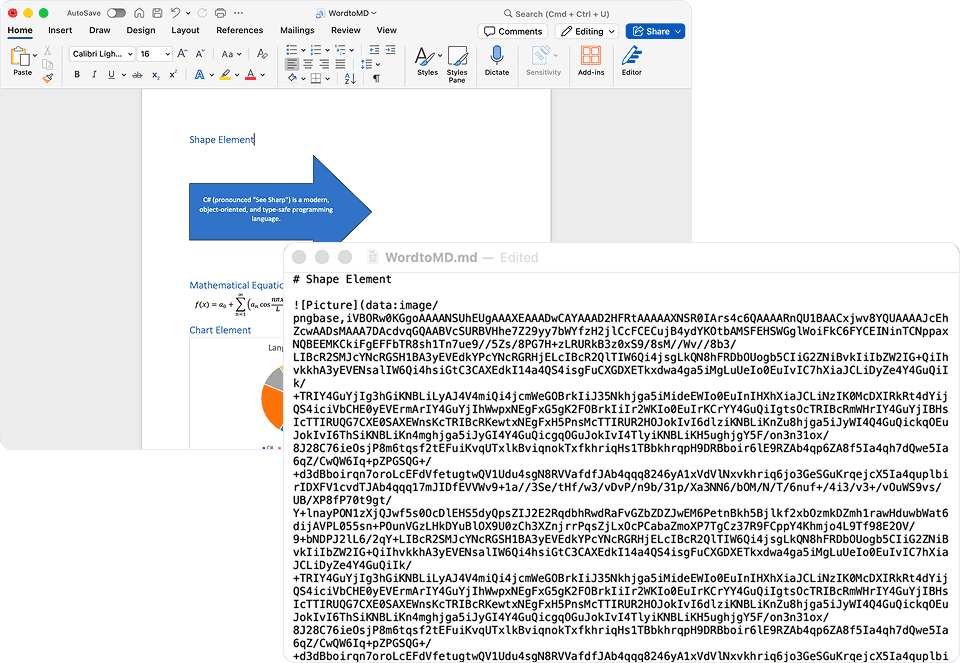
Preserve visual elements as images in Word-to-Markdown conversion
Visual elements such as shapes, charts, drawing canvas objects, ink annotations, MathML equations, text boxes, group shapes, and SmartArt are converted to images when Word documents are converted to Markdown. This ensures that visual content is retained and rendered accurately in the resulting Markdown.
Custom font registry for Word to PDF and image conversion
The .NET Word library supports registering custom fonts through the FontManager class. This feature provides a private font repository within the library, similar to the Windows Fonts directory (C:\Windows\Fonts), allowing applications to register and manage fonts without requiring installation on the host system.
Users can load font streams during application startup, such as in the Startup.cs file of an ASP.NET Core application, ensuring that custom fonts are readily available for document conversions. This enables consistent font usage across environments and simplifies deployment scenarios where system font availability cannot be guaranteed.
Support SVG images during Word to PDF conversion
SVG (Scalable Vector Graphics) images are fully supported in Word-to-PDF conversion. This enhancement ensures that SVG images embedded in Word documents are accurately rendered and preserved in the resulting PDF, maintaining their original visual quality, scalability, and appearance.
.NET PowerPoint Library
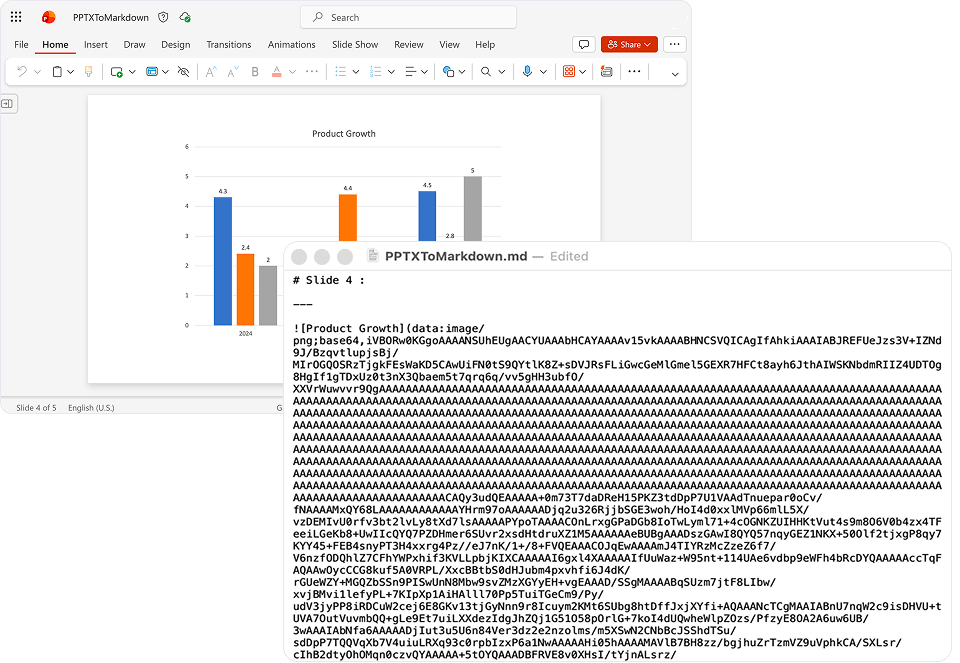
Preserve visual elements as images in Presentation-to-Markdown conversion
The .NET PowerPoint library now preserves visual elements such as charts, group shapes, OLE objects, and SmartArt as images when converting Presentation documents to Markdown. This ensures that visual content is retained and rendered accurately in the generated Markdown output.
Custom font registry for PPTX to PDF and image conversion
The .NET PowerPoint library now supports registering custom fonts through the FontManager class. This feature provides a private font repository within the library, similar to the Windows Fonts directory (C:\Windows\Fonts), allowing applications to register and manage fonts without requiring installation on the host system.
Users can load font streams during application startup, such as in the Startup.cs file of an ASP.NET Core application, ensuring that custom fonts are readily available for document conversions. This enables consistent font usage across different environments and simplifies deployment scenarios where system font availability cannot be guaranteed.
Support SVG images during PPTX to PDF conversion
SVG (Scalable Vector Graphics) images are now fully supported during PPTX to PDF conversion. This enhancement ensures that SVG images embedded in Presentation documents are accurately rendered and preserved in the generated PDF, maintaining their original visual quality, scalability, and appearance.
.NET Data Extraction Library
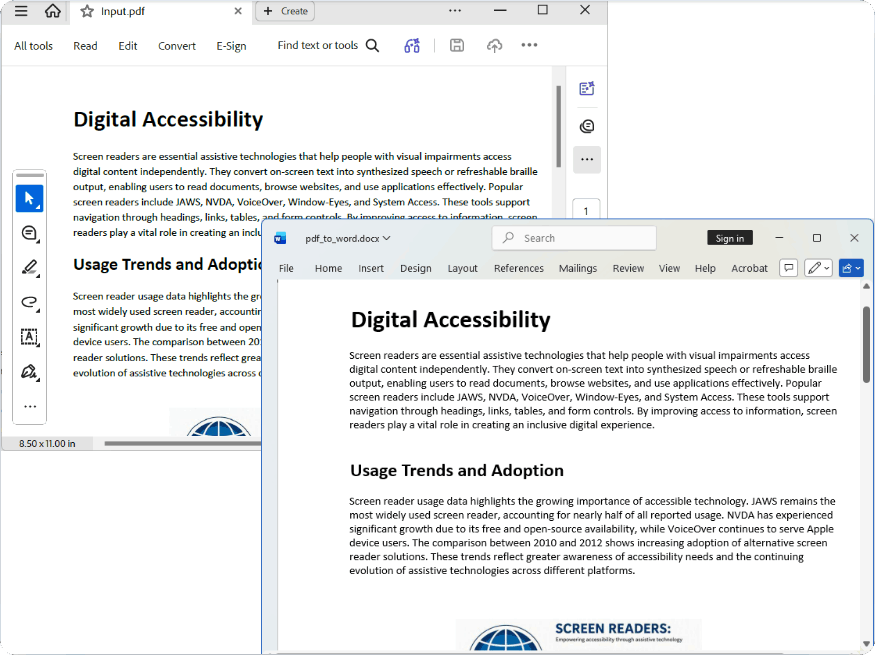
Conversion of PDF to Word and HTML
Convert PDF documents into Word or HTML formats, transforming PDF content into editable documents while preserving layouts, tables, images, and formatting. This makes content reuse, accessibility, and business process integration easier.
Barcode recognition
This enhancement allows users to automatically detect and extract information from barcodes and QR codes embedded in PDF and image documents, and return the extracted data in a structured JSON format. It simplifies data capture from visual elements, improves processing efficiency, and supports seamless integration of extracted data into .NET applications and business workflows.

Do you have a feature request? Post the details in the feedback portal.







