 Manikanda Akash Munisamy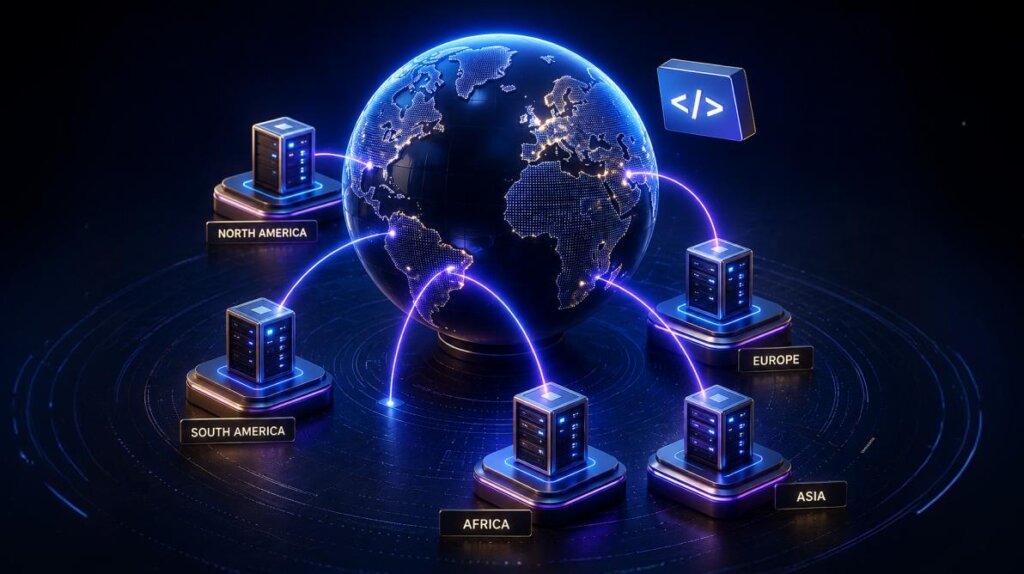
TL;DR: Cut global latency from ~400 ms to under 100 ms by running application logic at the edge. Explore edge functions, real performance benchmarks, cost trade-offs, and when edge computing outperforms traditional serverless for building fast, scalable web apps.
Imagine a user in Sydney opens your app. Your server in Virginia processes the request, queries a database, and sends a response. The result? ~800 ms latency.
Now, imagine the same logic running at a nearby edge location, response time drops closer to 50–100 ms. That difference directly impacts user experience, engagement, and conversions.
Edge computing exists to solve this exact problem: unpredictable global latency.
Note: Example latency values; actual results depend on user location, network path, provider, workload, and origin distance.
This guide breaks down how edge computing works, where it fits in modern web architecture, and when it actually makes sense to use it.
Quick decision guide
Developers eventually ask: Should I actually use edge computing?
Here’s a practical framework to help you decide:
| If your application needs… | Use |
|---|---|
| Authentication | Edge |
| Personalization | Edge |
| Static pages | CDN |
| Video processing | Cloud |
| AI inference | Cloud GPU |
| Geo routing | Edge |
| Heavy computation | Cloud |
| Real time data sync | Edge |
| Complex database queries | Cloud |
| Session management | Edge |
How Edge computing works
Traditional cloud deployments run in a few fixed regions (e.g., us-east-1, eu-west-1). Users connect to the nearest region, but latency varies based on geography, often dramatically.
Edge computing changes that model.
Instead of a handful of regions, your application code runs across hundreds of global edge locations (PoPs). Requests are often served within tens of milliseconds, but total latency depends on network conditions, origin calls, and workload complexity.
Edge computing architecture
Here’s how a typical edge request flows through the system:
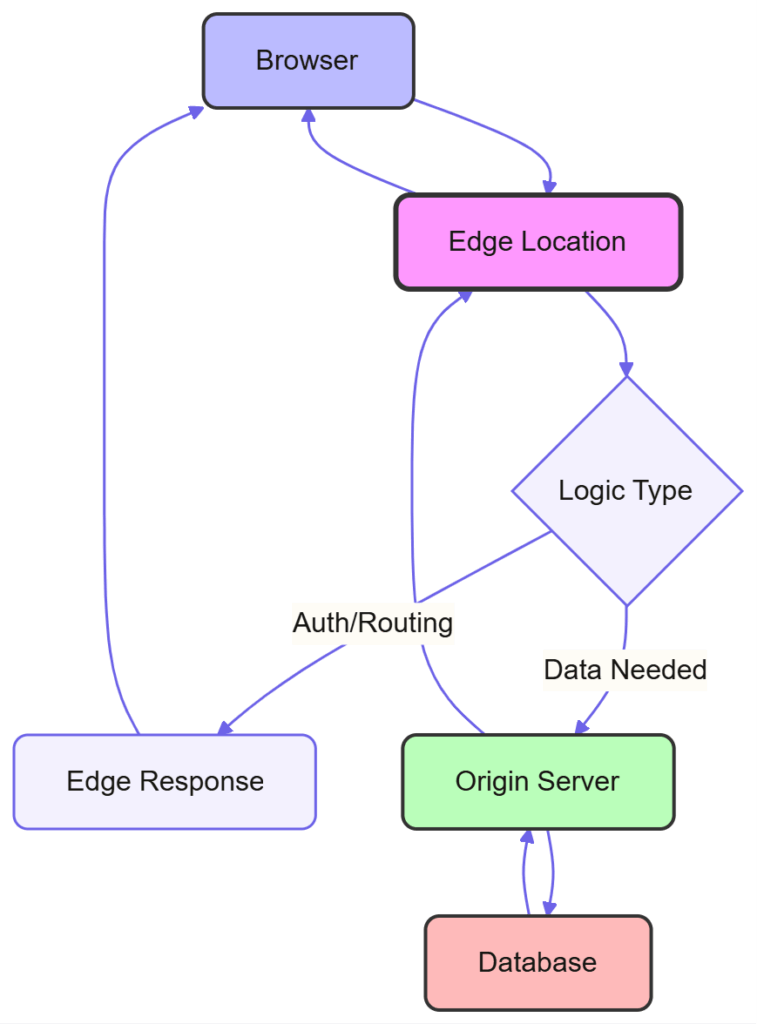
The edge layer sits between users and your origin server, handling lightweight logic without a full round trip to your backend.
Edge vs CDN vs Cloud
| Technology | Primary Purpose |
|---|---|
| CDN | Cache and deliver static content globally |
| Cloud | Run centralized backend logic (serverless/VMs) |
| Edge | Execute application logic at distributed locations near users |
Note: CDN and edge computing have merged. Modern platforms like Cloudflare and Fastly offer both caching (CDN) and edge compute capabilities in one service.
Think of edge computing as globally distributed serverless functions triggered by HTTP requests.
Edge computing vs Traditional Serverless (Latency comparison)
Let’s compare a typical request:
Traditional Serverless (Single region)
- Request travels to region →
100–200 ms - Cold start →
200–400 ms - Processing →
~50 ms - Response return →
100–200 ms
Total: 400–650 ms+
Edge execution
- Request hits nearest edge →
~20 ms - Warm startup →
~0–5 ms - Processing →
~50 ms - Response →
~20 ms
Total: ~90–100 ms
Note: Example values for illustration; actual performance varies by workload.
Key takeaway
Edge computing doesn’t eliminate latency, it reduces variability and improves latency consistency compared to centralized deployments, but network conditions still affect performance.
Edge computing platforms: Cloudflare, Vercel, AWS
Cold starts are generally smaller than traditional serverless, but not eliminated. Some platforms (e.g., Lambda@Edge) can still experience noticeable startup latency. Each has trade-offs in runtime limits, ecosystem support, and developer experience.
Edge computing performance benchmarks (Latency and cost)
Let’s move beyond marketing claims to measurable performance data from production deployments.
Latency improvements (Real-world observations)
Testing a simple API endpoint (fetch user preferences, apply business logic, return JSON) across platforms:
- US users:
~120 ms→~45 ms - EU users:
~180 ms→~50–55 ms - APAC users:
~450 ms→~60–70 ms - Global P99:
~1200 ms→~75–200 ms
The biggest gains happen when users are far from your origin.
Cost comparison (10M Requests / Month)
- Cloudflare Workers:
~$5 - Vercel Edge:
~$15–20 - AWS Lambda@Edge:
~$7–8 - Deno Deploy:
~$18–20
Note: Costs vary significantly based on execution time, data transfer, and storage usage. These estimates assume lightweight requests and minimal outbound bandwidth.
When Edge becomes cost-effective
- High global traffic
- Lightweight per-request compute
- Performance directly impacts conversions
For local apps, traditional serverless is often cheaper and simpler.
Building your edge function: Geo-based content delivery
Let’s build a practical edge function that delivers different content based on user location. This example runs on Cloudflare Workers. The core pattern works on other platforms (Vercel, Deno Deploy), but you’ll need to adapt platform-specific APIs for geolocation and storage.
Use case: An e-commerce site showing region-specific promotions, pricing, and shipping options without client-side detection or backend round-trips.
Example (Cloudflare Worker):
export default {
  async fetch(request, env) {
    const country =
      request.cf && request.cf.country
        ? request.cf.country
        : "US";

    const url = new URL(request.url);

    // Region-specific configurations
    const regions = {
      US: {
        currency: "USD",
        shipping: "Free shipping over $50",
        promotion: "20% off Spring Sale",
      },
      GB: {
        currency: "GBP",
        shipping: "Free UK delivery over £40",
        promotion: "15% off + Free Returns",
      },
      default: {
        currency: "USD",
        shipping: "International shipping available",
        promotion: "10% off",
      },
    };

    const regionConfig = regions[country] || regions.default;

    // Return region config as JSON
    if (url.pathname === "/api/region-config") {
      return new Response(
        JSON.stringify({
          country,
          ...regionConfig,
          detectedAt: "edge",
        }),
        {
          headers: {
            "Content-Type": "application/json",
            "Cache-Control": "public, max-age=300",
          },
        }
      );
    }

    // Pass through to origin
    return fetch(request);
  },
};
Why this matters
Instead of fetching region data from a backend:
- Saves
200–400 msper request - Improves
time-to-first-byte (TTFB) - Reduces backend load
How to deploy this:
# Install Wrangler CLI
npm install -g wrangler

# Create new project
wrangler init edge-geo-demo

# Copy the code above into src/index.js

# Deploy to Cloudflare
wrangler deploy
Testing: The function automatically detects user location from the request. To test different regions locally:
curl https://your-worker.dev/api/region-config \
  -H "CF-IPCountry: GB"
Example response:
{
  "country": "GB",
  "currency": "GBP",
  "shipping": "Free UK delivery over £40",
  "promotion": "15% off + Free Returns",
  "detectedAt": "edge"
}
Developers appreciate seeing the expected output format immediately.
Performance: This function adds 5-15 ms latency (edge processing time) but eliminates a potential 200-400 ms backend API call to fetch region configuration. Net improvement: 185-395 ms.
Real-world variant: Many large platforms use similar edge techniques for routing and personalization.
Edge computing limitations and pitfalls
1. Stateless execution
Edge functions don’t persist state between requests.
// Won't work - state resets
let requestCount = 0;

export default {
  async fetch(request) {
    requestCount++;
    return new Response(`Count: ${requestCount}`);
  }
};

// Use edge-compatible storage
export default {
  async fetch(request, env) {
    const count = parseInt(
      (await env.KV.get("requestCount")) || "0"
    );

    await env.KV.put(
      "requestCount",
      (count + 1).toString()
    );

    return new Response(`Count: ${count + 1}`);
  }
};
2. Storage costs can add up
Frequent reads from edge storage can increase costs quickly.
Recommendation:
- Cache aggressively
- Use edge storage selectively
- Monitor usage patterns
3. Runtime constraints
- Limited memory (often
~128MB) - Execution time limits
- Restricted Node.js APIs
Note: Runtime limits vary by platform (e.g., memory, execution time), so always check provider-specific constraints.
Not ideal for heavy compute workloads.
Edge computing for AI applications
Today, edge computing combined with AI is one of the hottest topics in web development. While AI inference requires GPUs in the cloud, edge functions handle authentication, routing, and filtering before expensive API calls.
Common patterns:
- AI inference routing: Direct premium users to GPT-4, free tier to GPT-3.5, decided at the edge
- Prompt preprocessing: Block invalid requests before hitting GPU infrastructure
- Authentication and rate limiting: Verify API keys and quotas at the edge, saving costly LLM calls for invalid requests
The pattern: Edge handles lightweight logic, cloud handles inference. This combination keeps latency low while reducing wasted compute costs.
When to use Edge computing (Use cases and Trade-offs)
Use Edge when:
- Users are globally distributed
- You need low-latency auth, routing, or personalization
- You’re handling high request volume with lightweight logic
Avoid Edge when:
- Workloads are compute-heavy
- You rely on unsupported languages or libraries
- Strict data locality/compliance is required
Edge computing vs Traditional Serverless: Trade-offs
| Factor | Edge | Traditional Serverless |
|---|---|---|
| Global latency | 50–100 ms | 50–500 ms |
| Cold starts | Near-zero | 100–400 ms |
| Execution limits | Restricted | Flexible |
| Language support | JS/WASM | Multiple languages |
| Debugging | Harder | Easier |
| Cost (scale) | Competitive | Moderate |
Frequently Asked Questions
Can edge functions connect to databases?
Most edge environments are not designed for long-lived database connections such as PostgreSQL over TCP. Instead, edge applications typically work best with HTTP-based databases, edge-native storage solutions such as KV stores and Durable Objects, or API gateways and data proxies.
Do npm packages work?
Pure JavaScript libraries generally work. However, Node.js-specific APIs such as fs and net are not supported.
How to test edge functions?
Use platform tools such as Wrangler Dev and Vercel Dev. Deploy behind feature flags for a safe rollout.
Conclusion
Edge computing is not a universal upgrade; it’s a targeted optimization for latency-sensitive, global applications.
If your bottleneck is network latency, edge functions can reduce latency by hundreds of milliseconds, delivering a faster, more consistent user experience.
If your bottleneck is compute or data access, the edge won’t help much.
The best way to evaluate it:
Start small. Move a single API endpoint to the edge, measure performance across regions, and decide based on real data, not assumptions.




Be the first to get updates